cruise control CADILLAC XT6 2020 Owner's Guide
[x] Cancel search | Manufacturer: CADILLAC, Model Year: 2020, Model line: XT6, Model: CADILLAC XT6 2020Pages: 385, PDF Size: 6.63 MB
Page 215 of 385
Cadillac XT6 Owner Manual (GMNA-Localizing-U.S./Canada-12984300) -
2020 - CRC - 3/19/19
214 DRIVING AND OPERATING
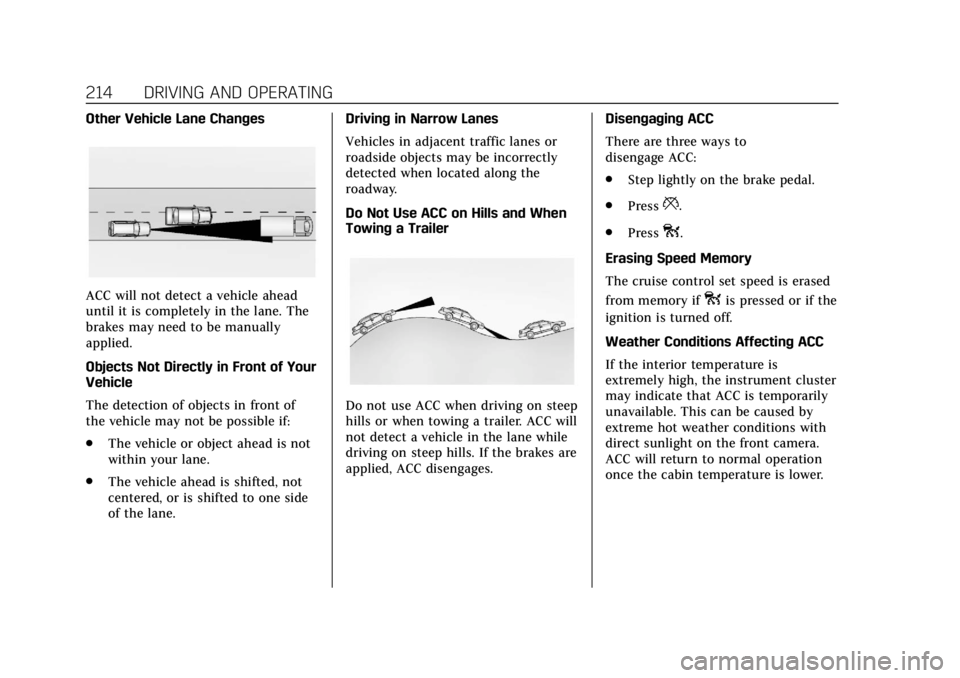
Other Vehicle Lane Changes
ACC will not detect a vehicle ahead
until it is completely in the lane. The
brakes may need to be manually
applied.
Objects Not Directly in Front of Your
Vehicle
The detection of objects in front of
the vehicle may not be possible if:
.The vehicle or object ahead is not
within your lane.
. The vehicle ahead is shifted, not
centered, or is shifted to one side
of the lane. Driving in Narrow Lanes
Vehicles in adjacent traffic lanes or
roadside objects may be incorrectly
detected when located along the
roadway.
Do Not Use ACC on Hills and When
Towing a Trailer
Do not use ACC when driving on steep
hills or when towing a trailer. ACC will
not detect a vehicle in the lane while
driving on steep hills. If the brakes are
applied, ACC disengages.
Disengaging ACC
There are three ways to
disengage ACC:
.
Step lightly on the brake pedal.
. Press
*.
. Press
o.
Erasing Speed Memory
The cruise control set speed is erased
from memory if
ois pressed or if the
ignition is turned off.
Weather Conditions Affecting ACC
If the interior temperature is
extremely high, the instrument cluster
may indicate that ACC is temporarily
unavailable. This can be caused by
extreme hot weather conditions with
direct sunlight on the front camera.
ACC will return to normal operation
once the cabin temperature is lower.
Page 216 of 385
Cadillac XT6 Owner Manual (GMNA-Localizing-U.S./Canada-12984300) -
2020 - CRC - 3/19/19
DRIVING AND OPERATING 215
Conditions that are associated with
low visibility, such as fog, rain, snow,
or road spray, may limit ACC
performance. Water droplets from rain
or snow that remain on the
windshield may also limit ACC’s
ability to detect objects.
Lighting Conditions Affecting ACC
The ACC front camera can be affected
by poor lighting conditions, and ACC
may have limited performance when:
.There are changes in brightness,
such as entering and exiting
tunnels, bridges, and overpasses.
. Low sun angles cause the camera
to not detect objects, or it is more
difficult to detect objects in the
same traffic lane.
. Lighting is poor in the evening or
early morning .
There are multiple changes in
brightness or shadows along the
vehicle roadway.
. In a tunnel without the headlamps
on, or in a tunnel when there is a
vehicle in front that does not have
its taillamps on.
. Subjected to strong light from
opposing lane traffic in the front
of the vehicle, such as high-beam
headlamps from oncoming traffic.
Accessory Installations and Vehicle
Modifications
Do not install or place any object
around the front camera windshield
area that would obstruct the front
camera view.
Do not install objects on top of the
vehicle that overhang and obstruct the
front camera, such as a canoe, kayak,
or other items that can be transported
on the vehicle roof.
Do not modify the hood, headlamps,
or fog lamps, as this may limit the
camera’s ability to detect an object. Cleaning the Sensing System
The camera sensor on the windshield
behind the rearview mirror can
become blocked by snow, ice, dirt,
mud, or debris. This area needs to be
cleaned for ACC to operate properly.
The vehicle headlamps may need to
be cleaned due to dirt, snow, or ice.
Objects that are not illuminated
correctly may be difficult to detect.
If ACC will not operate, regular cruise
control may be available. See
“Switching Between ACC and Regular
Cruise Control
”previously in this
section. Always consider driving
conditions before using either cruise
control system.
For cleaning instructions, see
“Washing the Vehicle ”under Exterior
Care 0324.
Page 222 of 385
Cadillac XT6 Owner Manual (GMNA-Localizing-U.S./Canada-12984300) -
2020 - CRC - 3/19/19
DRIVING AND OPERATING 221
{Warning
The Park Assist system does not
detect children, pedestrians,
bicyclists, animals, or objects
located below the bumper or that
are too close or too far from the
vehicle. It is not available at speeds
greater than 8 km/h (5 mph). To
prevent injury, death, or vehicle
damage, even with Park Assist,
always check the area around the
vehicle and check all mirrors before
moving forward or backing.
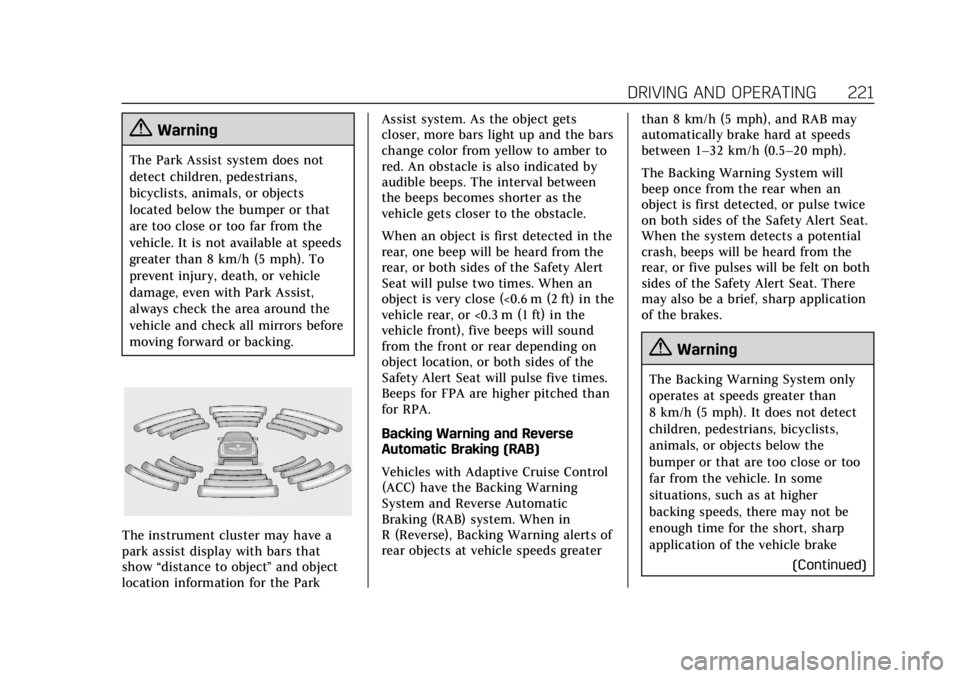
The instrument cluster may have a
park assist display with bars that
show“distance to object ”and object
location information for the Park Assist system. As the object gets
closer, more bars light up and the bars
change color from yellow to amber to
red. An obstacle is also indicated by
audible beeps. The interval between
the beeps becomes shorter as the
vehicle gets closer to the obstacle.
When an object is first detected in the
rear, one beep will be heard from the
rear, or both sides of the Safety Alert
Seat will pulse two times. When an
object is very close (<0.6 m (2 ft) in the
vehicle rear, or <0.3 m (1 ft) in the
vehicle front), five beeps will sound
from the front or rear depending on
object location, or both sides of the
Safety Alert Seat will pulse five times.
Beeps for FPA are higher pitched than
for RPA.
Backing Warning and Reverse
Automatic Braking (RAB)
Vehicles with Adaptive Cruise Control
(ACC) have the Backing Warning
System and Reverse Automatic
Braking (RAB) system. When in
R (Reverse), Backing Warning alerts of
rear objects at vehicle speeds greater
than 8 km/h (5 mph), and RAB may
automatically brake hard at speeds
between 1–32 km/h (0.5–20 mph).
The Backing Warning System will
beep once from the rear when an
object is first detected, or pulse twice
on both sides of the Safety Alert Seat.
When the system detects a potential
crash, beeps will be heard from the
rear, or five pulses will be felt on both
sides of the Safety Alert Seat. There
may also be a brief, sharp application
of the brakes.
{Warning
The Backing Warning System only
operates at speeds greater than
8 km/h (5 mph). It does not detect
children, pedestrians, bicyclists,
animals, or objects below the
bumper or that are too close or too
far from the vehicle. In some
situations, such as at higher
backing speeds, there may not be
enough time for the short, sharp
application of the vehicle brake
(Continued)
Page 227 of 385

Cadillac XT6 Owner Manual (GMNA-Localizing-U.S./Canada-12984300) -
2020 - CRC - 3/19/19
226 DRIVING AND OPERATING
Warning (Continued)
.The vehicle is not in
R (Reverse).
To help avoid death or injury,
always check for pedestrians
around the vehicle before backing
up. Be ready to take action and
apply the brakes. See Defensive
Driving 0166. Keep the RVC,
taillamps, and back-up lamps clean
and in good repair.
Rear Pedestrian Alert can be set to Off
or Alert. See “Rear Pedestrian
Detection ”in “Collision/Detection
Systems” underVehicle Personalization
0 135. If equipped, alerts can be set to
beeps or seat pulses. See “Alert Type”
in “Collision/Detection Systems” under
Vehicle Personalization 0135.
Assistance Systems for
Driving
If equipped, when driving the vehicle
in a forward gear, Forward Collision
Alert (FCA), Lane Departure Warning (LDW), Lane Keep Assist (LKA), Side
Blind Zone Alert (SBZA), Lane Change
Alert (LCA), Automatic Emergency
Braking (AEB), and/or the Front
Pedestrian Braking (FPB) System can
help to avoid a crash or reduce crash
damage.
Forward Collision Alert
(FCA) System
If equipped, the FCA system may help
to avoid or reduce the harm caused by
front-end crashes. When approaching
a vehicle ahead too quickly, FCA
provides a red flashing alert on the
windshield and rapidly beeps or pulses
the driver seat. FCA also lights an
amber visual alert if following another
vehicle much too closely.
FCA detects vehicles within a distance
of approximately 60 m (197 ft) and
operates at speeds above 8 km/h
(5 mph). If the vehicle has Adaptive
Cruise Control (ACC), it can detect
vehicles to distances of approximately
110 m (360 ft) and operates at all
speeds. See
Adaptive Cruise Control
0 205.
{Warning
FCA is a warning system and does
not apply the brakes. When
approaching a slower-moving or
stopped vehicle ahead too rapidly,
or when following a vehicle too
closely, FCA may not provide a
warning with enough time to help
avoid a crash. It also may not
provide any warning at all. FCA
does not warn of pedestrians,
animals, signs, guardrails, bridges,
construction barrels, or other
objects. Be ready to take action and
apply the brakes. See Defensive
Driving 0166.
FCA can be disabled. See “Collision/
Detection Systems” underVehicle
Personalization 0135.
Page 228 of 385

Cadillac XT6 Owner Manual (GMNA-Localizing-U.S./Canada-12984300) -
2020 - CRC - 3/19/19
DRIVING AND OPERATING 227
Detecting the Vehicle Ahead
FCA warnings will not occur unless
the FCA system detects a vehicle
ahead. When a vehicle is detected, the
vehicle ahead indicator will display
green. Vehicles may not be detected
on curves, highway exit ramps,
or hills, due to poor visibility; or if a
vehicle ahead is partially blocked by
pedestrians or other objects. FCA will
not detect another vehicle ahead until
it is completely in the driving lane.
{Warning
FCA does not provide a warning to
help avoid a crash, unless it detects
a vehicle. FCA may not detect a
vehicle ahead if the FCA sensor is
blocked by dirt, snow, or ice, or if(Continued)
Warning (Continued)
the windshield is damaged. It may
also not detect a vehicle on winding
or hilly roads, or in conditions that
can limit visibility such as fog, rain,
or snow, or if the headlamps or
windshield are not cleaned or in
proper condition. Keep the
windshield, headlamps, and FCA
sensors clean and in good repair.
Collision Alert
With Head-Up Display
Without Head-Up Display
When your vehicle approaches
another detected vehicle too rapidly,
the red FCA display will flash on the
windshield. Also, eight rapid
high-pitched beeps will sound from
the front, or both sides of the Safety
Alert Seat will pulse five times. When
this Collision Alert occurs, the brake
system may prepare for driver braking
to occur more rapidly which can cause
a brief, mild deceleration. Continue to
apply the brake pedal as needed.
Cruise control may be disengaged
when the Collision Alert occurs.
Page 229 of 385

Cadillac XT6 Owner Manual (GMNA-Localizing-U.S./Canada-12984300) -
2020 - CRC - 3/19/19
228 DRIVING AND OPERATING
Tailgating Alert
The vehicle ahead indicator will
display amber when you are following
a vehicle ahead much too closely.
Selecting the Alert Timing
The Collision Alert control is on the
steering wheel. Press
[to set the
FCA timing to Far, Medium, or Near, or on some vehicles, Off. The first
button press shows the current setting
on the DIC. Additional button presses
will change this setting. The chosen
setting will remain until it is changed
and will affect the timing of both the
Collision Alert and the Tailgating
Alert features. The timing of both
alerts will vary based on vehicle speed.
The faster the vehicle speed, the
farther away the alert will occur.
Consider traffic and weather
conditions when selecting the alert
timing. The range of selectable alert
timings may not be appropriate for all
drivers and driving conditions.
If your vehicle is equipped with
Adaptive Cruise Control (ACC),
changing the FCA timing setting
automatically changes the following
gap setting (Far, Medium, or Near).
Following Distance Indicator
The following distance to a moving
vehicle ahead in your path is indicated
in following time in seconds on the
Driver Information Center (DIC). See
Driver Information Center (DIC)
0128.
The minimum following time is 0.5 seconds away. If there is no vehicle
detected ahead, or the vehicle ahead is
out of sensor range, dashes will be
displayed.
Unnecessary Alerts
FCA may provide unnecessary alerts
for turning vehicles, vehicles in other
lanes, objects that are not vehicles,
or shadows. These alerts are normal
operation and the vehicle does not
need service.
Cleaning the System
If the FCA system does not seem to
operate properly, this may correct the
issue:
.
Clean the outside of the
windshield in front of the rearview
mirror.
. Clean the entire front of the
vehicle.
. Clean the headlamps.
Page 230 of 385

Cadillac XT6 Owner Manual (GMNA-Localizing-U.S./Canada-12984300) -
2020 - CRC - 3/19/19
DRIVING AND OPERATING 229
Automatic Emergency
Braking (AEB)
If the vehicle has Forward Collision
Alert (FCA), it also has AEB, which
includes Intelligent Brake Assist (IBA).
When the system detects a vehicle
ahead in your path that is traveling in
the same direction that you may be
about to crash into, it can provide a
boost to braking or automatically
brake the vehicle. This can help avoid
or lessen the severity of crashes when
driving in a forward gear. Depending
on the situation, the vehicle may
automatically brake moderately or
hard. This automatic emergency
braking can only occur if a vehicle is
detected. This is shown by the FCA
vehicle ahead indicator being lit. See
Forward Collision Alert (FCA) System
0226.
The system works when driving in a
forward gear between 8 km/h (5 mph)
and 80 km/h (50 mph), or on vehicles
with Adaptive Cruise Control (ACC),
above 4 km/h (2 mph). It can detect
vehicles up to approximately 60 m
(197 ft).
{Warning
AEB is an emergency crash
preparation feature and is not
designed to avoid crashes. Do not
rely on AEB to brake the vehicle.
AEB will not brake outside of its
operating speed range and only
responds to detected vehicles.
AEB may not: . Detect a vehicle ahead on
winding or hilly roads.
. Detect all vehicles, especially
vehicles with a trailer,
tractors, muddy vehicles, etc.
. Detect a vehicle when
weather limits visibility, such
as in fog, rain, or snow.
. Detect a vehicle ahead if it is
partially blocked by
pedestrians or other objects.
Complete attention is always
required while driving, and you
should be ready to take action and
apply the brakes and/or steer the
vehicle to avoid crashes. AEB may slow the vehicle to a
complete stop to try to avoid a
potential crash. If this happens, AEB
may engage the Electric Parking
Brake (EPB) to hold the vehicle at a
stop. Release the EPB or firmly press
the accelerator pedal.
{Warning
AEB may automatically brake the
vehicle suddenly in situations
where it is unexpected and
undesired. It could respond to a
turning vehicle ahead, guardrails,
signs, and other non-moving
objects. To override AEB, firmly
press the accelerator pedal, if it is
safe to do so.
Intelligent Brake Assist (IBA)
IBA may activate when the brake
pedal is applied quickly by providing a
boost to braking based on the speed
of approach and distance to a vehicle
ahead.
Page 232 of 385

Cadillac XT6 Owner Manual (GMNA-Localizing-U.S./Canada-12984300) -
2020 - CRC - 3/19/19
DRIVING AND OPERATING 231
{Warning
FPB does not provide an alert or
automatically brake the vehicle,
unless it detects a pedestrian. FPB
may not detect pedestrians,
including children:. When the pedestrian is not
directly ahead, fully visible,
or standing upright, or when
part of a group.
. Due to poor visibility,
including nighttime
conditions, fog, rain, or snow.
. If the FPB sensor is blocked
by dirt, snow, or ice.
. If the headlamps or
windshield are not cleaned or
in proper condition.
Be ready to take action and apply
the brakes. For more information,
see Defensive Driving 0166. Keep
the windshield, headlamps, and FPB
sensor clean and in good repair. FPB can be set to Off, Alert, or Alert
and Brake through vehicle
personalization. See
“Collision/
Detection Systems” underVehicle
Personalization 0135.
Detecting the Pedestrian Ahead
FPB alerts and automatic braking will
not occur unless the FPB system
detects a pedestrian. When a nearby
pedestrian is detected in front of the
vehicle, the pedestrian ahead indicator
will display amber.
Front Pedestrian Alert
With Head-Up Display
Without Head-Up Display
When the vehicle approaches a
pedestrian ahead too rapidly, the red
FPB alert display will flash on the
windshield. Eight rapid high-pitched
beeps will sound from the front,
or both sides of the Safety Alert Seat
will pulse five times. When this
Pedestrian Alert occurs, the brake
system may prepare for driver braking
to occur more rapidly which can cause
a brief, mild deceleration. Continue to
apply the brake pedal as needed.
Cruise control may be disengaged
when the Front Pedestrian Alert
occurs.
Automatic Braking
If FPB detects it is about to crash into
a pedestrian ahead, and the brakes
have not been applied, FPB may
automatically brake moderately or
brake hard. This can help to avoid
Page 246 of 385
Cadillac XT6 Owner Manual (GMNA-Localizing-U.S./Canada-12984300) -
2020 - CRC - 3/19/19
DRIVING AND OPERATING 245
Warning (Continued)
inadequate for the load, the vehicle
may not stop as expected. You and
others could be seriously injured.
The vehicle may also be damaged,
and the repairs would not be
covered by the vehicle warranty.
Pull a trailer only if all the steps in
this section have been followed. Ask
your dealer for advice and
information about towing a trailer
with the vehicle.
Driving with a Trailer
Trailering is different than just driving
the vehicle by itself. Trailering means
changes in handling, acceleration,
braking, durability, and fuel economy.
Successful, safe trailering takes correct
equipment, and it has to be used
properly.
The following information has many
time-tested, important trailering tips
and safety rules. Many of these areimportant for your safety and that of
your passengers. Read this section
carefully before pulling a trailer.
When towing a trailer:
.
Become familiar with and follow
all state and local laws that apply
to trailer towing. These
requirements vary from state to
state.
. State laws may require the use of
extended side view mirrors. Even if
not required, you should install
extended side view mirrors if your
visibility is limited or restricted
while towing.
. Do not tow a trailer during the
first 800 km (500 mi) of vehicle
use to prevent damage to the
engine, axle, or other parts.
. It is recommended to perform the
first oil change before heavy
towing.
. During the first 800 km (500 mi) of
trailer towing, do not drive over
80 km/h (50 mph) and do not
make starts at full throttle. .
Vehicles can tow in D (Drive).
If the transmission downshifts too
often, a lower gear may be
selected using Manual Mode. See
Manual Mode 0195.
If equipped, the following driver
assistance features should be turned
off when towing a trailer:
. Adaptive Cruise Control (ACC)
. Super Cruise Control
. Lane Keep Assist (LKA)
. Park Assist
. Automatic Parking Assist (APA)
. Reverse Automatic Braking (RAB)
If equipped, the following driver
assistance features should be turned
to alert or off when towing a trailer:
. Automatic Emergency
Braking (AEB)
. Intelligent Brake Assist (IBA)
. Front Pedestrian Braking (FPB)
Page 374 of 385

Cadillac XT6 Owner Manual (GMNA-Localizing-U.S./Canada-12984300) -
2020 - CRC - 3/19/19
INDEX 373
IndexA
Accessories and Modifications . . . . . 260
Accessory Power . . . . . . . . . . . . . . . . . . . . 186
Active Fuel Management . . . . . . . . . . . 188
Adaptive Cruise Control . . . . . . . . . . . . 205
Add-On Electrical Equipment . . . . . . 256
Additional InformationOnStar . . . . . . . . . . . . . . . . . . . . . . . . . . . . . 365
Additional Maintenance and Care . . . . . . . . . . . . . . . . . . . . . . . . . . . 340
Adjustments Lumbar, Front Seats . . . . . . . . . . . . . . . . 44
Air Cleaner/Filter, Engine . . . . . . . . . . 268
Air Conditioning . . . . . . . . . . . . . . .153, 158
Air Filter Life System . . . . . . . . . . . . . . . . . . . . . . . . 267
Air Filter, Passenger Compartment . . . . . . . . . . . . . . . . . . . . . 163
Air Vents . . . . . . . . . . . . . . . . . . . . . . . . . . . . 162
Airbag System
Check . . . . . . . . . . . . . . . . . . . . . . . . . . . . . . . . 74
How Does an Airbag Restrain? . . . . . 68
Passenger Sensing System . . . . . . . . . 69
What Makes an Airbag Inflate? . . . . 67
What Will You See after anAirbag Inflates? . . . . . . . . . . . . . . . . . . . 68
When Should an Airbag Inflate? . . . . . . . . . . . . . . . . . . . . . . . . . . . . . 66 Airbag System (cont'd)
Where Are the Airbags? . . . . . . . . . . . . 65
Airbags Adding Equipment to the
Vehicle . . . . . . . . . . . . . . . . . . . . . . . . . . . . . 73
Passenger Status Indicator . . . . . . . 119
Readiness Light . . . . . . . . . . . . . . . . . . . 119
Servicing Airbag-Equipped Vehicles . . . . . . . . . . . . . . . . . . . . . . . . . . . . 73
System Check . . . . . . . . . . . . . . . . . . . . . . . 63
Alarm Vehicle Security . . . . . . . . . . . . . . . . . . . . . 29
Alert Lane Change . . . . . . . . . . . . . . . . . . . . . . 235
Rear Pedestrian . . . . . . . . . . . . . . . . . . . 225
Side Blind Zone (SBZA) . . . . . . . . . . 235
All-Season Tires . . . . . . . . . . . . . . . . . . . . . 290
All-Wheel Drive . . . . . . . . . . . . . . . . . . . . . 196 Light . . . . . . . . . . . . . . . . . . . . . . . . . . . . . . . 123
Antilock Brake System (ABS) . . . . . . 197 Warning Light . . . . . . . . . . . . . . . . . . . . 123
Appearance Care Exterior . . . . . . . . . . . . . . . . . . . . . . . . . . . . 324
Interior . . . . . . . . . . . . . . . . . . . . . . . . . . . . 328
Armrest Storage . . . . . . . . . . . . . . . . . . . . . . 97
Assistance Systems for Driving . . . . 226
Assistance Systems for Parking and Backing . . . . . . . . . . . . . . . . . . . . . . . 217