radio CADILLAC XT6 2021 Owner's Guide
[x] Cancel search | Manufacturer: CADILLAC, Model Year: 2021, Model line: XT6, Model: CADILLAC XT6 2021Pages: 431, PDF Size: 8.29 MB
Page 200 of 431
Cadillac XT6 Owner Manual (GMNA-Localizing-U.S./Canada-14574701) -
2021 - CRC - 2/8/21
INFOTAINMENT SYSTEM 199
report a maximum of 1,000 counts.
The distance driven will report a
maximum of 64 374 km (40,000 mi).
To delete Report Card data, do one of
the following:
.From the Report Card display, touch
Reset.
.Touch Clear All Teen Keys and PIN
from the Teen Driver menu. This
will also unregister any Teen Driver
keys and delete the PIN.
Forgotten PIN
See your dealer to reset the PIN.
Trademarks and License
Agreements
FCC Information
See Radio Frequency Statement 0406.
"Made for iPod," and "Made for
iPhone," mean that an electronic
accessory has been designed to
connect specifically to iPod or iPhone,
respectively, and has been certified by
the developer to meet Apple
performance standards. Apple is not
responsible for the operation of this
device or its compliance with safety
and regulatory standards. Please note
that the use of this accessory with
iPod or iPhone may affect wireless
performance. iPhone, iPod, iPod
classic, iPod nano, iPod shuffle, and
iPod touch are trademarks of Apple
Inc., registered in the U.S. and other
countries.
If you decide to continue service after
your trial, your selected subscription
plan will automatically renew
thereafter. You will be charged at
then-current rates. Fees and taxes
apply. Please see the SiriusXM Customer Agreement at siriusxm.com
for complete terms and how to cancel,
which includes calling SiriusXM at
1-866-635-2349. All fees and
programming are subject to change.
Fees and Taxes: Subscription fee,
taxes, one time activation fee, and
other fees may apply. Subscription fee
is consumer only. All fees and
programming subject to change.
Subscriptions subject to Customer
Agreement available at
www.siriusxm.com. SiriusXM service is
only available in the 48 contiguous
United States and Canada.
In Canada: Some deterioration of
service may occur in extreme northern
latitudes. This is beyond the control of
SiriusXM Satellite Radio.
Explicit Language Notice: Channels
with frequent explicit language are
indicated with an
“XL”preceding the
channel name. Channel blocking is
available for SiriusXM Satellite Radio
receivers by notifying SiriusXM:
.USA Customers —See
www.siriusxm.com or call
1-888-601–6296.
Page 201 of 431
Cadillac XT6 Owner Manual (GMNA-Localizing-U.S./Canada-14574701) -
2021 - CRC - 2/8/21
200 INFOTAINMENT SYSTEM
.Canada Customers—See
www.siriusxm.ca or call
1-877-438-9677.
It is prohibited to copy, decompile,
disassemble, reverse engineer, hack,
manipulate, or otherwise make
available any technology or software
incorporated in receivers compatible
with the SiriusXM Satellite Radio
System or that support the SiriusXM
website, the Online Service or any of
its content. Furthermore, the AMBER
voice compression software included
in this product is protected by
intellectual property rights including
patent rights, copyrights, and trade
secrets of Digital Voice Systems, Inc.
General Requirements: 1. A License Agreement from SiriusXM is required for any
product that incorporates SiriusXM
Technology and/or for use of any of
the SiriusXM marks to be
manufactured, distributed,
or marketed in the SiriusXM
Service Area. 2. For products to be distributed,
marketed, and/or sold in Canada, a
separate agreement is required with
Canadian Satellite Radio Inc.
(operating as SiriusXM Canada).
TouchSense Technology and
TouchSense System 1000 Series
Licensed from Immersion Corporation.
TouchSense System 1000 protected
under one or more of the U.S. Patents
at the following address
www.immersion.com/
patent-marking.html and other
patents pending.
Bose
Bose AudioPilot and Bose Centerpoint
surround are registered trademarks of
Bose Corporation in the U.S. and other
countries. HD Radio Technology
HD Radio Technology manufactured
under license from iBiquity Digital
Corporation. U.S. and Foreign Patents.
For patents see http://dts.com/patents.
HD Radio and the HD, HD Radio, and
“ARC”
logos are registered trademarks
or trademarks of iBiquity Digital
Corporation in the United States and/
or other countries.
Bluetooth
The Bluetooth word mark and logos
are owned by the Bluetooth SIG, Inc.
and any use of such marks by General
Motors is under license. Other
trademarks and trade names are those
of their respective owners.
Java
Java is a registered trademark of
Oracle and/or its affiliates.
Page 213 of 431
Cadillac XT6 Owner Manual (GMNA-Localizing-U.S./Canada-14574701) -
2021 - CRC - 2/10/21
212 CLIMATE CONTROLS
Caution
Do not try to clear frost or other
material from the inside of the
front windshield and rear window
with a razor blade or anything else
that is sharp. This may damage the
rear window defogger grid and
affect the radio's ability to pick up
stations clearly. The repairs would
not be covered by the vehicle
warranty.
Driver and Passenger Heated and
Ventilated Seats (If Equipped) :
Press
MorLto heat the driver or
passenger seat cushion.
Press
Cor{to ventilate the driver
or passenger seat. See Heated and
Ventilated Front Seats 045.
Auto Heated and Ventilated Seats :
When the vehicle is on, this feature
will automatically activate the heated
or ventilated seats at the level
required by the vehicle's interior
temperature. The active high, medium,
low, or off heated or ventilated seat
level will be indicated by the manual
heated and ventilated seat buttons on the center stack. Use the manual
heated and ventilated seat buttons on
the center stack to turn auto heated
or ventilated seats off. If the
passenger seat is unoccupied, the auto
heated or ventilated seats feature will
not activate that seat. The auto heated
and ventilated seats feature can be
programmed to always be enabled
when the vehicle is on. If equipped
with a heated steering wheel, the auto
heated steering wheel activation will
follow the heated seat auto activation
and the heated wheel indicator will
follow the state of the steering wheel
heat. See
Heated and Ventilated Front
Seats 045 and
Vehicle Personalization 0130.
Remote Start Climate Control
Operation : If equipped with the
remote start feature, the climate
control system may run when the
vehicle is started remotely. The system
uses the driver’s previous settings to
heat or cool the inside of the vehicle.
The rear defog may come on during
remote start based on cold ambient
conditions. The rear defog indicator
light does not come on during a
remote start. If equipped, the heated seats will turn
on if it is cold outside or the
ventilated seats will turn on if it is hot
outside. The heated and ventilated
seat indicator lights may not come on
during a remote start. If equipped, the
heated steering wheel will come on in
a remote start if it is cold outside. The
heated steering wheel indicator light
may not come on. See
Remote Vehicle
Start 014 and
Heated and Ventilated Front Seats 045.
Sensor
Page 220 of 431

Cadillac XT6 Owner Manual (GMNA-Localizing-U.S./Canada-14574701) -
2021 - CRC - 2/8/21
DRIVING AND OPERATING 219
.Become familiar with vehicle
features before driving, such as
programming favorite radio stations
and adjusting climate control and
seat settings. Program all trip
information into any navigation
device prior to driving.
.Wait until the vehicle is parked to
retrieve items that have fallen to
the floor.
.Stop or park the vehicle to tend to
children.
.Keep pets in an appropriate carrier
or restraint.
.Avoid stressful conversations while
driving, whether with a passenger or
on a cell phone.
{Warning
Taking your eyes off the road too
long or too often could cause a
crash resulting in injury or death.
Focus your attention on driving.
Refer to the infotainment section for
more information on using that
system and the navigation system,
if equipped, including pairing and
using a cell phone.
Defensive Driving
Defensive driving means “always
expect the unexpected.” The first step
in driving defensively is to wear the
seat belt. See Seat Belts053.
.Assume that other road users
(pedestrians, bicyclists, and other
drivers) are going to be careless and
make mistakes. Anticipate what
they may do and be ready.
.Allow enough following distance
between you and the driver in front
of you.
.Focus on the task of driving.
Impaired Driving
Death and injury associated with
impaired driving is a global tragedy.
{Warning
Drinking alcohol or taking drugs
and then driving is very dangerous.
Your reflexes, perceptions,
attentiveness, and judgment can be
affected by even a small amount of
alcohol or drugs. You can have a
(Continued)
Warning (Continued)
serious—or even fatal —collision
if you drive after drinking or taking
drugs.
Do not drive while under the
influence of alcohol or drugs,
or ride with a driver who has been
drinking or is impaired by drugs.
Find alternate transportation home;
or if you are with a group, designate
a driver who will remain sober.
Control of a Vehicle
Braking, steering, and accelerating are
important factors in helping to control
a vehicle while driving.
Braking
Braking action involves perception
time and reaction time. Deciding to
push the brake pedal is perception
time. Actually doing it is
reaction time.
Average driver reaction time is about
three-quarters of a second. In that
time, a vehicle moving at 100 km/h
Page 233 of 431

Cadillac XT6 Owner Manual (GMNA-Localizing-U.S./Canada-14574701) -
2021 - CRC - 2/8/21
232 DRIVING AND OPERATING
Starting and Operating
New Vehicle Break-In
Caution
The vehicle does not need an
elaborate break-in. But it will
perform better in the long run if
you follow these guidelines:
.Do not drive at any one constant
speed, fast or slow, for the first
800 km (500 mi). Do not make
full-throttle starts. Avoid
downshifting to brake or slow the
vehicle.
.Avoid making hard stops for the
first 300 km (200 mi) or so.
During this time the new brake
linings are not yet broken in.
Hard stops with new linings can
mean premature wear and earlier
replacement. Follow this
breaking-in guideline every time
you get new brake linings.
Following break-in, engine speed
and load can be gradually
increased.
Ignition Positions
The vehicle has an electronic keyless
ignition with pushbutton start.
If the pushbutton start is not working,
the vehicle may be near a strong radio
antenna signal causing interference to
the Remote Keyless Entry (RKE)
system. See Remote Keyless Entry
(RKE) System Operation 07.
To shift out of P (Park), the vehicle
must be turned on and the brake
pedal must be applied. Stopping the Engine/OFF (No
Indicator Light) :
When the vehicle is
stopped, press ENGINE START/STOP
once to turn the engine off.
If the vehicle is in P (Park), the
ignition will turn off, and Retained
Accessory Power (RAP) will remain
active. See Retained Accessory Power
(RAP) 0237.
If the vehicle is in R (Reverse), D
(Drive), or M (Manual Mode), the
vehicle will shift into P (Park), the
ignition will turn off, and RAP will
remain active.
If the vehicle is in N (Neutral), the
ignition will return to ACC/
ACCESSORY and display the message
SHIFT TO PARK in the Driver
Information Center (DIC). When the
vehicle is shifted into P (Park), the
ignition will turn off.
{Warning
Turning off the vehicle while
moving may cause loss of power
assist in the brake and steering (Continued)
Page 255 of 431
Cadillac XT6 Owner Manual (GMNA-Localizing-U.S./Canada-14574701) -
2021 - CRC - 2/8/21
254 DRIVING AND OPERATING
Ending Cruise Control
There are four ways to end cruise
control:
.Step lightly on the brake pedal.
.Press*.
.Shift the transmission to
N (Neutral).
.PressJ.
Erasing Speed Memory
The cruise control set speed is erased
from memory if
Jis pressed or if the
ignition is turned off.
Adaptive Cruise Control
(Advanced)
If equipped, Adaptive Cruise Control
(ACC) allows the cruise control set
speed and following gap to be
selected. Read this entire section
before using this system. The
following gap is the following time
between your vehicle and a vehicle
detected directly ahead in your path,
moving in the same direction. If no
vehicle is detected in your path, ACC works like regular cruise control. ACC
uses camera and radar sensors. See
Radio Frequency Statement
0406.
If a vehicle is detected in your path,
ACC can speed up the vehicle or apply
limited, moderate braking to maintain
the selected following gap. To
disengage ACC, apply the brake.
If ACC is controlling your vehicle
speed when the traction control
system (TCS) or StabiliTrak electronic
stability control system activates, ACC
may automatically disengage. See
Traction Control/Electronic Stability
Control 0248. When road conditions
allow ACC to be safely used, ACC can
be turned back on.
Disabling the TCS or StabiliTrak/ESC
system will disengage and prevent
engagement of ACC.
ACC can reduce the need for you to
frequently brake and accelerate,
especially when used on expressways,
freeways, and interstate highways.
When used on other roads, you may
need to take over the control of
braking or acceleration more often.
{Warning
ACC has limited braking ability and
may not have time to slow the
vehicle down enough to avoid a
collision with another vehicle you
are following. This can occur when
vehicles suddenly slow or stop
ahead, or enter your lane. Also see
“Alerting the Driver” in this section.
Complete attention is always
required while driving and you
should be ready to take action and
apply the brakes. See Defensive
Driving 0219.
{Warning
ACC will not detect or brake for
children, pedestrians, animals,
or other objects.
Do not use ACC when:
.On winding and hilly roads or
when the sensors are blocked by
snow, ice, or dirt. The system
(Continued)
Page 265 of 431

Cadillac XT6 Owner Manual (GMNA-Localizing-U.S./Canada-14574701) -
2021 - CRC - 2/8/21
264 DRIVING AND OPERATING
Warning (Continued)
Complete attention is always
required while driving, and you
should be ready to take action and
apply the brakes and/or steer the
vehicle to avoid crashes.
Audible or Safety Alert Seat
Some driver assistance features alert
the driver of obstacles by beeping. To
change the volume of the warning
chime, see “Comfort and Convenience ”
under Vehicle Personalization 0130.
If equipped with the Safety Alert Seat,
the driver seat cushion may provide a
vibrating pulse alert instead of
beeping. To change this, see
“Collision/Detection Systems” under
Vehicle Personalization 0130.
Cleaning
Depending on vehicle options, keep
these areas of the vehicle clean to
ensure the best driver assistance
feature performance. Driver
Information Center (DIC) messages
may display when the systems are
unavailable or blocked.
.Front and rear bumpers and the
area below the bumpers
.Front grille and headlamps
.Front camera lens in the front grille
or near the front emblem
.Front side and rear side panels
.Outside of the windshield in front of
the rearview mirror
.Side camera lens on the bottom of
the outside mirrors
.Rear side corner bumpers
.Rear Vision Camera above the
license plate
Radio Frequency
This vehicle may be equipped with
driver assistance systems that operate
using radio frequency. See Radio
Frequency Statement 0406.
Assistance Systems for
Parking or Backing
If equipped, the Rear Vision Camera
(RVC), Rear Park Assist (RPA), Front
Park Assist (FPA), Surround Vision,
Reverse Automatic Braking (RAB) and
Backing Warning System, Rear Cross
Traffic Alert (RCTA), and Automatic
Parking Assist (APA) may help the
driver park or avoid objects. Always
check around the vehicle when
parking or backing.
Page 270 of 431

Cadillac XT6 Owner Manual (GMNA-Localizing-U.S./Canada-14574701) -
2021 - CRC - 2/8/21
DRIVING AND OPERATING 269
Warning (Continued)
system to occur. To prevent injury,
death, or vehicle damage, even with
the Backing Warning System,
always check the area around the
vehicle and check all mirrors before
backing.
When the vehicle is in R (Reverse),
if the system detects the vehicle is
backing too fast to avoid a crash with
a detected object behind your vehicle
in your path, it may automatically
brake hard to a stop to help avoid or
reduce the harm caused by a backing
crash.
{Warning
RAB may not avoid many types of
backing crashes. Do not wait for the
automatic braking to apply. This
system is not designed to replace
driver braking and only works in
R (Reverse) when an object is
detected directly behind the vehicle.
It may not brake or stop in time to
avoid a crash. It will not brake for (Continued)
Warning (Continued)
objects when the vehicle is moving
at very low speeds. It does not
detect children, pedestrians,
bicyclists, animals, or objects below
the bumper or that are too close or
too far from the vehicle. To prevent
injury, death, or vehicle damage,
even with RAB, always check the
area around the vehicle before and
while backing.
Pressing the brake pedal after the
vehicle comes to a stop will release
RAB. If the brake pedal is not pressed
soon after the stop, the Electric
Parking Brake (EPB) may be set. When
it is safe, press the accelerator pedal
firmly at any time to override RAB.
{Warning
There may be instances where
unexpected or undesired automatic
braking occurs. If this happens,
either press the brake pedal or
firmly press the accelerator pedal to
release the brakes from the RAB (Continued)
Warning (Continued)
system. Before releasing the brakes,
check the RVC and check the area
around the vehicle to make sure it
is safe to proceed.
Rear Cross Traffic Alert (RCTA)
If equipped, RCTA displays a red
warning triangle with a left or right
pointing arrow on the infotainment
display to warn of traffic coming from
the left or right. This system detects
objects coming from up to 20 m (65 ft)
from the left or right side of the
vehicle. When an object is detected,
either three beeps sound from the left
or right or three Safety Alert Seat
pulses occur on the left or right side,
depending on the direction of the
detected vehicle.
Use caution while backing up when
towing a trailer, as the RCTA
detection zones that extend out from
the back of the vehicle do not move
further back when a trailer is towed.
See Radio Frequency Statement 0406.
Page 283 of 431

Cadillac XT6 Owner Manual (GMNA-Localizing-U.S./Canada-14574701) -
2021 - CRC - 2/8/21
282 DRIVING AND OPERATING
signal is activated in the same
direction as a detected vehicle, this
display will flash as an extra warning
not to change lanes.
LCA can be disabled through vehicle
personalization. When you disable
LCA, SBZA is also disabled. SeeVehicle
Personalization 0130. If LCA is
disabled by the driver, the LCA mirror
displays will not light up.
When the System Does Not
Seem to Work Properly
The LCA system requires some driving
for the system to calibrate to
maximum performance. This
calibration may occur more quickly if
the vehicle is driving on a straight
highway road with traffic and roadside
objects (e.g., guardrails, barriers).
LCA displays may not come on when
passing a vehicle quickly, for a
stopped vehicle, or when towing a
trailer. The LCA detection zones that
extend back from the side of the
vehicle do not move further back
when a trailer is towed. Use caution
while changing lanes when towing a
trailer. LCA may alert to objects attached to the vehicle, such as a
trailer, bicycle, or object extending out
to either side of the vehicle. Attached
objects may also interfere with the
detection of vehicles. This is normal
system operation; the vehicle does not
need service.
LCA may not always alert the driver to
vehicles in the next lane over,
especially in wet conditions or when
driving on sharp curves. The system
does not need to be serviced. The
system may light up due to guardrails,
signs, trees, shrubs, and other
non-moving objects. This is normal
system operation; the vehicle does not
need service.
LCA may not operate when the LCA
sensors in the left or right corners of
the rear bumper are covered with
mud, dirt, snow, ice, or slush, or in
heavy rainstorms. For cleaning
instructions, see "Washing the
Vehicle" under
Exterior Care0370.
If the DIC still displays the system
unavailable message after cleaning
both sides of the vehicle toward the
rear corners of the vehicle, see your
dealer. If the LCA displays do not light up
when moving vehicles are in the side
blind zone or are rapidly approaching
this zone and the system is clean, the
system may need service. Take the
vehicle to your dealer.
Radio Frequency Information
See
Radio Frequency Statement 0406.
Lane Keep Assist (LKA)
If equipped, LKA may help avoid
crashes due to unintentional lane
departures. This system uses a camera
to detect lane markings between
60 km/h (37 mph) and 180 km/h
(112 mph). It may assist by gently
turning the steering wheel if the
vehicle approaches a detected lane
marking. It may also provide a Lane
Departure Warning (LDW) alert if the
vehicle crosses a detected lane
marking. LKA can be overridden by
turning the steering wheel. This
system is not intended to keep the
vehicle centered in the lane. LKA will
not assist and alert if the turn signal
is active in the direction of lane
Page 335 of 431
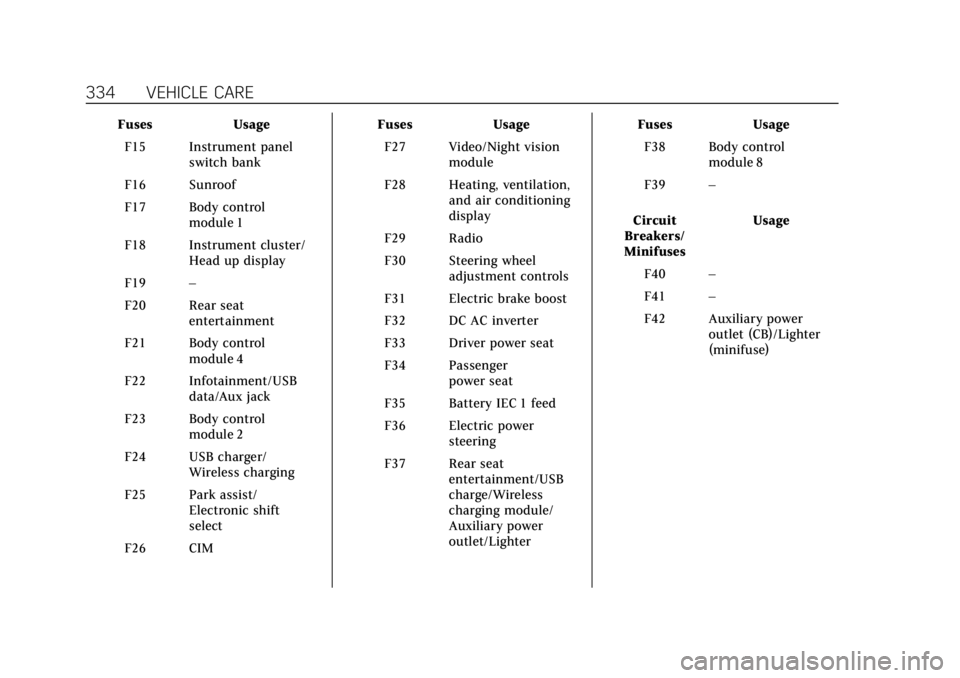
Cadillac XT6 Owner Manual (GMNA-Localizing-U.S./Canada-14574701) -
2021 - CRC - 2/8/21
334 VEHICLE CARE
FusesUsage
F15 Instrument panel switch bank
F16 Sunroof
F17 Body control module 1
F18 Instrument cluster/ Head up display
F19 –
F20 Rear seat entertainment
F21 Body control module 4
F22 Infotainment/USB data/Aux jack
F23 Body control module 2
F24 USB charger/ Wireless charging
F25 Park assist/ Electronic shift
select
F26 CIM Fuses
Usage
F27 Video/Night vision module
F28 Heating, ventilation, and air conditioning
display
F29 Radio
F30 Steering wheel adjustment controls
F31 Electric brake boost
F32 DC AC inverter
F33 Driver power seat
F34 Passenger power seat
F35 Battery IEC 1 feed
F36 Electric power steering
F37 Rear seat entertainment/USB
charge/Wireless
charging module/
Auxiliary power
outlet/Lighter Fuses
Usage
F38 Body control module 8
F39 –
Circuit
Breakers/
Minifuses Usage
F40 –
F41 –
F42 Auxiliary power outlet (CB)/Lighter
(minifuse)