ignition CADILLAC XT6 2022 Service Manual
[x] Cancel search | Manufacturer: CADILLAC, Model Year: 2022, Model line: XT6, Model: CADILLAC XT6 2022Pages: 447, PDF Size: 7.21 MB
Page 245 of 447

Cadillac XT6 Owner Manual (GMNA-Localizing-U.S./Canada-15218998) -
2022 - CRC - 10/22/21
244 DRIVING AND OPERATING
It will only automatically shift to the
next lower gear if the engine rpm is
much too low.
Drive Systems
All-Wheel Drive
Vehicles with this feature can operate
in All-Wheel Drive (AWD) Mode. See
Driver Mode Control0248.
Press MODE to activate AWD. AWD is
active in both AWD and Sport Modes.
The AWD system delivers power to all
four wheels and the system adjusts as
needed to improve traction. The AWD Mode will stay selected
until the mode is changed. If the
vehicle is placed in Sport Mode, see
Driver Mode Control
0248.
Sport Mode is canceled with each
ignition cycle. See Driver Mode Control
0 248.
When operated in Tour Mode, the
vehicle will deliver power to the front
wheels only and may provide better
fuel economy.
If Tour Mode is selected see Driver
Mode Control 0248.
Brakes
Electric Brake Boost
Vehicles equipped with electric brake
boost have hydraulic brake circuits
that are electronically controlled when
the brake pedal is applied during
normal operation. The system
performs routine tests and turns off
within a few minutes after the vehicle
is turned off. Noise may be heard
during this time. If the brake pedal is
pressed during the tests or when the electric brake boost system is off, a
noticeable change in pedal force and
travel may be felt. This is normal.
Antilock Brake
System (ABS)
The Antilock Brake System (ABS)
helps prevent a braking skid and
maintain steering while braking hard.
ABS performs a system check when
the vehicle is first driven.
A momentary motor or clicking noise
may be heard while this test is going
on, and the brake pedal may move
slightly. This is normal.
If there is a problem with ABS, this
warning light stays on. See
Antilock
Brake System (ABS) Warning Light
0 118.
Page 247 of 447

Cadillac XT6 Owner Manual (GMNA-Localizing-U.S./Canada-15218998) -
2022 - CRC - 10/22/21
246 DRIVING AND OPERATING
remains on. If the amber service
parking brake warning light is on, see
your dealer.
If the EPB is applied while the vehicle
is moving, the vehicle will decelerate
as long as the switch is pressed. If the
switch is pressed until the vehicle
comes to a stop, the EPB will remain
applied.
The vehicle may automatically apply
the EPB in some situations when the
vehicle is not moving. This is normal,
and is done to periodically check the
correct operation of the EPB system,
or at the request of other safety
functions that utilize the EPB.
If the EPB fails to apply, block the rear
wheels to prevent vehicle movement.
EPB Release
To release the EPB:1. Turn the ignition on or to ACC/ ACCESSORY.
2. Apply and hold the brake pedal.
3. Press the EPB switch momentarily.
The EPB is released when the red
parking brake status light is off. If the amber service parking brake
warning light is on, release the EPB by
pressing and holding the EPB switch.
Continue to hold the switch until the
red parking brake status light is off.
If either light stays on after release is
attempted, see your dealer.
Caution
Driving with the parking brake on
can overheat the brake system and
cause premature wear or damage to
brake system parts. Make sure that
the parking brake is fully released
and the brake warning light is off
before driving.
If you are towing a trailer and parking
on a hill, see Driving Characteristics
and Towing Tips 0305.
Automatic EPB Release
The EPB will automatically release if
the vehicle is running, placed into
gear, and an attempt is made to drive
away. Avoid rapid acceleration when
the EPB is applied, to preserve parking
brake lining life.
Brake Assist
Brake Assist detects rapid brake pedal
applications due to emergency braking
situations and provides additional
braking to activate the Antilock Brake
System (ABS) if the brake pedal is not
pushed hard enough to activate ABS
normally. Minor noise, brake pedal
pulsation, and/or pedal movement
during this time may occur. Continue
to apply the brake pedal as the driving
situation dictates. Brake Assist
disengages when the brake pedal is
released.
Hill Start Assist (HSA)
{Warning
Do not rely on the HSA feature.
HSA does not replace the need to
pay attention and drive safely. You
may not hear or feel alerts or
warnings provided by this system.
Failure to use proper care when
driving may result in injury, death,
or vehicle damage. See Defensive
Driving 0217.
Page 250 of 447

Cadillac XT6 Owner Manual (GMNA-Localizing-U.S./Canada-15218998) -
2022 - CRC - 10/22/21
DRIVING AND OPERATING 249
Control has the following modes:
Tour, Sport, All-Wheel Drive (AWD),
Snow/Ice (in Front-Wheel Drive
vehicles only), and Off-Road (in AWD
vehicles only). Driver mode availability
and affected vehicle subsystems are
dependent upon vehicle trim level,
region, and optional features.
Press MODE on the center console to
make a mode selection. The first press
of the switch will show the current
mode in the instrument cluster.
Continue pressing through the
available modes.
If the vehicle is in Tour or AWD, it
will stay in that mode through future
ignition cycles. If the vehicle is in any
other mode, it will return to Tour
Mode when the vehicle is restarted.
When a mode is selected, an indicator
will come on in the instrument cluster
and stay on.
Driver Mode Control Switch
Tour : Tour Mode operates in FWD to
improve fuel economy. Use this mode
during normal driving operations.
Sport : Sport Mode improves vehicle
handling and acceleration on dry
pavement. When active, Sport Mode
modifies steering efforts, transmission
shifting, AWD, ESC, engine sound
enhancement, and suspension tuning,
if equipped.
The Performance Algorithm Liftfoot
(PAL) feature is enabled in Sport
Mode. PAL allows the transmission to
hold the current gear after a quick release of a heavily applied accelerator
pedal. This provides greater engine
braking and enhanced vehicle control.
When PAL is activated, there may be
an additional green gear symbol which
appears in the instrument cluster
display. See
Performance Shifting Light
0 119.
AWD : AWD Mode provides drive
torque to all four wheels. Select AWD
to improve traction and control on
slippery road surfaces, such as gravel,
sand, wet pavement, snow, and ice.
When in AWD Mode, the AWD Mode
indicator light will be on. For more
information on AWD Mode, see
All-Wheel Drive 0244.
Snow/Ice (FWD Vehicles Only) :
Snow/Ice Mode improves vehicle
acceleration on snow and ice covered
roads.
Off-Road (AWD Vehicles Only) : Use
this mode for off-road recreational
driving. Off-Road Mode should be
used to improve driving at moderate
speeds, on grass, gravel, dirt, unpaved
roads, or snow-covered roads. This
Page 253 of 447

Cadillac XT6 Owner Manual (GMNA-Localizing-U.S./Canada-15218998) -
2022 - CRC - 10/22/21
252 DRIVING AND OPERATING
.To decrease the vehicle speed in
larger increments, briefly press SET
−to the second detent. For each
press, the vehicle speed decreases to
the next 5 km/h (5 mph) mark on
the speedometer.
The cruise control system may
automatically brake to slow the
vehicle.
The speedometer reading can be
displayed in either English or metric
units. See Instrument Cluster 0109.
The increment value used depends on
the units displayed.
Passing Another Vehicle While
Using Cruise Control
Use the accelerator pedal to increase
the vehicle speed. When you take your
foot off the pedal, the vehicle will slow
down to the previous set cruise speed.
While pressing the accelerator pedal
or shortly following the release to
override cruise, briefly moving the
thumbwheel down toward SET− will
result in cruise set to the current
vehicle speed. Using Cruise Control on Hills
How well cruise control will work on
hills depends upon the vehicle speed,
load, and the steepness of the hills.
When going up steep hills, you might
have to step on the accelerator pedal
to maintain speed. When going
downhill, the cruise control system
may automatically brake to slow the
vehicle. Also, you may have to brake
or shift to a lower gear to keep your
speed down. If the brake pedal is
applied, cruise control disengages.
Ending Cruise Control
There are four ways to end cruise
control:
.Step lightly on the brake pedal.
.Press*.
.Shift the transmission to
N (Neutral).
.PressJ.
Erasing Speed Memory
The cruise control set speed is erased
from memory if
Jis pressed or if the
ignition is turned off.
Adaptive Cruise Control
(Advanced)
If equipped, Adaptive Cruise Control
(ACC) allows the cruise control set
speed and following gap to be
selected. Read this entire section
before using this system. The
following gap is the following time
between your vehicle and a vehicle
detected directly ahead in your path,
moving in the same direction. If no
vehicle is detected in your path, ACC
works like regular cruise control. ACC
uses camera and radar sensors. See
Radio Frequency Statement 0421.
If a vehicle is detected in your path,
ACC can speed up the vehicle or apply
limited, moderate braking to maintain
the selected following gap. To
disengage ACC, apply the brake.
If ACC is controlling your vehicle
speed when the traction control
system (TCS) or StabiliTrak electronic
stability control system activates, ACC
may automatically disengage. See
Traction Control/Electronic Stability
Control 0247. When road conditions
allow ACC to be safely used, ACC can
be turned back on.
Page 260 of 447

Cadillac XT6 Owner Manual (GMNA-Localizing-U.S./Canada-15218998) -
2022 - CRC - 10/22/21
DRIVING AND OPERATING 259
addition, the left and right sides of the
Safety Alert Seat will pulse three
times, or three beeps will sound. See
“Alert Type”and “Adaptive Cruise Go
Notifier” in“Collision/Detection
Systems” underVehicle Personalization
0 130.
When the vehicle ahead drives away,
press RES+ or the accelerator pedal to
resume ACC. If stopped for more than
two minutes or if the driver door is
opened and the driver seat belt is
unbuckled, ACC automatically applies
the Electric Parking Brake (EPB) to
hold the vehicle. The Electric Parking
Brake light will turn on. See Electric
Parking Brake 0245.
A DIC warning message may display
indicating to shift to P (Park) before
exiting the vehicle. See Vehicle
Messages 0130.
{Warning
If ACC has stopped the vehicle, and
if ACC is disengaged, turned off,
or canceled, the vehicle will no
longer be held at a stop. The vehicle
can move. When ACC is holding the
(Continued)
Warning (Continued)
vehicle at a stop, always be
prepared to manually apply the
brakes.
{Warning
Leaving the vehicle without placing
it in P (Park) can be dangerous. Do
not leave the vehicle while it is
being held at a stop by ACC. Always
place the vehicle in P (Park) and
turn off the ignition before leaving
the vehicle.
ACC Override
If using the accelerator pedal while
ACC is active, the ACC indicator turns
blue on the instrument cluster and in
the HUD (if equipped) indicating ACC
braking will not occur. ACC will
resume operation when the
accelerator pedal is not being pressed.
{Warning
The ACC will not automatically
apply the brakes if your foot is
resting on the accelerator pedal.
You could crash into a vehicle
ahead of you.
Curves in the Road
{Warning
On curves, ACC may not detect a
vehicle ahead in your lane. You
could be startled if the vehicle
accelerates up to the set speed,
especially when following a vehicle
exiting or entering exit ramps. You
could lose control of the vehicle or
crash. Do not use ACC while driving
on an entrance or exit ramp. Always
be ready to use the brakes if
necessary.
Page 262 of 447

Cadillac XT6 Owner Manual (GMNA-Localizing-U.S./Canada-15218998) -
2022 - CRC - 10/22/21
DRIVING AND OPERATING 261
Objects Not Directly in Front of Your
Vehicle
The detection of objects in front of
the vehicle may not be possible if:
.The vehicle or object ahead is not
within your lane.
.The vehicle ahead is shifted, not
centered, or is shifted to one side of
the lane.
Driving in Narrow Lanes
Vehicles in adjacent traffic lanes or
roadside objects may be incorrectly
detected when located along the
roadway.
Do Not Use ACC on Hills
Do not use ACC when driving on steep
hills as ACC may not detect a vehicle
ahead. Do Not Use ACC When Towing a
Trailer
ACC should not be used when towing
a trailer.
Disengaging ACC
There are three ways to
disengage ACC:
.Step lightly on the brake pedal.
.Press*.
.Presso.
Erasing Speed Memory
The cruise control set speed is erased
from memory if
ois pressed or if the
ignition is turned off.
Weather Conditions Affecting ACC
System operation may be limited
under snow, heavy rain, or road spray
conditions.
Accessory Installations and Vehicle
Modifications
Do not install or place any object
around the front camera windshield
area that would obstruct the front
camera view. Do not install objects on top of the
vehicle that overhang and obstruct the
front camera, such as a canoe, kayak,
or other items that can be transported
on a roof rack system. See
Roof Rack
System 098.
Do not modify the hood, headlamps,
or fog lamps, as this may limit the
camera’s ability to detect an object.
Cleaning the Sensing System
The camera sensor on the windshield
behind the rearview mirror can
become blocked by snow, ice, dirt,
mud, or debris. This area needs to be
cleaned for ACC to operate properly.
The vehicle headlamps may need to
be cleaned due to dirt, snow, or ice.
Objects that are not illuminated
correctly may be difficult to detect.
If ACC will not operate, regular cruise
control may be available. See
“Switching Between ACC and Regular
Cruise Control ”previously in this
section. Always consider driving
conditions before using either cruise
control system.
Page 269 of 447

Cadillac XT6 Owner Manual (GMNA-Localizing-U.S./Canada-15218998) -
2022 - CRC - 10/22/21
268 DRIVING AND OPERATING
First Alert
.If the steering wheel light bar flashes green, the system has detected that your head and eyes
may not be directed toward the road.
.The flashing will stop when the system detects that your head and eyes appear to be directed
toward the road.
Second Alert
.If the steering wheel light bar flashes green for too long, Super Cruise will alert the driver to
take control of steering immediately by flashing the light bar red. Also, either beeps will sound
or the Safety Alert Seat will vibrate. See “Collision/Detection Systems”underVehicle
Personalization 0130.
.Take over steering, then Super Cruise will disengage.
.To re-engage Super Cruise, press]. See "Using Super Cruise" previously in this section.
Third Alert
.If the steering wheel light bar flashes red for too long, a voice command will tell you to take
control of the vehicle.
.Take control of the steering immediately; ACC and Super Cruise will disengage.
.A DIC message will indicate that Super Cruise is locked out. Super Cruise cannot be re-engaged
until the next ignition cycle.
.Continued failure to take over steering will cause the vehicle to brake to a stop and OnStar will
be called. The brake lamps and hazard warning flashers will come on.
.Take control of the vehicle and continue driving.
Page 276 of 447

Cadillac XT6 Owner Manual (GMNA-Localizing-U.S./Canada-15218998) -
2022 - CRC - 10/22/21
DRIVING AND OPERATING 275
Super Cruise Message Summary (cont'd)
Super Cruise UnavailableSuper Cruise is unavailable for reasons not described in
other messages.
Super Cruise Locked Out See Owner’s Manual The driver did not take control of the vehicle when
prompted by the Super Cruise system. The Super Cruise
system will be disabled until the ignition is turned off and
back on.
Map Updates
Super Cruise map information must
be periodically updated at least once
every seven months to determine
whether Super Cruise is available on
certain roads. Turn on the vehicle’s
built-in Wi-Fi hotspot to receive
automatic updates via OnStar, or see
your dealer. See the following
region-based websites for Super Cruise
map open source compliance
documentation, including the license
information:
Disabling the vehicle's Wi-Fi or
Location Services will disable
automatic map updates. Super Cruise
will stop functioning after seven
months or less, depending on the time
of the last map update. https://oss.veoneer.com/
Data Download
Super Cruise uses the Wi-Fi hotspot in
the vehicle to download map updates
and GPS enhancement data to the
vehicle. If a mobile device with its
own Wi-Fi hotspot is brought into the
vehicle and its Service Set Identifier
(SSID) and password are the same as
the OnStar Wi-Fi hotspot, then the
vehicle may connect to the mobile
device’s Wi-Fi hotspot to download
the data. See your dealer for details.
To prevent usage of a mobile device
data plan, do one of the following:
.Do not use the same SSID and
password for the OnStar Wi-Fi
hotspot and a mobile device.
.Disable the personal mobile device
Wi-Fi hotspot when inside the
vehicle.
If the vehicle is equipped with OnStar
and has an active service plan,
additional data may be collected
through the OnStar system. This
includes information about: the
vehicle’s operation; a crash involving
the vehicle; the use of the vehicle and
its features; and, in certain situations,
the location and approximate GPS
speed of the vehicle. Refer to the
OnStar Terms and Conditions and
Privacy Statement on the OnStar
website.
Page 295 of 447

Cadillac XT6 Owner Manual (GMNA-Localizing-U.S./Canada-15218998) -
2022 - CRC - 10/22/21
294 DRIVING AND OPERATING
With the Front Pedestrian Braking
system turned on, Night Vision
provides a red Head-Up Display (HUD)
alert when the system detects that the
vehicle is approaching a pedestrian
ahead too quickly. In addition, an alert
beeps or the Safety Alert Seat pulses,
if equipped. SeeFront Pedestrian
Braking (FPB) System 0291.
{Warning
The system does not detect all
objects or the vehicle distance from
objects. The system may not
provide a warning with enough time
to help avoid a crash.
1. Low-Beam Headlamps
2. High-Beam Headlamps
3. Night Vision System
By selecting a view on the instrument
cluster, the Night Vision image can be
displayed. See Instrument Cluster 0109
. The Night Vision system can operate
only if:
.The ignition is on.
.The vehicle is in P (Park) or a
forward gear.
.It is dark enough outside.
.The headlamps are on, except when
parked. Adjust the instrument panel
brightness to make the image no
brighter than necessary. Turn the
image off by selecting another view
on the instrument cluster.
Warm objects, such as pedestrians,
animals, and other moving vehicles,
should appear whiter on the Night
Vision display. Cold objects, such as
the sky, signs, and parked vehicles,
should appear darker. Night Vision
only shows objects that are warmer or
colder than the surroundings. It does
not detect brake lamps, turn signals,
emergency flashers, traffic lights,
or sign information.
Use this system as an aid by
occasionally glancing at the image. Do
not stare at the image or use the
image under well-lit conditions.
{Warning
Do not stare at the image while
driving as this might cause
important objects ahead not to be
seen. You could crash, and you or
others could be injured.
Page 334 of 447
Cadillac XT6 Owner Manual (GMNA-Localizing-U.S./Canada-15218998) -
2022 - CRC - 10/22/21
VEHICLE CARE 333
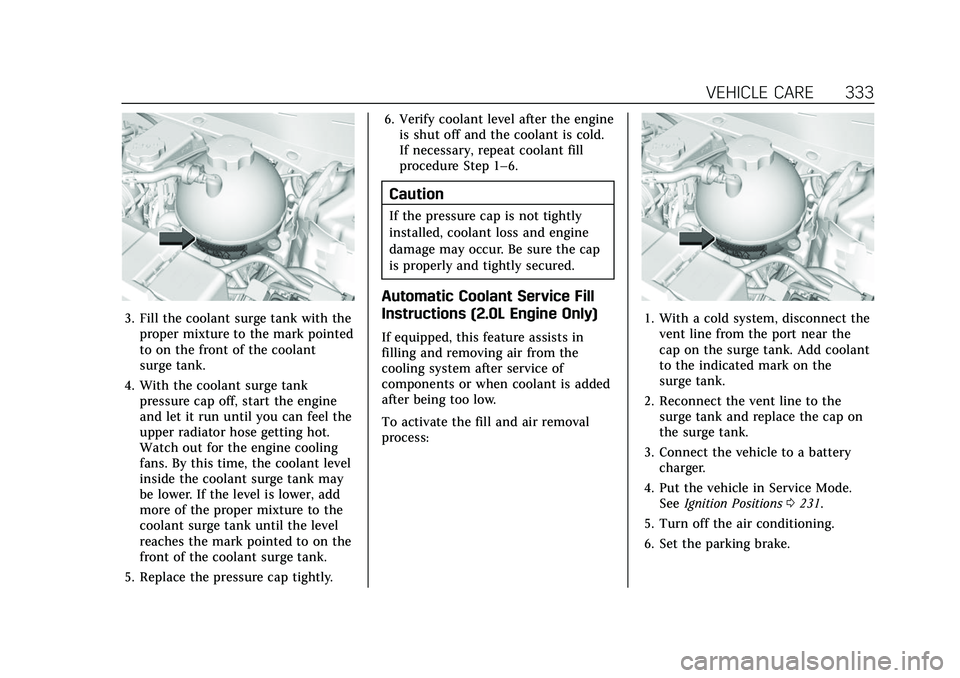
3. Fill the coolant surge tank with theproper mixture to the mark pointed
to on the front of the coolant
surge tank.
4. With the coolant surge tank pressure cap off, start the engine
and let it run until you can feel the
upper radiator hose getting hot.
Watch out for the engine cooling
fans. By this time, the coolant level
inside the coolant surge tank may
be lower. If the level is lower, add
more of the proper mixture to the
coolant surge tank until the level
reaches the mark pointed to on the
front of the coolant surge tank.
5. Replace the pressure cap tightly. 6. Verify coolant level after the engine
is shut off and the coolant is cold.
If necessary, repeat coolant fill
procedure Step 1–6.
Caution
If the pressure cap is not tightly
installed, coolant loss and engine
damage may occur. Be sure the cap
is properly and tightly secured.
Automatic Coolant Service Fill
Instructions (2.0L Engine Only)
If equipped, this feature assists in
filling and removing air from the
cooling system after service of
components or when coolant is added
after being too low.
To activate the fill and air removal
process:
1. With a cold system, disconnect thevent line from the port near the
cap on the surge tank. Add coolant
to the indicated mark on the
surge tank.
2. Reconnect the vent line to the surge tank and replace the cap on
the surge tank.
3. Connect the vehicle to a battery charger.
4. Put the vehicle in Service Mode. See Ignition Positions 0231.
5. Turn off the air conditioning.
6. Set the parking brake.