instrument cluster CADILLAC XT6 2022 Service Manual
[x] Cancel search | Manufacturer: CADILLAC, Model Year: 2022, Model line: XT6, Model: CADILLAC XT6 2022Pages: 447, PDF Size: 7.21 MB
Page 272 of 447

Cadillac XT6 Owner Manual (GMNA-Localizing-U.S./Canada-15218998) -
2022 - CRC - 10/22/21
DRIVING AND OPERATING 271
Steering WheelLight Bar Instrument Cluster Light Super Cruise Description
Off Off Super Cruise is off. There is no automatic steering. Operate the
vehicle manually.
Off White Super Cruise is available and can be engaged.
Solid Green Solid Green Super Cruise is steering. Pay attention to the road and vehicle
operation.
Pulsing Blue Solid Blue Super Cruise is not steering. Operate the vehicle manually. See
“Steering Manually and Changing Lanes”
previously in this section.
Flashing Green Solid Green Super Cruise has detected you are not paying sufficiently close
attention to the road. Pay attention to the road. See
“Attention to
the Road” previously in this section.
Flashing Red Solid Red Take over steering immediately. Super Cruise will disengage. See
“Take Over Alert
”previously in this section.
Disengaging Super Cruise
There are two ways to disengage
Super Cruise:
.Press]while your hands are on
the steering wheel. The Super Cruise
steering will disengage.
.Press the brake pedal while your
hands are on the steering wheel.
Both Super Cruise steering and
Adaptive Cruise Control will
disengage.
Super Cruise Messages
If
^does not appear,]can be
pressed to display a DIC message as to
why the system is unavailable. Immediately after a disengagement,
pressing the
]within 10 seconds will
display a DIC message with the reason
for Super Cruise disengagement.
Page 274 of 447

Cadillac XT6 Owner Manual (GMNA-Localizing-U.S./Canada-15218998) -
2022 - CRC - 10/22/21
DRIVING AND OPERATING 273
Super Cruise Message Summary (cont'd)
Unavailable Sensors Can’t Find Lane Lines.Rain or snow is inhibiting the system’s ability to see
lane lines.
.Direct sunlight is on the front camera at dawn or dusk.
.There are missing or poor lane line markings on
the road.
.There is sun glare on the road surface.
.There is heavy rain, puddles, or road spray.
Unavailable Sensor Can ’t See Face Clearly
.Sun is shining into the Driver Attention System (DAS)
camera.
.Dawn or dusk sun glare is on the driver’s face.
.Cups, food, hands, or other objects are obscuring the
DAS view of the driver’s face.
.The steering column is pointed too high or low for the
DAS to see the driver. Adjust the steering column or the
seat if the message occurs frequently.
Unavailable Looking Away From Road for Too Long The DAS system detects that the driver is not looking at the road.
Unavailable Center Vehicle In Lane The Super Cruise system has determined that the vehicle is
not centered in the lane lines. Once the vehicle has been
centered in the lane lines, the white
^will display in the
instrument cluster indicating that Super Cruise is available.
Page 295 of 447

Cadillac XT6 Owner Manual (GMNA-Localizing-U.S./Canada-15218998) -
2022 - CRC - 10/22/21
294 DRIVING AND OPERATING
With the Front Pedestrian Braking
system turned on, Night Vision
provides a red Head-Up Display (HUD)
alert when the system detects that the
vehicle is approaching a pedestrian
ahead too quickly. In addition, an alert
beeps or the Safety Alert Seat pulses,
if equipped. SeeFront Pedestrian
Braking (FPB) System 0291.
{Warning
The system does not detect all
objects or the vehicle distance from
objects. The system may not
provide a warning with enough time
to help avoid a crash.
1. Low-Beam Headlamps
2. High-Beam Headlamps
3. Night Vision System
By selecting a view on the instrument
cluster, the Night Vision image can be
displayed. See Instrument Cluster 0109
. The Night Vision system can operate
only if:
.The ignition is on.
.The vehicle is in P (Park) or a
forward gear.
.It is dark enough outside.
.The headlamps are on, except when
parked. Adjust the instrument panel
brightness to make the image no
brighter than necessary. Turn the
image off by selecting another view
on the instrument cluster.
Warm objects, such as pedestrians,
animals, and other moving vehicles,
should appear whiter on the Night
Vision display. Cold objects, such as
the sky, signs, and parked vehicles,
should appear darker. Night Vision
only shows objects that are warmer or
colder than the surroundings. It does
not detect brake lamps, turn signals,
emergency flashers, traffic lights,
or sign information.
Use this system as an aid by
occasionally glancing at the image. Do
not stare at the image or use the
image under well-lit conditions.
{Warning
Do not stare at the image while
driving as this might cause
important objects ahead not to be
seen. You could crash, and you or
others could be injured.
Page 296 of 447

Cadillac XT6 Owner Manual (GMNA-Localizing-U.S./Canada-15218998) -
2022 - CRC - 10/22/21
DRIVING AND OPERATING 295
When a pedestrian or large animal is
detected, an amber box displays
around the pedestrian or animal on
the Night Vision display and an amber
pedestrian icon,
~, or animal icon,
!, displays on the instrument
cluster. This pedestrian icon is also
shown on the Head-Up Display (HUD).
When the system detects the vehicle
is approaching a pedestrian too
quickly, the amber pedestrian icon
and box turns red, and a red flashing
icon,
~, displays on the HUD with
rapid beeping or pulsing of the Safety
Alert Seat, if equipped.
System pedestrian icons, beeps, and
(if equipped) Safety Alert Seat pulses
can be set to Off through vehicle
personalization by turning off the
Front Pedestrian Braking system. See
“Front Pedestrian Detection ”in
“Collision/Detection Systems” under
Vehicle Personalization 0130.
{Warning
The Night Vision system does not
automatically brake the vehicle.
It does not provide alerts unless it
detects a pedestrian or large
animal. The system may not detect
pedestrians, including children,
or animals:
.If they are less than 25 m
(82 ft) away.
.If they are not directly ahead in
the sensor coverage area, fully
visible, standing upright, or part
of a group.
.If the person or animal is moving
too quickly through the field of
view, such as a bicyclist.
.If the pedestrian is wearing
certain types of clothing.
.If headlamps are off, except
when parked.
.If the outside temperature is
higher than 30 °C (86 °F).
.Due to poor visibility, including
in heavy fog, rain, or snow.
(Continued)
Warning (Continued)
.If the sensor is blocked by dirt,
snow, rain, or ice.
Be ready to take action and apply
the brakes. For more information,
see Defensive Driving 0217. Keep
the Night Vision sensor clean and
in good repair.
Pedestrian detection may not be
available in high outside temperatures.
An amber icon,
*, displays. The
system does not need service.
In rain, snow, or fog the image may
not be clear and the direction of the
road ahead may not be seen. In more
severe weather conditions, the image
may be unclear and unusable. The
system does not need service.
Keep the system sensor clean by
activating the rear window washer
when it is dark enough for the system
to operate. If the Night Vision image
still looks blurry, use a soft wet cloth
to gently clean the sensor camera lens
and dry thoroughly. The sensor is
behind the lower front grille below the
driver side headlamp.
Page 316 of 447

Cadillac XT6 Owner Manual (GMNA-Localizing-U.S./Canada-15218998) -
2022 - CRC - 10/22/21
DRIVING AND OPERATING 315
controller as part of the trailer wiring
package. The harness contains the
following circuits:Electric Trailer
Brakes Blue
Battery Feed Red/Black or
Red/Blue
Brake Apply
Signal White/Blue
Ground Black or White
Refer to the aftermarket electric trailer
brake controller owner's manual to
determine wire color coding of the
electric trailer brake controller. The
wire colors on the brake controller
may be different from the vehicle.
It may be necessary to have a
technician connect the 12-volt power
to the engine compartment fuse block.
The electric trailer brake controller
should be installed by your dealer or a
qualified service center.
Trailer Lamps
Always check that all trailer lamps are
working at the beginning of each trip,
and periodically on longer trips.
Turn Signals When Towing a
Trailer
When properly connected, the trailer
turn signals should illuminate to
indicate the vehicle is turning,
changing lanes, or stopping. When
towing a trailer, the arrows on the
instrument cluster will illuminate
even if the trailer is not properly
connected or the bulbs are
burned out.
Trailer Sway Control (TSC)
Vehicles with StabiliTrak/Electronic
Stability Control (ESC) have a Trailer
Sway Control (TSC) feature. Trailer
sway is unintended side-to-side
motion of a trailer while towing. If the
vehicle is towing a trailer and the TSC
detects that sway is increasing, the
vehicle brakes are selectively applied
to help reduce excessive trailer sway.
If equipped with the Integrated Trailer
Brake Control (ITBC) system, and the
trailer has an electric brake system,
StabiliTrak/ESC may also apply the
trailer brakes.
If TSC is enabled, the Traction Control
System (TCS)/StabiliTrak/ESC warning
light will flash on the instrument
cluster. Reduce vehicle speed by
gradually removing your foot from the
accelerator pedal. If trailer sway
continues, StabiliTrak/ESC can reduce
engine torque to help slow the vehicle.
TSC will not function if StabiliTrak/
ESC is turned off. See Traction Control/
Electronic Stability Control 0247.
{Warning
Trailer sway can result in a crash
and in serious injury or death, even
if the vehicle is equipped with TSC.
If the trailer begins to sway, reduce
vehicle speed by gradually removing
your foot from the accelerator. Then
pull over to check the trailer and
vehicle to help correct possible
(Continued)
Page 335 of 447

Cadillac XT6 Owner Manual (GMNA-Localizing-U.S./Canada-15218998) -
2022 - CRC - 10/22/21
334 VEHICLE CARE
7. At the same time, press theaccelerator and the brake for
automatic transmission vehicles for
two seconds, then release.
At the end of the cycle, check the
coolant level in the surge tank and
add coolant, if it is low. Turn off the
vehicle, allow the Engine Control
Module (ECM) to go to sleep, about
two minutes, and repeat steps 3-7.
Listen for pump activation and
movement of the control valves while
watching the level of the tank. If the
tank empties, turn the ignition off,
carefully remove the surge tank cap,
refill to the indicated mark and repeat
steps 3-6. The fill and air removal
process will run for approximately
10 minutes.
Engine Overheating
The vehicle has several indicators to
warn of the engine overheating.
There is an engine coolant
temperature gauge on the instrument
cluster. See Engine Coolant Temperature
Gauge 0113. The vehicle may also
display a message on the Driver
Information Center (DIC). If the decision is made not to lift the
hood when this warning appears, get
service help right away. See
Roadside
Service 0416.
If the decision is made to lift the
hood, make sure the vehicle is parked
on a level surface. Then check to see if
the engine cooling fan is running.
If the engine is overheating, the fan
should be running. If it is not, do not
continue to run the engine. Have the
vehicle serviced.
Caution
Do not run the engine if there is a
leak in the engine cooling system.
This can cause a loss of all coolant
and can damage the system and
vehicle. Have any leaks fixed
right away.
If Steam Is Coming from the
Engine Compartment
{Warning
Steam and scalding liquids from a
hot cooling system are under
pressure. Turning the pressure cap,
even a little, can cause them to
come out at high speed and you
could be burned. Never turn the cap
when the cooling system, including
the pressure cap, is hot. Wait for
the cooling system and pressure
cap to cool.
If No Steam Is Coming from the
Engine Compartment
If an engine overheat warning is
displayed but no steam can be seen or
heard, the problem may not be too
serious. Sometimes the engine can get
a little too hot when the vehicle:
.Climbs a long hill on a hot day.
.Stops after high-speed driving.
.Idles for long periods in traffic.
If the overheat warning is displayed
with no sign of steam:
Page 346 of 447
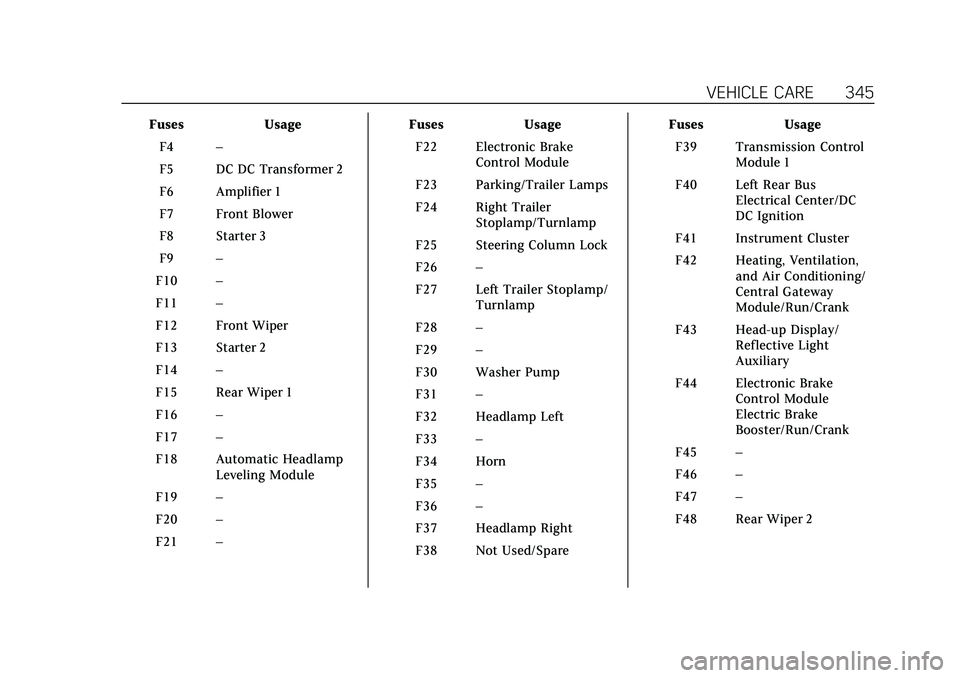
Cadillac XT6 Owner Manual (GMNA-Localizing-U.S./Canada-15218998) -
2022 - CRC - 10/22/21
VEHICLE CARE 345
FusesUsage
F4 –
F5 DC DC Transformer 2
F6 Amplifier 1
F7 Front Blower
F8 Starter 3
F9 –
F10 –
F11 –
F12 Front Wiper
F13 Starter 2
F14 –
F15 Rear Wiper 1
F16 –
F17 –
F18 Automatic Headlamp Leveling Module
F19 –
F20 –
F21 – Fuses
Usage
F22 Electronic Brake Control Module
F23 Parking/Trailer Lamps
F24 Right Trailer Stoplamp/Turnlamp
F25 Steering Column Lock
F26 –
F27 Left Trailer Stoplamp/ Turnlamp
F28 –
F29 –
F30 Washer Pump
F31 –
F32 Headlamp Left
F33 –
F34 Horn
F35 –
F36 –
F37 Headlamp Right
F38 Not Used/Spare Fuses
Usage
F39 Transmission Control Module 1
F40 Left Rear Bus Electrical Center/DC
DC Ignition
F41 Instrument Cluster
F42 Heating, Ventilation, and Air Conditioning/
Central Gateway
Module/Run/Crank
F43 Head-up Display/ Reflective Light
Auxiliary
F44 Electronic Brake Control Module
Electric Brake
Booster/Run/Crank
F45 –
F46 –
F47 –
F48 Rear Wiper 2
Page 349 of 447
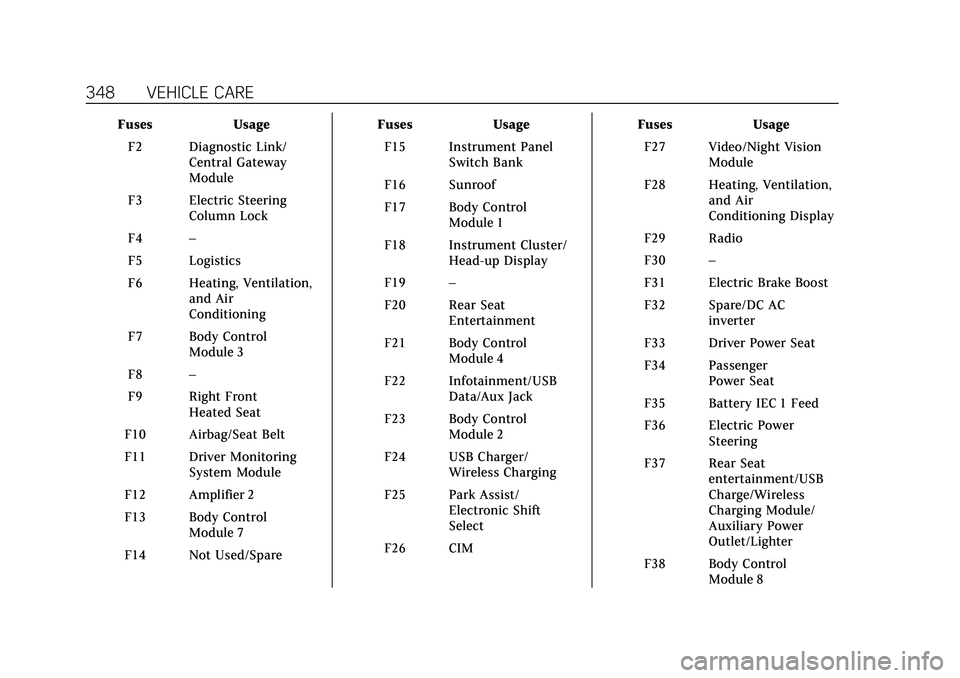
Cadillac XT6 Owner Manual (GMNA-Localizing-U.S./Canada-15218998) -
2022 - CRC - 10/22/21
348 VEHICLE CARE
FusesUsage
F2 Diagnostic Link/ Central Gateway
Module
F3 Electric Steering Column Lock
F4 –
F5 Logistics
F6 Heating, Ventilation, and Air
Conditioning
F7 Body Control Module 3
F8 –
F9 Right Front Heated Seat
F10 Airbag/Seat Belt
F11 Driver Monitoring System Module
F12 Amplifier 2
F13 Body Control Module 7
F14 Not Used/Spare Fuses
Usage
F15 Instrument Panel Switch Bank
F16 Sunroof
F17 Body Control Module 1
F18 Instrument Cluster/ Head-up Display
F19 –
F20 Rear Seat Entertainment
F21 Body Control Module 4
F22 Infotainment/USB Data/Aux Jack
F23 Body Control Module 2
F24 USB Charger/ Wireless Charging
F25 Park Assist/ Electronic Shift
Select
F26 CIM Fuses
Usage
F27 Video/Night Vision Module
F28 Heating, Ventilation, and Air
Conditioning Display
F29 Radio
F30 –
F31 Electric Brake Boost
F32 Spare/DC AC inverter
F33 Driver Power Seat
F34 Passenger Power Seat
F35 Battery IEC 1 Feed
F36 Electric Power Steering
F37 Rear Seat entertainment/USB
Charge/Wireless
Charging Module/
Auxiliary Power
Outlet/Lighter
F38 Body Control Module 8
Page 362 of 447

Cadillac XT6 Owner Manual (GMNA-Localizing-U.S./Canada-15218998) -
2022 - CRC - 10/22/21
VEHICLE CARE 361
remain continuously illuminated. This
sequence will continue upon
subsequent vehicle start-ups as long
as the malfunction exists.
When the malfunction indicator is
illuminated, the system may not be
able to detect or signal low tire
pressure as intended. TPMS
malfunctions may occur for a variety
of reasons, including the installation
of replacement or alternate tires or
wheels on the vehicle that prevent the
TPMS from functioning properly.
Always check the TPMS malfunction
telltale after replacing one or more
tires or wheels on your vehicle to
ensure that the replacement or
alternate tires and wheels allow the
TPMS to continue to function
properly.
SeeTire Pressure Monitor Operation
0 361.
See Radio Frequency Statement 0421.Tire Pressure Monitor
Operation
This vehicle may have a Tire Pressure
Monitor System (TPMS). The TPMS is
designed to warn the driver when a
low tire pressure condition exists.
TPMS sensors are mounted onto each
tire and wheel assembly, excluding the
spare tire and wheel assembly. The
TPMS sensors monitor the air
pressure in the tires and transmit the
tire pressure readings to a receiver
located in the vehicle.
When a low tire pressure condition is
detected, the TPMS illuminates the
low tire pressure warning light on the
instrument cluster. If the warning
light comes on, stop as soon as
possible and inflate the tires to the
recommended pressure shown on the
Tire and Loading Information label.
See Vehicle Load Limits 0226. A message to check the pressure in a
specific tire displays in the Driver
Information Center (DIC). The low tire
pressure warning light and the DIC
warning message come on at each
ignition cycle until the tires are
inflated to the correct inflation
pressure. Using the DIC, tire pressure
levels can be viewed. For additional
information and details about the DIC
operation and displays see
Driver
Information Center (DIC) 0124.
The low tire pressure warning light
may come on in cool weather when
the vehicle is first started, and then
turn off as the vehicle is driven. This
could be an early indicator that the air
pressure is getting low and needs to
be inflated to the proper pressure.
A Tire and Loading Information label,
attached to your vehicle, shows the
size of the original equipment tires
and the correct inflation pressure for
the tires when they are cold. See
Vehicle Load Limits 0226, for an
example of the Tire and Loading
Information label and its location.
Also see Tire Pressure 0358.
Page 392 of 447

Cadillac XT6 Owner Manual (GMNA-Localizing-U.S./Canada-15218998) -
2022 - CRC - 10/22/21
VEHICLE CARE 391
2. Remove excess moisture by gentlywringing until water does not drip
from the cleaning cloth.
3. Start on the outside edge of the soil and gently rub toward the
center. Fold the cleaning cloth to a
clean area frequently to prevent
forcing the soil into the fabric.
4. Continue gently rubbing the soiled area until there is no longer any
color transfer from the soil to the
cleaning cloth.
5. If the soil is not completely removed, use a mild soap solution
followed only by plain water.
If the soil is not completely removed,
it may be necessary to use a
commercial upholstery cleaner or spot
lifter. Test a small hidden area for
colorfastness before using a
commercial upholstery cleaner or spot
lifter. If ring formation occurs, clean
the entire fabric or carpet.
After cleaning, use a paper towel to
blot excess moisture.Cleaning High Gloss Surfaces
and Vehicle Information and
Radio Displays
Use a microfiber cloth on high gloss
surfaces or vehicle displays. First, use
a soft bristle brush to remove dirt that
can scratch the surface. Then gently
clean by rubbing with a microfiber
cloth. Never use window cleaners or
solvents. Periodically hand wash the
microfiber cloth separately, using mild
soap. Do not use bleach or fabric
softener. Rinse thoroughly and air dry
before next use.
Caution
Do not attach a device with a
suction cup to the display. This may
cause damage and would not be
covered by the vehicle warranty.
Instrument Panel, Leather, Vinyl,
Other Plastic Surfaces, Low
Gloss Paint Surfaces, and
Natural Open Pore Wood
Surfaces
Use a soft bristle brush to remove
dust from knobs and crevices on the
instrument cluster. Use a soft
microfiber cloth dampened with water
to remove dust and loose dirt. For a
more thorough cleaning, use a soft
microfiber cloth dampened with a
mild soap and water solution.
Caution
Soaking or saturating leather,
especially perforated leather, as well
as other interior surfaces, may
cause permanent damage. Wipe
excess moisture from these surfaces
after cleaning and allow them to
dry naturally. Never use heat,
steam, or spot removers. Do not use
liquids that contain alcohol or
solvents on leather seats. Do not
use cleaners that contain silicone or
wax-based products. Cleaners (Continued)