lock CADILLAC XT6 2022 Service Manual
[x] Cancel search | Manufacturer: CADILLAC, Model Year: 2022, Model line: XT6, Model: CADILLAC XT6 2022Pages: 447, PDF Size: 7.21 MB
Page 75 of 447

Cadillac XT6 Owner Manual (GMNA-Localizing-U.S./Canada-15218998) -
2022 - CRC - 10/22/21
74 SEATS AND RESTRAINTS
Warning (Continued)
serious or fatal injuries. The
shoulder belt should go over the
shoulder and across the chest.
Infants and Young Children
Everyone in a vehicle needs
protection! This includes infants and
all other children. Neither the distance
traveled nor the age and size of the
traveler changes the need, for
everyone, to use safety restraints. In
fact, the law in every state in theUnited States and in every Canadian
province says children up to some age
must be restrained while in a vehicle.
{Warning
Children can be seriously injured or
killed if the shoulder belt is worn
behind their back, under their legs,
or wrapped around their neck. The
shoulder belt can tighten but
cannot be loosened if it is locked.
The shoulder belt locks when it is
pulled all the way out of the
retractor. It unlocks when the
shoulder belt is allowed to go all
the way back into the retractor, but
it cannot do this if it is wrapped
around the child. Never leave
children unattended in a vehicle
and never allow children to
improperly wear, or play with, the
seat belts.
Every time infants and young children
ride in vehicles, they should have the
protection provided by appropriate
child restraints. Neither the vehicle's
seat belt system nor its airbag system
is designed for them. Children who are not restrained
properly can strike other people,
or can be thrown out of the vehicle.
{Warning
Never hold an infant or a child
while riding in a vehicle. Due to
crash forces, an infant or a child
will become so heavy it is not
possible to hold it during a crash.
For example, in a crash at only
40 km/h (25 mph), a 5.5 kg (12 lb)
infant will suddenly become a
110 kg (240 lb) force on a person's
arms. An infant or child should be
secured in an appropriate child
restraint.
Page 85 of 447

Cadillac XT6 Owner Manual (GMNA-Localizing-U.S./Canada-15218998) -
2022 - CRC - 10/22/21
84 SEATS AND RESTRAINTS
Do not secure a child restraint in a
position without a top tether anchor if
a national or local law requires that
the top tether be attached, or if the
instructions that come with the child
restraint say that the top tether must
be attached.
According to accident statistics,
children and infants are safer when
properly restrained in a child restraint
system or infant restraint system
secured in a rear seating position. See
Where to Put the Restraint078 for
additional information.
Securing a Child Restraint
Designed for the LATCH System
{Warning
A child could be seriously injured or
killed in a crash if the child
restraint is not properly attached to
the vehicle using either the LATCH
anchors or the vehicle seat belt.
Follow the instructions that came
with the child restraint and the
instructions in this manual.
{Warning
To reduce the risk of serious or
fatal injuries during a crash, do not
attach more than one child
restraint to a single anchor.
Attaching more than one child
restraint to a single anchor could
cause the anchor or attachment to
come loose or even break during a
crash. A child or others could be
injured.
{Warning
Children can be seriously injured or
strangled if a shoulder belt is
wrapped around their neck. The
shoulder belt can tighten but
cannot be loosened if it is locked.
The shoulder belt locks when it is
pulled all the way out of the
retractor. It unlocks when the
shoulder belt is allowed to go all
the way back into the retractor, but
it cannot do this if it is wrapped
around a child’s neck. If the
(Continued)
Warning (Continued)
shoulder belt is locked and
tightened around a child’s neck, the
only way to loosen the belt is to
cut it.
Buckle any unused seat belts
behind the child restraint so
children cannot reach them. Pull
the shoulder belt all the way out of
the retractor to set the lock, and
tighten the belt behind the child
restraint after the child restraint
has been installed.
Caution
Do not let the LATCH attachments
rub against the vehicle’s seat belts.
This may damage these parts.
If necessary, move buckled seat
belts to avoid rubbing the LATCH
attachments.
Do not fold the rear seatback when
the seat is occupied. Do not fold the
empty rear seat with a seat belt
buckled. This could damage the(Continued)
Page 89 of 447

Cadillac XT6 Owner Manual (GMNA-Localizing-U.S./Canada-15218998) -
2022 - CRC - 10/22/21
88 SEATS AND RESTRAINTS
3. Push the latch plate into the buckleuntil it clicks.
Position the release button on the
buckle, away from the child
restraint, so that the seat belt
could be quickly unbuckled if
necessary.
The push button used to release
the latch plate must be visible and
not obscured by the child restraint.
There must not be direct contact of
the child restraint to the push
button.4. Pull the shoulder belt all the wayout of the retractor to set the lock.
When the retractor lock is set, the
belt can be tightened but not
pulled out of the retractor.5. To tighten the belt, push down onthe child restraint, pull the
shoulder portion of the belt to
tighten the lap portion of the belt,
and feed the shoulder belt back
into the retractor. When installing
a forward-facing child restraint, it
may be helpful to use your knee to
push down on the child restraint as
you tighten the belt.
Try to pull the belt out of the
retractor to make sure the retractor
is locked. If the retractor is not
locked, repeat Steps 4 and 5.
6. If the child restraint has a top tether, follow the child restraint
manufacturer's instructions
Page 92 of 447

Cadillac XT6 Owner Manual (GMNA-Localizing-U.S./Canada-15218998) -
2022 - CRC - 10/22/21
SEATS AND RESTRAINTS 91
5. Pull the shoulder belt all the wayout of the retractor to set the lock.
When the retractor lock is set, the
belt can be tightened but not
pulled out of the retractor.6. To tighten the belt, push down onthe child restraint, pull the
shoulder portion of the belt to
tighten the lap portion of the belt,
and feed the shoulder belt back
into the retractor. When installing
a forward-facing child restraint, it
may be helpful to use your knee to
push down on the child restraint as
you tighten the belt.
Try to pull the belt out of the
retractor to make sure the retractor
is locked. If the retractor is not
locked, repeat Steps 5 and 6. 7. Before placing a child in the child
restraint, make sure it is securely
held in place. To check, grasp the
child restraint at the seat belt path
and attempt to move it side to side
and back and forth. When the child
restraint is properly installed, there
should be no more than
2.5 cm (1 in) of movement.
If the airbag is off, the OFF indicator
in the passenger airbag status
indicator will come on and stay on
when the vehicle is started.
If a child restraint has been installed
and the ON indicator is lit, see “If the
On Indicator Is Lit for a Child
Restraint ”under Passenger Sensing
System 067.
To remove the child restraint,
unbuckle the vehicle seat belt and let
it return to the stowed position.
Page 93 of 447

Cadillac XT6 Owner Manual (GMNA-Localizing-U.S./Canada-15218998) -
2022 - CRC - 10/22/21
92 STORAGE
Storage
Storage Compartments
Storage Compartments . . . . . . . . . . . . 92
Glove Box . . . . . . . . . . . . . . . . . . . . . . . . . . 92
Cupholders . . . . . . . . . . . . . . . . . . . . . . . . . 92
Rear Storage . . . . . . . . . . . . . . . . . . . . . . . 93
Center Console Storage . . . . . . . . . . . . 93
Additional Storage Features
Cargo Cover . . . . . . . . . . . . . . . . . . . . . . . . 94
Cargo Tie-Downs . . . . . . . . . . . . . . . . . . . 97
Cargo Management System . . . . . . . 97
Convenience Net . . . . . . . . . . . . . . . . . . . 98
Roof Rack System
Roof Rack System . . . . . . . . . . . . . . . . . 98
Storage Compartments{
Warning
Do not store heavy or sharp objects
in storage compartments. In a
crash, these objects may cause the
cover to open and could result in
injury.
Glove Box
Lift the handle to open the glove box.
Close until it latches. Use the vehicle
key to lock or unlock.
Cupholders
Front Cupholders
Cupholders in the center console are
under a cover. Do not place items on
the cover.
To open, slide the cover forward.
Page 95 of 447
Cadillac XT6 Owner Manual (GMNA-Localizing-U.S./Canada-15218998) -
2022 - CRC - 10/22/21
94 STORAGE
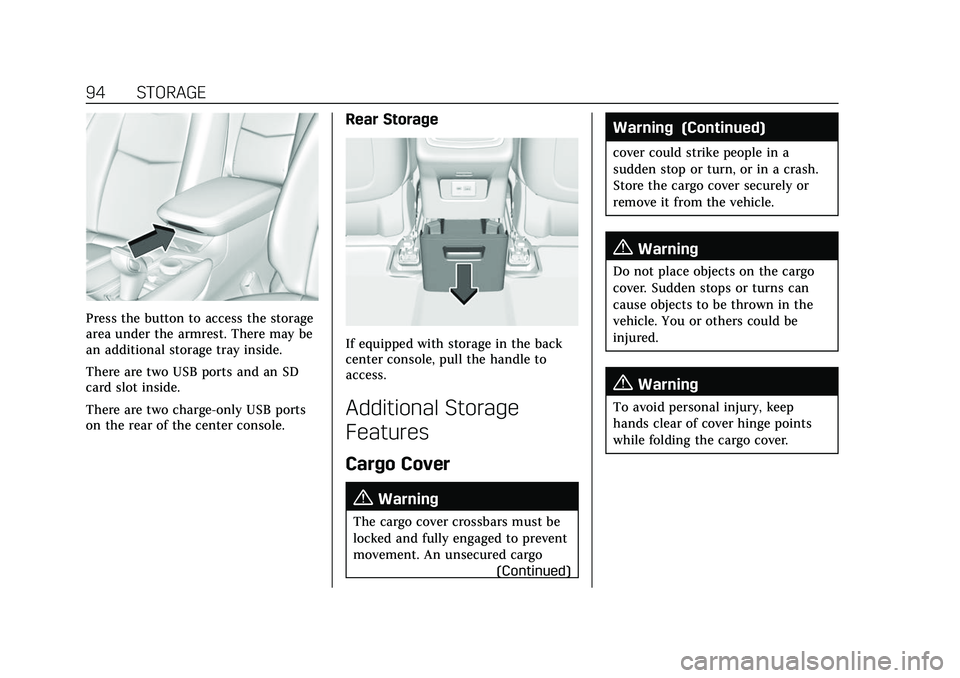
Press the button to access the storage
area under the armrest. There may be
an additional storage tray inside.
There are two USB ports and an SD
card slot inside.
There are two charge-only USB ports
on the rear of the center console.
Rear Storage
If equipped with storage in the back
center console, pull the handle to
access.
Additional Storage
Features
Cargo Cover
{Warning
The cargo cover crossbars must be
locked and fully engaged to prevent
movement. An unsecured cargo(Continued)
Warning (Continued)
cover could strike people in a
sudden stop or turn, or in a crash.
Store the cargo cover securely or
remove it from the vehicle.
{Warning
Do not place objects on the cargo
cover. Sudden stops or turns can
cause objects to be thrown in the
vehicle. You or others could be
injured.
{Warning
To avoid personal injury, keep
hands clear of cover hinge points
while folding the cargo cover.
Page 96 of 447

Cadillac XT6 Owner Manual (GMNA-Localizing-U.S./Canada-15218998) -
2022 - CRC - 10/22/21
STORAGE 95
If equipped, the cargo cover is used
to cover items in the cargo area. It is
foldable and stores in the cargo
storage bin under the load floor when
not in use.Installing the Cargo Cover
1. Slide the seat belt into the clip on
the side of the vehicle Do this for
both sides.
2. Remove the cargo cover from the storage bag.
3. Unroll the cargo cover.
4. Hold the cargo cover with the lock buttons facing up and the longest
crossbar facing the front of the
vehicle.
5. Open both crossbars until thecenter hinge locks. Keep fingers
clear of the crossbar hinges to
avoid being pinched.
Page 99 of 447

Cadillac XT6 Owner Manual (GMNA-Localizing-U.S./Canada-15218998) -
2022 - CRC - 10/22/21
98 STORAGE
Remove the cargo management
system tray (2) by pulling on the
handles (1).
Convenience Net
This vehicle may have a convenience
net in the rear of the vehicle. Attach it
to the cargo tie-downs for storing
small loads.
Do not use the net to store heavy
loads.
Roof Rack System
The vehicle may be equipped with
side-rails for a roof rack system. Cargo
must be secured with properlyinstalled cross rails and other
accessories designed to carry cargo.
These can be purchased from your
dealer.
{Warning
Before driving and occasionally
during a trip, check that cargo is
securely fastened, rests evenly
between the cross rails and does
not block the vehicle's lamps or
windows. Never load cargo directly
on the roof of the vehicle or allow
cargo to hang over the rear or sides
of the vehicle. Never load cargo
without first properly installing
cross rails and other accessories
designed to carry cargo. Personal
injury, death or damage to the
vehicle or other property may occur.
If driving for a long distance, on rough
roads, or at high speeds, occasionally
stop the vehicle to make sure the
cargo remains in its place.
Cargo Weight Limits
Do not exceed the maximum cargo
weight for the roof rack system,
including the weight of the cross rails
and any other accessories used to
carry the cargo such as bike racks or
roof boxes. The maximum cargo
weight that can be loaded onto the
roof rack system is 100 kg (220 lb) or
the weight designated in the
instructions that came with the cross
rails or other roof rack accessories,
whichever is less.
{Warning
Never load the roof rack with more
weight than specified in this
section. Loading cargo on the roof
rack will make the vehicle's center
of gravity higher. To avoid losing
control of the vehicle, avoid
overloading, high speeds, sudden
starts, sharp turns, sudden braking,
or abrupt maneuvers when carrying
cargo on the roof rack.
The weight of any cargo carried on the
roof rack system must be included in
calculating the loaded weight of the
Page 101 of 447

Cadillac XT6 Owner Manual (GMNA-Localizing-U.S./Canada-15218998) -
2022 - CRC - 10/22/21
100 INSTRUMENTS AND CONTROLS
Instruments and
Controls
Controls
Steering Wheel Adjustment . . . . . 101
Steering Wheel Controls . . . . . . . . . 101
Heated Steering Wheel . . . . . . . . . . 101
Horn . . . . . . . . . . . . . . . . . . . . . . . . . . . . . . . 102
Windshield Wiper/Washer . . . . . . . 102
Rear Window Wiper/Washer . . . . 104
Compass . . . . . . . . . . . . . . . . . . . . . . . . . . 105
Clock . . . . . . . . . . . . . . . . . . . . . . . . . . . . . . 105
Power Outlets . . . . . . . . . . . . . . . . . . . . . 105
Wireless Charging . . . . . . . . . . . . . . . . 106
Warning Lights, Gauges, and
Indicators
Warning Lights, Gauges, andIndicators . . . . . . . . . . . . . . . . . . . . . . . 109
Instrument Cluster . . . . . . . . . . . . . . . 109
Speedometer . . . . . . . . . . . . . . . . . . . . . . 111
Odometer . . . . . . . . . . . . . . . . . . . . . . . . . 112
Trip Odometer . . . . . . . . . . . . . . . . . . . . 112
Tachometer . . . . . . . . . . . . . . . . . . . . . . . 112
Fuel Gauge . . . . . . . . . . . . . . . . . . . . . . . . 112
Engine Coolant Temperature Gauge . . . . . . . . . . . . . . . . . . . . . . . . . . . . 113
Seat Belt Reminders . . . . . . . . . . . . . . 113
Airbag Readiness Light . . . . . . . . . . 114 Passenger Airbag Status
Indicator . . . . . . . . . . . . . . . . . . . . . . . . . 114
Charging System Light . . . . . . . . . . . 115
Malfunction Indicator Lamp (Check Engine Light) . . . . . . . . . . . 115
Brake System Warning Light . . . . 117
Electric Parking Brake Light . . . . . 118
Service Electric Parking Brake Light . . . . . . . . . . . . . . . . . . . . . . . . . . . . . 118
Antilock Brake System (ABS) Warning Light . . . . . . . . . . . . . . . . . . 118
Performance Shifting Light . . . . . . 119
All-Wheel-Drive Light . . . . . . . . . . . . 119
Lane Keep Assist (LKA) Light . . . 119
Vehicle Ahead Indicator . . . . . . . . . 120
Pedestrian Ahead Indicator . . . . . . 120
Traction Off Light . . . . . . . . . . . . . . . . 120
StabiliTrak OFF Light . . . . . . . . . . . . 120
Traction Control System (TCS)/ StabiliTrak Light . . . . . . . . . . . . . . . . 121
Driver Mode Control Light . . . . . . . 121
Tire Pressure Light . . . . . . . . . . . . . . . 121
Engine Oil Pressure Light . . . . . . . . 122
Low Fuel Warning Light . . . . . . . . . 122
Security Light . . . . . . . . . . . . . . . . . . . . . 122
High-Beam On Light . . . . . . . . . . . . . 123
Lamps On Reminder . . . . . . . . . . . . . 123
Cruise Control Light . . . . . . . . . . . . . . 123
Door Ajar Light . . . . . . . . . . . . . . . . . . . 124
Information Displays
Driver Information Center (DIC) . . . . . . . . . . . . . . . . . . . . . 124
Head-Up Display (HUD) . . . . . . . . . 127
Vehicle Messages
Vehicle Messages . . . . . . . . . . . . . . . . . 130
Engine Power Messages . . . . . . . . . . 130
Vehicle Speed Messages . . . . . . . . . 130
Vehicle Personalization
Vehicle Personalization . . . . . . . . . . 130
Universal Remote System
Universal Remote System . . . . . . . . 135
Universal Remote System Programming . . . . . . . . . . . . . . . . . . . 135
Universal Remote System Operation . . . . . . . . . . . . . . . . . . . . . . . . 137
Page 102 of 447
Cadillac XT6 Owner Manual (GMNA-Localizing-U.S./Canada-15218998) -
2022 - CRC - 10/22/21
INSTRUMENTS AND CONTROLS 101
Controls
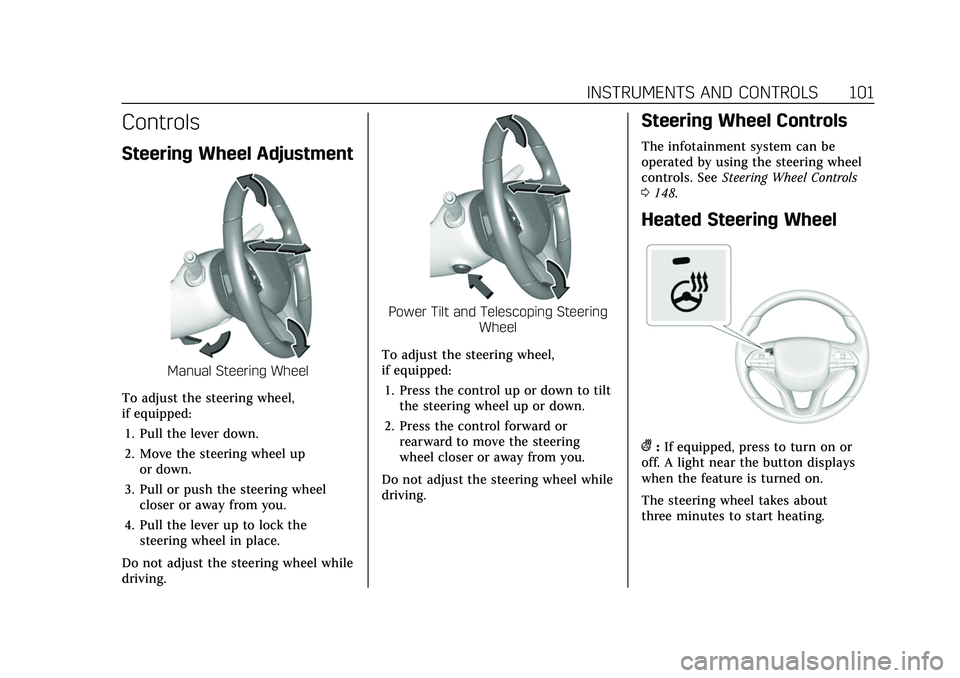
Steering Wheel Adjustment
Manual Steering Wheel
To adjust the steering wheel,
if equipped: 1. Pull the lever down.
2. Move the steering wheel up or down.
3. Pull or push the steering wheel closer or away from you.
4. Pull the lever up to lock the steering wheel in place.
Do not adjust the steering wheel while
driving.
Power Tilt and Telescoping Steering Wheel
To adjust the steering wheel,
if equipped: 1. Press the control up or down to tilt the steering wheel up or down.
2. Press the control forward or rearward to move the steering
wheel closer or away from you.
Do not adjust the steering wheel while
driving.
Steering Wheel Controls
The infotainment system can be
operated by using the steering wheel
controls. See Steering Wheel Controls
0 148.
Heated Steering Wheel
(:If equipped, press to turn on or
off. A light near the button displays
when the feature is turned on.
The steering wheel takes about
three minutes to start heating.