seats CADILLAC XT6 2022 Manual PDF
[x] Cancel search | Manufacturer: CADILLAC, Model Year: 2022, Model line: XT6, Model: CADILLAC XT6 2022Pages: 447, PDF Size: 7.21 MB
Page 213 of 447

Cadillac XT6 Owner Manual (GMNA-Localizing-U.S./Canada-15218998) -
2022 - CRC - 10/22/21
212 CLIMATE CONTROLS
Rear Climate Controls, Not Equipped with Heated Seats
1. Air Delivery Mode Control
2. AUTO (Automatic Operation)
3. Fan Control
4. Temperature Down
5. Temperature Up
6. On/Off
Rear Climate Display Controls
1. Rear Temperature Display 2. Fan Control
3. Sync (Synchronized Temperatures)
4. Rear Control Lockout
5. Air Delivery Mode Control
6. Auto (Rear Automatic Operation)
7. On/Off
8. Rear Climate Temperature Control
Rear : Touch this button on the front
climate control display to open the
rear climate control display. The rear
climate control settings can now be
adjusted from the front
passenger area.
On/Off : Touch On/Off on the display
to turn the rear climate control on or
off. If the rear climate control is
turned off using On/Off on the display,
the rear climate control buttons must
be pressed twice to turn the system
back on.
Sync : Touch Sync on the display to
match the rear climate control
settings to the front climate control
driver settings. The Sync button is
highlighted. Press the temperature
Page 214 of 447

Cadillac XT6 Owner Manual (GMNA-Localizing-U.S./Canada-15218998) -
2022 - CRC - 10/22/21
CLIMATE CONTROLS 213
button twice to unlink the set driver
and rear settings. The Sync button is
no longer highlighted.
Q:Touch to lock or unlock control of
the rear climate control system from
the rear seat passengers. When locked,
the rear climate controls can only be
adjusted from the front seat.
Automatic Operation
AUTO : Press to turn on or off. The
air delivery is controlled
automatically. The AUTO indicator
appears on the display. If the air
delivery mode or fan speed is
manually adjusted, this cancels full
automatic operation.
Manual Operation
]: Press the rear fan control up or
down to increase or decrease the
airf low to the rear panel outlets.
Temperature Controls : Press up or
down to adjust the rear passenger
temperature. The rear passenger
temperature can also be adjusted by
touching
Qfor warmer air orRfor
cooler air on the rear climate display. Air Delivery Mode Control :
Press up
or down to select the desired air
delivery mode. The air delivery mode
can also be changed by touching
[,
\, orYon the rear climate display.
This changes the direction of the
airf low in the rear seating area.
If the rear floor air delivery mode is
selected, the rear fan speed indicator
will change when adjusted, but the
airf low amount directed to the floor
will not. This is normal operation for
the system.
To activate the rear floor air delivery
mode, touch
[on the rear climate
display.
Air Vents
Use the slider switch on the air outlets
to change the direction of the airf low,
or to open and close off the airf low.
There are also outlets overhead in the
rear passenger area; adjust as needed.
Keep all outlets open whenever
possible for best system performance.
Operation Tips
.Clear away any ice, snow, or leaves
from the air inlets at the base of the
windshield that can block the flow
of air into the vehicle.
.Clear snow off the hood to improve
visibility and help decrease moisture
drawn into the vehicle.
.Use of non-GM approved hood
deflectors can adversely affect the
performance of the system.
.Keep the path under all seats clear
of objects to help circulate the air
inside the vehicle more effectively.
.If fogging reoccurs while in vent or
bi-level modes with mild
temperature throughout the vehicle,
turn on the air conditioner to
reduce windshield fogging.
Maintenance
Passenger Compartment
Air Filter
The filter reduces dust, pollen, and
other airborne irritants from outside
air that is pulled into the vehicle. The
Page 231 of 447

Cadillac XT6 Owner Manual (GMNA-Localizing-U.S./Canada-15218998) -
2022 - CRC - 10/22/21
230 DRIVING AND OPERATING
{Warning
Things inside the vehicle can
strike and injure people in a
sudden stop or turn, or in a
crash.
.Put things in the cargo area
of the vehicle. In the cargo
area, put them as far forward
as possible. Try to spread the
weight evenly.
.Never stack heavier things,
like suitcases, inside the
vehicle so that some of them
are above the tops of the
seats.
.Do not leave an unsecured
child restraint in the vehicle.
.Secure loose items in the
vehicle.
.Do not leave a seat folded
down unless needed.
Starting and Operating
New Vehicle Break-In
Caution
The vehicle does not need an
elaborate break-in. But it will
perform better in the long run if
you follow these guidelines:
.Do not drive at any one constant
speed, fast or slow, for the first
800 km (500 mi). Do not make
full-throttle starts. Avoid
downshifting to brake or slow the
vehicle.
.Avoid making hard stops for the
first 300 km (200 mi) or so.
During this time the new brake
linings are not yet broken in.
Hard stops with new linings can
mean premature wear and earlier
replacement. Follow this
breaking-in guideline every time
you get new brake linings. (Continued)
Caution (Continued)
.Do not tow a trailer during
break-in. SeeTrailer Towing 0308
for the trailer towing capabilities
of the vehicle and more
information.
Following break-in, engine speed
and load can be gradually
increased.
On new vehicles, the various
mechanical and electrical systems
experience a “break-in”period during
the first 6 400 km (4,000 mi) of
routine driving. As the vehicle is
driven, the mechanical systems adjust
to provide optimal fuel economy and
transmission shift performance.
Electrical systems will adapt and
calibrate during the break-in period.
A one-time occurrence of clicks and
similar vehicle noises is normal during
this process.
Normal driving charges the vehicle’s
battery to achieve the best operation
of the vehicle, including fuel economy
and the Stop/Start System. See Stop/
Start System 0233.
Page 347 of 447
Cadillac XT6 Owner Manual (GMNA-Localizing-U.S./Canada-15218998) -
2022 - CRC - 10/22/21
346 VEHICLE CARE
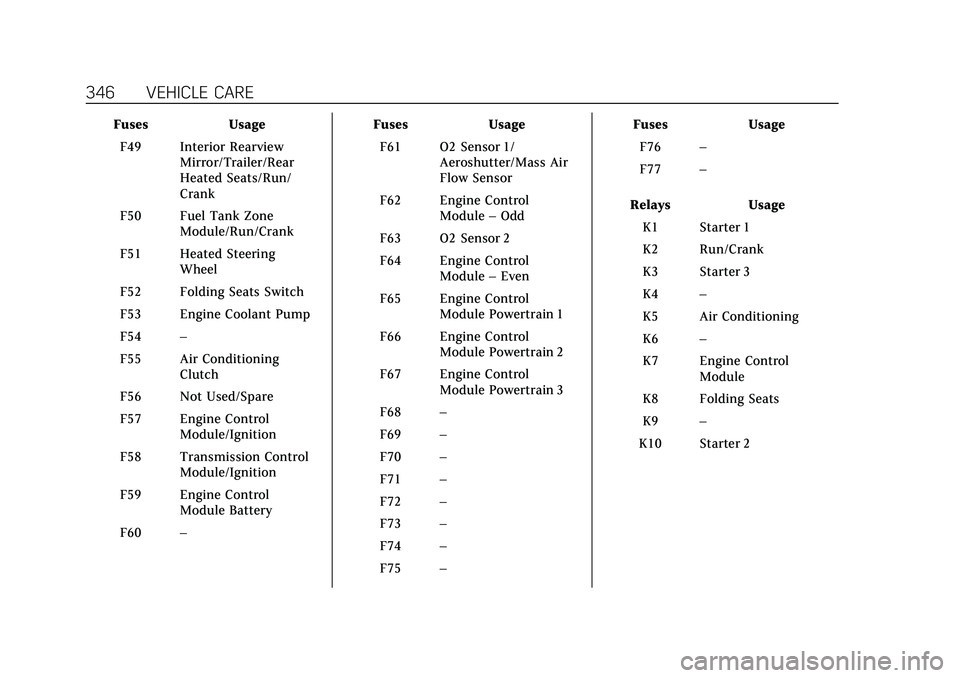
FusesUsage
F49 Interior Rearview Mirror/Trailer/Rear
Heated Seats/Run/
Crank
F50 Fuel Tank Zone Module/Run/Crank
F51 Heated Steering Wheel
F52 Folding Seats Switch
F53 Engine Coolant Pump
F54 –
F55 Air Conditioning Clutch
F56 Not Used/Spare
F57 Engine Control Module/Ignition
F58 Transmission Control Module/Ignition
F59 Engine Control Module Battery
F60 – Fuses
Usage
F61 O2 Sensor 1/ Aeroshutter/Mass Air
Flow Sensor
F62 Engine Control Module–Odd
F63 O2 Sensor 2
F64 Engine Control Module–Even
F65 Engine Control Module Powertrain 1
F66 Engine Control Module Powertrain 2
F67 Engine Control Module Powertrain 3
F68 –
F69 –
F70 –
F71 –
F72 –
F73 –
F74 –
F75 – Fuses
Usage
F76 –
F77 –
Relays Usage
K1 Starter 1
K2 Run/Crank
K3 Starter 3
K4 –
K5 Air Conditioning
K6 –
K7 Engine Control Module
K8 Folding Seats
K9 –
K10 Starter 2
Page 348 of 447

Cadillac XT6 Owner Manual (GMNA-Localizing-U.S./Canada-15218998) -
2022 - CRC - 10/22/21
VEHICLE CARE 347
Instrument Panel Fuse
Block
The instrument panel fuse block is in
the center console between the driver
and passenger seats. To access the
fuses, open the fuse panel door,
or remove the panel from the
passenger side by pulling it out, or see
your dealer.
To reinstall the door, push the door
back into its original location.
The vehicle may not be equipped with
all of the fuses, relays, and features
shown.
FusesUsage
F1 Body Control Module 6
Page 351 of 447

Cadillac XT6 Owner Manual (GMNA-Localizing-U.S./Canada-15218998) -
2022 - CRC - 10/22/21
350 VEHICLE CARE
FusesUsage
F1 –
F2 Trailer Battery 1
F3 Driver Seat Belt Motor
F4 Rear Blower
F5 Rear Drive Control
F6 Passenger Seat Belt Motor
F7 Right Window
F8 Rear Defogger
F9 Left Window
F10 Folding Seats 1
F11 Trailer Reverse
F12 –
F13 –
F14 –
F15 –
F16 –
F17 – Fuses
Usage
F18 Trailer Module/ External Object
Calculation Module 2
Ignition
F19 Ventilated Seats/Left Front Heated Seats/
Run/Crank
F20 –
F21 Trailer Connector
F22 –
F23 Spare
F24 Passenger Window Switch
F25 Spare
F26 Trailer Brake
F27 –
F28 Passive Entry/Passive Start
F29 Advanced Driver Assist Map Module
F30 Canister Vent
F31 – Fuses
Usage
F32 Heated Mirror
F33 –
F34 Liftgate Module
F35 Fuel System Control Module
F36 –
F37 –
F38 Window Module
F39 –
F40 Memory Seat Module
F41 Automatic Occupancy Sensor
F42 Trailer Battery 2
F43 –
F44 Third Row Seats
F45 Liftgate Motor
F46 Rear Heated Seats
F47 –
F48 Glass Break Sensor
F49 –
Page 352 of 447
Cadillac XT6 Owner Manual (GMNA-Localizing-U.S./Canada-15218998) -
2022 - CRC - 10/22/21
VEHICLE CARE 351
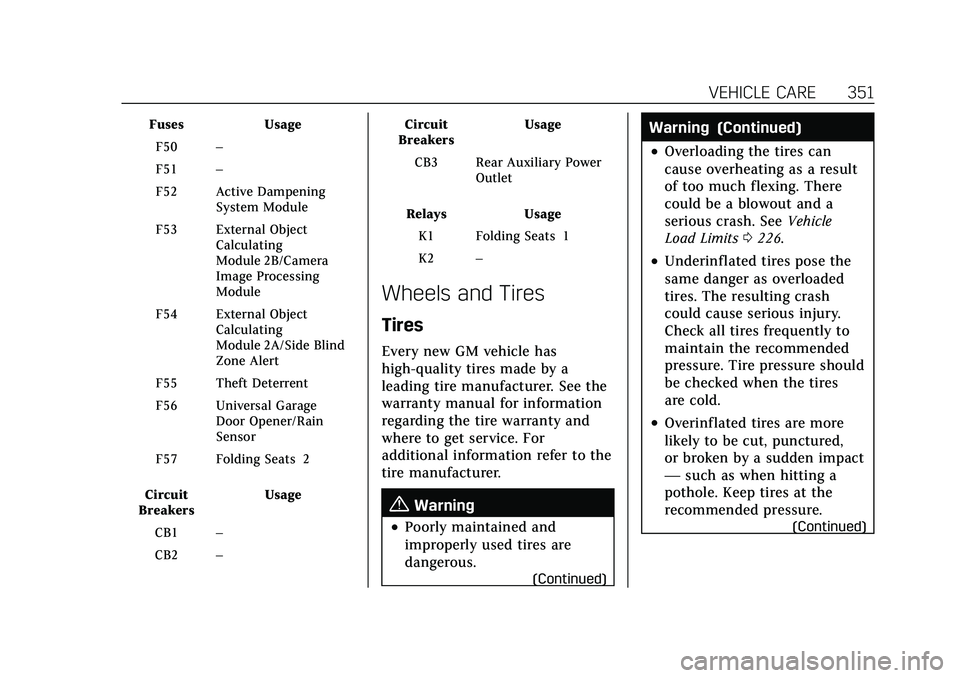
FusesUsage
F50 –
F51 –
F52 Active Dampening System Module
F53 External Object Calculating
Module 2B/Camera
Image Processing
Module
F54 External Object Calculating
Module 2A/Side Blind
Zone Alert
F55 Theft Deterrent
F56 Universal Garage Door Opener/Rain
Sensor
F57 Folding Seats 2
Circuit
Breakers Usage
CB1 –
CB2 – Circuit
Breakers Usage
CB3 Rear Auxiliary Power Outlet
Relays Usage
K1 Folding Seats 1
K2 –
Wheels and Tires
Tires
Every new GM vehicle has
high-quality tires made by a
leading tire manufacturer. See the
warranty manual for information
regarding the tire warranty and
where to get service. For
additional information refer to the
tire manufacturer.
{Warning
.Poorly maintained and
improperly used tires are
dangerous.
(Continued)
Warning (Continued)
.Overloading the tires can
cause overheating as a result
of too much flexing. There
could be a blowout and a
serious crash. See Vehicle
Load Limits 0226.
.Underinflated tires pose the
same danger as overloaded
tires. The resulting crash
could cause serious injury.
Check all tires frequently to
maintain the recommended
pressure. Tire pressure should
be checked when the tires
are cold.
.Overinflated tires are more
likely to be cut, punctured,
or broken by a sudden impact
— such as when hitting a
pothole. Keep tires at the
recommended pressure.
(Continued)
Page 356 of 447
Cadillac XT6 Owner Manual (GMNA-Localizing-U.S./Canada-15218998) -
2022 - CRC - 10/22/21
VEHICLE CARE 355
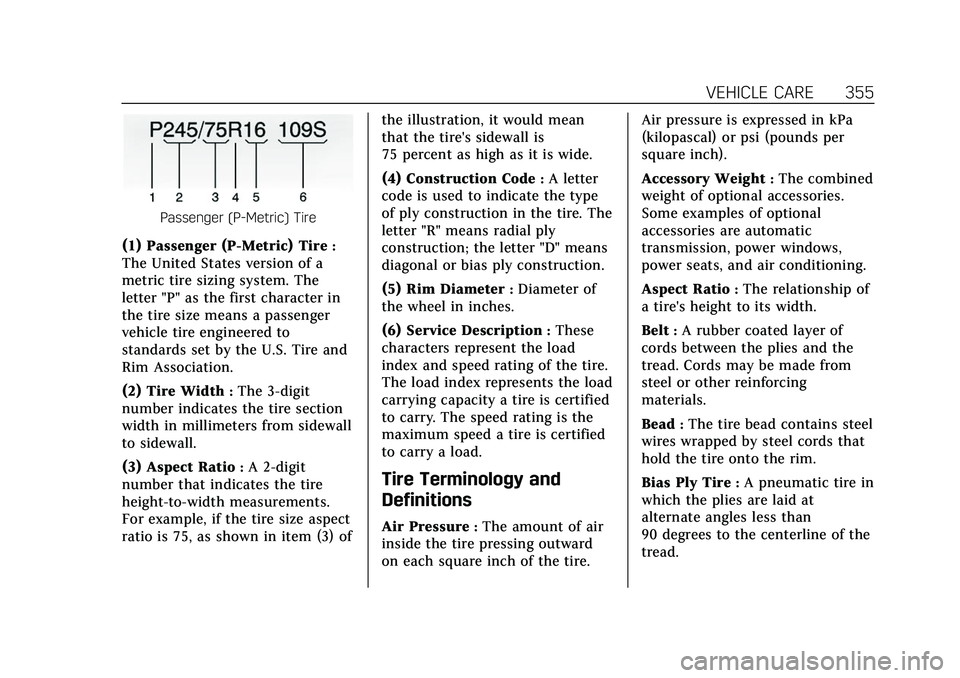
Passenger (P-Metric) Tire
(1) Passenger (P-Metric) Tire:
The United States version of a
metric tire sizing system. The
letter "P" as the first character in
the tire size means a passenger
vehicle tire engineered to
standards set by the U.S. Tire and
Rim Association.
(2) Tire Width
:The 3-digit
number indicates the tire section
width in millimeters from sidewall
to sidewall.
(3) Aspect Ratio
:A 2-digit
number that indicates the tire
height-to-width measurements.
For example, if the tire size aspect
ratio is 75, as shown in item (3) of the illustration, it would mean
that the tire's sidewall is
75 percent as high as it is wide.
(4) Construction Code
:A letter
code is used to indicate the type
of ply construction in the tire. The
letter "R" means radial ply
construction; the letter "D" means
diagonal or bias ply construction.
(5) Rim Diameter
:Diameter of
the wheel in inches.
(6) Service Description
:These
characters represent the load
index and speed rating of the tire.
The load index represents the load
carrying capacity a tire is certified
to carry. The speed rating is the
maximum speed a tire is certified
to carry a load.
Tire Terminology and
Definitions
Air Pressure:The amount of air
inside the tire pressing outward
on each square inch of the tire. Air pressure is expressed in kPa
(kilopascal) or psi (pounds per
square inch).
Accessory Weight
:The combined
weight of optional accessories.
Some examples of optional
accessories are automatic
transmission, power windows,
power seats, and air conditioning.
Aspect Ratio
:The relationship of
a tire's height to its width.
Belt
:A rubber coated layer of
cords between the plies and the
tread. Cords may be made from
steel or other reinforcing
materials.
Bead
:The tire bead contains steel
wires wrapped by steel cords that
hold the tire onto the rim.
Bias Ply Tire
:A pneumatic tire in
which the plies are laid at
alternate angles less than
90 degrees to the centerline of the
tread.
Page 367 of 447

Cadillac XT6 Owner Manual (GMNA-Localizing-U.S./Canada-15218998) -
2022 - CRC - 10/22/21
366 VEHICLE CARE
Lightly coat the inner diameter of
the wheel hub opening with wheel
bearing grease after a wheel
change or tire rotation to prevent
corrosion or rust buildup.
{Warning
Do not apply grease to the
wheel mounting surface, wheel
conical seats, or the wheel nuts
or bolts. Grease applied to these
areas could cause a wheel to
become loose or come off,
resulting in a crash.
When It Is Time for New
Tires
Factors, such as maintenance,
temperatures, driving speeds, vehicle
loading, and road conditions affect the
wear rate of the tires.
Treadwear indicators are one way to
tell when it is time for new tires.
Treadwear indicators appear when the
tires have only 1.6 mm (1/16 in) or
less of tread remaining. See Tire
Inspection 0364 and
Tire Rotation 0365 for additional
information.
The rubber in tires ages over time.
This also applies to the spare tire,
if the vehicle has one, even if it is
never used. Multiple factors including
temperatures, loading conditions, and
inflation pressure maintenance affect
how fast aging takes place. GM
recommends that tires, including the
spare if equipped, be replaced after six years, regardless of tread wear. To
identify the age of a tire, use the tire
manufacture date, which is the last
four digits of the DOT Tire
Identification Number (TIN) molded
into one side of the tire sidewall. The
last four digits of the TIN indicate the
tire manufactured date. The first two
digits represent the week and the last
two digits, the year. For example, the
third week of the year 2020 would
have a 4-digit DOT date of 0320. Week
01 is the first full week (Sunday
through Saturday) of each year.
Vehicle Storage
Tires age when stored normally
mounted on a parked vehicle. Park a
vehicle that will be stored for at least
a month in a cool, dry, clean area
away from direct sunlight to slow
aging. This area should be free of
grease, gasoline, or other substances
that can deteriorate rubber.
Parking for an extended period can
cause flat spots on the tires that may
result in vibrations while driving.
When storing a vehicle for at least a
Page 392 of 447

Cadillac XT6 Owner Manual (GMNA-Localizing-U.S./Canada-15218998) -
2022 - CRC - 10/22/21
VEHICLE CARE 391
2. Remove excess moisture by gentlywringing until water does not drip
from the cleaning cloth.
3. Start on the outside edge of the soil and gently rub toward the
center. Fold the cleaning cloth to a
clean area frequently to prevent
forcing the soil into the fabric.
4. Continue gently rubbing the soiled area until there is no longer any
color transfer from the soil to the
cleaning cloth.
5. If the soil is not completely removed, use a mild soap solution
followed only by plain water.
If the soil is not completely removed,
it may be necessary to use a
commercial upholstery cleaner or spot
lifter. Test a small hidden area for
colorfastness before using a
commercial upholstery cleaner or spot
lifter. If ring formation occurs, clean
the entire fabric or carpet.
After cleaning, use a paper towel to
blot excess moisture.Cleaning High Gloss Surfaces
and Vehicle Information and
Radio Displays
Use a microfiber cloth on high gloss
surfaces or vehicle displays. First, use
a soft bristle brush to remove dirt that
can scratch the surface. Then gently
clean by rubbing with a microfiber
cloth. Never use window cleaners or
solvents. Periodically hand wash the
microfiber cloth separately, using mild
soap. Do not use bleach or fabric
softener. Rinse thoroughly and air dry
before next use.
Caution
Do not attach a device with a
suction cup to the display. This may
cause damage and would not be
covered by the vehicle warranty.
Instrument Panel, Leather, Vinyl,
Other Plastic Surfaces, Low
Gloss Paint Surfaces, and
Natural Open Pore Wood
Surfaces
Use a soft bristle brush to remove
dust from knobs and crevices on the
instrument cluster. Use a soft
microfiber cloth dampened with water
to remove dust and loose dirt. For a
more thorough cleaning, use a soft
microfiber cloth dampened with a
mild soap and water solution.
Caution
Soaking or saturating leather,
especially perforated leather, as well
as other interior surfaces, may
cause permanent damage. Wipe
excess moisture from these surfaces
after cleaning and allow them to
dry naturally. Never use heat,
steam, or spot removers. Do not use
liquids that contain alcohol or
solvents on leather seats. Do not
use cleaners that contain silicone or
wax-based products. Cleaners (Continued)