night vision CADILLAC XT6 2022 Owners Manual
[x] Cancel search | Manufacturer: CADILLAC, Model Year: 2022, Model line: XT6, Model: CADILLAC XT6 2022Pages: 447, PDF Size: 7.21 MB
Page 106 of 447
Cadillac XT6 Owner Manual (GMNA-Localizing-U.S./Canada-15218998) -
2022 - CRC - 10/22/21
INSTRUMENTS AND CONTROLS 105
Rear Camera Washer
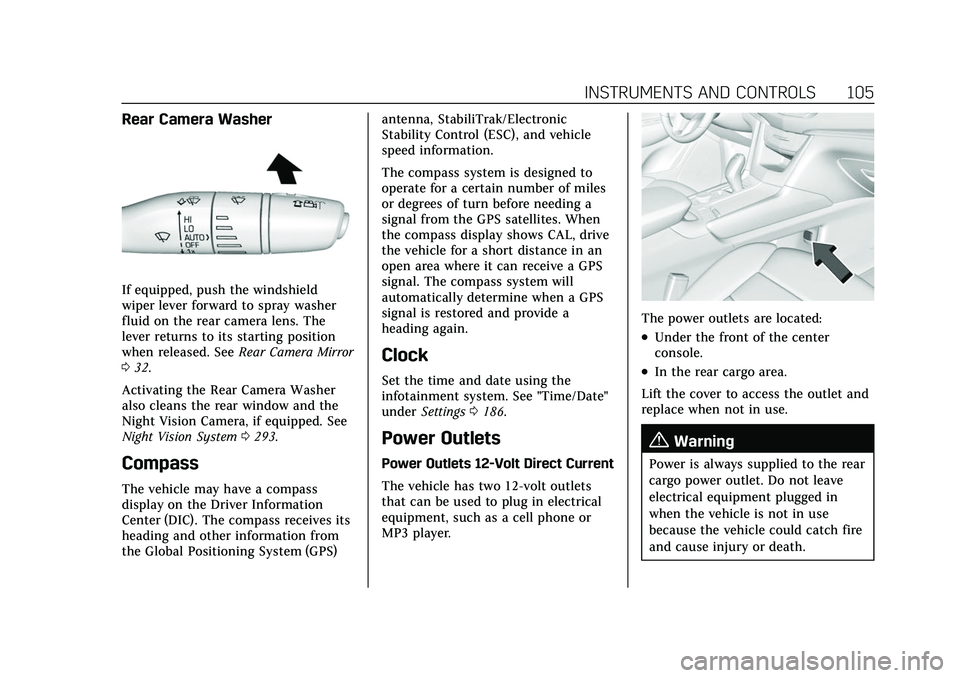
If equipped, push the windshield
wiper lever forward to spray washer
fluid on the rear camera lens. The
lever returns to its starting position
when released. SeeRear Camera Mirror
0 32.
Activating the Rear Camera Washer
also cleans the rear window and the
Night Vision Camera, if equipped. See
Night Vision System 0293.
Compass
The vehicle may have a compass
display on the Driver Information
Center (DIC). The compass receives its
heading and other information from
the Global Positioning System (GPS) antenna, StabiliTrak/Electronic
Stability Control (ESC), and vehicle
speed information.
The compass system is designed to
operate for a certain number of miles
or degrees of turn before needing a
signal from the GPS satellites. When
the compass display shows CAL, drive
the vehicle for a short distance in an
open area where it can receive a GPS
signal. The compass system will
automatically determine when a GPS
signal is restored and provide a
heading again.
Clock
Set the time and date using the
infotainment system. See "Time/Date"
under
Settings 0186.
Power Outlets
Power Outlets 12-Volt Direct Current
The vehicle has two 12-volt outlets
that can be used to plug in electrical
equipment, such as a cell phone or
MP3 player.
The power outlets are located:
.Under the front of the center
console.
.In the rear cargo area.
Lift the cover to access the outlet and
replace when not in use.
{Warning
Power is always supplied to the rear
cargo power outlet. Do not leave
electrical equipment plugged in
when the vehicle is not in use
because the vehicle could catch fire
and cause injury or death.
Page 112 of 447
Cadillac XT6 Owner Manual (GMNA-Localizing-U.S./Canada-15218998) -
2022 - CRC - 10/22/21
INSTRUMENTS AND CONTROLS 111
.Night Vision
.Options
Audio
In the Audio menu browse for music,
select from the favorites, or change
the audio source. Use the thumbwheel
to change the station or go to the next
or previous track.
Navigation
If there is an active route, press the
thumbwheel to cancel or resume route
guidance, or turn the voice prompts
on or off.
Phone
In the Phone menu, if there is no
active phone call, view recent calls,
or scroll through contacts. If there is
an active call, mute the phone or
switch to handset operation.
Night Vision (Uplevel)
If equipped, provides an infrared night
vision image of the area beyond the
headlamps that highlights and
provides alerts to detected pedestrians
or large animals. See Night Vision
System 0293. Options
Use the thumbwheel to scroll through
items in the Options menu.
Units :
Choose English or metric units
by pressing the thumbwheel while the
desired item is highlighted.
Info Page Options : Press the
thumbwheel to select the items to be
displayed in the Info app. See Driver
Information Center (DIC) 0124.
Display : Press the thumbwheel to
enter the Display menu. Select to turn
on or off the speedometer, time, fuel
range, or, if equipped, compass or
speed sign.
Speed Warning : The Speed Warning
display allows the driver to set a
warning at a speed that they do not
want to exceed. To set the Speed
Warning press the thumbwheel when
Speed Warning is displayed. Use the
thumbwheel to adjust the value and
press to set the speed.
Once the speed is set, this feature can
be turned off by pressing the
thumbwheel while viewing this page. If the selected speed limit is exceeded,
a pop-up warning is displayed with a
chime.
Head-up Display (HUD) (Uplevel) :
If equipped, this feature allows for
adjusting the angle of the HUD image
and changing or turning off the Speed
Limit Sign.
HUD Rotation (Uplevel): Press the
thumbwheel while Adjust Rotation is
highlighted to enter Adjust Mode.
Scroll to adjust the angle of the HUD
display. Press the thumbwheel to
confirm and save the setting. This
feature may only be available in
P (Park).
Speed Sign: If equipped, press the
thumbwheel while Speed Sign is
highlighted to turn it on or off.
Software Information :
Displays open
source software information.
Speedometer
The speedometer shows the vehicle
speed in either kilometers per hour
(km/h) or miles per hour (mph).
Page 216 of 447

Cadillac XT6 Owner Manual (GMNA-Localizing-U.S./Canada-15218998) -
2022 - CRC - 10/22/21
DRIVING AND OPERATING 215
Driving and
Operating
Driving Information
Driving for Better FuelEconomy . . . . . . . . . . . . . . . . . . . . . . . . 216
Distracted Driving . . . . . . . . . . . . . . . . 216
Defensive Driving . . . . . . . . . . . . . . . . 217
Impaired Driving . . . . . . . . . . . . . . . . . 217
Control of a Vehicle . . . . . . . . . . . . . . 217
Braking . . . . . . . . . . . . . . . . . . . . . . . . . . . . 217
Steering . . . . . . . . . . . . . . . . . . . . . . . . . . . 218
Off-Road Recovery . . . . . . . . . . . . . . . . 219
Loss of Control . . . . . . . . . . . . . . . . . . . 219
Off-Road Driving . . . . . . . . . . . . . . . . . 220
Driving on Wet Roads . . . . . . . . . . . 223
Hill and Mountain Roads . . . . . . . . 224
Winter Driving . . . . . . . . . . . . . . . . . . . . 225
If the Vehicle Is Stuck . . . . . . . . . . . 226
Vehicle Load Limits . . . . . . . . . . . . . . 226
Starting and Operating
New Vehicle Break-In . . . . . . . . . . . . 230
Ignition Positions . . . . . . . . . . . . . . . . 231
Starting the Engine . . . . . . . . . . . . . . 232
Stop/Start System . . . . . . . . . . . . . . . . 233
Engine Heater . . . . . . . . . . . . . . . . . . . . 234
Retained Accessory Power (RAP) . . . . . . . . . . . . . . . . . . . . 236 Shifting Into Park . . . . . . . . . . . . . . . . 236
Shifting out of Park . . . . . . . . . . . . . . 236
Parking over Things
That Burn . . . . . . . . . . . . . . . . . . . . . . . 237
Active Fuel Management . . . . . . . . 237
Extended Parking . . . . . . . . . . . . . . . . . 237
Engine Exhaust
Engine Exhaust . . . . . . . . . . . . . . . . . . . 238
Running the Vehicle While
Parked . . . . . . . . . . . . . . . . . . . . . . . . . . . 238
Automatic Transmission
Automatic Transmission . . . . . . . . . 238
Manual Mode . . . . . . . . . . . . . . . . . . . . . 243
Drive Systems
All-Wheel Drive . . . . . . . . . . . . . . . . . . 244
Brakes
Electric Brake Boost . . . . . . . . . . . . . . 244
Antilock Brake System (ABS) . . . . 244
Electric Parking Brake . . . . . . . . . . . . 245
Brake Assist . . . . . . . . . . . . . . . . . . . . . . . 246
Hill Start Assist (HSA) . . . . . . . . . . . 246
Ride Control Systems
Traction Control/ElectronicStability Control . . . . . . . . . . . . . . . . 247
Driver Mode Control . . . . . . . . . . . . . 248
Cruise Control
Cruise Control . . . . . . . . . . . . . . . . . . . . 250
Adaptive Cruise Control (Advanced) . . . . . . . . . . . . . . . . . . . . . . 252
Super Cruise . . . . . . . . . . . . . . . . . . . . . . 262
Driver Assistance Systems
Driver Assistance Systems . . . . . . . 276
Assistance Systems for Parking or Backing . . . . . . . . . . . . . . . . . . . . . . . 278
Rear Vision Camera (RVC) . . . . . . . 278
Surround Vision System . . . . . . . . . 279
Park Assist . . . . . . . . . . . . . . . . . . . . . . . . 281
Automatic Parking Assist (APA) . . . . . . . . . . . . . . . . . . . . . 282
Reverse Automatic Braking (RAB) . . . . . . . . . . . . . . . . . . . 285
Rear Pedestrian Alert . . . . . . . . . . . . 286
Rear Cross Traffic Alert (RCTA)
System . . . . . . . . . . . . . . . . . . . . . . . . . . 287
Assistance Systems for Driving . . . . . . . . . . . . . . . . . . . . . . . . . . 287
Forward Collision Alert (FCA) System . . . . . . . . . . . . . . . . . . . . . . . . . . 287
Automatic Emergency Braking (AEB) . . . . . . . . . . . . . . . . . . . 290
Front Pedestrian Braking (FPB) System . . . . . . . . . . . . . . . . . . . . . . . . . . 291
Night Vision System . . . . . . . . . . . . . 293
Side Blind Zone Alert (SBZA) . . . . 296
Page 287 of 447

Cadillac XT6 Owner Manual (GMNA-Localizing-U.S./Canada-15218998) -
2022 - CRC - 10/22/21
286 DRIVING AND OPERATING
Parking Brake (EPB) may be set. When
it is safe, press the accelerator pedal
firmly at any time to override RAB.
{Warning
There may be instances where
unexpected or undesired automatic
braking occurs. If this happens,
either press the brake pedal or
firmly press the accelerator pedal to
release the brakes from the RAB
system. Before releasing the brakes,
check the RVC and check the area
around the vehicle to make sure it
is safe to proceed.
Rear Pedestrian Alert
Under certain conditions, this feature
can provide alerts for a pedestrian
within the system’s range directly
behind the vehicle. This feature only
works in R (Reverse) below 12 km/h
(8 mph), and detects pedestrians up to
8 m (26 ft) away during daytime
driving. During nighttime driving,
feature performance is very limited.
Rear Pedestrian Alert Indicator
When a pedestrian is detected within
the system’s range directly behind the
vehicle, this symbol flashes amber on
the infotainment display, along with
two beeps from the rear, or if
equipped, two pulses from both sides
of the driver seat. When a pedestrian
is detected close to the vehicle, the
symbol flashes red on the
infotainment display, along with seven
beeps from the rear, or if equipped,
seven pulses from both sides of the
driver seat.
{Warning
Rear Pedestrian Alert does not
automatically brake the vehicle.
It also does not provide an alert
unless it detects a pedestrian, and it
may not detect all pedestrians if: (Continued)
Warning (Continued)
.The pedestrian is not directly
behind the vehicle, fully visible
to the Rear Vision Camera (RVC),
or standing upright.
.The pedestrian is part of a group.
.The pedestrian is a child.
.Visibility is poor, including
nighttime conditions, fog, rain,
or snow.
.The RVC is blocked by dirt, snow,
or ice.
.The RVC, taillamps, or back-up
lamps are not cleaned or in
proper working condition.
.The vehicle is not in R (Reverse).
To help avoid death or injury,
always check for pedestrians
around the vehicle before backing
up. Be ready to take action and
apply the brakes. See Defensive
Driving 0217. Keep the RVC,
taillamps, and back-up lamps clean
and in good repair.
Page 288 of 447

Cadillac XT6 Owner Manual (GMNA-Localizing-U.S./Canada-15218998) -
2022 - CRC - 10/22/21
DRIVING AND OPERATING 287
Rear Pedestrian Alert can be set to Off
or Alert. See“Rear Pedestrian
Detection ”in “Collision/Detection
Systems” underVehicle Personalization
0 130. If equipped, alerts can be set to
beeps or seat pulses. See “Alert Type”
in “Collision/Detection Systems” under
Vehicle Personalization 0130.
Rear Cross Traffic Alert
(RCTA) System
If equipped, Rear Cross Traffic Alert
(RCTA) displays a red warning triangle
with a left or right pointing arrow on
the infotainment display to warn of
traffic coming from the left or right.
This system detects objects coming
from up to 20 m (65 ft) from the left
or right side of the vehicle. When an
object is detected, either three beeps
sound from the left or right or three
Safety Alert Seat pulses occur on the
left or right side, depending on the
direction of the detected vehicle.
Use caution while backing up when
towing a trailer, as the RCTA
detection zones that extend out from the back of the vehicle do not move
farther back when a trailer is attached
to the vehicle.
Driving With a Trailer
Use caution while backing up when
towing a trailer. The RCTA feature is
automatically disabled when a trailer
is attached to the vehicle.
Turning the Features On or Off
TheXbutton on the center stack is
used to turn on or off the Front and
Rear Park Assist, and Backing
Warning and Reverse Automatic
Braking (RAB) systems at the same
time. The indicator light next to the
button comes on when the features
are on and turns off when the features
have been disabled.
RCTA can be turned on or off using
the infotainment system. See
“Collision/Detection Systems” under
Vehicle Personalization 0130.
Assistance Systems for
Driving
If equipped, when driving the vehicle
in a forward gear, Forward Collision
Alert (FCA), Lane Keep Assist (LKA),
Side Blind Zone Alert (SBZA), Lane
Change Alert (LCA), Automatic
Emergency Braking (AEB), Front
Pedestrian Braking (FPB) System, and/
or the Night Vision System can help
to avoid a crash or reduce crash
damage.
Forward Collision Alert
(FCA) System
If equipped, the FCA system may help
to avoid or reduce the harm caused by
front-end crashes. When approaching
a vehicle ahead too quickly, FCA
provides a red flashing alert on the
windshield and rapidly beeps or pulses
the driver seat. FCA also lights an
amber visual alert if following another
vehicle much too closely.
FCA detects vehicles within a distance
of approximately 60 m (197 ft) and
operates at speeds above 8 km/h
(5 mph). If the vehicle has Adaptive
Page 293 of 447

Cadillac XT6 Owner Manual (GMNA-Localizing-U.S./Canada-15218998) -
2022 - CRC - 10/22/21
292 DRIVING AND OPERATING
is very limited. If the vehicle is
equipped with the Night Vision
system, during night time driving, the
vehicle can detect and alert
pedestrians when driving in a
forward gear.
{Warning
FPB does not provide an alert or
automatically brake the vehicle,
unless it detects a pedestrian. FPB
may not detect pedestrians,
including children:
.When the pedestrian is not
directly ahead, fully visible,
or standing upright, or when part
of a group.
.Due to poor visibility, including
nighttime conditions, fog, rain,
or snow.
.If the FPB sensor is blocked by
dirt, snow, or ice.
.If the headlamps or windshield
are not cleaned or in proper
condition.(Continued)
Warning (Continued)
Be ready to take action and apply
the brakes. For more information,
seeDefensive Driving 0217. Keep
the windshield, headlamps, and FPB
sensor clean and in good repair.
FPB can be set to Off, Alert, or Alert
and Brake through vehicle
personalization. See “Collision/
Detection Systems” underVehicle
Personalization 0130.
Detecting the Pedestrian Ahead
FPB alerts and automatic braking will
not occur unless the FPB system
detects a pedestrian. When a nearby
pedestrian is detected in front of the
vehicle, the pedestrian ahead indicator
will display amber.
Front Pedestrian Alert
With Head-Up Display
Without Head-Up Display
When the vehicle approaches a
pedestrian ahead too rapidly, the red
FPB alert display will flash on the
windshield. Eight rapid high-pitched
beeps will sound from the front,
or both sides of the Safety Alert Seat
will pulse five times. When this
Pedestrian Alert occurs, the brake
system may prepare for driver braking
to occur more rapidly which can cause
a brief, mild deceleration. Continue to
apply the brake pedal as needed.
Page 294 of 447

Cadillac XT6 Owner Manual (GMNA-Localizing-U.S./Canada-15218998) -
2022 - CRC - 10/22/21
DRIVING AND OPERATING 293
Cruise control may be disengaged
when the Front Pedestrian Alert
occurs.
Automatic Braking
If FPB detects it is about to crash into
a pedestrian directly ahead, and the
brakes have not been applied, FPB
may automatically brake moderately
or brake hard. This can help to avoid
some very low speed pedestrian
crashes or reduce pedestrian injury.
FPB can automatically brake to
detected pedestrians between 8 km/h
(5 mph) and 80 km/h (50 mph).
Automatic braking levels may be
reduced under certain conditions,
such as higher speeds.
If this happens, Automatic Braking
may engage the Electric Parking Brake
(EPB) to hold the vehicle at a stop.
Release the EPB. A firm press of the
accelerator pedal will also release
Automatic Braking and the EPB.
If equipped with the Night Vision
system, pedestrians detected by the
Night Vision system will not cause
automatic braking to occur.
{Warning
FPB may alert or automatically
brake the vehicle suddenly in
situations where it is unexpected
and undesired. It could falsely alert
or brake for objects similar in shape
or size to pedestrians, including
shadows. This is normal operation
and the vehicle does not need
service. To override Automatic
Braking, firmly press the accelerator
pedal, if it is safe to do so.
Automatic Braking can be disabled
through vehicle personalization. See
“Front Pedestrian Detection ”in
“Collision/Detection Systems” under
Vehicle Personalization 0130.
{Warning
Using the Front Pedestrian Braking
system while towing a trailer could
cause you to lose control of the
vehicle and crash. Turn the system
to Alert or Off when towing a
trailer.
Cleaning the System
If FPB does not seem to operate
properly, cleaning the outside of the
windshield in front of the rearview
mirror may correct the issue.
Night Vision System
If equipped, this system can help the
driver see and alert the driver to
pedestrians or large animals ahead of
the vehicle beyond the area lit by the
headlamps. A thermal heat image of
the view ahead is displayed when it is
dark enough outside. If a pedestrian
or large animal is detected more than
25 m (82 ft) away, an amber
pedestrian or animal icon displays and
a box appears around the pedestrian
or animal. When the system detects
that the vehicle is approaching a
pedestrian ahead too quickly, the box
changes to red.
Page 295 of 447

Cadillac XT6 Owner Manual (GMNA-Localizing-U.S./Canada-15218998) -
2022 - CRC - 10/22/21
294 DRIVING AND OPERATING
With the Front Pedestrian Braking
system turned on, Night Vision
provides a red Head-Up Display (HUD)
alert when the system detects that the
vehicle is approaching a pedestrian
ahead too quickly. In addition, an alert
beeps or the Safety Alert Seat pulses,
if equipped. SeeFront Pedestrian
Braking (FPB) System 0291.
{Warning
The system does not detect all
objects or the vehicle distance from
objects. The system may not
provide a warning with enough time
to help avoid a crash.
1. Low-Beam Headlamps
2. High-Beam Headlamps
3. Night Vision System
By selecting a view on the instrument
cluster, the Night Vision image can be
displayed. See Instrument Cluster 0109
. The Night Vision system can operate
only if:
.The ignition is on.
.The vehicle is in P (Park) or a
forward gear.
.It is dark enough outside.
.The headlamps are on, except when
parked. Adjust the instrument panel
brightness to make the image no
brighter than necessary. Turn the
image off by selecting another view
on the instrument cluster.
Warm objects, such as pedestrians,
animals, and other moving vehicles,
should appear whiter on the Night
Vision display. Cold objects, such as
the sky, signs, and parked vehicles,
should appear darker. Night Vision
only shows objects that are warmer or
colder than the surroundings. It does
not detect brake lamps, turn signals,
emergency flashers, traffic lights,
or sign information.
Use this system as an aid by
occasionally glancing at the image. Do
not stare at the image or use the
image under well-lit conditions.
{Warning
Do not stare at the image while
driving as this might cause
important objects ahead not to be
seen. You could crash, and you or
others could be injured.
Page 296 of 447

Cadillac XT6 Owner Manual (GMNA-Localizing-U.S./Canada-15218998) -
2022 - CRC - 10/22/21
DRIVING AND OPERATING 295
When a pedestrian or large animal is
detected, an amber box displays
around the pedestrian or animal on
the Night Vision display and an amber
pedestrian icon,
~, or animal icon,
!, displays on the instrument
cluster. This pedestrian icon is also
shown on the Head-Up Display (HUD).
When the system detects the vehicle
is approaching a pedestrian too
quickly, the amber pedestrian icon
and box turns red, and a red flashing
icon,
~, displays on the HUD with
rapid beeping or pulsing of the Safety
Alert Seat, if equipped.
System pedestrian icons, beeps, and
(if equipped) Safety Alert Seat pulses
can be set to Off through vehicle
personalization by turning off the
Front Pedestrian Braking system. See
“Front Pedestrian Detection ”in
“Collision/Detection Systems” under
Vehicle Personalization 0130.
{Warning
The Night Vision system does not
automatically brake the vehicle.
It does not provide alerts unless it
detects a pedestrian or large
animal. The system may not detect
pedestrians, including children,
or animals:
.If they are less than 25 m
(82 ft) away.
.If they are not directly ahead in
the sensor coverage area, fully
visible, standing upright, or part
of a group.
.If the person or animal is moving
too quickly through the field of
view, such as a bicyclist.
.If the pedestrian is wearing
certain types of clothing.
.If headlamps are off, except
when parked.
.If the outside temperature is
higher than 30 °C (86 °F).
.Due to poor visibility, including
in heavy fog, rain, or snow.
(Continued)
Warning (Continued)
.If the sensor is blocked by dirt,
snow, rain, or ice.
Be ready to take action and apply
the brakes. For more information,
see Defensive Driving 0217. Keep
the Night Vision sensor clean and
in good repair.
Pedestrian detection may not be
available in high outside temperatures.
An amber icon,
*, displays. The
system does not need service.
In rain, snow, or fog the image may
not be clear and the direction of the
road ahead may not be seen. In more
severe weather conditions, the image
may be unclear and unusable. The
system does not need service.
Keep the system sensor clean by
activating the rear window washer
when it is dark enough for the system
to operate. If the Night Vision image
still looks blurry, use a soft wet cloth
to gently clean the sensor camera lens
and dry thoroughly. The sensor is
behind the lower front grille below the
driver side headlamp.
Page 349 of 447
Cadillac XT6 Owner Manual (GMNA-Localizing-U.S./Canada-15218998) -
2022 - CRC - 10/22/21
348 VEHICLE CARE
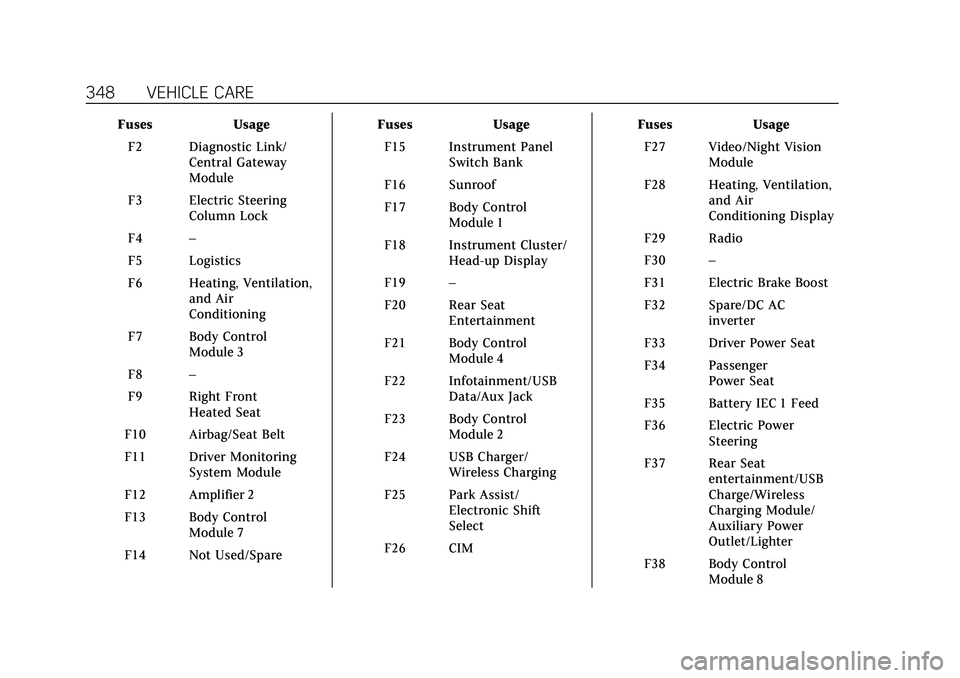
FusesUsage
F2 Diagnostic Link/ Central Gateway
Module
F3 Electric Steering Column Lock
F4 –
F5 Logistics
F6 Heating, Ventilation, and Air
Conditioning
F7 Body Control Module 3
F8 –
F9 Right Front Heated Seat
F10 Airbag/Seat Belt
F11 Driver Monitoring System Module
F12 Amplifier 2
F13 Body Control Module 7
F14 Not Used/Spare Fuses
Usage
F15 Instrument Panel Switch Bank
F16 Sunroof
F17 Body Control Module 1
F18 Instrument Cluster/ Head-up Display
F19 –
F20 Rear Seat Entertainment
F21 Body Control Module 4
F22 Infotainment/USB Data/Aux Jack
F23 Body Control Module 2
F24 USB Charger/ Wireless Charging
F25 Park Assist/ Electronic Shift
Select
F26 CIM Fuses
Usage
F27 Video/Night Vision Module
F28 Heating, Ventilation, and Air
Conditioning Display
F29 Radio
F30 –
F31 Electric Brake Boost
F32 Spare/DC AC inverter
F33 Driver Power Seat
F34 Passenger Power Seat
F35 Battery IEC 1 Feed
F36 Electric Power Steering
F37 Rear Seat entertainment/USB
Charge/Wireless
Charging Module/
Auxiliary Power
Outlet/Lighter
F38 Body Control Module 8