change time CADILLAC XT6 2023 User Guide
[x] Cancel search | Manufacturer: CADILLAC, Model Year: 2023, Model line: XT6, Model: CADILLAC XT6 2023Pages: 507, PDF Size: 6.49 MB
Page 155 of 507

Cadillac XT6 Owner Manual (GMNA-Localizing-U.S./Canada-16405819) -
2023 - CRC - 3/22/22
154 Instruments and Controls
garage door moves,
programming is
complete.
.If the indicator light
flashes rapidly and the
garage door does not
move, continue with
programming Steps 4–6.
Learn or Smart Button
4. After completing Steps 1– 3, locate the Learn or
Smart button inside
garage on the garage door
opener receiver. The name
and color of the button
may vary by manufacturer. 5. Press and release the
Learn or Smart button.
Step 6 must be completed
within 30 seconds of
pressing this button.
6. Return to the vehicle and firmly press and hold the
trained Universal Remote
system button for
two seconds and release.
Repeat the “press/hold/
release” sequence up to
three times to complete
the training process.
The Universal Remote system
should now activate the
garage door.
Repeat the process for
programming the two
remaining buttons.
Radio Signals for Some
Gate Operators
For questions or programming
help, see www.homelink.com/
gm or call 1-800-355-3515.
For calls placed outside the
U.S., Canada, or Puerto Rico, international rates will apply
and may differ based on
landline or mobile phone.
Some gate operators and
radio-frequency laws require
transmitter signals to time out
or quit after several seconds
of transmission. This may not
be long enough for the
Universal Remote system to
pick up the signal during
programming.
If the programming did not
work, replace Step 2 under
“Programming the Universal
Remote System”
with the
following:
Press and hold the Universal
Remote system button while
pressing and releasing the
hand-held transmitter button
every two seconds until the
signal has been successfully
accepted by the Universal
Remote system. The Universal
Remote system indicator light
will flash slowly at first and
then change to a rapid flash or
continuous solid-light. Proceed
Page 157 of 507

Cadillac XT6 Owner Manual (GMNA-Localizing-U.S./Canada-16405819) -
2023 - CRC - 3/22/22
156 Lighting
Lighting
Exterior Lighting
Exterior LampControls . . . . . . . . . . . . . . . . . . . . . 156
Exterior Lamps Off Reminder . . . . . . . . . . . . . . . . . . . 158
Headlamp High/ Low-Beam Changer . . . . . 158
Flash-to-Pass . . . . . . . . . . . . . . . 158
Daytime Running Lamps (DRL) . . . . . . . . . . . . . . . 159
Automatic Headlamp System . . . . . . . . . . . . . . . . . . . . . . 159
Hazard Warning Flashers . . . . . . . . . . . . . . . . . . . . . 160
Turn and Lane-Change Signals . . . . . . . . . . . . . . . . . . . . . . . 160
Cornering Lamps . . . . . . . . . . . 161
Interior Lighting
Instrument Panel Illumination Control . . . . . . . 161
Courtesy Lamps . . . . . . . . . . . . 161
Dome Lamps . . . . . . . . . . . . . . . . . 161
Reading Lamps . . . . . . . . . . . . . 162
Lighting Features
Entry Lighting . . . . . . . . . . . . . . . 162
Exit Lighting . . . . . . . . . . . . . . . . . 163
Battery Power Protection . . . . . . . . . . . . . . . . . . 163
Exterior Lighting Battery
Saver . . . . . . . . . . . . . . . . . . . . . . . . . 163Exterior Lighting
Exterior Lamp
Controls
The exterior lamp control is on
the turn signal lever.
Turn the control to the
following positions:
O:Turns the exterior lamps
off and deactivates the AUTO
mode. Turn to
Oagain to
reactivate the AUTO mode.
In Canada, the headlamps will
automatically reactivate when
the vehicle is shifted out of
P (Park).
Page 160 of 507

Cadillac XT6 Owner Manual (GMNA-Localizing-U.S./Canada-16405819) -
2023 - CRC - 3/22/22
Lighting 159
Daytime Running
Lamps (DRL)
DRL can make it easier for
others to see the front of your
vehicle during the day. Fully
functional DRL are required on
all vehicles first sold in
Canada.
The dedicated DRL will come
on when all of the following
conditions are met:
.The ignition is on.
.The exterior lamp control is
in AUTO.
.The light sensor determines
it is daytime.
.The parking brake is
released or the vehicle is not
in P (Park).
When the DRL are on, the
taillamps, sidemarker lamps,
and other lamps will not be on.
The DRL turn off when the
headlamps are turned to
Oor
the ignition is off. For vehicles first sold in Canada, the DRL
can only be turned off when
the vehicle is parked.
Automatic Headlamp
System
When the exterior lamp
control is set to AUTO and it is
dark enough outside, the
headlamps come on
automatically.
There is a light sensor on top
of the instrument panel. Do
not cover the sensor.
The system may also turn on
the headlamps when driving
through a parking garage or
tunnel.
If the vehicle is started in a
dark garage, the automatic
headlamp system comes on
immediately. If it is light
outside when the vehicle
leaves the garage, there is a
slight delay before the
automatic headlamp system
changes to the Daytime
Running Lamps (DRL). During
that delay, the instrument
cluster may not be as bright as
usual. Make sure the
instrument panel brightness
control is in the full bright
position. See Instrument Panel
Illumination Control
0161.
When it is bright enough
outside, the headlamps will
turn off or may change
to DRL.
The automatic headlamp
system turns off when the
exterior lamp control is turned
to
Oor the ignition is off.
Page 161 of 507
Cadillac XT6 Owner Manual (GMNA-Localizing-U.S./Canada-16405819) -
2023 - CRC - 3/22/22
160 Lighting
For vehicles sold in Canada,
this control only works when
the transmission is in P (Park).
Lights On with Wipers
If the windshield wipers are
activated in daylight with the
engine on, and the exterior
lamp control is in AUTO, the
headlamps, parking lamps, and
other exterior lamps come on.
The transition time for the
lamps coming on varies based
on wiper speed. When the
wipers are not operating,
these lamps turn off. Move the
exterior lamp control to
Oor
;to disable this feature.
Hazard Warning
Flashers
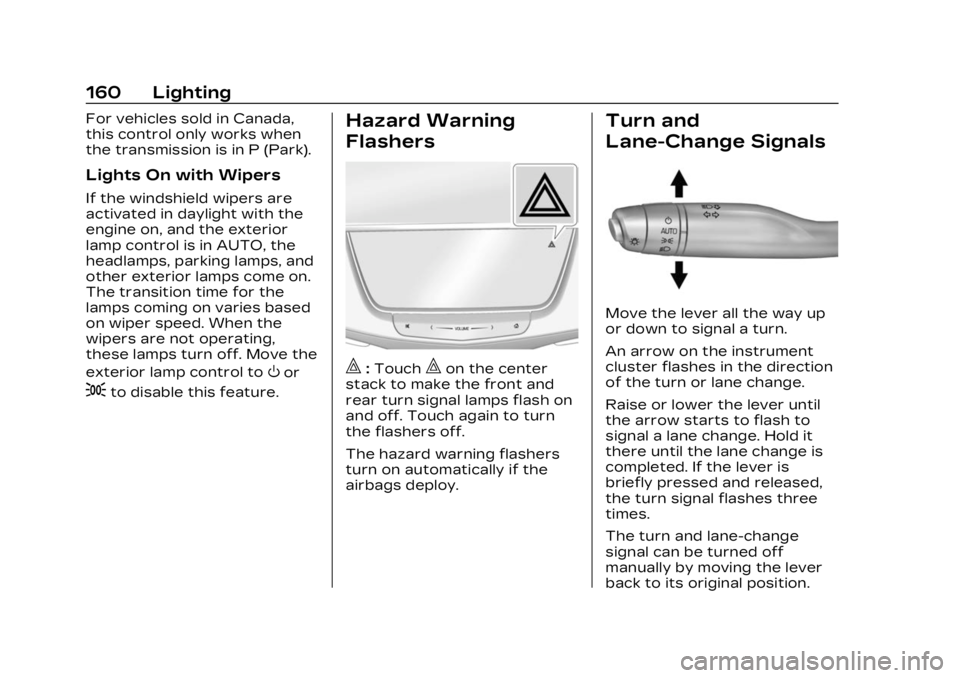
|:Touch|on the center
stack to make the front and
rear turn signal lamps flash on
and off. Touch again to turn
the flashers off.
The hazard warning flashers
turn on automatically if the
airbags deploy.
Turn and
Lane-Change Signals
Move the lever all the way up
or down to signal a turn.
An arrow on the instrument
cluster flashes in the direction
of the turn or lane change.
Raise or lower the lever until
the arrow starts to flash to
signal a lane change. Hold it
there until the lane change is
completed. If the lever is
briefly pressed and released,
the turn signal flashes three
times.
The turn and lane-change
signal can be turned off
manually by moving the lever
back to its original position.
Page 164 of 507
Cadillac XT6 Owner Manual (GMNA-Localizing-U.S./Canada-16405819) -
2023 - CRC - 3/22/22
Lighting 163
This feature can be changed.
On the infotainment home
page, select the Settings icon
TVehicleTVehicle Locator
Lights.
Exit Lighting
Some exterior lamps and
interior lamps turn on when
the driver door is opened after
the vehicle is turned off.
The exterior and interior lamps
remain on for a set amount of
time, then automatically
turn off.
The interior lights turn on
when the vehicle is turned off.
The exterior lamps turn off
immediately by turning the
exterior lamp control off.
This feature can be changed.
On the infotainment home
screen, select the Settings
icon
TVehicleTExit Lighting.
Battery Power
Protection
This feature helps prevent the
battery from being drained,
if the interior courtesy lamps
or reading lamps are
accidentally left on. If any of
these lamps are left on, they
automatically turn off after
10 minutes, if the ignition is off.
The lamps will not come back
on again until one of the
following occurs:
.The ignition is turned on.
.The doors are closed and
then re-opened.
Exterior Lighting
Battery Saver
The exterior lamps turn off
about 10 minutes after the
vehicle is turned off, if the
parking lamps or headlamps
have been manually left on.
This protects against draining
the battery. To restart the
10-minute timer, turn the exterior lamp control to the
O
position and then back to the
;or2position.
To keep the lamps on for more
than 10 minutes, the vehicle
must be on or in
accessory mode.
Page 183 of 507

Cadillac XT6 Owner Manual (GMNA-Localizing-U.S./Canada-16405819) -
2023 - CRC - 3/22/22
182 Infotainment System
.Alert Preferences
.Fuel Grade Preferences
.Manage History
.Predictive Navigation: See
“Predictive Navigation (If
Equipped)”previously in this
section.
.About
To exit a list, touch
zin the
top right corner to return to
the main map view.
Make sure to set up
preferences before setting a
destination and starting active
guidance.
Map Preferences
Touch to choose between
basic map feature
configurations:
Map Colors
.Auto –Touch to
automatically change modes
based on lighting conditions.
.Day (Light)
.Night (Dark) 3D Landmark (Default is
On) :
Touch On or Off. When
turned on, the system will
display all 3D Landmarks on
the map depending on the
zoom level.
3D Building (Default is Off) :
Touch On or Off. When turned
on, the system will display all
of the possible 3D building
shapes on the map depending
on the zoom level.
Show Terrain in 3D (Default
is Off) : If equipped, touch On
or Off. When turned on, the
system will display terrain
information on the map in
3D view.
Auto-Zoom (Default is On) :
Touch On or Off. When turned
on, the system will
automatically adjust the zoom
level when the vehicle is
approaching a turn. After the
turn is completed, the system
automatically brings the zoom
back to the originally set level.
If the vehicle is approaching a
turn with the next turn occurring shortly after, the
Auto-Zoom will remain on until
both turns are completed.
Route Preferences
Touch to access the Route
Preferences. The choices are:
.Preferred Route
–Choose
from two different route
options: Fastest or
Eco-Friendly.
‐ Fastest would be the route
with the shortest
drive time.
‐ Eco-Friendly would be the
most fuel-efficient route.
.Avoid on Current Route –
Choose any of the road
features to avoid while on
route:
‐ Highways
‐ Unpaved Roads
‐ Ferries
‐ Carpool Lanes
‐ Toll Roads
‐ Tunnels
‐ Country Borders
Page 187 of 507

Cadillac XT6 Owner Manual (GMNA-Localizing-U.S./Canada-16405819) -
2023 - CRC - 3/22/22
186 Infotainment System
1. From active guidance,touch
}.
2. Search for the destination using One-Box, Voice
search, or the Quick
Category icons.
3. Choose search results Along Route, Nearby,
or Near Destination.
4. Choose the desired waypoint and touch Add to
Trip or replace the current
destination by touching
New Destination.
Route options are not
available for waypoints.
Arriving at a Waypoint
When approaching a waypoint,
the system will display a
Destination Arrival view. To
continue on to the next
destination touch the Drive to
message on the infotainment
display.
If the vehicle passes the
waypoint or gets out of the
current route, the system will automatically reroute back to
this waypoint. At the same
time, it will show a Drive to
icon along with the next
waypoint address so the
current waypoint can be
skipped and guidance can
resume to the next waypoint
or destination.
Editing a Waypoint
When waypoints are added
during active guidance, the
system allows a stop to be
deleted or the order to be
changed. To edit a waypoint:
1. Touch
A.
2. Touch Edit Destinations.
.Modify destination order
by touching and holding
the arrow until it is
highlighted. Drag to
move the waypoint up or
down the list.
.Delete a waypoint by
touching
Y. A pop-up will
appear to confirm
waypoint removal. Once
the request is confirmed, the system will remove
the address from the
destinations list. Touch
zon the top right corner
so the system can
recalculate the route.
If there is only one
address in the
destinations list, the
system will disable the
move and delete
functions. The system
will not allow the final
destination to be
deleted.
Map Information
Road network attributes are
contained in the map database
for map information.
Attributes include information
such as street names, street
addresses, and turn
restrictions. A detailed area
includes all major highways,
service roads, and residential
roads. The detailed areas
include Places of Interest
(POIs) such as restaurants,
airports, banks, hospitals,
Page 193 of 507

Cadillac XT6 Owner Manual (GMNA-Localizing-U.S./Canada-16405819) -
2023 - CRC - 3/22/22
192 Infotainment System
category icon shortcuts,
recents icon, favorites icon,
and keyboard.
Auto Complete
Enter a partial location in the
field entry box on the search
display. Auto complete will
attempt to complete the
destination based on what is
being entered. Touch the
suggested item to search.
Search While in Motion with
No Front Seat Passenger
Present
The search display will not
allow changes or text input
with the keyboard when the
vehicle is in motion. As a
result, a display showing three
rows of the most commonly
used categories appears.
Touching the search box will
activate speech recognition.Search While in Motion with
Front Seat Passenger
Present
If the system detects that the
front seat passenger is
present with both driver and
passenger seat belts buckled,
touching the search icon will
display an alert message that
allows the passenger to
search for a destination as if
the vehicle were stopped.
Connected Navigation
Connected Navigation is a
subscription service that
enables certain capabilities
within the navigation system,
such as Traffic, Smart Search/
Routing, and Predictive
Navigation capabilities. The
system will show an alert
when the subscription is
expiring and will ask to renew
the plan.
Global Positioning
System (GPS)
If equipped, the position of the
vehicle is determined by using
satellite signals, various
vehicle signals, and map data.
At times, other interference
such as the satellite condition,
road configuration, condition
of the vehicle, and/or other
circumstances can affect the
navigation system's ability to
determine the accurate
position of the vehicle.
The GPS shows the current
position of the vehicle using
signals sent by GPS satellites.
When the vehicle is not
receiving signals from the
satellites, a symbol appears in
the status bar.
This system might not be
available or interference can
occur if any of the following
are true:
.Signals are obstructed by
tall buildings, trees, large
trucks, or a tunnel.
Page 194 of 507

Cadillac XT6 Owner Manual (GMNA-Localizing-U.S./Canada-16405819) -
2023 - CRC - 3/22/22
Infotainment System 193
.Satellites are being repaired
or improved.
For more information if the
GPS is not functioning
properly, see Problems with
Route Guidance 0193 and
If the System Needs Service
0 194.
Vehicle Positioning
At times, the position of the
vehicle on the map could be
inaccurate due to one or more
of the following reasons:
.The road system has
changed.
.The vehicle is driving on
slippery road surfaces such
as sand, gravel, or snow.
.The vehicle is traveling on
winding roads or long,
straight roads.
.The vehicle is approaching a
tall building or a large
vehicle.
.The surface streets run
parallel to a freeway.
.The vehicle has been
transferred by a vehicle
carrier or a ferry.
.The current position
calibration is set incorrectly.
.The vehicle is traveling at
high speed.
.The vehicle changes
directions more than once,
or the vehicle is turning on a
turn table in a parking lot.
.The vehicle is entering and/
or exiting a parking lot,
garage, or a lot with a roof.
.The GPS signal is not
received.
.A roof carrier is installed on
the vehicle.
.Tire chains are installed on
the vehicle.
.The tires are replaced
or worn.
.The tire pressure for the
tires is incorrect.
.This is the first navigation
use after the map data is
updated.
.The 12-volt battery has been
disconnected for
several days.
.The vehicle is driving in
heavy traffic where driving is
at low speeds, and the
vehicle is stopped and
started repeatedly.
Problems with Route
Guidance
Inappropriate route guidance
can occur under one or more
of the following conditions:
.The turn was not made on
the road indicated.
.Route guidance might not be
available when using
automatic rerouting for the
next right or left turn.
.The route might not be
changed when using
automatic rerouting.
.There is no route guidance
when turning at an
intersection.
.Plural names of places might
be announced occasionally.
Page 195 of 507

Cadillac XT6 Owner Manual (GMNA-Localizing-U.S./Canada-16405819) -
2023 - CRC - 3/22/22
194 Infotainment System
.It could take a long time to
operate automatic rerouting
during high-speed driving.
.Automatic rerouting might
display a route returning to
the set waypoint if heading
for a destination without
passing through a set
waypoint.
.The route prohibits the
entry of a vehicle due to a
regulation by time or season
or any other regulation
which may be given.
.Some routes might not be
searched.
.The route to the destination
might not be shown if there
are new roads, if roads have
recently changed, or if
certain roads are not listed
in the map data. See Maps
0184.
To recalibrate the vehicle's
position on the map, park with
the vehicle running for two to
five minutes, until the vehicle
position updates. Make sure
the vehicle is parked in a location that is safe and has a
clear view of the sky and away
from large obstructions.
If the System Needs
Service
If the navigation system needs
service, see your dealer.
Map Data Updates
The map data in the vehicle is
the most up-to-date
information available when the
vehicle was produced. The
map data is updated
periodically, provided that the
map information has changed
and the vehicle has a relevant
service plan.
See www.gmnavdisc.com for
details on ordering,
purchasing, and installing a
new or replacement SD card.
Features are subject to
change. For more information
on this feature, visit your
brand website. See Online
Account
0469 for details. If the vehicle is equipped with
Connected Navigation, which
is a subscription service that
enables certain features of
the navigation system, such as
Traffic, Smart Search/Routing,
and Predictive Navigation,
then the system will download
the latest map data from the
cloud.Database Coverage
Explanations
Coverage areas vary with
respect to the level of map
detail available for any given
area. Some areas feature
greater levels of detail than
others. If this happens, it does
not mean there is a problem
with the system. As the map
data is updated, more detail
can become available for
areas that previously had
limited detail. See Map Data
Updates
0194.