lights CADILLAC XT6 2023 User Guide
[x] Cancel search | Manufacturer: CADILLAC, Model Year: 2023, Model line: XT6, Model: CADILLAC XT6 2023Pages: 507, PDF Size: 6.49 MB
Page 158 of 507

Cadillac XT6 Owner Manual (GMNA-Localizing-U.S./Canada-16405819) -
2023 - CRC - 3/22/22
Lighting 157
AUTO :Automatically turns
the exterior lamps on and off,
depending on outside lighting.
;: Turns on the parking
lamps including all lamps,
except the headlamps.
2: Turns on the headlamps
together with the parking
lamps and instrument panel
lights.
IntelliBeam System
If equipped, this system turns
the vehicle's high-beam
headlamps on and off
according to surrounding
traffic conditions. The system turns the
high-beam headlamps on when
it is dark enough and there is
no other traffic present.
This light
bcomes on in the
instrument cluster when the
IntelliBeam system is enabled.
Turning On and Enabling
IntelliBeam
To enable the IntelliBeam
system, press the end of the
turn signal lever when it is
dark outside and the exterior
lamp control is in AUTO or
2.
Driving with IntelliBeam
The system only activates the
high beams when driving over
40 km/h (25 mph). The blue high-beam on light
appears on the instrument
cluster when the high beams
are on.
There is a sensor near the top
center of the windshield that
automatically controls the
system. Keep this area of the
windshield clear of debris to
allow for best system
performance.
The high-beam headlamps
remain on, under the
automatic control, until one of
the following occurs:
.The system detects an
approaching vehicle's
headlamps.
.The system detects a
preceding vehicle's taillamps.
.The outside light is bright
enough that high-beam
headlamps are not required.
.The vehicle's speed drops
below 20 km/h (12 mph).
.The IntelliBeam system is
disabled by the button on
the turn signal lever. If this
Page 161 of 507
Cadillac XT6 Owner Manual (GMNA-Localizing-U.S./Canada-16405819) -
2023 - CRC - 3/22/22
160 Lighting
For vehicles sold in Canada,
this control only works when
the transmission is in P (Park).
Lights On with Wipers
If the windshield wipers are
activated in daylight with the
engine on, and the exterior
lamp control is in AUTO, the
headlamps, parking lamps, and
other exterior lamps come on.
The transition time for the
lamps coming on varies based
on wiper speed. When the
wipers are not operating,
these lamps turn off. Move the
exterior lamp control to
Oor
;to disable this feature.
Hazard Warning
Flashers
|:Touch|on the center
stack to make the front and
rear turn signal lamps flash on
and off. Touch again to turn
the flashers off.
The hazard warning flashers
turn on automatically if the
airbags deploy.
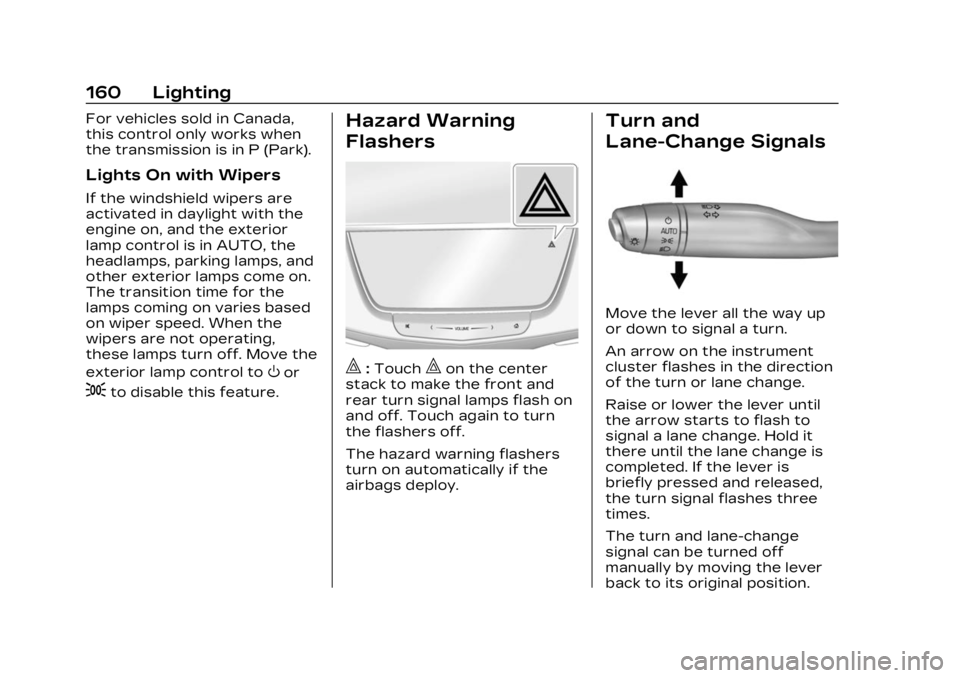
Turn and
Lane-Change Signals
Move the lever all the way up
or down to signal a turn.
An arrow on the instrument
cluster flashes in the direction
of the turn or lane change.
Raise or lower the lever until
the arrow starts to flash to
signal a lane change. Hold it
there until the lane change is
completed. If the lever is
briefly pressed and released,
the turn signal flashes three
times.
The turn and lane-change
signal can be turned off
manually by moving the lever
back to its original position.
Page 162 of 507
Cadillac XT6 Owner Manual (GMNA-Localizing-U.S./Canada-16405819) -
2023 - CRC - 3/22/22
Lighting 161
If after signaling a turn or lane
change, the arrow flashes
rapidly or does not come on, a
signal bulb may be burned out.
Cornering Lamps
Cornering lamps automatically
come on when all of the
following occur:
.The low-beam headlamps
are on.
.The turn signals are
activated or the steering
wheel is turned 50 degrees
in either directon.
.The vehicle speed is below
40 km/h (25 mph).
Interior Lighting
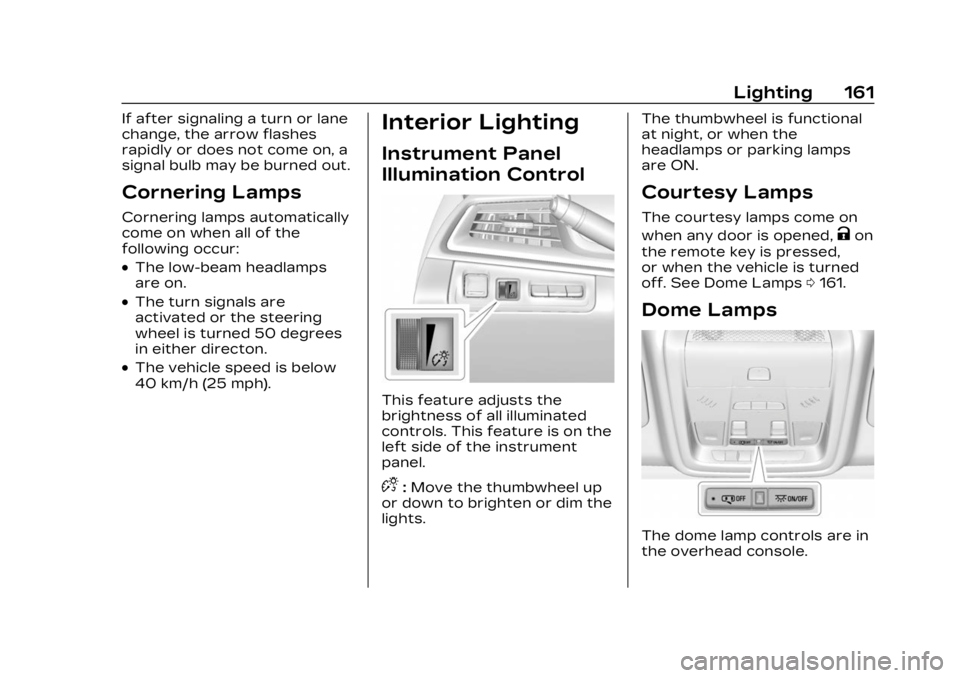
Instrument Panel
Illumination Control
This feature adjusts the
brightness of all illuminated
controls. This feature is on the
left side of the instrument
panel.
D:Move the thumbwheel up
or down to brighten or dim the
lights. The thumbwheel is functional
at night, or when the
headlamps or parking lamps
are ON.
Courtesy Lamps
The courtesy lamps come on
when any door is opened,
Kon
the remote key is pressed,
or when the vehicle is turned
off. See Dome Lamps 0161.
Dome Lamps
The dome lamp controls are in
the overhead console.
Page 164 of 507
Cadillac XT6 Owner Manual (GMNA-Localizing-U.S./Canada-16405819) -
2023 - CRC - 3/22/22
Lighting 163
This feature can be changed.
On the infotainment home
page, select the Settings icon
TVehicleTVehicle Locator
Lights.
Exit Lighting
Some exterior lamps and
interior lamps turn on when
the driver door is opened after
the vehicle is turned off.
The exterior and interior lamps
remain on for a set amount of
time, then automatically
turn off.
The interior lights turn on
when the vehicle is turned off.
The exterior lamps turn off
immediately by turning the
exterior lamp control off.
This feature can be changed.
On the infotainment home
screen, select the Settings
icon
TVehicleTExit Lighting.
Battery Power
Protection
This feature helps prevent the
battery from being drained,
if the interior courtesy lamps
or reading lamps are
accidentally left on. If any of
these lamps are left on, they
automatically turn off after
10 minutes, if the ignition is off.
The lamps will not come back
on again until one of the
following occurs:
.The ignition is turned on.
.The doors are closed and
then re-opened.
Exterior Lighting
Battery Saver
The exterior lamps turn off
about 10 minutes after the
vehicle is turned off, if the
parking lamps or headlamps
have been manually left on.
This protects against draining
the battery. To restart the
10-minute timer, turn the exterior lamp control to the
O
position and then back to the
;or2position.
To keep the lamps on for more
than 10 minutes, the vehicle
must be on or in
accessory mode.
Page 234 of 507

Cadillac XT6 Owner Manual (GMNA-Localizing-U.S./Canada-16405819) -
2023 - CRC - 3/22/22
Climate Controls 233
buttons on the center stack.
Use the manual heated and
ventilated seat buttons on the
center stack to turn auto
heated or ventilated seats off.
If the passenger seat is
unoccupied, the auto heated
or ventilated seats feature will
not activate that seat. The
auto heated and ventilated
seats feature can be
programmed to always be
enabled when the vehicle is
on. If equipped with a heated
steering wheel, the auto
heated steering wheel
activation will follow the
heated seat auto activation
and the heated wheel
indicator will follow the state
of the steering wheel heat.
See Heated and Ventilated
Front Seats054.
Remote Start Climate
Control Operation :
If equipped with the remote
start feature, the climate
control system may run when
the vehicle is started remotely.
The system uses the driver’s previous settings to heat or
cool the inside of the vehicle.
The rear defog may come on
during remote start based on
cold ambient conditions. The
rear defog indicator light does
not come on during a remote
start.
If equipped, the heated seats
will turn on if it is cold outside
or the ventilated seats will
turn on if it is hot outside. The
heated and ventilated seat
indicator lights may not come
on during a remote start.
If equipped, the heated
steering wheel will come on in
a remote start if it is cold
outside. The heated steering
wheel indicator light may not
come on. See Remote Vehicle
Start
019 and
Heated and Ventilated Front
Seats 054.Sensor
The solar sensor, on top of the
instrument panel near the
windshield, monitors the
solar heat.
The climate control system
uses the sensor information to
adjust the temperature, fan
speed, recirculation, and air
delivery mode for best
comfort.
If the sensor is covered, the
automatic climate control
system may not work properly.
Page 296 of 507

Cadillac XT6 Owner Manual (GMNA-Localizing-U.S./Canada-16405819) -
2023 - CRC - 3/22/22
Driving and Operating 295
.Global Positioning System
(GPS) sensing
.A high-precision map
.GPS-enhancement data
downloaded through OnStar
Super Cruise works with
Adaptive Cruise Control (ACC),
which controls acceleration
and braking while Super
Cruise is enabled and
operating. Review and
understand both this section
and the ACC section before
using Super Cruise. See
Adaptive Cruise Control
(Advanced) 0283.
An active OnStar or
connected service plan that
includes Emergency Services
is required to use Super
Cruise.
{Warning
Super Cruise does not
perform all aspects of
driving, nor does it do
everything a driver can do. (Continued)
Warning (Continued)
Super Cruise only steers to
maintain lane position. Super
Cruise can only be used with
Adaptive Cruise Control.
Super Cruise does:
.Not prevent crashes or
warn of possible crashes.
.Not steer to avoid
stopped or slow-moving
vehicles, construction
barriers or cones,
motorcycles, children,
pedestrians, animals,
or other objects on the
freeway.
.Not steer in response to
vehicles or objects next to
your vehicle, including
vehicles attempting to
enter your lane.
.Not respond to traffic
lights, stop signs, or other
traffic control devices.
.Not change lanes.(Continued)
Warning (Continued)
.Not make turns.
.Not steer to merge onto
or to exit freeways.
.Not detect, steer to avoid,
or steer through
construction zones.
.Not function on surface
streets.
.Not respond to crossing
or oncoming traffic.
.Not function in city driving
conditions.
{Warning
Some state and local laws
may require hands to be
kept on the steering wheel
at all times. Only remove
your hands from the
steering wheel if Super
Cruise is engaged, it is safe
to do so, and it is permitted
by state and local laws.
(Continued)
Page 327 of 507

Cadillac XT6 Owner Manual (GMNA-Localizing-U.S./Canada-16405819) -
2023 - CRC - 3/22/22
326 Driving and Operating
Select“Vehicle” to display the
list of available options and
select “Collision/Detection
Systems”.
Assistance Systems
for Driving
If equipped, when driving the
vehicle in a forward gear,
Forward Collision Alert (FCA),
Lane Keep Assist (LKA), Side
Blind Zone Alert (SBZA), Lane
Change Alert (LCA), Automatic
Emergency Braking (AEB),
Front Pedestrian Braking
(FPB) System, and/or the
Night Vision System can help
to avoid a crash or reduce
crash damage.
Forward Collision
Alert (FCA) System
If equipped, the FCA system
may help to avoid or reduce
the harm caused by front-end
crashes. When approaching a
vehicle ahead too quickly, FCA
provides a red flashing alert
on the windshield and rapidly beeps or pulses the driver
seat. FCA also lights an amber
visual alert if following another
vehicle much too closely.
FCA detects vehicles within a
distance of approximately
60 m (197 ft) and operates at
speeds above 8 km/h (5 mph).
If the vehicle has Adaptive
Cruise Control (ACC), it can
detect vehicles to distances of
approximately 110 m (360 ft)
and operates at all speeds.
See Adaptive Cruise Control
(Advanced)
0283.
{Warning
FCA is a warning system and
does not apply the brakes.
When approaching a
slower-moving or stopped
vehicle ahead too rapidly,
or when following a vehicle
too closely, FCA may not
provide a warning with
enough time to help avoid a
crash. It also may not
provide any warning at all.
(Continued)
Warning (Continued)
FCA does not warn of
pedestrians, animals, signs,
guardrails, bridges,
construction barrels,
or other objects. Be ready to
take action and apply the
brakes. See Defensive
Driving0240.
To view available settings for
this feature, touch the
Settings icon on the
infotainment home page.
Select “Vehicle” to display the
list of available options and
select “Collision/Detection
Systems”.
Detecting the Vehicle
Ahead
Page 335 of 507

Cadillac XT6 Owner Manual (GMNA-Localizing-U.S./Canada-16405819) -
2023 - CRC - 3/22/22
334 Driving and Operating
1. Low-Beam Headlamps
2. High-Beam Headlamps
3. Night Vision System
By selecting a view on the
instrument cluster, the Night
Vision image can be displayed.
See Instrument Cluster0127.
The Night Vision system can
operate only if:
.The ignition is on.
.The vehicle is in P (Park) or a
forward gear.
.It is dark enough outside.
.The headlamps are on,
except when parked. Adjust the instrument panel
brightness to make the image
no brighter than necessary.
Turn the image off by
selecting another view on the
instrument cluster.
Warm objects, such as
pedestrians, animals, and
other moving vehicles, should
appear whiter on the Night
Vision display. Cold objects,
such as the sky, signs, and
parked vehicles, should appear
darker. Night Vision only
shows objects that are
warmer or colder than the
surroundings. It does not
detect brake lamps, turn
signals, emergency flashers,
traffic lights, or sign
information.
Use this system as an aid by
occasionally glancing at the
image. Do not stare at the
image or use the image under
well-lit conditions.
{Warning
Do not stare at the image
while driving as this might
cause important objects
ahead not to be seen. You
could crash, and you or
others could be injured.
When a pedestrian or large
animal is detected, an amber
box displays around the
pedestrian or animal on the
Night Vision display and an
amber pedestrian icon,
~,
or animal icon,
!, displays on
the instrument cluster. This
pedestrian icon is also shown
on the Head-Up Display (HUD).
When the system detects the
vehicle is approaching a
pedestrian too quickly, the
amber pedestrian icon and box
turns red, and a red flashing
icon,
~, displays on the HUD
with rapid beeping or pulsing
of the Safety Alert Seat,
if equipped.
Page 338 of 507

Cadillac XT6 Owner Manual (GMNA-Localizing-U.S./Canada-16405819) -
2023 - CRC - 3/22/22
Driving and Operating 337
Blind Zone Alert (SBZA)
warning area starts at
approximately the middle of
the vehicle and goes back 5 m
(16 ft). Drivers are also warned
of vehicles rapidly
approaching from up to 70 m
(230 ft) behind the vehicle.
How the System Works
The LCA symbol lights up in
the side mirrors when the
system detects a moving
vehicle in the next lane over
that is in the side blind zone or
rapidly approaching that zone
from behind. A lit LCA symbol
indicates it may be unsafe to
change lanes. Before making a
lane change, check the LCA
display, check mirrors, glance
over your shoulder, and use
the turn signals.
Left Side
Mirror DisplayRight Side
Mirror Display
When the vehicle is started,
both outside mirror LCA
displays will briefly come on to
indicate the system is
operating. When the vehicle is
in a forward gear, the left or
right side mirror display will
light up if a moving vehicle is
detected in the next lane over
in that blind zone or rapidly
approaching that zone. If the
turn signal is activated in the
same direction as a detected
vehicle, this display will flash
as an extra warning not to
change lanes.
LCA can be disabled through
vehicle settings. When you
disable LCA, SBZA is also
disabled.To view available
settings from the infotainment screen, touch Settings >
Vehicle > Collision/Detection
Systems. If LCA is disabled by
the driver, the LCA mirror
displays will not light up.When the System Does
Not Seem to Work
Properly
The LCA system requires
some driving for the system to
calibrate to maximum
performance. This calibration
may occur more quickly if the
vehicle is driving on a straight
highway road with traffic and
roadside objects (e.g.,
guardrails, barriers).
LCA displays may not come on
when passing a vehicle quickly,
for a stopped vehicle, or when
towing a trailer. The LCA
detection zones that extend
back from the side of the
vehicle do not move further
back when a trailer is towed.
Use caution while changing
lanes when towing a trailer.
LCA may alert to objects
attached to the vehicle, such
Page 437 of 507

Cadillac XT6 Owner Manual (GMNA-Localizing-U.S./Canada-16405819) -
2023 - CRC - 3/22/22
436 Vehicle Care
Caution (Continued)
possible, turn off or unplug
all accessories on either
vehicle when jump starting.
4. Turn the ignition off. Turn off all lights and
accessories in both
vehicles, except the hazard
warning flashers if needed.
{Warning
An electric fan can start up
even when the engine is not
running and can injure you.
Keep hands, clothing, and
tools away from any
underhood electric fan.
{Warning
Using a match near a
battery can cause battery
gas to explode. People have
been hurt doing this, and
(Continued)
Warning (Continued)
some have been blinded.
Use a flashlight if you need
more light.
Battery fluid contains acid
that can burn you. Do not
get it on you. If you
accidentally get it in your
eyes or on your skin, flush
the place with water and get
medical help immediately.
{Warning
Fans or other moving engine
parts can injure you badly.
Keep your hands away from
moving parts once the
engine is running.
5. Connect one end of the red positive (+) cable to the
discharged battery
positive (+) terminal. 6. Connect the other end of
the red positive (+) cable to
the good battery
positive (+) terminal.
7. Connect one end of the black negative (–) cable to
the good battery negative
(–) terminal.
8. Connect the other end of the black negative (–) cable
to the discharged battery
negative (–) grounding
point.
9. Start the engine in the vehicle with the good
battery and run the engine
at idle speed for at least
four minutes.
10. Try to start the vehicle that had the dead battery.
If it will not start after a
few tries, it probably needs
service.
Jumper Cable Removal
Reverse the sequence exactly
when removing the jumper
cables.