ad blue CADILLAC XT6 2023 Owner's Manual
[x] Cancel search | Manufacturer: CADILLAC, Model Year: 2023, Model line: XT6, Model: CADILLAC XT6 2023Pages: 507, PDF Size: 6.49 MB
Page 221 of 507
Cadillac XT6 Owner Manual (GMNA-Localizing-U.S./Canada-16405819) -
2023 - CRC - 3/22/22
220 Infotainment System
manipulate, or otherwise make
available any technology or
software incorporated in
receivers compatible with the
SiriusXM Satellite Radio
System or that support the
SiriusXM website, the Online
Service or any of its content.
Furthermore, the AMBER
voice compression software
included in this product is
protected by intellectual
property rights including
patent rights, copyrights, and
trade secrets of Digital Voice
Systems, Inc.
General Requirements:1. A License Agreement from SiriusXM is required for
any product that
incorporates SiriusXM
Technology and/or for use
of any of the SiriusXM
marks to be manufactured,
distributed, or marketed in
the SiriusXM Service Area.
2. For products to be distributed, marketed, and/
or sold in Canada, a separate agreement is
required with Canadian
Satellite Radio Inc.
(operating as SiriusXM
Canada).
TouchSense Technology and
TouchSense System 1000
Series Licensed from
Immersion Corporation.
TouchSense System 1000
protected under one or more
of the U.S. Patents at the
following address
www.immersion.com/
patent-marking.html and other
patents pending.
Bose
Bose AudioPilot and Bose
Centerpoint surround are
registered trademarks of Bose
Corporation in the U.S. and
other countries.HD Radio Technology
HD Radio Technology
manufactured under license
from iBiquity Digital
Corporation. U.S. and Foreign
Patents. For patents see
https://dts.com/patents. HD
Radio and the HD, HD Radio,
and
“ARC” logos are
registered trademarks or
trademarks of iBiquity Digital
Corporation in the United
States and/or other countries.
Bluetooth
The Bluetooth word mark and
logos are owned by the
Bluetooth SIG, Inc. and any use
of such marks by General
Motors is under license. Other
trademarks and trade names
are those of their respective
owners.
Page 288 of 507

Cadillac XT6 Owner Manual (GMNA-Localizing-U.S./Canada-16405819) -
2023 - CRC - 3/22/22
Driving and Operating 287
indicator will turn blue on the
instrument cluster and
Head-Up Display (HUD),
if equipped.
.Press and hold RES+ until
the desired set speed
appears on the display, then
release it.
.To increase vehicle speed in
small increments, press
RES+ to the first detent. For
each press, the vehicle goes
1 km/h or (1 mph) faster.
.To increase vehicle speed in
larger increments, press
RES+ to the second detent.
For each press, the vehicle
speed increases to the next
5 km/h (5 mph) mark on the
speedometer.
The set speed can also be
increased while the vehicle is
stopped.
.If stopped with the brake
applied, press RES+ until the
desired set speed is
displayed.
.If ACC is holding the vehicle
at a stop and there is
another vehicle directly
ahead, pressing RES+ will
increase the set speed.
.Pressing RES+ when there is
no longer a vehicle ahead or
the vehicle ahead is pulling
away and the brake is not
applied will cause the ACC to
resume.
When it is determined that
there is no vehicle ahead,
or the vehicle ahead is beyond
the select following gap, then
the vehicle speed will increase
to the set speed.
Reducing Speed While ACC is
at a Set Speed
If ACC is already activated, do
one of the following:
.Use the brake to get to the
desired lower speed.
Release the brake and press
SET–. The vehicle will now
cruise at the lower speed.
.Press and hold SET– until
the desired lower speed is
displayed, then release it.
.To decrease the vehicle
speed in smaller increments,
press SET− to the first
detent. For each press, the
vehicle goes 1 km/h (1 mph)
slower.
.To decrease speed in larger
increments, press SET− to
the second detent. For each
press, the vehicle speed
decreases to the next
5 km/h (5 mph) mark on the
speedometer.
The set speed can also be
decreased while the vehicle
is stopped.
.If stopped with the brake
applied, press or hold SET−
until the desired set speed is
displayed.
Selecting the Follow
Distance Gap
When a slower moving vehicle
is detected ahead within the
selected following gap, ACC
Page 292 of 507
Cadillac XT6 Owner Manual (GMNA-Localizing-U.S./Canada-16405819) -
2023 - CRC - 3/22/22
Driving and Operating 291
When the vehicle ahead drives
away, ACC resumes
automatically if the stop was
brief. If necessary, press RES+
or the accelerator pedal to
resume ACC. If stopped for
more than two minutes or if
the driver door is opened and
the driver seat belt is
unbuckled, ACC automatically
applies the Electric Parking
Brake (EPB) to hold the
vehicle. The Electric Parking
Brake light will turn on. See
Electric Parking Brake0274.
To release the EPB, press the
accelerator pedal.
A DIC warning message may
display indicating to shift to
P (Park) before exiting the
vehicle. See Vehicle Messages
0 151.{Warning
If ACC has stopped the
vehicle, and if ACC is
disengaged, turned off,
or canceled, the vehicle will
no longer be held at a stop.
The vehicle can move. When
ACC is holding the vehicle at
a stop, always be prepared
to manually apply the
brakes.
{Warning
Leaving the vehicle without
placing it in P (Park) can be
dangerous. Do not leave the
vehicle while it is being held
at a stop by ACC. Always
place the vehicle in P (Park)
and turn off the ignition
before leaving the vehicle. ACC Override
If using the accelerator pedal
while ACC is active, the ACC
indicator turns blue on the
instrument cluster and in the
HUD (if equipped) indicating
ACC braking will not occur.
ACC will resume operation
when the accelerator pedal is
not being pressed.
{Warning
The ACC will not
automatically apply the
brakes if your foot is resting
on the accelerator pedal.
You could crash into a
vehicle ahead of you.
Page 299 of 507
 -
2023 - CRC - 3/22/22
298 Driving and Operating
To engage:1. Press
Jto turn on ACC.
Make sure the white
\
indicator displays in the
in")
Cadillac XT6 Owner Manual (GMNA-Localizing-U.S./Canada-16405819) -
2023 - CRC - 3/22/22
298 Driving and Operating
To engage:1. Press
Jto turn on ACC.
Make sure the white
\
indicator displays in the
instrument cluster. See
Adaptive Cruise Control
(Advanced) 0283.
2. Center the vehicle in the lane.
3. When Super Cruise is available, the white
^will
display in the instrument
cluster.
4. Press
]to engage both
Super Cruise and ACC. ACC will set the speed at
the current vehicle speed.
If ACC has a previously set
speed, it may resume at
that speed.
5. When engaged, the steering wheel light bar,
^, and\will display
green.
When Super Cruise is
engaged, when traffic and
other conditions and laws
permit, and when it is safe to
do so, your hands can be
taken off the steering wheel.
Always pay attention to the
road and the operation of the
vehicle. Always monitor and be
attentive of surrounding
traffic, including vehicles that
may cross the road in front
of you.
Super Cruise steering can be
overridden with manual
steering at any time. When
Super Cruise is engaged,
always be prepared to take immediate action
—including
steering, accelerating, and
braking quickly, if necessary.
Steering Manually and
Changing Lanes
The vehicle can always be
manually steered, even with
Super Cruise engaged; for
example, when changing lanes.
When the steering wheel is
moved manually, the steering
wheel light bar pulses blue and
^on the instrument cluster
turns blue to indicate Super
Cruise is not steering the
vehicle.
When ready to allow Super
Cruise to resume steering
again, position the vehicle in
the center of the lane, hold the
steering wheel until the
steering wheel light bar turns
green, and then release the
steering wheel when it is safe
to do so.
Super Cruise does not
respond to vehicles in other
lanes near your vehicle.
Page 306 of 507
Cadillac XT6 Owner Manual (GMNA-Localizing-U.S./Canada-16405819) -
2023 - CRC - 3/22/22
Driving and Operating 305
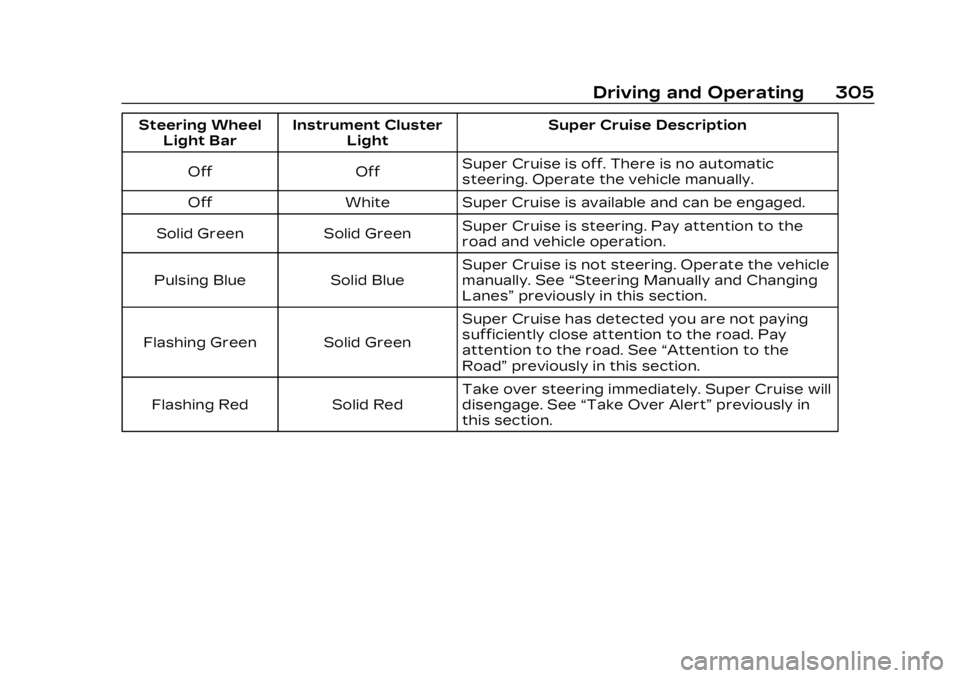
Steering WheelLight Bar Instrument Cluster
Light Super Cruise Description
Off Off Super Cruise is off. There is no automatic
steering. Operate the vehicle manually.
Off White Super Cruise is available and can be engaged.
Solid Green Solid Green Super Cruise is steering. Pay attention to the
road and vehicle operation.
Pulsing Blue Solid Blue Super Cruise is not steering. Operate the vehicle
manually. See
“Steering Manually and Changing
Lanes” previously in this section.
Flashing Green Solid Green Super Cruise has detected you are not paying
sufficiently close attention to the road. Pay
attention to the road. See
“Attention to the
Road” previously in this section.
Flashing Red Solid Red Take over steering immediately. Super Cruise will
disengage. See
“Take Over Alert” previously in
this section.
Page 311 of 507

Cadillac XT6 Owner Manual (GMNA-Localizing-U.S./Canada-16405819) -
2023 - CRC - 3/22/22
310 Driving and Operating
Super Cruise Message Summary (cont'd)
Unavailable Press OnStar Button.The owner’s required Connected Services
subscription may have ended.
.There may be poor GPS reception (e.g., in
isolated areas).
.The GPS reception may be blocked by
objects such as tall buildings or large
structures.
.Press the blue OnStar button in your vehicle
to speak with an OnStar representative, who
can help determine the issue and what
actions to take.
Unavailable You Have Taken Vehicle Control
.The brake pedal is being pressed.
.The Adaptive Cruise Control has been
canceled or turned off.
Unavailable Sensor Blocked Clear snow, ice, dirt, or other contaminants from the front and rear areas of the vehicle.
Unavailable Sharp Curve Some curves are too sharp to be navigated by the Super Cruise system. Super Cruise will be
available after the curve is traveled.
Super Cruise Unavailable Super Cruise is unavailable for reasons not described in other messages.
Super Cruise Locked Out See Owner’s Manual The driver did not take control of the vehicle when prompted by the Super Cruise system.
The Super Cruise system will be disabled until
the ignition is turned off and back on.
Page 359 of 507

Cadillac XT6 Owner Manual (GMNA-Localizing-U.S./Canada-16405819) -
2023 - CRC - 3/22/22
358 Driving and Operating
1. Left Turn/Brake
2. Taillamps
3. Reverse Lamps
4. Battery feed
5. Right Turn/Brake
6. Electric Brakes
7. Ground
If the vehicle is not equipped
with a trailer connector on the
trailer hitch, a seven-wire
trailering harness is tied to the
vehicles frame. The harness
requires the installation of a
trailer connector, which is
available through your dealer.Use only a round, seven-wire
connector with flat blade
terminals meeting SAE J2863
specifications for proper
electrical connectivity.
The seven-wire harness
contains the following trailer
circuits:
Stop/Turn
Signal Left Yellow/Gray
Stop/Turn
Signal Right Green/Violet
Taillamps/
Parking
Lamps Gray/Brown
or Brown
Reverse
Lamps White/Green
or Gray
Battery Feed Red/Green or
Orange
Ground Black or
White
Electric
Trailer Brake Blue Electric Brake Control Wiring
Provisions
If equipped, four blunt-cut
wires are near the driver's
feet for an aftermarket
electric trailer brake controller
as part of the trailer wiring
package. The harness contains
the following circuits:
Electric
Trailer Brakes Blue
Battery Feed Red/Black or
Red/Blue
Brake Apply
Signal White/Blue
Ground Black or
White
Refer to the aftermarket
electric trailer brake controller
owner's manual to determine
wire color coding of the
electric trailer brake controller.
The wire colors on the brake
controller may be different
from the vehicle. It may be
necessary to have a technician
connect the 12-volt power to
Page 481 of 507
Cadillac XT6 Owner Manual (GMNA-Localizing-U.S./Canada-16405819) -
2023 - CRC - 3/22/22
480 Customer Information
connect your vehicle to any
unknown or untrusted
networks (such as Bluetooth,
WIFI or similar technology). In
the event you suspect any
security incident impacting
your data or the safe
operation of your vehicle,
please stop operating your
vehicle and contact your
dealer.
Event Data Recorders
This vehicle is equipped with
an Event Data Recorder (EDR).
The main purpose of an EDR is
to record, in certain crash or
near crash-like situations, such
as an air bag deployment or
hitting a road obstacle, data
that will assist in
understanding how a vehicle’s
systems performed. The EDR
is designed to record data
related to vehicle dynamics
and safety systems for a short
period of time, typically
30 seconds or less. The EDR in
this vehicle is designed to
record such data as:
.How various systems in your
vehicle were operating;
.Whether or not the driver
and passenger safety belts
were buckled/fastened;
.How far (if at all) the driver
was depressing the
accelerator and/or brake
pedal; and,
.How fast the vehicle was
traveling.
These data can help provide a
better understanding of the
circumstances in which
crashes and injuries occur.
Note
EDR data are recorded by
your vehicle only if a non-trivial
crash situation occurs; no data
are recorded by the EDR
under normal driving
conditions and no personal
data (e.g., name, gender, age,
and crash location) are
recorded. However, other
parties, such as law
enforcement, could combine
the EDR data with the type of personally identifying data
routinely acquired during a
crash investigation.
To read data recorded by an
EDR, special equipment is
required, and access to the
vehicle or the EDR is needed.
In addition to the vehicle
manufacturer, other parties,
such as law enforcement, that
have the special equipment,
can read the information if
they have access to the
vehicle or the EDR.
GM will not access these data
or share it with others except:
with the consent of the vehicle
owner or, if the vehicle is
leased, with the consent of the
lessee; in response to an
official request by police or
similar government office; as
part of GM's defense of
litigation through the
discovery process; or, as
permitted by law. Data that
GM collects or receives may
also be used for GM research
needs or may be made
Page 483 of 507

Cadillac XT6 Owner Manual (GMNA-Localizing-U.S./Canada-16405819) -
2023 - CRC - 3/22/22
482 OnStar
OnStar
OnStar Overview
OnStar Overview . . . . . . . . . . 482
OnStar Services
Emergency . . . . . . . . . . . . . . . . . . 483
Security . . . . . . . . . . . . . . . . . . . . . . 484
OnStar Additional
Information
OnStar AdditionalInformation . . . . . . . . . . . . . . . . 484
OnStar Overview
=Voice Command Button
QBlue OnStar Button
>Red Emergency Button
This vehicle may be equipped
with a comprehensive,
in-vehicle system that can
connect to an OnStar Advisor
for Emergency, Security,
Navigation, Connections, and
Diagnostics Services. OnStar
services may require a paid
service plan and data plan.
OnStar requires the vehicle
battery and electrical system,
cellular service, and GPS
satellite signals to be available
and operating. OnStar acts as
a link to existing emergency
service providers. OnStar may
collect information about you and your vehicle, including
location information. See
OnStar User Terms, Privacy
Statement, and Software
Terms for more details
including system limitations at
www.onstar.com (U.S.) or
www.onstar.ca (Canada).
The OnStar system status
light is next to the OnStar
buttons. If the status light is:.Solid Green: System is ready.
.Flashing Green: On a call.
.Red: Indicates a problem.
.Off: System is off. PressQ
twice to speak with an
OnStar Advisor.
Press
Qor call
1-888-4ONSTAR
(1-888-466-7827) to speak to
an Advisor.
Functionality of the Voice
Command button may vary by
vehicle and region.
Page 494 of 507

Cadillac XT6 Owner Manual (GMNA-Localizing-U.S./Canada-16405819) -
2023 - CRC - 3/22/22
INDEX 493
Alert (cont'd)Rear Pedestrian . . . . . . . . . . . 324
Side Blind
Zone (SBZA) . . . . . . . . . . . . . . . 336
All-Season Tires . . . . . . . . . . . . . . 401
All-Wheel Drive . . . . . . . . . . . . . . . .273 Light . . . . . . . . . . . . . . . . . . . . . . . . . . . . 138
AM-FM Radio . . . . . . . . . . . . . . . . . . . 171
Antenna Multi-band . . . . . . . . . . . . . . . . . . . . 175
Antilock Brake System (ABS) . . . . . . . . . . . . . . . .273
Warning Light . . . . . . . . . . . . . . . 138
Appearance Care Exterior . . . . . . . . . . . . . . . . . . . . . . . 440
Interior . . . . . . . . . . . . . . . . . . . . . . . . 446
Apple CarPlay and Android Auto . . . . . . . . . . . . . . . . 208
Assistance Program, Roadside . . . . . . . . . . . . . . . . . . . . . 470
Assistance Systems
Driving . . . . . . . . . . . . . . . . . . . . . . . . 326
Parking and Backing . . . . . . . 314
Audio Bluetooth . . . . . . . . . . . . . . . . . . . . . 179
Automatic
Dimming Mirrors . . . . . . . . . . . . . 38
Door Locks . . . . . . . . . . . . . . . . . . . . 23 Automatic (cont'd)
Emergency
Braking (AEB) . . . . . . . . . . . . . 328
Headlamp System . . . . . . . . . . 159
Parking Assist (APA) . . . . . 320
Transmission . . . . . . . . . . . . . . . 266
Transmission Fluid . . . . . . . . 374
Automatic Transmission Manual Mode . . . . . . . . . . . . . . . . 271
Avoiding Untrusted Media Devices . . . . . . . . . . . . . . . 176
B
BatteryExterior LightingBattery Saver . . . . . . . . . . . . . . 163
Power Protection . . . . . . . . . . 163
Battery - North America . . . . . . . . . . . . . . . . 385, 434
Blade Replacement, Wiper . . . . . . . . . . . . . . . . . . . . . . . . . . 386
Bluetooth
Audio . . . . . . . . . . . . . . . . . . . . . . . . . . . 179
Overview . . . . . . . . . . . . . . 202, 203
Brake Fluid . . . . . . . . . . . . . . . . . . . . . . . . . . . 384
System Warning Light . . . . 136
Brakes . . . . . . . . . . . . . . . . . . . . . . . . . . 383 Brakes (cont'd)
Antilock . . . . . . . . . . . . . . . . . . . . . . . . 273
Brake Assist . . . . . . . . . . . . . . . . . 276
Electric Brake Boost . . . . . . 273
Electric Parking Brake . . . . 274
Braking . . . . . . . . . . . . . . . . . . . . . . . . . . 241 Automatic
Emergency (AEB) . . . . . . . . 328
Reverse Automatic . . . . . . . 322
Braking System FrontPedestrian (FPB) . . . . . . . . . 330
Break-In, New Vehicle . . . . . . 256
Bulb Replacement Headlamp Aiming . . . . . . . . . . 389
Buying New Tires . . . . . . . . . . . . . 419
C
Calibration
Compass . . . . . . . . . . . . . . . . . . . . . . 122
California Perchlorate Materials
Requirements . . . . . . . . . . . . . 363
California Proposition 65 Warning . . . . . . . . . . . . . . . . 1, 434
Camera
Rear Vision (RVC) . . . . . . . . . . 314
Canadian Vehicle Owners . . . . 2