climate control CADILLAC XTS 2013 1.G User Guide
[x] Cancel search | Manufacturer: CADILLAC, Model Year: 2013, Model line: XTS, Model: CADILLAC XTS 2013 1.GPages: 438, PDF Size: 7.4 MB
Page 50 of 438
Black plate (20,1)Cadillac XTS Owner Manual - 2013 - 1st - 4/13/12
2-20 Keys, Doors, and Windows
Heated Mirrors
=
(Rear Window Defogger):
Press to heat the mirrors.
See Dual Automatic Climate Control
System (Uplevel) on page 8‑1 or
Dual Automatic Climate Control
System (Base) on page 8‑6.
Interior Mirrors
Automatic Dimming
Rearview Mirror
To adjust the inside rearview mirror,
hold the rearview mirror in the
center and move it to view the area
behind the vehicle.
The vehicle has an automatic
dimming rearview mirror. The mirror
will automatically reduce the glare
from the headlamps from behind.
The dimming feature comes on
when the vehicle is started.
Cleaning the Mirror
Do not spray glass cleaner directly
on the mirror. Use a soft towel
dampened with water.
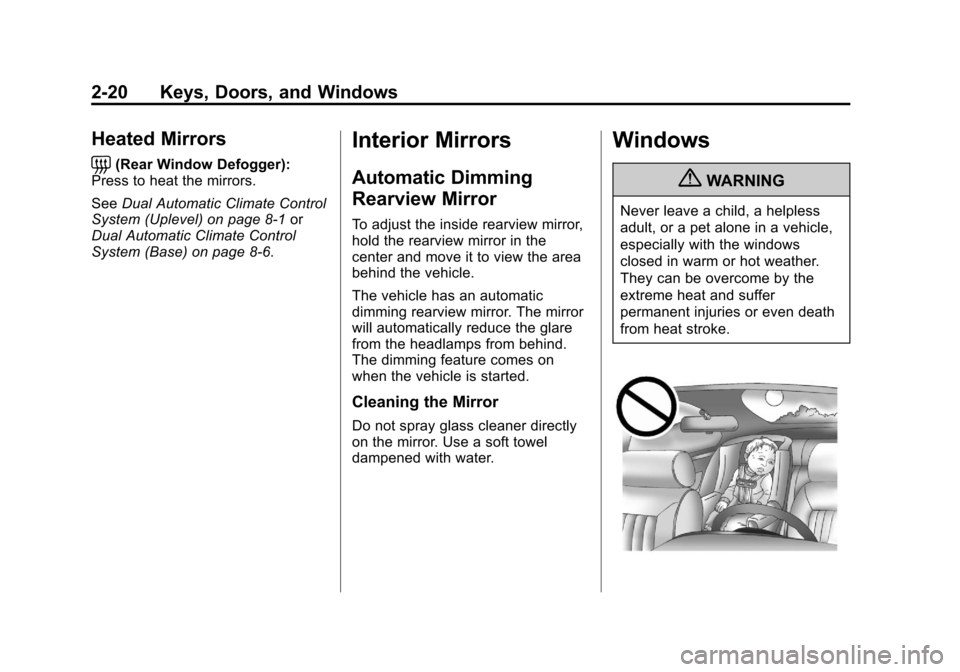
Windows
{WARNING
Never leave a child, a helpless
adult, or a pet alone in a vehicle,
especially with the windows
closed in warm or hot weather.
They can be overcome by the
extreme heat and suffer
permanent injuries or even death
from heat stroke.
Page 66 of 438
Black plate (10,1)Cadillac XTS Owner Manual - 2013 - 1st - 4/13/12
3-10 Seats and Restraints
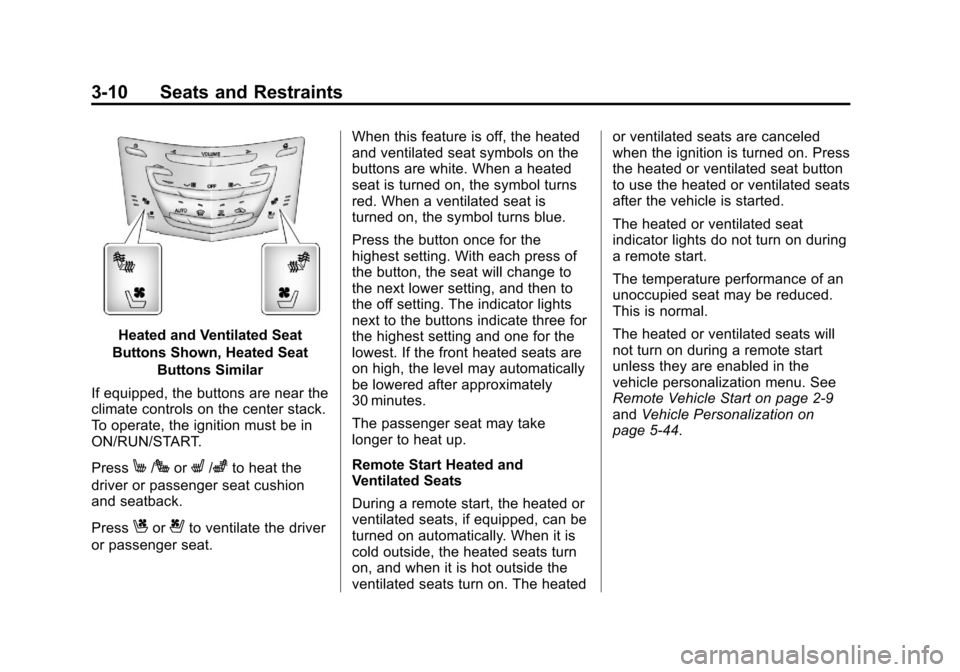
Heated and Ventilated Seat
Buttons Shown, Heated Seat Buttons Similar
If equipped, the buttons are near the
climate controls on the center stack.
To operate, the ignition must be in
ON/RUN/START.
Press
M/JorL/zto heat the
driver or passenger seat cushion
and seatback.
Press
Cor{to ventilate the driver
or passenger seat. When this feature is off, the heated
and ventilated seat symbols on the
buttons are white. When a heated
seat is turned on, the symbol turns
red. When a ventilated seat is
turned on, the symbol turns blue.
Press the button once for the
highest setting. With each press of
the button, the seat will change to
the next lower setting, and then to
the off setting. The indicator lights
next to the buttons indicate three for
the highest setting and one for the
lowest. If the front heated seats are
on high, the level may automatically
be lowered after approximately
30 minutes.
The passenger seat may take
longer to heat up.
Remote Start Heated and
Ventilated Seats
During a remote start, the heated or
ventilated seats, if equipped, can be
turned on automatically. When it is
cold outside, the heated seats turn
on, and when it is hot outside the
ventilated seats turn on. The heatedor ventilated seats are canceled
when the ignition is turned on. Press
the heated or ventilated seat button
to use the heated or ventilated seats
after the vehicle is started.
The heated or ventilated seat
indicator lights do not turn on during
a remote start.
The temperature performance of an
unoccupied seat may be reduced.
This is normal.
The heated or ventilated seats will
not turn on during a remote start
unless they are enabled in the
vehicle personalization menu. See
Remote Vehicle Start on page 2‑9
and
Vehicle Personalization on
page 5‑44.
Page 69 of 438
Black plate (13,1)Cadillac XTS Owner Manual - 2013 - 1st - 4/13/12
Seats and Restraints 3-13
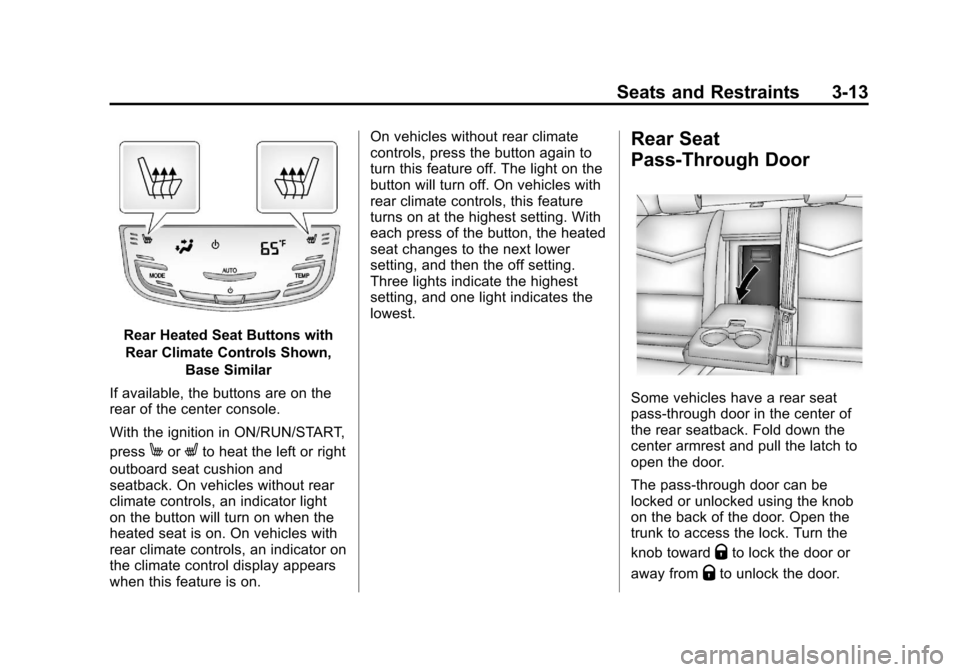
Rear Heated Seat Buttons withRear Climate Controls Shown, Base Similar
If available, the buttons are on the
rear of the center console.
With the ignition in ON/RUN/START,
press
MorLto heat the left or right
outboard seat cushion and
seatback. On vehicles without rear
climate controls, an indicator light
on the button will turn on when the
heated seat is on. On vehicles with
rear climate controls, an indicator on
the climate control display appears
when this feature is on. On vehicles without rear climate
controls, press the button again to
turn this feature off. The light on the
button will turn off. On vehicles with
rear climate controls, this feature
turns on at the highest setting. With
each press of the button, the heated
seat changes to the next lower
setting, and then the off setting.
Three lights indicate the highest
setting, and one light indicates the
lowest.
Rear Seat
Pass-Through Door
Some vehicles have a rear seat
pass-through door in the center of
the rear seatback. Fold down the
center armrest and pull the latch to
open the door.
The pass-through door can be
locked or unlocked using the knob
on the back of the door. Open the
trunk to access the lock. Turn the
knob toward
Qto lock the door or
away from
Qto unlock the door.
Page 117 of 438
Black plate (1,1)Cadillac XTS Owner Manual - 2013 - 1st - 4/13/12
Storage 4-1
Storage
Storage Compartments
Instrument Panel Storage . . . . . 4-1
Glove Box . . . . . . . . . . . . . . . . . . . . 4-2
Cupholders . . . . . . . . . . . . . . . . . . . 4-2
Armrest Storage . . . . . . . . . . . . . . 4-3
Center Console Storage . . . . . . 4-3
Additional Storage Features
Cargo Tie-Downs . . . . . . . . . . . . . 4-4
Cargo ManagementSystem . . . . . . . . . . . . . . . . . . . . . . 4-4
Convenience Net . . . . . . . . . . . . . 4-4
Storage
Compartments
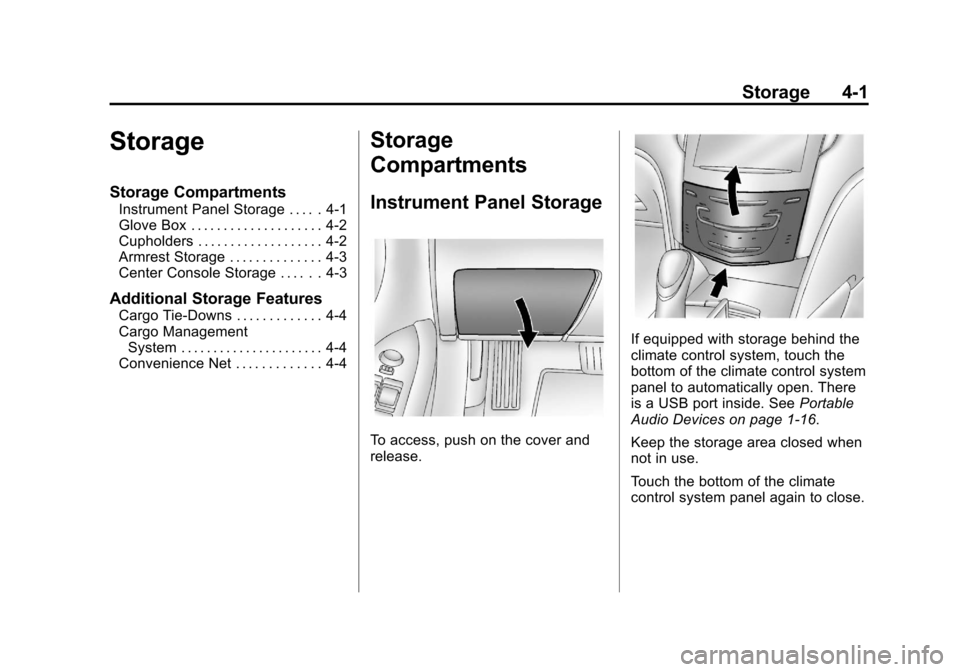
Instrument Panel Storage
To access, push on the cover and
release.
If equipped with storage behind the
climate control system, touch the
bottom of the climate control system
panel to automatically open. There
is a USB port inside. See Portable
Audio Devices on page 1‑16.
Keep the storage area closed when
not in use.
Touch the bottom of the climate
control system panel again to close.
Page 126 of 438
Black plate (6,1)Cadillac XTS Owner Manual - 2013 - 1st - 4/13/12
5-6 Instruments and Controls
To set the date:
1. Press the SETTINGS screenbutton and press Time and Date.
2. Press Set Date and press + or −
to increase or decrease month,
day, or year.
3. Press
}to go back to the
previous menu.
To set the clock display:
1. Press the SETTINGS screen button and press Time and Date.
2. Press Clock Display and press OFF or ON to turn the clock
display off or on.
3. Press
}to go back to the
previous menu.
Power Outlets
The accessory power outlets can be
used to plug in electrical equipment,
such as a cell phone or MP3 player. The vehicle has three accessory
power outlets:
.Inside the front storage area
below the climate control
system.
.Inside the center console.
.On the rear of the center
console.
Lift the cover to access the
accessory power outlet.
Certain accessory power plugs may
not be compatible with the
accessory power outlet and could
overload vehicle or adapter fuses.
If a problem is experienced, see
your dealer.
When adding electrical equipment,
be sure to follow the proper
installation instructions included with
the equipment. See Add-On
Electrical Equipment on page 9‑65.
Notice: Hanging heavy
equipment from the power outlet
can cause damage not covered
by the vehicle warranty. The power outlets are designed for
accessory power plugs only, such
as cell phone charge cords.
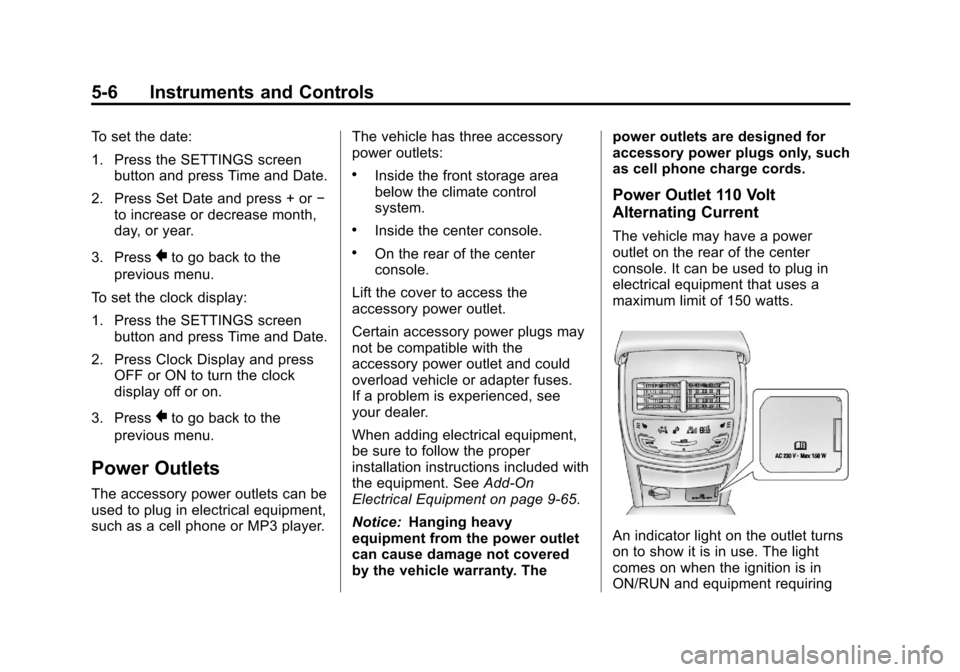
Power Outlet 110 Volt
Alternating Current
The vehicle may have a power
outlet on the rear of the center
console. It can be used to plug in
electrical equipment that uses a
maximum limit of 150 watts.
An indicator light on the outlet turns
on to show it is in use. The light
comes on when the ignition is in
ON/RUN and equipment requiring
Page 127 of 438
Black plate (7,1)Cadillac XTS Owner Manual - 2013 - 1st - 4/13/12
Instruments and Controls 5-7
less than 150 watts is plugged into
the outlet, and no system fault is
detected.
The indicator light does not come on
when the ignition is in LOCK/OFF or
if the equipment is not fully seated
into the outlet.
If equipment is connected using
more than 150 watts or a system
fault is detected, a protection circuit
shuts off the power supply and the
indicator light turns off. To reset the
circuit, unplug the item and plug it
back in or turn the Retained
Accessory Power (RAP) off and
then back on. SeeRetained
Accessory Power (RAP) on
page 9‑19. The power restarts when
equipment using 150 watts or less is
plugged into the outlet and a system
fault is not detected. The power outlet is not designed for
and may not work properly, if the
following are plugged in:
.Equipment with high initial peak
wattage such as:
compressor-driven refrigerators
and electric power tools.
.Other equipment requiring an
extremely stable power supply
such as:
microcomputer-controlled
electric blankets, touch sensor
lamps, etc.
Cigarette Lighter
For vehicles with cigarette lighters,
they are located under the climate
control system inside the storage
area and on the rear of the center
console.
To activate the cigarette lighter,
push it into the heating element and
let go. The lighter pops out when it
is ready to be used.
Notice:
Holding a cigarette lighter
in while it is heating does not let
the lighter back away from the
heating element when it is hot.
Damage from overheating can
occur to the lighter or heating
element, or a fuse could be
blown. Do not hold a cigarette
lighter in while it is heating.
Page 164 of 438
Black plate (44,1)Cadillac XTS Owner Manual - 2013 - 1st - 4/13/12
5-44 Instruments and Controls
Vehicle Speed Messages
SELECTED SPEED LIMIT
EXCEEDED
This message is displayed when the
vehicle speed is greater than the set
speed. See "Speed Warning" under
Driver Information Center (DIC) on
page 5‑27.
Washer Fluid Messages
WASHER FLUID LOW ADD
FLUID
This message may display when the
washer fluid level is low. See
Washer Fluid on page 10‑17.
Window Messages
OPEN, THEN CLOSE DRIVER/
PASSENGER WINDOW
This message is displayed when the
window needs to be reprogrammed.
If the vehicle's battery has been
recharged or disconnected, you will
need to reprogram each front
window for the express-up feature to
work. SeePower Windows on
page 2‑21.
Vehicle
Personalization
The audio system controls are used
to access the personalization
menus for customizing vehicle
features.
Personalization Menus
1. Press SETTINGS on the Home page on the infotainment system
display.
2. Press Vehicle Settings.
The following list of menu items may
be available:
.Climate and Air Quality
.Collision/Detection Systems
.Comfort and Convenience
.Lighting
.Power Door Locks
.Remote Lock, Unlock, Start
Page 165 of 438
Black plate (45,1)Cadillac XTS Owner Manual - 2013 - 1st - 4/13/12
Instruments and Controls 5-45
Climate and Air Quality
Select the Climate and Air Quality
menu and the following may be
displayed:
.Auto Fan Max Speed
.Air Quality Sensor
.Auto Compartment Zone Temp
.Auto Cooled Seats
.Auto Defog
.Auto Rear Defog
Auto Fan Max Speed
This feature will set the maximum
auto fan speed.
Press Auto Fan Max Speed. Press
to select Low, Medium, or High.
Press
0to go back to the
last menu.
Air Quality Sensor
This allows for selection of air
quality sensor operation at high or
low sensitivity. Only vehicles with
the dual automatic climate control
will have this option. Press Air Quality Sensor. Press to
select Off, Low Sensitivity, or High
Sensitivity. Press
0to go back to
the last menu.
Auto Compartment Zone Temp
This feature allows for selection of
the compartment zone temperature
setting when the vehicle is
restarted.
Press Auto Compartment Zone
Temp. Press to select Single Zone,
Dual Zone, or Last Setting. Press
0
to go back to the last menu.
Auto Cooled Seats
When on, this feature will turn the
cooled seats on when using remote
start on warm days.
Press Auto Cooled Seats. Press to
select Off or On. Press
0to go back
to the last menu. Auto Defog
When set to ON, the front defog will
automatically come on when the
vehicle is started. Only vehicles with
the dual automatic climate control
will have this option.
Press Auto Defog. Press to select
Off or On. Press
0to go back to the
last menu.
Auto Rear Defog
If equipped, this allows the Auto
Rear Defog to be turned on or off.
This feature will automatically turn
on the rear window defogger when it
is cold outside.
Press Auto Rear Defog. Press to
select Off or On. Press
0to go back
to the last menu.
Collision/Detection Systems
Select the Collision/Detection
Systems menu and the following will
be displayed:
.Alert Type
.Auto Collision Preparation
Page 215 of 438
Black plate (1,1)Cadillac XTS Owner Manual - 2013 - 1st - 4/13/12
Climate Controls 8-1
Climate Controls
Climate Control Systems
Dual Automatic Climate ControlSystem (Uplevel) . . . . . . . . . . . . 8-1
Dual Automatic Climate Control System (Base) . . . . . . . . . . . . . . . 8-6
Rear Climate Control System . . . . . . . . . . . . . . . . . . . . . . 8-9
Air Vents
Air Vents . . . . . . . . . . . . . . . . . . . . . 8-11
Maintenance
Passenger Compartment AirFilter . . . . . . . . . . . . . . . . . . . . . . . 8-12
Service . . . . . . . . . . . . . . . . . . . . . . 8-14
Climate Control Systems
Dual Automatic Climate Control System (Uplevel)
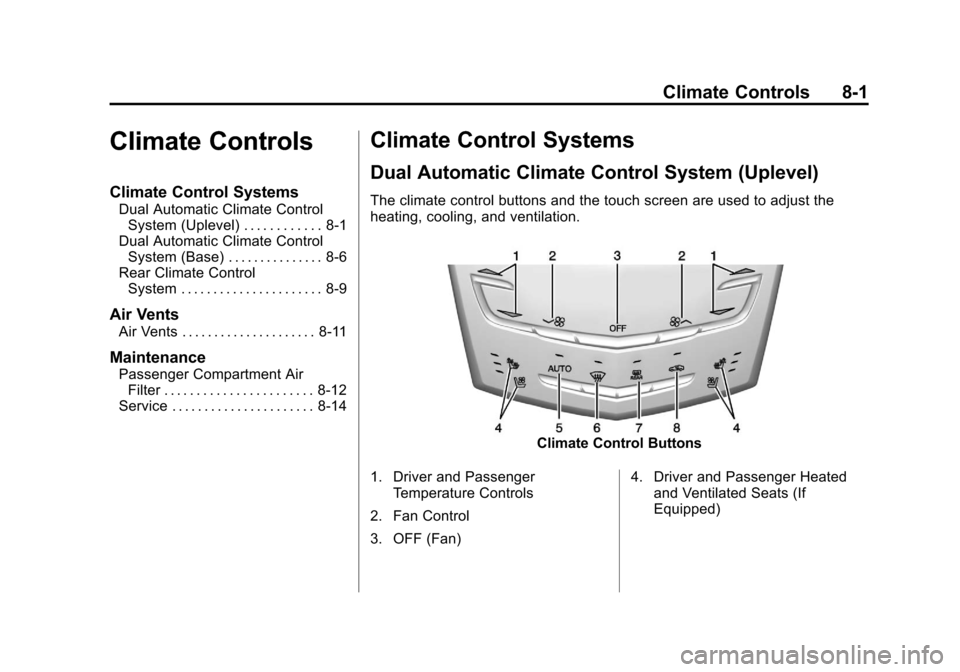
The climate control buttons and the touch screen are used to adjust the
heating, cooling, and ventilation.
Climate Control Buttons
1. Driver and Passenger Temperature Controls
2. Fan Control
3. OFF (Fan) 4. Driver and Passenger Heated
and Ventilated Seats (If
Equipped)
Page 216 of 438
Black plate (2,1)Cadillac XTS Owner Manual - 2013 - 1st - 4/13/12
8-2 Climate Controls
5. AUTO (Automatic Operation)
6. Defrost
7. Rear Window Defogger
8. Recirculation
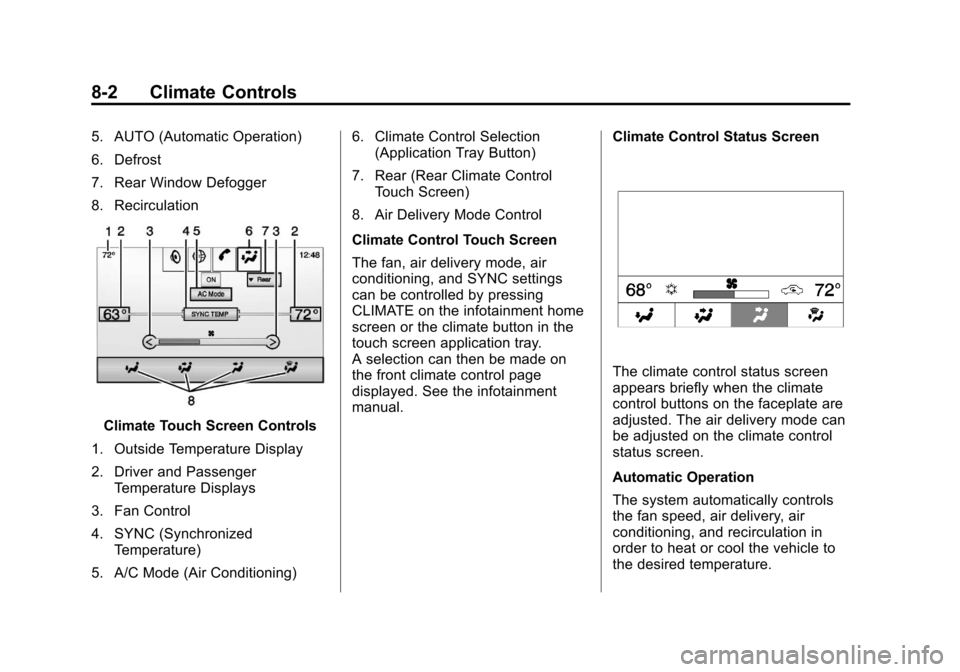
Climate Touch Screen Controls
1. Outside Temperature Display
2. Driver and Passenger Temperature Displays
3. Fan Control
4. SYNC (Synchronized Temperature)
5. A/C Mode (Air Conditioning) 6. Climate Control Selection
(Application Tray Button)
7. Rear (Rear Climate Control Touch Screen)
8. Air Delivery Mode Control
Climate Control Touch Screen
The fan, air delivery mode, air
conditioning, and SYNC settings
can be controlled by pressing
CLIMATE on the infotainment home
screen or the climate button in the
touch screen application tray.
A selection can then be made on
the front climate control page
displayed. See the infotainment
manual. Climate Control Status Screen
The climate control status screen
appears briefly when the climate
control buttons on the faceplate are
adjusted. The air delivery mode can
be adjusted on the climate control
status screen.
Automatic Operation
The system automatically controls
the fan speed, air delivery, air
conditioning, and recirculation in
order to heat or cool the vehicle to
the desired temperature.