climate settings CADILLAC XTS 2013 1.G User Guide
[x] Cancel search | Manufacturer: CADILLAC, Model Year: 2013, Model line: XTS, Model: CADILLAC XTS 2013 1.GPages: 438, PDF Size: 7.4 MB
Page 225 of 438
Black plate (11,1)Cadillac XTS Owner Manual - 2013 - 1st - 4/13/12
Climate Controls 8-11
SYNC:Press SYNC on the touch
screen to match the rear climate
control temperature to the front
climate control driver temperature.
The SYNC indicator light turns on.
Adjusting the rear temperature
controls will unlink the set driver and
rear temperatures. The SYNC
indicator turns off.
Rear Control Lockout: Press to
lock or unlock control of the rear
climate control system from the rear
seat passengers. When locked, the
rear climate control can only be
adjusted from the front seat.
Automatic Operation
Rear AUTO: Press to turn on or off.
The air delivery and fan speed are
controlled automatically. The AUTO
indicator appears on the display.
If any of the climate control settings
are manually adjusted, this cancels
full automatic operation. Manual Operation
S
A T(Fan Control): Press or
press and hold the rear climate
control buttons or touch screen to
increase or decrease the airflow.
Pressing
T Awhen the system is
off will turn the system on. The air
delivery mode remains in its
previous setting.
+/− (Temperature Control): Press
or press and hold the rear
temperature control buttons or touch
screen to adjust the rear passenger
temperature. Press + for warmer air
and press −for cooler air.
Y/\/Y(Air Delivery Mode
Control): Press the desired mode
button on the touch screen or the
MODE button on the rear faceplate
to change the direction of the airflow
in the rear seating area.
MorL(Heated Rear Seats, If
Equipped): Press
MorLto heat
the left or right outboard seat
cushion and seatback. See Heated
Rear Seats on page 3‑12.
Air Vents
Adjustable air vents are in the
center and on the side of the
instrument panel.
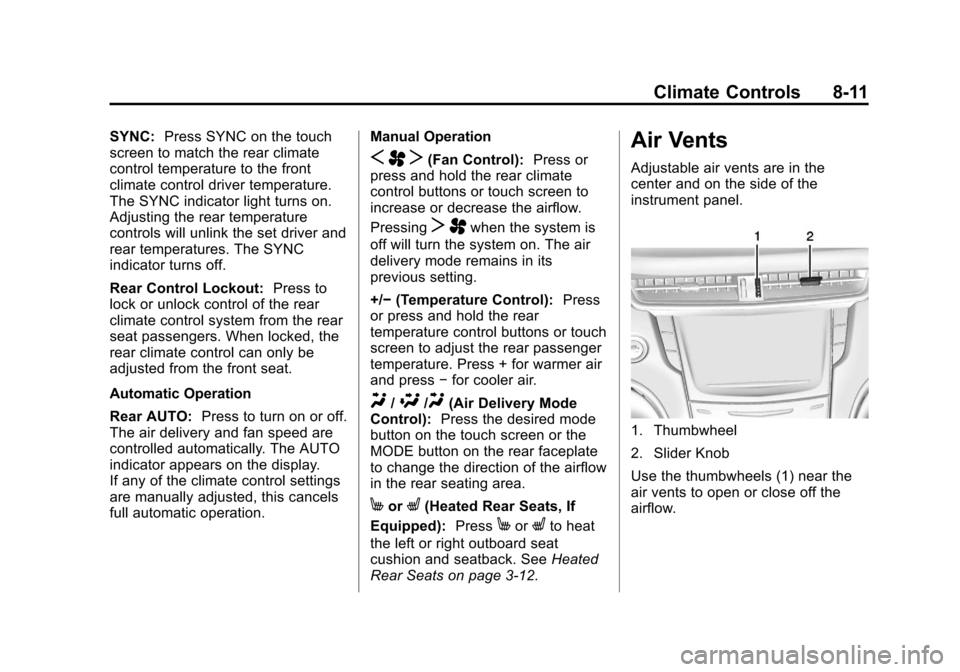
1. Thumbwheel
2. Slider Knob
Use the thumbwheels (1) near the
air vents to open or close off the
airflow.
Page 230 of 438
Black plate (2,1)Cadillac XTS Owner Manual - 2013 - 1st - 4/13/12
9-2 Driving and Operating
Fuel Additives . . . . . . . . . . . . . . . 9-56
Filling the Tank . . . . . . . . . . . . . . 9-57
Filling a Portable FuelContainer . . . . . . . . . . . . . . . . . . . 9-59
Towing
General TowingInformation . . . . . . . . . . . . . . . . . 9-60
Driving Characteristics and Towing Tips . . . . . . . . . . . . . . . . 9-60
Trailer Towing . . . . . . . . . . . . . . . . 9-63
Towing Equipment . . . . . . . . . . . 9-64
Conversions and Add-Ons
Add-On Electrical Equipment . . . . . . . . . . . . . . . . . 9-65
Driving Information
Distracted Driving
Distraction comes in many forms
and can take your focus from the
task of driving. Exercise good
judgment and do not let other
activities divert your attention away
from the road. Many local
governments have enacted laws
regarding driver distraction. Become
familiar with the local laws in
your area.
To avoid distracted driving, always
keep your eyes on the road, hands
on the wheel, and mind on the drive.
.Do not use a phone in
demanding driving situations.
Use a hands-free method to
place or receive necessary
phone calls.
.Watch the road. Do not read,
take notes, or look up
information on phones or other
electronic devices.
.Designate a front seat
passenger to handle potential
distractions.
.Become familiar with vehicle
features before driving, such as
programming favorite radio
stations and adjusting climate
control and seat settings.
Program all trip information into
any navigation device prior to
driving.
.Wait until the vehicle is parked
to retrieve items that have fallen
to the floor.
.Stop or park the vehicle to tend
to children.
.Keep pets in an appropriate
carrier or restraint.
.Avoid stressful conversations
while driving, whether with a
passenger or on a cell phone.