radio controls CADILLAC XTS 2013 1.G User Guide
[x] Cancel search | Manufacturer: CADILLAC, Model Year: 2013, Model line: XTS, Model: CADILLAC XTS 2013 1.GPages: 438, PDF Size: 7.4 MB
Page 172 of 438
Black plate (52,1)Cadillac XTS Owner Manual - 2013 - 1st - 4/13/12
5-52 Instruments and Controls
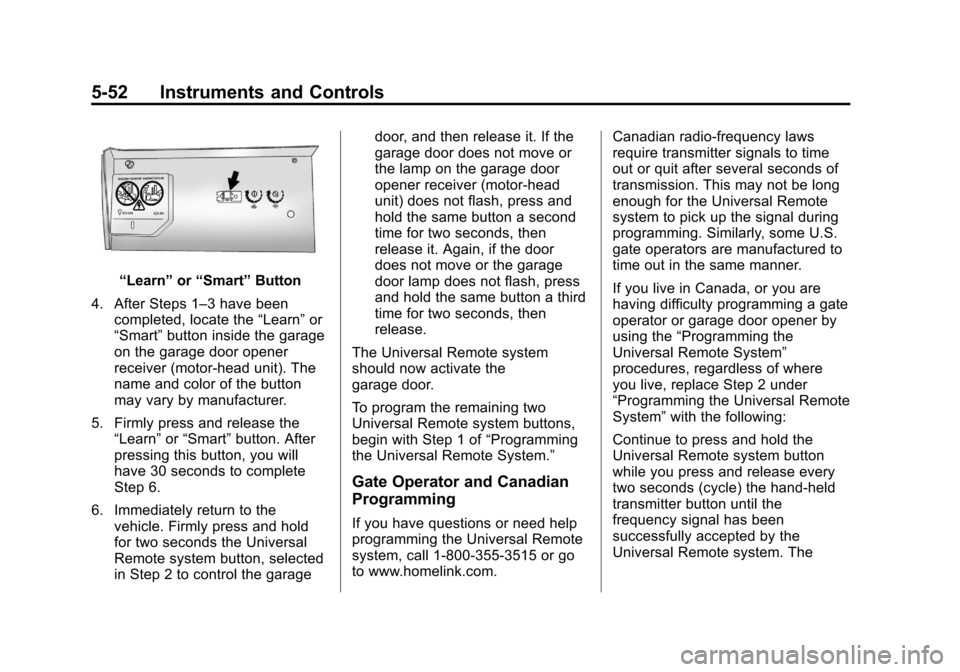
“Learn”or“Smart” Button
4. After Steps 1–3 have been completed, locate the “Learn”or
“Smart” button inside the garage
on the garage door opener
receiver (motor-head unit). The
name and color of the button
may vary by manufacturer.
5. Firmly press and release the “Learn” or“Smart” button. After
pressing this button, you will
have 30 seconds to complete
Step 6.
6. Immediately return to the vehicle. Firmly press and hold
for two seconds the Universal
Remote system button, selected
in Step 2 to control the garage door, and then release it. If the
garage door does not move or
the lamp on the garage door
opener receiver (motor-head
unit) does not flash, press and
hold the same button a second
time for two seconds, then
release it. Again, if the door
does not move or the garage
door lamp does not flash, press
and hold the same button a third
time for two seconds, then
release.
The Universal Remote system
should now activate the
garage door.
To program the remaining two
Universal Remote system buttons,
begin with Step 1 of “Programming
the Universal Remote System.”
Gate Operator and Canadian
Programming
If you have questions or need help
programming the Universal Remote
system, call 1-800-355-3515 or go
to www.homelink.com. Canadian radio-frequency laws
require transmitter signals to time
out or quit after several seconds of
transmission. This may not be long
enough for the Universal Remote
system to pick up the signal during
programming. Similarly, some U.S.
gate operators are manufactured to
time out in the same manner.
If you live in Canada, or you are
having difficulty programming a gate
operator or garage door opener by
using the
“Programming the
Universal Remote System”
procedures, regardless of where
you live, replace Step 2 under
“Programming the Universal Remote
System” with the following:
Continue to press and hold the
Universal Remote system button
while you press and release every
two seconds (cycle) the hand-held
transmitter button until the
frequency signal has been
successfully accepted by the
Universal Remote system. The
Page 183 of 438
Black plate (1,1)Cadillac XTS Owner Manual - 2013 - 1st - 4/13/12
Infotainment System 7-1
Infotainment
System
Introduction
Infotainment . . . . . . . . . . . . . . . . . . . 7-1
Theft-Deterrent Feature . . . . . . . 7-2
Overview . . . . . . . . . . . . . . . . . . . . . . 7-3
Home Page . . . . . . . . . . . . . . . . . . . 7-4
Software Updates . . . . . . . . . . . . . 7-7
Radio
AM-FM Radio . . . . . . . . . . . . . . . . . 7-7
Satellite Radio . . . . . . . . . . . . . . . . 7-9
Radio Reception . . . . . . . . . . . . . 7-10
Backglass Antenna . . . . . . . . . . 7-11
Multi-Band Antenna . . . . . . . . . . 7-11
Audio Players
CD Player . . . . . . . . . . . . . . . . . . . . 7-11
USB Port . . . . . . . . . . . . . . . . . . . . 7-14
SD Card Reader . . . . . . . . . . . . . 7-17
Auxiliary Jack . . . . . . . . . . . . . . . . 7-17
Phone
Bluetooth (Overview) . . . . . . . . 7-18
Bluetooth (InfotainmentControls) . . . . . . . . . . . . . . . . . . . 7-20
Bluetooth (Voice Recognition) . . . . . . . . . . . . . . . 7-24
Trademarks and License
Agreements
Trademarks and License
Agreements . . . . . . . . . . . . . . . . 7-29
Introduction
Infotainment
Read the following pages to
become familiar with the
infotainment system featured in this
owner manual.
{WARNING
Taking your eyes off the road
for too long or too often while
using any infotainment features
can cause a crash resulting in
injury or death. Do not give
extended attention to
infotainment tasks while
driving. Focus your attention
on driving and limit glances to
the instrument cluster or center
stack screens. Use voice
guidance whenever possible.
The infotainment system has built-in
features intended to help with this
by disabling some functions when
Page 186 of 438
Black plate (4,1)Cadillac XTS Owner Manual - 2013 - 1st - 4/13/12
7-4 Infotainment System
4.6(Seek Next/Fast Forward)
.Press to seek the next
track.
.Press and hold to fast
forward through a track.
Release the button to return
to playing speed. SeeCD
Player on page 7‑11.
.For AM, FM, or XM (if
equipped), press to seek to
the next strong station.
5. MENU
.Press to access the menu
for the current audio
source.
.Press to select the
highlighted menu option.
.Turn to scroll through a list.
6.
{(Home Page)
.See “Home Page” following
in this section. 7. RADIO
.Press to change the audio
source between AM, FM,
or XM (if equipped).
8. MEDIA
.Press to change the audio
source between CD, USB,
SD Card, and AUX.
9. PHONE
.See Bluetooth (Infotainment
Controls) on page 7‑20 or
Bluetooth (Voice
Recognition) on page 7‑24
or Bluetooth (Overview) on
page 7‑18.
10.
SBACK
.Press to return to the
previous screen in
a menu.
.On a page accessed
directly by a faceplate
button or Home Page
screen button, press
S
BACK to go to the
previous menu.
Home Page
Home Page Features
The infotainment system displays a
Home Page that makes it easy to
access all of the applications. Turn
the MENU knob to highlight feature
icons. Press the MENU knob to
access the feature’s options.
Various functions are disabled when
the vehicle is moving.
AUDIO: Select the AUDIO screen
icon to display the active source
page. The sources available are
AM, FM, XM (if equipped), CD,
USB/iPod, AUX, and SD Card. See
AM-FM Radio on page 7‑7, Satellite
Radio on page 7‑9, CD Player on
page 7‑11, and Auxiliary Jack on
page 7‑17.
PHONE: Select the PHONE screen
icon to display the Phone main
page. See “PHONE”in this section.
Page 189 of 438
Black plate (7,1)Cadillac XTS Owner Manual - 2013 - 1st - 4/13/12
Infotainment System 7-7
all personalized radio settings will
be restored back to the factory
settings. Select Cancel or Confirm.
Select
SBACK to go back to the
last menu.
English and Metric Unit
Conversion
To change the display units between
English and metric units, see
Instrument Cluster on page 5‑9.
Software Updates
See the following websites for
information:
Cadillac
In the U.S., see www.cadillac.com.
In Canada, see www.cadillac.ca.
Radio
AM-FM Radio
Playing the Radio
While on the audio main page,
press the RADIO or MEDIA button
repeatedly to display and scroll
through the available sources (AM,
FM, and XM (if equipped), CD, USB,
SD, and AUX).
The steering wheel controls can
also be used to adjust the volume.
See Steering Wheel Controls on
page 5‑2.
AM, FM, XM (If Equipped)
To select AM, FM, XM (if equipped):
1. Press
{.
2. Turn the MENU knob to highlight the AUDIO screen icon.
3. Press the MENU knob to select. 4. Turn the MENU knob to highlight
either AM, FM, or XM (if
equipped) and press the MENU
to select.
Pressing the RADIO faceplate
button is another way to change
from a different source, to AM, FM,
or XM (if equipped).
Press the RADIO faceplate button
to display the active radio source.
Press the MENU knob and the
following radio settings may display:
Tone Settings:
.Bass, Midrange, and Treble:
Turn the MENU knob and
highlight. Press the MENU knob
to select. Turn the MENU knob
to adjust.
.Balance: Turn the MENU knob
to highlight. Press the MENU
knob to select. Turn the MENU
knob left for more sound from
the left speakers or right for
more sound from the right
Page 219 of 438
Black plate (5,1)Cadillac XTS Owner Manual - 2013 - 1st - 4/13/12
Climate Controls 8-5
control system may adjust to
outside air supply and turn on the
air conditioner. If the climate control
system does not detect possible
window fogging, it returns to normal
operation. To turn Auto Defog off or
on, see“Climate and Air Quality”
under Vehicle Personalization on
page 5‑44.
Rear Window Defogger
=(Rear Window Defogger):
Press to turn the rear window
defogger on or off.
The rear window defogger turns off
automatically after about
10 minutes. If turned on again, it
runs for about five minutes before
turning off. At higher vehicle
speeds, the rear window defogger
may stay on continuously.
The rear window defogger can be
set to automatic operation. See
“Climate and Air Quality” under
Vehicle Personalization on
page 5‑44. When Auto Rear Defog
is selected, the rear window
defogger turns on automatically when the interior temperature is cold
and the outside temperature is
about 4°C (40°F) and below. The
auto rear defogger turns off
automatically after about
10 minutes. At higher vehicle
speeds, the rear window defogger
may stay on continuously.
The heated outside rearview mirrors
turn on when the rear window
defogger button is on and help to
clear fog or frost from the surface of
the mirrors.
Notice:
Do not try to clear frost
or other material from the inside
of the front windshield and rear
window with a razor blade or
anything else that is sharp. This
may damage the rear window
defogger grid and affect the
radio's ability to pick up stations
clearly. The repairs would not be
covered by the vehicle warranty. Driver and Passenger Heated and
Ventilated Seats (If Equipped):
Press
Jorzto heat the driver or
passenger seat cushion and
seatback.
Press
Cor{to ventilate the driver
or passenger seat. See Heated and
Ventilated Seats on page 1‑8.
Remote Start Climate Control
Operation: For vehicles with the
remote start feature, the climate
control system may run when the
vehicle is started remotely. The
system uses the driver ’s previous
settings to heat or cool the inside of
the vehicle. The rear defog may
come on during remote start based
on cold ambient conditions. The
rear defog indicator light does not
come on during a remote start. If the
vehicle has heated or ventilated
seats, they may come on during a
remote start. See Remote Vehicle
Start on page 2‑9 andHeated and
Ventilated Seats on page 1‑8.
Page 223 of 438
Black plate (9,1)Cadillac XTS Owner Manual - 2013 - 1st - 4/13/12
Climate Controls 8-9
turning off. At higher vehicle
speeds, the rear window defogger
may stay on continuously.
The rear window defogger can be
set to automatic operation. See
“Climate and Air Quality”under
Vehicle Personalization on
page 5‑44. When Auto Rear Defog
is selected, the rear window
defogger turns on automatically
when the interior temperature is cold
and the outside temperature is
about 4°C (40°F) and below. The
auto rear defogger turns off
automatically after about
10 minutes. At higher vehicle
speeds, the rear window defogger
may stay on continuously.
The heated outside mirrors turn on
when the rear window defogger
button is on. They help to clear fog
or frost from the surface of the
mirrors.
Notice: Do not try to clear frost
or other material from the inside
of the front windshield and rear
window with a razor blade or anything else that is sharp. This
may damage the rear window
defogger grid and affect the
radio's ability to pick up stations
clearly. The repairs would not be
covered by the vehicle warranty.
Driver and Passenger Heated
Seats (If Equipped):
Press
MorL
to heat the driver or passenger seat.
SeeHeated and Ventilated Front
Seats on page 3‑9.
Remote Start Climate Control
Operation: For vehicles with the
remote vehicle start feature, the
climate control system may run
when the vehicle is started remotely.
The system uses the driver's
previous settings to heat or cool the
inside of the vehicle. See Remote
Vehicle Start on page 2‑9.
The rear window defogger turns on
if it is cold outside.
Sensors
The solar sensor, located on top of
the instrument panel near the
windshield, monitors the solar heat. The climate control system uses the
sensor information to adjust the
temperature, fan speed,
recirculation, and air delivery mode
for best comfort.
If the sensor is covered, the
automatic climate control system
may not work properly.
Rear Climate Control
System
For vehicles with a rear climate
control system, the settings can be
adjusted with the rear climate
control buttons and the touch
screen.