Transmitter CADILLAC XTS 2013 1.G Owner's Manual
[x] Cancel search | Manufacturer: CADILLAC, Model Year: 2013, Model line: XTS, Model: CADILLAC XTS 2013 1.GPages: 438, PDF Size: 7.4 MB
Page 48 of 438
Black plate (18,1)Cadillac XTS Owner Manual - 2013 - 1st - 4/13/12
2-18 Keys, Doors, and Windows
vehicle. If the transmitter is ever
damaged, you may not be able to
start your vehicle.
When trying to start the vehicle, the
security light comes on briefly when
the ignition is turned on.
If the engine does not start and the
security light stays on, there is a
problem with the system. Turn the
ignition off and try again.
If the vehicle will not change ignition
modes (ACC/ACCESSORY, ON/
RUN/START, OFF), and the RKE
transmitter appears to be
undamaged, try another transmitter.
Or, you may try placing the
transmitter in the transmitter pocket
located in the center console. See
“NO REMOTE DETECTED”under
Key and Lock Messages on
page 5‑38.
If the ignition modes will not change
with the other transmitter, your
vehicle needs service. If the ignition
does change modes, the first
transmitter may be faulty. See your
dealer who can service the theft-deterrent system and have a
new RKE transmitter programmed to
the vehicle.
It is possible for the immobilizer
system to learn new or replacement
RKE transmitters. Up to eight
transmitters can be programmed for
the vehicle. To program additional
transmitters, see
“Programming
Transmitters to the Vehicle” under
Remote Keyless Entry (RKE)
System Operation on page 2‑3.
Do not leave the key or device that
disarms or deactivates the
theft-deterrent system in the vehicle.Exterior Mirrors
Convex Mirrors
{CAUTION
A convex mirror can make things,
like other vehicles, look farther
away than they really are. If you
cut too sharply into the right lane,
you could hit a vehicle on the
right. Check the inside mirror or
glance over your shoulder before
changing lanes.
The passenger side mirror is convex
shaped. A convex mirror's surface is
curved so more can be seen from
the driver seat.
Page 51 of 438
Black plate (21,1)Cadillac XTS Owner Manual - 2013 - 1st - 4/13/12
Keys, Doors, and Windows 2-21
The vehicle aerodynamics are
designed to improve fuel economy
performance. This may result in a
pulsing sound when either rear
window is down and the front
windows are up. To reduce the
sound, open either a front window
or the sunroof (if equipped).
Power Windows
{WARNING
Children could be seriously
injured or killed if caught in the
path of a closing window. Never
leave the Remote Keyless Entry
(RKE) transmitter in a vehicle with
children. When there are children
in the rear seat, use the window
lockout switch to prevent
operation of the windows. See
Keys on page 2‑1.The power windows only operate
with the ignition in ACC/
ACCESSORY or ON/RUN/START,
or when Retained Accessory Power
(RAP) is active. SeeRetained
Accessory Power (RAP) on
page 9‑19.
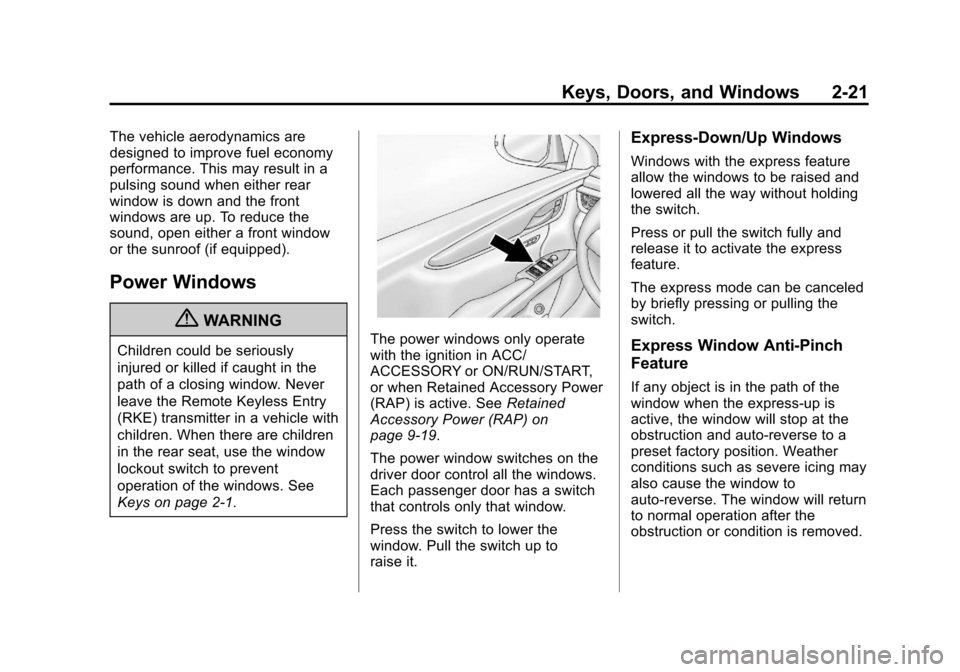
The power window switches on the
driver door control all the windows.
Each passenger door has a switch
that controls only that window.
Press the switch to lower the
window. Pull the switch up to
raise it.
Express-Down/Up Windows
Windows with the express feature
allow the windows to be raised and
lowered all the way without holding
the switch.
Press or pull the switch fully and
release it to activate the express
feature.
The express mode can be canceled
by briefly pressing or pulling the
switch.
Express Window Anti-Pinch
Feature
If any object is in the path of the
window when the express-up is
active, the window will stop at the
obstruction and auto-reverse to a
preset factory position. Weather
conditions such as severe icing may
also cause the window to
auto-reverse. The window will return
to normal operation after the
obstruction or condition is removed.
Page 63 of 438
Black plate (7,1)Cadillac XTS Owner Manual - 2013 - 1st - 4/13/12
Seats and Restraints 3-7
Memory Seats
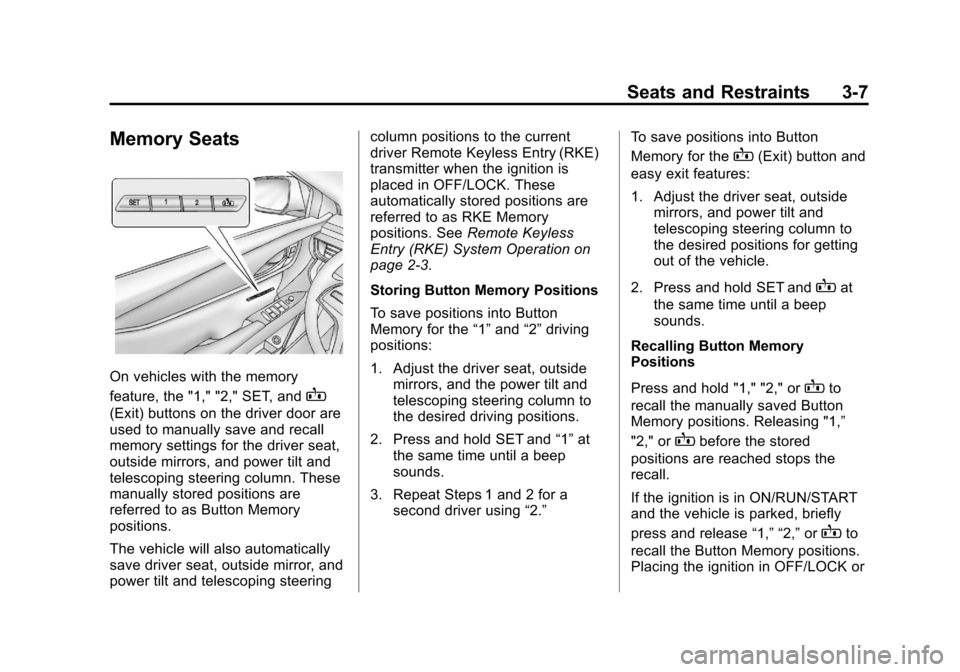
On vehicles with the memory
feature, the "1," "2," SET, and
B
(Exit) buttons on the driver door are
used to manually save and recall
memory settings for the driver seat,
outside mirrors, and power tilt and
telescoping steering column. These
manually stored positions are
referred to as Button Memory
positions.
The vehicle will also automatically
save driver seat, outside mirror, and
power tilt and telescoping steeringcolumn positions to the current
driver Remote Keyless Entry (RKE)
transmitter when the ignition is
placed in OFF/LOCK. These
automatically stored positions are
referred to as RKE Memory
positions. See
Remote Keyless
Entry (RKE) System Operation on
page 2‑3.
Storing Button Memory Positions
To save positions into Button
Memory for the “1”and “2”driving
positions:
1. Adjust the driver seat, outside mirrors, and the power tilt and
telescoping steering column to
the desired driving positions.
2. Press and hold SET and “1”at
the same time until a beep
sounds.
3. Repeat Steps 1 and 2 for a second driver using “2.”To save positions into Button
Memory for the
B(Exit) button and
easy exit features:
1. Adjust the driver seat, outside mirrors, and power tilt and
telescoping steering column to
the desired positions for getting
out of the vehicle.
2. Press and hold SET and
Bat
the same time until a beep
sounds.
Recalling Button Memory
Positions
Press and hold "1," "2," or
Bto
recall the manually saved Button
Memory positions. Releasing "1,”
"2," or
Bbefore the stored
positions are reached stops the
recall.
If the ignition is in ON/RUN/START
and the vehicle is parked, briefly
press and release “1,” “2,”or
Bto
recall the Button Memory positions.
Placing the ignition in OFF/LOCK or
Page 64 of 438
Black plate (8,1)Cadillac XTS Owner Manual - 2013 - 1st - 4/13/12
3-8 Seats and Restraints
moving the shift lever out of P (Park)
before the stored positions are
reached stops the recall.
If something has blocked the driver
seat and/or power tilt and
telescoping steering column while
recalling a memory position, the
recall may stop. Remove the
obstruction; then press and hold the
appropriate manual control for the
memory item that is not recalling for
two seconds. Try recalling the
memory position again by pressing
the appropriate memory button.
If the memory position is still not
recalling, see your dealer for
service.
Storing RKE Memory Positions
Every time the ignition is placed in
OFF/LOCK, the vehicle will
automatically store the driver seat,
outside mirrors, and power tilt and
telescoping steering column
positions to the RKE transmitter
used to start the vehicle. These
positions are called RKE Memory
positions and may be different thanthe previously mentioned Button
Memory positions saved to the
“1,”
“2,” and
Bbuttons.
Recalling RKE Memory Positions
(Auto Memory Recall)
The Auto (Automatic) Memory
Recall feature automatically recalls
the previously stored RKE Memory
positions for the current driver when
entering the vehicle.
Depending upon the Auto Memory
Recall features enabled in the
vehicle personalization menu, RKE
Memory positions are recalled in the
following ways:
To activate the recall when On -
Driver Door Open is selected in the
personalization menu, do one of the
following:
.PressKon the RKE transmitter
and open the driver door.
.PressKon the RKE transmitter
when the driver door is
already open.
.Press the lock/unlock button on
the outside driver door handle
and open the driver door. The
RKE transmitter must be present
for the recall to activate.
To activate the recall when On - At
Ignition On is selected in the vehicle
personalization menu:
.Place the ignition in ON/RUN/
START.
See Vehicle Personalization on
page 5‑44.
To stop recall movement, press one
of the memory, power mirror or
power seat controls; or press the
power tilt and telescoping steering
column control.
If something has blocked the driver
seat and/or the power tilt and
telescoping steering column while
recalling a memory position, the
recall may stop. Remove the
obstruction; then press and hold the
appropriate manual control for the
memory item that is not recalling for
two seconds. Try recalling the
memory position again by opening
Page 65 of 438
Black plate (9,1)Cadillac XTS Owner Manual - 2013 - 1st - 4/13/12
Seats and Restraints 3-9
the driver door and pressingKon
the RKE transmitter. If the memory
position is still not recalling, see
your dealer for service.
Easy Exit Recall
If programmed on in the vehicle
personalization menu, the easy exit
feature automatically moves the
driver seat, outside mirrors, and
power tilt and telescoping steering
column to the Button Memory
positions saved to the
B(Exit)
button. See “Storing Button Memory
Positions” in this section and
Vehicle Personalization on
page 5‑44.
Easy exit recall automatically
activates when one of the following
occurs:
.The vehicle is turned off and the
driver door is opened within a
short time.
.The vehicle is turned off with the
driver door open. If something has blocked the driver
seat and/or power tilt and
telescoping steering column while
recalling the exit position, the recall
may stop. Remove the obstruction;
then press and hold the appropriate
manual control for the exit feature
not recalling for two seconds. Try
recalling the exit position again.
If the exit position is still not
recalling, see your dealer for
service.
Heated and Ventilated
Front Seats
{WARNING
If you cannot feel temperature
change or pain to the skin, the
seat heater may cause burns. To
reduce the risk of burns, people
with such a condition should use
care when using the seat heater,
especially for long periods of
time. Do not place anything on
(Continued)
WARNING (CONTINUED)
the seat that insulates against
heat, such as a blanket, cushion,
cover, or similar item. This may
cause the seat heater to
overheat. An overheated seat
heater may cause a burn or may
damage the seat.
Page 158 of 438
Black plate (38,1)Cadillac XTS Owner Manual - 2013 - 1st - 4/13/12
5-38 Instruments and Controls
Key and Lock Messages
NO REMOTE KEY WAS
DETECTED PLACE KEY IN
TRANSMITTER POCKET THEN
START YOUR VEHICLE SEE
OWNER’S MANUAL FOR
DETAILS
This message displays when trying
to start the vehicle if an RKE
transmitter is not detected. The
transmitter battery may be weak.
See“Starting the Vehicle with a Low
Transmitter Battery” underRemote
Keyless Entry (RKE) System
Operation on page 2‑3.
NO REMOTE PRESS BRAKE
TO RESTART
This message is displayed if the
remote is no longer detected in the
vehicle. Press the brake pedal to
restart the vehicle.
NUMBER OF KEYS
PROGRAMMED
This message displays when
programming new keys to the
vehicle.
REMOTE LEFT IN VEHICLE
This message displays when
leaving the vehicle with the RKE
transmitter still inside.
REPLACE BATTERY IN
REMOTE KEY
This message displays when the
battery in the RKE transmitter needs
to be replaced.
Lamp Messages
AFL (ADAPTIVE FORWARD
LIGHTING) LAMPS NEED
SERVICE
This message displays when the
AFL system is disabled and needs
service. See your dealer. See
Adaptive Forward Lighting (AFL) on
page 6‑5.
AUTOMATIC LIGHT CONTROL
ON/OFF
This message is displayed when the
exterior lamp control is in AUTO and
the lights have turned on or off. See
Automatic Headlamp System on
page 6‑4.
XXX TURN INDICATOR
FAILURE
When one of the turn signals is out,
this message displays to show
which bulb needs to be replaced.
See Bulb Replacement on
page 10‑23 andReplacement Bulbs
on page 10‑25.
TURN SIGNAL ON
This message is displayed if the
turn signal has been left on. Turn off
the turn signal.
Page 167 of 438
Black plate (47,1)Cadillac XTS Owner Manual - 2013 - 1st - 4/13/12
Instruments and Controls 5-47
Easy Exit Options
This allows the Easy Exit Options
feature to be turned on or off.
Press Easy Exit Options. Press to
select Off or On. Press
0to go back
to the last menu.
Chime Volume
This allows the selection of the
chime volume level.
Press Chime Volume. Press + or −
to adjust the volume. Press
0to go
back to the last menu.
Reverse Tilt Mirror
When on, both the driver and
passenger mirrors will tilt downward
when the vehicle is shifted to
R (Reverse) to improve visibility of
the ground near the rear wheels.
They will return to their previous
driving position when the vehicle is
shifted out of R (Reverse) or the
ignition is turned to OFF. Press Reverse Tilt Mirror. Press to
select Off, On, On - Driver and
Passenger, On - Driver or On -
Passenger. Press
0to go back to
the last menu.
Personalization by Driver
If equipped, this allows the
Personalization by Driver feature to
be turned on or off.
Press Personalization by Driver.
Press to select Off or On. Press
0
to go back to the last menu.
Language
Select the Language menu and the
following will be displayed:
.English
.French
.Spanish
Press to select the language. Press
0to go back to the last menu.
Lighting
Select the Lighting menu and the
following will be displayed:
.Vehicle Locator Lights
.Exit Lighting
.Auto High Beam
.Daytime Tail Lights
Vehicle Locator Lights
This feature will flash the exterior
lights when
Kon the Remote
Keyless Entry (RKE) transmitter is
pressed to locate the vehicle.
Press Vehicle Locator Lights. Press
to select Off or On. Press
0to go
back to the last menu.
Exit Lighting
This allows the selection of how
long the exterior lamps stay on
when leaving the vehicle when it is
dark outside.
Page 168 of 438
Black plate (48,1)Cadillac XTS Owner Manual - 2013 - 1st - 4/13/12
5-48 Instruments and Controls
Press Exit Lighting. Press to select
Off, 30 Seconds, 60 Seconds,
or 120 Seconds. Press
0to go back
to the last menu.
Auto High Beam
This allows the Auto High Beam to
be turned on or off.
Press Auto High Beam. Press to
select Off or On. On some vehicles
select Off, Normal Sensitivity,
or Low Sensitivity. Press
0to go
back to the last menu.
Daytime Tail Lights
This feature allows the taillamps to
be on during the day.
Press Daytime Tail Lights. Press to
select Off or On. Press
0to go back
to the last menu.
Power Door Locks
Select Power Door Locks and the
following will be displayed:
.Unlocked Door Anti Lock Out
.Auto Door Unlock
.Delayed Door Lock
Unlocked Door Anti Lock Out
When on, this feature will keep the
driver door from locking when the
door is open. If Off is selected, the
Delayed Door Lock menu will be
available.
Press Unlocked Door Anti Lock Out.
Press to select Off or On. Press
0
to go back to the last menu.
Auto Door Unlock
This allows selection of which of the
doors will automatically unlock when
the vehicle is shifted into P (Park).
Press Auto Door Unlock. Press to
select Off, All Doors, or Driver Door.
Press
0to go back to the
last menu.
Delayed Door Lock
When on, this feature will delay the
locking of the doors. To override the
delay, press the power door lock
switch on the door. Press Delayed Door Lock. Press to
select Off or On. Press
0to go back
to the last menu.
Remote Lock, Unlock, Start
Select Remote Lock, Unlock, Start
and the following may be displayed:
.Remote Unlock Light Feedback
.Remote Lock Feedback
.Remote Door Unlock
.Remote Start Auto Cool Seats
.Remote Start Auto Heat Seats
.Passive Door Unlock
.Passive Door Lock
.Remote Left in Vehicle Reminder
Remote Unlock Light Feedback
When on, the exterior lamps will
flash when unlocking the vehicle
with the RKE transmitter.
Press Remote Unlock Light
Feedback. Press to select Off or
Flash Lights. Press
0to go back to
the last menu.
Page 169 of 438
Black plate (49,1)Cadillac XTS Owner Manual - 2013 - 1st - 4/13/12
Instruments and Controls 5-49
Remote Lock Feedback
This allows selection of what type of
feedback is given when locking the
vehicle with the RKE transmitter.
Press Remote Lock Feedback.
Press to select Off, Lights and Horn,
Lights Only, or Horn Only. Press
0
to go back to the last menu.
Remote Door Unlock
This allows selection of which doors
will unlock when pressing
Kon the
RKE transmitter.
Press Remote Door Unlock. Press
to select All Doors or Driver Door
Only. Press
0to go back to the
last menu.
Remote Start Auto Cool Seats
If equipped and turned on, this
feature will turn the cooled seats on
when using remote start on
warm days.
Press Remote Start Auto Cool
Seats. Press to select Off or On. On
some vehicles select Off, On - Driver and Passenger, or On -
Driver. Press
0to go back to the
last menu.
Remote Start Auto Heat Seats
If equipped and turned on, this
feature will turn the heated seats on
when using remote start on
cold days.
Press Remote Start Auto Heat
Seats. Press to select Off or On. On
some vehicles select Off, On -
Driver and Passenger, or On -
Driver. Press
0to go back to the
last menu.
Passive Door Unlock
This allows the selection of what
doors will unlock when using the
button on the driver door to unlock
the vehicle.
Press Passive Door Unlock. Press
to select All Doors or Driver Door
Only. Press
0to go back to the
last menu. Passive Door Lock
This feature can be turned on or off
or used to select feedback when
using the button on the driver door
to lock the vehicle. See
Remote
Keyless Entry (RKE) System
Operation on page 2‑3.
Press Passive Door Lock. Press to
select On, On with Horn Chirp,
or Off. Press
0to go back to the
last menu.
Remote Left in Vehicle Reminder
This feature sounds an alert when
the RKE is left in the vehicle.
Press Remote Left in Vehicle
Reminder. Press to select Off or On.
Press
0to go back to the
last menu.
Page 170 of 438
Black plate (50,1)Cadillac XTS Owner Manual - 2013 - 1st - 4/13/12
5-50 Instruments and Controls
Universal Remote
System
SeeRadio Frequency Statement on
page 13‑15 for information
regarding Part 15 of the Federal
Communications Commission (FCC)
rules and Industry Canada
Standards RSS-GEN/210/220/310.
Universal Remote System
Programming
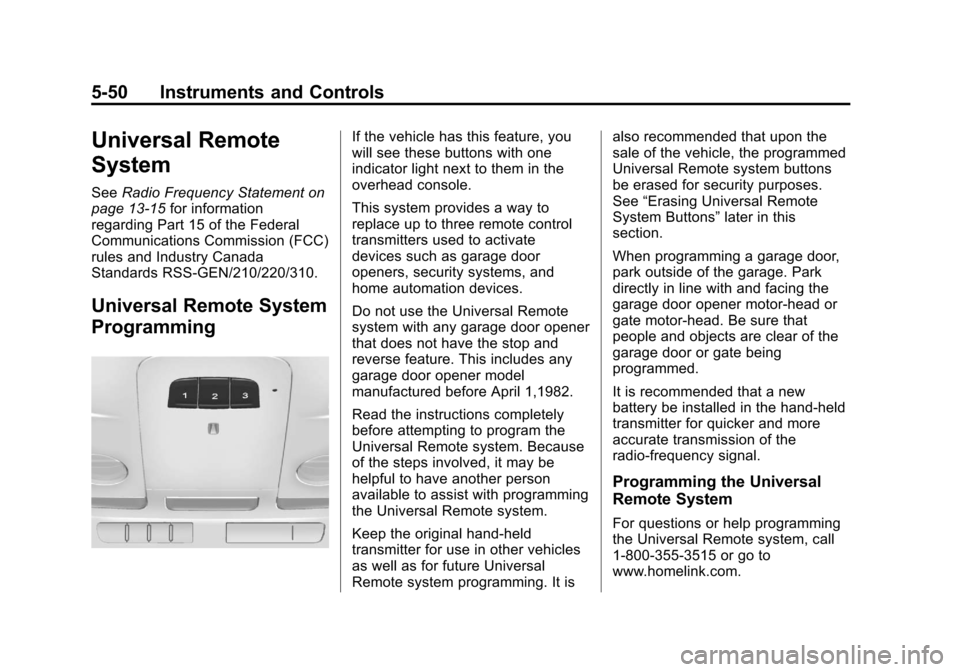
If the vehicle has this feature, you
will see these buttons with one
indicator light next to them in the
overhead console.
This system provides a way to
replace up to three remote control
transmitters used to activate
devices such as garage door
openers, security systems, and
home automation devices.
Do not use the Universal Remote
system with any garage door opener
that does not have the stop and
reverse feature. This includes any
garage door opener model
manufactured before April 1,1982.
Read the instructions completely
before attempting to program the
Universal Remote system. Because
of the steps involved, it may be
helpful to have another person
available to assist with programming
the Universal Remote system.
Keep the original hand-held
transmitter for use in other vehicles
as well as for future Universal
Remote system programming. It is also recommended that upon the
sale of the vehicle, the programmed
Universal Remote system buttons
be erased for security purposes.
See
“Erasing Universal Remote
System Buttons” later in this
section.
When programming a garage door,
park outside of the garage. Park
directly in line with and facing the
garage door opener motor-head or
gate motor-head. Be sure that
people and objects are clear of the
garage door or gate being
programmed.
It is recommended that a new
battery be installed in the hand-held
transmitter for quicker and more
accurate transmission of the
radio-frequency signal.
Programming the Universal
Remote System
For questions or help programming
the Universal Remote system, call
1-800-355-3515 or go to
www.homelink.com.