seat memory CADILLAC XTS 2013 1.G Owners Manual
[x] Cancel search | Manufacturer: CADILLAC, Model Year: 2013, Model line: XTS, Model: CADILLAC XTS 2013 1.GPages: 438, PDF Size: 7.4 MB
Page 7 of 438
Black plate (1,1)Cadillac XTS Owner Manual - 2013 - 1st - 4/13/12
In Brief 1-1
In Brief
Instrument Panel
Instrument Panel Overview . . . . 1-2
Initial Drive Information
Initial Drive Information . . . . . . . . 1-4
Remote Keyless Entry (RKE)System . . . . . . . . . . . . . . . . . . . . . . 1-4
Remote Vehicle Start . . . . . . . . . 1-4
Door Locks . . . . . . . . . . . . . . . . . . . 1-5
Trunk . . . . . . . . . . . . . . . . . . . . . . . . . 1-5
Windows . . . . . . . . . . . . . . . . . . . . . . 1-6
Seat Adjustment . . . . . . . . . . . . . . 1-6
Memory Features . . . . . . . . . . . . . 1-7
Second Row Seats . . . . . . . . . . . 1-7
Heated and Ventilated Seats . . . . . . . . . . . . . . . . . . . . . . . . 1-8
Head Restraint Adjustment . . . . 1-8
Safety Belts . . . . . . . . . . . . . . . . . . . 1-8
Passenger Sensing System . . . 1-9
Mirror Adjustment . . . . . . . . . . . . . 1-9 Steering Wheel
Adjustment . . . . . . . . . . . . . . . . . 1-10
Interior Lighting . . . . . . . . . . . . . . 1-10
Exterior Lighting . . . . . . . . . . . . . 1-11
Windshield Wiper/Washer . . . . 1-12
Climate Controls . . . . . . . . . . . . . 1-13
Transmission . . . . . . . . . . . . . . . . 1-15Vehicle Features
Radio(s) . . . . . . . . . . . . . . . . . . . . . 1-15
Satellite Radio . . . . . . . . . . . . . . . 1-16
Portable Audio Devices . . . . . . 1-16
Bluetooth
®. . . . . . . . . . . . . . . . . . . 1-17
Steering Wheel Controls . . . . . 1-17
Cruise Control . . . . . . . . . . . . . . . 1-18
Infotainment System . . . . . . . . . 1-18
Driver Information Center (DIC) . . . . . . . . . . . . . . . 1-18
Forward Collision Alert (FCA) System . . . . . . . . . . . . . . . . . . . . . 1-19
Lane Departure Warning (LDW) . . . . . . . . . . . . . 1-19 Side Blind Zone
Alert (SBZA) . . . . . . . . . . . . . . . 1-19
Rear Vision Camera (RVC) . . . . . . . . . . . . . 1-19
Ultrasonic Parking Assist . . . . 1-19
Active Emergency Braking
System . . . . . . . . . . . . . . . . . . . . . 1-20
Power Outlets . . . . . . . . . . . . . . . 1-20
Universal Remote System . . . 1-20
Sunroof . . . . . . . . . . . . . . . . . . . . . . 1-21
Performance and Maintenance
Traction Control System (TCS) . . . . . . . . . . . . . . 1-22
StabiliTrak
®System . . . . . . . . . 1-22
Tire Pressure Monitor . . . . . . . . 1-22
Tire Sealant and Compressor Kit . . . . . . . . . . . . . 1-23
Engine Oil Life System . . . . . . 1-23
Driving for Better Fuel Economy . . . . . . . . . . . . . . . . . . . 1-24
Roadside Service . . . . . . . . . . . . 1-24
OnStar
®. . . . . . . . . . . . . . . . . . . . . 1-24
Page 13 of 438
Black plate (7,1)Cadillac XTS Owner Manual - 2013 - 1st - 4/13/12
In Brief 1-7
.Press and hold the control
upward to raise or downward to
lower the height of the lumbar
support.
See Lumbar Adjustment on
page 3‑5.
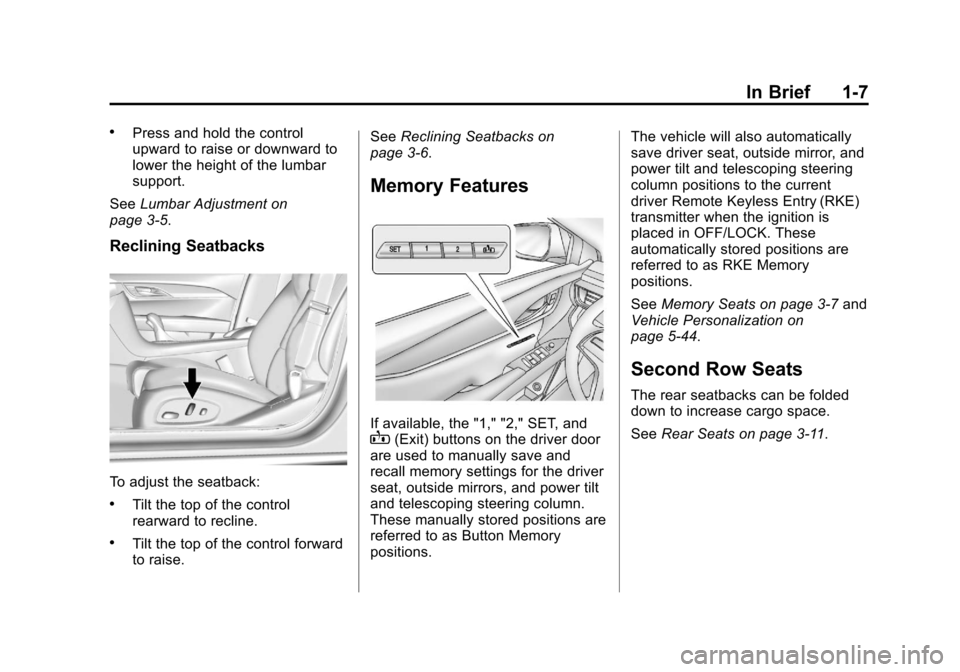
Reclining Seatbacks
To adjust the seatback:
.Tilt the top of the control
rearward to recline.
.Tilt the top of the control forward
to raise. See
Reclining Seatbacks on
page 3‑6.
Memory Features
If available, the "1," "2," SET, andB(Exit) buttons on the driver door
are used to manually save and
recall memory settings for the driver
seat, outside mirrors, and power tilt
and telescoping steering column.
These manually stored positions are
referred to as Button Memory
positions. The vehicle will also automatically
save driver seat, outside mirror, and
power tilt and telescoping steering
column positions to the current
driver Remote Keyless Entry (RKE)
transmitter when the ignition is
placed in OFF/LOCK. These
automatically stored positions are
referred to as RKE Memory
positions.
See
Memory Seats on page 3‑7 and
Vehicle Personalization on
page 5‑44.
Second Row Seats
The rear seatbacks can be folded
down to increase cargo space.
See Rear Seats on page 3‑11.
Page 33 of 438
Black plate (3,1)Cadillac XTS Owner Manual - 2013 - 1st - 4/13/12
Keys, Doors, and Windows 2-3
.If the transmitter is still not
working correctly, see your
dealer or a qualified technician
for service.
Remote Keyless Entry
(RKE) System Operation
The RKE transmitter functions may
work up to 60 m (195 ft) away from
the vehicle.
Other conditions, such as those
previously stated, can impact the
performance of the transmitter.
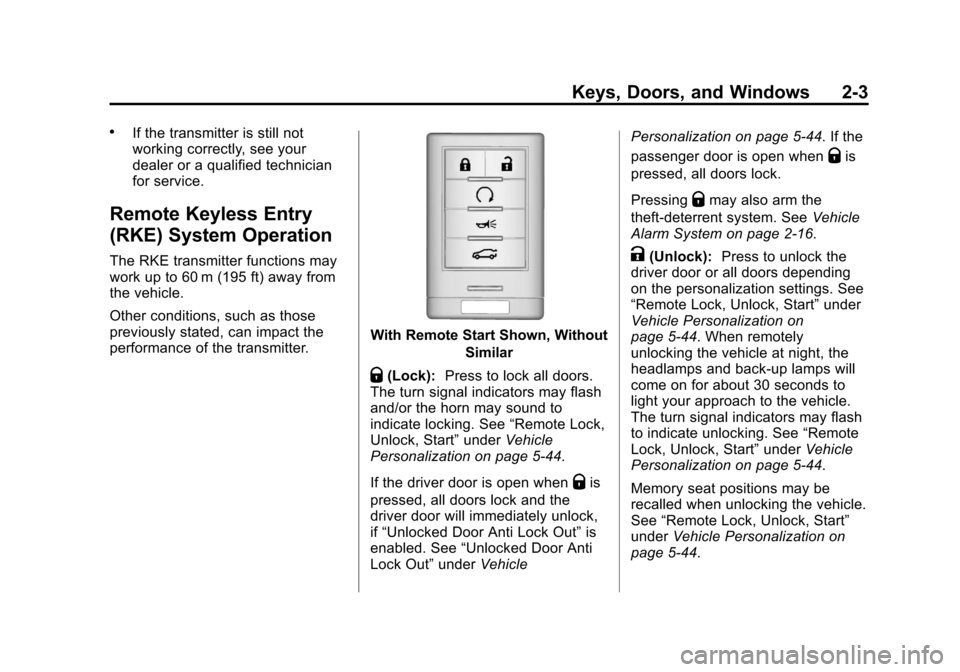
With Remote Start Shown, WithoutSimilar
Q(Lock):Press to lock all doors.
The turn signal indicators may flash
and/or the horn may sound to
indicate locking. See “Remote Lock,
Unlock, Start” underVehicle
Personalization on page 5‑44.
If the driver door is open when
Qis
pressed, all doors lock and the
driver door will immediately unlock,
if “Unlocked Door Anti Lock Out” is
enabled. See “Unlocked Door Anti
Lock Out” underVehicle Personalization on page 5‑44. If the
passenger door is open when
Qis
pressed, all doors lock.
Pressing
Qmay also arm the
theft-deterrent system. See Vehicle
Alarm System on page 2‑16.
K(Unlock): Press to unlock the
driver door or all doors depending
on the personalization settings. See
“Remote Lock, Unlock, Start” under
Vehicle Personalization on
page 5‑44. When remotely
unlocking the vehicle at night, the
headlamps and back-up lamps will
come on for about 30 seconds to
light your approach to the vehicle.
The turn signal indicators may flash
to indicate unlocking. See “Remote
Lock, Unlock, Start” underVehicle
Personalization on page 5‑44.
Memory seat positions may be
recalled when unlocking the vehicle.
See “Remote Lock, Unlock, Start”
under Vehicle Personalization on
page 5‑44.
Page 49 of 438
Black plate (19,1)Cadillac XTS Owner Manual - 2013 - 1st - 4/13/12
Keys, Doors, and Windows 2-19
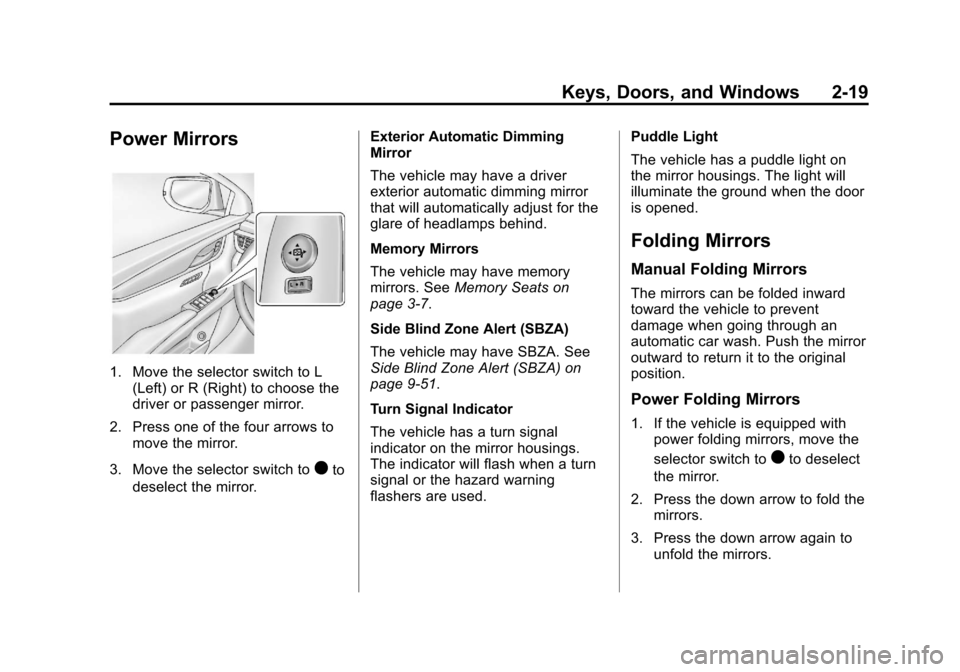
Power Mirrors
1. Move the selector switch to L(Left) or R (Right) to choose the
driver or passenger mirror.
2. Press one of the four arrows to move the mirror.
3. Move the selector switch to
)to
deselect the mirror. Exterior Automatic Dimming
Mirror
The vehicle may have a driver
exterior automatic dimming mirror
that will automatically adjust for the
glare of headlamps behind.
Memory Mirrors
The vehicle may have memory
mirrors. See
Memory Seats on
page 3‑7.
Side Blind Zone Alert (SBZA)
The vehicle may have SBZA. See
Side Blind Zone Alert (SBZA) on
page 9‑51.
Turn Signal Indicator
The vehicle has a turn signal
indicator on the mirror housings.
The indicator will flash when a turn
signal or the hazard warning
flashers are used. Puddle Light
The vehicle has a puddle light on
the mirror housings. The light will
illuminate the ground when the door
is opened.
Folding Mirrors
Manual Folding Mirrors
The mirrors can be folded inward
toward the vehicle to prevent
damage when going through an
automatic car wash. Push the mirror
outward to return it to the original
position.
Power Folding Mirrors
1. If the vehicle is equipped with
power folding mirrors, move the
selector switch to
)to deselect
the mirror.
2. Press the down arrow to fold the mirrors.
3. Press the down arrow again to unfold the mirrors.
Page 57 of 438
Black plate (1,1)Cadillac XTS Owner Manual - 2013 - 1st - 4/13/12
Seats and Restraints 3-1
Seats and
Restraints
Head Restraints
Head Restraints . . . . . . . . . . . . . . . 3-2
Front Seats
Power Seat Adjustment . . . . . . . 3-4
Lumbar Adjustment . . . . . . . . . . . 3-5
Thigh Support Adjustment . . . . 3-5
Reclining Seatbacks . . . . . . . . . . 3-6
Memory Seats . . . . . . . . . . . . . . . . 3-7
Heated and Ventilated FrontSeats . . . . . . . . . . . . . . . . . . . . . . . . 3-9
Rear Seats
Rear Seats . . . . . . . . . . . . . . . . . . 3-11
Heated Rear Seats . . . . . . . . . . 3-12
Rear SeatPass-Through Door . . . . . . . . 3-13
Safety Belts
Safety Belts . . . . . . . . . . . . . . . . . . 3-14
How to Wear Safety BeltsProperly . . . . . . . . . . . . . . . . . . . . 3-15
Lap-Shoulder Belt . . . . . . . . . . . 3-16 Safety Belt Use During
Pregnancy . . . . . . . . . . . . . . . . . . 3-20
Safety Belt Extender . . . . . . . . . 3-20
Safety System Check . . . . . . . . 3-21
Safety Belt Care . . . . . . . . . . . . . 3-21
Replacing Safety Belt System Parts after a Crash . . . . . . . . . 3-21
Airbag System
Airbag System (Sedan) . . . . . . 3-22
Airbag System (ProfessionalVehicle) . . . . . . . . . . . . . . . . . . . . 3-24
Where Are the Airbags? (Sedan) . . . . . . . . . . . . . . . . . . . . 3-26
Where Are the Airbags? (Professional Vehicle) . . . . . . 3-28
When Should an Airbag
Inflate? (Sedan) . . . . . . . . . . . . 3-30
When Should an Airbag Inflate? (Professional
Vehicle) . . . . . . . . . . . . . . . . . . . . 3-31
What Makes an Airbag Inflate? . . . . . . . . . . . . . . . . . . . . . 3-32
How Does an Airbag Restrain? . . . . . . . . . . . . . . . . . . . 3-32
What Will You See after an Airbag Inflates? . . . . . . . . . . . . 3-32 Passenger Sensing
System . . . . . . . . . . . . . . . . . . . . . 3-34
Servicing the Airbag-Equipped Vehicle . . . . . . . . . . . . . . . . . . . . . 3-38
Adding Equipment to the
Airbag-Equipped Vehicle . . . 3-39
Airbag System Check . . . . . . . . 3-40
Replacing Airbag System Parts after a Crash . . . . . . . . . 3-40Child Restraints
Older Children . . . . . . . . . . . . . . . 3-41
Infants and YoungChildren . . . . . . . . . . . . . . . . . . . . 3-43
Child Restraint Systems . . . . . 3-45
Where to Put the Restraint . . . 3-47
Lower Anchors and Tethers for Children (LATCH
System) . . . . . . . . . . . . . . . . . . . . 3-48
Replacing LATCH System Parts After a Crash . . . . . . . . . 3-54
Securing Child Restraints (Rear Seat) . . . . . . . . . . . . . . . . . 3-54
Securing Child Restraints (Front Passenger Seat) . . . . 3-57
Page 63 of 438
Black plate (7,1)Cadillac XTS Owner Manual - 2013 - 1st - 4/13/12
Seats and Restraints 3-7
Memory Seats
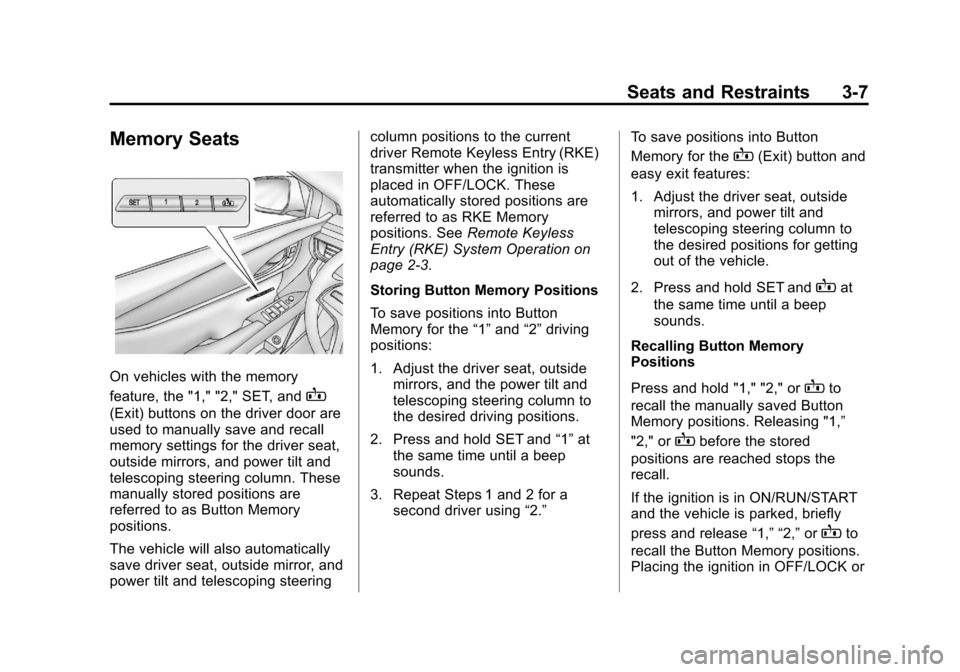
On vehicles with the memory
feature, the "1," "2," SET, and
B
(Exit) buttons on the driver door are
used to manually save and recall
memory settings for the driver seat,
outside mirrors, and power tilt and
telescoping steering column. These
manually stored positions are
referred to as Button Memory
positions.
The vehicle will also automatically
save driver seat, outside mirror, and
power tilt and telescoping steeringcolumn positions to the current
driver Remote Keyless Entry (RKE)
transmitter when the ignition is
placed in OFF/LOCK. These
automatically stored positions are
referred to as RKE Memory
positions. See
Remote Keyless
Entry (RKE) System Operation on
page 2‑3.
Storing Button Memory Positions
To save positions into Button
Memory for the “1”and “2”driving
positions:
1. Adjust the driver seat, outside mirrors, and the power tilt and
telescoping steering column to
the desired driving positions.
2. Press and hold SET and “1”at
the same time until a beep
sounds.
3. Repeat Steps 1 and 2 for a second driver using “2.”To save positions into Button
Memory for the
B(Exit) button and
easy exit features:
1. Adjust the driver seat, outside mirrors, and power tilt and
telescoping steering column to
the desired positions for getting
out of the vehicle.
2. Press and hold SET and
Bat
the same time until a beep
sounds.
Recalling Button Memory
Positions
Press and hold "1," "2," or
Bto
recall the manually saved Button
Memory positions. Releasing "1,”
"2," or
Bbefore the stored
positions are reached stops the
recall.
If the ignition is in ON/RUN/START
and the vehicle is parked, briefly
press and release “1,” “2,”or
Bto
recall the Button Memory positions.
Placing the ignition in OFF/LOCK or
Page 64 of 438
Black plate (8,1)Cadillac XTS Owner Manual - 2013 - 1st - 4/13/12
3-8 Seats and Restraints
moving the shift lever out of P (Park)
before the stored positions are
reached stops the recall.
If something has blocked the driver
seat and/or power tilt and
telescoping steering column while
recalling a memory position, the
recall may stop. Remove the
obstruction; then press and hold the
appropriate manual control for the
memory item that is not recalling for
two seconds. Try recalling the
memory position again by pressing
the appropriate memory button.
If the memory position is still not
recalling, see your dealer for
service.
Storing RKE Memory Positions
Every time the ignition is placed in
OFF/LOCK, the vehicle will
automatically store the driver seat,
outside mirrors, and power tilt and
telescoping steering column
positions to the RKE transmitter
used to start the vehicle. These
positions are called RKE Memory
positions and may be different thanthe previously mentioned Button
Memory positions saved to the
“1,”
“2,” and
Bbuttons.
Recalling RKE Memory Positions
(Auto Memory Recall)
The Auto (Automatic) Memory
Recall feature automatically recalls
the previously stored RKE Memory
positions for the current driver when
entering the vehicle.
Depending upon the Auto Memory
Recall features enabled in the
vehicle personalization menu, RKE
Memory positions are recalled in the
following ways:
To activate the recall when On -
Driver Door Open is selected in the
personalization menu, do one of the
following:
.PressKon the RKE transmitter
and open the driver door.
.PressKon the RKE transmitter
when the driver door is
already open.
.Press the lock/unlock button on
the outside driver door handle
and open the driver door. The
RKE transmitter must be present
for the recall to activate.
To activate the recall when On - At
Ignition On is selected in the vehicle
personalization menu:
.Place the ignition in ON/RUN/
START.
See Vehicle Personalization on
page 5‑44.
To stop recall movement, press one
of the memory, power mirror or
power seat controls; or press the
power tilt and telescoping steering
column control.
If something has blocked the driver
seat and/or the power tilt and
telescoping steering column while
recalling a memory position, the
recall may stop. Remove the
obstruction; then press and hold the
appropriate manual control for the
memory item that is not recalling for
two seconds. Try recalling the
memory position again by opening
Page 65 of 438
Black plate (9,1)Cadillac XTS Owner Manual - 2013 - 1st - 4/13/12
Seats and Restraints 3-9
the driver door and pressingKon
the RKE transmitter. If the memory
position is still not recalling, see
your dealer for service.
Easy Exit Recall
If programmed on in the vehicle
personalization menu, the easy exit
feature automatically moves the
driver seat, outside mirrors, and
power tilt and telescoping steering
column to the Button Memory
positions saved to the
B(Exit)
button. See “Storing Button Memory
Positions” in this section and
Vehicle Personalization on
page 5‑44.
Easy exit recall automatically
activates when one of the following
occurs:
.The vehicle is turned off and the
driver door is opened within a
short time.
.The vehicle is turned off with the
driver door open. If something has blocked the driver
seat and/or power tilt and
telescoping steering column while
recalling the exit position, the recall
may stop. Remove the obstruction;
then press and hold the appropriate
manual control for the exit feature
not recalling for two seconds. Try
recalling the exit position again.
If the exit position is still not
recalling, see your dealer for
service.
Heated and Ventilated
Front Seats
{WARNING
If you cannot feel temperature
change or pain to the skin, the
seat heater may cause burns. To
reduce the risk of burns, people
with such a condition should use
care when using the seat heater,
especially for long periods of
time. Do not place anything on
(Continued)
WARNING (CONTINUED)
the seat that insulates against
heat, such as a blanket, cushion,
cover, or similar item. This may
cause the seat heater to
overheat. An overheated seat
heater may cause a burn or may
damage the seat.
Page 152 of 438
Black plate (32,1)Cadillac XTS Owner Manual - 2013 - 1st - 4/13/12
5-32 Instruments and Controls
To adjust the HUD image:
1. Adjust the driver seat.
2. Start the engine.
Use the following settings to adjust
the HUD.
wHUDx:Press to center the
HUD image. The HUD image can
only be adjusted up and down, not
side to side.
INFO: Press to select the display
view. Release when the desired
display is shown on the HUD.
If vehicle messages are displayed,
pressing the DIC select button may
clear the message. See Driver
Information Center (DIC) on
page 5‑27.
Brightness: Press up or down and
hold to brighten or dim the display.
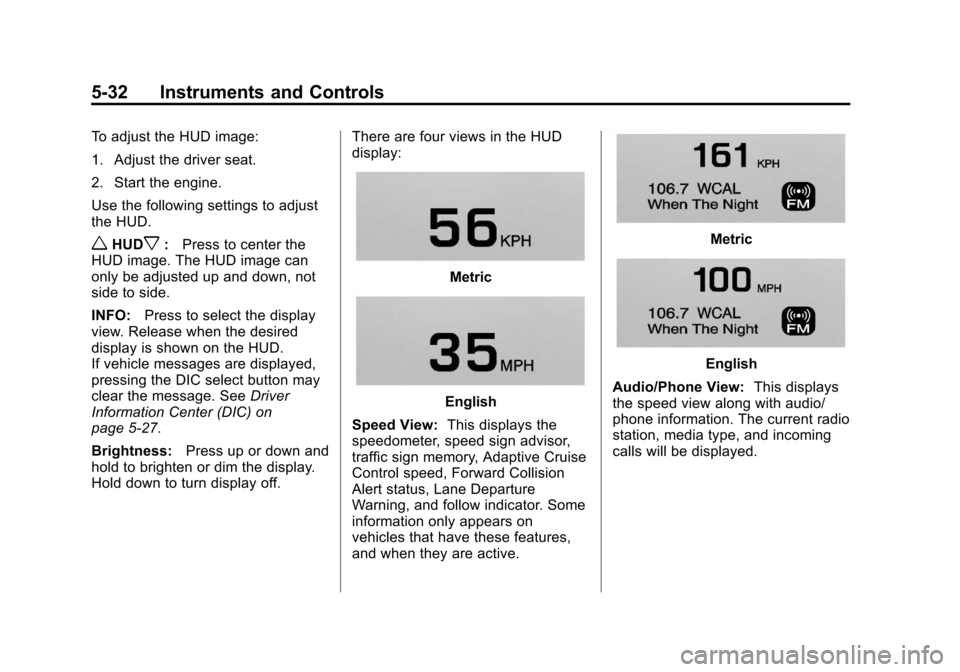
Hold down to turn display off. There are four views in the HUD
display:
Metric
English
Speed View: This displays the
speedometer, speed sign advisor,
traffic sign memory, Adaptive Cruise
Control speed, Forward Collision
Alert status, Lane Departure
Warning, and follow indicator. Some
information only appears on
vehicles that have these features,
and when they are active.
Metric
English
Audio/Phone View: This displays
the speed view along with audio/
phone information. The current radio
station, media type, and incoming
calls will be displayed.
Page 166 of 438
Black plate (46,1)Cadillac XTS Owner Manual - 2013 - 1st - 4/13/12
5-46 Instruments and Controls
.Go Notifier
.Side Blind Zone Alert
Alert Type
This feature will set crash alerts to
beeps or seat vibrations. This
setting affects all crash alerts
including Forward Collision, Lane
Departure Warning, Adaptive Cruise
Control, Parking Assist, and
Backing Warning alerts.
Press Alert Type. Press to select
Beeps or Safety Alert Seat. Press
0
to go back to the last menu.
Auto Collision Preparation
This feature will turn on or off the
Forward Collision Alert feature as
well as the Automatic Braking
capability of the Auto Collision
Preparation feature. With the "Alert
and Brake" setting, both Forward
Collision Alert as well as the
Automatic Braking capability of the
Auto Collision Preparation feature
are available. The "Alert" setting
disables most automatic braking
functions of the Auto Collision Preparation feature. Some
last-second automatic braking
capability is still provided with the
"Alert" setting, but it is much less
likely to be triggered by most driving
conditions. Off disables all Forward
Collision Alert and Automatic
Braking capabilities of the Auto
Collision Preparation feature. See
Active Emergency Braking System
on page 9‑49.
Press Auto Collision Preparation.
Press to select Off, Alert & Brake,
or Alert. Press0to go back to the
last menu.
Go Notifier
This feature will give a reminder that
Adaptive Cruise Control provides
when it has brought the vehicle to a
complete stop behind another
stopping vehicle, and then that
vehicle drives on.
Press Go Notifier. Press to select
Off or On. Press
0to go back to the
last menu. Side Blind Zone Alert
This allows the Side Blind Zone
Alert feature to be turned on or off.
Press Side Blind Zone Alert. Press
to select Off or On. Press
0to go
back to the last menu.
Comfort and Convenience
Select the Comfort and
Convenience menu and the
following will be displayed:
.Auto Memory Recall
.Easy Exit Options
.Chime Volume
.Reverse Tilt Mirror
.Personalization by Driver
Auto Memory Recall
This allows the Auto Memory Recall
feature to be turned on or off.
Press Auto Memory Recall. Press to
select Off, On, On - Driver Door
Open, or On - At Ignition On. See
Memory Seats on page 3‑7 or press
0to go back to the last menu.