battery CADILLAC XTS 2016 1.G Owners Manual
[x] Cancel search | Manufacturer: CADILLAC, Model Year: 2016, Model line: XTS, Model: CADILLAC XTS 2016 1.GPages: 320, PDF Size: 2.07 MB
Page 28 of 320
Cadillac XTS Owner Manual (GMNA-Localizing-MidEast-9369806) - 2016 -
crc - 6/24/15
Keys, Doors, and Windows 27
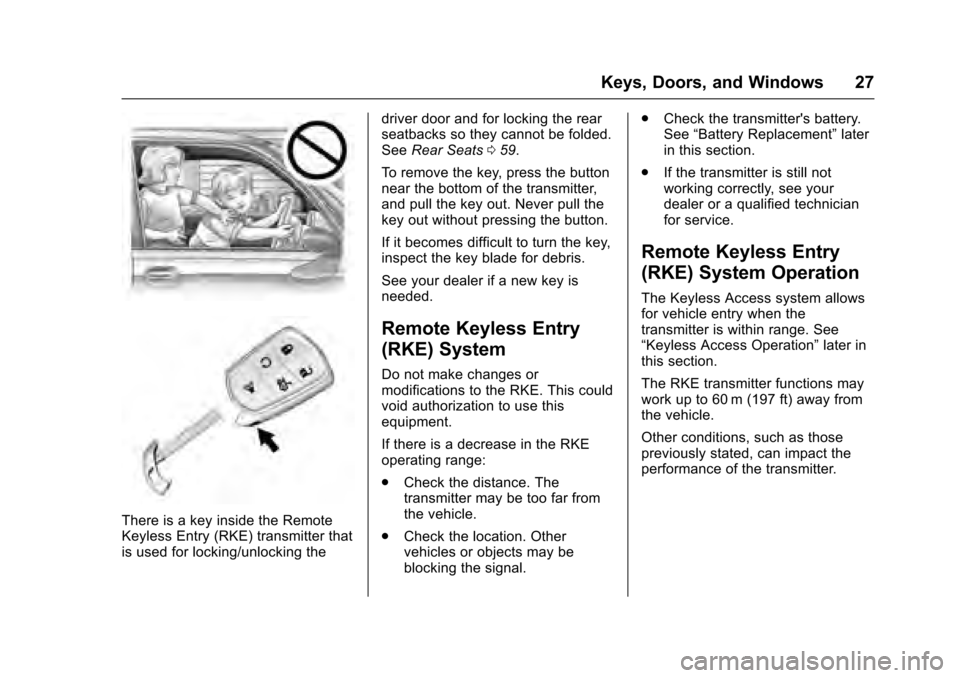
There is a key inside the Remote
Keyless Entry (RKE) transmitter that
is used for locking/unlocking thedriver door and for locking the rear
seatbacks so they cannot be folded.
See
Rear Seats 059.
To remove the key, press the button
near the bottom of the transmitter,
and pull the key out. Never pull the
key out without pressing the button.
If it becomes difficult to turn the key,
inspect the key blade for debris.
See your dealer if a new key is
needed.
Remote Keyless Entry
(RKE) System
Do not make changes or
modifications to the RKE. This could
void authorization to use this
equipment.
If there is a decrease in the RKE
operating range:
. Check the distance. The
transmitter may be too far from
the vehicle.
. Check the location. Other
vehicles or objects may be
blocking the signal. .
Check the transmitter's battery.
See “Battery Replacement” later
in this section.
. If the transmitter is still not
working correctly, see your
dealer or a qualified technician
for service.
Remote Keyless Entry
(RKE) System Operation
The Keyless Access system allows
for vehicle entry when the
transmitter is within range. See
“Keyless Access Operation” later in
this section.
The RKE transmitter functions may
work up to 60 m (197 ft) away from
the vehicle.
Other conditions, such as those
previously stated, can impact the
performance of the transmitter.
Page 31 of 320
Cadillac XTS Owner Manual (GMNA-Localizing-MidEast-9369806) - 2016 -
crc - 6/24/15
30 Keys, Doors, and Windows
transmitter inside the vehicle. Do
not leave the RKE transmitter in an
unattended vehicle.
To customize the doors to
automatically lock when exiting the
vehicle, seeVehicle Personalization
0 145.
Temporary Disable of Passive
Locking Feature
Temporarily disable the passive
locking by pressing and holding
K
on the interior door switch with a
door open for at least four seconds,
or until three chimes are heard.
Passive locking will then remain
disabled until
Qon the interior door
is pressed, or until the vehicle is
turned on.
Keyless Trunk Opening
Press the touch pad on the rear of
the trunk above the license plate to
open the trunk when the RKE
transmitter is in range.
Keyed Access
For accessing a vehicle with a dead
transmitter battery, see Door Locks
0 33.
Programming Transmitters to
the Vehicle
Only RKE transmitters programmed
to the vehicle will work. If a
transmitter is lost or stolen, a
replacement can be purchased and
programmed through your dealer.
When the replacement transmitter is
programmed to this vehicle, all
remaining transmitters must also be
reprogrammed. Any lost or stolen
transmitters will no longer work
once the new transmitter is
programmed. Each vehicle can
have up to eight transmitters
programmed to it. See your dealer
to program transmitters to the
vehicle.
Starting the Vehicle with a Low
Transmitter Battery
If the transmitter battery is weak,
or if there is interference with the
signal, the DIC may display NO
REMOTE DETECTED or NO
REMOTE KEY WAS DETECTED
PLACE KEY IN TRANSMITTER
POCKET THEN START YOUR VEHICLE when you try to start the
vehicle. See
Key and Lock
Messages 0138.
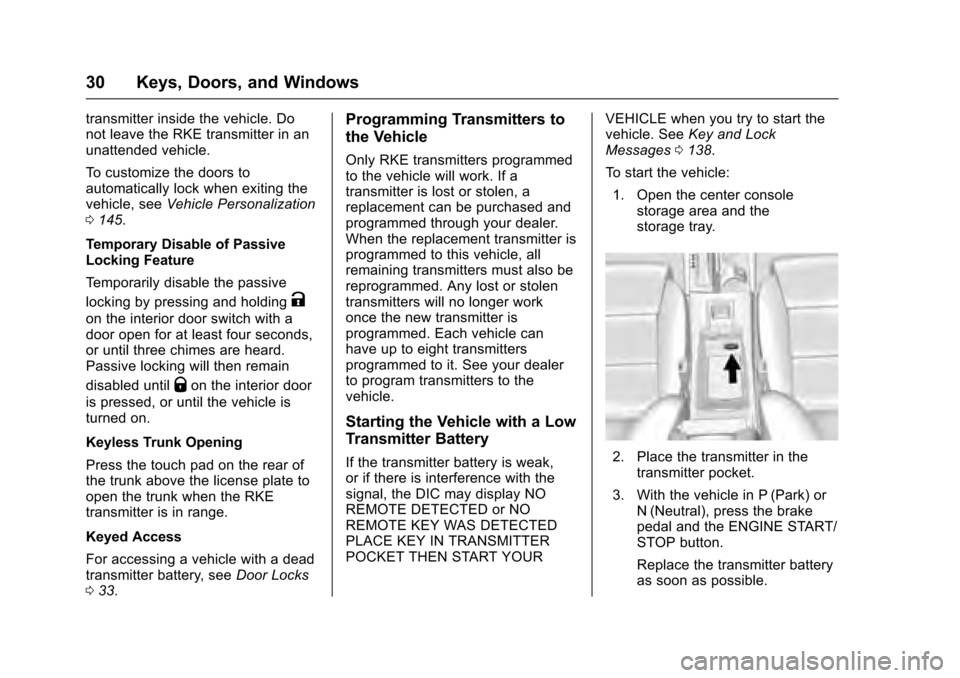
To start the vehicle: 1. Open the center console storage area and the
storage tray.2. Place the transmitter in the
transmitter pocket.
3. With the vehicle in P (Park) or N (Neutral), press the brake
pedal and the ENGINE START/
STOP button.
Replace the transmitter battery
as soon as possible.
Page 32 of 320
Cadillac XTS Owner Manual (GMNA-Localizing-MidEast-9369806) - 2016 -
crc - 6/24/15
Keys, Doors, and Windows 31
Battery ReplacementCaution
When replacing the battery, do
not touch any of the circuitry on
the transmitter. Static from your
body could damage the
transmitter.
Replace the battery if the REPLACE
BATTERY IN REMOTE KEY
message displays in the DIC.
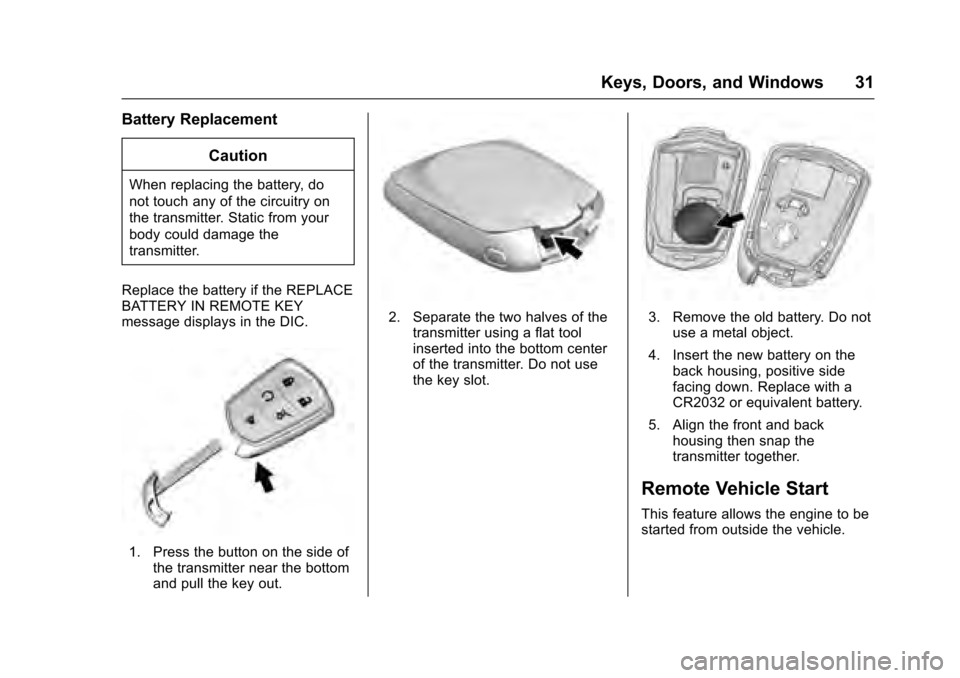
1. Press the button on the side of the transmitter near the bottom
and pull the key out.
2. Separate the two halves of the
transmitter using a flat tool
inserted into the bottom center
of the transmitter. Do not use
the key slot.3. Remove the old battery. Do notuse a metal object.
4. Insert the new battery on the back housing, positive side
facing down. Replace with a
CR2032 or equivalent battery.
5. Align the front and back housing then snap the
transmitter together.
Remote Vehicle Start
This feature allows the engine to be
started from outside the vehicle.
Page 46 of 320
Cadillac XTS Owner Manual (GMNA-Localizing-MidEast-9369806) - 2016 -
crc - 6/24/15
Keys, Doors, and Windows 45
Programming the Power
Windows
If the vehicle battery has been
recharged or disconnected, or is not
working, the front power windows
will need to be reprogrammed for
the express-up feature to work.
Before reprogramming, replace or
recharge the vehicle's battery.
To program:1. With the ignition in ON/RUN or ACC/ACCESSORY, or when
RAP is active, close all doors.
2. Press and hold the power window switch until the window
is fully open.
3. Pull the power window switch up until the window is fully
closed.
4. Continue holding the switch up for approximately two seconds
after the window is completely
closed.
The window is now reprogrammed.
Repeat the process for the other
windows.
Window Operation from
Outside the Vehicle
The vehicle may be equipped with a
remote venting window feature.
As you approach the vehicle,
press
Kon the Remote Keyless
Entry (RKE) transmitter long enough
for the windows to start lowering to
the full open position.
Pressing the
Kagain will cause
window movement to stop.
This feature may be turned off by
your dealer.
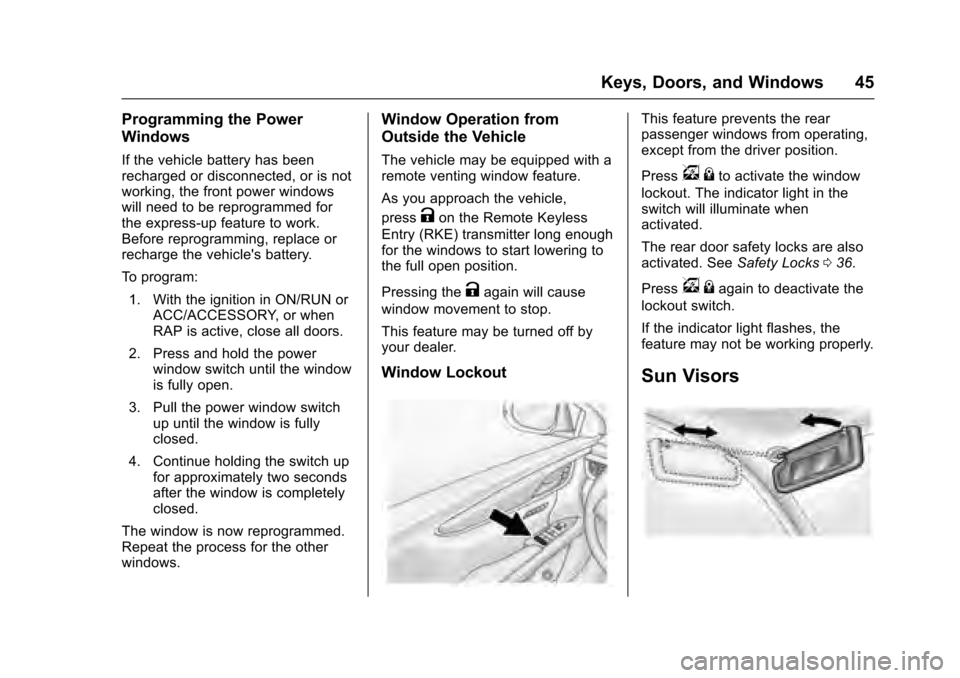
Window Lockout
This feature prevents the rear
passenger windows from operating,
except from the driver position.
Press
v {to activate the window
lockout. The indicator light in the
switch will illuminate when
activated.
The rear door safety locks are also
activated. See Safety Locks036.
Press
v {again to deactivate the
lockout switch.
If the indicator light flashes, the
feature may not be working properly.
Sun Visors
Page 79 of 320
Cadillac XTS Owner Manual (GMNA-Localizing-MidEast-9369806) - 2016 -
crc - 6/24/15
78 Seats and Restraints
happens, the off indicator will be
lit, and the airbag readiness light
on the instrument panel will also
be lit.
. Liquid pooled on the seat that
has not soaked in may make it
more likely that the passenger
sensing system will turn on the
passenger frontal airbag and
passenger knee airbag while a
child restraint or child occupant
is on the seat. If the passenger
frontal airbag and passenger
knee airbag are turned on, the
on indicator will be lit.
If the passenger seat gets wet, dry
the seat immediately. If the airbag
readiness light is lit, do not install a
child restraint or allow anyone to
occupy the seat. See Airbag
Readiness Light 0118 for important
safety information.
The on indicator may be lit if an
object, such as a briefcase,
handbag, grocery bag, laptop,
or other electronic device, is put on
an unoccupied seat. If this is not
desired, remove the object from
the seat.{Warning
Stowing of articles under the
passenger seat or between the
passenger seat cushion and
seatback may interfere with the
proper operation of the passenger
sensing system.
Servicing the
Airbag-Equipped Vehicle
Airbags affect how the vehicle
should be serviced. There are parts
of the airbag system in several
places around the vehicle. Your
dealer and the service manual have
information about servicing the
vehicle and the airbag system.
{Warning
For up to 10 seconds after the
vehicle is turned off and the
battery is disconnected, an airbag
can still inflate during improper
service. You can be injured if you
(Continued)
Warning (Continued)
are close to an airbag when it
inflates. Avoid yellow connectors.
They are probably part of the
airbag system. Be sure to follow
proper service procedures, and
make sure the person performing
work for you is qualified to do so.
Adding Equipment to the
Airbag-Equipped Vehicle
Adding accessories that change the
vehicle's frame, bumper system,
height, front end, or side sheet
metal, may keep the airbag system
from working properly. The
operation of the airbag system can
also be affected by changing or
moving any parts of the front seats,
safety belts, the airbag sensing and
diagnostic module, steering wheel,
instrument panel, any airbag
module, ceiling or pillar garnish trim,
overhead console, front sensors,
side impact sensors, or airbag
wiring.
Page 103 of 320
Cadillac XTS Owner Manual (GMNA-Localizing-MidEast-9369806) - 2016 -
crc - 6/24/15
102 Instruments and Controls
Instruments and
Controls
Controls
Steering Wheel Adjustment . . . 103
Steering Wheel Controls . . . . . . 103
Heated Steering Wheel . . . . . . . 103
Horn . . . . . . . . . . . . . . . . . . . . . . . . . . 104
Windshield Wiper/Washer . . . . 104
Compass . . . . . . . . . . . . . . . . . . . . . 105
Clock . . . . . . . . . . . . . . . . . . . . . . . . . 106
Power Outlets . . . . . . . . . . . . . . . . 106
Wireless Charging . . . . . . . . . . . . 108
Cigarette Lighter . . . . . . . . . . . . . . 109
Ashtrays . . . . . . . . . . . . . . . . . . . . . . 109
Warning Lights, Gauges, and
Indicators
Warning Lights, Gauges, andIndicators . . . . . . . . . . . . . . . . . . . 110
Instrument Cluster . . . . . . . . . . . . 111
Speedometer . . . . . . . . . . . . . . . . . 114
Odometer . . . . . . . . . . . . . . . . . . . . . 115
Trip Odometer . . . . . . . . . . . . . . . . 115
Tachometer . . . . . . . . . . . . . . . . . . . 115
Fuel Gauge . . . . . . . . . . . . . . . . . . . 115
Engine Coolant Temperature
Gauge . . . . . . . . . . . . . . . . . . . . . . 116
Safety Belt Reminders . . . . . . . . 117 Airbag Readiness Light . . . . . . . 118
Passenger Airbag Status
Indicator . . . . . . . . . . . . . . . . . . . . . 118
Charging System Light . . . . . . . 119
Malfunction Indicator Lamp (Check Engine Light) . . . . . . . . 119
Brake System Warning Light . . . . . . . . . . . . . . . . . . . . . . . . 121
Electric Parking Brake Light . . . . . . . . . . . . . . . . . . . . . . . . 122
Service Electric Parking Brake Light . . . . . . . . . . . . . . . . . . . . . . . . 122
Antilock Brake System (ABS) Warning Light . . . . . . . . . . . . . . . 122
Lane Departure Warning (LDW) Light . . . . . . . . . . . . . . . . . 123
Vehicle Ahead Indicator . . . . . . 123
Traction Off Light . . . . . . . . . . . . . 123
StabiliTrak
®OFF Light . . . . . . . . 124
Traction Control System (TCS)/ StabiliTrak
®Light . . . . . . . . . . . 124
Engine Coolant Temperature Warning Light . . . . . . . . . . . . . . . 124
Tire Pressure Light . . . . . . . . . . . 125
Engine Oil Pressure Light . . . . 125
Low Fuel Warning Light . . . . . . 126
Security Light . . . . . . . . . . . . . . . . . 126
High-Beam On Light . . . . . . . . . . 126
Adaptive Forward Lighting (AFL) Light . . . . . . . . . . . . . . . . . . 127
Lamps On Reminder . . . . . . . . . 127 Cruise Control Light . . . . . . . . . . 127
Door Ajar Light . . . . . . . . . . . . . . . 127
Information Displays
Driver Information
Center (DIC) . . . . . . . . . . . . . . . . 128
Head-Up Display (HUD) . . . . . . 131
Vehicle Messages
Vehicle Messages . . . . . . . . . . . . 134
Battery Voltage and Charging Messages . . . . . . . . . . . . . . . . . . . 135
Brake System Messages . . . . . 135
Compass Messages . . . . . . . . . . 136
Cruise Control Messages . . . . . 136
Door Ajar Messages . . . . . . . . . . 136
Engine Cooling System Messages . . . . . . . . . . . . . . . . . . . 137
Engine Oil Messages . . . . . . . . . 137
Engine Power Messages . . . . . 138
Fuel System Messages . . . . . . . 138
Key and Lock Messages . . . . . 138
Lamp Messages . . . . . . . . . . . . . . 139
Object Detection System Messages . . . . . . . . . . . . . . . . . . . 139
Ride Control System Messages . . . . . . . . . . . . . . . . . . . 141
Airbag System Messages . . . . 142
Security Messages . . . . . . . . . . . 142
Service Vehicle Messages . . . . 142
Page 120 of 320
Cadillac XTS Owner Manual (GMNA-Localizing-MidEast-9369806) - 2016 -
crc - 6/24/15
Instruments and Controls 119
If, after several seconds, both status
indicator lights remain on, or if there
are no lights at all, there may be a
problem with the lights or the
passenger sensing system. See
your dealer for service.
{Warning
If the airbag readiness light ever
comes on and stays on, it means
that something may be wrong
with the airbag system. To help
avoid injury to yourself or others,
have the vehicle serviced right
away. SeeAirbag Readiness
Light 0118 for more information,
including important safety
information.
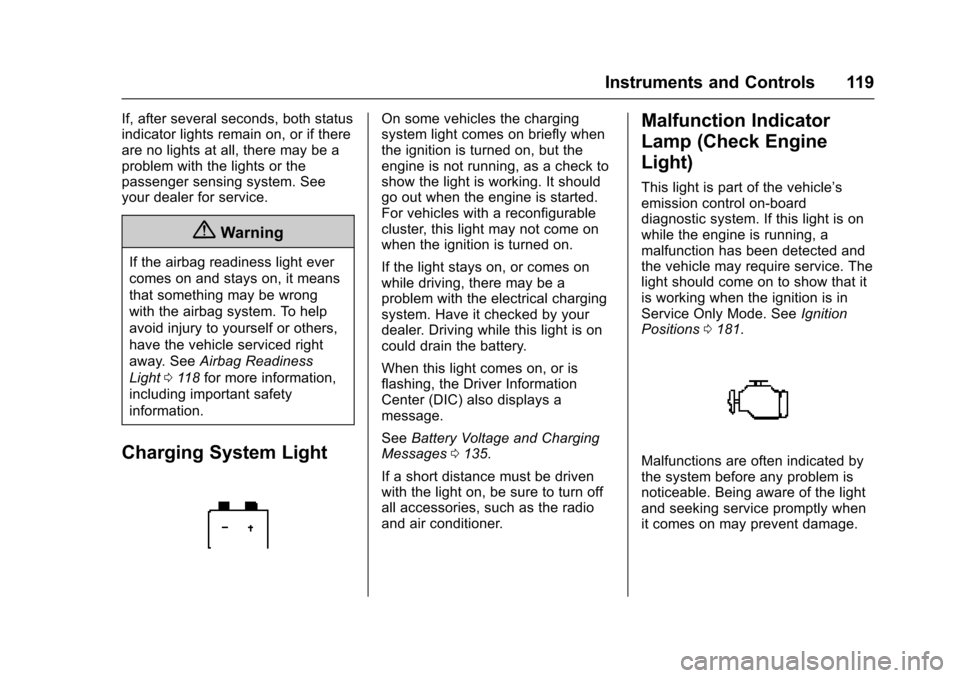
Charging System Light
On some vehicles the charging
system light comes on briefly when
the ignition is turned on, but the
engine is not running, as a check to
show the light is working. It should
go out when the engine is started.
For vehicles with a reconfigurable
cluster, this light may not come on
when the ignition is turned on.
If the light stays on, or comes on
while driving, there may be a
problem with the electrical charging
system. Have it checked by your
dealer. Driving while this light is on
could drain the battery.
When this light comes on, or is
flashing, the Driver Information
Center (DIC) also displays a
message.
See Battery Voltage and Charging
Messages 0135.
If a short distance must be driven
with the light on, be sure to turn off
all accessories, such as the radio
and air conditioner.Malfunction Indicator
Lamp (Check Engine
Light)
This light is part of the vehicle’s
emission control on-board
diagnostic system. If this light is on
while the engine is running, a
malfunction has been detected and
the vehicle may require service. The
light should come on to show that it
is working when the ignition is in
Service Only Mode. See Ignition
Positions 0181.
Malfunctions are often indicated by
the system before any problem is
noticeable. Being aware of the light
and seeking service promptly when
it comes on may prevent damage.
Page 122 of 320
Cadillac XTS Owner Manual (GMNA-Localizing-MidEast-9369806) - 2016 -
crc - 6/24/15
Instruments and Controls 121
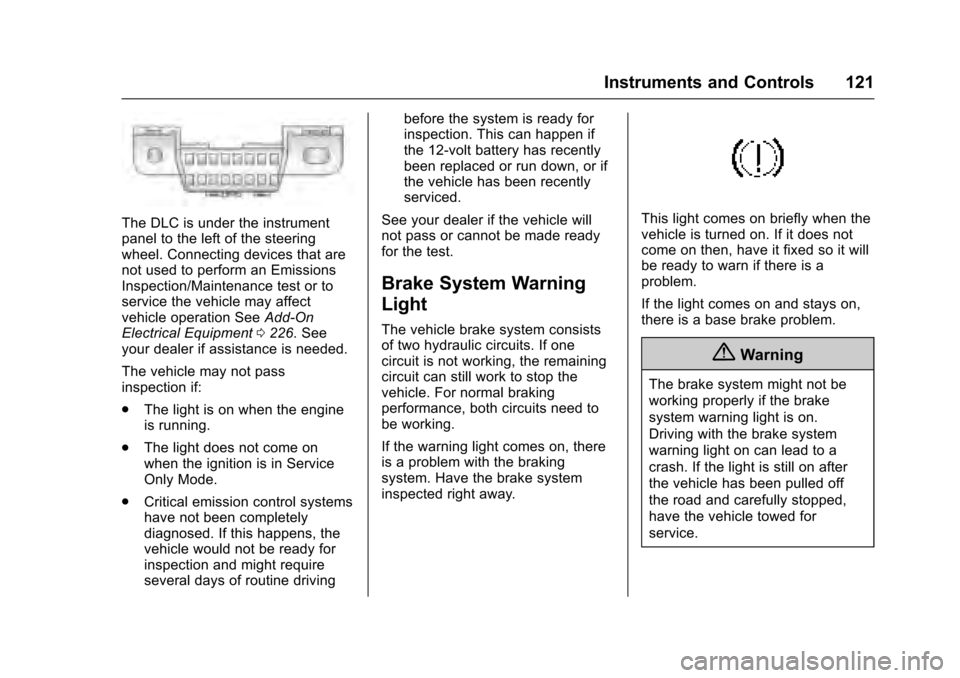
The DLC is under the instrument
panel to the left of the steering
wheel. Connecting devices that are
not used to perform an Emissions
Inspection/Maintenance test or to
service the vehicle may affect
vehicle operation SeeAdd-On
Electrical Equipment 0226. See
your dealer if assistance is needed.
The vehicle may not pass
inspection if:
. The light is on when the engine
is running.
. The light does not come on
when the ignition is in Service
Only Mode.
. Critical emission control systems
have not been completely
diagnosed. If this happens, the
vehicle would not be ready for
inspection and might require
several days of routine driving before the system is ready for
inspection. This can happen if
the 12-volt battery has recently
been replaced or run down, or if
the vehicle has been recently
serviced.
See your dealer if the vehicle will
not pass or cannot be made ready
for the test.
Brake System Warning
Light
The vehicle brake system consists
of two hydraulic circuits. If one
circuit is not working, the remaining
circuit can still work to stop the
vehicle. For normal braking
performance, both circuits need to
be working.
If the warning light comes on, there
is a problem with the braking
system. Have the brake system
inspected right away.
This light comes on briefly when the
vehicle is turned on. If it does not
come on then, have it fixed so it will
be ready to warn if there is a
problem.
If the light comes on and stays on,
there is a base brake problem.
{Warning
The brake system might not be
working properly if the brake
system warning light is on.
Driving with the brake system
warning light on can lead to a
crash. If the light is still on after
the vehicle has been pulled off
the road and carefully stopped,
have the vehicle towed for
service.
Page 131 of 320
Cadillac XTS Owner Manual (GMNA-Localizing-MidEast-9369806) - 2016 -
crc - 6/24/15
130 Instruments and Controls
active and the timer is running. To
reset the timer to zero, press and
hold SEL while this display is active.
Compass (Base Cluster) :Shows
the direction the vehicle is driving.
Turn Arrow : Shows the next
maneuver when using route
guidance.
Estimated Time to Arrival : Shows
the estimated time until arrival at
your destination.
Distance to Destination : Shows
the distance to the destination when
using route guidance.
Speed Limit : Shows the current
speed limit. The information for this
page comes from a roadway
database.
Speed Warning : Allows the driver
to set a speed that they do not want
to exceed. To set the Speed
Warning, press SEL when Speed
Warning is displayed. Press
yor
zto adjust the value. This feature
can be turned off by pressing and
holding SEL while viewing this page. If the selected speed limit is
exceeded, a pop-up warning is
displayed and a chime may sound.
Best Fuel Economy :
Displays
average fuel economy, the best fuel
economy over the selected
distance, and a bar graph showing
instantaneous fuel economy.
Driver Assistance (Uplevel
Cluster) : Shows information for
Lane Keeping Assist (LKA), Lane
Departure Warning (LDW), and
Forward Collision Alert (FCA).
Performance Timer (V Sport
Only) : Shows the last performance
time recorded. Press and hold SEL
while viewing the performance timer
to reset and stop the timer. Press
SEL to enter the performance timer
menu. In the menu, set the start
speed, set the end speed, and reset
the timer.
Cruise Set Speed : Shows the
speed the cruise control or Adaptive
Cruise Control is set to.
Follow Distance Indicator : When
Adaptive Cruise Control (ACC) is
not engaged, the current follow time to the vehicle ahead is displayed as
a time value on this page. When
ACC has been engaged, the display
switches to the gap setting page.
This page shows the current gap
setting along with the vehicle ahead
telltale.
Battery Voltage :
Shows the
current battery voltage.
Oil Life : Shows an estimate of the
oil's remaining useful life.
If REMAINING OIL LIFE 99% is
displayed, that means 99% of the
current oil life remains.
When the remaining oil life is low,
the CHANGE ENGINE OIL SOON
message will appear on the display.
See Engine Oil Messages 0137.
The oil should be changed as soon
as possible. See Engine Oil0234.
In addition to the engine oil life
system monitoring the oil life,
additional maintenance is
recommended. See Maintenance
Schedule 0297.
The Oil Life display must be reset
after each oil change. It will not
reset itself. Do not reset the Oil Life
display accidentally at any time
Page 136 of 320
Cadillac XTS Owner Manual (GMNA-Localizing-MidEast-9369806) - 2016 -
crc - 6/24/15
Instruments and Controls 135
Battery Voltage and
Charging Messages
BATTERY SAVER ACTIVE
This message displays when the
vehicle has detected that the battery
voltage is dropping beyond a
reasonable point. The battery saver
system starts reducing features of
the vehicle that may be noticed. At
the point that features are disabled,
this message displays. Turn off
unnecessary accessories to allow
the battery to recharge.
LOW BATTERY
This message is displayed when the
battery voltage is low. SeeBattery
0 248.
SERVICE BATTERY
CHARGING SYSTEM
This message is displayed when
there is a fault in the battery
charging system. Take the vehicle to
your dealer for service.
TRANSPORT MODE ON
This message is displayed when the
vehicle is in transport mode. Some
features can be disabled while in
this mode, including Remote
Keyless Entry (RKE), remote start,
and the vehicle alarm system. Take
the vehicle to your dealer for service
to turn transport mode off.
Brake System Messages
BRAKE FLUID LOW
This message is displayed when the
brake fluid level is low. See Brake
Fluid 0247.
BRAKES OVERHEATED
This message is displayed when the
brakes are becoming overheated.
This may be seen when driving on
hills. Shift to a lower gear.
STEP ON BRAKE TO
RELEASE PARK BRAKE
This message is displayed if you
attempt to release the Electric
Parking Brake without the brake
pedal applied. See Electric Parking
Brake 0190.
RELEASE PARKING BRAKE
This message is displayed if the
Electric Parking Brake is on while
the vehicle is in motion. See Electric
Parking Brake 0190.
SERVICE BRAKE ASSIST
This message may be displayed
when there is a problem with the
brake boost assist system. The
brake boost assist motor may be
heard and brake pedal pulsation
may be felt. This is normal under
these conditions. Take the vehicle to
your dealer for service.
SERVICE PARKING BRAKE
This message is displayed when
there is a problem with the parking
brake. Take the vehicle to your
dealer for service.