center console CADILLAC XTS 2017 1.G User Guide
[x] Cancel search | Manufacturer: CADILLAC, Model Year: 2017, Model line: XTS, Model: CADILLAC XTS 2017 1.GPages: 314, PDF Size: 3.71 MB
Page 109 of 314
Cadillac XTS Owner Manual (GMNA-Localizing-MidEast-10292881) - 2017 -
crc - 7/1/16
108 INSTRUMENTS AND CONTROLS
Caution
Hanging heavy equipment from the
power outlet can cause damage not
covered by the vehicle warranty.
The power outlets are designed for
accessory power plugs only, such as
cell phone charge cords.
Always unplug electrical equipment
when not in use and do not plug in
equipment that exceeds the maximum
20 amps rating.
Power Outlet 220/230 Volt
Alternating Current
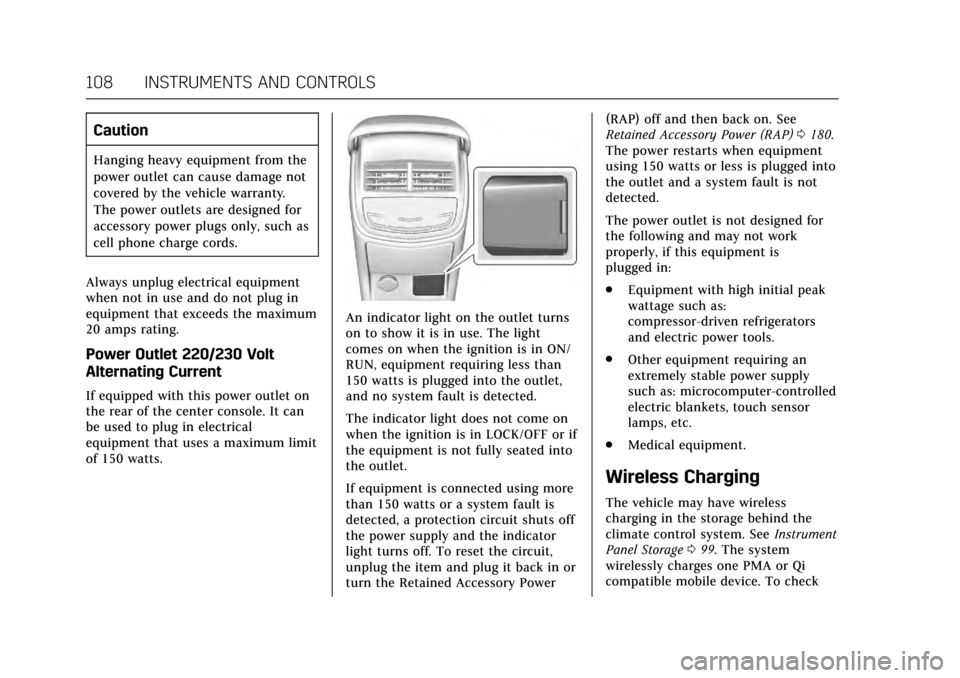
If equipped with this power outlet on
the rear of the center console. It can
be used to plug in electrical
equipment that uses a maximum limit
of 150 watts.
An indicator light on the outlet turns
on to show it is in use. The light
comes on when the ignition is in ON/
RUN, equipment requiring less than
150 watts is plugged into the outlet,
and no system fault is detected.
The indicator light does not come on
when the ignition is in LOCK/OFF or if
the equipment is not fully seated into
the outlet.
If equipment is connected using more
than 150 watts or a system fault is
detected, a protection circuit shuts off
the power supply and the indicator
light turns off. To reset the circuit,
unplug the item and plug it back in or
turn the Retained Accessory Power (RAP) off and then back on. See
Retained Accessory Power (RAP)
0180.
The power restarts when equipment
using 150 watts or less is plugged into
the outlet and a system fault is not
detected.
The power outlet is not designed for
the following and may not work
properly, if this equipment is
plugged in:
. Equipment with high initial peak
wattage such as:
compressor-driven refrigerators
and electric power tools.
. Other equipment requiring an
extremely stable power supply
such as: microcomputer-controlled
electric blankets, touch sensor
lamps, etc.
. Medical equipment.
Wireless Charging
The vehicle may have wireless
charging in the storage behind the
climate control system. See Instrument
Panel Storage 099. The system
wirelessly charges one PMA or Qi
compatible mobile device. To check
Page 111 of 314
Cadillac XTS Owner Manual (GMNA-Localizing-MidEast-10292881) - 2017 -
crc - 7/1/16
110 INSTRUMENTS AND CONTROLS
2. Remove all objects from thecharging pad. The system may
not charge if there are any
objects on the charging pad.
3. Place the mobile device face up on the
@symbol on the
charging pad.
4. The
~will display on theV
on the infotainment screen. This
indicates that the mobile device
is properly positioned and
charging. If a phone is placed on
the charging pad and
~does
not display, remove the phone
from the pad, turn 180 degrees
and wait three seconds before
placing/aligning the phone on
the pad again.
Keep the storage door closed while
driving.
Cigarette Lighter
The vehicle has two cigarette lighters;
they are under the climate control
system inside the storage area and on
the rear of the center console. To activate the cigarette lighter, push
it into the heating element and let go.
The lighter pops out when it is ready
to be used.
Caution
Holding a cigarette lighter in while
it is heating does not let the lighter
back away from the heating
element when it is hot. Damage
from overheating can occur to the
lighter or heating element, or a fuse
could be blown. Do not hold a
cigarette lighter in while it is
heating.
Ashtrays
If equipped with a removable ashtray,
the ashtray can be placed into the
front console cupholders.
To open the ashtray, lift the lid of the
ashtray. After using, close the lid.
To empty the ashtray for cleaning,
slightly turn the upper part of the
ashtray counterclockwise and
remove it.
Caution
Holding a cigarette lighter in while
it is heating does not let the lighter
back away from the heating
element when it is hot. Damage
from overheating can occur to the
lighter or heating element, or a fuse
could be blown. Do not hold a
cigarette lighter in while it is
heating.
Page 120 of 314

Cadillac XTS Owner Manual (GMNA-Localizing-MidEast-10292881) - 2017 -
crc - 7/1/16
INSTRUMENTS AND CONTROLS 119
Airbag Readiness Light
This light shows if there is an
electrical problem with the airbag
system. The system check includes
the airbag sensor(s), the passenger
sensing system, the pretensioners, the
airbag modules, the wiring, and the
crash sensing and diagnostic module.
For more information on the airbag
system, seeAirbag System 069.
The airbag readiness light comes on
for several seconds when the vehicle is
started. If the light does not come on
then, have it fixed immediately.
{Warning
If the airbag readiness light stays
on after the vehicle is started or
comes on while driving, it means
the airbag system might not be
(Continued)
Warning (Continued)
working properly. The airbags in the
vehicle might not inflate in a crash,
or they could even inflate without a
crash. To help avoid injury, have
the vehicle serviced right away.
If there is a problem with the airbag
system, a Driver Information Center
(DIC) message may also come on. See
Airbag System Messages 0141.
Passenger Airbag Status
Indicator
The vehicle has a passenger sensing
system. See Passenger Sensing System
0 75 for important safety information.
The passenger airbag status indicator
is in the overhead console.
When the vehicle is started, the
passenger airbag status indicator will
light the symbol for on and off, for
several seconds as a system check.
Then, after several more seconds, the
status indicator will light either the on
or off symbol, to let you know the
status of the front outboard passenger
frontal airbag and knee airbag.
If the on symbol is lit on the
passenger airbag status indicator, it
means that the front outboard
passenger frontal airbag and knee
airbag are allowed to inflate.
If the off symbol is lit on the airbag
status indicator, it means that the
passenger sensing system has turned
off the front outboard passenger
frontal airbag and knee airbag.
If, after several seconds, both status
indicator lights remain on, or if there
are no lights at all, there may be a
problem with the lights or the
passenger sensing system. See your
dealer for service.
Page 157 of 314
Cadillac XTS Owner Manual (GMNA-Localizing-MidEast-10292881) - 2017 -
crc - 7/1/16
156 LIGHTING
ON :Turns the lamp on.
Reading Lamps
There are reading lamps on the
overhead console and over the rear
passenger doors. These lamps come
on automatically when any door is
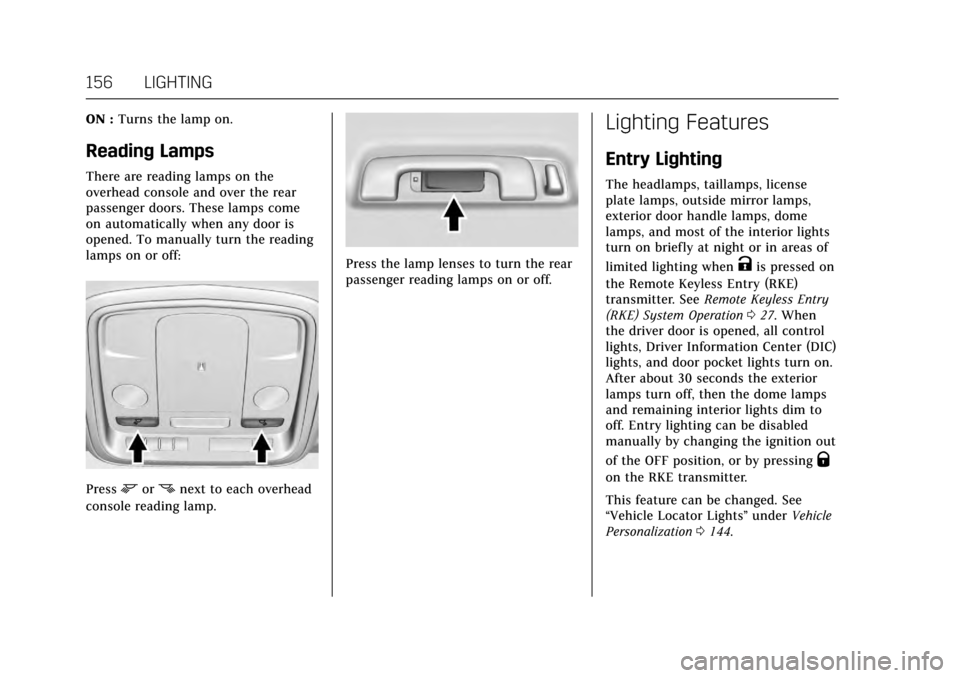
opened. To manually turn the reading
lamps on or off:
Pressmornnext to each overhead
console reading lamp.
Press the lamp lenses to turn the rear
passenger reading lamps on or off.
Lighting Features
Entry Lighting
The headlamps, taillamps, license
plate lamps, outside mirror lamps,
exterior door handle lamps, dome
lamps, and most of the interior lights
turn on briefly at night or in areas of
limited lighting when
Kis pressed on
the Remote Keyless Entry (RKE)
transmitter. See Remote Keyless Entry
(RKE) System Operation 027. When
the driver door is opened, all control
lights, Driver Information Center (DIC)
lights, and door pocket lights turn on.
After about 30 seconds the exterior
lamps turn off, then the dome lamps
and remaining interior lights dim to
off. Entry lighting can be disabled
manually by changing the ignition out
of the OFF position, or by pressing
Q
on the RKE transmitter.
This feature can be changed. See
“Vehicle Locator Lights” underVehicle
Personalization 0144.
Page 164 of 314
Cadillac XTS Owner Manual (GMNA-Localizing-MidEast-10292881) - 2017 -
crc - 7/1/16
CLIMATE CONTROLS 163
Driver and Passenger Heated and
Ventilated Seats :If equipped,
press
Jorzto heat the driver or
passenger seat cushion and seatback.
Press
Cor{to ventilate the driver
or passenger seat. See Heated and
Ventilated Front Seats 058.
The vehicle also has auto heated or
ventilated seats that turn on when the
vehicle is on. The seats will activate at
the level required by the vehicle’s
interior temperature. To turn off the
heated seats, press
Jorz. To turn
off ventilated seats, press
Cor{.
The auto heated or ventilated seats
feature can be turned on or off. See
Vehicle Personalization 0144 and
Heated and Ventilated Seats 013.
Remote Start Climate Control
Operation : If equipped with the
remote start feature, the climate
control system may run when the
vehicle is started remotely. The system
uses the driver’s previous settings to
heat or cool the inside of the vehicle.
The rear defog may come on during
remote start based on cold ambient
conditions. The rear defog indicator light does not come on during a
remote start. If equipped with heated
or ventilated seats, they may come on
during a remote start. See
Remote
Vehicle Start 031 and Heated and
Ventilated Front Seats 058.
Sensor
The solar sensor, on top of the
instrument panel near the windshield,
monitors the solar heat.
The climate control system uses the
sensor information to adjust the
temperature, fan speed, recirculation,
and air delivery mode for best
comfort. If the sensor is covered, the automatic
climate control system may not work
properly.
Rear Climate Control
System
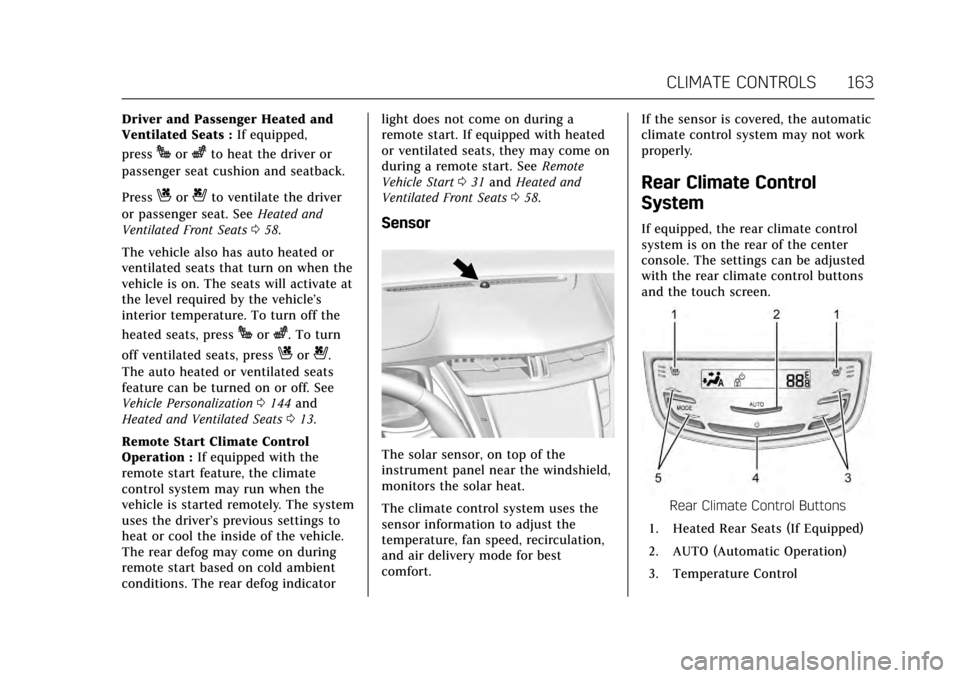
If equipped, the rear climate control
system is on the rear of the center
console. The settings can be adjusted
with the rear climate control buttons
and the touch screen.
Rear Climate Control Buttons
1. Heated Rear Seats (If Equipped)
2. AUTO (Automatic Operation)
3. Temperature Control
Page 306 of 314

Cadillac XTS Owner Manual (GMNA-Localizing-MidEast-10292881) - 2017 -
crc - 7/1/16
INDEX 305
Automatic (cont'd)Door Locks . . . . . . . . . . . . . . . . . . . . . . . . . . 35
Forward Braking . . . . . . . . . . . . . . . . . . 208
Headlamp System . . . . . . . . . . . . . . . . 153
Level Control . . . . . . . . . . . . . . . . . . . . . . 191
Transmission . . . . . . . . . . . . . . . . . . . . . . 183
Transmission Fluid . . . . . . . . . . . . . . . 231
Automatic Transmission Manual Mode . . . . . . . . . . . . . . . . . . . . . 184
Shift Lock Control Function
Check . . . . . . . . . . . . . . . . . . . . . . . . . . . . 243
B
Battery . . . . . . . . . . . . . . . . . . . . . . . . . . . . . . . 242Exterior Lighting BatterySaver . . . . . . . . . . . . . . . . . . . . . . . . . . . . . 157
Jump Starting . . . . . . . . . . . . . . . . . . . . . 273
Power Protection . . . . . . . . . . . . . . . . . . 157
Voltage and Charging Messages . . . . . . . . . . . . . . . . . . . . . . . . 134
Blade Replacement, Wiper . . . . . . . . . 244
Brake Parking, Electric . . . . . . . . . . . . . . . . . . 186
System Warning Light . . . . . . . . . . . . 122
Brakes . . . . . . . . . . . . . . . . . . . . . . . . . . . . . . . 240 Antilock . . . . . . . . . . . . . . . . . . . . . . . . . . . 185
Assist . . . . . . . . . . . . . . . . . . . . . . . . . . . . . . 187
Fluid . . . . . . . . . . . . . . . . . . . . . . . . . . . . . . . 241
System Messages . . . . . . . . . . . . . . . . . 135 Braking . . . . . . . . . . . . . . . . . . . . . . . . . . . . . . 168
Automatic Forward . . . . . . . . . . . . . . . 208
Break-In, New Vehicle . . . . . . . . . . . . . . 177
Bulb Replacement . . . . . . . . . . . . . . . . . . 247 Back-up Lamps . . . . . . . . . . . . . . . . . . . 245
Headlamp Aiming . . . . . . . . . . . . . . . . 245
Headlamps . . . . . . . . . . . . . . . . . . . . . . . . 245
High Intensity Discharge(HID) Lighting . . . . . . . . . . . . . . . . . . . 245
License Plate Lamps . . . . . . . . . . . . . . 246
Buying New Tires . . . . . . . . . . . . . . . . . . . 264
C
Calibration . . . . . . . . . . . . . . . . . . . . . . . . . . 106
Capacities and Specifications . . . . . . 299
Carbon Monoxide Engine Exhaust . . . . . . . . . . . . . . . . . . . 182
Trunk . . . . . . . . . . . . . . . . . . . . . . . . . . . . . . . . 37
Winter Driving . . . . . . . . . . . . . . . . . . . . 172
Cargo Management System . . . . . . . . . . . . . 102
Tie-Downs . . . . . . . . . . . . . . . . . . . . . . . . . 101
Caution, Danger, and Warning . . . . . . . . 2
Center Console Storage . . . . . . . . . . . . . 100
Chains, Tire . . . . . . . . . . . . . . . . . . . . . . . . . 266
Charging Wireless . . . . . . . . . . . . . . . . . . . . . . . . . . . 108
Charging System Light . . . . . . . . . . . . . 120 Check
Malfunction Indicator Engine
Light . . . . . . . . . . . . . . . . . . . . . . . . . . . . . 120
Child Restraints Infants and Young Children . . . . . . . . 82
Lower Anchors and Tethers forChildren . . . . . . . . . . . . . . . . . . . . . . . . . . . 87
Older Children . . . . . . . . . . . . . . . . . . . . . . 81
Securing . . . . . . . . . . . . . . . . . . . . . . . . .94, 95
Systems . . . . . . . . . . . . . . . . . . . . . . . . . . . . . 85
Cigarette Lighter . . . . . . . . . . . . . . . . . . . . 110
Circuit Breakers . . . . . . . . . . . . . . . . . . . . . 248
Cleaning
Exterior Care . . . . . . . . . . . . . . . . . . . . . . 278
Interior Care . . . . . . . . . . . . . . . . . . . . . . 282
Climate Control Systems
Dual Automatic . . . . . . . . . . . . . . . . . . . 159
Rear . . . . . . . . . . . . . . . . . . . . . . . . . . . . . . . . 163
Clock . . . . . . . . . . . . . . . . . . . . . . . . . . . . . . . . . 106
Cluster, Instrument . . . . . . . . . . . . . . . . . 112
Compact Spare Tire . . . . . . . . . . . . . . . . . 272
Compartments Storage . . . . . . . . . . . . . . . . . . . . . . . . . . . . . . 99
Compass . . . . . . . . . . . . . . . . . . . . . . . . . . . . . 106 Messages . . . . . . . . . . . . . . . . . . . . . . . . . . 135
Control Traction and ElectronicStability . . . . . . . . . . . . . . . . . . . . . . . . . . 188
Page 313 of 314

Cadillac XTS Owner Manual (GMNA-Localizing-MidEast-10292881) - 2017 -
crc - 7/1/16
312 INDEX
StabiliTrakOFF Light . . . . . . . . . . . . . . . . . . . . . . . . . . 124
Start Assist, Hill . . . . . . . . . . . . . . . . . . . . 188
Start Vehicle, Remote . . . . . . . . . . . . . . . 31
Starter Switch Check . . . . . . . . . . . . . . . 243
Starting the Engine . . . . . . . . . . . . . . . . . 179
Starting the Vehicle Messages . . . . . 142
Steering . . . . . . . . . . . . . . . . . . . . . . . . . . . . . . 169 Fluid, Power . . . . . . . . . . . . . . . . . . . . . . . 238
Heated Wheel . . . . . . . . . . . . . . . . . . . . . 104
Wheel Adjustment . . . . . . . . . . . . . . . . 104
Wheel Controls . . . . . . . . . . . . . . . . . . . 104
Storage Areas Armrest . . . . . . . . . . . . . . . . . . . . . . . . . . . . 100
Cargo Management System . . . . . . 102
Center Console . . . . . . . . . . . . . . . . . . . . 100
Convenience Net . . . . . . . . . . . . . . . . . . 102
Glove Box . . . . . . . . . . . . . . . . . . . . . . . . . 100
Instrument Panel . . . . . . . . . . . . . . . . . . . 99
Storage Compartments . . . . . . . . . . . . . . 99
Stuck Vehicle . . . . . . . . . . . . . . . . . . . . . . . 173
Summer Tires . . . . . . . . . . . . . . . . . . . . . . . 256
Sun Visors . . . . . . . . . . . . . . . . . . . . . . . . . . . . 45
Sunroof . . . . . . . . . . . . . . . . . . . . . . . . . . . . . . . 47
Sunshade Rear Window . . . . . . . . . . . . . . . . . . . . . . . . 46
Symbols . . . . . . . . . . . . . . . . . . . . . . . . . . . . . . . . 2 System
Forward Collision Alert (FCA) . . . . 206
Infotainment . . . . . . . . . . . . . . . . . 158, 303
Systems Driver Assistance . . . . . . . . . . . . . . . . . 201
T
Tachometer . . . . . . . . . . . . . . . . . . . . . . . . . 116
Theft-Deterrent Systems . . . . . . . . . . . . 40
Thigh Support Adjustment . . . . . . . . . . 55
Time . . . . . . . . . . . . . . . . . . . . . . . . . . . . . . . . . 106
Tires . . . . . . . . . . . . . . . . . . . . . . . . . . . . . . . . . 254All-Season . . . . . . . . . . . . . . . . . . . . . . . . . 255
Buying New Tires . . . . . . . . . . . . . . . . . 264
Chains . . . . . . . . . . . . . . . . . . . . . . . . . . . . . 266
Changing . . . . . . . . . . . . . . . . . . . . . . . . . . 268
Compact Spare . . . . . . . . . . . . . . . . . . . . 272
Different Size . . . . . . . . . . . . . . . . . . . . . . 265
If a Tire Goes Flat . . . . . . . . . . . . . . . . 267
Inspection . . . . . . . . . . . . . . . . . . . . . . . . . 262
Low Profile . . . . . . . . . . . . . . . . . . . . . . . . 256
Messages . . . . . . . . . . . . . . . . . . . . . . . . . . 142
Pressure . . . . . . . . . . . . . . . . . . . . . . 256, 257
Pressure Light . . . . . . . . . . . . . . . . . . . . . 125
Pressure Monitor Operation . . . . . . 259
Pressure Monitor System . . . . . . . . 258
Rotation . . . . . . . . . . . . . . . . . . . . . . . . . . . 262
Wheel Alignment and TireBalance . . . . . . . . . . . . . . . . . . . . . . . . . . 265 Tires (cont'd)
Wheel Replacement . . . . . . . . . . . . . . 266
When It Is Time for New
Tires . . . . . . . . . . . . . . . . . . . . . . . . . . . . . 263
Winter . . . . . . . . . . . . . . . . . . . . . . . . . . . . . 255
Towing Driving Characteristics . . . . . . . . . . . 215
Equipment . . . . . . . . . . . . . . . . . . . . . . . . 219
General Information . . . . . . . . . . . . . . 215
Recreational Vehicle . . . . . . . . . . . . . . 276
Trailer . . . . . . . . . . . . . . . . . . . . . . . . . . . . . 218
Vehicle . . . . . . . . . . . . . . . . . . . . . . . . . . . . . 276
Traction Control System (TCS)/
StabiliTrak
®Light . . . . . . . . . . . . . . . 125
Limited-Slip Rear Axle . . . . . . . . . . . 190
Off Light . . . . . . . . . . . . . . . . . . . . . . . . . . . 124
Traction Control/Electronic
Stability Control . . . . . . . . . . . . . . . . . . . 188
Trailer Towing . . . . . . . . . . . . . . . . . . . . . . . . . . . . 218
Transmission Automatic . . . . . . . . . . . . . . . . . . . . . . . . . 183
Fluid, Automatic . . . . . . . . . . . . . . . . . . 231
Messages . . . . . . . . . . . . . . . . . . . . . . . . . . 142
Trip Odometer . . . . . . . . . . . . . . . . . . . . . . 116
Trunk . . . . . . . . . . . . . . . . . . . . . . . . . . . . . . . . . 37
Turn and Lane-Change Signals . . . . 154