climate control CADILLAC XTS 2017 1.G User Guide
[x] Cancel search | Manufacturer: CADILLAC, Model Year: 2017, Model line: XTS, Model: CADILLAC XTS 2017 1.GPages: 314, PDF Size: 3.71 MB
Page 63 of 314
Cadillac XTS Owner Manual (GMNA-Localizing-MidEast-10292881) - 2017 -
crc - 7/1/16
62 SEATS AND RESTRAINTS
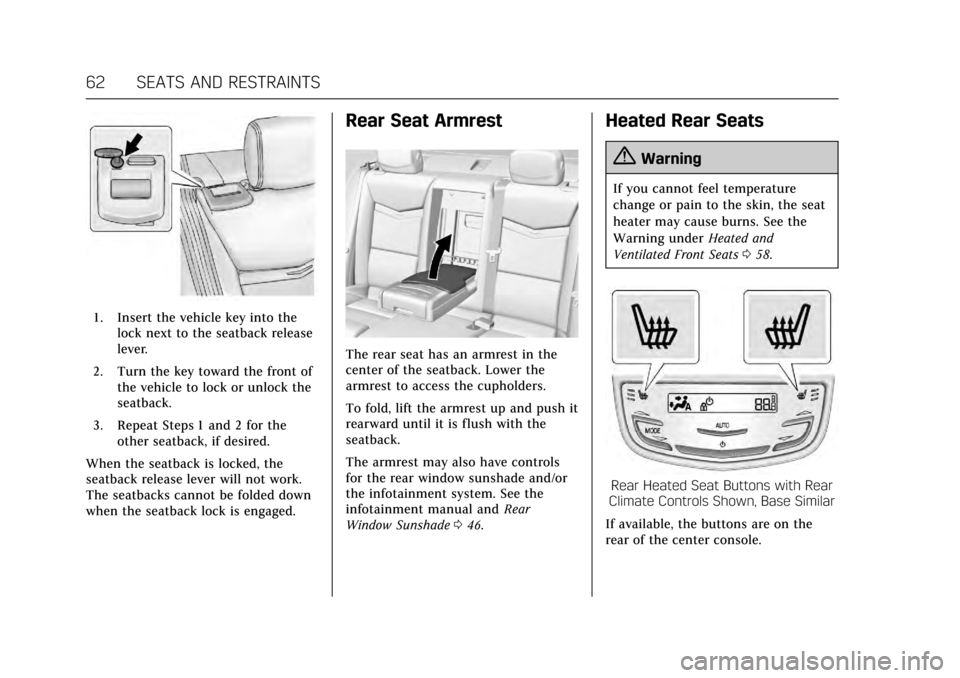
1. Insert the vehicle key into thelock next to the seatback release
lever.
2. Turn the key toward the front of the vehicle to lock or unlock the
seatback.
3. Repeat Steps 1 and 2 for the other seatback, if desired.
When the seatback is locked, the
seatback release lever will not work.
The seatbacks cannot be folded down
when the seatback lock is engaged.
Rear Seat Armrest
The rear seat has an armrest in the
center of the seatback. Lower the
armrest to access the cupholders.
To fold, lift the armrest up and push it
rearward until it is flush with the
seatback.
The armrest may also have controls
for the rear window sunshade and/or
the infotainment system. See the
infotainment manual and Rear
Window Sunshade 046.
Heated Rear Seats
{Warning
If you cannot feel temperature
change or pain to the skin, the seat
heater may cause burns. See the
Warning under Heated and
Ventilated Front Seats 058.
Rear Heated Seat Buttons with Rear
Climate Controls Shown, Base Similar
If available, the buttons are on the
rear of the center console.
Page 64 of 314
Cadillac XTS Owner Manual (GMNA-Localizing-MidEast-10292881) - 2017 -
crc - 7/1/16
SEATS AND RESTRAINTS 63
With the ignition in ON/RUN/START,
press
MorLto heat the left or right
outboard seat cushion and seatback.
On vehicles without rear climate
controls, an indicator light on the
button will turn on when the heated
seat is on. On vehicles with rear
climate controls, an indicator on the
climate control display appears when
this feature is on.
On vehicles without rear climate
controls, press the button again to
turn this feature off. The light on the
button will turn off. On vehicles with
rear climate controls, this feature
turns on at the highest setting. With
each press of the button, the heated
seat changes to the next lower setting,
and then the off setting. Three lights
indicate the highest setting, and one
light indicates the lowest. If the
heated seats are on high, the level
may automatically be lowered after
approximately 30 minutes.Rear Seat
Pass-Through Door
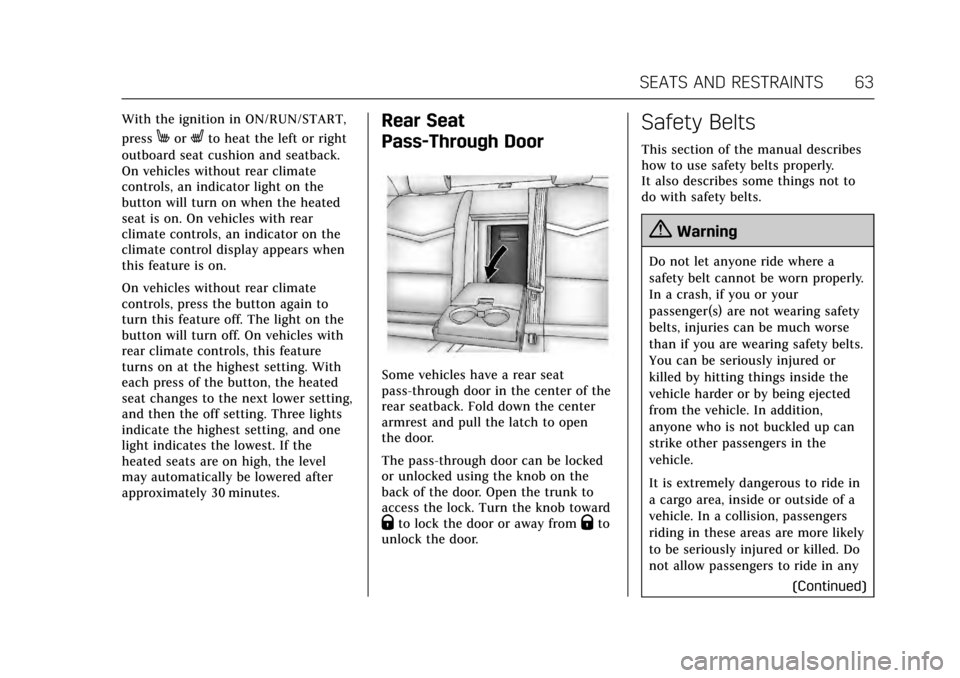
Some vehicles have a rear seat
pass-through door in the center of the
rear seatback. Fold down the center
armrest and pull the latch to open
the door.
The pass-through door can be locked
or unlocked using the knob on the
back of the door. Open the trunk to
access the lock. Turn the knob toward
Qto lock the door or away fromQto
unlock the door.
Safety Belts
This section of the manual describes
how to use safety belts properly.
It also describes some things not to
do with safety belts.
{Warning
Do not let anyone ride where a
safety belt cannot be worn properly.
In a crash, if you or your
passenger(s) are not wearing safety
belts, injuries can be much worse
than if you are wearing safety belts.
You can be seriously injured or
killed by hitting things inside the
vehicle harder or by being ejected
from the vehicle. In addition,
anyone who is not buckled up can
strike other passengers in the
vehicle.
It is extremely dangerous to ride in
a cargo area, inside or outside of a
vehicle. In a collision, passengers
riding in these areas are more likely
to be seriously injured or killed. Do
not allow passengers to ride in any
(Continued)
Page 100 of 314
Cadillac XTS Owner Manual (GMNA-Localizing-MidEast-10292881) - 2017 -
crc - 7/1/16
STORAGE 99
Storage
Storage Compartments
Storage Compartments . . . . . . . . . . . . 99
Instrument Panel Storage . . . . . . . . . 99
Glove Box . . . . . . . . . . . . . . . . . . . . . . . . . 100
Armrest Storage . . . . . . . . . . . . . . . . . . 100
Center Console Storage . . . . . . . . . . 100
Additional Storage Features
Cargo Tie-Downs . . . . . . . . . . . . . . . . . 101
Cargo Management System . . . . . . 102
Convenience Net . . . . . . . . . . . . . . . . . 102
Safety Kit . . . . . . . . . . . . . . . . . . . . . . . . . 102
Storage Compartments
{Warning
Do not store heavy or sharp objects
in storage compartments. In a
crash, these objects may cause the
cover to open and could result in
injury.
Instrument Panel Storage
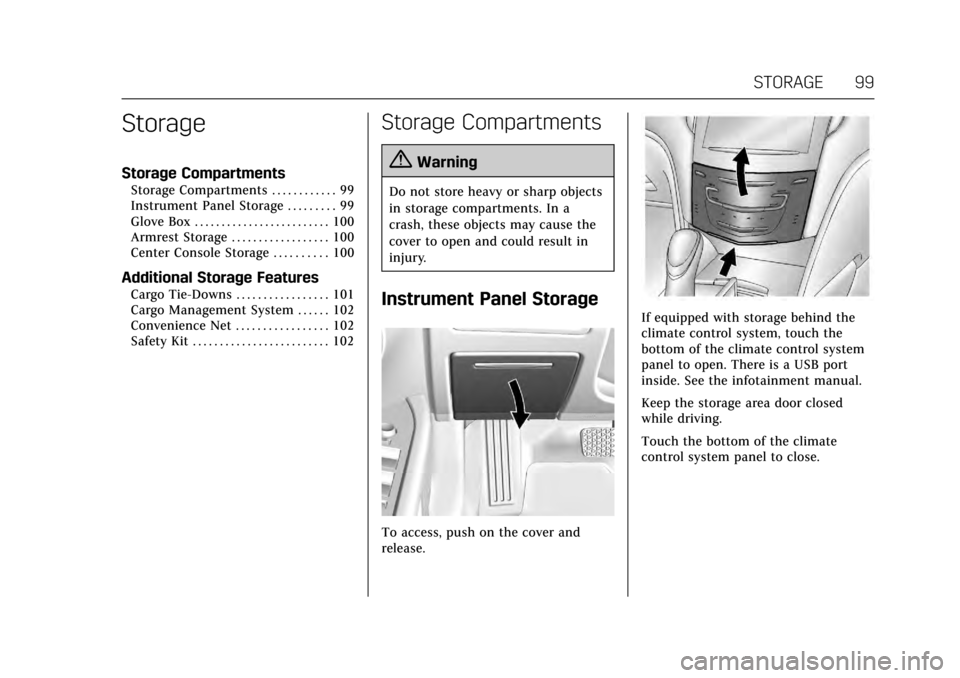
To access, push on the cover and
release.
If equipped with storage behind the
climate control system, touch the
bottom of the climate control system
panel to open. There is a USB port
inside. See the infotainment manual.
Keep the storage area door closed
while driving.
Touch the bottom of the climate
control system panel to close.
Page 109 of 314
Cadillac XTS Owner Manual (GMNA-Localizing-MidEast-10292881) - 2017 -
crc - 7/1/16
108 INSTRUMENTS AND CONTROLS
Caution
Hanging heavy equipment from the
power outlet can cause damage not
covered by the vehicle warranty.
The power outlets are designed for
accessory power plugs only, such as
cell phone charge cords.
Always unplug electrical equipment
when not in use and do not plug in
equipment that exceeds the maximum
20 amps rating.
Power Outlet 220/230 Volt
Alternating Current
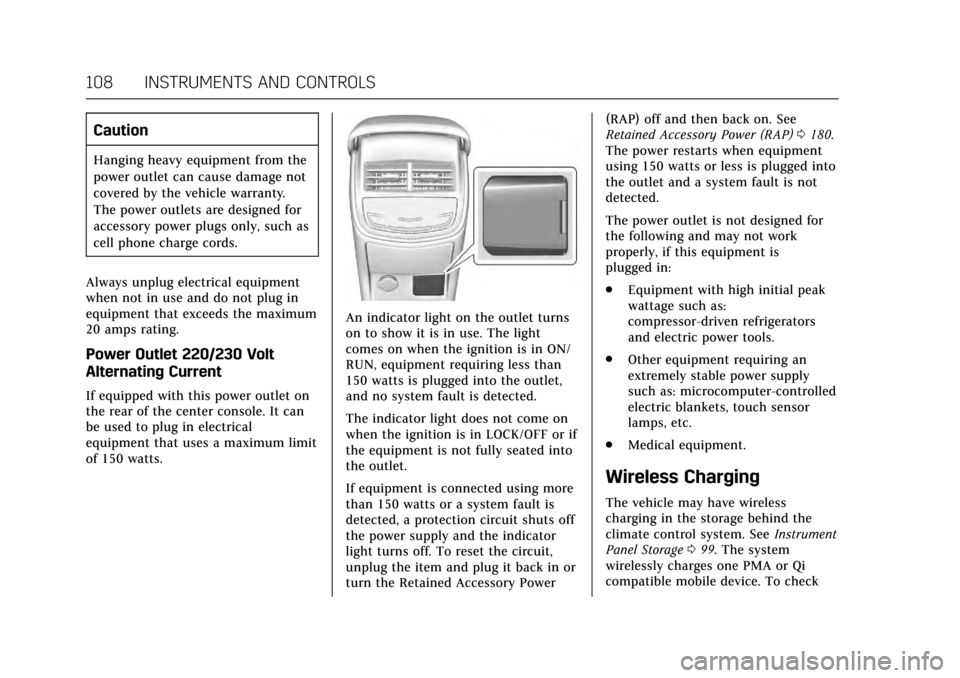
If equipped with this power outlet on
the rear of the center console. It can
be used to plug in electrical
equipment that uses a maximum limit
of 150 watts.
An indicator light on the outlet turns
on to show it is in use. The light
comes on when the ignition is in ON/
RUN, equipment requiring less than
150 watts is plugged into the outlet,
and no system fault is detected.
The indicator light does not come on
when the ignition is in LOCK/OFF or if
the equipment is not fully seated into
the outlet.
If equipment is connected using more
than 150 watts or a system fault is
detected, a protection circuit shuts off
the power supply and the indicator
light turns off. To reset the circuit,
unplug the item and plug it back in or
turn the Retained Accessory Power (RAP) off and then back on. See
Retained Accessory Power (RAP)
0180.
The power restarts when equipment
using 150 watts or less is plugged into
the outlet and a system fault is not
detected.
The power outlet is not designed for
the following and may not work
properly, if this equipment is
plugged in:
. Equipment with high initial peak
wattage such as:
compressor-driven refrigerators
and electric power tools.
. Other equipment requiring an
extremely stable power supply
such as: microcomputer-controlled
electric blankets, touch sensor
lamps, etc.
. Medical equipment.
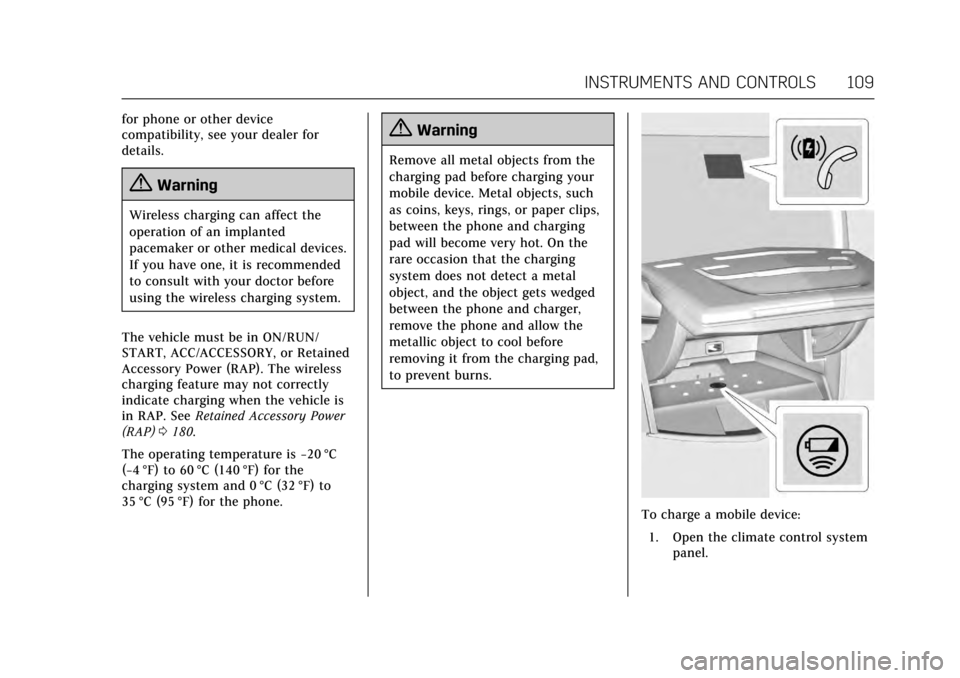
Wireless Charging
The vehicle may have wireless
charging in the storage behind the
climate control system. See Instrument
Panel Storage 099. The system
wirelessly charges one PMA or Qi
compatible mobile device. To check
Page 110 of 314
Cadillac XTS Owner Manual (GMNA-Localizing-MidEast-10292881) - 2017 -
crc - 7/1/16
INSTRUMENTS AND CONTROLS 109
for phone or other device
compatibility, see your dealer for
details.
{Warning
Wireless charging can affect the
operation of an implanted
pacemaker or other medical devices.
If you have one, it is recommended
to consult with your doctor before
using the wireless charging system.
The vehicle must be in ON/RUN/
START, ACC/ACCESSORY, or Retained
Accessory Power (RAP). The wireless
charging feature may not correctly
indicate charging when the vehicle is
in RAP. See Retained Accessory Power
(RAP) 0180.
The operating temperature is −20 °C
(−4 °F) to 60 °C (140 °F) for the
charging system and 0 °C (32 °F) to
35 °C (95 °F) for the phone.
{Warning
Remove all metal objects from the
charging pad before charging your
mobile device. Metal objects, such
as coins, keys, rings, or paper clips,
between the phone and charging
pad will become very hot. On the
rare occasion that the charging
system does not detect a metal
object, and the object gets wedged
between the phone and charger,
remove the phone and allow the
metallic object to cool before
removing it from the charging pad,
to prevent burns.
To charge a mobile device:
1. Open the climate control system panel.
Page 111 of 314
Cadillac XTS Owner Manual (GMNA-Localizing-MidEast-10292881) - 2017 -
crc - 7/1/16
110 INSTRUMENTS AND CONTROLS
2. Remove all objects from thecharging pad. The system may
not charge if there are any
objects on the charging pad.
3. Place the mobile device face up on the
@symbol on the
charging pad.
4. The
~will display on theV
on the infotainment screen. This
indicates that the mobile device
is properly positioned and
charging. If a phone is placed on
the charging pad and
~does
not display, remove the phone
from the pad, turn 180 degrees
and wait three seconds before
placing/aligning the phone on
the pad again.
Keep the storage door closed while
driving.
Cigarette Lighter
The vehicle has two cigarette lighters;
they are under the climate control
system inside the storage area and on
the rear of the center console. To activate the cigarette lighter, push
it into the heating element and let go.
The lighter pops out when it is ready
to be used.
Caution
Holding a cigarette lighter in while
it is heating does not let the lighter
back away from the heating
element when it is hot. Damage
from overheating can occur to the
lighter or heating element, or a fuse
could be blown. Do not hold a
cigarette lighter in while it is
heating.
Ashtrays
If equipped with a removable ashtray,
the ashtray can be placed into the
front console cupholders.
To open the ashtray, lift the lid of the
ashtray. After using, close the lid.
To empty the ashtray for cleaning,
slightly turn the upper part of the
ashtray counterclockwise and
remove it.
Caution
Holding a cigarette lighter in while
it is heating does not let the lighter
back away from the heating
element when it is hot. Damage
from overheating can occur to the
lighter or heating element, or a fuse
could be blown. Do not hold a
cigarette lighter in while it is
heating.
Page 146 of 314
Cadillac XTS Owner Manual (GMNA-Localizing-MidEast-10292881) - 2017 -
crc - 7/1/16
INSTRUMENTS AND CONTROLS 145
Manage Favorites
This allows favorites to be edited. See
“Manage Favorites”in “Settings” under
“Radio ”in the infotainment manual.
Number of Favorites Shown
Press to set the number of favorites to
display.
Select the desired number or select
Auto and the infotainment system will
automatically adjust the number of
favorites shown.
Audible Touch Feedback
This allows Audible Touch Feedback
to be turned on or off.
Select Off or On.
Bose Audio Pilot
This feature adjusts the volume based
on the noise in the vehicle. See “Bose
AudioPilot Noise Compensation
Technology” under“Infotainment
System Settings” in the infotainment
manual.
Select Off or On. Maximum Start Up Volume
This feature sets the maximum
startup volume. If the vehicle is
started and the volume is greater than
this level, the volume is adjusted to
this level.
To set the maximum startup volume,
press + or
−to increase or decrease.
Vehicle
Select and the following may display:
.
Climate and Air Quality
. Collision/Detection Systems
. Comfort and Convenience
. Lighting
. Power Door Locks
. Remote Lock, Unlock, Start
Climate and Air Quality
Select and the following may display:
. Auto Fan Max Speed
. Air Quality Sensor
. Auto Cooled Seats
. Auto Heated Seats
. Auto Defog .
Auto Rear Defog
Auto Fan Max Speed
This feature will set the maximum
auto fan speed.
Select Low, Medium, or High.
Air Quality Sensor
This allows for selection of air quality
sensor operation at high or low
sensitivity.
Select Off, Low Sensitivity, or High
Sensitivity.
Auto Cooled Seats
When enabled, this feature will
automatically activate ventilated seats
at the level required by the interior
temperature. The auto ventilated seats
can be turned off by using the
ventilated seat buttons on the center
stack. See Heated and Ventilated Front
Seats 058.
Select Off or On.
Auto Heated Seats
When enabled, this feature will
automatically activate the heated
seats at the level required by the
Page 160 of 314
Cadillac XTS Owner Manual (GMNA-Localizing-MidEast-10292881) - 2017 -
crc - 7/1/16
CLIMATE CONTROLS 159
Climate Controls
Climate Control Systems
Dual Automatic Climate ControlSystem . . . . . . . . . . . . . . . . . . . . . . . . . . 159
Rear Climate Control System . . . . 163
Air Vents
Air Vents . . . . . . . . . . . . . . . . . . . . . . . . . . 165
Maintenance
Passenger Compartment Air Filter . . . . . . . . . . . . . . . . . . . . . . . . . . . . . 166
Service . . . . . . . . . . . . . . . . . . . . . . . . . . . . 166
Climate Control Systems
Dual Automatic Climate Control System
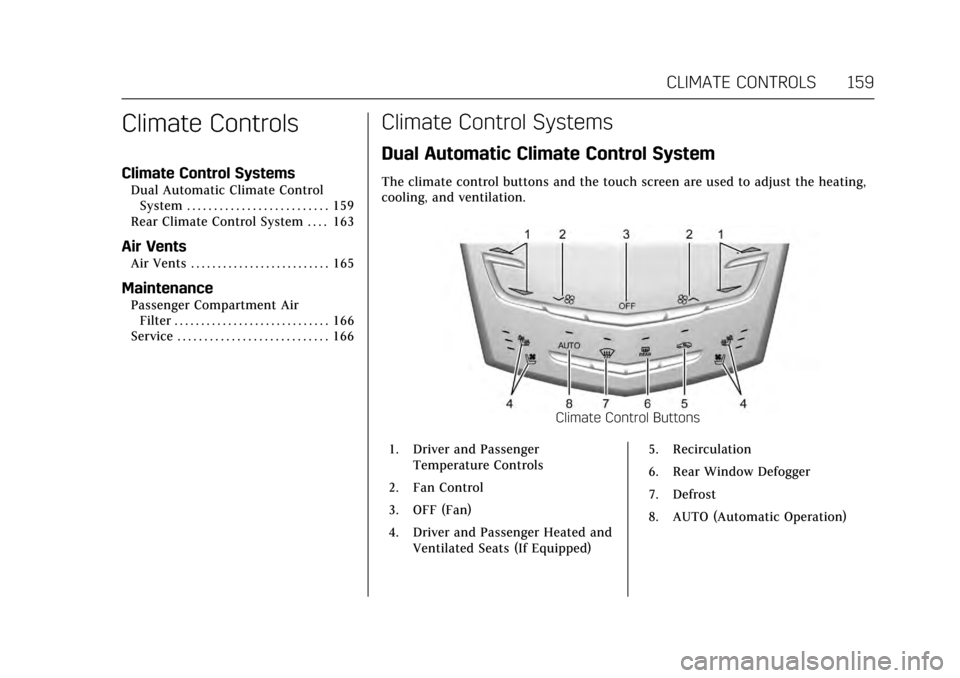
The climate control buttons and the touch screen are used to adjust the heating,
cooling, and ventilation.
Climate Control Buttons
1. Driver and Passenger Temperature Controls
2. Fan Control
3. OFF (Fan)
4. Driver and Passenger Heated and Ventilated Seats (If Equipped) 5. Recirculation
6. Rear Window Defogger
7. Defrost
8. AUTO (Automatic Operation)
Page 161 of 314
Cadillac XTS Owner Manual (GMNA-Localizing-MidEast-10292881) - 2017 -
crc - 7/1/16
160 CLIMATE CONTROLS
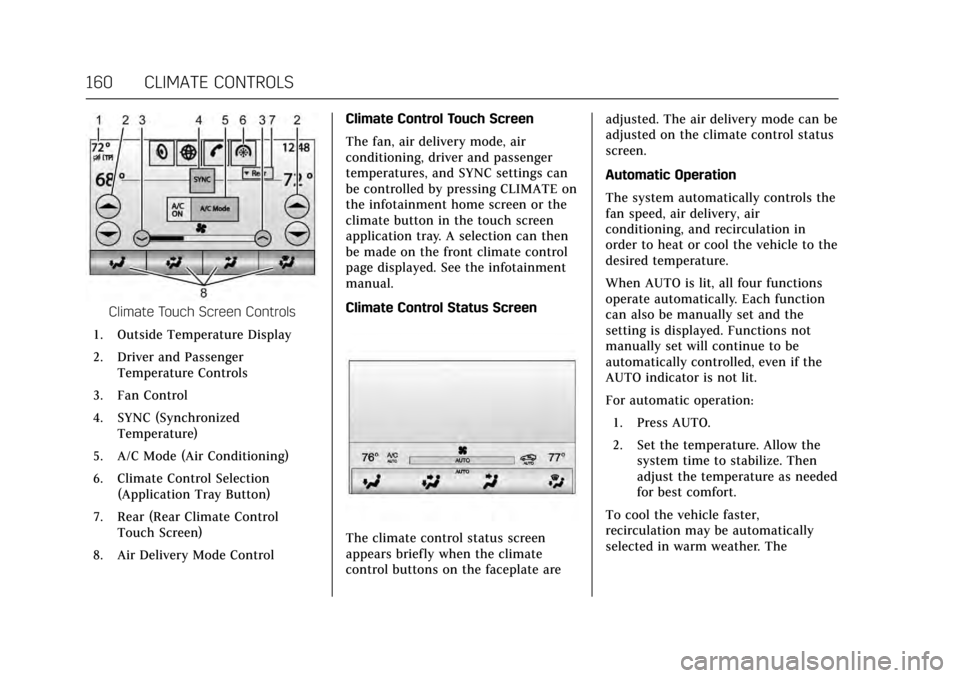
Climate Touch Screen Controls
1. Outside Temperature Display
2. Driver and Passenger Temperature Controls
3. Fan Control
4. SYNC (Synchronized Temperature)
5. A/C Mode (Air Conditioning)
6. Climate Control Selection (Application Tray Button)
7. Rear (Rear Climate Control Touch Screen)
8. Air Delivery Mode Control Climate Control Touch Screen
The fan, air delivery mode, air
conditioning, driver and passenger
temperatures, and SYNC settings can
be controlled by pressing CLIMATE on
the infotainment home screen or the
climate button in the touch screen
application tray. A selection can then
be made on the front climate control
page displayed. See the infotainment
manual.
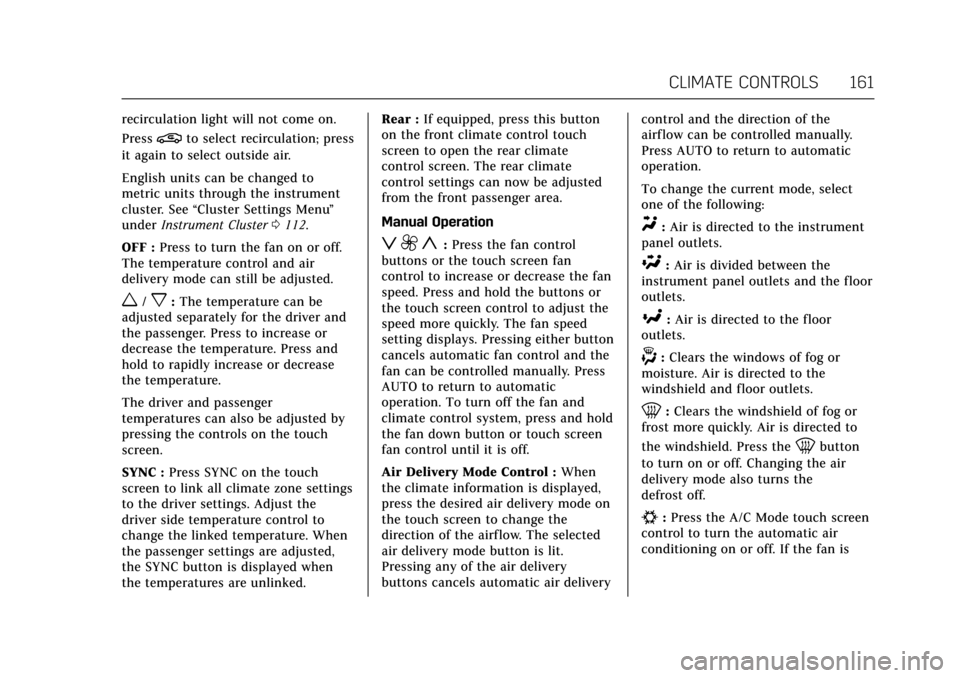
Climate Control Status Screen
The climate control status screen
appears briefly when the climate
control buttons on the faceplate are adjusted. The air delivery mode can be
adjusted on the climate control status
screen.
Automatic Operation
The system automatically controls the
fan speed, air delivery, air
conditioning, and recirculation in
order to heat or cool the vehicle to the
desired temperature.
When AUTO is lit, all four functions
operate automatically. Each function
can also be manually set and the
setting is displayed. Functions not
manually set will continue to be
automatically controlled, even if the
AUTO indicator is not lit.
For automatic operation:
1. Press AUTO.
2. Set the temperature. Allow the system time to stabilize. Then
adjust the temperature as needed
for best comfort.
To cool the vehicle faster,
recirculation may be automatically
selected in warm weather. The
Page 162 of 314
Cadillac XTS Owner Manual (GMNA-Localizing-MidEast-10292881) - 2017 -
crc - 7/1/16
CLIMATE CONTROLS 161
recirculation light will not come on.
Press
@to select recirculation; press
it again to select outside air.
English units can be changed to
metric units through the instrument
cluster. See “Cluster Settings Menu ”
under Instrument Cluster 0112.
OFF : Press to turn the fan on or off.
The temperature control and air
delivery mode can still be adjusted.
w/x: The temperature can be
adjusted separately for the driver and
the passenger. Press to increase or
decrease the temperature. Press and
hold to rapidly increase or decrease
the temperature.
The driver and passenger
temperatures can also be adjusted by
pressing the controls on the touch
screen.
SYNC : Press SYNC on the touch
screen to link all climate zone settings
to the driver settings. Adjust the
driver side temperature control to
change the linked temperature. When
the passenger settings are adjusted,
the SYNC button is displayed when
the temperatures are unlinked. Rear :
If equipped, press this button
on the front climate control touch
screen to open the rear climate
control screen. The rear climate
control settings can now be adjusted
from the front passenger area.
Manual Operation
z 9 y: Press the fan control
buttons or the touch screen fan
control to increase or decrease the fan
speed. Press and hold the buttons or
the touch screen control to adjust the
speed more quickly. The fan speed
setting displays. Pressing either button
cancels automatic fan control and the
fan can be controlled manually. Press
AUTO to return to automatic
operation. To turn off the fan and
climate control system, press and hold
the fan down button or touch screen
fan control until it is off.
Air Delivery Mode Control : When
the climate information is displayed,
press the desired air delivery mode on
the touch screen to change the
direction of the airflow. The selected
air delivery mode button is lit.
Pressing any of the air delivery
buttons cancels automatic air delivery control and the direction of the
airf low can be controlled manually.
Press AUTO to return to automatic
operation.
To change the current mode, select
one of the following:
Y:
Air is directed to the instrument
panel outlets.
\: Air is divided between the
instrument panel outlets and the floor
outlets.
[: Air is directed to the floor
outlets.
-: Clears the windows of fog or
moisture. Air is directed to the
windshield and floor outlets.
0: Clears the windshield of fog or
frost more quickly. Air is directed to
the windshield. Press the
0button
to turn on or off. Changing the air
delivery mode also turns the
defrost off.
#: Press the A/C Mode touch screen
control to turn the automatic air
conditioning on or off. If the fan is