remote control CADILLAC XTS 2017 1.G User Guide
[x] Cancel search | Manufacturer: CADILLAC, Model Year: 2017, Model line: XTS, Model: CADILLAC XTS 2017 1.GPages: 314, PDF Size: 3.71 MB
Page 139 of 314
Cadillac XTS Owner Manual (GMNA-Localizing-MidEast-10292881) - 2017 -
crc - 7/1/16
138 INSTRUMENTS AND CONTROLS
NO REMOTE DETECTED
This message displays when the
transmitter battery may be weak. See
“Starting the Vehicle with a Low
Transmitter Battery”underRemote
Keyless Entry (RKE) System
Operation 027.
NO REMOTE DETECTED PRESS
BRAKE TO RESTART
This message displays when
attempting to turn off the vehicle and
the RKE transmitter is no longer
detected. Restarting is allowed
without the RKE transmitter for
five minutes. Press the brake pedal
and ENGINE START/STOP to restart
the vehicle.
NUMBER OF KEYS PROGRAMMED
This message displays when
programming new keys to the vehicle.
REMOTE LEFT IN VEHICLE
This message displays when leaving
the vehicle with the RKE transmitter
still inside.
REPLACE BATTERY IN
REMOTE KEY
This message displays when the
battery in the RKE transmitter needs
to be replaced.
Lamp Messages
AFL (ADAPTIVE FORWARD
LIGHTING) LAMPS NEED SERVICE
This message displays when the AFL
system is disabled and needs service.
See your dealer. See Adaptive Forward
Lighting (AFL) 0154.
AUTOMATIC LIGHT CONTROL
ON/OFF
This message is displayed when the
exterior lamp control is in AUTO and
the lights have turned on or off. See
Automatic Headlamp System 0153.
XXX TURN INDICATOR FAILURE
When one of the turn signals is out,
this message displays to show which
bulb needs to be replaced. See Bulb
Replacement 0245 and Replacement
Bulbs 0247.
TURN SIGNAL ON
This message is displayed if the turn
signal has been left on. Turn off the
turn signal.
Object Detection System
Messages
24 GHz RADARS OFF
This message displays when driving in
certain areas where there may be
radar interference. Adaptive Cruise
Control (ACC), Forward Collision Alert
(FCA), and the Forward Automatic
Braking (FAB) may not work or may
not work as well. The vehicle does not
need service.
FORWARD COLLISION
SYSTEM OFF
This message displays when the
Forward Automatic Braking (FAB) has
been turned off. See Forward
Automatic Braking (FAB) 0208.
Page 146 of 314
Cadillac XTS Owner Manual (GMNA-Localizing-MidEast-10292881) - 2017 -
crc - 7/1/16
INSTRUMENTS AND CONTROLS 145
Manage Favorites
This allows favorites to be edited. See
“Manage Favorites”in “Settings” under
“Radio ”in the infotainment manual.
Number of Favorites Shown
Press to set the number of favorites to
display.
Select the desired number or select
Auto and the infotainment system will
automatically adjust the number of
favorites shown.
Audible Touch Feedback
This allows Audible Touch Feedback
to be turned on or off.
Select Off or On.
Bose Audio Pilot
This feature adjusts the volume based
on the noise in the vehicle. See “Bose
AudioPilot Noise Compensation
Technology” under“Infotainment
System Settings” in the infotainment
manual.
Select Off or On. Maximum Start Up Volume
This feature sets the maximum
startup volume. If the vehicle is
started and the volume is greater than
this level, the volume is adjusted to
this level.
To set the maximum startup volume,
press + or
−to increase or decrease.
Vehicle
Select and the following may display:
.
Climate and Air Quality
. Collision/Detection Systems
. Comfort and Convenience
. Lighting
. Power Door Locks
. Remote Lock, Unlock, Start
Climate and Air Quality
Select and the following may display:
. Auto Fan Max Speed
. Air Quality Sensor
. Auto Cooled Seats
. Auto Heated Seats
. Auto Defog .
Auto Rear Defog
Auto Fan Max Speed
This feature will set the maximum
auto fan speed.
Select Low, Medium, or High.
Air Quality Sensor
This allows for selection of air quality
sensor operation at high or low
sensitivity.
Select Off, Low Sensitivity, or High
Sensitivity.
Auto Cooled Seats
When enabled, this feature will
automatically activate ventilated seats
at the level required by the interior
temperature. The auto ventilated seats
can be turned off by using the
ventilated seat buttons on the center
stack. See Heated and Ventilated Front
Seats 058.
Select Off or On.
Auto Heated Seats
When enabled, this feature will
automatically activate the heated
seats at the level required by the
Page 148 of 314
Cadillac XTS Owner Manual (GMNA-Localizing-MidEast-10292881) - 2017 -
crc - 7/1/16
INSTRUMENTS AND CONTROLS 147
.Rain Sense Wipers
Auto Memory Recall
This feature automatically recalls the
current driver’s previously stored 1 or
2 button positions when entering the
vehicle. See Memory Seats 057.
Select Off, On - Driver Door Open,
or On - At ignition On.
Easy Exit Options
This feature automatically recalls the
current driver’s previously stored Exit
button position when exiting the
vehicle. See Memory Seats 057.
Select Off or On.
Chime Volume
This allows the selection of the chime
volume level.
Press + or −to adjust the volume.
Reverse Tilt Mirror
When on, both the driver and
passenger outside mirrors will tilt
downward when the vehicle is shifted
to R (Reverse) to improve visibility of
the ground near the rear wheels. They
will return to their previous driving position when the vehicle is shifted
out of R (Reverse) or the engine is
turned off.
Select Off, On, On - Driver and
Passenger, On - Driver, or On -
Passenger.
Auto Mirror Folding
When on, the outside rearview mirrors
will automatically fold or unfold when
the Remote Keyless Entry (RKE)
transmitter
QorKbutton is pressed
and held.
Select Off or On.
Rain Sense Wipers
This allows the Rain Sense Wipers
feature to be disabled or enabled.
Select Disabled or Enabled.
Lighting
Select and the following may display:
. Vehicle Locator Lights
. Exit Lighting Vehicle Locator Lights
This feature will flash the exterior
lamps and allows some of the exterior
lamps and most of the interior lamps
to turn on briefly at night when
Kon
the Remote Keyless Entry (RKE)
transmitter is pressed to locate the
vehicle.
Select Off or On.
Exit Lighting
This allows the selection of how long
the exterior lamps stay on when
leaving the vehicle when it is dark
outside.
Select Off, 30 Seconds, 60 Seconds,
or 120 Seconds.
Power Door Locks
Select and the following may display:
. Unlocked Door Anti-Lockout
. Auto Door Lock
. Auto Door Unlock
. Delayed Door Lock
Page 149 of 314

Cadillac XTS Owner Manual (GMNA-Localizing-MidEast-10292881) - 2017 -
crc - 7/1/16
148 INSTRUMENTS AND CONTROLS
Unlocked Door Anti-Lockout
When on, this feature will keep the
driver door from locking when the
door is open. If Off is selected, the
Delayed Door Lock menu will be
available.
Select Off or On.
Auto Door Lock
When this feature is turned on, all
doors will automatically lock when the
vehicle is shifted out of P (Park). The
doors will automatically unlock when
the vehicle is shifted into P (Park).
Select Off or On.
Auto Door Unlock
This allows selection of which of the
doors will automatically unlock when
the vehicle is shifted into P (Park).
Select Off, All Doors, or Driver Door.
Delayed Door Lock
When on, this feature will delay the
locking of the doors. To override the
delay, press the power door lock
switch on the door.
Select Off or On.Remote Lock, Unlock, Start
Select and the following may display:
.Remote Unlock Light Feedback
. Remote Lock Feedback
. Remote Door Unlock
. Remote Start Auto Cool Seats
. Remote Start Auto Heat Seats
. Remote Window Operation
. Passive Door Unlock
. Passive Door Lock
. Remote Left in Vehicle Alert
Remote Unlock Light Feedback
When on, the exterior lamps will flash
when unlocking the vehicle with the
RKE transmitter.
Select Off or Flash Lights.
Remote Lock Feedback
This allows selection of what type of
feedback is given when locking the
vehicle with the RKE transmitter.
Select Off, Lights and Horn, Lights
Only, or Horn Only. Remote Door Unlock
This allows selection of which doors
will unlock when pressing
Kon the
RKE transmitter.
Select All Doors or Driver Door.
Remote Start Auto Cool Seats
If equipped and turned on, this
feature will turn the ventilated seats
on when using remote start on
warm days.
Select Off or On.
Remote Start Auto Heat Seats
If equipped and turned on, this
feature will turn the heated seats on
when using remote start on cold days.
Select Off or On.
Remote Window Operation
This allows the window to be opened
when pressing
Kon the RKE
transmitter. See Remote Keyless Entry
(RKE) System Operation 027.
Select Off or On.
Page 150 of 314
Cadillac XTS Owner Manual (GMNA-Localizing-MidEast-10292881) - 2017 -
crc - 7/1/16
INSTRUMENTS AND CONTROLS 149
Passive Door Unlock
This allows the selection of what
doors will unlock when using the
button on the driver door to unlock
the vehicle.
Select All Doors or Driver Door.
Passive Door Lock
This feature can be turned on or off or
used to select feedback when using
the button on the driver door to lock
the vehicle. SeeRemote Keyless Entry
(RKE) System Operation 027.
Select On, On with Horn Chirp, or Off.
Remote Left in Vehicle Alert
This feature sounds an alert when the
RKE transmitter is left in the vehicle.
Select Off or On.
Bluetooth
Select and the following may display:
. Pair New Device
. Device Management
. Ringtones
. Voice Mail Numbers Pair New Device
Select to pair a new device. See
“Pairing”
in“Infotainment Controls ”
under “Bluetooth ”in the infotainment
manual.
Device Management
Select to connect to a different phone
source, disconnect a phone, or delete
a phone.
Ringtones
Press to change the ring tone for the
specific phone. The phone does not
need to be connected to change
the ring.
Voice Mail Numbers
This feature displays the voice mail
number for all connected phones. To
change the voice mail number, select
EDIT or press the EDIT button. Type a
new number, then select SAVE or
press the SAVE button.
Apple CarPlay™
Select and the following may display:
. Apple CarPlay
. Manage Apple CarPlay Devices Apple CarPlay
This feature allows Apple devices to
be connected to the infotainment
system through a USB port.
Select Off or On.
Manage Apple CarPlay Devices
Select to manage Apple devices. Apple
CarPlay must be on for this feature to
be accessed.
Android Auto
Select and the following may display:
.
Android Auto
. Manage Android Auto Devices
Android Auto
This feature allows Android devices to
be connected to the infotainment
system through a USB port.
Select Off or On.
Manage Android Auto Devices
Select to manage Android devices.
Android Auto must be on for this
feature to be accessed.
Page 157 of 314
Cadillac XTS Owner Manual (GMNA-Localizing-MidEast-10292881) - 2017 -
crc - 7/1/16
156 LIGHTING
ON :Turns the lamp on.
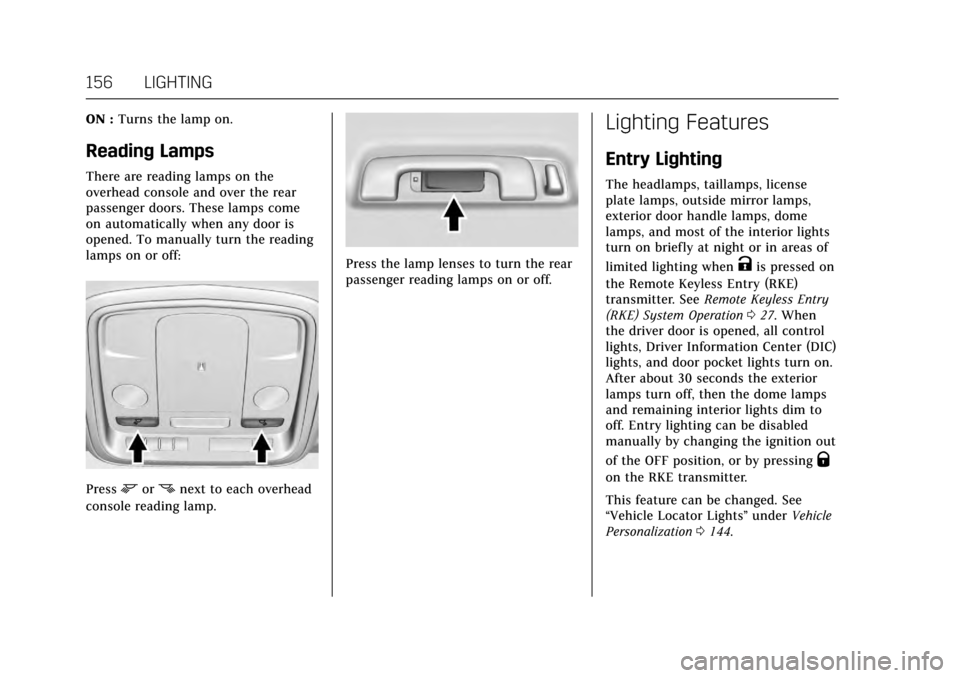
Reading Lamps
There are reading lamps on the
overhead console and over the rear
passenger doors. These lamps come
on automatically when any door is
opened. To manually turn the reading
lamps on or off:
Pressmornnext to each overhead
console reading lamp.
Press the lamp lenses to turn the rear
passenger reading lamps on or off.
Lighting Features
Entry Lighting
The headlamps, taillamps, license
plate lamps, outside mirror lamps,
exterior door handle lamps, dome
lamps, and most of the interior lights
turn on briefly at night or in areas of
limited lighting when
Kis pressed on
the Remote Keyless Entry (RKE)
transmitter. See Remote Keyless Entry
(RKE) System Operation 027. When
the driver door is opened, all control
lights, Driver Information Center (DIC)
lights, and door pocket lights turn on.
After about 30 seconds the exterior
lamps turn off, then the dome lamps
and remaining interior lights dim to
off. Entry lighting can be disabled
manually by changing the ignition out
of the OFF position, or by pressing
Q
on the RKE transmitter.
This feature can be changed. See
“Vehicle Locator Lights” underVehicle
Personalization 0144.
Page 164 of 314
Cadillac XTS Owner Manual (GMNA-Localizing-MidEast-10292881) - 2017 -
crc - 7/1/16
CLIMATE CONTROLS 163
Driver and Passenger Heated and
Ventilated Seats :If equipped,
press
Jorzto heat the driver or
passenger seat cushion and seatback.
Press
Cor{to ventilate the driver
or passenger seat. See Heated and
Ventilated Front Seats 058.
The vehicle also has auto heated or
ventilated seats that turn on when the
vehicle is on. The seats will activate at
the level required by the vehicle’s
interior temperature. To turn off the
heated seats, press
Jorz. To turn
off ventilated seats, press
Cor{.
The auto heated or ventilated seats
feature can be turned on or off. See
Vehicle Personalization 0144 and
Heated and Ventilated Seats 013.
Remote Start Climate Control
Operation : If equipped with the
remote start feature, the climate
control system may run when the
vehicle is started remotely. The system
uses the driver’s previous settings to
heat or cool the inside of the vehicle.
The rear defog may come on during
remote start based on cold ambient
conditions. The rear defog indicator light does not come on during a
remote start. If equipped with heated
or ventilated seats, they may come on
during a remote start. See
Remote
Vehicle Start 031 and Heated and
Ventilated Front Seats 058.
Sensor
The solar sensor, on top of the
instrument panel near the windshield,
monitors the solar heat.
The climate control system uses the
sensor information to adjust the
temperature, fan speed, recirculation,
and air delivery mode for best
comfort. If the sensor is covered, the automatic
climate control system may not work
properly.
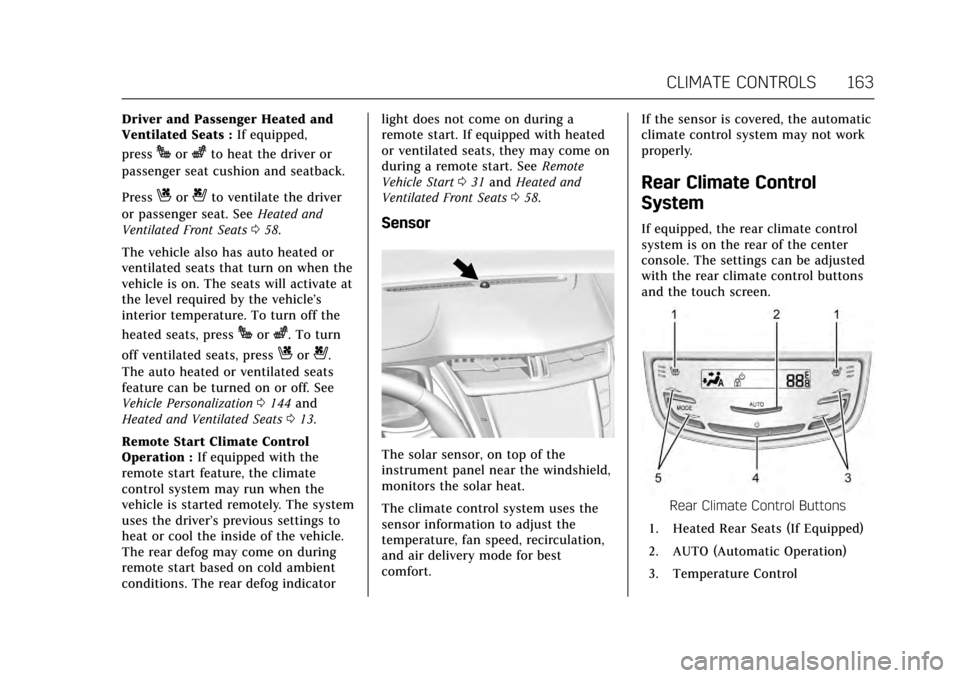
Rear Climate Control
System
If equipped, the rear climate control
system is on the rear of the center
console. The settings can be adjusted
with the rear climate control buttons
and the touch screen.
Rear Climate Control Buttons
1. Heated Rear Seats (If Equipped)
2. AUTO (Automatic Operation)
3. Temperature Control
Page 309 of 314

Cadillac XTS Owner Manual (GMNA-Localizing-MidEast-10292881) - 2017 -
crc - 7/1/16
308 INDEX
Headlamps (cont'd)High Intensity Discharge
(HID) Lighting . . . . . . . . . . . . . . . . . . . 245
High-Beam On Light . . . . . . . . . . . . . . 127
High/Low Beam Changer . . . . . . . . . 152
Lamps On Reminder . . . . . . . . . . . . . . 127
Heated Rear Seats . . . . . . . . . . . . . . . . . . . . . . . . . . . 62
Steering Wheel . . . . . . . . . . . . . . . . . . . . 104
Heated and Ventilated Front Seats . . . . . . . . . . . . . . . . . . . . . . . . . . . . . . . . 58
Heated Mirrors . . . . . . . . . . . . . . . . . . . . . . . 42
Heating . . . . . . . . . . . . . . . . . . . . . . . . .159, 163
High-Beam On Light . . . . . . . . . . . . . . . . 127
High-Speed Operation . . . . . . . . . . . . . . 257
Hill and Mountain Roads . . . . . . . . . . 171
Hill Start Assist (HSA) . . . . . . . . . . . . . 188
Hood . . . . . . . . . . . . . . . . . . . . . . . . . . . . . . . . . 223
Horn . . . . . . . . . . . . . . . . . . . . . . . . . . . . . . . . . 104
How to Wear Safety Belts Properly . . . . . . . . . . . . . . . . . . . . . . . . . . . . . 64
HVAC . . . . . . . . . . . . . . . . . . . . . . . . . . .159, 163
I
Ignition Positions . . . . . . . . . . . . . . . . . . . 177
Indicator Vehicle Ahead . . . . . . . . . . . . . . . . . . . . . 124
Infants and Young Children,
Restraints . . . . . . . . . . . . . . . . . . . . . . . . . . . 82 Infotainment . . . . . . . . . . . . . . . . . . . . . . . . 158
Infotainment System . . . . . . . . . . . . . . . 303
Instrument Cluster . . . . . . . . . . . . . . . . . 112
Instrument Panel
Storage Area . . . . . . . . . . . . . . . . . . . . . . . . 99
Instrument Panel Overview . . . . . . . . . . . 6
Interior Rearview Mirrors . . . . . . . . . . . 43
Introduction . . . . . . . . . . . . . . . . . . . . . . . . . . . . 2
J
Jump Starting . . . . . . . . . . . . . . . . . . . . . . . 273
K
Key and Lock Messages . . . . . . . . . . . . 137
Keyless Entry Remote (RKE) System . . . . . . . . . . . . . . 27
Keys . . . . . . . . . . . . . . . . . . . . . . . . . . . . . . . . . . 26
L
Lamps
Courtesy . . . . . . . . . . . . . . . . . . . . . . . . . . . 155
Daytime Running (DRL) . . . . . . . . . . 153
Dome . . . . . . . . . . . . . . . . . . . . . . . . . . . . . . 155
Exterior Controls . . . . . . . . . . . . . . . . . . 151
Exterior Lamps Off Reminder . . . . 152
Exterior Lighting BatterySaver . . . . . . . . . . . . . . . . . . . . . . . . . . . . . 157
License Plate . . . . . . . . . . . . . . . . . . . . . . 246
Malfunction Indicator . . . . . . . . . . . . 120
Messages . . . . . . . . . . . . . . . . . . . . . . . . . . 138 Lamps (cont'd)
On Reminder . . . . . . . . . . . . . . . . . . . . . . 127
Reading . . . . . . . . . . . . . . . . . . . . . . . . . . . . 156
Lane Departure
Warning (LDW) . . . . . . . . . . . . . . . . . . . 211
Lane Departure Warning Light . . . . 123
Lap-Shoulder Belt . . . . . . . . . . . . . . . . . . . . 65
LATCH System Replacing Parts after a Crash . . . . . . 93
LATCH, Lower Anchors and Tethers for Children . . . . . . . . . . . . . . . 87
LED Lighting . . . . . . . . . . . . . . . . . . . . . . . . 245
Level Control Automatic . . . . . . . . . . . . . . . . . . . . . . . . . 191
Light Adaptive Forward Lighting(AFL) Light . . . . . . . . . . . . . . . . . . . . . . 127
Lighter, Cigarette . . . . . . . . . . . . . . . . . . . 110
Lighting
Adaptive Forward . . . . . . . . . . . . . . . . . 154
Entry . . . . . . . . . . . . . . . . . . . . . . . . . . . . . . 156
Exit . . . . . . . . . . . . . . . . . . . . . . . . . . . . . . . . 157
Illumination Control . . . . . . . . . . . . . . 155
LED . . . . . . . . . . . . . . . . . . . . . . . . . . . . . . . . 245
Lights . . . . . . . . . . . . . . . . . . . . . . . . . . . . . . . . 123 Airbag Readiness . . . . . . . . . . . . . . . . . 119
Antilock Brake System (ABS)Warning . . . . . . . . . . . . . . . . . . . . . . . . . 123
Page 311 of 314

Cadillac XTS Owner Manual (GMNA-Localizing-MidEast-10292881) - 2017 -
crc - 7/1/16
310 INDEX
Mirrors, Interior Rearview . . . . . . . . . . . 43
Monitor System, Tire Pressure . . . . . 258
N
Net, Convenience . . . . . . . . . . . . . . . . . . . 102
New Vehicle Break-In . . . . . . . . . . . . . . . 177
O
Object Detection SystemMessages . . . . . . . . . . . . . . . . . . . . . . . . . . 138
Odometer . . . . . . . . . . . . . . . . . . . . . . . . . . . . 116 Trip . . . . . . . . . . . . . . . . . . . . . . . . . . . . . . . . 116
Off-Road
Recovery . . . . . . . . . . . . . . . . . . . . . . . . . . . 170
Oil Engine . . . . . . . . . . . . . . . . . . . . . . . . . . . . . 228
Engine Oil Life System . . . . . . . . . . . 230
Messages . . . . . . . . . . . . . . . . . . . . . . . . . . 137
Pressure Light . . . . . . . . . . . . . . . . . . . . . 126
Older Children, Restraints . . . . . . . . . . . 81
Operating Mode Overheated Engine Protection . . . 238
Outlets Power . . . . . . . . . . . . . . . . . . . . . . . . . . . . . . 107
Overheated Engine Protection Operating Mode . . . . . . . . . . . . . . . . . . . 238
Overheating, Engine . . . . . . . . . . . . . . . . 237
P
Park
Shifting Into . . . . . . . . . . . . . . . . . . . . . . 180
Shifting Out of . . . . . . . . . . . . . . . . . . . . 181
Parking
Brake and P (Park)Mechanism Check . . . . . . . . . . . . . . . 243
Over Things That Burn . . . . . . . . . . . 181
Parking Assist . . . . . . . . . . . . . . . . . . . . . . . 202
Parking or Backing Assistance Systems . . . . . . . . . . . . . . . 202
Passenger Airbag Status Indicator . . . . . . . . . . . . . . . . . . . . . . . . . . . 119
Passenger Compartment Air
Filter . . . . . . . . . . . . . . . . . . . . . . . . . . . . . . . 166
Passenger Sensing System . . . . . . . . . . 75
Personalization Vehicle . . . . . . . . . . . . . . . . . . . . . . . . . . . . . 144
Power
Door Locks . . . . . . . . . . . . . . . . . . . . . . . . . . 35
Mirrors . . . . . . . . . . . . . . . . . . . . . . . . . . . . . . 41
Outlets . . . . . . . . . . . . . . . . . . . . . . . . . . . . . 107
Protection, Battery . . . . . . . . . . . . . . . . 157
Retained Accessory (RAP) . . . . . . . . 180
Seat Adjustment . . . . . . . . . . . . . . . . . . . . 53
Steering Fluid . . . . . . . . . . . . . . . . . . . . . 238
Windows . . . . . . . . . . . . . . . . . . . . . . . . . . . . 43 Pregnancy, Using Safety Belts . . . . . . 68
Privacy
Vehicle Data Recording . . . . . . . . . . 302
R
Reading Lamps . . . . . . . . . . . . . . . . . . . . . 156
Rear AxleLimited-Slip . . . . . . . . . . . . . . . . . . . . . . . 190
Rear Climate Control System . . . . . . 163
Rear Seat Armrest . . . . . . . . . . . . . . . . . . . 62
Rear Seat Pass-Through Door . . . . . . . 63
Rear Seats . . . . . . . . . . . . . . . . . . . . . . . . . . . . 60 Heated . . . . . . . . . . . . . . . . . . . . . . . . . . . . . . . 62
Rear Vision Camera (RVC) . . . . . . . . . 202
Rear Window Sunshade . . . . . . . . . . . . . 46
Rearview Mirrors Automatic Dimming . . . . . . . . . . . . . . . . 43
Reclining Seatbacks . . . . . . . . . . . . . . . . . 56
Recommended Fluids and Lubricants . . . . . . . . . . . . . . . . . . . . . . . . . 295
Records
Maintenance . . . . . . . . . . . . . . . . . . . . . . 297
Recreational Vehicle Towing . . . . . . . 276
Remote Keyless Entry (RKE) System . . . . . . . . . . . . . . . . . . . . . . . . . . . . . . 27
Remote Vehicle Start . . . . . . . . . . . . . . . . 31
Replacement Bulbs . . . . . . . . . . . . . . . . . 247
Replacement Parts
Airbags . . . . . . . . . . . . . . . . . . . . . . . . . . . . . . 80
Page 313 of 314

Cadillac XTS Owner Manual (GMNA-Localizing-MidEast-10292881) - 2017 -
crc - 7/1/16
312 INDEX
StabiliTrakOFF Light . . . . . . . . . . . . . . . . . . . . . . . . . . 124
Start Assist, Hill . . . . . . . . . . . . . . . . . . . . 188
Start Vehicle, Remote . . . . . . . . . . . . . . . 31
Starter Switch Check . . . . . . . . . . . . . . . 243
Starting the Engine . . . . . . . . . . . . . . . . . 179
Starting the Vehicle Messages . . . . . 142
Steering . . . . . . . . . . . . . . . . . . . . . . . . . . . . . . 169 Fluid, Power . . . . . . . . . . . . . . . . . . . . . . . 238
Heated Wheel . . . . . . . . . . . . . . . . . . . . . 104
Wheel Adjustment . . . . . . . . . . . . . . . . 104
Wheel Controls . . . . . . . . . . . . . . . . . . . 104
Storage Areas Armrest . . . . . . . . . . . . . . . . . . . . . . . . . . . . 100
Cargo Management System . . . . . . 102
Center Console . . . . . . . . . . . . . . . . . . . . 100
Convenience Net . . . . . . . . . . . . . . . . . . 102
Glove Box . . . . . . . . . . . . . . . . . . . . . . . . . 100
Instrument Panel . . . . . . . . . . . . . . . . . . . 99
Storage Compartments . . . . . . . . . . . . . . 99
Stuck Vehicle . . . . . . . . . . . . . . . . . . . . . . . 173
Summer Tires . . . . . . . . . . . . . . . . . . . . . . . 256
Sun Visors . . . . . . . . . . . . . . . . . . . . . . . . . . . . 45
Sunroof . . . . . . . . . . . . . . . . . . . . . . . . . . . . . . . 47
Sunshade Rear Window . . . . . . . . . . . . . . . . . . . . . . . . 46
Symbols . . . . . . . . . . . . . . . . . . . . . . . . . . . . . . . . 2 System
Forward Collision Alert (FCA) . . . . 206
Infotainment . . . . . . . . . . . . . . . . . 158, 303
Systems Driver Assistance . . . . . . . . . . . . . . . . . 201
T
Tachometer . . . . . . . . . . . . . . . . . . . . . . . . . 116
Theft-Deterrent Systems . . . . . . . . . . . . 40
Thigh Support Adjustment . . . . . . . . . . 55
Time . . . . . . . . . . . . . . . . . . . . . . . . . . . . . . . . . 106
Tires . . . . . . . . . . . . . . . . . . . . . . . . . . . . . . . . . 254All-Season . . . . . . . . . . . . . . . . . . . . . . . . . 255
Buying New Tires . . . . . . . . . . . . . . . . . 264
Chains . . . . . . . . . . . . . . . . . . . . . . . . . . . . . 266
Changing . . . . . . . . . . . . . . . . . . . . . . . . . . 268
Compact Spare . . . . . . . . . . . . . . . . . . . . 272
Different Size . . . . . . . . . . . . . . . . . . . . . . 265
If a Tire Goes Flat . . . . . . . . . . . . . . . . 267
Inspection . . . . . . . . . . . . . . . . . . . . . . . . . 262
Low Profile . . . . . . . . . . . . . . . . . . . . . . . . 256
Messages . . . . . . . . . . . . . . . . . . . . . . . . . . 142
Pressure . . . . . . . . . . . . . . . . . . . . . . 256, 257
Pressure Light . . . . . . . . . . . . . . . . . . . . . 125
Pressure Monitor Operation . . . . . . 259
Pressure Monitor System . . . . . . . . 258
Rotation . . . . . . . . . . . . . . . . . . . . . . . . . . . 262
Wheel Alignment and TireBalance . . . . . . . . . . . . . . . . . . . . . . . . . . 265 Tires (cont'd)
Wheel Replacement . . . . . . . . . . . . . . 266
When It Is Time for New
Tires . . . . . . . . . . . . . . . . . . . . . . . . . . . . . 263
Winter . . . . . . . . . . . . . . . . . . . . . . . . . . . . . 255
Towing Driving Characteristics . . . . . . . . . . . 215
Equipment . . . . . . . . . . . . . . . . . . . . . . . . 219
General Information . . . . . . . . . . . . . . 215
Recreational Vehicle . . . . . . . . . . . . . . 276
Trailer . . . . . . . . . . . . . . . . . . . . . . . . . . . . . 218
Vehicle . . . . . . . . . . . . . . . . . . . . . . . . . . . . . 276
Traction Control System (TCS)/
StabiliTrak
®Light . . . . . . . . . . . . . . . 125
Limited-Slip Rear Axle . . . . . . . . . . . 190
Off Light . . . . . . . . . . . . . . . . . . . . . . . . . . . 124
Traction Control/Electronic
Stability Control . . . . . . . . . . . . . . . . . . . 188
Trailer Towing . . . . . . . . . . . . . . . . . . . . . . . . . . . . 218
Transmission Automatic . . . . . . . . . . . . . . . . . . . . . . . . . 183
Fluid, Automatic . . . . . . . . . . . . . . . . . . 231
Messages . . . . . . . . . . . . . . . . . . . . . . . . . . 142
Trip Odometer . . . . . . . . . . . . . . . . . . . . . . 116
Trunk . . . . . . . . . . . . . . . . . . . . . . . . . . . . . . . . . 37
Turn and Lane-Change Signals . . . . 154