traction control CADILLAC XTS 2017 1.G Owner's Manual
[x] Cancel search | Manufacturer: CADILLAC, Model Year: 2017, Model line: XTS, Model: CADILLAC XTS 2017 1.GPages: 314, PDF Size: 3.71 MB
Page 195 of 314
Cadillac XTS Owner Manual (GMNA-Localizing-MidEast-10292881) - 2017 -
crc - 7/1/16
194 DRIVING AND OPERATING
Ending Cruise Control
There are four ways to end cruise
control:
.Step lightly on the brake pedal.
. Press
*.
. Shift the transmission to
N (Neutral).
. Press
J.
Erasing Speed Memory
The cruise control set speed is erased
from memory if
Jis pressed or if
the ignition is turned off.
Adaptive Cruise Control
If equipped with Adaptive Cruise
Control (ACC), it allows for selecting
the cruise control set speed and
following gap. Read this entire section
before using this system. ACC uses a
camera and radar sensors to detect
other vehicles. The following gap is
the following time (or distance)
between your vehicle and a vehicle
detected directly ahead in your path, moving in the same direction. If no
vehicle is detected in your path, ACC
works like regular cruise control.
If a vehicle is detected in your path,
ACC can speed up the vehicle or apply
limited, moderate braking to maintain
the selected following gap. To
disengage ACC, apply the brake. If the
Traction Control System (TCS) or
StabiliTrak
®electronic stability
control system activates while ACC is
engaged, ACC may automatically
disengage. See Traction Control/
Electronic Stability Control 0188. When
road conditions allow ACC to be safely
used, ACC can be turned back on. ACC
will not engage if the TCS or
StabiliTrak electronic stability control
system is disabled.
{Warning
ACC has limited braking ability and
may not have time to slow the
vehicle down enough to avoid a
collision with another vehicle you
are following. This can occur when
vehicles suddenly slow or stop
(Continued)
Warning (Continued)
ahead, or enter your lane. Also see
“Alerting the Driver”in this section.
Complete attention is always
required while driving and you
should be ready to take action and
apply the brakes. See Defensive
Driving 0168.
{Warning
ACC will not detect or brake for
children, pedestrians, animals,
or other objects.
Do not use ACC when:
. On winding and hilly roads or
when the sensors are blocked
by snow, ice, or dirt. The
system may not detect a
vehicle ahead. Keep the entire
front of the vehicle clean.
(Continued)
Page 196 of 314
Cadillac XTS Owner Manual (GMNA-Localizing-MidEast-10292881) - 2017 -
crc - 7/1/16
DRIVING AND OPERATING 195
Warning (Continued)
.Visibility is low, such as in
fog, rain, or snow conditions.
ACC performance is limited
under these conditions.
. On slippery roads where fast
changes in tire traction can
cause excessive wheel slip.
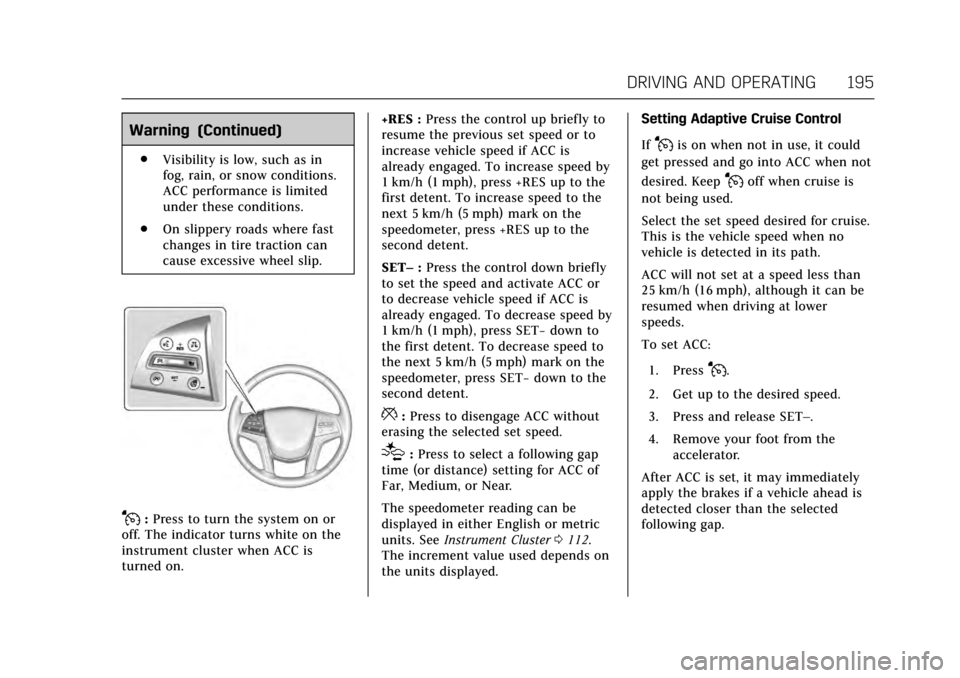
J:Press to turn the system on or
off. The indicator turns white on the
instrument cluster when ACC is
turned on. +RES :
Press the control up briefly to
resume the previous set speed or to
increase vehicle speed if ACC is
already engaged. To increase speed by
1 km/h (1 mph), press +RES up to the
first detent. To increase speed to the
next 5 km/h (5 mph) mark on the
speedometer, press +RES up to the
second detent.
SET– :Press the control down briefly
to set the speed and activate ACC or
to decrease vehicle speed if ACC is
already engaged. To decrease speed by
1 km/h (1 mph), press SET− down to
the first detent. To decrease speed to
the next 5 km/h (5 mph) mark on the
speedometer, press SET− down to the
second detent.
*: Press to disengage ACC without
erasing the selected set speed.
[: Press to select a following gap
time (or distance) setting for ACC of
Far, Medium, or Near.
The speedometer reading can be
displayed in either English or metric
units. See Instrument Cluster 0112.
The increment value used depends on
the units displayed. Setting Adaptive Cruise Control
If
Jis on when not in use, it could
get pressed and go into ACC when not
desired. Keep
Joff when cruise is
not being used.
Select the set speed desired for cruise.
This is the vehicle speed when no
vehicle is detected in its path.
ACC will not set at a speed less than
25 km/h (16 mph), although it can be
resumed when driving at lower
speeds.
To set ACC:
1. Press
J.
2. Get up to the desired speed.
3. Press and release SET–.
4. Remove your foot from the accelerator.
After ACC is set, it may immediately
apply the brakes if a vehicle ahead is
detected closer than the selected
following gap.
Page 199 of 314
Cadillac XTS Owner Manual (GMNA-Localizing-MidEast-10292881) - 2017 -
crc - 7/1/16
198 DRIVING AND OPERATING
feel or sound different than if the
brakes were applied manually. This is
normal.
Stationary or Very Slow-Moving
Objects
{Warning
ACC may not detect and react to
stopped or slow-moving vehicles
ahead of you. For example, the
system may not brake for a vehicle
it has never detected moving. This
can occur in stop-and-go traffic or
when a vehicle suddenly appears
due to a vehicle ahead changing
lanes. Your vehicle may not stop
and could cause a crash. Use
caution when using ACC. Your
complete attention is always
required while driving and you
should be ready to take action and
apply the brakes.
ACC Automatically Disengages
ACC may automatically disengage and
the driver will need to manually apply
the brakes to slow the vehicle when: .
The sensors are blocked.
. The Traction Control System (TCS)
or electronic stability control
system has activated or been
disabled.
. No traffic or other objects are
being detected.
. There is a fault in the system.
The ACC active symbol will not be
displayed when ACC is no longer
active.
Notification to Resume ACC
ACC will maintain a follow gap behind
a detected vehicle and slow your
vehicle to a stop behind that vehicle.
If the stopped vehicle ahead has
driven away and ACC has not
resumed, the vehicle ahead indicator
will flash as a reminder to check
traffic ahead before proceeding. In
addition, the left and right sides of the
Safety Alert Seat will pulse three
times, or three beeps will sound. See
”Alert Type ”and “Go Notifier” in
“Collision/Detection Systems” under
Vehicle Personalization 0144. When the vehicle ahead drives away,
press +RES or the accelerator pedal to
resume cruise control. If stopped for
more than two minutes or if the driver
door is opened and the driver safety
belt is unbuckled, the ACC
automatically applies the Electric
Parking Brake to hold the vehicle. The
Electric Parking Brake status light will
turn on. See
Electric Parking Brake
0 186. To resume ACC and release the
electric parking brake, press the
accelerator pedal.
A DIC warning message may display
indicating to shift to P (Park) before
exiting the vehicle. See Vehicle
Messages 0134.
{Warning
If ACC has stopped the vehicle, and
if ACC is disengaged, turned off,
or canceled, the vehicle will no
longer be held at a stop. The vehicle
can move. When ACC is holding the
vehicle at a stop, always be
prepared to manually apply the
brakes.
Page 223 of 314
Cadillac XTS Owner Manual (GMNA-Localizing-MidEast-10292881) - 2017 -
crc - 7/1/16
222 VEHICLE CARE
Appearance Care
Exterior Care . . . . . . . . . . . . . . . . . . . . . . 278
Interior Care . . . . . . . . . . . . . . . . . . . . . . 282
Floor Mats . . . . . . . . . . . . . . . . . . . . . . . . 285General Information
For service and parts needs, visit your
dealer. You will receive genuine parts
and trained and supported service
people.
Accessories and
Modifications
Adding non-dealer accessories or
making modifications to the vehicle
can affect vehicle performance and
safety, including such things as
airbags, braking, stability, ride and
handling, emissions systems,
aerodynamics, durability, and
electronic systems like antilock
brakes, traction control, and stability
control. These accessories or
modifications could even cause
malfunction or damage not covered by
the vehicle warranty.
Damage to suspension components
caused by modifying vehicle height
outside of factory settings will not be
covered by the vehicle warranty.Damage to vehicle components
resulting from modifications or the
installation or use of non-GM certified
parts, including control module or
software modifications, is not covered
under the terms of the vehicle
warranty and may affect remaining
warranty coverage for affected parts.
GM Accessories are designed to
complement and function with other
systems on the vehicle. See your
dealer to accessorize the vehicle using
genuine GM Accessories installed by a
dealer technician.
Also, see
Adding Equipment to the
Airbag-Equipped Vehicle 079.
Page 265 of 314
Cadillac XTS Owner Manual (GMNA-Localizing-MidEast-10292881) - 2017 -
crc - 7/1/16
264 VEHICLE CARE
Parking for an extended period can
cause flat spots on the tires that may
result in vibrations while driving.
When storing a vehicle for at least a
month, remove the tires or raise the
vehicle to reduce the weight from the
tires.
Buying New Tires
GM has developed and matched
specific tires for the vehicle. The
original equipment tires installed
were designed to meet General
Motors Tire Performance Criteria
Specification (TPC Spec) system
rating. When replacement tires are
needed, GM strongly recommends
buying tires with the same TPC
Spec rating.
GM's exclusive TPC Spec system
considers over a dozen critical
specifications that impact the
overall performance of the vehicle,
including brake system
performance, ride and handling,
traction control, and tire pressure
monitoring performance. GM's
TPC Spec number is molded ontothe tire's sidewall near the tire
size. If the tires have an all-season
tread design, the TPC Spec
number will be followed by MS for
mud and snow.
GM recommends replacing worn
tires in complete sets of four.
Uniform tread depth on all tires
will help to maintain the
performance of the vehicle.
Braking and handling performance
may be adversely affected if all the
tires are not replaced at the same
time. If proper rotation and
maintenance have been done, all
four tires should wear out at
about the same time. See
Tire
Rotation 0262 for information on
proper tire rotation. However, if it
is necessary to replace only one
axle set of worn tires, place the
new tires on the rear axle.
Winter tires with the same speed
rating as the original equipment
tires may not be available for H, V,
W, Y, and ZR speed rated tires.
Never exceed the winter tire's maximum speed capability when
using winter tires with a lower
speed rating.
{Warning
Tires could explode during
improper service. Attempting to
mount or dismount a tire could
cause injury or death. Only your
dealer or authorized tire service
center should mount or
dismount the tires.
{Warning
Mixing tires of different sizes,
brands, or types may cause loss
of control of the vehicle,
resulting in a crash or other
vehicle damage. Use the correct
size, brand, and type of tires on
all wheels.
Page 266 of 314

Cadillac XTS Owner Manual (GMNA-Localizing-MidEast-10292881) - 2017 -
crc - 7/1/16
VEHICLE CARE 265
{Warning
Using bias-ply tires on the
vehicle may cause the wheel rim
flanges to develop cracks after
many miles of driving. A tire
and/or wheel could fail suddenly
and cause a crash. Use only
radial-ply tires with the wheels
on the vehicle.
If the vehicle tires must be
replaced with a tire that does not
have a TPC Spec number, make
sure they are the same size, load
range, speed rating, and
construction (radial) as the
original tires.
Vehicles that have a tire pressure
monitoring system could give an
inaccurate low-pressure warning if
non-TPC Spec rated tires are
installed. See Tire Pressure Monitor
System 0258. The Tire and Loading Information
label indicates the original
equipment tires on the vehicle.
See
Vehicle Load Limits 0173 for
the label location and more
information about the Tire and
Loading Information label.
Different Size Tires and
Wheels
If wheels or tires are installed that are
a different size than the original
equipment wheels and tires, vehicle
performance, including its braking,
ride and handling characteristics,
stability, and resistance to rollover
may be affected. If the vehicle has
electronic systems such as antilock
brakes, rollover airbags, traction
control, electronic stability control,
or All-Wheel Drive, the performance
of these systems can also be affected.
{Warning
If different sized wheels are used,
there may not be an acceptable
level of performance and safety if
tires not recommended for those
wheels are selected. This increases
the chance of a crash and serious
injury. Only use GM specific wheel
and tire systems developed for the
vehicle, and have them properly
installed by a GM certified
technician.
See Buying New Tires 0264 and
Accessories and Modifications 0222.
Wheel Alignment and Tire
Balance
The tires and wheels were aligned and
balanced at the factory to provide the
longest tire life and best overall
performance. Adjustments to wheel
alignment and tire balancing are not
necessary on a regular basis. Consider
an alignment check if there is unusual
tire wear or the vehicle is significantly
pulling to one side or the other. Some
Page 267 of 314
Cadillac XTS Owner Manual (GMNA-Localizing-MidEast-10292881) - 2017 -
crc - 7/1/16
266 VEHICLE CARE
slight pull to the left or right,
depending on the crown of the road
and/or other road surface variations
such as troughs or ruts, is normal.
If the vehicle is vibrating when driving
on a smooth road, the tires and
wheels may need to be rebalanced.
See your dealer for proper diagnosis.
Wheel Replacement
Replace any wheel that is bent,
cracked, or badly rusted or corroded.
If wheel nuts keep coming loose, the
wheel, wheel bolts, and wheel nuts
should be replaced. If the wheel leaks
air, replace it. Some aluminum wheels
can be repaired. See your dealer if any
of these conditions exist.
Your dealer will know the kind of
wheel that is needed.
Each new wheel should have the same
load-carrying capacity, diameter,
width, offset, and be mounted the
same way as the one it replaces.
Replace wheels, wheel bolts, wheel
nuts, or Tire Pressure Monitor System
(TPMS) sensors with new GM original
equipment parts.
{Warning
Using the wrong replacement
wheels, wheel bolts, or wheel nuts
can be dangerous. It could affect
the braking and handling of the
vehicle. Tires can lose air, and
cause loss of control, causing a
crash. Always use the correct wheel,
wheel bolts, and wheel nuts for
replacement.
Caution
The wrong wheel can also cause
problems with bearing life, brake
cooling, speedometer or odometer
calibration, headlamp aim, bumper
height, vehicle ground clearance,
and tire or tire chain clearance to
the body and chassis.
Used Replacement Wheels
{Warning
Replacing a wheel with a used one
is dangerous. How it has been used
or how far it has been driven may
be unknown. It could fail suddenly
and cause a crash. When replacing
wheels, use a new GM original
equipment wheel.
Tire Chains
{Warning
Do not use tire chains. There is not
enough clearance. Tire chains used
on a vehicle without the proper
amount of clearance can cause
damage to the brakes, suspension,
or other vehicle parts. The area
damaged by the tire chains could
cause loss of control and a crash.
Use another type of traction device
only if its manufacturer
recommends it for the vehicle's tire(Continued)
Page 274 of 314
Cadillac XTS Owner Manual (GMNA-Localizing-MidEast-10292881) - 2017 -
crc - 7/1/16
VEHICLE CARE 273
the vehicle speed be limited to
80 km/h (50 mph). To conserve the
tread of the spare tire, have the
standard tire repaired or replaced as
soon as convenient and return the
spare tire to the storage area.
When using a compact spare tire, the
AWD (if equipped), ABS, and Traction
Control systems may engage until the
spare tire is recognized by the vehicle,
especially on slippery roads. Adjust
driving to reduce possible wheel slip.
Caution
When the compact spare is
installed, do not take the vehicle
through an automatic car wash
with guide rails. The compact spare
can get caught on the rails which
can damage the tire, wheel, and
other parts of the vehicle.Do not use the compact spare on
other vehicles.
Do not mix the compact spare tire or
wheel with other wheels or tires. They
will not fit. Keep the spare tire and its
wheel together.
Caution
Tire chains will not fit the compact
spare. Using them can damage the
vehicle and the chains. Do not use
tire chains on the compact spare.
Jump Starting
For more information about the
vehicle battery, see
Battery0242.
If the battery has run down, try to use
another vehicle and some jumper
cables to start your vehicle. Be sure to
use the following steps to do it safely.
{Warning
Batteries can hurt you. They can be
dangerous because: . They contain acid that can
burn you.
. They contain gas that can
explode or ignite.
. They contain enough
electricity to burn you.
If you do not follow these steps
exactly, some or all of these things
can hurt you.
Page 306 of 314

Cadillac XTS Owner Manual (GMNA-Localizing-MidEast-10292881) - 2017 -
crc - 7/1/16
INDEX 305
Automatic (cont'd)Door Locks . . . . . . . . . . . . . . . . . . . . . . . . . . 35
Forward Braking . . . . . . . . . . . . . . . . . . 208
Headlamp System . . . . . . . . . . . . . . . . 153
Level Control . . . . . . . . . . . . . . . . . . . . . . 191
Transmission . . . . . . . . . . . . . . . . . . . . . . 183
Transmission Fluid . . . . . . . . . . . . . . . 231
Automatic Transmission Manual Mode . . . . . . . . . . . . . . . . . . . . . 184
Shift Lock Control Function
Check . . . . . . . . . . . . . . . . . . . . . . . . . . . . 243
B
Battery . . . . . . . . . . . . . . . . . . . . . . . . . . . . . . . 242Exterior Lighting BatterySaver . . . . . . . . . . . . . . . . . . . . . . . . . . . . . 157
Jump Starting . . . . . . . . . . . . . . . . . . . . . 273
Power Protection . . . . . . . . . . . . . . . . . . 157
Voltage and Charging Messages . . . . . . . . . . . . . . . . . . . . . . . . 134
Blade Replacement, Wiper . . . . . . . . . 244
Brake Parking, Electric . . . . . . . . . . . . . . . . . . 186
System Warning Light . . . . . . . . . . . . 122
Brakes . . . . . . . . . . . . . . . . . . . . . . . . . . . . . . . 240 Antilock . . . . . . . . . . . . . . . . . . . . . . . . . . . 185
Assist . . . . . . . . . . . . . . . . . . . . . . . . . . . . . . 187
Fluid . . . . . . . . . . . . . . . . . . . . . . . . . . . . . . . 241
System Messages . . . . . . . . . . . . . . . . . 135 Braking . . . . . . . . . . . . . . . . . . . . . . . . . . . . . . 168
Automatic Forward . . . . . . . . . . . . . . . 208
Break-In, New Vehicle . . . . . . . . . . . . . . 177
Bulb Replacement . . . . . . . . . . . . . . . . . . 247 Back-up Lamps . . . . . . . . . . . . . . . . . . . 245
Headlamp Aiming . . . . . . . . . . . . . . . . 245
Headlamps . . . . . . . . . . . . . . . . . . . . . . . . 245
High Intensity Discharge(HID) Lighting . . . . . . . . . . . . . . . . . . . 245
License Plate Lamps . . . . . . . . . . . . . . 246
Buying New Tires . . . . . . . . . . . . . . . . . . . 264
C
Calibration . . . . . . . . . . . . . . . . . . . . . . . . . . 106
Capacities and Specifications . . . . . . 299
Carbon Monoxide Engine Exhaust . . . . . . . . . . . . . . . . . . . 182
Trunk . . . . . . . . . . . . . . . . . . . . . . . . . . . . . . . . 37
Winter Driving . . . . . . . . . . . . . . . . . . . . 172
Cargo Management System . . . . . . . . . . . . . 102
Tie-Downs . . . . . . . . . . . . . . . . . . . . . . . . . 101
Caution, Danger, and Warning . . . . . . . . 2
Center Console Storage . . . . . . . . . . . . . 100
Chains, Tire . . . . . . . . . . . . . . . . . . . . . . . . . 266
Charging Wireless . . . . . . . . . . . . . . . . . . . . . . . . . . . 108
Charging System Light . . . . . . . . . . . . . 120 Check
Malfunction Indicator Engine
Light . . . . . . . . . . . . . . . . . . . . . . . . . . . . . 120
Child Restraints Infants and Young Children . . . . . . . . 82
Lower Anchors and Tethers forChildren . . . . . . . . . . . . . . . . . . . . . . . . . . . 87
Older Children . . . . . . . . . . . . . . . . . . . . . . 81
Securing . . . . . . . . . . . . . . . . . . . . . . . . .94, 95
Systems . . . . . . . . . . . . . . . . . . . . . . . . . . . . . 85
Cigarette Lighter . . . . . . . . . . . . . . . . . . . . 110
Circuit Breakers . . . . . . . . . . . . . . . . . . . . . 248
Cleaning
Exterior Care . . . . . . . . . . . . . . . . . . . . . . 278
Interior Care . . . . . . . . . . . . . . . . . . . . . . 282
Climate Control Systems
Dual Automatic . . . . . . . . . . . . . . . . . . . 159
Rear . . . . . . . . . . . . . . . . . . . . . . . . . . . . . . . . 163
Clock . . . . . . . . . . . . . . . . . . . . . . . . . . . . . . . . . 106
Cluster, Instrument . . . . . . . . . . . . . . . . . 112
Compact Spare Tire . . . . . . . . . . . . . . . . . 272
Compartments Storage . . . . . . . . . . . . . . . . . . . . . . . . . . . . . . 99
Compass . . . . . . . . . . . . . . . . . . . . . . . . . . . . . 106 Messages . . . . . . . . . . . . . . . . . . . . . . . . . . 135
Control Traction and ElectronicStability . . . . . . . . . . . . . . . . . . . . . . . . . . 188
Page 310 of 314

Cadillac XTS Owner Manual (GMNA-Localizing-MidEast-10292881) - 2017 -
crc - 7/1/16
INDEX 309
Lights (cont'd)Brake System Warning . . . . . . . . . . . 122
Charging System . . . . . . . . . . . . . . . . . . 120
Cruise Control . . . . . . . . . . . . . . . . . . . . . 127
Door Ajar . . . . . . . . . . . . . . . . . . . . . . . . . . 128
Electric Parking Brake . . . . . . . . . . . . 122
Engine Coolant Temperature
Warning . . . . . . . . . . . . . . . . . . . . . . . . . 125
Engine Oil Pressure . . . . . . . . . . . . . . . 126
Flash-to-Pass . . . . . . . . . . . . . . . . . . . . . . 153
High-Beam On . . . . . . . . . . . . . . . . . . . . 127
High/Low Beam Changer . . . . . . . . . 152
Lane Departure Warning . . . . . . . . . 123
Low Fuel Warning . . . . . . . . . . . . . . . . 126
Safety Belt Reminders . . . . . . . . . . . . 118
Security . . . . . . . . . . . . . . . . . . . . . . . . . . . . 126
Service Electric Parking Brake . . . 123
StabiliTrak
®OFF . . . . . . . . . . . . . . . . . . 124
Tire Pressure . . . . . . . . . . . . . . . . . . . . . . 125
Traction Control System (TCS)/StabiliTrak
®. . . . . . . . . . . . . . 125
Traction Off . . . . . . . . . . . . . . . . . . . . . . . 124
Limited-Slip Rear Axle . . . . . . . . . . . . . 190
Locks
Automatic Door . . . . . . . . . . . . . . . . . . . . . 35
Delayed Locking . . . . . . . . . . . . . . . . . . . . 35
Door . . . . . . . . . . . . . . . . . . . . . . . . . . . . . . . . . 33
Lockout Protection . . . . . . . . . . . . . . . . . 36 Locks (cont'd)
Power Door . . . . . . . . . . . . . . . . . . . . . . . . . . 35
Safety . . . . . . . . . . . . . . . . . . . . . . . . . . . . . . . . 36
Loss of Control . . . . . . . . . . . . . . . . . . . . . . 170
Low Fuel Warning Light . . . . . . . . . . . 126
Low-Profile Tires . . . . . . . . . . . . . . . . . . . . 256
Lower Anchors and Tethers for
Children (LATCH System) . . . . . . . . . 87
Lumbar Adjustment . . . . . . . . . . . . . . . . . 54
Front Seats . . . . . . . . . . . . . . . . . . . . . . . . . . 54
M
Magnetic Ride Control . . . . . . . . . . . . . 190
MaintenanceRecords . . . . . . . . . . . . . . . . . . . . . . . . . . . . 297
Maintenance Schedule . . . . . . . . . . . . . 288 Recommended Fluids andLubricants . . . . . . . . . . . . . . . . . . . . . . . 295
Malfunction Indicator Lamp . . . . . . . 120
Manual Mode . . . . . . . . . . . . . . . . . . . . . . . 184
Massage . . . . . . . . . . . . . . . . . . . . . . . . . . . . . . 60
Memory Features . . . . . . . . . . . . . . . . . . . . 12
Memory Seats . . . . . . . . . . . . . . . . . . . . . . . . 57
Messages
Airbag System . . . . . . . . . . . . . . . . . . . . . 141
Battery Voltage and Charging . . . . 134
Brake System . . . . . . . . . . . . . . . . . . . . . . 135
Compass . . . . . . . . . . . . . . . . . . . . . . . . . . . 135
Door Ajar . . . . . . . . . . . . . . . . . . . . . . . . . . 136 Messages (cont'd)
Engine Cooling System . . . . . . . . . . . 136
Engine Oil . . . . . . . . . . . . . . . . . . . . . . . . . 137
Engine Power . . . . . . . . . . . . . . . . . . . . . 137
Fuel System . . . . . . . . . . . . . . . . . . . . . . . 137
Key and Lock . . . . . . . . . . . . . . . . . . . . . . 137
Lamp . . . . . . . . . . . . . . . . . . . . . . . . . . . . . . 138
Object Detection System . . . . . . . . . 138
Ride Control System . . . . . . . . . . . . . . 141
Security . . . . . . . . . . . . . . . . . . . . . . . . . . . . 141
Service Vehicle . . . . . . . . . . . . . . . . . . . . 142
Starting the Vehicle . . . . . . . . . . . . . . 142
Tire . . . . . . . . . . . . . . . . . . . . . . . . . . . . . . . . 142
Transmission . . . . . . . . . . . . . . . . . . . . . . 142
Vehicle . . . . . . . . . . . . . . . . . . . . . . . . . . . . . 134
Vehicle Reminder . . . . . . . . . . . . . . . . . 143
Vehicle Speed . . . . . . . . . . . . . . . . . . . . . 143
Washer Fluid . . . . . . . . . . . . . . . . . . . . . . 143
Window . . . . . . . . . . . . . . . . . . . . . . . . . . . 143
Mirrors Automatic Dimming . . . . . . . . . . . . . . . . 42
Automatic Dimming Rearview . . . . . 43
Convex . . . . . . . . . . . . . . . . . . . . . . . . . . . . . . . 41
Folding . . . . . . . . . . . . . . . . . . . . . . . . . . . . . . 42
Heated . . . . . . . . . . . . . . . . . . . . . . . . . . . . . . . 42
Power . . . . . . . . . . . . . . . . . . . . . . . . . . . . . . . . 41
Tilt in Reverse . . . . . . . . . . . . . . . . . . . . . . 42