seats CADILLAC XTS 2017 1.G Repair Manual
[x] Cancel search | Manufacturer: CADILLAC, Model Year: 2017, Model line: XTS, Model: CADILLAC XTS 2017 1.GPages: 314, PDF Size: 3.71 MB
Page 146 of 314
Cadillac XTS Owner Manual (GMNA-Localizing-MidEast-10292881) - 2017 -
crc - 7/1/16
INSTRUMENTS AND CONTROLS 145
Manage Favorites
This allows favorites to be edited. See
“Manage Favorites”in “Settings” under
“Radio ”in the infotainment manual.
Number of Favorites Shown
Press to set the number of favorites to
display.
Select the desired number or select
Auto and the infotainment system will
automatically adjust the number of
favorites shown.
Audible Touch Feedback
This allows Audible Touch Feedback
to be turned on or off.
Select Off or On.
Bose Audio Pilot
This feature adjusts the volume based
on the noise in the vehicle. See “Bose
AudioPilot Noise Compensation
Technology” under“Infotainment
System Settings” in the infotainment
manual.
Select Off or On. Maximum Start Up Volume
This feature sets the maximum
startup volume. If the vehicle is
started and the volume is greater than
this level, the volume is adjusted to
this level.
To set the maximum startup volume,
press + or
−to increase or decrease.
Vehicle
Select and the following may display:
.
Climate and Air Quality
. Collision/Detection Systems
. Comfort and Convenience
. Lighting
. Power Door Locks
. Remote Lock, Unlock, Start
Climate and Air Quality
Select and the following may display:
. Auto Fan Max Speed
. Air Quality Sensor
. Auto Cooled Seats
. Auto Heated Seats
. Auto Defog .
Auto Rear Defog
Auto Fan Max Speed
This feature will set the maximum
auto fan speed.
Select Low, Medium, or High.
Air Quality Sensor
This allows for selection of air quality
sensor operation at high or low
sensitivity.
Select Off, Low Sensitivity, or High
Sensitivity.
Auto Cooled Seats
When enabled, this feature will
automatically activate ventilated seats
at the level required by the interior
temperature. The auto ventilated seats
can be turned off by using the
ventilated seat buttons on the center
stack. See Heated and Ventilated Front
Seats 058.
Select Off or On.
Auto Heated Seats
When enabled, this feature will
automatically activate the heated
seats at the level required by the
Page 147 of 314
Cadillac XTS Owner Manual (GMNA-Localizing-MidEast-10292881) - 2017 -
crc - 7/1/16
146 INSTRUMENTS AND CONTROLS
interior temperature. The auto heated
seats can be turned off by using the
heated seat buttons on the center
stack.
Select Off or On.
Auto Defog
When set to On, the front defog will
automatically react to temperature
and humidity conditions that may
cause fogging.
Select Off or On.
Auto Rear Defog
If equipped, this allows the Auto Rear
Defog to be turned on or off. This
feature will automatically turn on the
rear window defogger when it is cold
outside.
Select Off or On.
Collision/Detection Systems
Select the Collision/Detection Systems
menu and the following may be
displayed if equipped:
.Alert Type
. Auto Collision Preparation
. Go Notifier .
Rear Cross Traffic Alert
. Lane Change Alert
Alert Type
This feature will set crash alerts to
beeps or seat vibrations. This setting
affects all crash alerts including
Forward Collision, Lane Departure
Warning, Adaptive Cruise Control,
Parking Assist, and Backing Warning
alerts.
Select Beeps or Safety Alert Seat.
Auto Collision Preparation
This feature will turn on or off the
Forward Collision Alert (FCA) and
Forward Automatic Braking (FAB).
The Off setting disables all FCA and
FAB functions. With the Alert and
Brake setting, both FCA and FAB are
available. The Alert setting disables
FAB, but some last-second automatic
braking capability is still provided,
though less likely to occur. See
Forward Automatic Braking
(FAB) 0208.
Select Off, Alert and Brake, or Alert. Go Notifier
This feature will give a reminder that
Adaptive Cruise Control provides
when it has brought the vehicle to a
complete stop behind another
stopping vehicle, and then that vehicle
drives on.
Select Off or On.
Rear Cross Traffic Alert
This allows the Rear Cross Traffic
Alert feature to be turned on or off.
Select Off or On.
Lane Change Alert
This allows the Lane Change Alert
feature to be turned on or off.
Select Off or On.
Comfort and Convenience
Select and the following may display:
.
Auto Memory Recall
. Easy Exit Options
. Chime Volume
. Reverse Tilt Mirror
. Auto Mirror Folding
Page 148 of 314
Cadillac XTS Owner Manual (GMNA-Localizing-MidEast-10292881) - 2017 -
crc - 7/1/16
INSTRUMENTS AND CONTROLS 147
.Rain Sense Wipers
Auto Memory Recall
This feature automatically recalls the
current driver’s previously stored 1 or
2 button positions when entering the
vehicle. See Memory Seats 057.
Select Off, On - Driver Door Open,
or On - At ignition On.
Easy Exit Options
This feature automatically recalls the
current driver’s previously stored Exit
button position when exiting the
vehicle. See Memory Seats 057.
Select Off or On.
Chime Volume
This allows the selection of the chime
volume level.
Press + or −to adjust the volume.
Reverse Tilt Mirror
When on, both the driver and
passenger outside mirrors will tilt
downward when the vehicle is shifted
to R (Reverse) to improve visibility of
the ground near the rear wheels. They
will return to their previous driving position when the vehicle is shifted
out of R (Reverse) or the engine is
turned off.
Select Off, On, On - Driver and
Passenger, On - Driver, or On -
Passenger.
Auto Mirror Folding
When on, the outside rearview mirrors
will automatically fold or unfold when
the Remote Keyless Entry (RKE)
transmitter
QorKbutton is pressed
and held.
Select Off or On.
Rain Sense Wipers
This allows the Rain Sense Wipers
feature to be disabled or enabled.
Select Disabled or Enabled.
Lighting
Select and the following may display:
. Vehicle Locator Lights
. Exit Lighting Vehicle Locator Lights
This feature will flash the exterior
lamps and allows some of the exterior
lamps and most of the interior lamps
to turn on briefly at night when
Kon
the Remote Keyless Entry (RKE)
transmitter is pressed to locate the
vehicle.
Select Off or On.
Exit Lighting
This allows the selection of how long
the exterior lamps stay on when
leaving the vehicle when it is dark
outside.
Select Off, 30 Seconds, 60 Seconds,
or 120 Seconds.
Power Door Locks
Select and the following may display:
. Unlocked Door Anti-Lockout
. Auto Door Lock
. Auto Door Unlock
. Delayed Door Lock
Page 149 of 314

Cadillac XTS Owner Manual (GMNA-Localizing-MidEast-10292881) - 2017 -
crc - 7/1/16
148 INSTRUMENTS AND CONTROLS
Unlocked Door Anti-Lockout
When on, this feature will keep the
driver door from locking when the
door is open. If Off is selected, the
Delayed Door Lock menu will be
available.
Select Off or On.
Auto Door Lock
When this feature is turned on, all
doors will automatically lock when the
vehicle is shifted out of P (Park). The
doors will automatically unlock when
the vehicle is shifted into P (Park).
Select Off or On.
Auto Door Unlock
This allows selection of which of the
doors will automatically unlock when
the vehicle is shifted into P (Park).
Select Off, All Doors, or Driver Door.
Delayed Door Lock
When on, this feature will delay the
locking of the doors. To override the
delay, press the power door lock
switch on the door.
Select Off or On.Remote Lock, Unlock, Start
Select and the following may display:
.Remote Unlock Light Feedback
. Remote Lock Feedback
. Remote Door Unlock
. Remote Start Auto Cool Seats
. Remote Start Auto Heat Seats
. Remote Window Operation
. Passive Door Unlock
. Passive Door Lock
. Remote Left in Vehicle Alert
Remote Unlock Light Feedback
When on, the exterior lamps will flash
when unlocking the vehicle with the
RKE transmitter.
Select Off or Flash Lights.
Remote Lock Feedback
This allows selection of what type of
feedback is given when locking the
vehicle with the RKE transmitter.
Select Off, Lights and Horn, Lights
Only, or Horn Only. Remote Door Unlock
This allows selection of which doors
will unlock when pressing
Kon the
RKE transmitter.
Select All Doors or Driver Door.
Remote Start Auto Cool Seats
If equipped and turned on, this
feature will turn the ventilated seats
on when using remote start on
warm days.
Select Off or On.
Remote Start Auto Heat Seats
If equipped and turned on, this
feature will turn the heated seats on
when using remote start on cold days.
Select Off or On.
Remote Window Operation
This allows the window to be opened
when pressing
Kon the RKE
transmitter. See Remote Keyless Entry
(RKE) System Operation 027.
Select Off or On.
Page 160 of 314
Cadillac XTS Owner Manual (GMNA-Localizing-MidEast-10292881) - 2017 -
crc - 7/1/16
CLIMATE CONTROLS 159
Climate Controls
Climate Control Systems
Dual Automatic Climate ControlSystem . . . . . . . . . . . . . . . . . . . . . . . . . . 159
Rear Climate Control System . . . . 163
Air Vents
Air Vents . . . . . . . . . . . . . . . . . . . . . . . . . . 165
Maintenance
Passenger Compartment Air Filter . . . . . . . . . . . . . . . . . . . . . . . . . . . . . 166
Service . . . . . . . . . . . . . . . . . . . . . . . . . . . . 166
Climate Control Systems
Dual Automatic Climate Control System
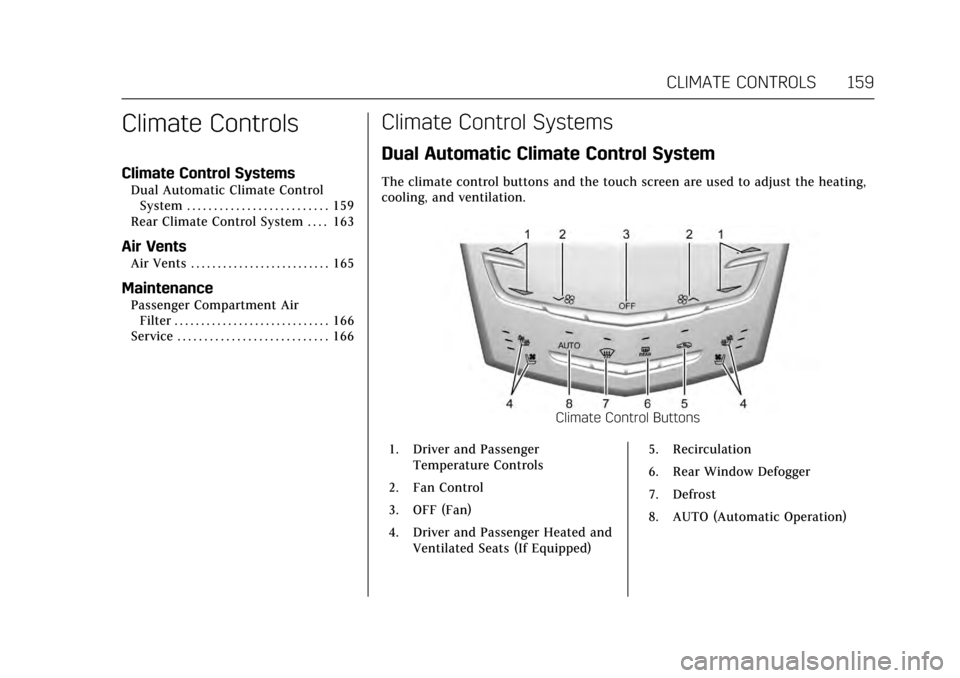
The climate control buttons and the touch screen are used to adjust the heating,
cooling, and ventilation.
Climate Control Buttons
1. Driver and Passenger Temperature Controls
2. Fan Control
3. OFF (Fan)
4. Driver and Passenger Heated and Ventilated Seats (If Equipped) 5. Recirculation
6. Rear Window Defogger
7. Defrost
8. AUTO (Automatic Operation)
Page 164 of 314
Cadillac XTS Owner Manual (GMNA-Localizing-MidEast-10292881) - 2017 -
crc - 7/1/16
CLIMATE CONTROLS 163
Driver and Passenger Heated and
Ventilated Seats :If equipped,
press
Jorzto heat the driver or
passenger seat cushion and seatback.
Press
Cor{to ventilate the driver
or passenger seat. See Heated and
Ventilated Front Seats 058.
The vehicle also has auto heated or
ventilated seats that turn on when the
vehicle is on. The seats will activate at
the level required by the vehicle’s
interior temperature. To turn off the
heated seats, press
Jorz. To turn
off ventilated seats, press
Cor{.
The auto heated or ventilated seats
feature can be turned on or off. See
Vehicle Personalization 0144 and
Heated and Ventilated Seats 013.
Remote Start Climate Control
Operation : If equipped with the
remote start feature, the climate
control system may run when the
vehicle is started remotely. The system
uses the driver’s previous settings to
heat or cool the inside of the vehicle.
The rear defog may come on during
remote start based on cold ambient
conditions. The rear defog indicator light does not come on during a
remote start. If equipped with heated
or ventilated seats, they may come on
during a remote start. See
Remote
Vehicle Start 031 and Heated and
Ventilated Front Seats 058.
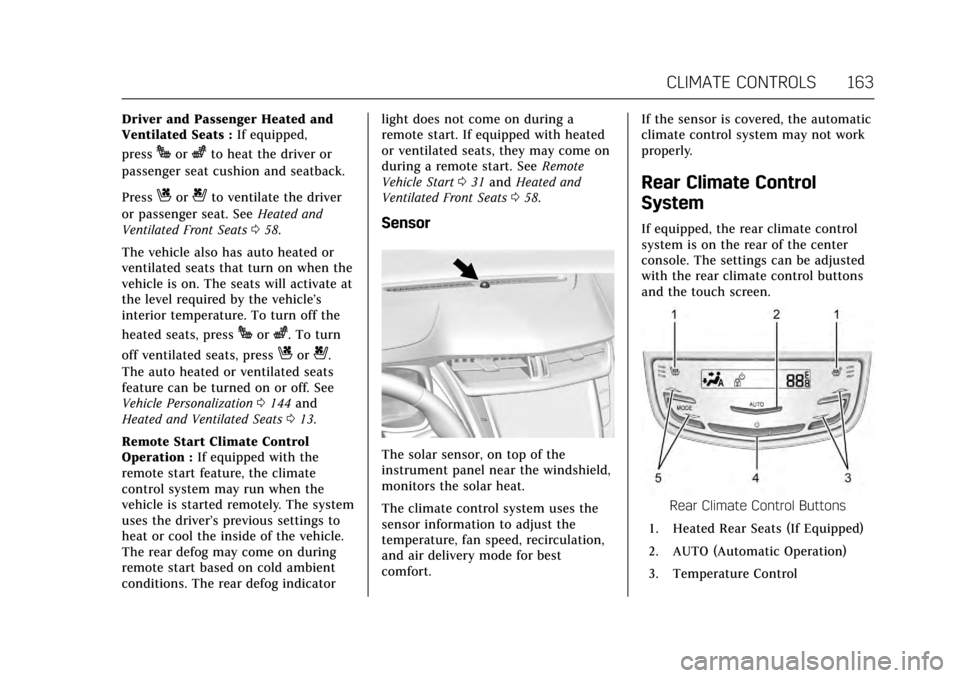
Sensor
The solar sensor, on top of the
instrument panel near the windshield,
monitors the solar heat.
The climate control system uses the
sensor information to adjust the
temperature, fan speed, recirculation,
and air delivery mode for best
comfort. If the sensor is covered, the automatic
climate control system may not work
properly.
Rear Climate Control
System
If equipped, the rear climate control
system is on the rear of the center
console. The settings can be adjusted
with the rear climate control buttons
and the touch screen.
Rear Climate Control Buttons
1. Heated Rear Seats (If Equipped)
2. AUTO (Automatic Operation)
3. Temperature Control
Page 166 of 314
Cadillac XTS Owner Manual (GMNA-Localizing-MidEast-10292881) - 2017 -
crc - 7/1/16
CLIMATE CONTROLS 165
Y/[/\:Press the desired mode
button on the touch screen or the
MODE button on the rear faceplate to
change the direction of the airf low in
the rear seating area.
MorL: If equipped, pressMorLto heat the left or right outboard seat
cushion and seatback. See Heated Rear
Seats 062.
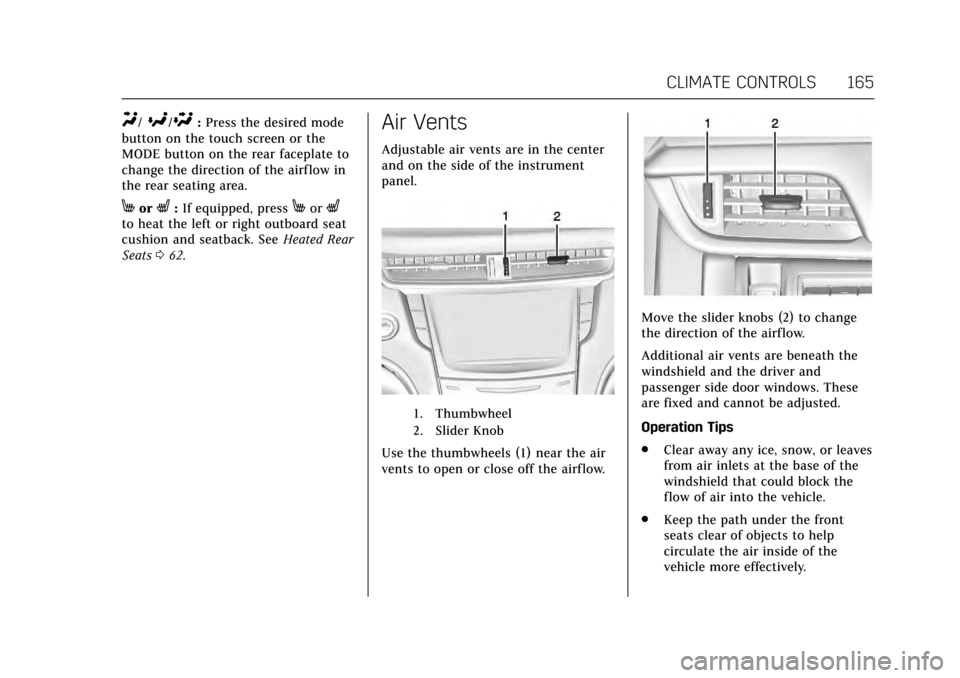
Air Vents
Adjustable air vents are in the center
and on the side of the instrument
panel.
1. Thumbwheel
2. Slider Knob
Use the thumbwheels (1) near the air
vents to open or close off the airflow.
Move the slider knobs (2) to change
the direction of the airf low.
Additional air vents are beneath the
windshield and the driver and
passenger side door windows. These
are fixed and cannot be adjusted.
Operation Tips
.
Clear away any ice, snow, or leaves
from air inlets at the base of the
windshield that could block the
flow of air into the vehicle.
. Keep the path under the front
seats clear of objects to help
circulate the air inside of the
vehicle more effectively.
Page 177 of 314
Cadillac XTS Owner Manual (GMNA-Localizing-MidEast-10292881) - 2017 -
crc - 7/1/16
176 DRIVING AND OPERATING
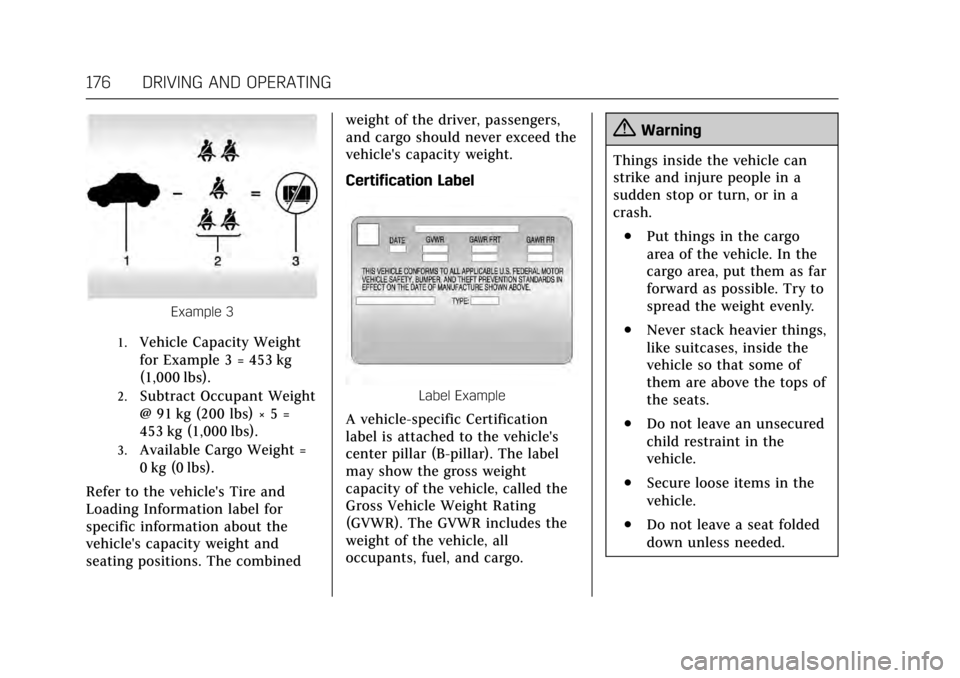
Example 3
1.Vehicle Capacity Weight
for Example 3 = 453 kg
(1,000 lbs).
2.Subtract Occupant Weight
@ 91 kg (200 lbs) × 5 =
453 kg (1,000 lbs).
3.Available Cargo Weight =
0 kg (0 lbs).
Refer to the vehicle's Tire and
Loading Information label for
specific information about the
vehicle's capacity weight and
seating positions. The combined weight of the driver, passengers,
and cargo should never exceed the
vehicle's capacity weight.
Certification Label
Label Example
A vehicle-specific Certification
label is attached to the vehicle's
center pillar (B-pillar). The label
may show the gross weight
capacity of the vehicle, called the
Gross Vehicle Weight Rating
(GVWR). The GVWR includes the
weight of the vehicle, all
occupants, fuel, and cargo.
{Warning
Things inside the vehicle can
strike and injure people in a
sudden stop or turn, or in a
crash.
.Put things in the cargo
area of the vehicle. In the
cargo area, put them as far
forward as possible. Try to
spread the weight evenly.
.Never stack heavier things,
like suitcases, inside the
vehicle so that some of
them are above the tops of
the seats.
.Do not leave an unsecured
child restraint in the
vehicle.
.Secure loose items in the
vehicle.
.Do not leave a seat folded
down unless needed.
Page 305 of 314

Cadillac XTS Owner Manual (GMNA-Localizing-MidEast-10292881) - 2017 -
crc - 7/1/16
304 INDEX
IndexA
Accessories and Modifications . . . . . 222
Accessory Power . . . . . . . . . . . . . . . . . . . . 180
Adaptive Cruise Control . . . . . . . . . . . . 194
Adaptive ForwardLighting (AFL) . . . . . . . . . . . . . . . . . . . . . 154
Adaptive Forward Lighting (AFL) Light . . . . . . . . . . . . . . . . . . . . . . . . 127
Add-On Electrical Equipment . . . . . . 220
Adjustments Lumbar, Front Seats . . . . . . . . . . . . . . . . 54
Thigh Support . . . . . . . . . . . . . . . . . . . . . . 55
Air Cleaner/Filter, Engine . . . . . . . . . . 231
Air Conditioning . . . . . . . . . . . . . . .159, 163
Air Filter, Passenger Compartment . . . . . . . . . . . . . . . . . . . . . 166
Air Vents . . . . . . . . . . . . . . . . . . . . . . . . . . . . 165
Airbag System Check . . . . . . . . . . . . . . . . . . . . . . . . . . . . . . . . 80
How Does an Airbag Restrain? . . . . . 74
Passenger Sensing System . . . . . . . . . 75
What Makes an Airbag Inflate? . . . . 73
What Will You See after anAirbag Inflates? . . . . . . . . . . . . . . . . . . . 74
When Should an Airbag Inflate? . . . . . . . . . . . . . . . . . . . . . . . . . . . . . 72
Where Are the Airbags? . . . . . . . . . . . . 71 Airbags
Adding Equipment to the
Vehicle . . . . . . . . . . . . . . . . . . . . . . . . . . . . . 79
Passenger Status Indicator . . . . . . . 119
Readiness Light . . . . . . . . . . . . . . . . . . . 119
Servicing Airbag-Equipped Vehicles . . . . . . . . . . . . . . . . . . . . . . . . . . . . 79
System Check . . . . . . . . . . . . . . . . . . . . . . . 69
Alarm Vehicle Security . . . . . . . . . . . . . . . . . . . . . 39
Alert
Side Blind Zone (SBZA) . . . . . . . . . . 210
All-Season Tires . . . . . . . . . . . . . . . . . . . . . 255
All-Wheel Drive . . . . . . . . . . . . . . . .185, 242
Antilock Brake System (ABS) . . . . . . 185 Warning Light . . . . . . . . . . . . . . . . . . . . 123
Appearance Care Exterior . . . . . . . . . . . . . . . . . . . . . . . . . . . . 278
Interior . . . . . . . . . . . . . . . . . . . . . . . . . . . . 282
Armrest Rear Seat . . . . . . . . . . . . . . . . . . . . . . . . . . . . 62
Armrest Storage . . . . . . . . . . . . . . . . . . . . . 100
Ashtrays . . . . . . . . . . . . . . . . . . . . . . . . . . . . . 110
Assistance Systems for Driving . . . . 206
Assistance Systems for Parking and Backing . . . . . . . . . . . . . . . . . . . . . . . 202
Automatic Dimming Mirrors . . . . . . . . . . . . . . . . . . . 42
Page 308 of 314

Cadillac XTS Owner Manual (GMNA-Localizing-MidEast-10292881) - 2017 -
crc - 7/1/16
INDEX 307
Engine (cont'd)Oil Pressure Light . . . . . . . . . . . . . . . . . 126
Overheated Protection
Operating Mode . . . . . . . . . . . . . . . . . 238
Overheating . . . . . . . . . . . . . . . . . . . . . . . 237
Power Messages . . . . . . . . . . . . . . . . . . 137
Running While Parked . . . . . . . . . . . 182
Starting . . . . . . . . . . . . . . . . . . . . . . . . . . . . 179
Entry Lighting . . . . . . . . . . . . . . . . . . . . . . 156
Equipment, Towing . . . . . . . . . . . . . . . . . 219
Event Data Recorders . . . . . . . . . . . . . . 302
Exit Lighting . . . . . . . . . . . . . . . . . . . . . . . . 157
Exterior Lamp Controls . . . . . . . . . . . . 151
Exterior Lamps Off Reminder . . . . . . 152
Exterior Lighting Battery Saver . . . . 157
F
Features Memory . . . . . . . . . . . . . . . . . . . . . . . . . . . . . 12
Filter, Engine Air Cleaner . . . . . . . . . . . . . . . . 231
Flash-to-Pass . . . . . . . . . . . . . . . . . . . . . . . . 153
Flashers, Hazard Warning . . . . . . . . . . 154
Flat Tire . . . . . . . . . . . . . . . . . . . . . . . . . . . . . 267 Changing . . . . . . . . . . . . . . . . . . . . . . . . . . 268
Floor Mats . . . . . . . . . . . . . . . . . . . . . . . . . . . 285
Fluid Automatic Transmission . . . . . . . . . 231
Brakes . . . . . . . . . . . . . . . . . . . . . . . . . . . . . 241 Fluid (cont'd)
Power Steering . . . . . . . . . . . . . . . . . . . . 238
Washer . . . . . . . . . . . . . . . . . . . . . . . . . . . . 239
Folding Mirrors . . . . . . . . . . . . . . . . . . . . . . 42
Forward Automatic Braking . . . . . . . . 208
Forward Collision Alert (FCA)
System . . . . . . . . . . . . . . . . . . . . . . . . . . . . . 206
Front Seats Heated and Ventilated . . . . . . . . . . . . . 58
Fuel . . . . . . . . . . . . . . . . . . . . . . . . . . . . . . . . . . 212 Additives . . . . . . . . . . . . . . . . . . . . . . . . . . 213
Economy Driving . . . . . . . . . . . . . . . . . . . 24
Filling a Portable FuelContainer . . . . . . . . . . . . . . . . . . . . . . . . 215
Filling the Tank . . . . . . . . . . . . . . . . . . . 213
Gauge . . . . . . . . . . . . . . . . . . . . . . . . . . . . . . 116
Low Fuel Warning Light . . . . . . . . . 126
System Messages . . . . . . . . . . . . . . . . . 137
Fuses Engine Compartment FuseBlock . . . . . . . . . . . . . . . . . . . . . . . . . . . . . 248
Fuses and Circuit Breakers . . . . . . . 248
Instrument Panel Fuse Block . . . . 251
Rear Compartment Fuse Block . . . . . . . . . . . . . . . . . . . . . . . . . . . . . 252
G
GaugesEngine Coolant Temperature . . . . 117
Fuel . . . . . . . . . . . . . . . . . . . . . . . . . . . . . . . . 116
Odometer . . . . . . . . . . . . . . . . . . . . . . . . . . 116
Speedometer . . . . . . . . . . . . . . . . . . . . . . 115
Tachometer . . . . . . . . . . . . . . . . . . . . . . . 116
Trip Odometer . . . . . . . . . . . . . . . . . . . . 116
Warning Lights andIndicators . . . . . . . . . . . . . . . . . . . . . . . . 111
General Information Service and Maintenance . . . . . . . . 287
Towing . . . . . . . . . . . . . . . . . . . . . . . . . . . . 215
Vehicle Care . . . . . . . . . . . . . . . . . . . . . . . 222
Glove Box . . . . . . . . . . . . . . . . . . . . . . . . . . . 100
H
Hazard Warning Flashers . . . . . . . . . . 154
Head Restraints . . . . . . . . . . . . . . . . . . . . . . 50
Head-up Display . . . . . . . . . . . . . . . . . . . . 131
Headlamps Adaptive ForwardLighting (AFL) . . . . . . . . . . . . . . . . . . . 154
Aiming . . . . . . . . . . . . . . . . . . . . . . . . . . . . . 245
Automatic . . . . . . . . . . . . . . . . . . . . . . . . . 153
Bulb Replacement . . . . . . . . . . . . . . . . 245
Daytime Running
Lamps (DRL) . . . . . . . . . . . . . . . . . . . . 153
Flash-to-Pass . . . . . . . . . . . . . . . . . . . . . . 153