warning light CADILLAC XTS 2017 1.G Owners Manual
[x] Cancel search | Manufacturer: CADILLAC, Model Year: 2017, Model line: XTS, Model: CADILLAC XTS 2017 1.GPages: 314, PDF Size: 3.71 MB
Page 4 of 314
Cadillac XTS Owner Manual (GMNA-Localizing-MidEast-10292881) - 2017 -
crc - 7/1/16
INTRODUCTION 3
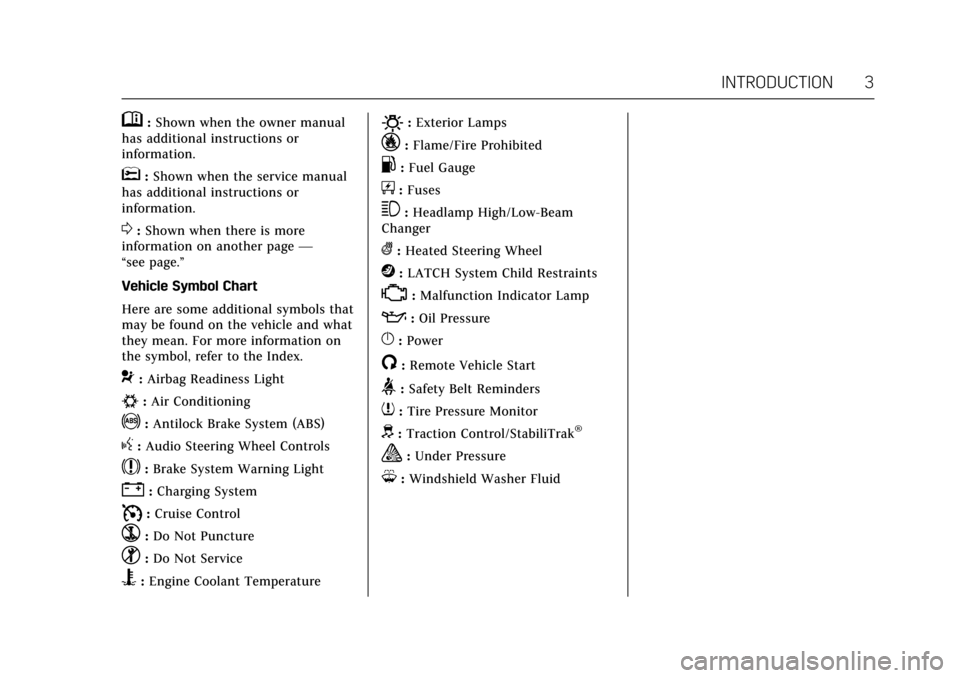
M:Shown when the owner manual
has additional instructions or
information.
*: Shown when the service manual
has additional instructions or
information.
0: Shown when there is more
information on another page —
“see page.”
Vehicle Symbol Chart
Here are some additional symbols that
may be found on the vehicle and what
they mean. For more information on
the symbol, refer to the Index.
9: Airbag Readiness Light
#:Air Conditioning
!:Antilock Brake System (ABS)
g: Audio Steering Wheel Controls
$:Brake System Warning Light
":Charging System
I: Cruise Control
`:Do Not Puncture
^:Do Not Service
B:Engine Coolant Temperature
O:Exterior Lamps
_:Flame/Fire Prohibited
.:Fuel Gauge
+: Fuses
3:Headlamp High/Low-Beam
Changer
(: Heated Steering Wheel
j:LATCH System Child Restraints
*:Malfunction Indicator Lamp
::Oil Pressure
}:Power
/:Remote Vehicle Start
>:Safety Belt Reminders
7: Tire Pressure Monitor
d:Traction Control/StabiliTrak®
a:Under Pressure
M: Windshield Washer Fluid
Page 6 of 314

Cadillac XTS Owner Manual (GMNA-Localizing-MidEast-10292881) - 2017 -
crc - 7/1/16
IN BRIEF 5
In Brief
Instrument Panel
Instrument Panel Overview . . . . . . . . . 6
Initial Drive Information
Initial Drive Information . . . . . . . . . . . 8
Remote Keyless Entry (RKE)System . . . . . . . . . . . . . . . . . . . . . . . . . . . . . 8
Remote Vehicle Start . . . . . . . . . . . . . . . 8
Door Locks . . . . . . . . . . . . . . . . . . . . . . . . . . 9
Trunk . . . . . . . . . . . . . . . . . . . . . . . . . . . . . . . . 9
Windows . . . . . . . . . . . . . . . . . . . . . . . . . . . . . 9
Seat Adjustment . . . . . . . . . . . . . . . . . . . 10
Memory Features . . . . . . . . . . . . . . . . . . 12
Second Row Seats . . . . . . . . . . . . . . . . . 13
Heated and Ventilated Seats . . . . . . 13
Head Restraint Adjustment . . . . . . . 13
Safety Belts . . . . . . . . . . . . . . . . . . . . . . . . . 14
Passenger Sensing System . . . . . . . . 14
Mirror Adjustment . . . . . . . . . . . . . . . . 14
Steering Wheel Adjustment . . . . . . . 15
Interior Lighting . . . . . . . . . . . . . . . . . . . 15
Exterior Lighting . . . . . . . . . . . . . . . . . . . 16
Windshield Wiper/Washer . . . . . . . . 16
Climate Controls . . . . . . . . . . . . . . . . . . . 17
Transmission . . . . . . . . . . . . . . . . . . . . . . . 18
Vehicle Features
Infotainment System . . . . . . . . . . . . . . 19 Steering Wheel Controls . . . . . . . . . . 19
Cruise Control . . . . . . . . . . . . . . . . . . . . . 19
Driver Information
Center (DIC) . . . . . . . . . . . . . . . . . . . . . . 20
Forward Collision Alert (FCA)
System . . . . . . . . . . . . . . . . . . . . . . . . . . . . 20
Forward Automatic Braking (FAB) . . . . . . . . . . . . . . . . . . . . 20
Lane Departure Warning (LDW) . . . . . . . . . . . . . . . . . . 20
Side Blind Zone Alert (SBZA) . . . . . 21
Surround Vision . . . . . . . . . . . . . . . . . . . 21
Rear Vision Camera (RVC) . . . . . . . . 21
Rear Cross Traffic Alert (RCTA) System . . . . . . . . . . . . . . . . . . . . . . . . . . . . 21
Parking Assist . . . . . . . . . . . . . . . . . . . . . . 21
Reverse Automatic Braking (RAB) . . . . . . . . . . . . . . . . . . . . 21
Power Outlets . . . . . . . . . . . . . . . . . . . . . . 22
Sunroof . . . . . . . . . . . . . . . . . . . . . . . . . . . . . 22
Performance and Maintenance
Traction Control/Electronic Stability Control . . . . . . . . . . . . . . . . . . 23
Tire Pressure Monitor . . . . . . . . . . . . . 23
Fuel (LFX 3.6L V6 Engine) . . . . . . . . 23
Fuel (LF3 3.6L V6 Twin Turbo Engine) . . . . . . . . . . . . . . . . . . . . . . . . . . . 24
Engine Oil Life System . . . . . . . . . . . . 24
Driving for Better Fuel Economy . . . . . . . . . . . . . . . . . . . . . . . . . . 24
Page 8 of 314

Cadillac XTS Owner Manual (GMNA-Localizing-MidEast-10292881) - 2017 -
crc - 7/1/16
IN BRIEF 7
1.Air Vents 0165.
2. Electric Parking Brake 0186.
Instrument Panel Illumination
Control 0155.
Head-Up Display (HUD) 0131 (If
Equipped).
3. Exterior Lamp Controls 0151.
Turn Signal Lever. See Turn and
Lane-Change Signals 0154.
4. Instrument Cluster 0112.
Driver Information Center (DIC)
Display. See Driver Information
Center (DIC) 0128.
5. Windshield Wiper/Washer 0105.
6. Hazard Warning Flashers 0154.
Lane Departure Warning
(LDW) 0211.
Traction Control/Electronic
Stability Control 0188.
7. Infotainment 0158.
8. Glove Box Button. See Glove
Box 0100.
Parking Assist Button. See
Assistance Systems for Parking or
Backing 0202. 9.
Dual Automatic Climate Control
System 0159.
Heated and Ventilated Front Seats
0 58 (If Equipped).
10. Instrument Panel Storage 099 (If
Equipped).
Wireless Charging Pad (If
Equipped) (Out of View). See
Wireless Charging 0108.
11. Shift Lever. See Automatic
Transmission 0183.
12. ENGINE START/STOP Button. SeeIgnition Positions 0177.
13. Steering Wheel Controls 0104.
14. Horn 0104.
15. Steering Wheel Adjustment 0104.
16. Cruise Control 0191.
Adaptive Cruise Control 0194 (If
Equipped).
Forward Collision Alert (FCA)
System 0206 (If Equipped).
Phone Button. See “Steering
Wheel Controls ”in the
infotainment manual. Heated Steering Wheel
0104 (If
Equipped).
17. Data Link Connector (DLC) (Out of View). See Malfunction
Indicator Lamp (Check Engine
Light) 0120.
18. Hood Release. See Hood0223.
19. Instrument Panel Storage 099.
Page 21 of 314
Cadillac XTS Owner Manual (GMNA-Localizing-MidEast-10292881) - 2017 -
crc - 7/1/16
20 IN BRIEF
Driver Information
Center (DIC)
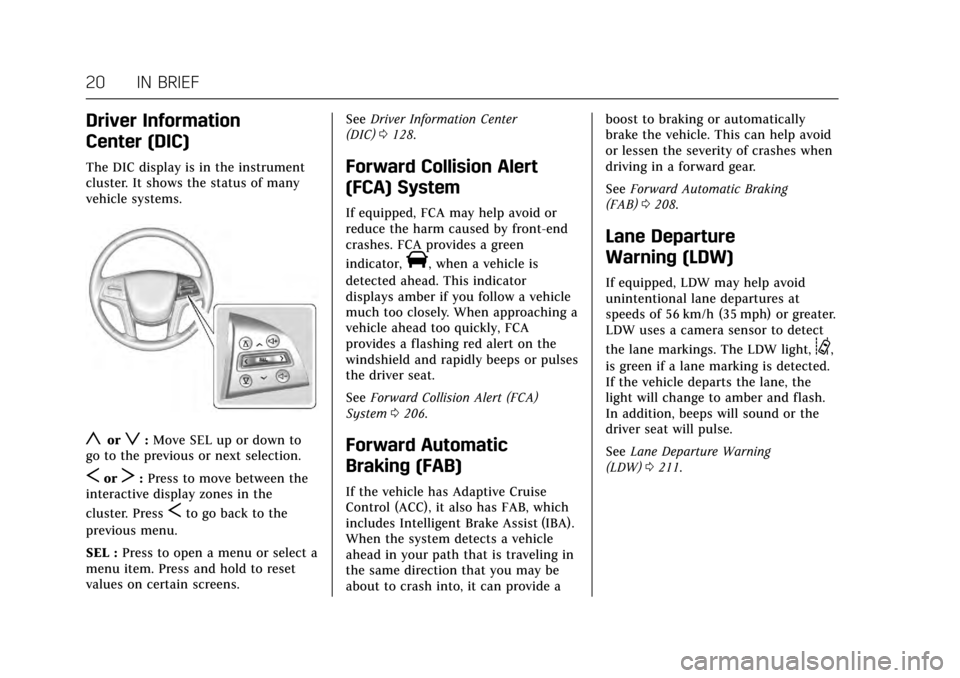
The DIC display is in the instrument
cluster. It shows the status of many
vehicle systems.
yorz:Move SEL up or down to
go to the previous or next selection.
SorT: Press to move between the
interactive display zones in the
cluster. Press
Sto go back to the
previous menu.
SEL : Press to open a menu or select a
menu item. Press and hold to reset
values on certain screens. See
Driver Information Center
(DIC) 0128.
Forward Collision Alert
(FCA) System
If equipped, FCA may help avoid or
reduce the harm caused by front-end
crashes. FCA provides a green
indicator,
V, when a vehicle is
detected ahead. This indicator
displays amber if you follow a vehicle
much too closely. When approaching a
vehicle ahead too quickly, FCA
provides a flashing red alert on the
windshield and rapidly beeps or pulses
the driver seat.
See Forward Collision Alert (FCA)
System 0206.
Forward Automatic
Braking (FAB)
If the vehicle has Adaptive Cruise
Control (ACC), it also has FAB, which
includes Intelligent Brake Assist (IBA).
When the system detects a vehicle
ahead in your path that is traveling in
the same direction that you may be
about to crash into, it can provide a boost to braking or automatically
brake the vehicle. This can help avoid
or lessen the severity of crashes when
driving in a forward gear.
See
Forward Automatic Braking
(FAB) 0208.
Lane Departure
Warning (LDW)
If equipped, LDW may help avoid
unintentional lane departures at
speeds of 56 km/h (35 mph) or greater.
LDW uses a camera sensor to detect
the lane markings. The LDW light,
@,
is green if a lane marking is detected.
If the vehicle departs the lane, the
light will change to amber and flash.
In addition, beeps will sound or the
driver seat will pulse.
See Lane Departure Warning
(LDW) 0211.
Page 22 of 314
Cadillac XTS Owner Manual (GMNA-Localizing-MidEast-10292881) - 2017 -
crc - 7/1/16
IN BRIEF 21
Side Blind Zone
Alert (SBZA)
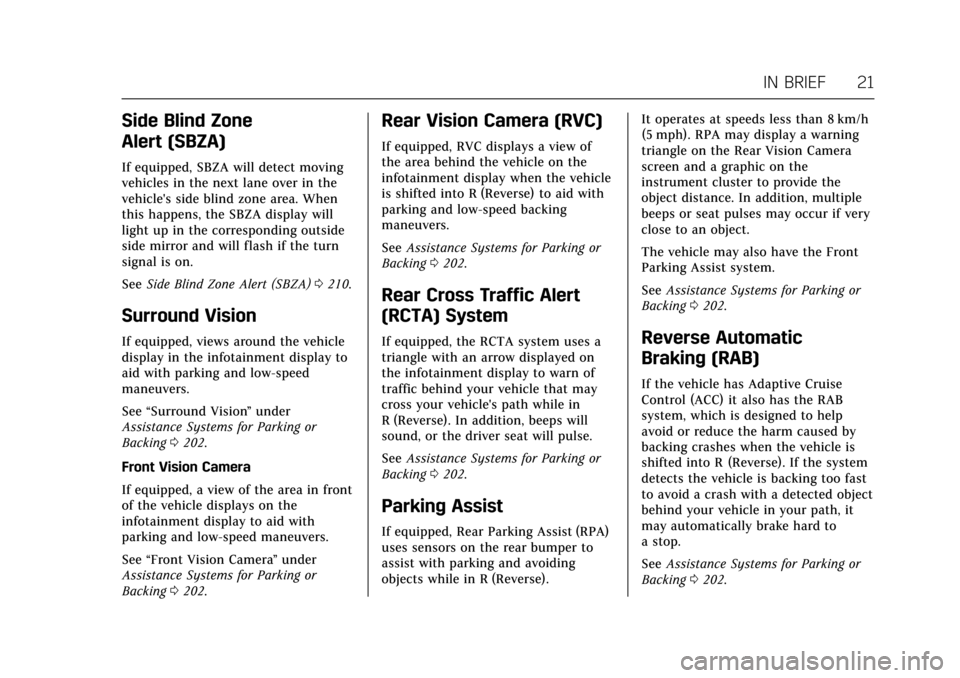
If equipped, SBZA will detect moving
vehicles in the next lane over in the
vehicle's side blind zone area. When
this happens, the SBZA display will
light up in the corresponding outside
side mirror and will flash if the turn
signal is on.
SeeSide Blind Zone Alert (SBZA) 0210.
Surround Vision
If equipped, views around the vehicle
display in the infotainment display to
aid with parking and low-speed
maneuvers.
See “Surround Vision ”under
Assistance Systems for Parking or
Backing 0202.
Front Vision Camera
If equipped, a view of the area in front
of the vehicle displays on the
infotainment display to aid with
parking and low-speed maneuvers.
See “Front Vision Camera ”under
Assistance Systems for Parking or
Backing 0202.
Rear Vision Camera (RVC)
If equipped, RVC displays a view of
the area behind the vehicle on the
infotainment display when the vehicle
is shifted into R (Reverse) to aid with
parking and low-speed backing
maneuvers.
See Assistance Systems for Parking or
Backing 0202.
Rear Cross Traffic Alert
(RCTA) System
If equipped, the RCTA system uses a
triangle with an arrow displayed on
the infotainment display to warn of
traffic behind your vehicle that may
cross your vehicle's path while in
R (Reverse). In addition, beeps will
sound, or the driver seat will pulse.
See Assistance Systems for Parking or
Backing 0202.
Parking Assist
If equipped, Rear Parking Assist (RPA)
uses sensors on the rear bumper to
assist with parking and avoiding
objects while in R (Reverse). It operates at speeds less than 8 km/h
(5 mph). RPA may display a warning
triangle on the Rear Vision Camera
screen and a graphic on the
instrument cluster to provide the
object distance. In addition, multiple
beeps or seat pulses may occur if very
close to an object.
The vehicle may also have the Front
Parking Assist system.
See
Assistance Systems for Parking or
Backing 0202.
Reverse Automatic
Braking (RAB)
If the vehicle has Adaptive Cruise
Control (ACC) it also has the RAB
system, which is designed to help
avoid or reduce the harm caused by
backing crashes when the vehicle is
shifted into R (Reverse). If the system
detects the vehicle is backing too fast
to avoid a crash with a detected object
behind your vehicle in your path, it
may automatically brake hard to
a stop.
See Assistance Systems for Parking or
Backing 0202.
Page 24 of 314
Cadillac XTS Owner Manual (GMNA-Localizing-MidEast-10292881) - 2017 -
crc - 7/1/16
IN BRIEF 23
Performance and
Maintenance
Traction Control/Electronic
Stability Control
The Traction Control System (TCS)
limits wheel spin. The system turns
on automatically every time the
vehicle is started.
The StabiliTrak system assists with
directional control of the vehicle in
difficult driving conditions. The
system also turns on automatically
every time the vehicle is started.
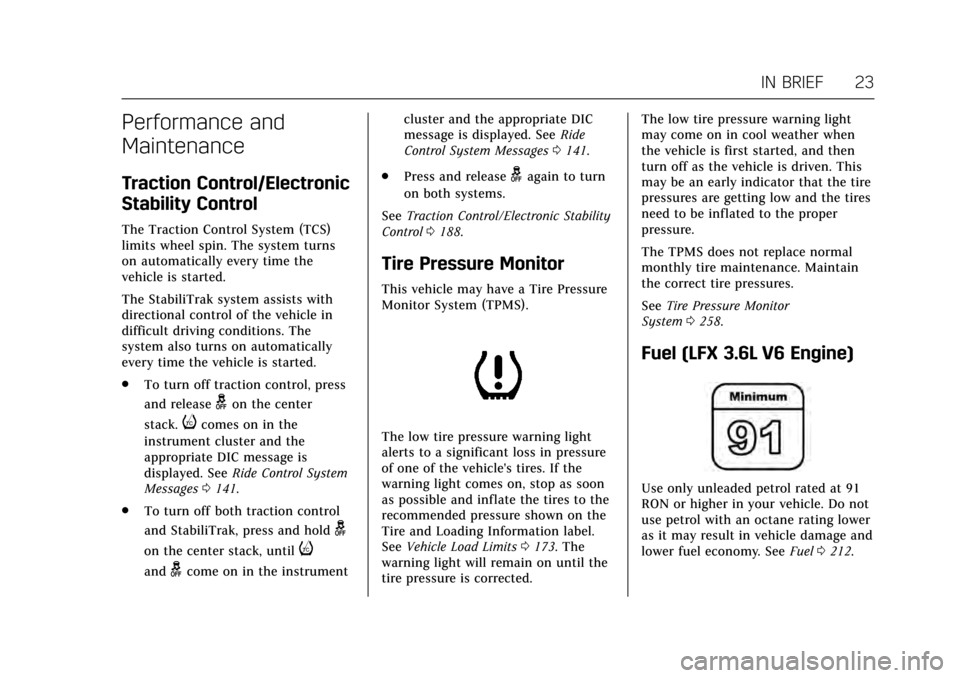
.To turn off traction control, press
and release
gon the center
stack.
icomes on in the
instrument cluster and the
appropriate DIC message is
displayed. See Ride Control System
Messages 0141.
. To turn off both traction control
and StabiliTrak, press and hold
g
on the center stack, untili
andgcome on in the instrument cluster and the appropriate DIC
message is displayed. See
Ride
Control System Messages 0141.
. Press and release
gagain to turn
on both systems.
See Traction Control/Electronic Stability
Control 0188.
Tire Pressure Monitor
This vehicle may have a Tire Pressure
Monitor System (TPMS).
The low tire pressure warning light
alerts to a significant loss in pressure
of one of the vehicle's tires. If the
warning light comes on, stop as soon
as possible and inflate the tires to the
recommended pressure shown on the
Tire and Loading Information label.
See Vehicle Load Limits 0173. The
warning light will remain on until the
tire pressure is corrected. The low tire pressure warning light
may come on in cool weather when
the vehicle is first started, and then
turn off as the vehicle is driven. This
may be an early indicator that the tire
pressures are getting low and the tires
need to be inflated to the proper
pressure.
The TPMS does not replace normal
monthly tire maintenance. Maintain
the correct tire pressures.
See
Tire Pressure Monitor
System 0258.
Fuel (LFX 3.6L V6 Engine)
Use only unleaded petrol rated at 91
RON or higher in your vehicle. Do not
use petrol with an octane rating lower
as it may result in vehicle damage and
lower fuel economy. See Fuel0212.
Page 33 of 314
Cadillac XTS Owner Manual (GMNA-Localizing-MidEast-10292881) - 2017 -
crc - 7/1/16
32 KEYS, DOORS, AND WINDOWS
If equipped, heated and ventilated
front seats may also come on if
enabled in vehicle personalization. See
Heated and Ventilated Front Seats058
and Vehicle Personalization 0144
The climate control system will use
the previous settings during a remote
start. The rear window defogger may
come on during remote start based on
cold ambient conditions. The rear
defog indicator light does not come on
during remote start.
Laws in some local communities may
restrict the use of remote starters. For
example, some laws may require a
person using remote start to have the
vehicle in view. Check local
regulations for any requirements.
If your vehicle is low on fuel, do not
use the remote start feature. The
vehicle may run out of fuel.
The RKE transmitter range may be
less while the vehicle is running.
Other conditions can affect the
performance of the transmitter. See
Remote Keyless Entry (RKE)
System 027. Starting the Engine Using Remote
Start
1. Press and release
Qon the RKE
transmitter.
2. Immediately press and hold
/
for at least four seconds or until
the turn signal lamps flash. This
confirms the request to remote
start the vehicle has been
received.
During the remote start, the
doors will be locked and the
parking lamps will remain on as
long as the engine is running.
The engine will shut off after
10 minutes unless a time
extension is done or the ignition
is put in ON/RUN/START.
3. Press the brake pedal and select the ON/RUN/START ignition
mode to drive the vehicle.
Extending Engine Run Time
The engine run time can also be
extended by another 10 minutes,
if during the first 10 minutes Steps 1–
2 are repeated while the engine is still running. An extension can be
requested, 30 seconds after starting.
This provides a total of 20 minutes.
The remote start can only be
extended once.
A maximum of two remote starts, or a
remote start with an extension, are
allowed between ignition cycles.
The vehicle's ignition must be
changed to ON/RUN/START and then
back to OFF before the remote start
procedure can be used again.
Canceling a Remote Start
To cancel a remote start, do any of
the following:
.
Press and hold
/until the
parking lamps turn off.
. Turn on the hazard warning
flashers.
. Turn the vehicle on and then
back off.
Page 64 of 314
Cadillac XTS Owner Manual (GMNA-Localizing-MidEast-10292881) - 2017 -
crc - 7/1/16
SEATS AND RESTRAINTS 63
With the ignition in ON/RUN/START,
press
MorLto heat the left or right
outboard seat cushion and seatback.
On vehicles without rear climate
controls, an indicator light on the
button will turn on when the heated
seat is on. On vehicles with rear
climate controls, an indicator on the
climate control display appears when
this feature is on.
On vehicles without rear climate
controls, press the button again to
turn this feature off. The light on the
button will turn off. On vehicles with
rear climate controls, this feature
turns on at the highest setting. With
each press of the button, the heated
seat changes to the next lower setting,
and then the off setting. Three lights
indicate the highest setting, and one
light indicates the lowest. If the
heated seats are on high, the level
may automatically be lowered after
approximately 30 minutes.Rear Seat
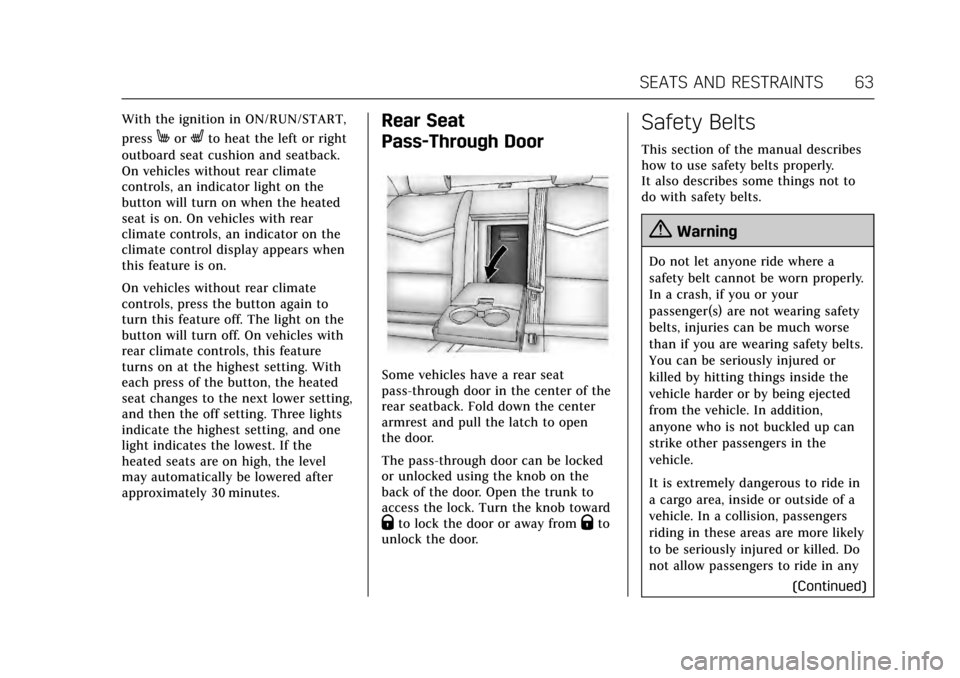
Pass-Through Door
Some vehicles have a rear seat
pass-through door in the center of the
rear seatback. Fold down the center
armrest and pull the latch to open
the door.
The pass-through door can be locked
or unlocked using the knob on the
back of the door. Open the trunk to
access the lock. Turn the knob toward
Qto lock the door or away fromQto
unlock the door.
Safety Belts
This section of the manual describes
how to use safety belts properly.
It also describes some things not to
do with safety belts.
{Warning
Do not let anyone ride where a
safety belt cannot be worn properly.
In a crash, if you or your
passenger(s) are not wearing safety
belts, injuries can be much worse
than if you are wearing safety belts.
You can be seriously injured or
killed by hitting things inside the
vehicle harder or by being ejected
from the vehicle. In addition,
anyone who is not buckled up can
strike other passengers in the
vehicle.
It is extremely dangerous to ride in
a cargo area, inside or outside of a
vehicle. In a collision, passengers
riding in these areas are more likely
to be seriously injured or killed. Do
not allow passengers to ride in any
(Continued)
Page 69 of 314
Cadillac XTS Owner Manual (GMNA-Localizing-MidEast-10292881) - 2017 -
crc - 7/1/16
68 SEATS AND RESTRAINTS
Rear Safety Belt Comfort Guides
Rear safety belt comfort guides may
provide added safety belt comfort for
older children who have outgrown
booster seats and for some adults.
When installed on a shoulder belt, the
comfort guide positions the belt away
from the neck and head.
Comfort guides may be available
through your dealer for the rear
outboard seating positions.
If available, instructions are included
with the guide.
Safety Belt Use During
Pregnancy
Safety belts work for everyone,
including pregnant women. Like all
occupants, they are more likely to be
seriously injured if they do not wear
safety belts.
A pregnant woman should wear a
lap-shoulder belt, and the lap portion
should be worn as low as possible,
below the rounding, throughout the
pregnancy.
The best way to protect the fetus is to
protect the mother. When a safety belt
is worn properly, it is more likely that
the fetus will not be hurt in a crash.
For pregnant women, as for anyone,
the key to making safety belts
effective is wearing them properly.
Safety System Check
Check that the safety belt reminder,
safety belts, buckles, latch plates, and
retractors, are all working properly.Look for any other loose or damaged
safety belt system parts that might
keep a safety belt system from
performing properly. See your dealer
to have it repaired. Torn or frayed
safety belts may not protect you in a
crash. They can rip apart under
impact forces. If a belt is torn or
frayed, have it replaced immediately.
Make sure the safety belt reminder
light is working. See
Safety Belt
Reminders 0118.
Keep safety belts clean and dry. See
Safety Belt Care 068.
Safety Belt Care
Keep belts clean and dry.
{Warning
Do not bleach or dye safety belt
webbing. It may severely weaken
the webbing. In a crash, they might
not be able to provide adequate
protection. Clean and rinse safety
belt webbing only with mild soap
and lukewarm water. Allow the
webbing to dry.
Page 70 of 314
Cadillac XTS Owner Manual (GMNA-Localizing-MidEast-10292881) - 2017 -
crc - 7/1/16
SEATS AND RESTRAINTS 69
Safety belts should be properly cared
for and maintained.
Safety belt hardware should be kept
dry and free of dust or debris. As
necessary exterior hard surfaces and
safety belt webbing may be lightly
cleaned with mild soap and water.
Ensure there is not excessive dust or
debris in the mechanism. If dust or
debris exists in the system please see
the dealer. Parts may need to be
replaced to ensure proper
functionality of the system.
Replacing Safety Belt
System Parts after a Crash
{Warning
A crash can damage the safety belt
system in the vehicle. A damaged
safety belt system may not properly
protect the person using it,
resulting in serious injury or even
death in a crash. To help make sure
the safety belt systems are working
properly after a crash, have them(Continued)
Warning (Continued)
inspected and any necessary
replacements made as soon as
possible.
After a minor crash, replacement of
safety belts may not be necessary. But
the safety belt assemblies that were
used during any crash may have been
stressed or damaged. See your dealer
to have the safety belt assemblies
inspected or replaced.
New parts and repairs may be
necessary even if the safety belt
system was not being used at the time
of the crash.
Have the safety belt pretensioners
checked if the vehicle has been in a
crash, or if the airbag readiness light
stays on after you start the vehicle or
while you are driving. See Airbag
Readiness Light 0119.
Airbag System
The vehicle has the following airbags:
.
A frontal airbag for the driver.
. A frontal airbag for the front
outboard passenger.
. A knee airbag for the driver.
. A knee airbag for the front
outboard passenger.
. A seat-mounted side impact airbag
for the driver.
. A seat-mounted side impact airbag
for the front outboard passenger.
. Seat-mounted side impact airbags
for the second row outboard
passengers.
. A roof-rail airbag for the driver
and the passenger seated directly
behind the driver.
. A roof-rail airbag for the front
outboard passenger and the
passenger seated directly behind
the front outboard passenger.
All vehicle airbags have the word
AIRBAG on the trim or on a label near
the deployment opening.