Door CADILLAC XTS 2018 Repair Manual
[x] Cancel search | Manufacturer: CADILLAC, Model Year: 2018, Model line: XTS, Model: CADILLAC XTS 2018Pages: 370, PDF Size: 6.45 MB
Page 157 of 370
Cadillac XTS Owner Manual (GMNA-Localizing-U.S./Canada-11354412) -
2018 - crc - 11/16/17
156 LIGHTING
If after signaling a turn or lane
change, the arrow flashes rapidly or
does not come on, a signal bulb may
be burned out.
Replace any burned out bulbs. If a
bulb is not burned out, check the fuse.
SeeFuses and Circuit Breakers 0260.
Cornering Lamps
If equipped with cornering lamps, they
automatically come on when all of the
following occur:
.
The low-beam headlamps are on.
. The turn signals are activated or
the steering wheel is at a
calibrated angle.
. The vehicle speed is below the
calibrated speed.
Interior Lighting
Instrument Panel
Illumination Control
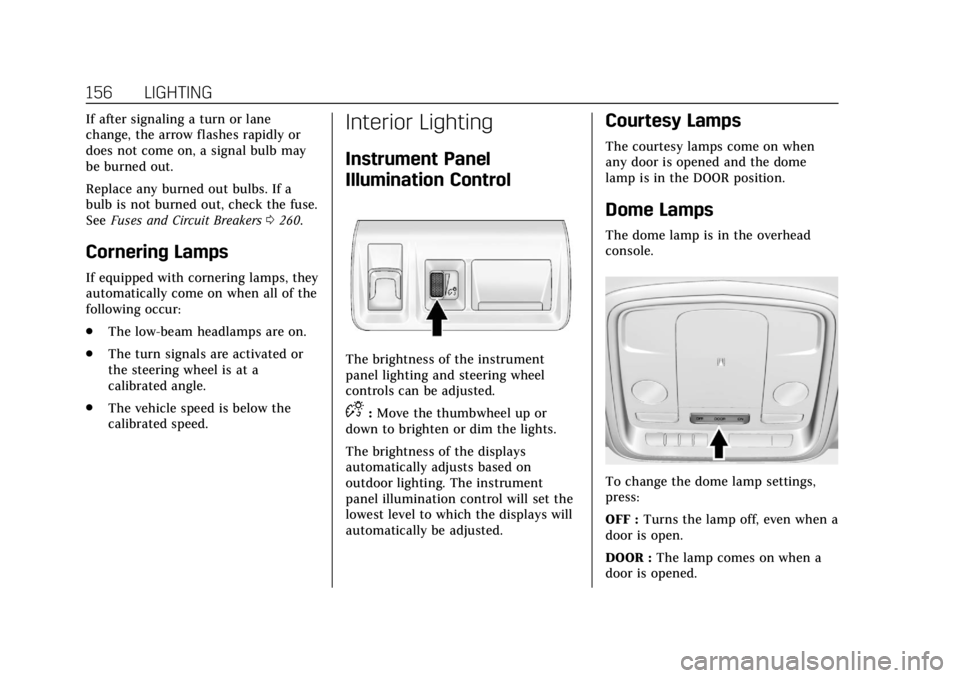
The brightness of the instrument
panel lighting and steering wheel
controls can be adjusted.
D:Move the thumbwheel up or
down to brighten or dim the lights.
The brightness of the displays
automatically adjusts based on
outdoor lighting. The instrument
panel illumination control will set the
lowest level to which the displays will
automatically be adjusted.
Courtesy Lamps
The courtesy lamps come on when
any door is opened and the dome
lamp is in the DOOR position.
Dome Lamps
The dome lamp is in the overhead
console.
To change the dome lamp settings,
press:
OFF : Turns the lamp off, even when a
door is open.
DOOR : The lamp comes on when a
door is opened.
Page 158 of 370
Cadillac XTS Owner Manual (GMNA-Localizing-U.S./Canada-11354412) -
2018 - crc - 11/16/17
LIGHTING 157
ON :Turns the lamp on.
Reading Lamps
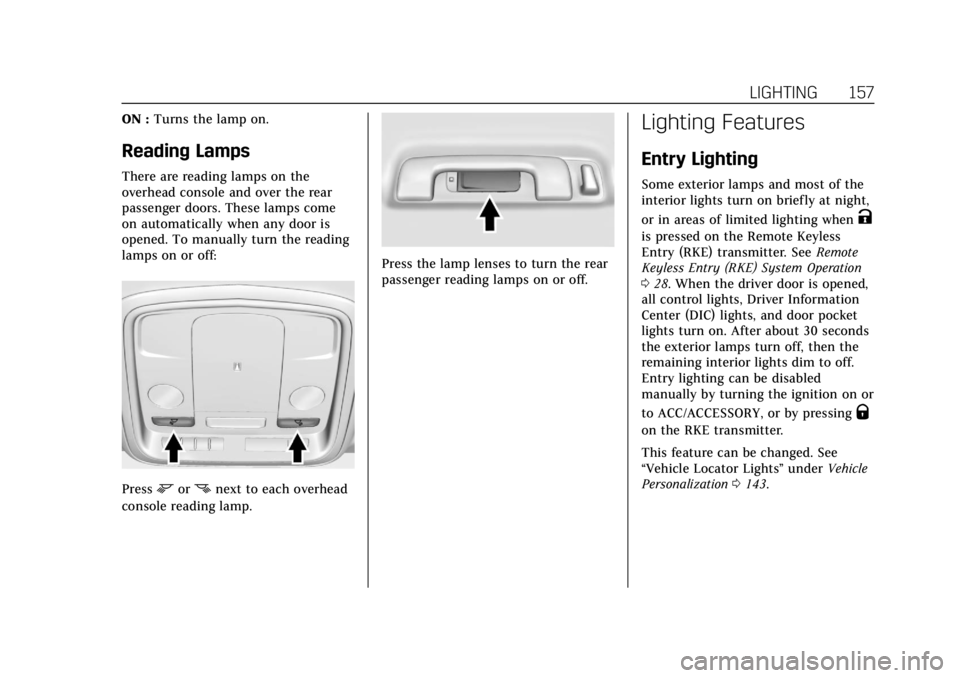
There are reading lamps on the
overhead console and over the rear
passenger doors. These lamps come
on automatically when any door is
opened. To manually turn the reading
lamps on or off:
Pressmornnext to each overhead
console reading lamp.
Press the lamp lenses to turn the rear
passenger reading lamps on or off.
Lighting Features
Entry Lighting
Some exterior lamps and most of the
interior lights turn on briefly at night,
or in areas of limited lighting when
K
is pressed on the Remote Keyless
Entry (RKE) transmitter. See Remote
Keyless Entry (RKE) System Operation
0 28. When the driver door is opened,
all control lights, Driver Information
Center (DIC) lights, and door pocket
lights turn on. After about 30 seconds
the exterior lamps turn off, then the
remaining interior lights dim to off.
Entry lighting can be disabled
manually by turning the ignition on or
to ACC/ACCESSORY, or by pressing
Q
on the RKE transmitter.
This feature can be changed. See
“Vehicle Locator Lights” underVehicle
Personalization 0143.
Page 159 of 370
Cadillac XTS Owner Manual (GMNA-Localizing-U.S./Canada-11354412) -
2018 - crc - 11/16/17
158 LIGHTING
Exit Lighting
Some exterior lamps and interior
lights come on at night, or in areas
with limited lighting, when the driver
door is opened after the ignition is
turned off. The dome lamp comes on
after the ignition is turned off. The
exterior lamps and dome lamp remain
on for a set amount of time, then
automatically turn off.
The exterior lamps turn off
immediately by turning the exterior
lamp control off.
This feature can be changed. See
Vehicle Personalization0143.
Battery Power Protection
The battery saver feature is designed
to protect the vehicle's battery.
If some interior lamps are left on and
the ignition is turned off, the battery
rundown protection system
automatically turns the lamp off after
some time.
Exterior Lighting Battery
Saver
The exterior lamps turn off about
10 minutes after the ignition is turned
off, if the parking lamps or headlamps
have been manually left on. This
protects against draining the battery.
To restart the 10-minute timer, turn
the exterior lamp control to the off
position and then back to the parking
lamp or headlamp position.
To keep the lamps on for more than
10 minutes, the ignition must be on or
in ACC/ACCESSORY.
Page 168 of 370
Cadillac XTS Owner Manual (GMNA-Localizing-U.S./Canada-11354412) -
2018 - crc - 11/16/17
CLIMATE CONTROLS 167
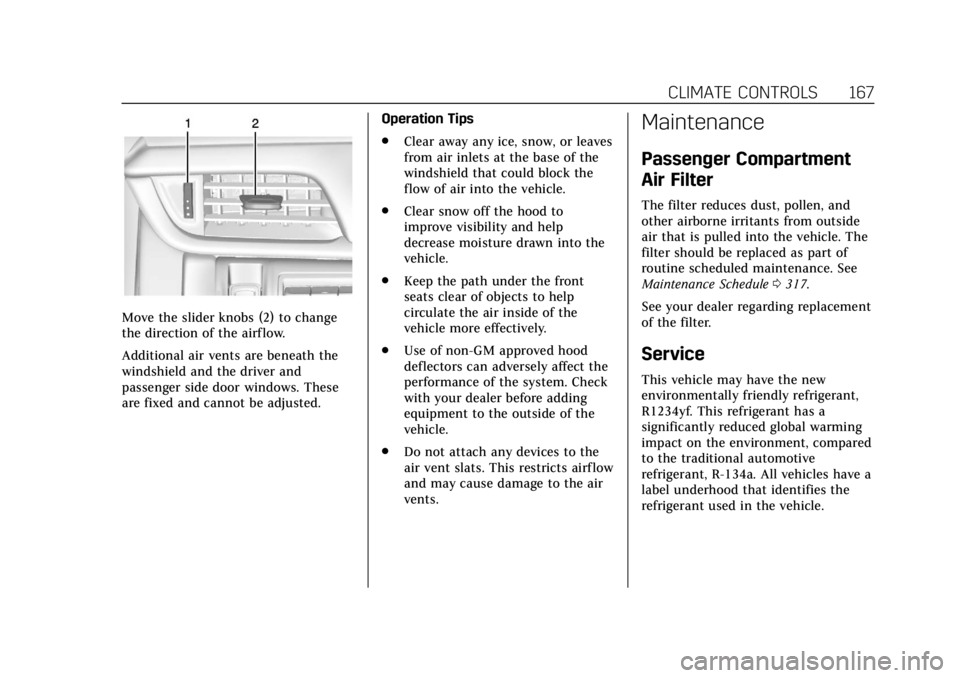
Move the slider knobs (2) to change
the direction of the airf low.
Additional air vents are beneath the
windshield and the driver and
passenger side door windows. These
are fixed and cannot be adjusted.Operation Tips
.
Clear away any ice, snow, or leaves
from air inlets at the base of the
windshield that could block the
flow of air into the vehicle.
. Clear snow off the hood to
improve visibility and help
decrease moisture drawn into the
vehicle.
. Keep the path under the front
seats clear of objects to help
circulate the air inside of the
vehicle more effectively.
. Use of non-GM approved hood
deflectors can adversely affect the
performance of the system. Check
with your dealer before adding
equipment to the outside of the
vehicle.
. Do not attach any devices to the
air vent slats. This restricts airflow
and may cause damage to the air
vents.
Maintenance
Passenger Compartment
Air Filter
The filter reduces dust, pollen, and
other airborne irritants from outside
air that is pulled into the vehicle. The
filter should be replaced as part of
routine scheduled maintenance. See
Maintenance Schedule 0317.
See your dealer regarding replacement
of the filter.
Service
This vehicle may have the new
environmentally friendly refrigerant,
R1234yf. This refrigerant has a
significantly reduced global warming
impact on the environment, compared
to the traditional automotive
refrigerant, R-134a. All vehicles have a
label underhood that identifies the
refrigerant used in the vehicle.
Page 186 of 370
Cadillac XTS Owner Manual (GMNA-Localizing-U.S./Canada-11354412) -
2018 - crc - 11/16/17
DRIVING AND OPERATING 185
4. Before starting the engine, besure to unplug and store the cord
as it was before to keep it away
from moving engine parts.
The length of time the heater should
remain plugged in depends on several
factors. Ask a dealer in the area where
you will be parking the vehicle for the
best advice on this.
Retained Accessory
Power (RAP)
Some vehicle accessories may be used
after the ignition is turned off.
The power windows and sunroof,
if equipped, will continue to work for
up to 10 minutes or until any door is
opened.
The infotainment system will continue
to work for 10 minutes, until the
driver door is opened, or until the
ignition is turned on or placed in
ACC/ACCESSORY.
Shifting Into Park
1. Hold the brake pedal down and apply the parking brake. See
Electric Parking Brake 0191.
2. Move the shift lever into P (Park) by pushing the lever all the way
toward the front of the vehicle.
3. Turn the ignition off.
Leaving the Vehicle with the
Engine Running
{Warning
It can be dangerous to leave the
vehicle with the engine running.
It could overheat and catch fire.
It is dangerous to get out of the
vehicle if the shift lever is not fully
in P (Park) with the parking brake
firmly set. The vehicle can roll.
Do not leave the vehicle when the
engine is running. If you have left
the engine running, the vehicle can
move suddenly. You or others could (Continued)
Warning (Continued)
be injured. To be sure the vehicle
will not move, even when you are
on fairly level ground, always set
the parking brake and move the
shift lever to P (Park). See Shifting
Into Park 0185. If you are towing a
trailer, see Driving Characteristics
and Towing Tips 0226.
If you have to leave the vehicle with
the engine running, be sure the
vehicle is in P (Park) and the parking
brake is firmly set before you leave it.
After you have moved the shift lever
into P (Park), hold down the regular
brake pedal. See if you can move the
shift lever away from P (Park) without
first pulling it toward you. If you can,
it means that the shift lever was not
fully locked into P (Park).
Torque Lock
Torque lock is when the weight of the
vehicle puts too much force on the
parking pawl in the transmission. This
happens when parking on a hill and
Page 204 of 370
Cadillac XTS Owner Manual (GMNA-Localizing-U.S./Canada-11354412) -
2018 - crc - 11/16/17
DRIVING AND OPERATING 203
feel or sound different than if the
brakes were applied manually. This is
normal.
Stationary or Very Slow-Moving
Objects
{Warning
ACC may not detect and react to
stopped or slow-moving vehicles
ahead of you. For example, the
system may not brake for a vehicle
it has never detected moving. This
can occur in stop-and-go traffic or
when a vehicle suddenly appears
due to a vehicle ahead changing
lanes. Your vehicle may not stop
and could cause a crash. Use
caution when using ACC. Your
complete attention is always
required while driving and you
should be ready to take action and
apply the brakes.
ACC Automatically Disengages
ACC may automatically disengage and
the driver will need to manually apply
the brakes to slow the vehicle when: .
The sensors are blocked.
. The Traction Control System (TCS)
or electronic stability control
system has activated or been
disabled.
. There is a fault in the system.
. The radar falsely reports blockage
when driving in a desert or remote
area with no other vehicles or
roadside objects. A DIC message
may display to indicate that ACC
is temporarily unavailable.
The ACC indicator will turn white
when ACC is no longer active.
In some cases, when ACC will not
activate, regular Cruise Control may
be used. See “Switching Between ACC
and Regular Cruise Control ”previously
in this section. Always consider
driving conditions before using either
cruise control system.
Notification to Resume ACC
ACC will maintain a follow gap behind
a detected vehicle and slow your
vehicle to a stop behind that vehicle. If the stopped vehicle ahead has
driven away and ACC has not
resumed, the vehicle ahead indicator
will flash as a reminder to check
traffic ahead before proceeding. In
addition, the left and right sides of the
Safety Alert Seat will pulse three
times, or three beeps will sound. See
“Alert Type
”and “Adaptive Cruise Go
Notifier” in“Collision/Detection
Systems” underVehicle Personalization
0 143.
When the vehicle ahead drives away,
press +RES or the accelerator pedal to
resume cruise control. If stopped for
more than two minutes or if the driver
door is opened and the driver seat belt
is unbuckled, the ACC automatically
applies the Electric Parking Brake
(EPB) to hold the vehicle. The EPB
status light will turn on. See Electric
Parking Brake 0191. To resume ACC
and release the EPB, press the
accelerator pedal.
A DIC warning message may display
indicating to shift to P (Park) before
exiting the vehicle. See Vehicle
Messages 0142.
Page 225 of 370
Cadillac XTS Owner Manual (GMNA-Localizing-U.S./Canada-11354412) -
2018 - crc - 11/16/17
224 DRIVING AND OPERATING
Filling the Tank
{Warning
Fuel vapors and fuel fires burn
violently and can cause injury or
death.. To help avoid injuries to you
and others, read and follow
all the instructions on the
fuel pump island.
. Turn off the engine when
refueling.
. Keep sparks, flames, and
smoking materials away
from fuel.
. Do not leave the fuel pump
unattended.
. Do not use a cell phone while
refueling.
. Do not reenter the vehicle
while pumping fuel.
. Keep children away from the
fuel pump and never let
children pump fuel.
(Continued)
Warning (Continued)
.Fuel can spray out if the
refueling nozzle is inserted
too quickly. This spray can
happen if the tank is nearly
full, and is more likely in hot
weather. Insert the refueling
nozzle slowly and wait for any
hiss noise to stop prior to
beginning to flow fuel.
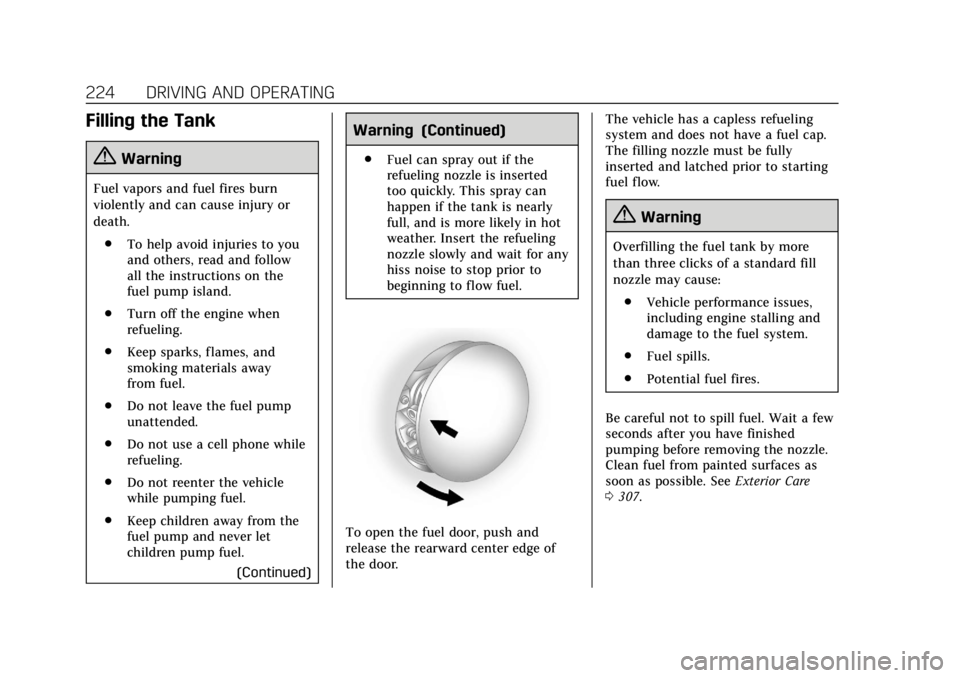
To open the fuel door, push and
release the rearward center edge of
the door. The vehicle has a capless refueling
system and does not have a fuel cap.
The filling nozzle must be fully
inserted and latched prior to starting
fuel flow.
{Warning
Overfilling the fuel tank by more
than three clicks of a standard fill
nozzle may cause:
. Vehicle performance issues,
including engine stalling and
damage to the fuel system.
. Fuel spills.
. Potential fuel fires.
Be careful not to spill fuel. Wait a few
seconds after you have finished
pumping before removing the nozzle.
Clean fuel from painted surfaces as
soon as possible. See Exterior Care
0 307.
Page 263 of 370
Cadillac XTS Owner Manual (GMNA-Localizing-U.S./Canada-11354412) -
2018 - crc - 11/16/17
262 VEHICLE CARE
FusesUsage
23 Variable effort steering module
24 Front power windows
25 Retained accessory power
26 ABS pump
27 Electric park brake
28 Rear window defogger
29 Passive entry/Passive start
30 Spare
31 Heated driver seat
32 Stop lamps —center
high mounted stop
lamp/Backup-reverse
lamps/Interior
33 Heated passenger seat
34 ABS valves
35 Amplifier
36 Tail park lamp —
driver side Fuses
Usage
37 Right high-beam headlamp
38 Left high-beam headlamp
39 Tail park lamp —
passenger side
40 Long range radar
41 Brake vacuum assist pump
42 Cooling fan high speed
43 –
44 –
45 Cooling fan low speed
46 Cooling fan control
47 Pre-catalytic converter O2 sensor
heater/Canister purge
solenoid
48 Low temperature radiator coolant pump
49 Right headlamp LED Fuses
Usage
50 Left headlamp LED
51 Horn
52 Display/Ignition
53 Air quality sensor/ Inside rearview
mirror/Rear vision
camera
54 HVAC/Reflective LED alert display
55 Driver and passenger door switches/Outside
rearview mirror
switch/Mirror
memory module
56 Windshield washer
57 –
58 –
59 –
60 Heated outside rearview mirror
61 –
62 Front seats massage module
Page 264 of 370
Cadillac XTS Owner Manual (GMNA-Localizing-U.S./Canada-11354412) -
2018 - crc - 11/16/17
VEHICLE CARE 263
FusesUsage
63 –
64 Spare
65 Spare
66 Trunk release
67 Chassis control module
68 –
69 Battery voltage sensor
70 Canister vent solenoid
71 Memory seat module
72 Electric power steering
Relays Usage
1 A/C clutch
2 Starter
3 –
4 Wiper speed
5 Wiper control
6 –
7 Powertrain Relays
Usage
8 –
9 Cooling fan —high
speed
10 Cooling fan —low
speed
11 Tail/Park lamps
12 –
13 Cooling fan control
14 Low beam LED headlamps
15 Run/Crank
16 –
17 Rear window and mirror defoggerInstrument Panel Fuse
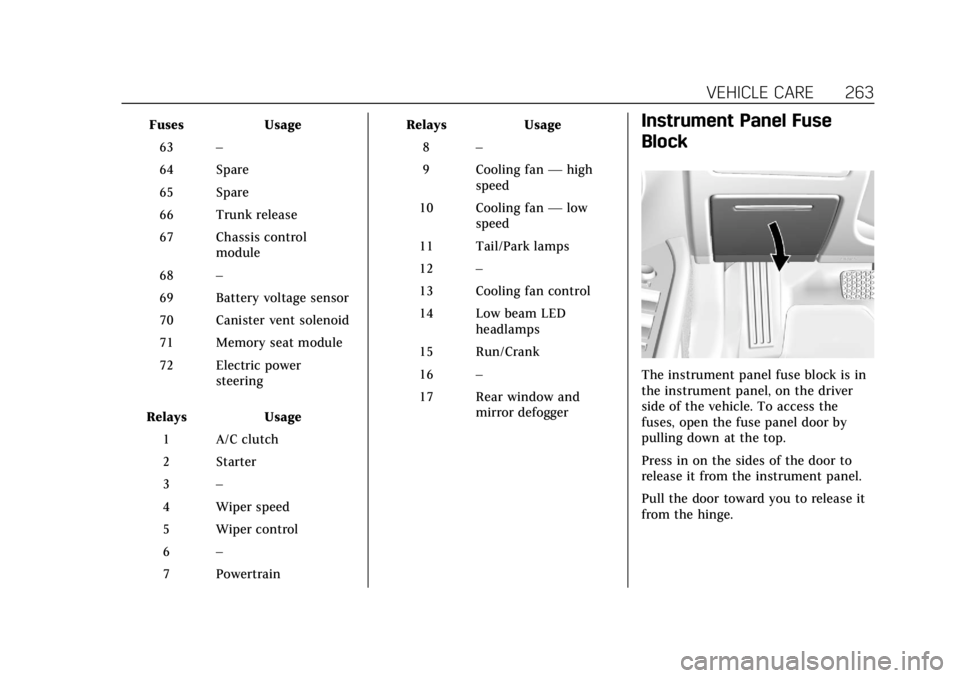
Block
The instrument panel fuse block is in
the instrument panel, on the driver
side of the vehicle. To access the
fuses, open the fuse panel door by
pulling down at the top.
Press in on the sides of the door to
release it from the instrument panel.
Pull the door toward you to release it
from the hinge.
Page 270 of 370
Cadillac XTS Owner Manual (GMNA-Localizing-U.S./Canada-11354412) -
2018 - crc - 11/16/17
VEHICLE CARE 269
Summer Tires
This vehicle may come with high
performance summer tires. These tires
have a special tread and compound
that are optimized for maximum dry
and wet road performance. This
special tread and compound will have
decreased performance in cold
climates, and on ice and snow. It is
recommended that winter tires be
installed on the vehicle if frequent
driving at temperatures below
approximately 5 °C (40 °F) or on ice or
snow covered roads is expected. See
Winter Tires0268.
Caution
High performance summer tires
have rubber compounds that lose
flexibility and may develop surface
cracks in the tread area at
temperatures below −7 °C (20 °F).
Always store high performance
summer tires indoors and at
temperatures above −7 °C (20 °F)
when not in use. If the tires have
(Continued)
Caution (Continued)
been subjected to−7 °C (20 °F) or
less, let them warm up in a heated
space to at least 5 °C (40 °F) for
24 hours or more before being
installed or driving a vehicle on
which they are installed. Do not
apply heat or blow heated air
directly on the tires. Always inspect
tires before use. See Tire Inspection
0 280.
Tire Sidewall Labeling
Useful information about a tire is
molded into its sidewall. The
examples show a typical passenger
vehicle tire and a compact spare
tire sidewall.
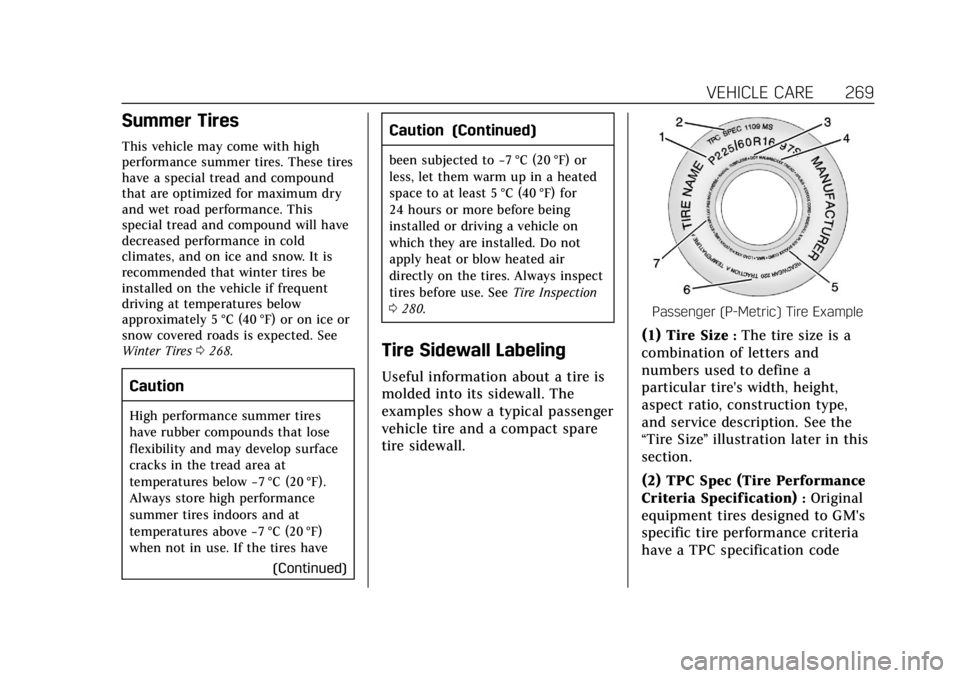
Passenger (P-Metric) Tire Example
(1) Tire Size:The tire size is a
combination of letters and
numbers used to define a
particular tire's width, height,
aspect ratio, construction type,
and service description. See the
“Tire Size ”illustration later in this
section.
(2) TPC Spec (Tire Performance
Criteria Specification)
:Original
equipment tires designed to GM's
specific tire performance criteria
have a TPC specification code