steering wheel CHEVROLET ASTRO 1997 2.G Owners Manual
[x] Cancel search | Manufacturer: CHEVROLET, Model Year: 1997, Model line: ASTRO, Model: CHEVROLET ASTRO 1997 2.GPages: 404, PDF Size: 20.63 MB
Page 37 of 404
Downloaded from www.Manualslib.com manuals search engine How the Air Bag System Works
I
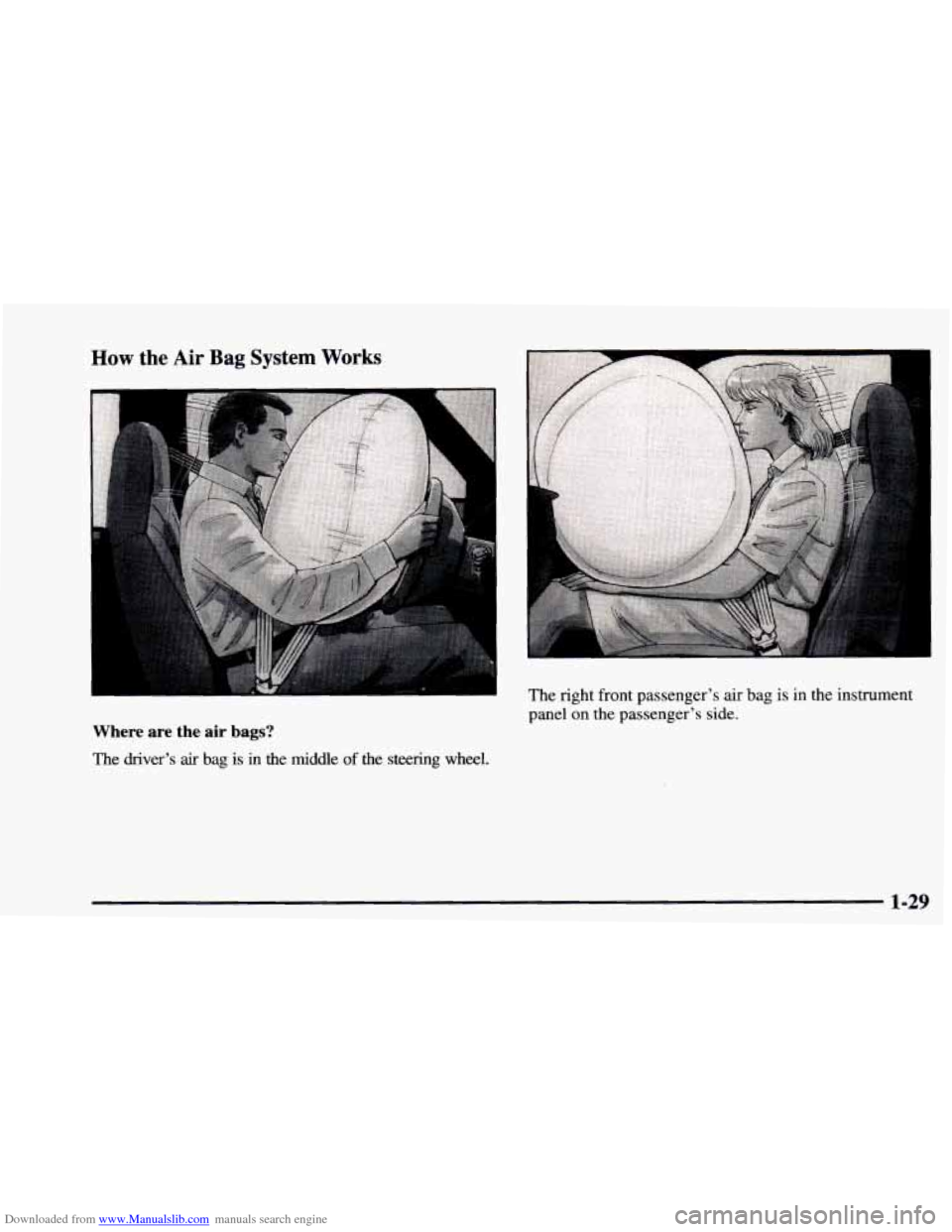
Where are the air bags?
The driver’s air bag is in the middle of the steering wheel. The right front passenger’s air
bag
is in the instrument
panel
on the passenger’s side.
1-29
Page 38 of 404
Downloaded from www.Manualslib.com manuals search engine If something is between an occupant and an air
bag, the bag might not inflate properly or it
might force the object into that person. The path
of an inflating
air bag must be kept clear. Don’t
put anything between an occupant and an air
bag, and don’t attach or put anything on the
steering wheel hub or on or near any other
air
bag covering. And don’t hang anything from the
assist handle on the passenger’s side of the
instrument panel.
When should an air bag inflate?
An air bag is designed to inflate in a moderate to severe
frontal or near-frontal crash. The air bag will inflate
only
if the impact speed is above the system’s designed
“threshold level.” If your vehicle goes straight into a
wall that doesn’t move or deform, the threshold level is
about
1 1 to 16 mph (1 8 to 26 km/h). The threshold level
can vary, however, with specific vehicle design, so that it
can be
somewhat above or below this range. If your
vehicle strikes something that will move
or deform, such
as a parked car, the threshold level will be higher. The
air bag is not designed to inflate in rollovers, side
impacts or rear impacts, because inflation would
not
help the occupant.
In any particular crash, no one can say whether
an air
bag should have inflated simply because
of the damage
to a vehicle or because
of what the repair costs were.
Inflation
is determined by the angle of the impact and
how quickly
the vehicle slows down in frontal or
near-frontal impacts.
What makes an air bag inflate?
In an impact of sufficient severity, the air bag sensing
system detects that the vehicle
is in a crash. The sensing
system triggers a release of gas from the inflator, which
inflates the air bag. The inflator, air bag and related
hardware are all part of the air bag modules inside the
steering wheel and in the instrument panel
in front of the
right front passenger.
1-30
Page 39 of 404
Downloaded from www.Manualslib.com manuals search engine How does an air bag restrain?
In moderate to severe frontal or near-frontal collisions,
even belted occupants can contact the steering wheel or the
instrument panel.
Air bags supplement the protection
provided by safety belts.
Air bags distribute the force of
the impact more evenly over the occupant’s upper body,
stopping the occupant more gradually. But air bags would
not help you
in many types of collisions, including
rollovers, rear impacts and side impacts, primarily because
an occupant’s motion is not toward those air bags. Air
bags should never be regarded as anwg more than a
supplement to safety
belts, and then only in moderate to
severe frontal or near-frontal collisions.
What will you see after an air bag inflates?
After an air bag inflates, it quickly deflates, so quickly
that some people
may not even realize the air bag
inflated. Some components of the air bag module
-- the
steering wheel hub for the driver’s air bag, or the
instrument panel for the right front passenger’s
bag
-- will be hot for a short time. The parts of the
bag that come into contact with you may be warm, but
not too hot to touch. There will be some smoke and
dust coming from vents in the deflated air bags. Air bag
inflation doesn’t prevent the driver from seeing or from
being able to steer the vehicle, nor does it
stop people
from leaving the vehicle.
When an air bag inflates, there is dust in the air.
This dust could cause breathing problems for
people with a history of asthma
or other
breathing trouble. To avoid this, everyone in the
vehicle should get out as soon as it is safe to do
so.
If you have breathing problems but can’t get out
of the vehicle after an air bag inflates, then get
fresh air by opening a window or
door.
0
0
Air bags are designed to inflate only once. After they
inflate, you’ll need some new parts for your air bag
system.
If you don’t get them, the air bag system
won’t be there to help protect you in another crash.
A new system will include air bag modules and
possibly other parts. The service manual for your
vehicle covers the need to replace other parts.
Your vehicle is equipped with a crash sensing and
diagnostic module, which records information
about the
air bag system. The module records
information about the readiness of the system,
when the sensors are activated and
driver’s safety
belt usage at deployment.
1-31
Page 40 of 404
Downloaded from www.Manualslib.com manuals search engine Let only qualified technicians work on your air bag
system. Improper service
can mean that your air bag
system won’t work properly. See your dealer
for service.
NOTICE:
~ ~ ~~~
If you damage the covering for the driver’s or the
right front passenger’s air bag, the bag may not
work properly. You may have to replace the air
bag module in the steering wheel or both the
air
bag module and the instrument panel for the
right front passenger’s
air bag. Do not open or
break the air bag coverings.
Servicing Your Air Bag-Equipped Vehicle
Air bags affect how your vehicle should be serviced.
There are parts
of the air bag system in several places
around your vehicle. You don’t
want the system to
inflate while someone is working on your vehicle. Your
GM dealer and the service manual have information
about servicing your vehicle and the air bag system. To
purchase a service manual, see “Service and Owner
Publications”
in the Index.
I a CAUTION:
For up to 10 minutes after the ignition key is
turned
off and the battery is disconnected, an air
bag can still inflate during improper service.
You
can be injured if you are close to an air bag when
it inflates. Avoid wires wrapped with yellow tape
or yellow connectors. They are probably part
of
the air bag system. Be sure to follow proper
service procedures, and make sure the person
performing work for you is qualified to do
so.
The air bag system does not need regular maintenance.
1-32
Page 88 of 404
Downloaded from www.Manualslib.com manuals search engine Theft Parking at Night
Park in a lighted spot, close all windows and lock your
vehicle. Remember to keep your valuables out of sight.
Put them in a storage area, or take them with you.
Vehicle
theft is big business, especially in sbme cities.
Although your vehicle has a number of theft-deterrent
features, we know that nothing we put
on it can make
it impossible to steal. However, there are ways
you
can help.
Key in the Ignition
If you leave your vehicle with the keys inside, it’s an
easy target for joy riders or professional thieves -- so
don’t do it.
When you park your vehicle and open the driver’s
door, you’ll hear
a chime reminding you to remove your
key from the ignition and take it with you. Always do
this. Your steering wheel will be locked, and
so will
your ignition and transmission. And remember
to lock
the doors.
Parking Lots
If you park in a lot where someone will be watching
your vehicle, it’s best
to lock it up and take your key.
But what if
you have to leave your key? What if you
have
to leave something valuable in your vehicle?
Put your valuables in a storage area, like your
Lock all the doors except the driver’s.
glove box.
Then take the door
key and remote keyless entry
transmitter with you.
2-14
Page 89 of 404
Downloaded from www.Manualslib.com manuals search engine New Vehicle “Break-In” Ignition Positior- -
NOTICE:
Your
modern vehicle doesn’t need an elaborate
“break-in.” But it will perform better in the long
run if you follow these guidelines:
0
0
0
0
Keep your speed at 55 mph (SS km/h) or
less for the
first 500 miles (SO5 km).
Don’t drive
at any one speed -- fast or
slow
-- for the first 500 miles (SO5 km).
Don’t make full-throttle starts.
Avoid making hard stops for the first
200 miles (322 km) or so. During this time
your new brake linings aren’t yet broken in. Hard stops with new linings can mean
premature wear and earlier replacement.
Follow this breaking-in guideline every
time you get new brake linings.
Don’t tow
a trailer during break-in. See
“Towing
a Trailer’’ in the Index for more
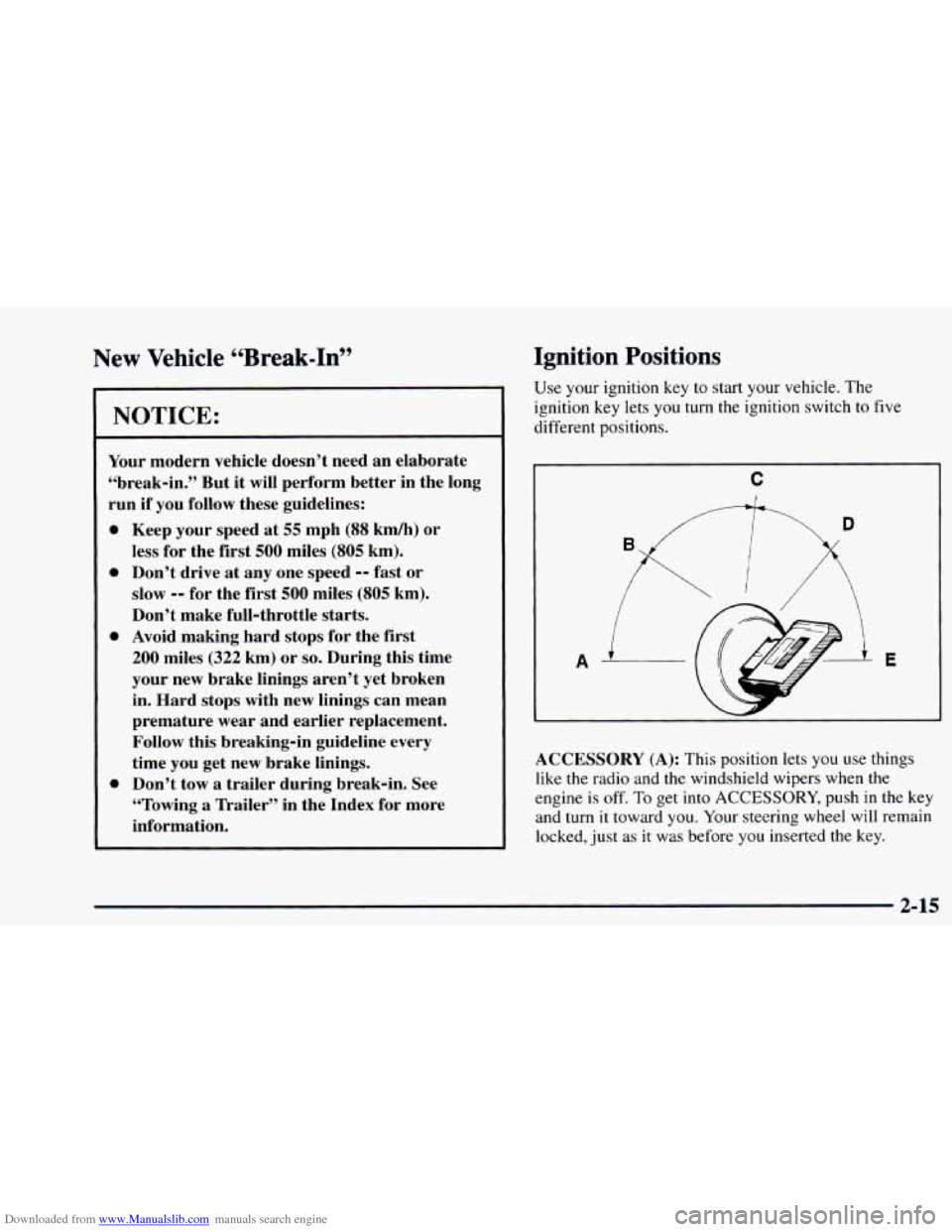
information. Use your ignition
key to
stan your vehicle. The
ignition key lets
you turn the ignition switch to five
different positions.
C
ACCESSORY (A): This position lets you use things
like
the radio and the windshield wipers when the
engine is
off. To get into ACCESSORY, push in the key
and turn
it toward you. Your steering wheel will remain
locked, just as
it was before you inserted the key.
2-15
Page 90 of 404
Downloaded from www.Manualslib.com manuals search engine NOTICE:
Don’t operate accessories in the ACCESSORY
position for long periods of time. Prolonged
operation
of accessories in the ACCESSORY
position could drain your battery and prevent
you from starting your vehicle.
LOCK (B): This position locks your ignition, steering
wheel and transmission shift lever in
PARK (P). It’s a
theft-deterrent feature. You will only be able to remove
your key when the ignition
is turned to LOCK.
OFF (C): This position lets you turn off the engine but
still turn the steering wheel. Use
OFF if you must have
your vehicle
in motion while the engine is off (for
example, if your vehicle is being towed).
RUN (D): This is the position for driving.
START (E): This starts your engine.
NOTICE:
If your key seems stuck in LOCK and you can’t
turn it, be sure you are using the correct key; if
so, is it all the way in? If it is, then turn the
steering wheel left and right while you turn the
key hard. But turn the key only with your hand.
Using
a tool to force it could break the key or the
ignition switch. If none of this works, then your
vehicle needs service.
2-16
Page 105 of 404
Downloaded from www.Manualslib.com manuals search engine Horn
To sound the horn, press the horn symbols on the
steering wheel.
Tilt Wheel (If Equipped)
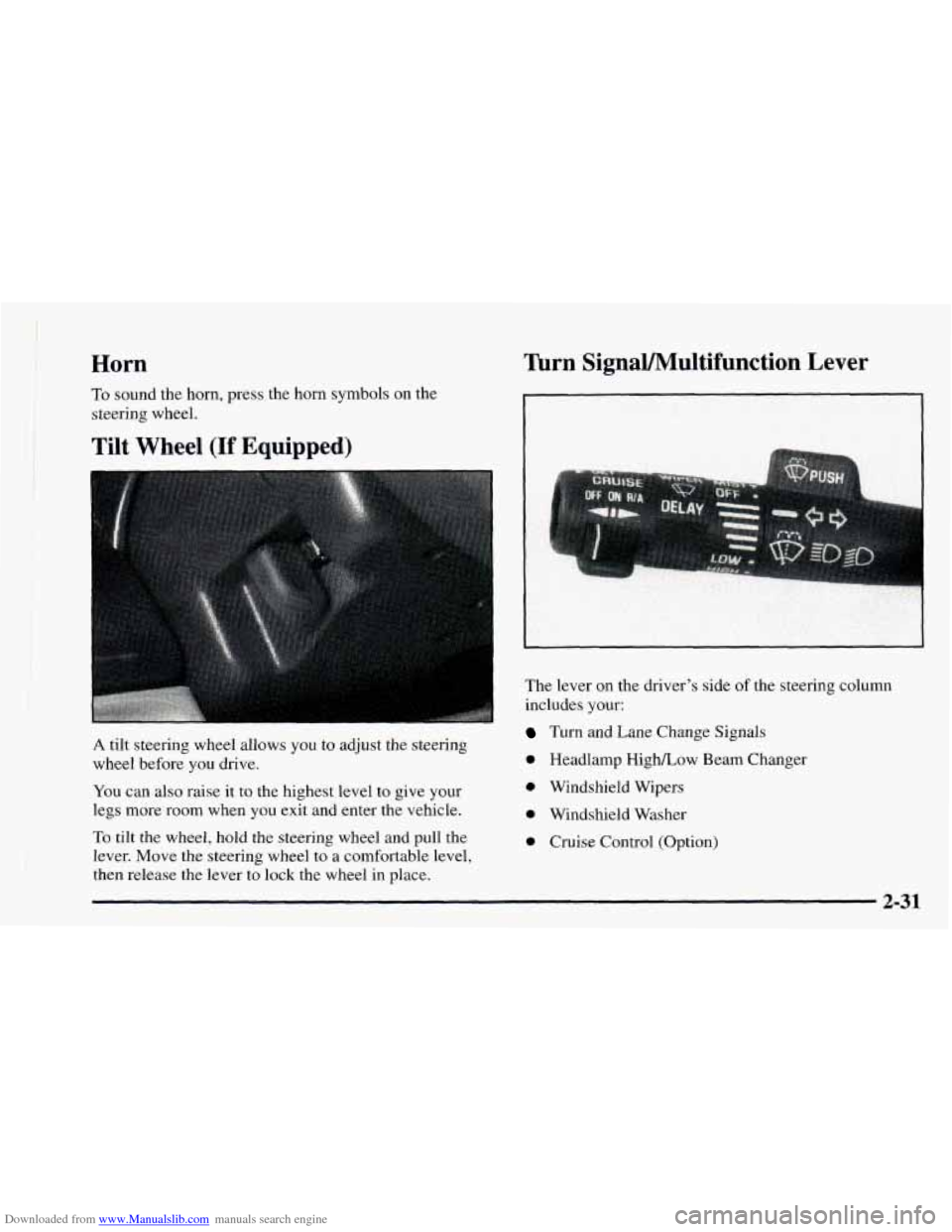
A tilt steering wheel allows you to adjust the steering
wheel before you drive.
You can also raise it to the highest level to give your
legs more room when you exit and enter the vehicle.
Turn SignaVMultifunction Lever
The lever on the driver’s side of the steering column
includes your:
Turn and Lane Change Signals
0 Headlamp HighLow Beam Changer
0 Windshield Wipers
0 Windshield Washer
0 Cruise Control (Option) To tilt the wheel, hold the steering wheel and pull the
lever. Move the steering wheel
to a comfortable level,
then release the lever to lock the wheel in place.
2-31
Page 185 of 404
Downloaded from www.Manualslib.com manuals search engine Remember: Anti-lock doesn’t change the time you need
to get your foot up to the brake pedal or always decrease
stopping distance.
If you get too close to the vehicle in
front of you, you won’t have time to apply your brakes
if that vehicle suddenly slows or stops. Always leave
enough room up ahead to stop,
even though you have
anti-lock brakes.
Using Anti-Lock
Don’t pump the brakes. Just hold the brake pedal down
and let anti-lock work for
you. You may feel the brakes
vibrate, or you may notice some noise, but
* ‘.s is normal.
Braking in Emergencies
With anti-lock, you can steer and brake at the same
time. In many emergencies, steering can help you more
than even the very best braking.
Steering
Power Steering
If you lose power steering assist because the engine
stops or the system
is not functioning, you can steer but
it will take much more effort.
Steering Tips
Driving on Curves
It’s important to take curves at a reasonable speed.
A lot of the “driver lost control’’ accidents mentioned on
the news happen on curves. Here’s why:
Experienced driver or beginner, each
of us is subject to
the same laws of physics when driving on curves. The
traction
of the tires against the road surface makes it
possible for the vehicle to change its path when you turn
the front wheels. If there’s no traction, inertia will keep
the vehicle going in the same direction.
If you’ve ever
tried
to steer a vehicle on wet ice, you’ll understand this.
The traction
you can get in a curve depends on the
condition of your tires and the road surface,
the angle at
which the curve is banked, and your speed. While you’re
in a curve, speed is the one Factor you can control.
Suppose you’re steering through
a sharp curve. Then you
suddenly accelerate. Both control systems -- steering and
acceleration
-- have to do their work where the tires meet
the road. Adding the sudden acceleration can demand too much
of those places. You can lose control.
4-9
Page 186 of 404
Downloaded from www.Manualslib.com manuals search engine What should you do if this ever happens? Ease up on the
accelerator pedal, steer the vehicle the way
you want it
to go, and slow down.
Speed limit signs near curves warn that
you should
adjust your speed. Of course, the posted speeds are
based
on good weather and road conditions. Under less
favorable conditions you’ll want
to go slower.
If you need
to reduce your speed as you approach a
curve,
do it before you enter the curve, while your front
wheels are straight ahead.
Try to adjust your speed
so you can “drive” through the
curve. Maintain a reasonable, steady speed. Wait to
accelerate until you are
out of the curve, and then
accelerate gently into the straightaway.
Steering in Emergencies
There are times when steering can be more effective than
braking. For example,
you come over a hill and find a
truck stopped in your
lane, or a car suddenly pulls out
from nowhere, or a child darts out from between parked
cars and stops right in front
of you. You can avoid these
problems
by braking -- if you can stop in time. But
sometimes you can’t; there isn’t room, That’s the time for
evasive action
-- steering around the problem.
Your vehicle can perform very well in emergencies like
these. First apply your brakes. (See “Braking in
Emergencies” earlier in this section.)
It is better to
remove as much speed as you can from a possible
collision. Then steer around
the problem, to the left or
right depending on the space available.
4-10