audio CHEVROLET ASTRO CARGO VAN 2003 2.G Owners Manual
[x] Cancel search | Manufacturer: CHEVROLET, Model Year: 2003, Model line: ASTRO CARGO VAN, Model: CHEVROLET ASTRO CARGO VAN 2003 2.GPages: 382, PDF Size: 2.63 MB
Page 1 of 382

Seats and Restraint Systems........................... 1-1
Front Seats
............................................... 1-2
Rear Seats
............................................... 1-7
Safety Belts
.............................................1-13
Child Restraints
.......................................1-35
Air Bag System
.......................................1-62
Restraint System Check
............................1-71
Features and Controls..................................... 2-1
Keys
........................................................ 2-2
Doors and Locks
....................................... 2-7
Windows
.................................................2-16
Theft-Deterrent Systems
............................2-18
Starting and Operating Your Vehicle
...........2-19
Mirrors
....................................................2-32
HomeLink
žTransmitter
.............................2-34
Storage Areas
.........................................2-38
Instrument Panel............................................. 3-1
Instrument Panel Overview
.......................... 3-2
Climate Controls
......................................3-18
Warning Lights, Gages and Indicators
.........3-23
Audio System(s)
.......................................3-38
Driving Your Vehicle....................................... 4-1
Your Driving, the Road, and Your Vehicle
..... 4-2Towing
....................................................4-29
Service and Appearance Care.......................... 5-1
Service
..................................................... 5-3
Fuel
......................................................... 5-5
Checking Things Under the Hood
...............5-11
All-Wheel Drive
........................................5-52
Rear Axle
...............................................5-53
Front Axle
...............................................5-54
Bulb Replacement
....................................5-55
Windshield Wiper Blade Replacement
.........5-62
Tires
......................................................5-63
Appearance Care
.....................................5-83
Vehicle Identi®cation
.................................5-91
Electrical System
......................................5-92
Capacities and Speci®cations
.....................5-99
Normal Maintenance Replacement Parts
....5-101
Maintenance Schedule..................................... 6-1
Maintenance Schedule
................................ 6-2
Customer Assistance Information.................... 7-1
Customer Assistance Information
.................. 7-2
Reporting Safety Defects
...........................7-10
Index.................................................................1
2003 Chevrolet Astro Owner ManualM
Page 4 of 382

Vehicle Damage Warnings
Also, in this book you will ®nd these notices:
Notice:These mean there is something that could
damage your vehicle.
A notice will tell you about something that can damage
your vehicle. Many times, this damage would not be
covered by your warranty, and it could be costly. But the
notice will tell you what to do to help avoid the
damage.
When you read other manuals, you might see CAUTION
and NOTICE warnings in different colors or in different
words.
You'll also see warning labels on your vehicle. They use
the same words, CAUTION or NOTICE.
Vehicle Symbols
Your vehicle has components and labels that use
symbols instead of text. Symbols, used on your vehicle,
are shown along with the text describing the operation
or information relating to a speci®c component, control,
message, gage or indicator.
If you need help ®guring out a speci®c name of a
component, gage or indicator, reference the following
topics:
·Seats and Restraint Systems in Section 1
·Features and Controls in Section 2
·Instrument Panel Overview in Section 3
·Climate Controls in Section 3
·Warning Lights, Gages and Indicators in Section 3
·Audio System(s) in Section 3
·Engine Compartment Overview in Section 5
iv
Page 125 of 382

Instrument Panel Overview...............................3-2
Hazard Warning Flashers................................3-4
Other Warning Devices...................................3-5
Horn.............................................................3-5
Tilt Wheel.....................................................3-5
Turn Signal/Multifunction Lever.........................3-6
Exterior Lamps.............................................3-12
Interior Lamps..............................................3-15
Accessory Power Outlets...............................3-16
Ashtrays and Cigarette Lighter........................3-17
Climate Controls............................................3-18
Climate Control System.................................3-18
Rear Heating System....................................3-19
Rear Air Conditioning System.........................3-20
Rear Climate Control System.........................3-21
Warning Lights, Gages and Indicators.............3-23
Instrument Panel Cluster................................3-24
Speedometer and Odometer...........................3-25
Safety Belt Reminder Light.............................3-26
Air Bag Readiness Light................................3-26
Charging System Light..................................3-27
Voltmeter Gage............................................3-28
Brake System Warning Light..........................3-28Anti-Lock Brake System Warning Light.............3-29
Engine Coolant Temperature Gage..................3-30
Malfunction Indicator Lamp.............................3-30
Oil Pressure Gage........................................3-34
Security Light...............................................3-35
Service All-Wheel Drive Light.........................3-35
Tow/Haul Mode Light....................................3-36
Check Gages Warning Light...........................3-36
Fuel Gage...................................................3-36
Low Fuel Warning Light.................................3-37
Audio System(s).............................................3-38
Setting the Time for Radios with
the Set Button..........................................3-38
Setting the Time for Radios with
HR and MN Buttons..................................3-38
AM-FM Radio...............................................3-39
Radio with CD..............................................3-41
Rear Seat Audio (RSA).................................3-46
Theft-Deterrent Feature..................................3-47
Understanding Radio Reception......................3-50
Care of Your CDs.........................................3-50
Care of Your CD Player................................3-50
Fixed Mast Antenna......................................3-50
Section 3 Instrument Panel
3-1
Page 127 of 382

The main components of your instrument panel are the following:
A. Exterior Lamp Control
B. Instrument Panel Brightness Thumbwheel
C. Multifunction Lever
D. Hazard Warning Flasher Button
E. Transmission Shift Lever
F. Ignition Switch
G. Rear Defogger Button (Option)
H. Climate Controls
I. Rear A/C Control (Option)
J. Rear Heater Control (Option)K. Rear Washer/Wiper Switch (Option)
L. Front Ashtray
M. Dome Override Button
N. Hood Release
O. Cigarette Lighter
P. Audio System
Q. Front Storage Compartment
R. Cupholders/Storage Tray
S. Accessory Power Outlets
3-3
Page 133 of 382
Rear Window Washer/Wiper
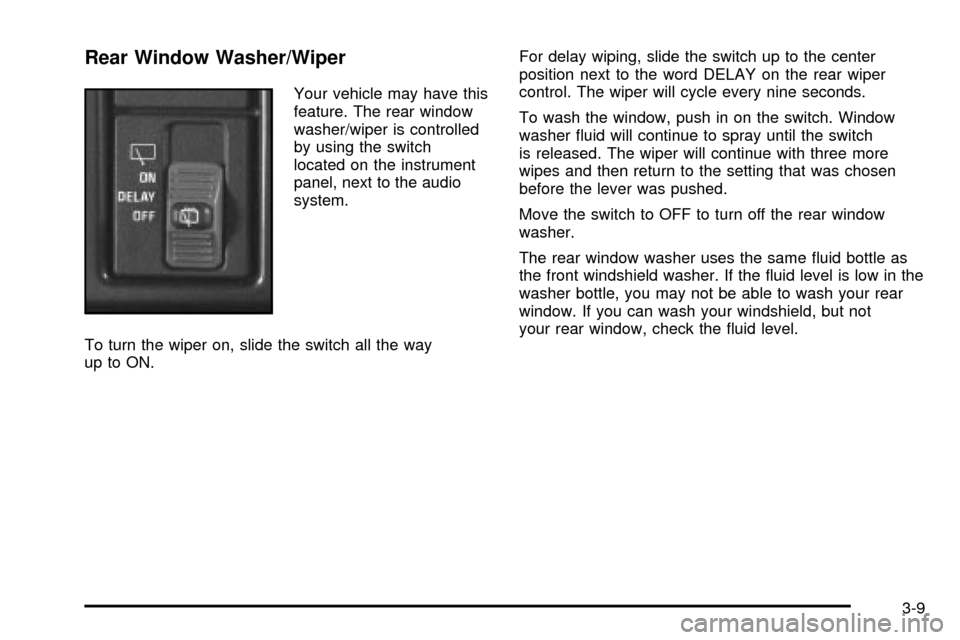
Your vehicle may have this
feature. The rear window
washer/wiper is controlled
by using the switch
located on the instrument
panel, next to the audio
system.
To turn the wiper on, slide the switch all the way
up to ON.For delay wiping, slide the switch up to the center
position next to the word DELAY on the rear wiper
control. The wiper will cycle every nine seconds.
To wash the window, push in on the switch. Window
washer ¯uid will continue to spray until the switch
is released. The wiper will continue with three more
wipes and then return to the setting that was chosen
before the lever was pushed.
Move the switch to OFF to turn off the rear window
washer.
The rear window washer uses the same ¯uid bottle as
the front windshield washer. If the ¯uid level is low in the
washer bottle, you may not be able to wash your rear
window. If you can wash your windshield, but not
your rear window, check the ¯uid level.
3-9
Page 143 of 382
Defogging and Defrosting
Turn the right knob to select the defog or defrost mode.
-(Blend):With this setting, the outside air comes
out of both the ¯oor and defroster outlets. Adjust
the temperature knob for warmer or cooler air. The air
conditioning compressor may operate in this setting
to dehumidfy the air.
1(Defrost):This setting operates the defroster. Most
of the air comes out near the windshield, with some
going to the ¯oor outlets and front side windows. The air
conditioning compressor may operate in this setting to
dehumidify the air.
The bi-level setting is useful for cold weather with a
large number of passengers or very humid conditions to
help keep the windshield clear. Use defrost to remove
fog or ice from the windshield quickly in extremely
cold conditions. The temperature knob should be in the
red area and the fan control toward high.
Rear Heating System
Your vehicle may have an optional rear heating system
that allows you to adjust the amount of air ¯owing
into the rear of the vehicle, from the front-seating area.
This feature works with the main climate-control
system in your vehicle.
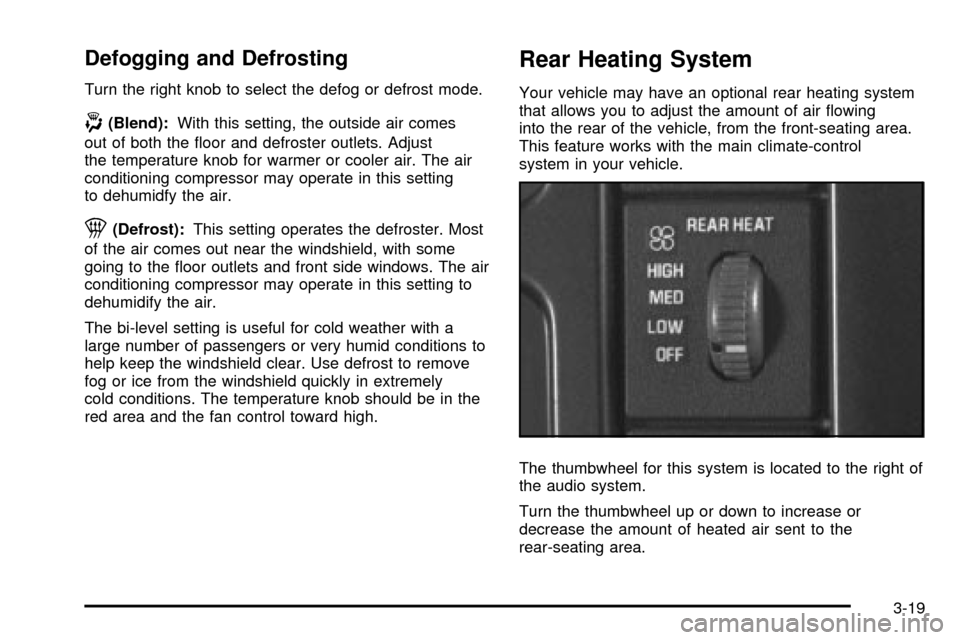
The thumbwheel for this system is located to the right of
the audio system.
Turn the thumbwheel up or down to increase or
decrease the amount of heated air sent to the
rear-seating area.
3-19
Page 162 of 382

Audio System(s)
Notice:Before you add any sound equipment to
your vehicle ± like a tape player, CB radio, mobile
telephone or two-way radio ± be sure you can
add what you want. If you can, it's very important to
do it properly. Added sound equipment may
interfere with the operation of your vehicle's engine,
radio or other systems, and even damage them.
Your vehicle's systems may interfere with the
operation of sound equipment that has been added
improperly.
So, before adding sound equipment, check with
your dealer and be sure to check federal rules
covering mobile radio and telephone units.
Your audio system has been designed to operate easily
and to give years of listening pleasure. You will get
the most enjoyment out of it if you acquaint yourself with
it ®rst. Figure out which radio you have in your vehicle,
®nd out what your audio system can do and how to
operate all of its controls to be sure you're getting the
most out of the advanced engineering that went into it.
Your vehicle may have a feature called Retained
Accessory Power (RAP). With RAP, you can play your
audio system even after the ignition is turned off.
See ªRetained Accessory Power (RAP)º under
Ignition
Positions on page 2-19.
Setting the Time for Radios with the
Set Button
Press SET. Within ®ve seconds, press and hold the
right SEEK arrow until the correct minute appears on the
display. Press and hold the left SEEK arrow until the
correct hour appears on the display.
Setting the Time for Radios with HR
and MN Buttons
Press and hold HR until the correct hour appears on the
display. Press and hold MN until the correct minute
appears on the display. To display the time with
the ignition off, press RECALL or HR/MN and the time
will be displayed for a few seconds. There is an
initial two-second delay before the clock goes into the
time-set mode.
3-38
Page 165 of 382
Radio with CD
Playing the Radio
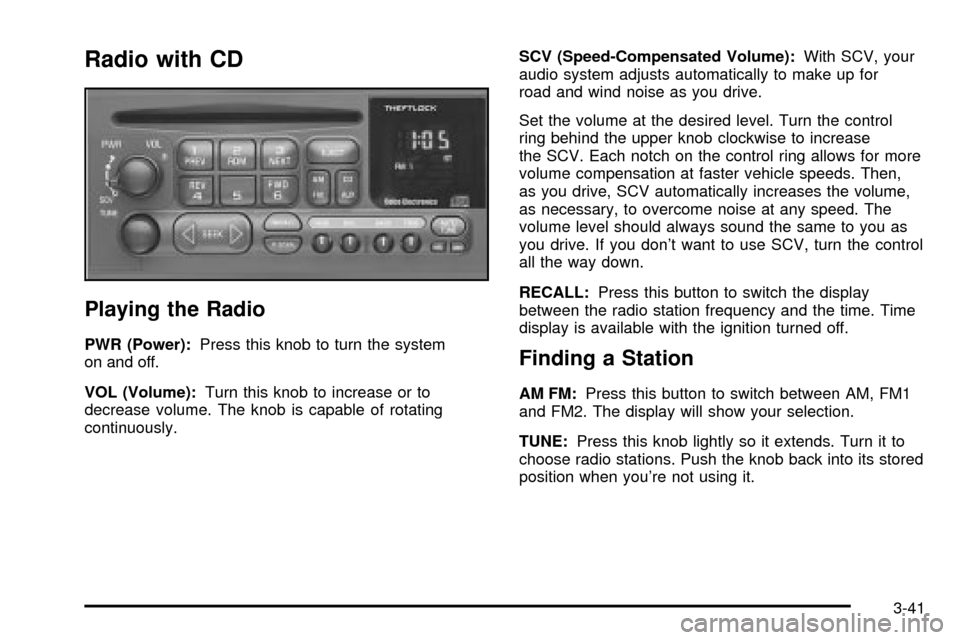
PWR (Power):Press this knob to turn the system
on and off.
VOL (Volume):Turn this knob to increase or to
decrease volume. The knob is capable of rotating
continuously.SCV (Speed-Compensated Volume):With SCV, your
audio system adjusts automatically to make up for
road and wind noise as you drive.
Set the volume at the desired level. Turn the control
ring behind the upper knob clockwise to increase
the SCV. Each notch on the control ring allows for more
volume compensation at faster vehicle speeds. Then,
as you drive, SCV automatically increases the volume,
as necessary, to overcome noise at any speed. The
volume level should always sound the same to you as
you drive. If you don't want to use SCV, turn the control
all the way down.
RECALL:Press this button to switch the display
between the radio station frequency and the time. Time
display is available with the ignition turned off.Finding a Station
AM FM:Press this button to switch between AM, FM1
and FM2. The display will show your selection.
TUNE:Press this knob lightly so it extends. Turn it to
choose radio stations. Push the knob back into its stored
position when you're not using it.
3-41
Page 170 of 382
Rear Seat Audio (RSA)
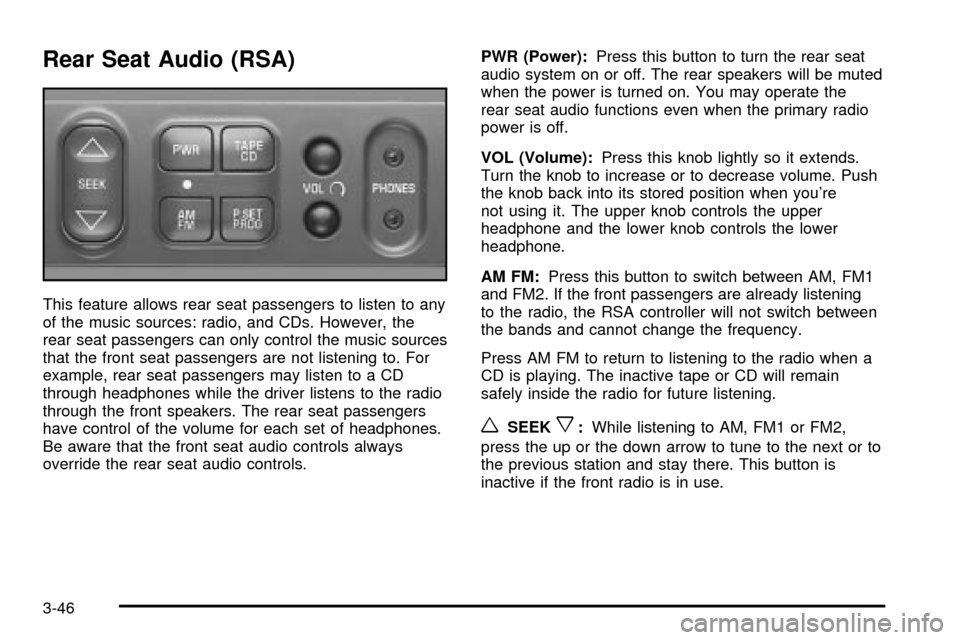
This feature allows rear seat passengers to listen to any
of the music sources: radio, and CDs. However, the
rear seat passengers can only control the music sources
that the front seat passengers are not listening to. For
example, rear seat passengers may listen to a CD
through headphones while the driver listens to the radio
through the front speakers. The rear seat passengers
have control of the volume for each set of headphones.
Be aware that the front seat audio controls always
override the rear seat audio controls.PWR (Power):Press this button to turn the rear seat
audio system on or off. The rear speakers will be muted
when the power is turned on. You may operate the
rear seat audio functions even when the primary radio
power is off.
VOL (Volume):Press this knob lightly so it extends.
Turn the knob to increase or to decrease volume. Push
the knob back into its stored position when you're
not using it. The upper knob controls the upper
headphone and the lower knob controls the lower
headphone.
AM FM:Press this button to switch between AM, FM1
and FM2. If the front passengers are already listening
to the radio, the RSA controller will not switch between
the bands and cannot change the frequency.
Press AM FM to return to listening to the radio when a
CD is playing. The inactive tape or CD will remain
safely inside the radio for future listening.
wSEEKx:While listening to AM, FM1 or FM2,
press the up or the down arrow to tune to the next or to
the previous station and stay there. This button is
inactive if the front radio is in use.
3-46
Page 263 of 382
Vehicle Storage
If you're not going to drive your vehicle for 25 days or
more, remove the black, negative (-) cable from the
battery. This will help keep your battery from running
down.
{CAUTION:
Batteries have acid that can burn you and gas
that can explode. You can be badly hurt if you
aren't careful. See ªJump Startingº next for
tips on working around a battery without
getting hurt.
Contact your dealer to learn how to prepare your
vehicle for longer storage periods.
Also, for your audio system, see
Theft-Deterrent
Feature on page 3-47.
Jump Starting
If your battery has run down, you may want to use
another vehicle and some jumper cables to start your
vehicle. But please follow the numbered steps to
do it safely.
{CAUTION:
Batteries can hurt you. They can be dangerous
because:
·They contain acid that can burn you.
·They contain gas that can explode or
ignite.
·They contain enough electricity to burn
you.
If you don't follow these steps exactly, some
or all of these things can hurt you.
Notice:Ignoring these steps could result in costly
damage to your vehicle that wouldn't be covered
by your warranty.
Trying to start your vehicle by pushing or pulling it
won't work, and it could damage your vehicle.
5-47