reset CHEVROLET ASTRO CARGO VAN 2003 2.G Owners Manual
[x] Cancel search | Manufacturer: CHEVROLET, Model Year: 2003, Model line: ASTRO CARGO VAN, Model: CHEVROLET ASTRO CARGO VAN 2003 2.GPages: 382, PDF Size: 2.63 MB
Page 115 of 382

Continue to press and hold the HomeLinkžbutton while
you press and release every two seconds (cycle)
your hand-held transmitter until the frequency signal has
been successfully accepted by HomeLink
ž. The
indicator light will ¯ash slowly at ®rst and then rapidly.
Proceed with Step 4 under ªProgramming HomeLink
žº
to complete.
Using HomeLinkž
Press and hold the appropriate HomeLinkžbutton for at
least half of a second. The indicator light will come
on while the signal is being transmitted.
Erasing HomeLinkžButtons
To erase programming from the three buttons do the
following:
1. Press and hold down the two outside buttons until
the indicator light begins to ¯ash, after 20 seconds.
2. Release both buttons. Do not hold for longer than
30 seconds.
HomeLink
žis now in the train (learning) mode and can
be programmed at any time beginning with Step 2
under ªProgramming HomeLink
ž.º
Individual buttons can not be erased, but they can be
reprogrammed. See ªReprogramming a Single
HomeLink
žButtonº next.
Reprogramming a Single HomeLinkž
Button
To program a device to HomeLinkžusing a HomeLinkž
button previously trained, follow these steps:
1. Press and hold the desired HomeLink
žbutton. Do
not release the button.
2. The indicator light will begin to ¯ash after
20 seconds. While still holding the HomeLink
ž
button, proceed with Step 2 under ªProgramming
HomeLinkž.º
Resetting Defaults
To reset HomeLinkžto default settings do the following:
1. Hold down the two outside buttons for about
20 seconds until the indicator light begins to ¯ash.
2. Continue to hold both buttons until the HomeLink
ž
indicator light turns off.
3. Release both buttons.
For questions or comments, contact HomeLink
žat
1-800-355-3515, or on the internet at
www.homelink.com.
2-37
Page 121 of 382

If this happens, follow these instructions to set the
variance for your particular location:
1. Find your location on the zone map. Record your
zone number.
2. Press and hold both the US/MET and the MODE
buttons while in the COMP/TEMP mode.
3. After ®ve seconds, the compass will acknowledge
the variation mode by displaying the current zone
number. When it does, release both buttons.4. Press US/MET until your zone number appears on
the display.
5. Press MODE to enter your zone number. Your
variance is now set and the display will return to
the COMP/TEMP mode.
TRIP:Once in the TRIP mode, pressing the MODE
button will take you through the following TRIP functions:
·AVG ECON (Average Economy):The average
fuel economy since the last reset is displayed.
·INST ECON (Instantaneous Economy):
Instantaneous fuel economy for the last second of
driving is displayed.
·RANGE:The display indicates the estimated
distance that can be travelled with the remaining
fuel in the tank, based on the fuel economy for the
last few hours of driving.
·FUEL USED:The fuel used since the last reset is
displayed.
·AVG SPEED (Average Speed):The average
speed since the last reset is displayed.
To reset the trip computer, press the MODE and
US/MET buttons simultaneously for at least two
seconds. All functions will be displayed brie¯y once the
system is reset. Reset can only be performed in the
AVG ECON, FUEL USED and AVG SPEED modes.
All three modes are reset simultaneously.
2-43
Page 132 of 382
Windshield Wipers
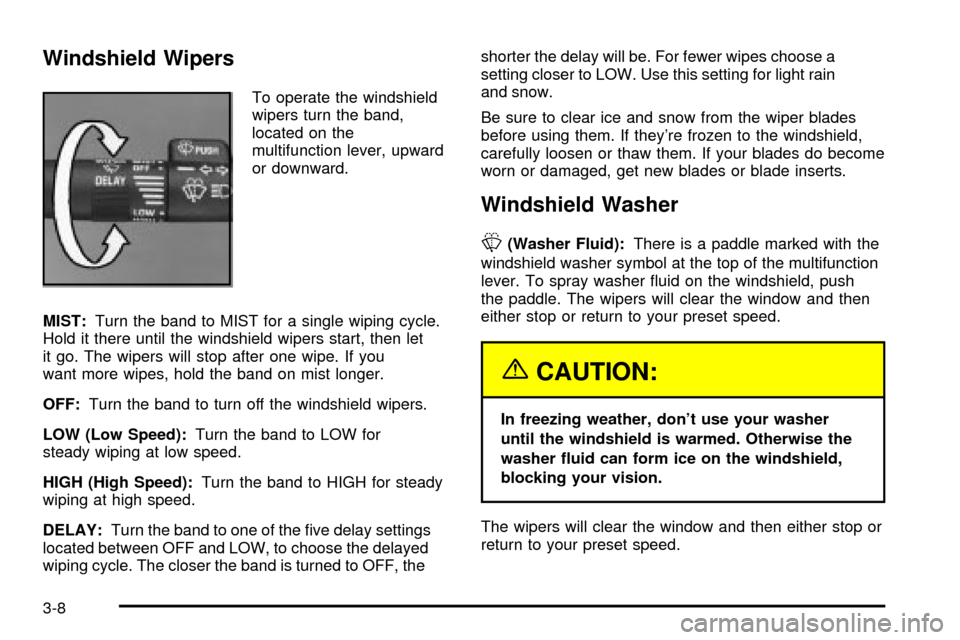
To operate the windshield
wipers turn the band,
located on the
multifunction lever, upward
or downward.
MIST:Turn the band to MIST for a single wiping cycle.
Hold it there until the windshield wipers start, then let
it go. The wipers will stop after one wipe. If you
want more wipes, hold the band on mist longer.
OFF:Turn the band to turn off the windshield wipers.
LOW (Low Speed):Turn the band to LOW for
steady wiping at low speed.
HIGH (High Speed):Turn the band to HIGH for steady
wiping at high speed.
DELAY:Turn the band to one of the ®ve delay settings
located between OFF and LOW, to choose the delayed
wiping cycle. The closer the band is turned to OFF, theshorter the delay will be. For fewer wipes choose a
setting closer to LOW. Use this setting for light rain
and snow.
Be sure to clear ice and snow from the wiper blades
before using them. If they're frozen to the windshield,
carefully loosen or thaw them. If your blades do become
worn or damaged, get new blades or blade inserts.
Windshield Washer
L
(Washer Fluid):There is a paddle marked with the
windshield washer symbol at the top of the multifunction
lever. To spray washer ¯uid on the windshield, push
the paddle. The wipers will clear the window and then
either stop or return to your preset speed.
{CAUTION:
In freezing weather, don't use your washer
until the windshield is warmed. Otherwise the
washer ¯uid can form ice on the windshield,
blocking your vision.
The wipers will clear the window and then either stop or
return to your preset speed.
3-8
Page 135 of 382
Resuming a Set Speed
Suppose you set your cruise control at a desired speed
and then you apply the brake. This, of course, shuts
off the cruise control. But you don't need to reset it.
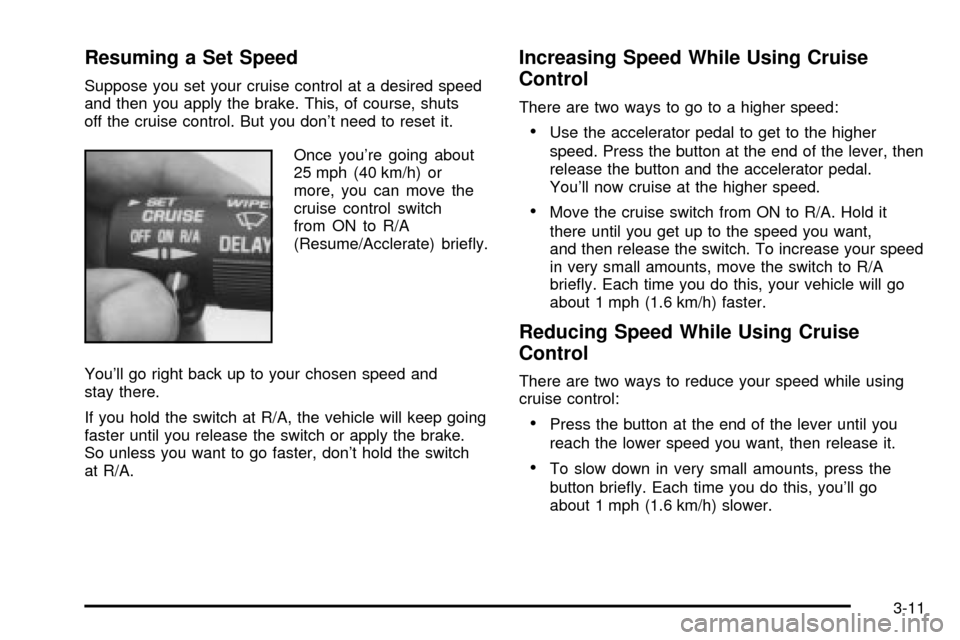
Once you're going about
25 mph (40 km/h) or
more, you can move the
cruise control switch
from ON to R/A
(Resume/Acclerate) brie¯y.
You'll go right back up to your chosen speed and
stay there.
If you hold the switch at R/A, the vehicle will keep going
faster until you release the switch or apply the brake.
So unless you want to go faster, don't hold the switch
at R/A.
Increasing Speed While Using Cruise
Control
There are two ways to go to a higher speed:
·Use the accelerator pedal to get to the higher
speed. Press the button at the end of the lever, then
release the button and the accelerator pedal.
You'll now cruise at the higher speed.
·Move the cruise switch from ON to R/A. Hold it
there until you get up to the speed you want,
and then release the switch. To increase your speed
in very small amounts, move the switch to R/A
brie¯y. Each time you do this, your vehicle will go
about 1 mph (1.6 km/h) faster.
Reducing Speed While Using Cruise
Control
There are two ways to reduce your speed while using
cruise control:
·Press the button at the end of the lever until you
reach the lower speed you want, then release it.
·To slow down in very small amounts, press the
button brie¯y. Each time you do this, you'll go
about 1 mph (1.6 km/h) slower.
3-11
Page 149 of 382

Speedometer and Odometer
Your speedometer lets you see your speed in both
miles per hour (mph) and kilometers per hour (km/h).
Your odometer shows how far your vehicle has
been driven, in either miles (used in the United States)
or kilometers (used in Canada).
Your odometer is tamper resistant. The digital odometer
will read 999,999 if someone tries to turn it back.
You may wonder what happens if your vehicle needs a
new odometer installed. If the new one can be set to
the mileage total of the old odometer, then it must
be. But if it can't, then it's set at zero, and a label must
be put on the driver's door to show the old mileage
reading when the new odometer was installed.
Trip Odometer
The trip odometer can tell you how far your vehicle has
been driven since you last set the trip odometer to zero.
The trip odometer will appear in place of your regular
odometer when you press the TRIP button.
To reset the trip odometer, press and hold the TRIP
button. To change back to the regular odometer, press
the TRIP button again.
3-25
Page 163 of 382
AM-FM Radio
Playing the Radio
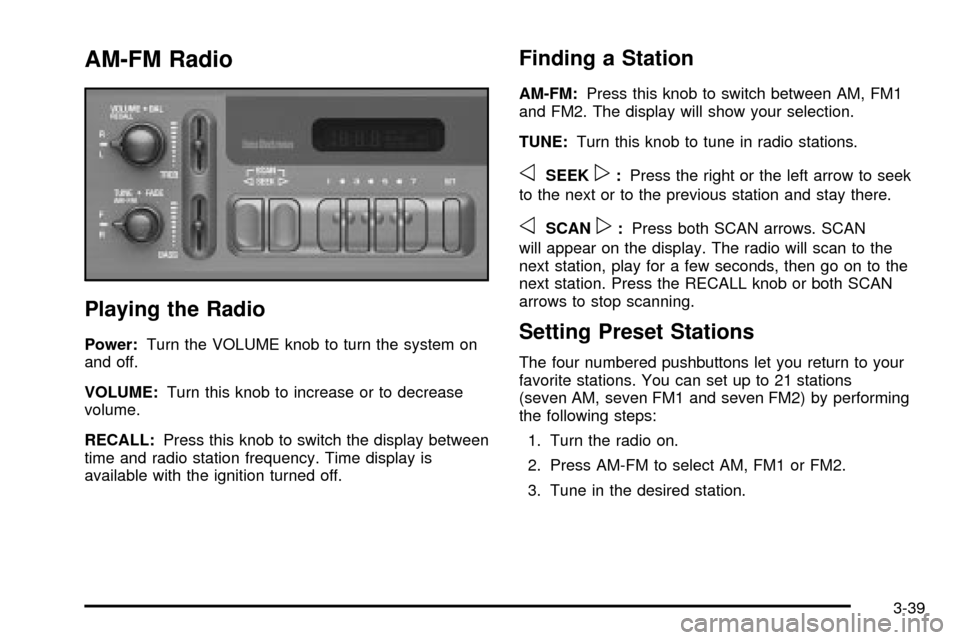
Power:Turn the VOLUME knob to turn the system on
and off.
VOLUME:Turn this knob to increase or to decrease
volume.
RECALL:Press this knob to switch the display between
time and radio station frequency. Time display is
available with the ignition turned off.
Finding a Station
AM-FM:Press this knob to switch between AM, FM1
and FM2. The display will show your selection.
TUNE:Turn this knob to tune in radio stations.
oSEEKp:Press the right or the left arrow to seek
to the next or to the previous station and stay there.
oSCANp:Press both SCAN arrows. SCAN
will appear on the display. The radio will scan to the
next station, play for a few seconds, then go on to the
next station. Press the RECALL knob or both SCAN
arrows to stop scanning.
Setting Preset Stations
The four numbered pushbuttons let you return to your
favorite stations. You can set up to 21 stations
(seven AM, seven FM1 and seven FM2) by performing
the following steps:
1. Turn the radio on.
2. Press AM-FM to select AM, FM1 or FM2.
3. Tune in the desired station.
3-39
Page 164 of 382

4. Press SET. SET will appear on the display.
5. Press one of the four pushbuttons within ®ve
seconds. Whenever you press that numbered
pushbutton, the station you set will return.
6. Repeat the steps for each pushbutton.
In addition to the four stations already set, up to three
more stations may be preset on each band by pressing
two adjoining pushbuttons at the same time and by
performing the following steps:
1. Tune in the desired station.
2. Press SET. SET will appear on the display.
3. Press two adjoining pushbuttons at the same time,
within ®ve seconds. Whenever you press the same
two pushbuttons, the station you set will return.
4. Repeat the steps for each pushbutton.Setting the Tone (Bass/Treble)
BASS:Slide this lever up or down to increase or to
decrease bass.
TREB (Treble):Slide this lever up or down to increase
or to decrease treble. If a station is weak or noisy,
you may want to decrease the treble.
Adjusting the Speakers (Balance/Fade)
BAL (Balance):Turn the control ring behind the
upper knob to move the sound toward the left or the
right speakers.
FADE:Turn the control ring behind the lower knob to
move the sound toward the front or the rear speakers.
3-40
Page 166 of 382

oSEEKp:Press the right or the left arrow to seek
to the next station or to the previous station and
stay there.
To scan stations, press and hold either SEEK arrow for
two seconds until SCAN appears on the display. The
radio will scan to a station, play for a few seconds, then
go on to the next station. Press either SEEK arrow
again to stop scanning.
The radio will seek and scan only to stations that are in
the selected band and only to those with a strong signal.
P.SCAN (Preset Scan):Press this button to listen to
each of your favorite stations stored on the pushbuttons
for a few seconds. P.SCAN will appear on the display.
Press this button again or one of the pushbuttons to stop
scanning presets.
The radio will scan only to the preset stations that are in
the selected band and only to those with a strong signal.Setting Preset Stations
The six numbered pushbuttons let you return to your
favorite stations. You can set up to 18 stations (six AM,
six FM1 and six FM2) by performing the following
steps:
1. Turn the radio on.
2. Press AM FM to select AM, FM1 or FM2.
3. Tune in the desired station.
4. Press AUTO TONE to select the setting you prefer.
5. Press and hold one of the six pushbuttons. The
sound will mute. When it returns, release the
pushbutton. Whenever you press that numbered
pushbutton, the station you set will return and
the tone you selected will be automatically selected
for that pushbutton.
6. Repeat the steps for each pushbutton.
3-42
Page 171 of 382

While listening to a CD, press the up arrow to hear the
next track on the CD. Press the down arrow to go
back to the start of the current track if more than eight
seconds have played. The SEEK button is inactive if the
CD mode on the front radio is in use.
To scan preset stations, press and hold SEEK until the
radio goes into scan mode. The radio will go to a station,
play for a few seconds, then go on to the next station.
Press either SEEK arrow again to stop scanning. The
scan function is inactive if the front radio is in use.
P.SET PROG (Preset Program):The front passengers
must be listening to something different for each of
these functions to work:
·Press this button to scan through the preset radio
stations set on the pushbuttons on the main radio.
The radio will go to a preset station, play for a
few seconds, then go on to the next preset station.
Press this button again to stop scanning.
TAPE CD:Press this button to switch between playing
a tape or CD if loaded. The inactive tape or CD will
remain safely inside the radio for future listening.
Theft-Deterrent Feature
THEFTLOCKžis designed to discourage theft of your
radio. It works by using a secret code to disable all radio
functions whenever battery power is interrupted.
The THEFTLOCK
žfeature for the radio may be used or
ignored. If ignored, the system plays normally and the
radio is not protected by the feature. If THEFTLOCK
žis
activated, your radio will not operate if stolen.
When THEFTLOCK
žis activated, the radio will display
LOC to indicate a locked condition anytime battery
power has been interrupted. If your battery loses power
for any reason, you must unlock the radio with the
secret code before it will operate.
3-47
Page 285 of 382
Wheel Alignment and Tire Balance
The wheels on your vehicle were aligned and balanced
carefully at the factory to give you the longest tire life
and best overall performance.
Scheduled wheel alignment and wheel balancing are
not needed. However, if you notice unusual tire wear or
your vehicle pulling one way or the other, the alignment
may need to be reset. If you notice your vehicle
vibrating when driving on a smooth road, your wheels
may need to be rebalanced.
Wheel Replacement
Replace any wheel that is bent, cracked or badly rusted
or corroded. If wheel nuts keep coming loose, the
wheel, wheel bolts and wheel nuts should be replaced.
If the wheel leaks air, replace it (except some
aluminum wheels, which can sometimes be repaired).
See your dealer if any of these conditions exist.
Your dealer will know the kind of wheel you need.
Each new wheel should have the same load-carrying
capacity, diameter, width, offset and be mounted
the same way as the one it replaces.If you need to replace any of your wheels, wheel bolts
or wheel nuts, replace them only with new GM
original equipment parts. This way, you will be sure to
have the right wheel, wheel bolts and wheel nuts
for your vehicle.
{CAUTION:
Using the wrong replacement wheels, wheel
bolts or wheel nuts on your vehicle can be
dangerous. It could affect the braking and
handling of your vehicle, make your tires lose
air and make you lose control. You could have
a collision in which you or others could be
injured. Always use the correct wheel, wheel
bolts and wheel nuts for replacement.
Notice:The wrong wheel can also cause problems
with bearing life, brake cooling, speedometer or
odometer calibration, headlamp aim, bumper height,
vehicle ground clearance and tire or tire chain
clearance to the body and chassis.
See
Changing a Flat Tire on page 5-71for more
information.
5-69