cruise control CHEVROLET ASTRO CARGO VAN 2004 2.G Owners Manual
[x] Cancel search | Manufacturer: CHEVROLET, Model Year: 2004, Model line: ASTRO CARGO VAN, Model: CHEVROLET ASTRO CARGO VAN 2004 2.GPages: 386, PDF Size: 2.55 MB
Page 126 of 386
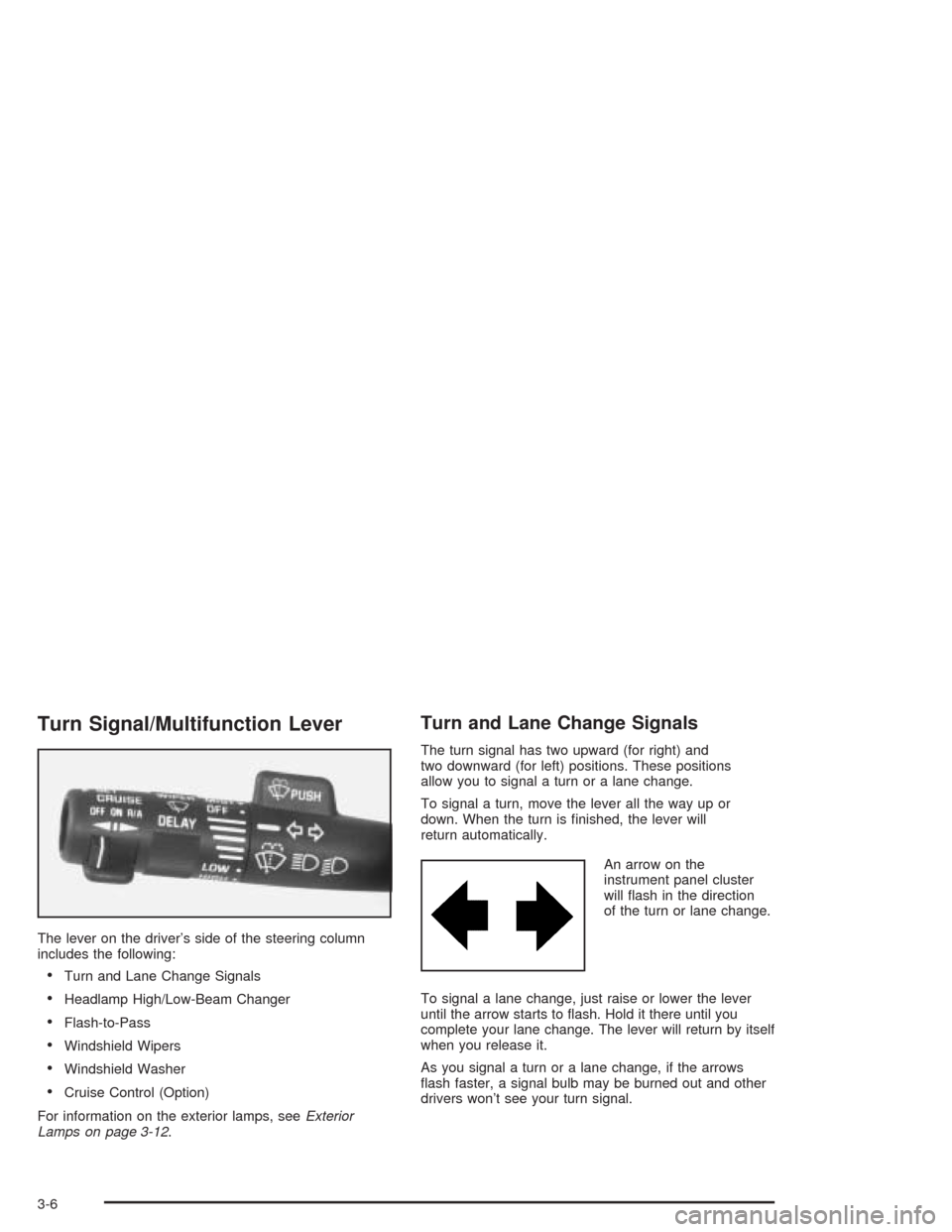
Turn Signal/Multifunction Lever
The lever on the driver’s side of the steering column
includes the following:
Turn and Lane Change Signals
Headlamp High/Low-Beam Changer
Flash-to-Pass
Windshield Wipers
Windshield Washer
Cruise Control (Option)
For information on the exterior lamps, seeExterior
Lamps on page 3-12.
Turn and Lane Change Signals
The turn signal has two upward (for right) and
two downward (for left) positions. These positions
allow you to signal a turn or a lane change.
To signal a turn, move the lever all the way up or
down. When the turn is nished, the lever will
return automatically.
An arrow on the
instrument panel cluster
will ash in the direction
of the turn or lane change.
To signal a lane change, just raise or lower the lever
until the arrow starts to ash. Hold it there until you
complete your lane change. The lever will return by itself
when you release it.
As you signal a turn or a lane change, if the arrows
ash faster, a signal bulb may be burned out and other
drivers won’t see your turn signal.
3-6
Page 129 of 386
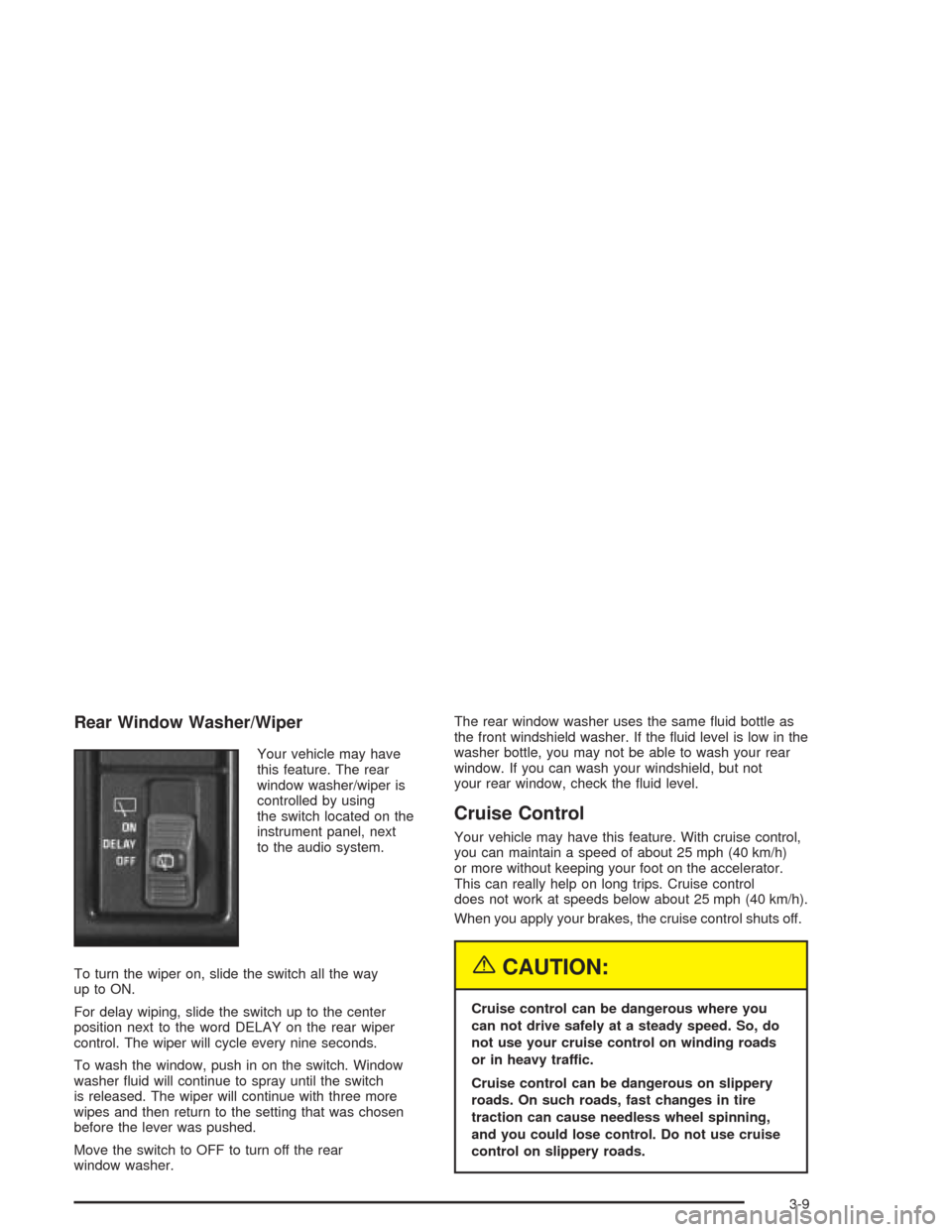
Rear Window Washer/Wiper
Your vehicle may have
this feature. The rear
window washer/wiper is
controlled by using
the switch located on the
instrument panel, next
to the audio system.
To turn the wiper on, slide the switch all the way
up to ON.
For delay wiping, slide the switch up to the center
position next to the word DELAY on the rear wiper
control. The wiper will cycle every nine seconds.
To wash the window, push in on the switch. Window
washer uid will continue to spray until the switch
is released. The wiper will continue with three more
wipes and then return to the setting that was chosen
before the lever was pushed.
Move the switch to OFF to turn off the rear
window washer.The rear window washer uses the same uid bottle as
the front windshield washer. If the uid level is low in the
washer bottle, you may not be able to wash your rear
window. If you can wash your windshield, but not
your rear window, check the uid level.
Cruise Control
Your vehicle may have this feature. With cruise control,
you can maintain a speed of about 25 mph (40 km/h)
or more without keeping your foot on the accelerator.
This can really help on long trips. Cruise control
does not work at speeds below about 25 mph (40 km/h).
When you apply your brakes, the cruise control shuts off.
{CAUTION:
Cruise control can be dangerous where you
can not drive safely at a steady speed. So, do
not use your cruise control on winding roads
or in heavy traffic.
Cruise control can be dangerous on slippery
roads. On such roads, fast changes in tire
traction can cause needless wheel spinning,
and you could lose control. Do not use cruise
control on slippery roads.
3-9
Page 130 of 386
Setting Cruise Control
{CAUTION:
If you leave your cruise control on when you
are not using cruise, you might hit a button
and go into cruise when you do not want to.
You could be startled and even lose control.
Keep the cruise control switch off until you
want to use cruise control.
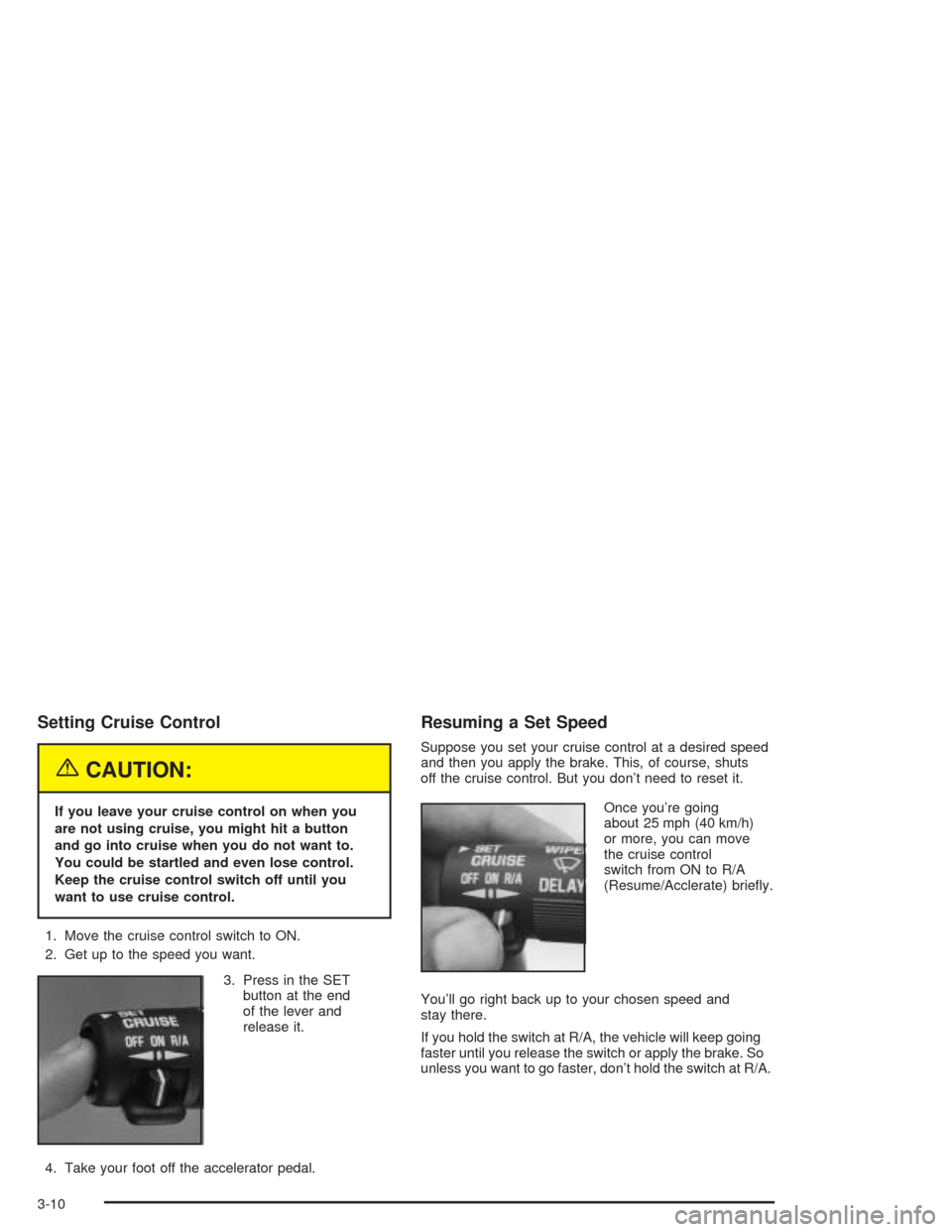
1. Move the cruise control switch to ON.
2. Get up to the speed you want.
3. Press in the SET
button at the end
of the lever and
release it.
4. Take your foot off the accelerator pedal.
Resuming a Set Speed
Suppose you set your cruise control at a desired speed
and then you apply the brake. This, of course, shuts
off the cruise control. But you don’t need to reset it.
Once you’re going
about 25 mph (40 km/h)
or more, you can move
the cruise control
switch from ON to R/A
(Resume/Acclerate) briey.
You’ll go right back up to your chosen speed and
stay there.
If you hold the switch at R/A, the vehicle will keep going
faster until you release the switch or apply the brake. So
unless you want to go faster, don’t hold the switch at R/A.
3-10
Page 131 of 386
Increasing Speed While Using
Cruise Control
There are two ways to go to a higher speed:
Use the accelerator pedal to get to the higher
speed. Press the button at the end of the lever,
then release the button and the accelerator pedal.
You’ll now cruise at the higher speed.
Move the cruise switch from ON to R/A. Hold it
there until you get up to the speed you want,
and then release the switch. To increase your speed
in very small amounts, move the switch to R/A
briey. Each time you do this, your vehicle will go
about 1 mph (1.6 km/h) faster.
Reducing Speed While Using
Cruise Control
There are two ways to reduce your speed while using
cruise control:
Press the button at the end of the lever until you
reach the lower speed you want, then release it.
To slow down in very small amounts, press the
button briey. Each time you do this, you’ll go
about 1 mph (1.6 km/h) slower.
Passing Another Vehicle While
Using Cruise Control
Use the accelerator pedal to increase your speed.
When you take your foot off the pedal, your vehicle will
slow down to the cruise control speed you set earlier.
Using Cruise Control on Hills
How well your cruise control will work on hills depends
upon your speed, load and the steepness of the hills.
When going up steep hills, you may want to step on the
accelerator pedal to maintain your speed. When going
downhill, you may have to brake or shift to a lower gear
to keep your speed down. Of course, applying the brake
takes you out of cruise control. Many drivers nd this to
be too much trouble and don’t use cruise control on
steep hills.
Ending Cruise Control
There are two ways to turn off the cruise control:
Step lightly on the brake pedal.
Move the cruise switch to OFF.
Erasing Speed Memory
When you turn off the cruise control or the ignition,
your cruise control set speed memory is erased.
3-11
Page 316 of 386
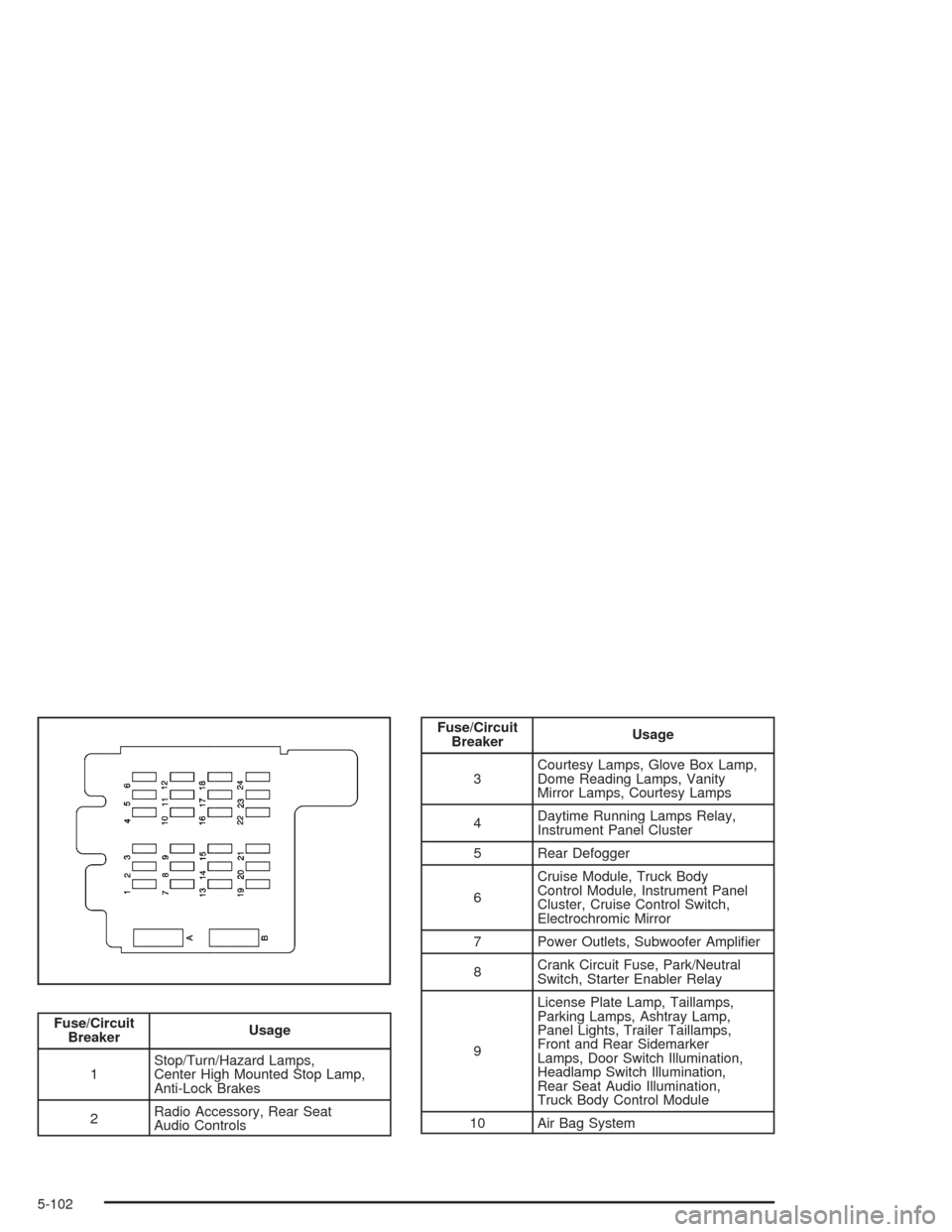
Fuse/Circuit
BreakerUsage
1Stop/Turn/Hazard Lamps,
Center High Mounted Stop Lamp,
Anti-Lock Brakes
2Radio Accessory, Rear Seat
Audio Controls
Fuse/Circuit
BreakerUsage
3Courtesy Lamps, Glove Box Lamp,
Dome Reading Lamps, Vanity
Mirror Lamps, Courtesy Lamps
4Daytime Running Lamps Relay,
Instrument Panel Cluster
5 Rear Defogger
6Cruise Module, Truck Body
Control Module, Instrument Panel
Cluster, Cruise Control Switch,
Electrochromic Mirror
7 Power Outlets, Subwoofer Amplier
8Crank Circuit Fuse, Park/Neutral
Switch, Starter Enabler Relay
9License Plate Lamp, Taillamps,
Parking Lamps, Ashtray Lamp,
Panel Lights, Trailer Taillamps,
Front and Rear Sidemarker
Lamps, Door Switch Illumination,
Headlamp Switch Illumination,
Rear Seat Audio Illumination,
Truck Body Control Module
10 Air Bag System
5-102
Page 317 of 386
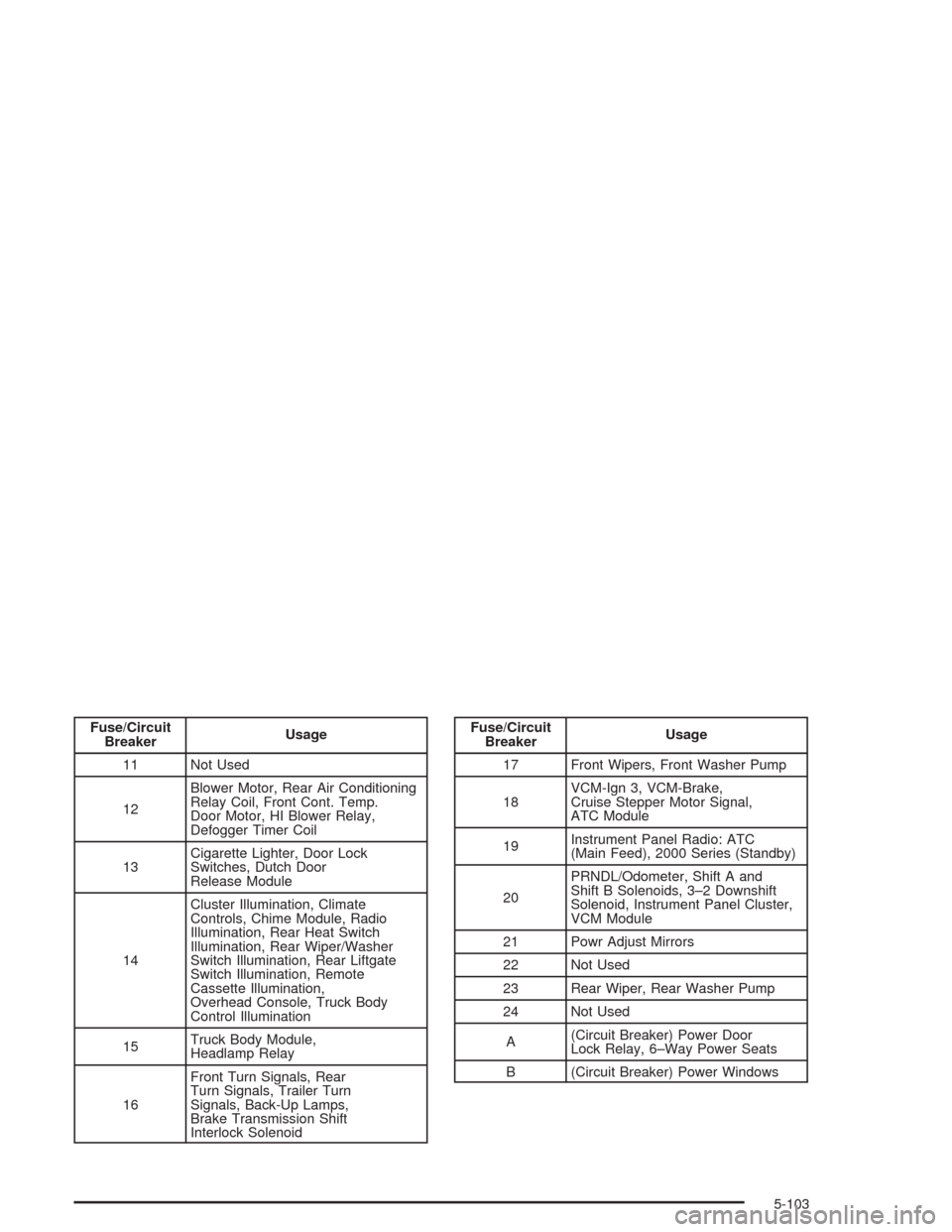
Fuse/Circuit
BreakerUsage
11 Not Used
12Blower Motor, Rear Air Conditioning
Relay Coil, Front Cont. Temp.
Door Motor, HI Blower Relay,
Defogger Timer Coil
13Cigarette Lighter, Door Lock
Switches, Dutch Door
Release Module
14Cluster Illumination, Climate
Controls, Chime Module, Radio
Illumination, Rear Heat Switch
Illumination, Rear Wiper/Washer
Switch Illumination, Rear Liftgate
Switch Illumination, Remote
Cassette Illumination,
Overhead Console, Truck Body
Control Illumination
15Truck Body Module,
Headlamp Relay
16Front Turn Signals, Rear
Turn Signals, Trailer Turn
Signals, Back-Up Lamps,
Brake Transmission Shift
Interlock SolenoidFuse/Circuit
BreakerUsage
17 Front Wipers, Front Washer Pump
18VCM-Ign 3, VCM-Brake,
Cruise Stepper Motor Signal,
ATC Module
19Instrument Panel Radio: ATC
(Main Feed), 2000 Series (Standby)
20PRNDL/Odometer, Shift A and
Shift B Solenoids, 3–2 Downshift
Solenoid, Instrument Panel Cluster,
VCM Module
21 Powr Adjust Mirrors
22 Not Used
23 Rear Wiper, Rear Washer Pump
24 Not Used
A(Circuit Breaker) Power Door
Lock Relay, 6–Way Power Seats
B (Circuit Breaker) Power Windows
5-103
Page 351 of 386
Throttle System Inspection
Inspect the throttle system for interference or binding,
and for damaged or missing parts. Replace parts
as needed. Replace any components that have high
effort or excessive wear. Do not lubricate accelerator
and cruise control cables.
Transfer Case and Front Axle
(All-Wheel Drive) Inspection
Every 12 months, or at engine oil change intervals,
check front axle and transfer case and add lubricant
when necessary. A uid loss could indicate a problem.
Check and have it repaired, if needed. Check vent
hose at transfer case for kinks and proper installation.
Brake System Inspection
Inspect the complete system. Inspect brake lines
and hoses for proper hook-up, binding, leaks, cracks,
chang, etc. Inspect disc brake pads for wear and
rotors for surface condition. Inspect other brake parts,
including calipers, parking brake, etc. Check parking
brake adjustment. You may need to have your brakes
inspected more often if your driving habits or conditions
result in frequent braking.
6-27
Page 374 of 386
Cruise Control.................................................. 3-9
Current and Past Model Order Forms................7-13
Customer Assistance Information
Courtesy Transportation.................................. 7-8
Customer Assistance for Text
Telephone (TTY) Users............................... 7-4
Customer Assistance Offices........................... 7-4
Customer Satisfaction Procedure..................... 7-2
GM Mobility Program for Persons
with Disabilities.......................................... 7-6
Reporting Safety Defects to
General Motors........................................7-12
Reporting Safety Defects to the
Canadian Government..............................7-11
Reporting Safety Defects to the
United States Government.........................7-11
Roadside Assistance Program......................... 7-6
Service Publications Ordering Information........7-12
D
Daytime Running Lamps (DRL).........................3-13
Defensive Driving............................................. 4-2
Defogging and Defrosting.................................3-18
Directing the Airow........................................3-21Disabling the Theft-Deterrent Feature.................3-46
Doing Your Own Service Work........................... 5-3
Dome Lamps.................................................3-15
Door
Locks.......................................................... 2-7
Power Door Locks......................................... 2-8
Programmable Automatic Door Locks............... 2-8
Rear Doors.................................................2-12
Sliding Side Door.......................................... 2-9
Driver
Position, Safety Belt.....................................1-18
Driver Information System................................2-40
Driving
At Night.....................................................4-14
City...........................................................4-18
Defensive..................................................... 4-2
Drunken....................................................... 4-2
Freeway.....................................................4-19
Hill and Mountain Roads..............................4-22
In Rain and on Wet Roads...........................4-15
Winter........................................................4-24
Driving On Grades..........................................4-43
Driving on Snow or Ice....................................4-24
Driving Through Deep Standing Water...............4-17
Driving Through Flowing Water.........................4-17
Driving with a Trailer.......................................4-41
4