climate control CHEVROLET AVALANCHE 2003 1.G User Guide
[x] Cancel search | Manufacturer: CHEVROLET, Model Year: 2003, Model line: AVALANCHE, Model: CHEVROLET AVALANCHE 2003 1.GPages: 492, PDF Size: 3.53 MB
Page 186 of 492
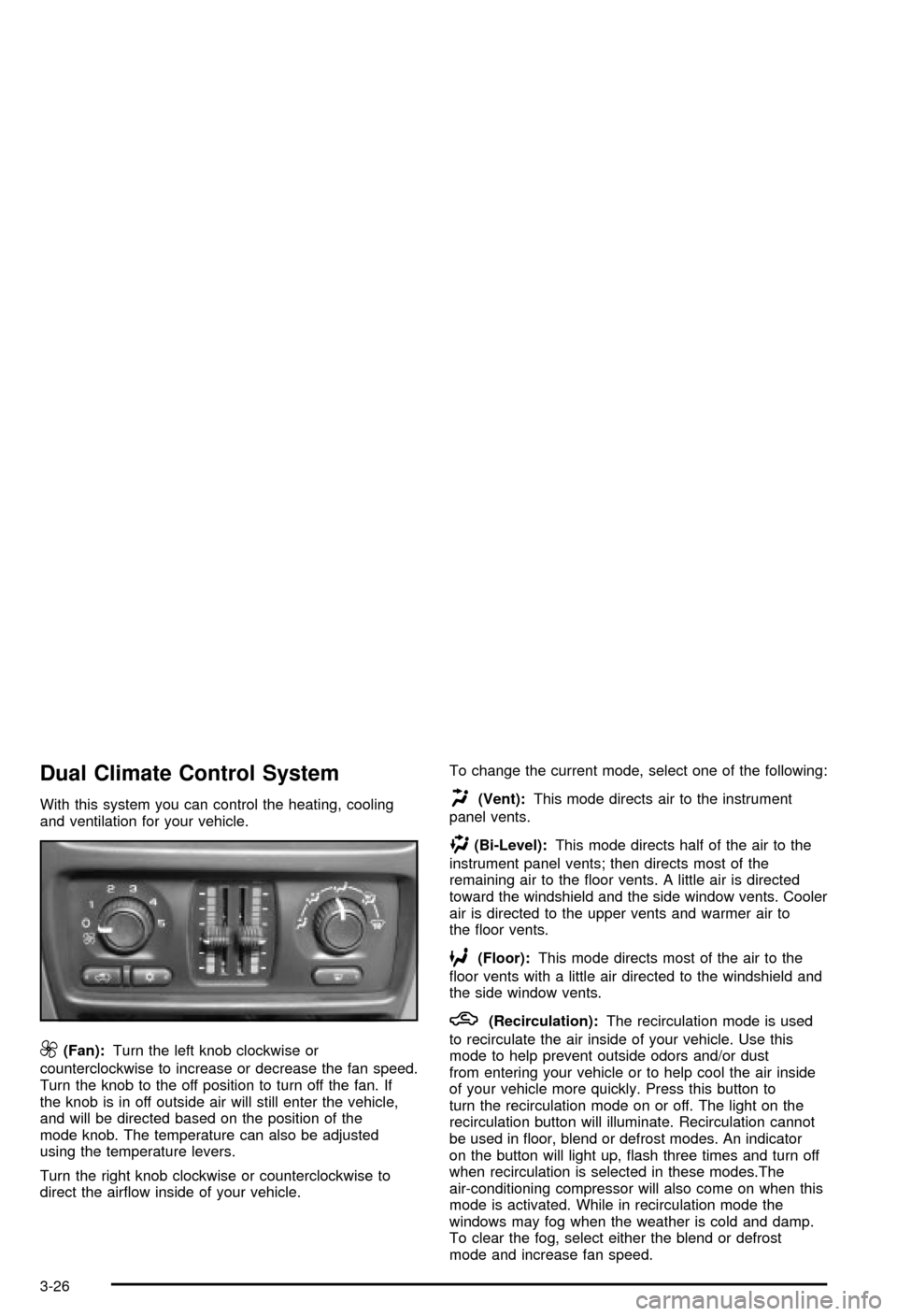
Dual Climate Control System
With this system you can control the heating, cooling
and ventilation for your vehicle.
9(Fan):Turn the left knob clockwise or
counterclockwise to increase or decrease the fan speed.
Turn the knob to the off position to turn off the fan. If
the knob is in off outside air will still enter the vehicle,
and will be directed based on the position of the
mode knob. The temperature can also be adjusted
using the temperature levers.
Turn the right knob clockwise or counterclockwise to
direct the air¯ow inside of your vehicle.To change the current mode, select one of the following:
H(Vent):This mode directs air to the instrument
panel vents.
)(Bi-Level):This mode directs half of the air to the
instrument panel vents; then directs most of the
remaining air to the ¯oor vents. A little air is directed
toward the windshield and the side window vents. Cooler
air is directed to the upper vents and warmer air to
the ¯oor vents.
6(Floor):This mode directs most of the air to the
¯oor vents with a little air directed to the windshield and
the side window vents.
h(Recirculation):The recirculation mode is used
to recirculate the air inside of your vehicle. Use this
mode to help prevent outside odors and/or dust
from entering your vehicle or to help cool the air inside
of your vehicle more quickly. Press this button to
turn the recirculation mode on or off. The light on the
recirculation button will illuminate. Recirculation cannot
be used in ¯oor, blend or defrost modes. An indicator
on the button will light up, ¯ash three times and turn off
when recirculation is selected in these modes.The
air-conditioning compressor will also come on when this
mode is activated. While in recirculation mode the
windows may fog when the weather is cold and damp.
To clear the fog, select either the blend or defrost
mode and increase fan speed.
3-26
Page 187 of 492

Temperature Control
Driver's Side:The lever on the left side of the climate
control panel is used to raise or lower the temperature
on the driver's side of the vehicle. This lever also adjusts
the temperature to the center console outlets (if
equipped).
Passenger's Side:The lever on the right side of the
climate control panel is used to raise or lower the
temperature on the passenger's side of the vehicle.
#(Air Conditioning):Press this button to turn
the air-conditioning system on or off. When the button is
pressed, an indicator light will come on and the
system will begin to cool and dehumidify the air inside
of your vehicle. You may notice a slight change in
engine performance when the air conditioning
compressor shuts off and turns on again. This is
normal.
Defogging and Defrosting
There are two modes to choose from to clear fog or
frost from your windshield. Use the defog mode to clear
the windows of fog or moisture and warm the
passengers. Use the defrost mode to remove fog or
frost from the windshield more quickly.
Turn the right knob clockwise or counterclockwise to
select one of the following modes:
-(Defog):This mode directs the air to the ¯oor
outlets, windshield and the side window vents. The air
conditioning compressor will run automatically to
dehumidify the air to prevent window fogging. The
recirculation mode cannot be selected while in the defog
mode.
1(Defrost):This mode directs most of the air to the
windshield and the side window vents, with only a
little air directed to the ¯oor vents. The air conditioning
compressor will run automatically to dehumidify the
air to prevent window fogging. The recirculation mode
cannot be selected while in defrost mode.
3-27
Page 189 of 492

Operation Tips
·
Keep the hood and front air inlets free of ice, snow,
or any other obstruction (such as leaves). The
heater and defroster will work far better, reducing
the chance of fogging the inside of your windows.
·Keep the air path under the front seats clear
of objects. This helps air to circulate throughout your
vehicle.
·Adding outside equipment to the front of your
vehicle, such as hood-air de¯ectors, etc., may affect
the performance of the heating and air conditioning
system. Check with your dealer before adding
equipment to the outside of your vehicle.
Climate Controls Personalization
If your vehicle is equipped with the electronic climate
control system, you can store and recall the climate
control settings for temperature, air delivery mode and
fan speed for two different drivers. The personal
choice settings recalled are determined by the
transmitter used to enter the vehicle.
After the button with the unlock symbol on a remote
keyless entry transmitter is pressed, the climate control
will adjust to the last settings of the identi®ed driver.
The settings can also be changed by pressing one of the
memory buttons (1 or 2) located on the driver's door.
When adjustments are made, the new settings are
automatically saved for that driver.
3-29
Page 399 of 492

While the tires available on General Motors passenger
cars and light trucks may vary with respect to these
grades, they must also conform to federal safety
requirements and additional General Motors Tire
Performance Criteria (TPC) standards.
Treadwear
The treadwear grade is a comparative rating based on
the wear rate of the tire when tested under controlled
conditions on a speci®ed government test course.
For example, a tire graded 150 would wear one and
a half (1.5) times as well on the government course as
a tire graded 100. The relative performance of tires
depends upon the actual conditions of their use,
however, and may depart signi®cantly from the norm
due to variations in driving habits, service practices and
differences in road characteristics and climate.
Traction ± AA, A, B, C
The traction grades, from highest to lowest, are AA, A,
B, and C. Those grades represent the tire's ability
to stop on wet pavement as measured under controlled
conditions on speci®ed government test surfaces of
asphalt and concrete. A tire marked C may have poor
traction performance. Warning: The traction grade
assigned to this tire is based on straight-ahead braking
traction tests, and does not include acceleration,
cornering, hydroplaning, or peak traction characteristics.
Temperature ± A, B, C
The temperature grades are A (the highest), B, and C,
representing the tire's resistance to the generation
of heat and its ability to dissipate heat when tested
under controlled conditions on a speci®ed indoor
laboratory test wheel. Sustained high temperature can
cause the material of the tire to degenerate and
reduce tire life, and excessive temperature can lead to
sudden tire failure. The grade C corresponds to a
level of performance which all passenger car tires must
meet under the Federal Motor Vehicle Safety Standard
No. 109. Grades B and A represent higher levels of
performance on the laboratory test wheel than the
minimum required by law.
Warning: The temperature grade for this tire is
established for a tire that is properly in¯ated and not
overloaded. Excessive speed, underin¯ation, or
excessive loading, either separately or in combination,
can cause heat buildup and possible tire failure.
5-66
Page 431 of 492

You may have spare fuses located behind the fuse
block access door. These can be used to replace a bad
fuse. However, make sure it is of the correct amperage.
Your vehicle may not have all of the features or
fuses listed in this section.
Fuses Usage
RR Wiper Rear Window Wiper Switch
SEO ACCYSpecial Equipment Option
Accessory
Fuses Usage
WS WPR Windshield Wipers
TBC ACCYTruck Body Controller
Accessory
IGN 3 Ignition, Heated Seats
4WDFour-Wheel Drive System,
Auxiliary Battery
HTR A/C Climate Control System
LOCKPower Door Lock Relay
(Lock Function)
HVAC 1Inside Rearview Mirror,
Climate Control System
L DOORDriver's Door Harness
Connection
CRUISE Cruise Control
UNLOCKPower Door Lock Relay
(Unlock Function)
RR FOG LP Rear Fog Lamp (Export Only)
BRAKE Anti-Lock Brake System
DRIVER UNLOCKPower Door Lock Relay
(Driver's Door Unlock
Function)
5-98
Page 432 of 492
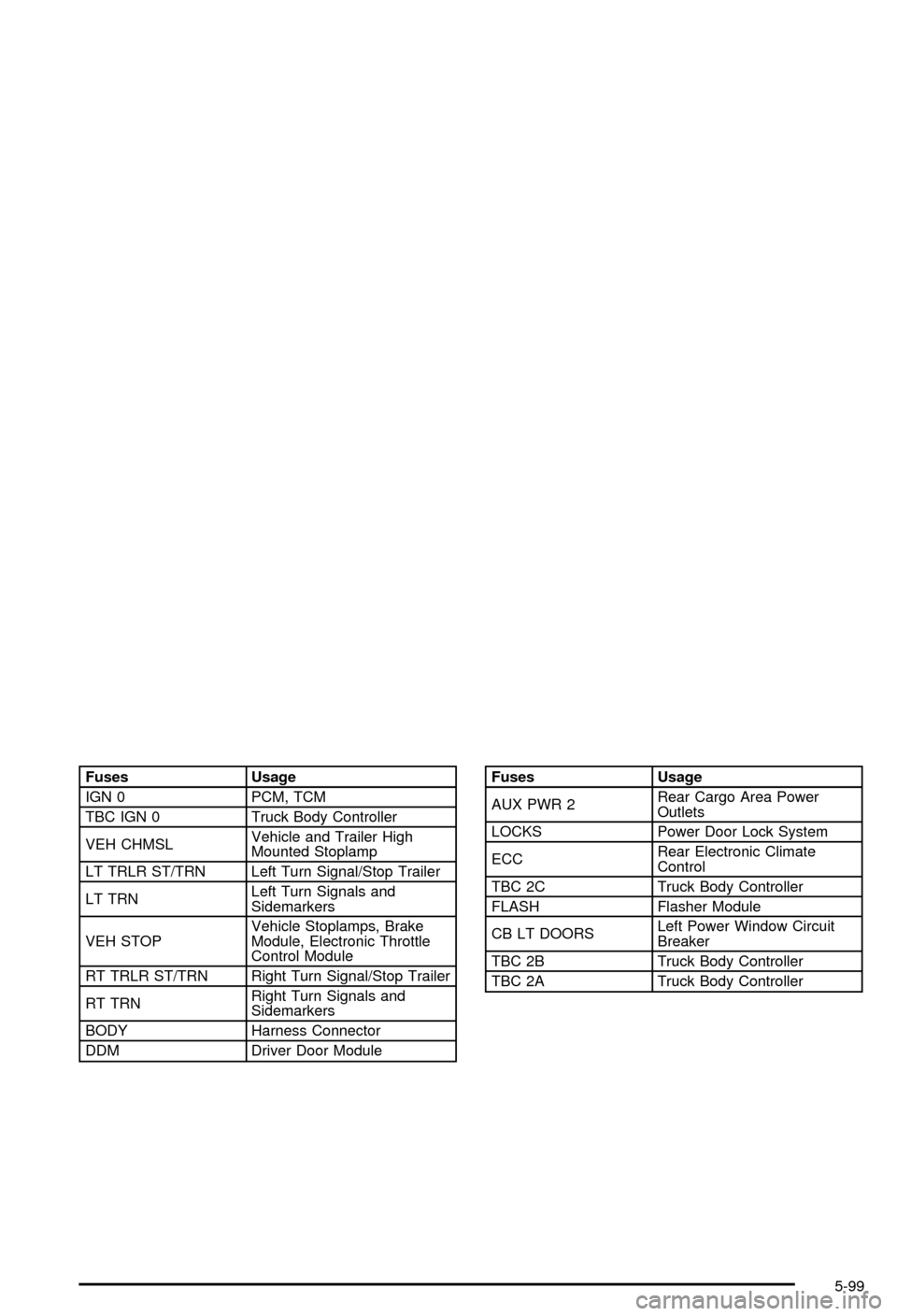
Fuses Usage
IGN 0 PCM, TCM
TBC IGN 0 Truck Body Controller
VEH CHMSLVehicle and Trailer High
Mounted Stoplamp
LT TRLR ST/TRN Left Turn Signal/Stop Trailer
LT TRNLeft Turn Signals and
Sidemarkers
VEH STOPVehicle Stoplamps, Brake
Module, Electronic Throttle
Control Module
RT TRLR ST/TRN Right Turn Signal/Stop Trailer
RT TRNRight Turn Signals and
Sidemarkers
BODY Harness Connector
DDM Driver Door ModuleFuses Usage
AUX PWR 2Rear Cargo Area Power
Outlets
LOCKS Power Door Lock System
ECCRear Electronic Climate
Control
TBC 2C Truck Body Controller
FLASH Flasher Module
CB LT DOORSLeft Power Window Circuit
Breaker
TBC 2B Truck Body Controller
TBC 2A Truck Body Controller
5-99
Page 436 of 492
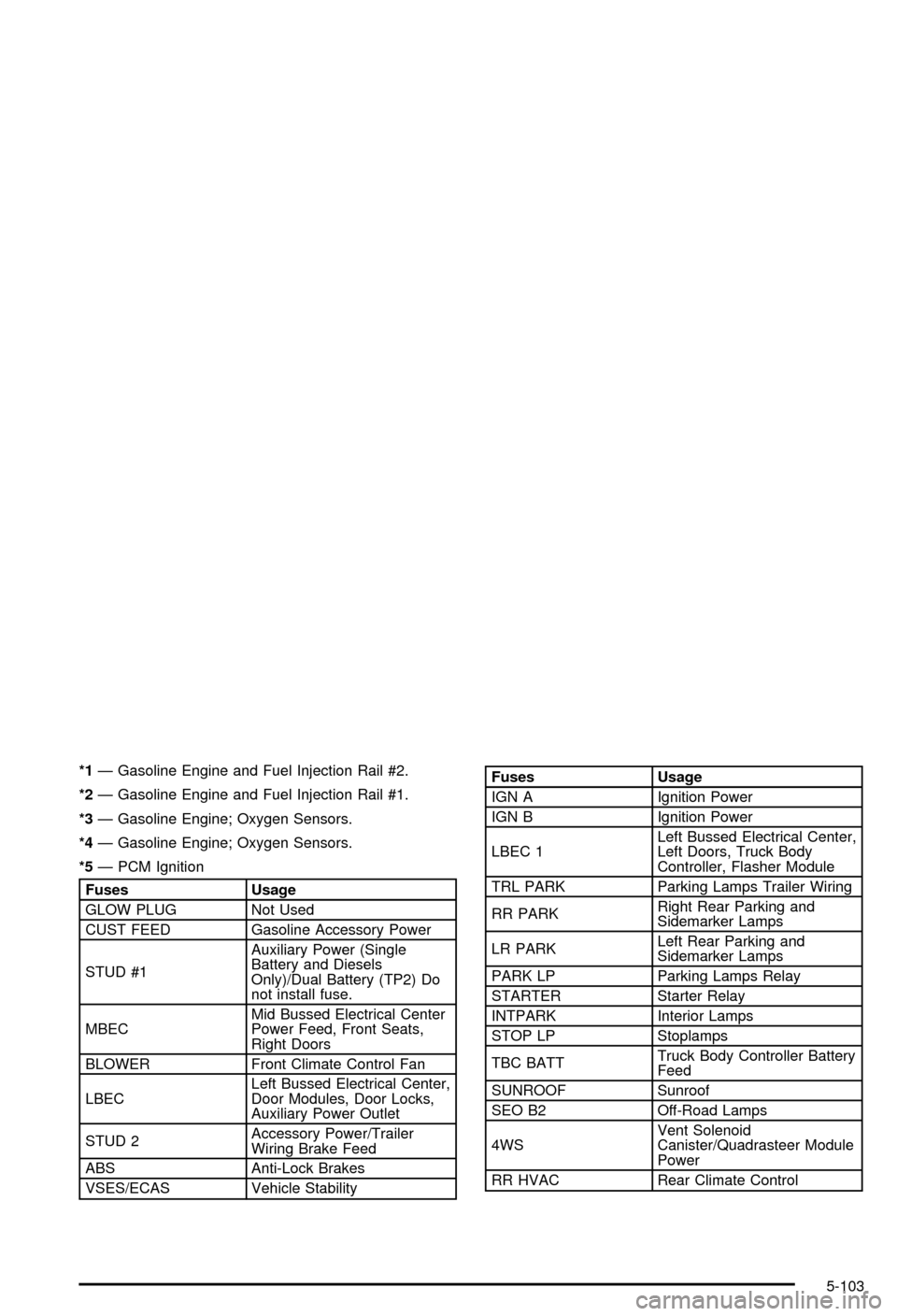
*1Ð Gasoline Engine and Fuel Injection Rail #2.
*2Ð Gasoline Engine and Fuel Injection Rail #1.
*3Ð Gasoline Engine; Oxygen Sensors.
*4Ð Gasoline Engine; Oxygen Sensors.
*5Ð PCM Ignition
Fuses Usage
GLOW PLUG Not Used
CUST FEED Gasoline Accessory Power
STUD #1Auxiliary Power (Single
Battery and Diesels
Only)/Dual Battery (TP2) Do
not install fuse.
MBECMid Bussed Electrical Center
Power Feed, Front Seats,
Right Doors
BLOWER Front Climate Control Fan
LBECLeft Bussed Electrical Center,
Door Modules, Door Locks,
Auxiliary Power Outlet
STUD 2Accessory Power/Trailer
Wiring Brake Feed
ABS Anti-Lock Brakes
VSES/ECAS Vehicle Stability
Fuses Usage
IGN A Ignition Power
IGN B Ignition Power
LBEC 1Left Bussed Electrical Center,
Left Doors, Truck Body
Controller, Flasher Module
TRL PARK Parking Lamps Trailer Wiring
RR PARKRight Rear Parking and
Sidemarker Lamps
LR PARKLeft Rear Parking and
Sidemarker Lamps
PARK LP Parking Lamps Relay
STARTER Starter Relay
INTPARK Interior Lamps
STOP LP Stoplamps
TBC BATTTruck Body Controller Battery
Feed
SUNROOF Sunroof
SEO B2 Off-Road Lamps
4WSVent Solenoid
Canister/Quadrasteer Module
Power
RR HVAC Rear Climate Control
5-103
Page 437 of 492

Fuses Usage
AUX PWRAuxiliary Power Outlet Ð
Console
IGN 1 Ignition Relay
PCM 1 Powertrain Control Module
ETC/ECMElectronic Throttle Control,
Electronic Brake Controller
IGN EInstrument Panel Cluster, Air
Conditioning Relay, Turn
Signal/Hazard Switch, Starter
Relay
RTD Ride Control
TRL B/U Backup Lamps Trailer Wiring
PCM BPowertrain Control Module,
Fuel Pump
F/PMP Fuel Pump (Relay)
B/U LPBack-up Lamps, Automatic
Transmission Shift Lock
Control System
RR DEFOG Rear Window Defogger
HDLP-HI Headlamp High Beam Relay
PRIME Not UsedFuses Usage
SIRSupplemental In¯atable
Restraint System
FRT PARKFront Parking Lamps,
Sidemarker Lamps
DRLDaytime Running Lamps
(Relay)
SEO IGN Rear Defog Relay
TBC IGN1 Truck Body Controller Ignition
HI HDLP-LT High Beam Headlamp-Left
LH HID Not Used
DRL Daytime Running Lamps
IPC/DICInstrument Panel
Cluster/Driver Information
Center
HVAC/ECAS Climate Control Controller
CIG LTR Cigarette Lighter
HI HDLP-RT High Beam Headlamp-Right
HDLP-LOW Headlamp Low Beam Relay
A/C COMP Air Conditioning Compressor
A/C COMPAir Conditioning Compressor
Relay
5-104
Page 476 of 492

A
Accessory Power Outlets.................................3-19
Adding a Snow Plow or Similar Equipment.........4-54
Adding Washer Fluid.......................................5-38
Additional Program Information........................... 7-9
Additives, Fuel................................................. 5-6
Add-On Equipment..........................................4-53
Adjustable Throttle and Brake Pedal..................2-29
Adjusting the Speakers (Balance/Fade)......3-69, 3-80
After Off-Road Driving.....................................4-31
Air Bag Systems.....................................1-52, 1-58
Adding Equipment to Your Air Bag-Equipped
Vehicle...................................................1-66
How Does an Air Bag Restrain?....................1-59
Passenger Sensing System...........................1-62
Servicing Your Air Bag-Equipped Vehicle.........1-66
What Makes an Air Bag In¯ate?....................1-59
What Will You See After an Air Bag In¯ates?......1-60
When Should an Air Bag In¯ate?...................1-57
Where Are the Air Bags?..............................1-55
Air Bag .........................................................3-34
Passenger Status Indicator...........................3-34
Readiness Light..........................................3-33
Air Cleaner/Filter, Engine.................................5-20
Air Conditioning..............................................3-24
Aluminum or Chrome-Plated Wheels..................5-93
AM .............................................................3-102
Antenna, Fixed Mast......................................3-103
Antenna, XMŸ Satellite Radio Antenna System . . . 3-103Anti-Lock Brake, System Warning Light..............3-38
Anti-lock Brake System..................................... 4-7
Appearance Care............................................5-88
Care of Safety Belts....................................5-91
Chemical Paint Spotting...............................5-94
Cleaning the Inside of Your Vehicle................5-88
Cleaning the Outside of Your Vehicle..............5-91
Finish Damage............................................5-93
Sheet Metal Damage...................................5-93
Underbody Maintenance...............................5-94
Vehicle Care/Appearance Materials................5-94
Weatherstrips..............................................5-91
Approaching a Hill..........................................4-24
Ashtrays........................................................3-19
Audio Output..................................................3-97
Audio System(s).............................................3-64
Audio Steering Wheel Controls....................3-101
Care of Your CD and DVD Player................3-103
Care of Your CDs and DVDs.......................3-103
Fixed Mast Antenna...................................3-103
Radio with CD............................................3-65
Radio with Six-Disc CD................................3-76
Rear Seat Audio (RSA)................................3-99
Setting the Time..........................................3-64
Theft-Deterrent Feature...............................3-101
Understanding Radio Reception...................3-102
XMŸ Satellite Radio Antenna System...........3-103
Automatic Climate Control System.....................3-20
Automatic Headlamp System............................3-14
Automatic Transfer Case..................................2-34
1
Page 478 of 492

Care of (cont.)
Your CDs and DVDs..................................3-103
Cargo Area, All-Weather..................................2-72
Cargo Area Floor Drains..................................2-76
Cargo Cover Panels........................................2-61
Cargo Lamps.................................................3-16
Cargo Panel Storage System............................2-64
Cargo Tie Downs............................................2-71
Cassette Tape Player Service...........................6-11
Center Console Storage Area...........................2-59
Center High-Mounted Stoplamp (CHMSL)...........5-58
Center Instrument Panel Fuse Block................5-100
Center Overhead Console................................2-59
Center Passenger Position, Safety Belts.............1-24
Chains, Tires..................................................5-68
CHANGE ENGINE OIL....................................3-57
Charging System Light....................................3-36
Check Engine Light.........................................3-41
CHECK OIL LEVEL.........................................3-57
CHECK WASHER FLUID.................................3-60
Checking Brake Fluid......................................5-40
Checking Coolant............................................5-26
Checking Engine Oil........................................5-15
Checking Things Under the Hood......................5-10
Checking Your Restraint Systems......................1-67
Check...........................................................3-41
Engine Light...............................................3-41
Chemical Paint Spotting...................................5-94
Child Restraints..............................................1-38
Child Restraint Systems...............................1-38Child Restraints (cont.)
Infants and Young Children...........................1-34
Lower Anchorages and Top Tethers for
Children (LATCH System)..........................1-43
Older Children.............................................1-32
Securing a Child Restraint in a Rear Seat
Position..................................................1-45
Securing a Child Restraint in the Center Front
Seat Position...........................................1-48
Securing a Child Restraint in the Right Front
Seat Position...........................................1-48
Top Strap Anchor Location............................1-43
Top Strap...................................................1-42
Where to Put the Restraint...........................1-41
Cigarette Lighter.............................................3-19
Cleaning Exterior Lamps/Lenses.......................5-91
Cleaning Fabric/Carpet....................................5-88
Cleaning Glass Surfaces..................................5-90
Cleaning Interior Plastic Components.................5-90
Cleaning Leather............................................5-90
Cleaning the Mirror.................................2-48, 2-51
Cleaning the Top of the Instrument Panel...........5-90
Cleaning Vinyl................................................5-90
Cleaning........................................................5-88
Inside of Your Vehicle..................................5-88
Outside of Your Vehicle................................5-91
Underbody Maintenance...............................5-94
Video Screen............................................3-103
Weatherstrips..............................................5-91
Climate Control System...................................3-20
3