Rear Window CHEVROLET AVALANCHE 2003 1.G Owners Manual
[x] Cancel search | Manufacturer: CHEVROLET, Model Year: 2003, Model line: AVALANCHE, Model: CHEVROLET AVALANCHE 2003 1.GPages: 492, PDF Size: 3.53 MB
Page 1 of 492

Seats and Restraint Systems........................... 1-1
Front Seats
............................................... 1-2
Rear Seats
............................................... 1-8
Safety Belts
.............................................1-10
Child Restraints
.......................................1-32
Air Bag Systems
......................................1-52
Restraint System Check
............................1-67
Features and Controls..................................... 2-1
Keys
........................................................ 2-3
Doors and Locks
....................................... 2-7
Windows
.................................................2-23
Theft-Deterrent Systems
............................2-25
Starting and Operating Your Vehicle
...........2-27
Mirrors
....................................................2-46
OnStar
žSystem
......................................2-53
HomeLinkžTransmitter
.............................2-55
Storage Areas
.........................................2-59
Sunroof
..................................................2-84
Vehicle Personalization
.............................2-85
Instrument Panel............................................. 3-1
Instrument Panel Overview
.......................... 3-4
Climate Controls
......................................3-20
Warning Lights, Gages and Indicators
.........3-30
Driver Information Center (DIC)
..................3-46
Audio System(s)
.......................................3-64Driving Your Vehicle....................................... 4-1
Your Driving, the Road, and Your Vehicle
..... 4-2
Towing
...................................................4-48
Service and Appearance Care.......................... 5-1
Service
..................................................... 5-3
Fuel
......................................................... 5-5
Checking Things Under the Hood
...............5-10
Rear Axle
...............................................5-49
Four-Wheel Drive
.....................................5-50
Front Axle
...............................................5-51
Bulb Replacement
....................................5-52
Windshield Wiper Blade Replacement
.........5-60
Tires
......................................................5-61
Appearance Care
.....................................5-88
Vehicle Identi®cation
.................................5-96
Electrical System
......................................5-96
Capacities and Speci®cations
...................5-106
Normal Maintenance Replacement Parts
....5-108
Maintenance Schedule..................................... 6-1
Maintenance Schedule
................................ 6-2
Customer Assistance Information.................... 7-1
Customer Assistance Information
.................. 7-2
Reporting Safety Defects
...........................7-10
Index................................................................ 1
2003 Chevrolet Avalanche Owner ManualM
Page 75 of 492

Keys...............................................................2-3
Remote Keyless Entry System.........................2-4
Remote Keyless Entry System Operation...........2-5
Doors and Locks.............................................2-7
Door Locks....................................................2-7
Power Door Locks..........................................2-8
Delayed Locking.............................................2-8
Programmable Automatic Door Locks................2-8
Rear Door Security Locks..............................2-11
Lockout Protection........................................2-12
Midgate.......................................................2-12
Tailgate.......................................................2-21
Windows........................................................2-23
Power Windows............................................2-24
Sun Visors...................................................2-24
Theft-Deterrent Systems..................................2-25
Content Theft-Deterrent.................................2-25
Passlock
ž....................................................2-26
Starting and Operating Your Vehicle................2-27
New Vehicle Break-In....................................2-27
Ignition Positions..........................................2-27
Starting Your Engine.....................................2-28
Adjustable Throttle and Brake Pedal................2-29Engine Coolant Heater..................................2-30
Automatic Transmission Operation...................2-31
Four-Wheel Drive..........................................2-34
Parking Brake..............................................2-39
Shifting Into Park (P).....................................2-40
Shifting Out of Park (P).................................2-42
Parking Over Things That Burn.......................2-43
Engine Exhaust............................................2-44
Running Your Engine While You Are Parked. . . .2-44
Mirrors...........................................................2-46
Manual Rearview Mirror.................................2-46
Automatic Dimming Rearview Mirror with
OnStar
ž, Compass and Temperature
Display....................................................2-46
Automatic Dimming Rearview Mirror with
Compass and Temperature Display..............2-48
Outside Camper-Type Mirrors.........................2-51
Outside Power Mirrors...................................2-51
Outside Convex Mirror...................................2-52
Outside Heated Mirrors..................................2-52
Outside Automatic Dimming Mirror with Curb
View Assist..............................................2-53
Section 2 Features and Controls
2-1
Page 86 of 492

Lockout Protection
This feature protects you from locking your key in the
vehicle when the key is in the ignition and a door
is open.
If the power lock switch is pressed when a door is open
and the key is in the ignition, all of the doors will lock
and then the driver's door will unlock.
Midgate
{CAUTION:
It can be dangerous to drive with the cargo
area covered and the tailgate and the midgate
open because carbon monoxide (CO) gas can
come into your vehicle. You can't see or smell
CO. It can cause unconsciousness and even
death. If you must drive with the cargo covers
on and the tailgate and midgate open or if
CAUTION: (Continued)
CAUTION: (Continued)
electrical wiring or other cable connections
must pass through the seal between the body
and the midgate:
·Make sure all windows are shut.
·Turn the fan on your heating or cooling
system to its highest speed with the
setting on OUTSIDE AIR. That will force
outside air into your vehicle. See ªClimate
Control Systemº in the Index.
·If you have air outlets on or under the
instrument panel, open them all the way.
See ªEngine Exhaustº in the Index.
Midgate Operation
Your vehicle is equipped with a midgate and a
removable rear glass panel. The midgate allows you to
extend the length of your vehicle's cargo area.
2-12
Page 87 of 492
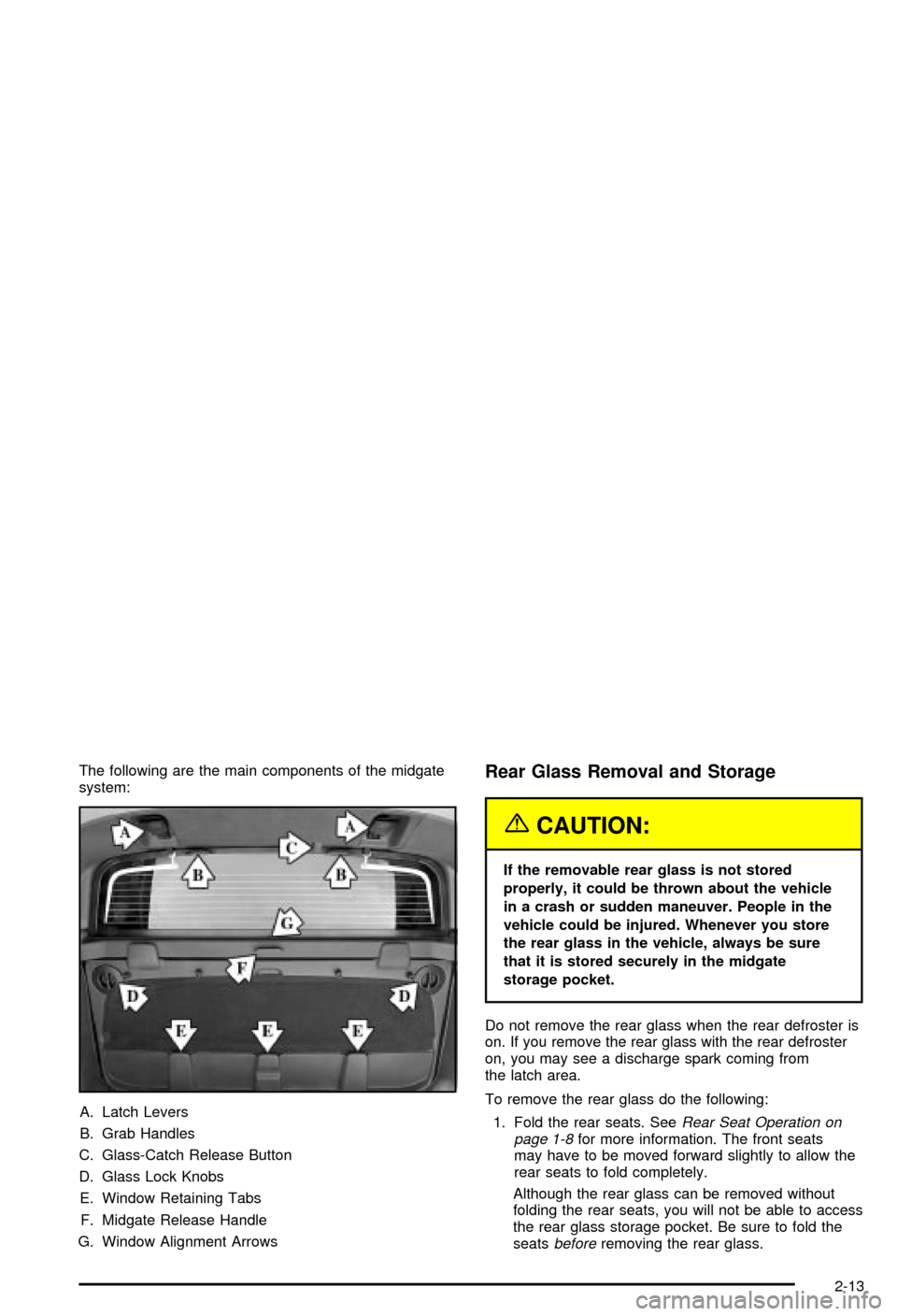
The following are the main components of the midgate
system:
A. Latch Levers
B. Grab Handles
C. Glass-Catch Release Button
D. Glass Lock Knobs
E. Window Retaining Tabs
F. Midgate Release Handle
G. Window Alignment ArrowsRear Glass Removal and Storage
{CAUTION:
If the removable rear glass is not stored
properly, it could be thrown about the vehicle
in a crash or sudden maneuver. People in the
vehicle could be injured. Whenever you store
the rear glass in the vehicle, always be sure
that it is stored securely in the midgate
storage pocket.
Do not remove the rear glass when the rear defroster is
on. If you remove the rear glass with the rear defroster
on, you may see a discharge spark coming from
the latch area.
To remove the rear glass do the following:
1. Fold the rear seats. See
Rear Seat Operation on
page 1-8for more information. The front seats
may have to be moved forward slightly to allow the
rear seats to fold completely.
Although the rear glass can be removed without
folding the rear seats, you will not be able to access
the rear glass storage pocket. Be sure to fold the
seats
beforeremoving the rear glass.
2-13
Page 89 of 492
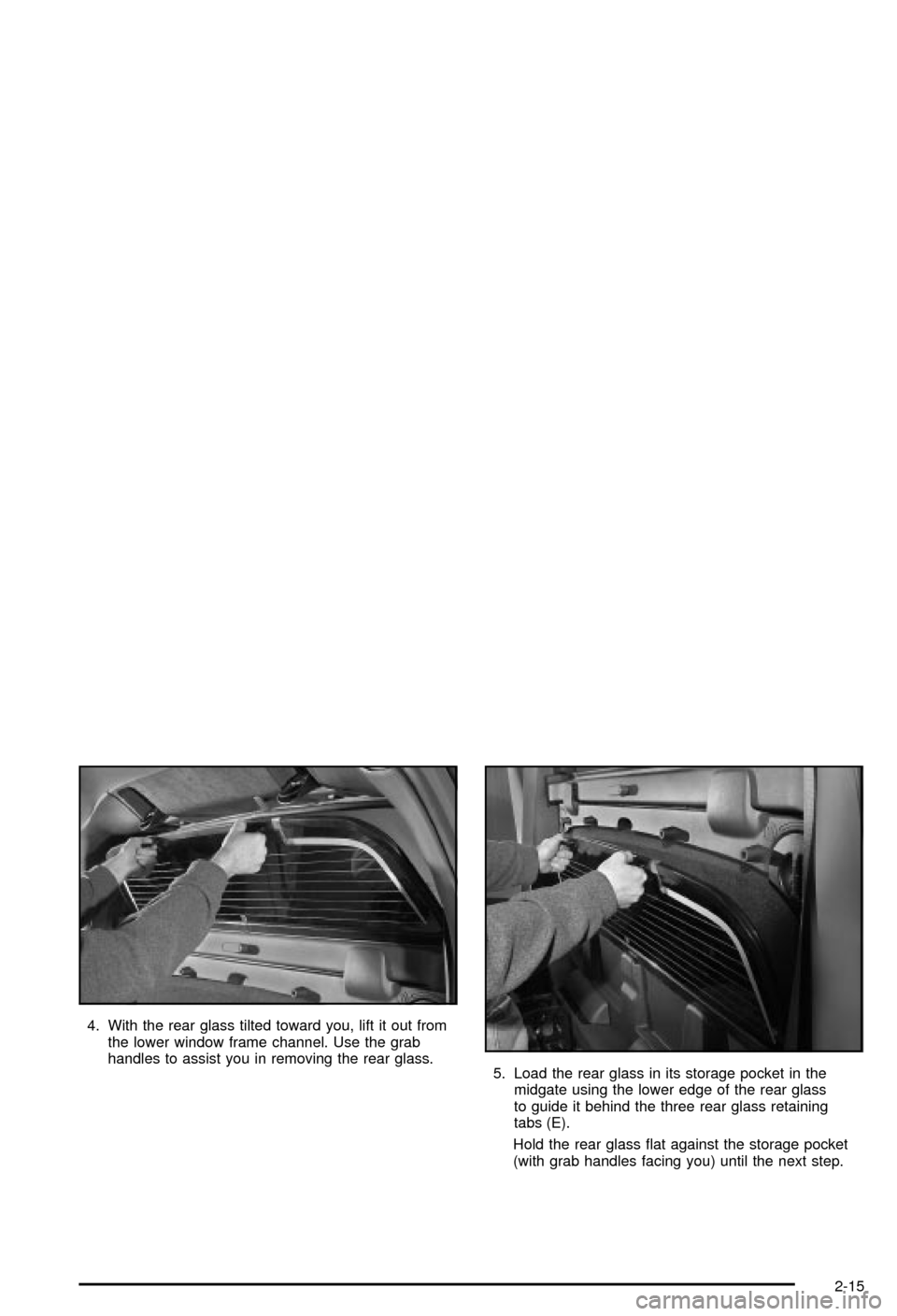
4. With the rear glass tilted toward you, lift it out from
the lower window frame channel. Use the grab
handles to assist you in removing the rear glass.
5. Load the rear glass in its storage pocket in the
midgate using the lower edge of the rear glass
to guide it behind the three rear glass retaining
tabs (E).
Hold the rear glass ¯at against the storage pocket
(with grab handles facing you) until the next step.
2-15
Page 91 of 492
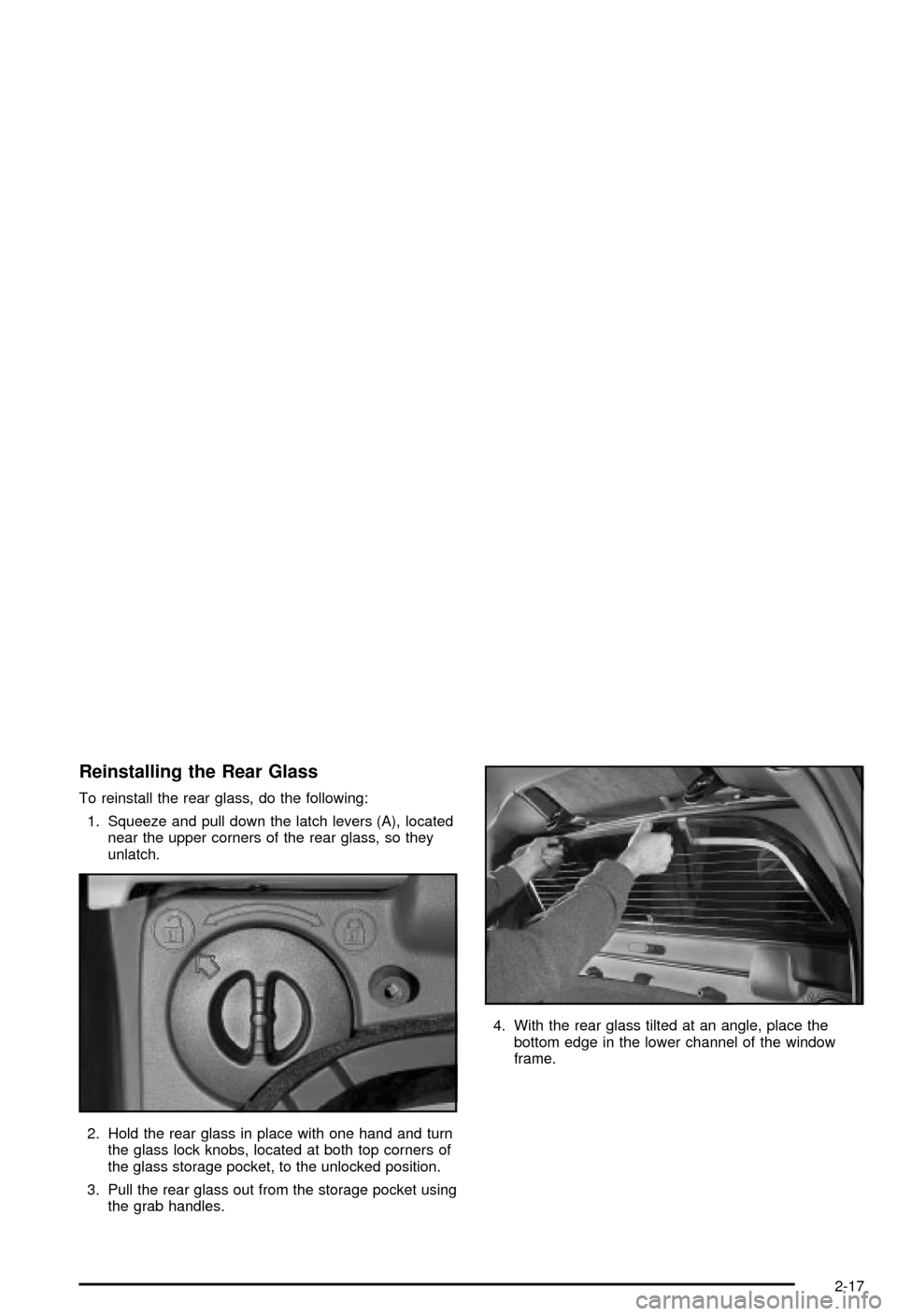
Reinstalling the Rear Glass
To reinstall the rear glass, do the following:
1. Squeeze and pull down the latch levers (A), located
near the upper corners of the rear glass, so they
unlatch.
2. Hold the rear glass in place with one hand and turn
the glass lock knobs, located at both top corners of
the glass storage pocket, to the unlocked position.
3. Pull the rear glass out from the storage pocket using
the grab handles.4. With the rear glass tilted at an angle, place the
bottom edge in the lower channel of the window
frame.
2-17
Page 92 of 492
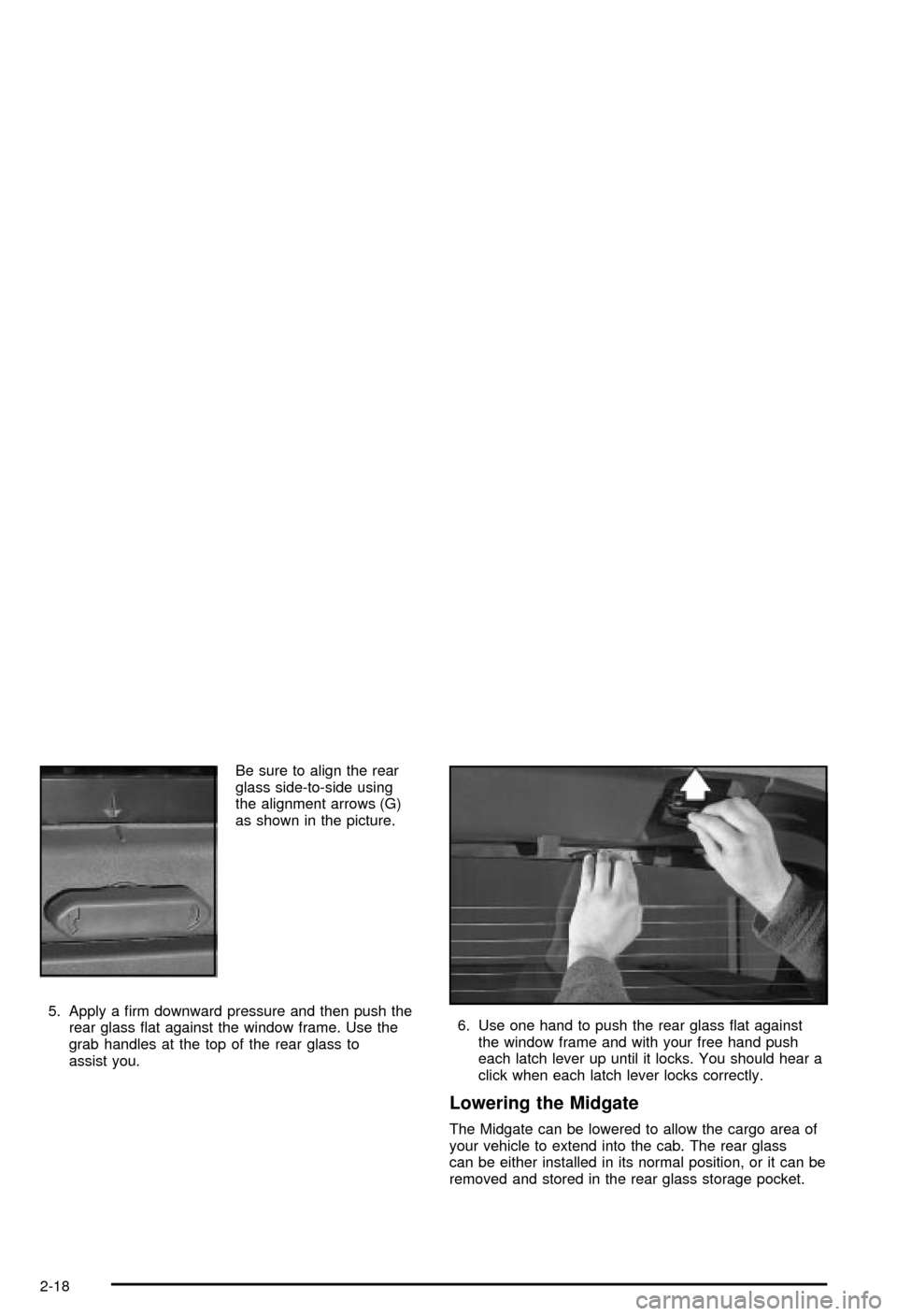
Be sure to align the rear
glass side-to-side using
the alignment arrows (G)
as shown in the picture.
5. Apply a ®rm downward pressure and then push the
rear glass ¯at against the window frame. Use the
grab handles at the top of the rear glass to
assist you.6. Use one hand to push the rear glass ¯at against
the window frame and with your free hand push
each latch lever up until it locks. You should hear a
click when each latch lever locks correctly.
Lowering the Midgate
The Midgate can be lowered to allow the cargo area of
your vehicle to extend into the cab. The rear glass
can be either installed in its normal position, or it can be
removed and stored in the rear glass storage pocket.
2-18
Page 122 of 492

Compass Calibration
The compass may need calibration if one of the
following occurs:
·After approximately ®ve seconds, the display does
not show a compass heading (N for North, for
example), there may be a strong magnetic ®eld
interfering with the compass. Such interference may
be caused by a magnetic antenna mount, magnetic
note pad holder or a similar magnetic item.
·The compass does not display the correct heading
and the compass zone variance is set correctly.
In order to calibrate, CAL must be displayed in the
mirror compass windows. If CAL is not displayed, push
the on/off button for approximately 12 seconds or
until CAL is displayed.
The compass can be calibrated by driving the vehicle in
circles at 5 mph (8 km/h) or less until the display
reads a direction.
Passenger Air Bag Indicator
Your vehicle may be equipped with a passenger air bag
indicator, on the mirror glass, just above the buttons.
If your vehicle has this feature, the mirror will display the
word ON, or an air bag symbol in Canada, when the
passenger air bag is enabled. For more information, see
Passenger Sensing System on page 1-62.
Cleaning the Mirror
When cleaning the mirror, use a paper towel or similar
material dampened with glass cleaner. Do not spray
glass cleaner directly on the mirror as that may cause
the liquid cleaner to enter the mirror housing.
Automatic Dimming Rearview Mirror
with Compass and Temperature
Display
If your vehicle is equipped with an electrochromic mirror
it will automatically dim to the proper level to minimize
glare from lights behind you after dark.
The mirror also includes a display in the upper right
corner of the mirror face. The compass reading and the
outside temperature will both appear in the display at the
same time. The dual display can be turned on or off by
brie¯y pressing either the TEMP or the COMP button.
2-48
Page 126 of 492
If the mirrors are accidently manually folded in or you
notice that the mirrors will not stay in the unfolded
position, unfold and fold them at least twice using the
mirror controls. Do not unfold them manually. The
mirrors may not stay in place otherwise.
The mirrors may also include a memory function which
works in conjunction with the memory seats. See
Memory Seat on page 2-85for more information.
Outside Convex Mirror
Your passenger's side mirror is convex. A convex
mirror's surface is curved so you can see more from the
driver's seat.
{CAUTION:
A convex mirror can make things (like other
vehicles) look farther away than they really are.
If you cut too sharply into the right lane, you
could hit a vehicle on your right. Check your
inside mirror or glance over your shoulder
before changing lanes.
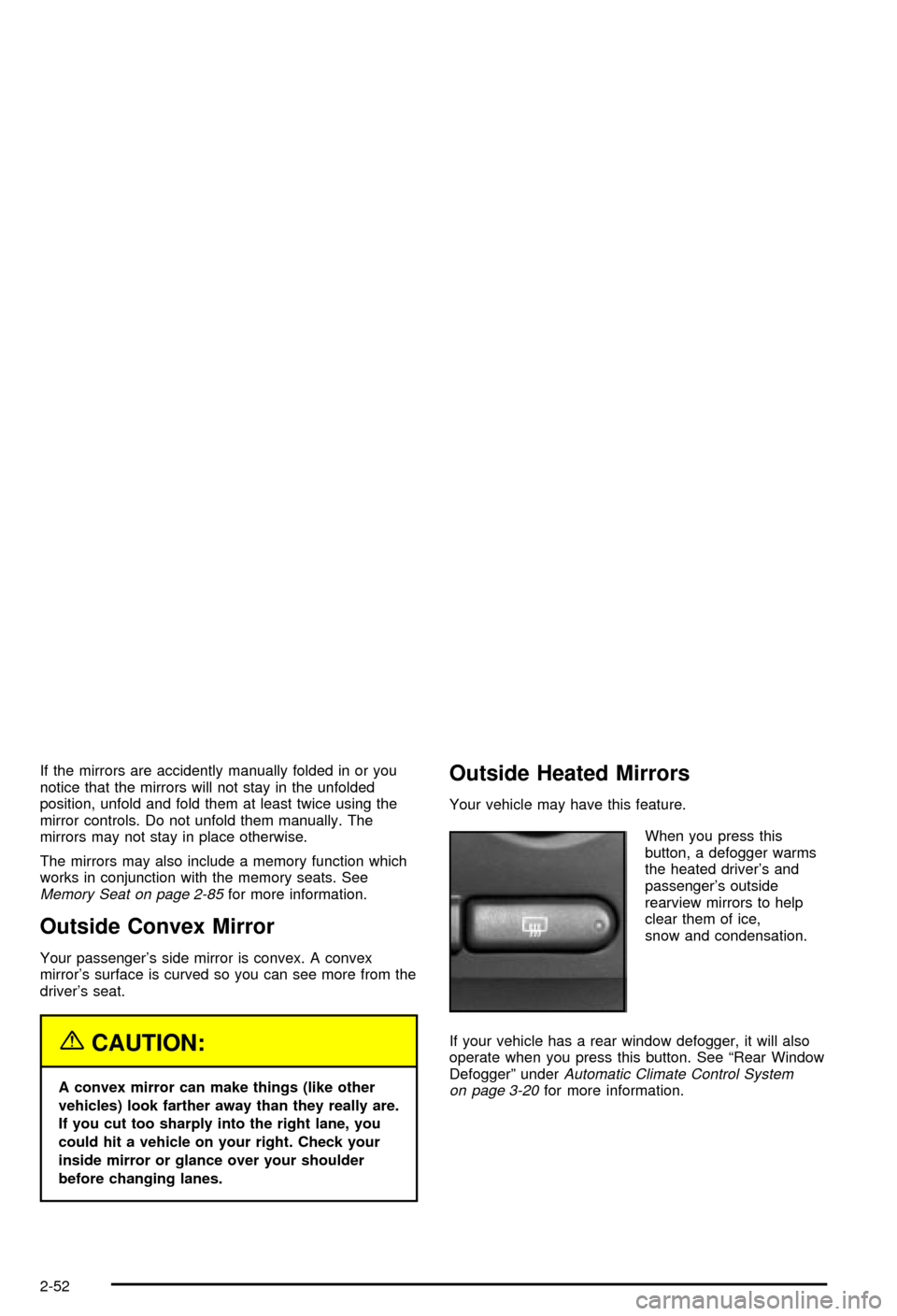
Outside Heated Mirrors
Your vehicle may have this feature.
When you press this
button, a defogger warms
the heated driver's and
passenger's outside
rearview mirrors to help
clear them of ice,
snow and condensation.
If your vehicle has a rear window defogger, it will also
operate when you press this button. See ªRear Window
Defoggerº under
Automatic Climate Control System
on page 3-20for more information.
2-52
Page 185 of 492

^(Air Conditioning Off):On some vehicles, when
you turn the air conditioning off, this symbol will appear
on the display. If your vehicle does not have this
symbol, the snow¯ake symbol will turn off to let you
know the air conditioning is off.
Heating
On cold days when using manual operation of the
automatic system, choose ¯oor mode to deliver air to
the ¯oor outlets. To warm or cool the air delivered, turn
the temperature knob to the desired setting.
If you want to use the automatic mode, press AUTO
and adjust the temperature by turning the temperature
knob.
The heater works best if you keep the windows closed
while using it.
Defogging and Defrosting
You can use either defog or front defrost to clear fog or
frost from your windshield. Use the defog mode to
clear the windows of fog or moisture. Use the front
defrost button to defrost the front windshield.
-(Defog):Use this setting to clear the windows of fog
or moisture. Press the mode button to select this
setting. This setting will deliver air to the ¯oor and
windshield outlets.
0(Front Defrost):Press the front defrost button to
defrost the windshield. The system will automatically
control the fan speed if you select defrost from AUTO
mode. If the outside temperature is 40ÉF (4ÉC) or warmer,
your air conditioning compressor will automatically run to
help dehumidify the air and dry the windshield.
Rear Window Defogger
If your vehicle has this feature, the lines you see on the
rear window warm the glass. The rear window
defogger uses a warming grid to remove fog from the
rear window.
<(Rear):Press this button to turn the rear window
defogger on or off. An indicator light in the button
will come on to let you know that the rear window
defogger is activated.
The rear window defogger will turn off about 10 minutes
after the button is pressed. If you need additional
warming time, press the button again.
If your vehicle is equipped with heated mirrors this
button will activate them.
Notice:Don't use a razor blade or something else
sharp on the inside of the rear window. If you
do, you could cut or damage the defogger and the
repairs would not be covered by your warranty.
Do not attach a temporary vehicle license, tape, a
decal or anything similar to the defogger grid.
3-25