CD player CHEVROLET AVALANCHE 2006 1.G Owner's Manual
[x] Cancel search | Manufacturer: CHEVROLET, Model Year: 2006, Model line: AVALANCHE, Model: CHEVROLET AVALANCHE 2006 1.GPages: 532, PDF Size: 3.3 MB
Page 276 of 532
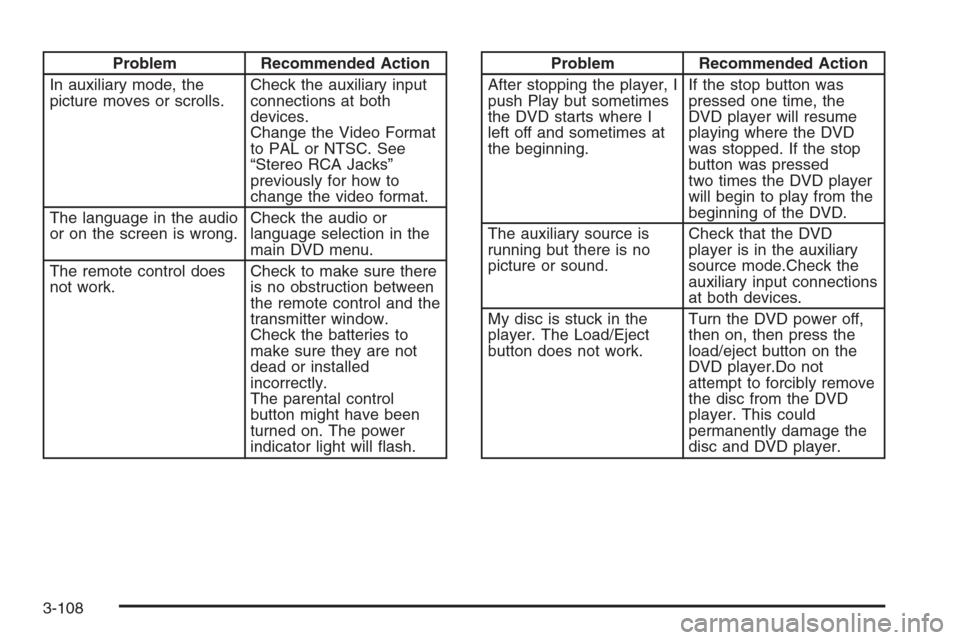
Problem Recommended Action
In auxiliary mode, the
picture moves or scrolls.Check the auxiliary input
connections at both
devices.
Change the Video Format
to PAL or NTSC. See
“Stereo RCA Jacks”
previously for how to
change the video format.
The language in the audio
or on the screen is wrong.Check the audio or
language selection in the
main DVD menu.
The remote control does
not work.Check to make sure there
is no obstruction between
the remote control and the
transmitter window.
Check the batteries to
make sure they are not
dead or installed
incorrectly.
The parental control
button might have been
turned on. The power
indicator light will ash.Problem Recommended Action
After stopping the player, I
push Play but sometimes
the DVD starts where I
left off and sometimes at
the beginning.If the stop button was
pressed one time, the
DVD player will resume
playing where the DVD
was stopped. If the stop
button was pressed
two times the DVD player
will begin to play from the
beginning of the DVD.
The auxiliary source is
running but there is no
picture or sound.Check that the DVD
player is in the auxiliary
source mode.Check the
auxiliary input connections
at both devices.
My disc is stuck in the
player. The Load/Eject
button does not work.Turn the DVD power off,
then on, then press the
load/eject button on the
DVD player.Do not
attempt to forcibly remove
the disc from the DVD
player. This could
permanently damage the
disc and DVD player.
3-108
Page 277 of 532
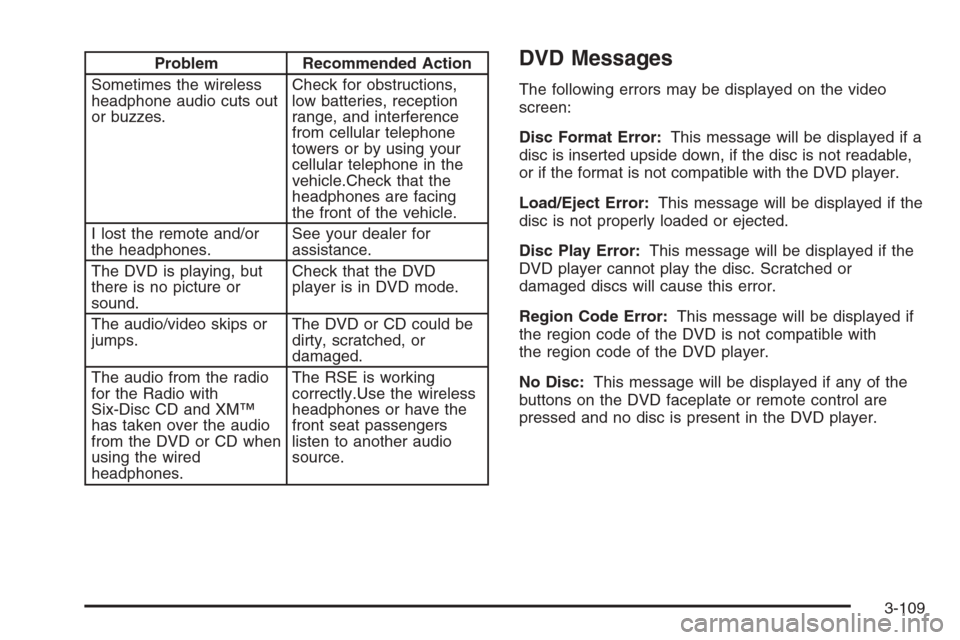
Problem Recommended Action
Sometimes the wireless
headphone audio cuts out
or buzzes.Check for obstructions,
low batteries, reception
range, and interference
from cellular telephone
towers or by using your
cellular telephone in the
vehicle.Check that the
headphones are facing
the front of the vehicle.
I lost the remote and/or
the headphones.See your dealer for
assistance.
The DVD is playing, but
there is no picture or
sound.Check that the DVD
player is in DVD mode.
The audio/video skips or
jumps.The DVD or CD could be
dirty, scratched, or
damaged.
The audio from the radio
for the Radio with
Six-Disc CD and XM™
has taken over the audio
from the DVD or CD when
using the wired
headphones.The RSE is working
correctly.Use the wireless
headphones or have the
front seat passengers
listen to another audio
source.DVD Messages
The following errors may be displayed on the video
screen:
Disc Format Error:This message will be displayed if a
disc is inserted upside down, if the disc is not readable,
or if the format is not compatible with the DVD player.
Load/Eject Error:This message will be displayed if the
disc is not properly loaded or ejected.
Disc Play Error:This message will be displayed if the
DVD player cannot play the disc. Scratched or
damaged discs will cause this error.
Region Code Error:This message will be displayed if
the region code of the DVD is not compatible with
the region code of the DVD player.
No Disc:This message will be displayed if any of the
buttons on the DVD faceplate or remote control are
pressed and no disc is present in the DVD player.
3-109
Page 278 of 532
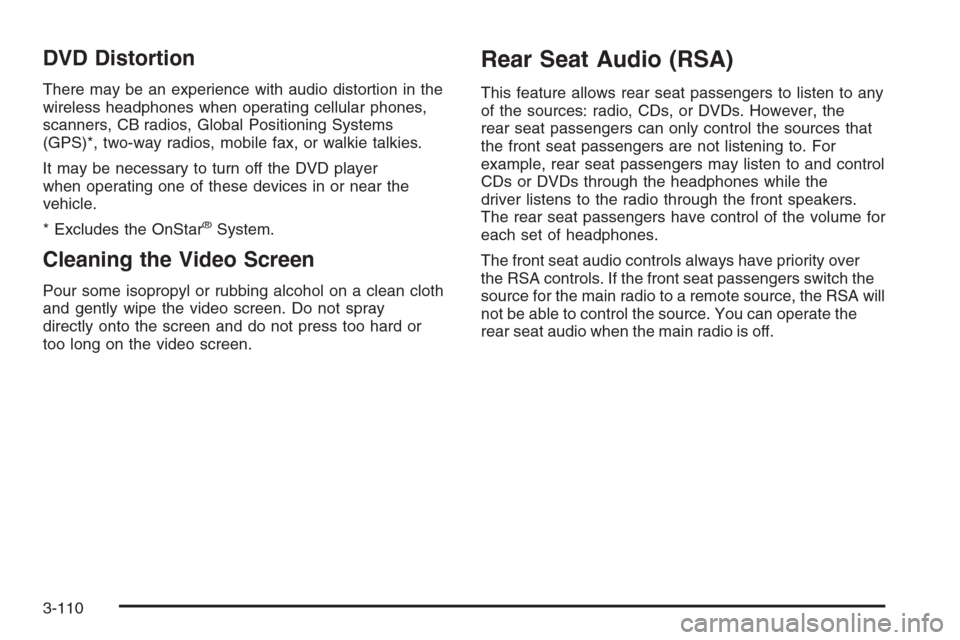
DVD Distortion
There may be an experience with audio distortion in the
wireless headphones when operating cellular phones,
scanners, CB radios, Global Positioning Systems
(GPS)*, two-way radios, mobile fax, or walkie talkies.
It may be necessary to turn off the DVD player
when operating one of these devices in or near the
vehicle.
* Excludes the OnStar
®System.
Cleaning the Video Screen
Pour some isopropyl or rubbing alcohol on a clean cloth
and gently wipe the video screen. Do not spray
directly onto the screen and do not press too hard or
too long on the video screen.
Rear Seat Audio (RSA)
This feature allows rear seat passengers to listen to any
of the sources: radio, CDs, or DVDs. However, the
rear seat passengers can only control the sources that
the front seat passengers are not listening to. For
example, rear seat passengers may listen to and control
CDs or DVDs through the headphones while the
driver listens to the radio through the front speakers.
The rear seat passengers have control of the volume for
each set of headphones.
The front seat audio controls always have priority over
the RSA controls. If the front seat passengers switch the
source for the main radio to a remote source, the RSA will
not be able to control the source. You can operate the
rear seat audio when the main radio is off.
3-110
Page 282 of 532
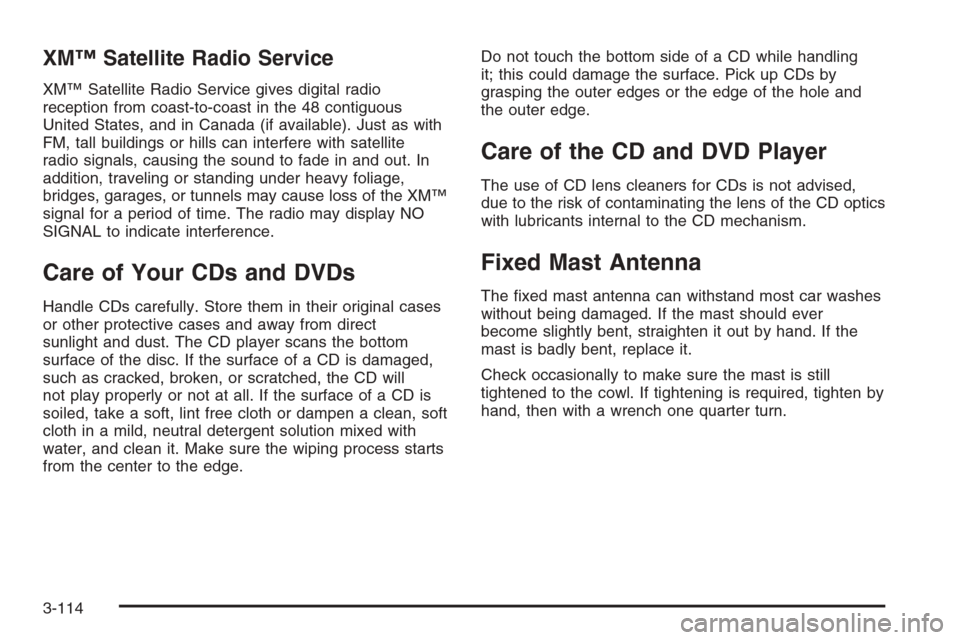
XM™ Satellite Radio Service
XM™ Satellite Radio Service gives digital radio
reception from coast-to-coast in the 48 contiguous
United States, and in Canada (if available). Just as with
FM, tall buildings or hills can interfere with satellite
radio signals, causing the sound to fade in and out. In
addition, traveling or standing under heavy foliage,
bridges, garages, or tunnels may cause loss of the XM™
signal for a period of time. The radio may display NO
SIGNAL to indicate interference.
Care of Your CDs and DVDs
Handle CDs carefully. Store them in their original cases
or other protective cases and away from direct
sunlight and dust. The CD player scans the bottom
surface of the disc. If the surface of a CD is damaged,
such as cracked, broken, or scratched, the CD will
not play properly or not at all. If the surface of a CD is
soiled, take a soft, lint free cloth or dampen a clean, soft
cloth in a mild, neutral detergent solution mixed with
water, and clean it. Make sure the wiping process starts
from the center to the edge.Do not touch the bottom side of a CD while handling
it; this could damage the surface. Pick up CDs by
grasping the outer edges or the edge of the hole and
the outer edge.
Care of the CD and DVD Player
The use of CD lens cleaners for CDs is not advised,
due to the risk of contaminating the lens of the CD optics
with lubricants internal to the CD mechanism.
Fixed Mast Antenna
The xed mast antenna can withstand most car washes
without being damaged. If the mast should ever
become slightly bent, straighten it out by hand. If the
mast is badly bent, replace it.
Check occasionally to make sure the mast is still
tightened to the cowl. If tightening is required, tighten by
hand, then with a wrench one quarter turn.
3-114
Page 519 of 532
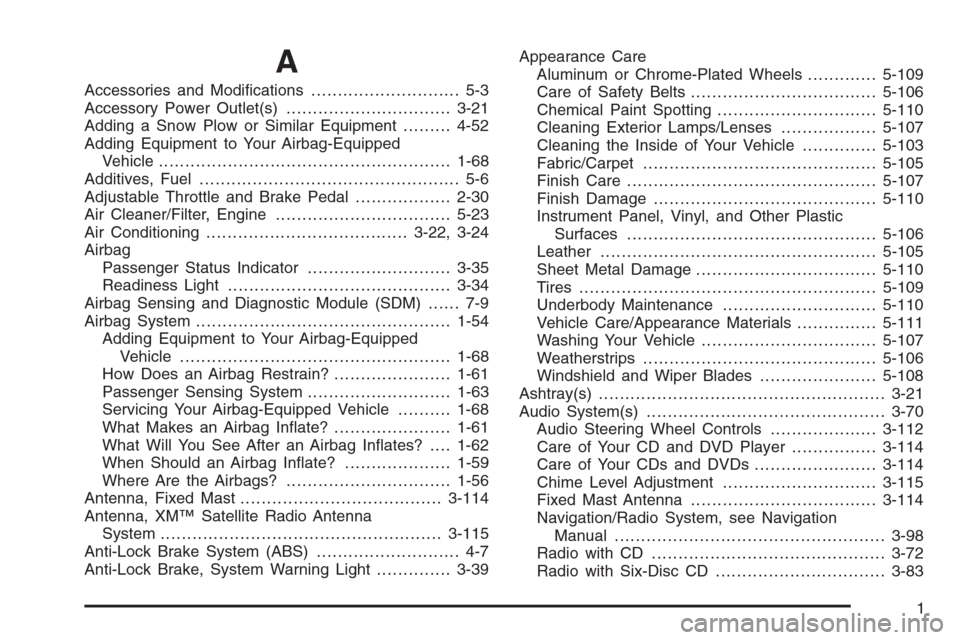
A
Accessories and Modications............................ 5-3
Accessory Power Outlet(s)...............................3-21
Adding a Snow Plow or Similar Equipment.........4-52
Adding Equipment to Your Airbag-Equipped
Vehicle.......................................................1-68
Additives, Fuel................................................. 5-6
Adjustable Throttle and Brake Pedal..................2-30
Air Cleaner/Filter, Engine.................................5-23
Air Conditioning......................................3-22, 3-24
Airbag
Passenger Status Indicator...........................3-35
Readiness Light..........................................3-34
Airbag Sensing and Diagnostic Module (SDM)...... 7-9
Airbag System................................................1-54
Adding Equipment to Your Airbag-Equipped
Vehicle...................................................1-68
How Does an Airbag Restrain?......................1-61
Passenger Sensing System...........................1-63
Servicing Your Airbag-Equipped Vehicle..........1-68
What Makes an Airbag Inate?......................1-61
What Will You See After an Airbag Inates?....1-62
When Should an Airbag Inate?....................1-59
Where Are the Airbags?...............................1-56
Antenna, Fixed Mast......................................3-114
Antenna, XM™ Satellite Radio Antenna
System.....................................................3-115
Anti-Lock Brake System (ABS)........................... 4-7
Anti-Lock Brake, System Warning Light..............3-39Appearance Care
Aluminum or Chrome-Plated Wheels.............5-109
Care of Safety Belts...................................5-106
Chemical Paint Spotting..............................5-110
Cleaning Exterior Lamps/Lenses..................5-107
Cleaning the Inside of Your Vehicle..............5-103
Fabric/Carpet............................................5-105
Finish Care...............................................5-107
Finish Damage..........................................5-110
Instrument Panel, Vinyl, and Other Plastic
Surfaces...............................................5-106
Leather....................................................5-105
Sheet Metal Damage..................................5-110
Tires........................................................5-109
Underbody Maintenance.............................5-110
Vehicle Care/Appearance Materials...............5-111
Washing Your Vehicle.................................5-107
Weatherstrips............................................5-106
Windshield and Wiper Blades......................5-108
Ashtray(s)......................................................3-21
Audio System(s).............................................3-70
Audio Steering Wheel Controls....................3-112
Care of Your CD and DVD Player................3-114
Care of Your CDs and DVDs .......................3-114
Chime Level Adjustment.............................3-115
Fixed Mast Antenna...................................3-114
Navigation/Radio System, see Navigation
Manual...................................................3-98
Radio with CD............................................3-72
Radio with Six-Disc CD................................3-83
1
Page 520 of 532
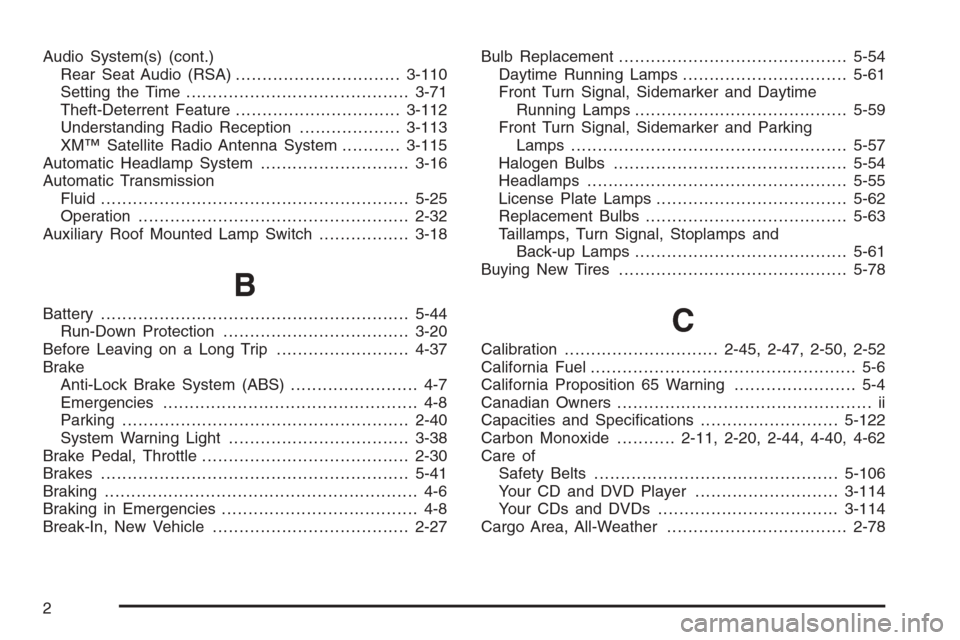
Audio System(s) (cont.)
Rear Seat Audio (RSA)...............................3-110
Setting the Time..........................................3-71
Theft-Deterrent Feature...............................3-112
Understanding Radio Reception...................3-113
XM™ Satellite Radio Antenna System...........3-115
Automatic Headlamp System............................3-16
Automatic Transmission
Fluid..........................................................5-25
Operation...................................................2-32
Auxiliary Roof Mounted Lamp Switch.................3-18
B
Battery..........................................................5-44
Run-Down Protection...................................3-20
Before Leaving on a Long Trip.........................4-37
Brake
Anti-Lock Brake System (ABS)........................ 4-7
Emergencies................................................ 4-8
Parking......................................................2-40
System Warning Light..................................3-38
Brake Pedal, Throttle.......................................2-30
Brakes..........................................................5-41
Braking........................................................... 4-6
Braking in Emergencies..................................... 4-8
Break-In, New Vehicle.....................................2-27Bulb Replacement...........................................5-54
Daytime Running Lamps...............................5-61
Front Turn Signal, Sidemarker and Daytime
Running Lamps........................................5-59
Front Turn Signal, Sidemarker and Parking
Lamps ....................................................5-57
Halogen Bulbs............................................5-54
Headlamps.................................................5-55
License Plate Lamps....................................5-62
Replacement Bulbs......................................5-63
Taillamps, Turn Signal, Stoplamps and
Back-up Lamps........................................5-61
Buying New Tires...........................................5-78C
Calibration.............................2-45, 2-47, 2-50, 2-52
California Fuel.................................................. 5-6
California Proposition 65 Warning....................... 5-4
Canadian Owners................................................ ii
Capacities and Specications..........................5-122
Carbon Monoxide...........2-11, 2-20, 2-44, 4-40, 4-62
Care of
Safety Belts..............................................5-106
Your CD and DVD Player...........................3-114
Your CDs and DVDs ..................................3-114
Cargo Area, All-Weather..................................2-78
2
Page 528 of 532
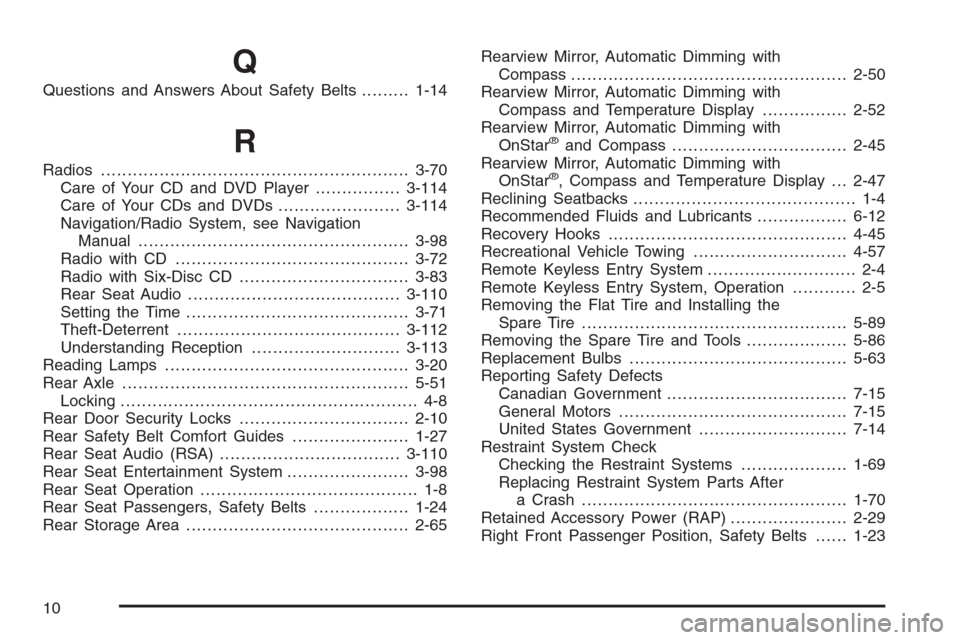
Q
Questions and Answers About Safety Belts.........1-14
R
Radios..........................................................3-70
Care of Your CD and DVD Player................3-114
Care of Your CDs and DVDs .......................3-114
Navigation/Radio System, see Navigation
Manual...................................................3-98
Radio with CD............................................3-72
Radio with Six-Disc CD................................3-83
Rear Seat Audio........................................3-110
Setting the Time..........................................3-71
Theft-Deterrent..........................................3-112
Understanding Reception............................3-113
Reading Lamps..............................................3-20
Rear Axle......................................................5-51
Locking........................................................ 4-8
Rear Door Security Locks................................2-10
Rear Safety Belt Comfort Guides......................1-27
Rear Seat Audio (RSA)..................................3-110
Rear Seat Entertainment System.......................3-98
Rear Seat Operation......................................... 1-8
Rear Seat Passengers, Safety Belts..................1-24
Rear Storage Area..........................................2-65Rearview Mirror, Automatic Dimming with
Compass....................................................2-50
Rearview Mirror, Automatic Dimming with
Compass and Temperature Display................2-52
Rearview Mirror, Automatic Dimming with
OnStar
®and Compass.................................2-45
Rearview Mirror, Automatic Dimming with
OnStar
®, Compass and Temperature Display . . . 2-47
Reclining Seatbacks.......................................... 1-4
Recommended Fluids and Lubricants.................6-12
Recovery Hooks.............................................4-45
Recreational Vehicle Towing.............................4-57
Remote Keyless Entry System............................ 2-4
Remote Keyless Entry System, Operation............ 2-5
Removing the Flat Tire and Installing the
Spare Tire..................................................5-89
Removing the Spare Tire and Tools...................5-86
Replacement Bulbs.........................................5-63
Reporting Safety Defects
Canadian Government..................................7-15
General Motors...........................................7-15
United States Government............................7-14
Restraint System Check
Checking the Restraint Systems....................1-69
Replacing Restraint System Parts After
a Crash..................................................1-70
Retained Accessory Power (RAP)......................2-29
Right Front Passenger Position, Safety Belts......1-23
10