reset CHEVROLET AVALANCHE 2006 1.G Owner's Guide
[x] Cancel search | Manufacturer: CHEVROLET, Model Year: 2006, Model line: AVALANCHE, Model: CHEVROLET AVALANCHE 2006 1.GPages: 532, PDF Size: 3.3 MB
Page 268 of 532
Battery Replacement
To change the batteries, do the following:
1. Loosen the screw on the battery compartment door
located on the left side of the headphone earpiece.
2. Replace the two AAA batteries in the compartment.
Make sure that they are installed correctly, using
the diagram on the inside of the battery
compartment.
3. Tighten the screw to close the compartment door.
If the headphones are to be stored for a long period
of time, remove the batteries and keep them in a cool,
dry place.
Stereo RCA Jacks
The RCA jacks are located behind the video screen.
The RCA jacks allow audio and video signals to
be connected from an auxiliary device such as a
camcorder or a video game unit to the RSE system.
Standard RCA cables, not included, are needed
to connect the auxiliary device to the RCA jacks. The
yellow connector inputs video and the red and white
connectors input right and left audio. Refer to the
manufacturer’s instructions for proper connection of the
auxiliary device.To use the auxiliary inputs on the RSE system, connect
an external auxiliary device to the color-coded RCA
jacks and turn both the auxiliary device and the
RSE system power on. If the RSE system had been
previously in the DVD player mode, pressing the SRCE
button on the faceplate or the remote control will
switch the RSE system between the auxiliary device
and the DVD player.
How to Change the Video Format when in
the Auxiliary Mode
The auxiliary input video format is preset to NTSC. In
some countries, the video format may be in the
PAL system. To change the video format, perform the
following:
1. Press the display menu button.
2. Press the down arrow button to highlight the Video
Format option.
3. Press the enter button to select Video Format.
4. Press the right or left arrow button to select
the desired video format.
5. Press the enter button to accept the change.
3-100
Page 279 of 532
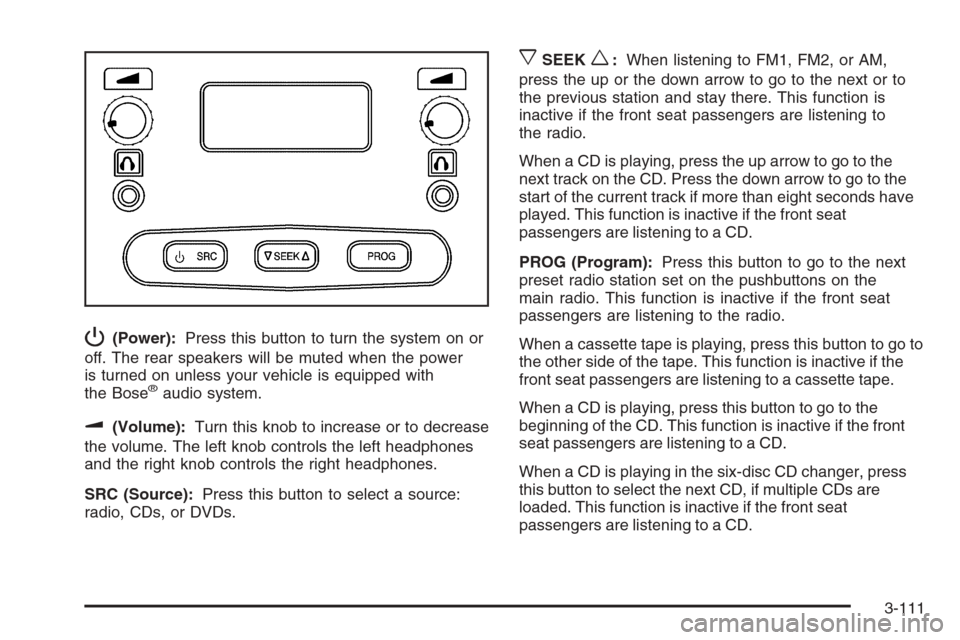
P(Power):Press this button to turn the system on or
off. The rear speakers will be muted when the power
is turned on unless your vehicle is equipped with
the Bose
®audio system.
u(Volume):Turn this knob to increase or to decrease
the volume. The left knob controls the left headphones
and the right knob controls the right headphones.
SRC (Source):Press this button to select a source:
radio, CDs, or DVDs.
xSEEKw:When listening to FM1, FM2, or AM,
press the up or the down arrow to go to the next or to
the previous station and stay there. This function is
inactive if the front seat passengers are listening to
the radio.
When a CD is playing, press the up arrow to go to the
next track on the CD. Press the down arrow to go to the
start of the current track if more than eight seconds have
played. This function is inactive if the front seat
passengers are listening to a CD.
PROG (Program):Press this button to go to the next
preset radio station set on the pushbuttons on the
main radio. This function is inactive if the front seat
passengers are listening to the radio.
When a cassette tape is playing, press this button to go to
the other side of the tape. This function is inactive if the
front seat passengers are listening to a cassette tape.
When a CD is playing, press this button to go to the
beginning of the CD. This function is inactive if the front
seat passengers are listening to a CD.
When a CD is playing in the six-disc CD changer, press
this button to select the next CD, if multiple CDs are
loaded. This function is inactive if the front seat
passengers are listening to a CD.
3-111
Page 281 of 532
PROG (Program):Press this button to play a station
you have programmed on the radio preset pushbuttons.
The radio will only seek preset stations with a strong
signal that are in the selected band.
When a CD is playing in the CD changer, press this
button to go to the next available CD, if multiple CDs are
loaded.
QSOURCER:Press this button to switch between
FM1, FM2, AM, or XM1 or XM2 (if equipped), or a
CD. If a CD is loaded the CD symbol will appear on the
display.
QSEEKR:Press the up or the down arrow to go to
the next or to the previous radio station and stay
there. The radio will only seek stations with a strong
signal that are in the selected band.
When a CD is playing, press the up or the down arrow
to fast forward or reverse.
QVOLR(Volume):Press the up or the down arrow
to increase or to decrease the volume.
Radio Reception
You may experience frequency interference and static
during normal radio reception if items such as cellphone
chargers, vehicle convenience accessories, and
external electronic devices are plugged into the
accessory power outlet. If there is interference or static,
unplug the item from the accessory power outlet.
AM
The range for most AM stations is greater than for FM,
especially at night. The longer range can cause
station frequencies to interfere with each other. For
better radio reception, most AM radio stations will boost
the power levels during the day, and then reduce
these levels during the night. Static can also occur when
things like storms and power lines interfere with radio
reception. When this happens, try reducing the treble on
your radio.
FM Stereo
FM stereo will give the best sound, but FM signals will
reach only about 10 to 40 miles (16 to 65 km). Tall
buildings or hills can interfere with FM signals, causing
the sound to fade in and out.
3-113
Page 381 of 532
If you are in an area of extreme cold, where the
temperature falls below−20°F (−29°C), it is
recommended that you use either an SAE 5W-30
synthetic oil or an SAE 0W-30 oil. Both will provide
easier cold starting and better protection for your engine
at extremely low temperatures.
Engine Oil Additives
Do not add anything to your oil. The recommended oils
with the starburst symbol that meet GM Standard
GM6094M are all you will need for good performance
and engine protection.
Engine Oil Life System
When to Change Engine Oil
Your vehicle has a computer system that lets you
know when to change the engine oil and lter. This is
based on engine revolutions and engine temperature,
and not on mileage. Based on driving conditions,
the mileage at which an oil change will be indicated
can vary considerably. For the oil life system to
work properly, you must reset the system every time
the oil is changed.When the system has calculated that oil life has been
diminished, it will indicate that an oil change is
necessary. A CHANGE ENGINE OIL message will
come on. Change your oil as soon as possible within
the next 600 miles (1 000 km). It is possible that, if you
are driving under the best conditions, the oil life
system may not indicate that an oil change is necessary
for over a year. However, your engine oil and lter
must be changed at least once a year and at this time
the system must be reset. Your dealer has GM-trained
service people who will perform this work using
genuine GM parts and reset the system. It is also
important to check your oil regularly and keep it at the
proper level.
If the system is ever reset accidentally, you must
change your oil at 3,000 miles (5 000 km) since your
last oil change. Remember to reset the oil life system
whenever the oil is changed.
5-21
Page 382 of 532
How to Reset the Engine Oil Life
System
The Engine Oil Life System calculates when to change
your engine oil and lter based on vehicle use.
Anytime your oil is changed, reset the system so it can
calculate when the next oil change is required. If a
situation occurs where you change your oil prior to a
CHANGE ENGINE OIL message being turned on, reset
the system.
To reset the CHANGE ENGINE OIL message, see
“Engine Oil Life System” underDIC Operation and
Displays on page 3-50for vehicles that have the DIC, or
do the following:
1. Turn the ignition key to RUN with the engine off.
2. Fully press and release the accelerator pedal slowly
three times within ve seconds.
If the OIL LIFE RESET message ashes for
10 seconds, the system is resetting.
3. Turn the key to LOCK.
If the CHANGE ENGINE OIL message comes back on
when you start your vehicle, the engine oil life system
has not reset. Repeat the procedure. If it still does
not reset, see your dealer for service.
What to Do with Used Oil
Used engine oil contains certain elements that may be
unhealthy for your skin and could even cause cancer.
Do not let used oil stay on your skin for very long. Clean
your skin and nails with soap and water, or a good
hand cleaner. Wash or properly dispose of clothing or
rags containing used engine oil. See the manufacturer’s
warnings about the use and disposal of oil products.
Used oil can be a threat to the environment. If you
change your own oil, be sure to drain all the oil from the
lter before disposal. Never dispose of oil by putting it
in the trash, pouring it on the ground, into sewers, or into
streams or bodies of water. Instead, recycle it by
taking it to a place that collects used oil. If you have a
problem properly disposing of your used oil, ask
your dealer, a service station, or a local recycling center
for help.
5-22
Page 383 of 532
Engine Air Cleaner/Filter
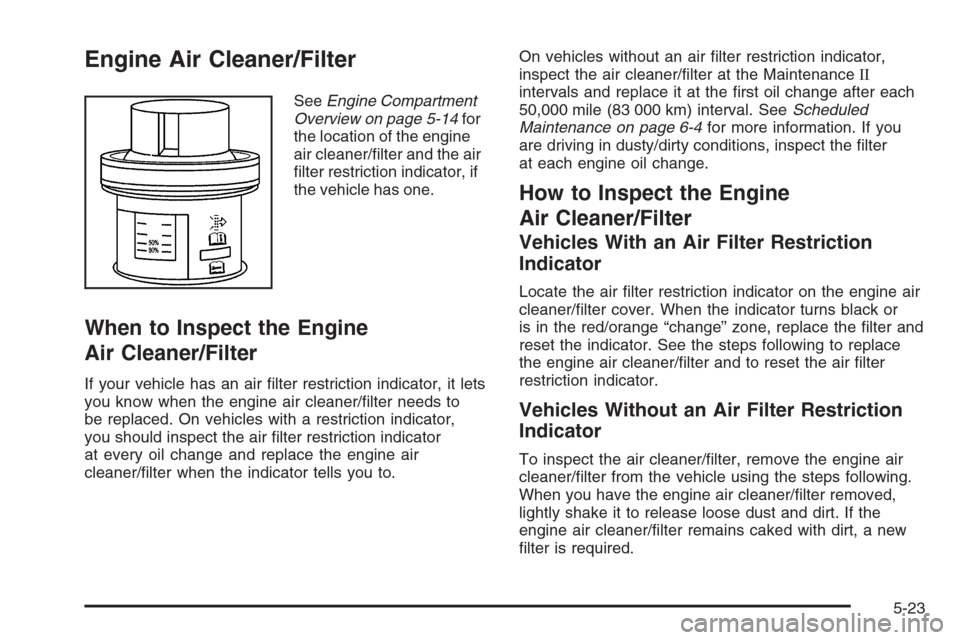
SeeEngine Compartment
Overview on page 5-14for
the location of the engine
air cleaner/lter and the air
lter restriction indicator, if
the vehicle has one.
When to Inspect the Engine
Air Cleaner/Filter
If your vehicle has an air lter restriction indicator, it lets
you know when the engine air cleaner/lter needs to
be replaced. On vehicles with a restriction indicator,
you should inspect the air lter restriction indicator
at every oil change and replace the engine air
cleaner/lter when the indicator tells you to.On vehicles without an air lter restriction indicator,
inspect the air cleaner/lter at the MaintenanceII
intervals and replace it at the rst oil change after each
50,000 mile (83 000 km) interval. SeeScheduled
Maintenance on page 6-4for more information. If you
are driving in dusty/dirty conditions, inspect the lter
at each engine oil change.
How to Inspect the Engine
Air Cleaner/Filter
Vehicles With an Air Filter Restriction
Indicator
Locate the air lter restriction indicator on the engine air
cleaner/lter cover. When the indicator turns black or
is in the red/orange “change” zone, replace the lter and
reset the indicator. See the steps following to replace
the engine air cleaner/lter and to reset the air lter
restriction indicator.
Vehicles Without an Air Filter Restriction
Indicator
To inspect the air cleaner/lter, remove the engine air
cleaner/lter from the vehicle using the steps following.
When you have the engine air cleaner/lter removed,
lightly shake it to release loose dust and dirt. If the
engine air cleaner/lter remains caked with dirt, a new
lter is required.
5-23
Page 384 of 532
Replacing the Engine Air Cleaner/Filter
and Resetting the Air Filter Restriction
Indicator
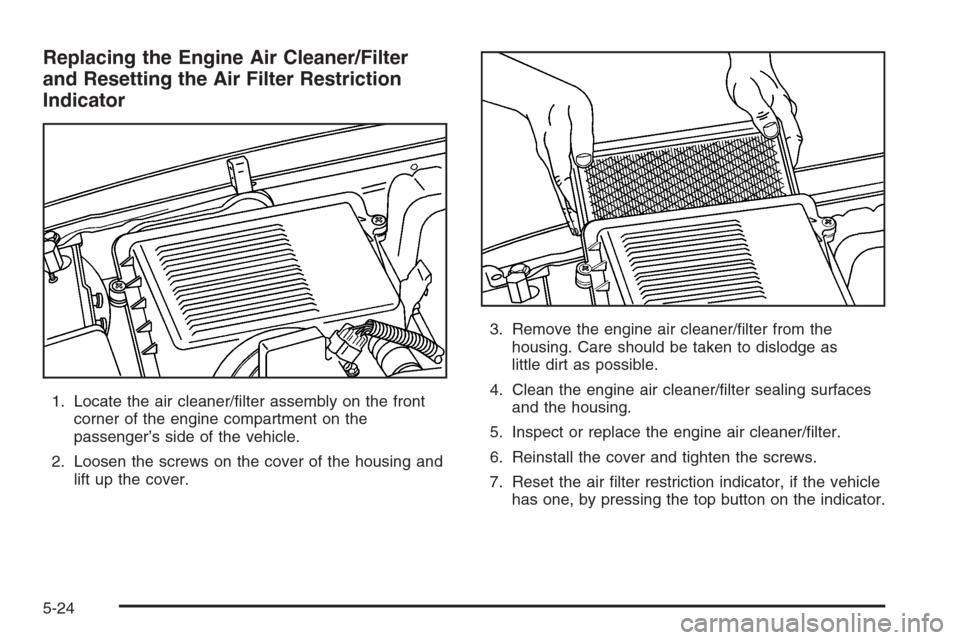
1. Locate the air cleaner/lter assembly on the front
corner of the engine compartment on the
passenger’s side of the vehicle.
2. Loosen the screws on the cover of the housing and
lift up the cover.3. Remove the engine air cleaner/lter from the
housing. Care should be taken to dislodge as
little dirt as possible.
4. Clean the engine air cleaner/lter sealing surfaces
and the housing.
5. Inspect or replace the engine air cleaner/lter.
6. Reinstall the cover and tighten the screws.
7. Reset the air lter restriction indicator, if the vehicle
has one, by pressing the top button on the indicator.
5-24
Page 392 of 532
Overheated Engine Protection
Operating Mode
If an overheated engine condition exists and the
REDUCED ENGINE POWER message is displayed,
an overheat protection mode which alternates ring
groups of cylinders helps prevent engine damage. In this
mode, you will notice a loss in power and engine
performance. This operating mode allows your vehicle
to be driven to a safe place in an emergency. Driving
extended miles (km) and/or towing a trailer in the
overheat protection mode should be avoided.
Notice:After driving in the overheated engine
protection operating mode, to avoid engine damage,
allow the engine to cool before attempting any
repair. The engine oil will be severely degraded.
Repair the cause of coolant loss, change the oil
and reset the oil life system. SeeEngine Oil
on page 5-18.
Cooling System
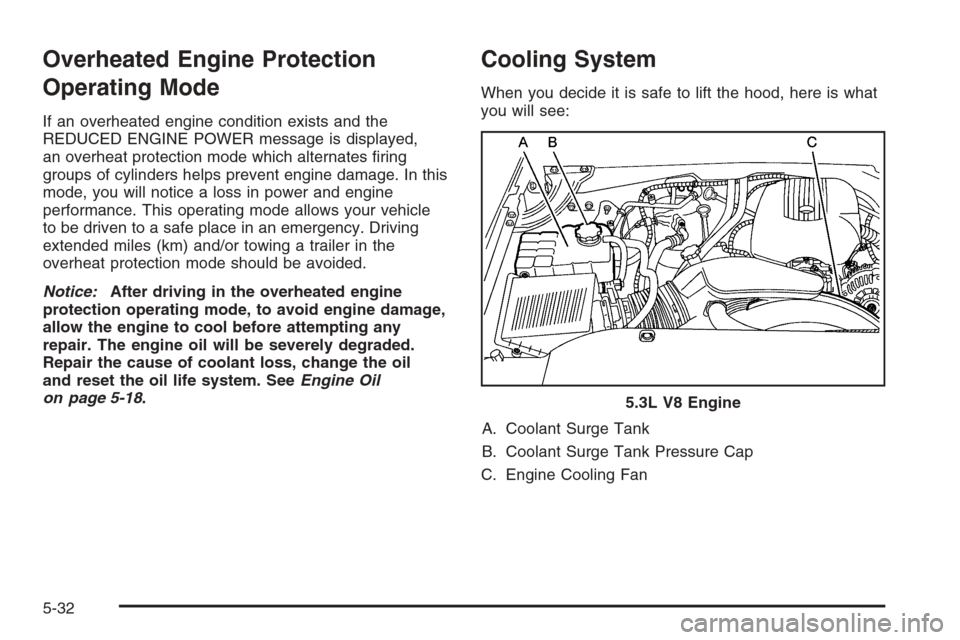
When you decide it is safe to lift the hood, here is what
you will see:
A. Coolant Surge Tank
B. Coolant Surge Tank Pressure Cap
C. Engine Cooling Fan5.3L V8 Engine
5-32
Page 434 of 532
Resetting the TPMS Identication Codes
Each TPMS sensor has a unique identication
code. Any time you rotate your vehicle’s tires or replace
one or more of the TPMS sensors, the identication
codes will need to be matched to the new tire/wheel
position. Each tire/wheel position is matched to a
sensor, by increasing or decreasing the tire’s air
pressure. The sensors are matched to the tire/wheel
positions in the following order: LF TIRE (left front tire on
the driver’s side of the vehicle), RF TIRE (right front
tire on the passengers side of the vehicle), RR
TIRE (right rear tire on the passengers side of the
vehicle), and LR TIRE (left rear tire on the driver’s side
of the vehicle).
You will have one minute to match the rst tire/wheel
position, and ve minutes overall to match all
four tire/wheel positions. If it takes longer than
one minute, to match the rst tire and wheel, or more
than ve minutes to match all four tire and wheel
positions the matching process stops and you will
need to start over.The TPMS sensor matching process is outlined below:
1. Set the parking brake.
2. Turn the ignition switch to RUN with the engine off.
3. Turn the headlamp switch from off to the parking
lamps setting four times within three seconds. A
double horn chirp will sound and the TPMS low tire
warning light will begin to ash. The double horn
chirp and ashing TPMS warning light indicate that
the TPMS matching process has started. The
TPMS warning light should continue ashing
throughout the matching procedure. The SERVICE
TIRE MONITOR message will be displayed on
the Driver Information Center (DIC).
4. Start with the driver’s side front tire.
5. Remove the valve cap from the valve cap stem.
Activate the TPMS sensor by increasing or
decreasing the tire’s air pressure for 10 seconds,
then stop and listen for a single horn chirp.
The single horn chirp should sound within
15 seconds, conrming that the sensor identication
code has been matched to this tire and wheel
position. If you do not hear the conrming single
horn chirp, you will need to start over with Step 1.
To let air-pressure out of a tire you can use the
pointed end of the valve cap, a pencil-style
air pressure gage or a key.
5-74
Page 436 of 532
Tire Inspection and Rotation
Tires should be rotated every 5,000 to 8,000 miles
(8 000 to 13 000 km).
Any time you notice unusual wear, rotate your tires as
soon as possible and check wheel alignment. Also
check for damaged tires or wheels. SeeWhen It Is Time
for New Tires on page 5-77andWheel Replacement
on page 5-81for more information.
Make sure the spare tire is stored securely. Push, pull,
and then try to rotate or turn the tire. If it moves,
use the ratchet/wheel wrench to tighten the cable. See
Changing a Flat Tire on page 5-84.
The purpose of regular rotation is to achieve more
uniform wear for all tires on the vehicle. The rst rotation
is the most important. SeeScheduled Maintenance
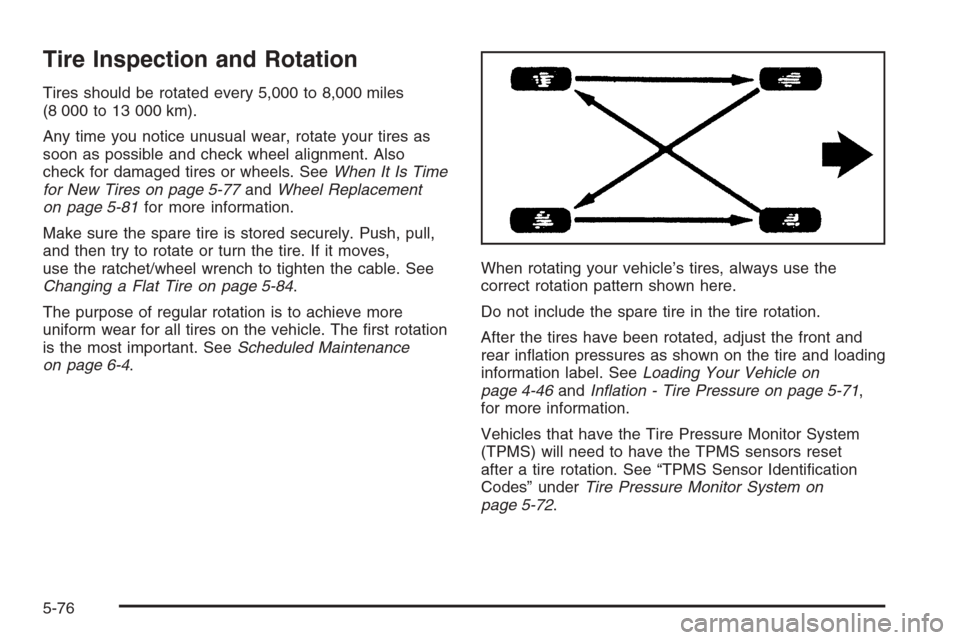
on page 6-4.When rotating your vehicle’s tires, always use the
correct rotation pattern shown here.
Do not include the spare tire in the tire rotation.
After the tires have been rotated, adjust the front and
rear ination pressures as shown on the tire and loading
information label. SeeLoading Your Vehicle on
page 4-46andInation - Tire Pressure on page 5-71,
for more information.
Vehicles that have the Tire Pressure Monitor System
(TPMS) will need to have the TPMS sensors reset
after a tire rotation. See “TPMS Sensor Identication
Codes” underTire Pressure Monitor System on
page 5-72.
5-76