Radio CHEVROLET AVALANCHE 2007 2.G User Guide
[x] Cancel search | Manufacturer: CHEVROLET, Model Year: 2007, Model line: AVALANCHE, Model: CHEVROLET AVALANCHE 2007 2.GPages: 618, PDF Size: 3.25 MB
Page 217 of 618

The DRL system will come on when the following
conditions are met:
The ignition is on.
The exterior lamps control is in AUTO.
The transmission is not in PARK (P).
The light sensor determines it is daytime.
When the DRL are on, only your DRL lamps will
be on. The taillamps, sidemarker, and other lamps
will not be on. The instrument panel will not be
lit up either.
When it begins to get dark, the automatic
headlamp system will switch from DRL to the
headlamps.
To turn off the DRL lamps, turn the exterior lamps
control to the OFF position and then release.
For vehicles rst sold in Canada, the transaxle
must be in the PARK (P) position, before the
DRL lamps can be turned off.
As with any vehicle, you should turn on the
regular headlamp system when you need it.
Automatic Headlamp System
When it is dark enough outside and the headlamp
switch is in AUTO, your automatic headlamp
system will turn on your headlamps at the normal
brightness along with other lamps such as the
taillamps, sidemarker, parking lamps, roof marker
lamps, and the instrument panel lights. The
radio lights will also be dim.
To turn off the automatic headlamp system,
turn the exterior lamps switch to the off position
and then release. For vehicles rst sold in Canada,
the transaxle must be in the PARK (P) position,
before the automatic headlamp system can
be turned off.
Your vehicle has a light sensor located on the
top of the instrument panel. Be sure it is not
covered, or the system will be on whenever the
ignition is on.
The system may also turn on your headlamps
when driving through a parking garage, heavy
overcast weather, or a tunnel. This is normal.
217
Page 219 of 618
The fog lamps will go off whenever your high-beam
headlamps come on. When the high beams go
off, the fog lamps will come on again.
The fog lamps will be cancelled after the ignition is
turned off. If you still want to use the fog lamps
after you restart the vehicle, you will need to press
the fog lamp button again.
Some localities have laws that require the
headlamps to be on along with the fog lamps.
Exterior Cargo Lamps
You can use the cargo lamp if you need more
light in the cargo area of your vehicle or in
the top-box storage units. Some vehicles will only
have a cargo lamp in the driver side top box.
The cargo lamps come on by turning on the
interior dome lamps.
Instrument Panel Brightness
The knob for this feature is located next to the
exterior lamps control.
D(Instrument Panel Lights):Turn the knob
clockwise or counterclockwise to brighten or
dim the instrument panel lights and the radio
display. This will only work if the headlamps or
parking lamps are on.
To turn on the dome lamps, with the vehicle doors
closed, turn the knob all the way to the right.
219
Page 223 of 618
CAUTION: (Continued)
So if you do not use proper care before
backing up, you could hit a vehicle, child,
pedestrian, bicyclist, or pet, resulting in
vehicle damage, injury, or death. Even
though the vehicle has the URPA system,
always check carefully before backing up
by checking behind your vehicle.
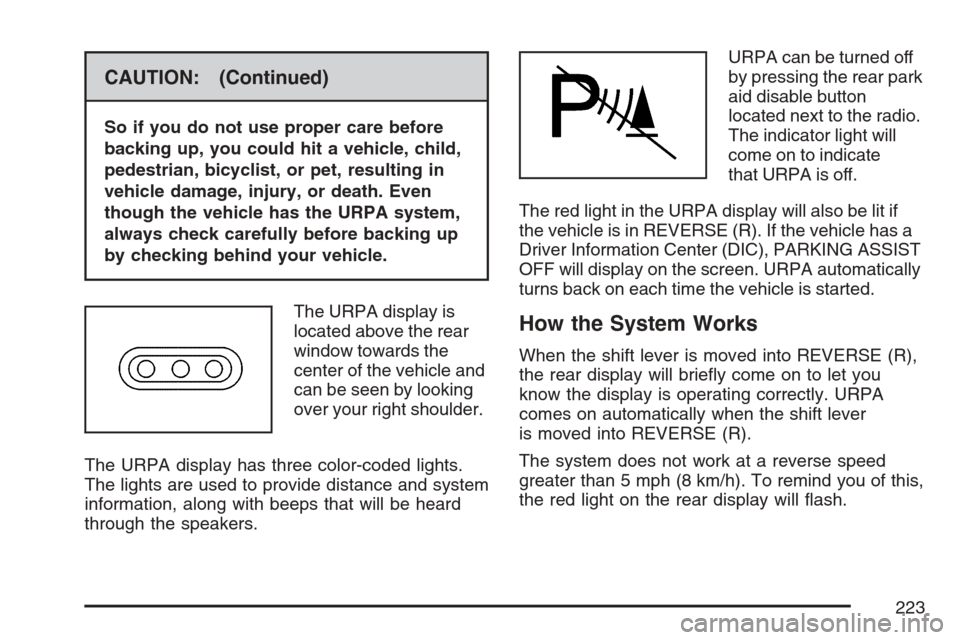
The URPA display is
located above the rear
window towards the
center of the vehicle and
can be seen by looking
over your right shoulder.
The URPA display has three color-coded lights.
The lights are used to provide distance and system
information, along with beeps that will be heard
through the speakers.URPA can be turned off
by pressing the rear park
aid disable button
located next to the radio.
The indicator light will
come on to indicate
that URPA is off.
The red light in the URPA display will also be lit if
the vehicle is in REVERSE (R). If the vehicle has a
Driver Information Center (DIC), PARKING ASSIST
OFF will display on the screen. URPA automatically
turns back on each time the vehicle is started.
How the System Works
When the shift lever is moved into REVERSE (R),
the rear display will briey come on to let you
know the display is operating correctly. URPA
comes on automatically when the shift lever
is moved into REVERSE (R).
The system does not work at a reverse speed
greater than 5 mph (8 km/h). To remind you of this,
the red light on the rear display will ash.
223
Page 245 of 618
If, after several seconds, all status indicator lights
remain on, or if there are no lights at all, there
may be a problem with the lights or the passenger
sensing system. See your dealer for service.
{CAUTION:
If the off indicator and the airbag
readiness light ever come on together,
it means that something may be wrong
with the airbag system. If this ever
happens, have the vehicle serviced
promptly, because an adult-size person
sitting in the right front passenger seat
may not have the protection of the frontal
airbag. SeeAirbag Readiness Light
on page 242.
Charging System Light
The charging system
light will come on briey
when you turn on the
ignition, but the engine is
not running, as a check
to show you it is working.
It should go out once the engine is running. If it
stays on, or comes on while you are driving, you
may have a problem with the charging system.
It could indicate that you have problems with the
generator, the generator drive belt, or another
electrical problem. Have it checked right away.
Driving while this light is on could drain your battery.
When this light comes on, the Driver Information
Center (DIC) will also display the SERVICE
BATTERY NOT CHARGING SYSTEM message.
SeeDIC Warnings and Messages on page 267
for more information.
If you must drive a short distance with the light
on, be certain to turn off all your accessories,
such as the radio and air conditioner, to reduce
the drain on your battery.
245
Page 286 of 618
FACTORY SETTINGS
This feature allows you to set all of the
customization features back to their factory
default settings.
Press the customization button until FACTORY
SETTINGS appears on the DIC display. Press the
set/reset button once to access the settings for
this feature. Then press the customization button
to scroll through the following settings:
RESTORE ALL (default):The customization
features will be set to their factory default settings.
DO NOT RESTORE:The customization features
will not be set to their factory default settings.
Choose one of the available settings and press
the set/reset button while it is displayed on the
DIC to select it.
EXIT FEATURE SETTINGS
This feature allows you to exit the feature
settings menu.
Press the customization button until
PRESS
VTO EXIT FEATURE SETTINGS
appears in the DIC display. Press the set/reset
button once to exit the menu.If you do not exit, pressing the customization
button again will return you to the beginning of
the feature settings menu.
Exiting the Feature Settings Menu
The feature settings menu will be exited when
any of the following occurs:
The vehicle is no longer in RUN.
The trip/fuel or vehicle information DIC
buttons are pressed.
The end of the feature settings menu is
reached and exited.
A 40 second time period has elapsed with
no selection made.
Audio System(s)
Determine which radio your vehicle has and then
read the pages following to familiarize yourself
with its features.
Driving without distraction is a necessity for a
safer driving experience. SeeDefensive Driving
on page 352. By taking a few moments to read
this manual and get familiar with your vehicle’s
audio system, you can use it with less effort,
as well as take advantage of its features.
286
Page 287 of 618
While your vehicle is parked, set up your audio
system by presetting your favorite radio stations,
setting the tone and adjusting the speakers. Then,
when driving conditions permit, you can tune to
your favorite stations using the presets and
steering wheel controls if the vehicle has them.
{CAUTION:
This system provides you with a far greater
access to audio stations and song listings.
Giving extended attention to entertainment
tasks while driving can cause a crash and
you or others can be injured or killed.
Always keep your eyes on the road and
your mind on the drive — avoid engaging
in extended searching while driving.
Keeping your mind on the drive is important for
safe driving. Here are some ways in which you can
help avoid distraction while driving.
While your vehicle is parked:
Familiarize yourself with all of its controls.
Familiarize yourself with its operation.
Set up your audio system by presetting your
favorite radio stations, setting the tone, and
adjusting the speakers. Then, when driving
conditions permit, you can tune to your favorite
radio stations using the presets and steering
wheel controls if the vehicle has them.
Notice:Before adding any sound equipment
to your vehicle, such as an audio system, CD
player, CB radio, mobile telephone, or two-way
radio, make sure that it can be added by
checking with your dealer. Also, check federal
rules covering mobile radio and telephone
units. If sound equipment can be added, it is
very important to do it properly. Added sound
equipment can interfere with the operation of
your vehicle’s engine, radio, or other systems,
and even damage them. Your vehicle’s systems
can interfere with the operation of sound
equipment that has been added.
Your vehicle has a feature called Retained
Accessory Power (RAP). With RAP, the audio
system can be played even after the ignition
is turned off. SeeRetained Accessory Power
(RAP) on page 124for more information.
287
Page 288 of 618
Setting the Time (MP3 Radio
with a Single CD Player)
If your vehicle has a radio with a single CD,
the radio has a clock button for setting the
time and date.
To set the time and date, follow the instructions:
1. Press the clock button and the HR, MIN,
MM, DD, YYYY (hour, minute, month, day,
and year) displays.
2. Press the pushbutton located under any one
of the labels that you want to change. Every
time the pushbutton is pressed again, the time
or the date if selected, increases by one.
Another way to increase the time or date,
is to press the right SEEK arrow or the
FWD (forward) button.
3. To decrease the time or date, press the left
SEEK arrow or the REV (reverse) button.
You can also turn the tune knob, located on
the upper right side of the radio, to adjust
the selected setting.
Changing the Time and Date Default
Settings
You can change the time default setting from
12 hours to 24 hours or change the date default
setting from month/day/year to day/month/year.
To change the time or date default settings,
follow these instructions:
1. Press the clock button and then the
pushbutton located under the forward arrow
that is currently displayed on the radio screen
until the time 12H (hour) and 24H (hour),
and the date MM/DD (month and day)
and DD/MM (day and month) displays.
2. Press the pushbutton located under the
desired option.
3. Press the clock button again to apply the
selected default, or let the screen time out.
288
Page 289 of 618
Setting the Time (MP3 Radio
with a CD and DVD Player)
If your vehicle has a radio with a single CD and
DVD player, the radio has a clock button for
setting the time and date.
To set the time and date, follow these instructions:
1. Press the clock button and the HR, MIN,
MM, DD, YYYY (hour, minute, month,
day, and year) displays.
2. Press the pushbutton located under any
one of the labels that you want to change.
Every time the pushbutton is pressed
again, the time or the date if selected,
increases by one.
Another way to increase the time or date,
is to press the right SEEK arrow or the
FWD (forward) button.
3. To decrease the time or date, press the left
SEEK arrow or the REV (reverse) button,
or turn the tune knob, located on the upper
right side of the radio, to adjust the selected
setting.
Changing the Time and Date Default
Settings
You can change the time default setting from
12 hours to 24 hours or change the date default
setting from month/day/year to day/month/year.
To change the time or date default settings,
follow these instructions:
1. Press the clock button and then the
pushbutton located under the forward arrow
that is currently displayed on the radio screen
until the time 12H (hour) and 24H (hour),
and the date MM/DD (month and day)
and DD/MM (day and month) displays.
2. Press the pushbutton located under the
desired option.
3. Press the clock button again to apply the
selected default, or let the screen time out.
289
Page 290 of 618
Setting the Time (MP3 Radio
with a Six-Disc CD Player)
If your vehicle has a radio with a six-disc CD
player, the radio has a MENU button instead of
the clock button to set the time and date.
To set the time and date, follow these instructions:
1. Press the MENU button. Once the clock
option displays, press the pushbutton
located under that label. The HR, MIN,
MM, DD, YYYY (hour, minute, month,
day, and year) displays.
2. Press the pushbutton located under any one
of the time or date setting labels that you
want to change. Every time the pushbutton
is pressed again, the time or the date if
selected, increases by one.
Another way to increase the time or date,
is to press the right SEEK arrow or the
FWD (forward) button.
3. To decrease the time or date, press the left
SEEK arrow or the REV (reverse) button.
You can also turn the tune knob, located
on the upper right side of the radio,
to adjust the selected setting.
Changing the Time and Date Default
Settings
You can change the time default setting from
12 hours to 24 hours or change the date default
setting from month/day/year to day/month/year.
To change the time or date default settings,
follow these instructions:
1. Press the MENU button. Once the clock
option displays, press the pushbutton
located under the forward arrow that is
currently displayed on the radio screen
until the 12H (hour) and 24H (hour), and
the date MM/DD (month and day) and
DD/MM (day and month) displays.
2. Press the pushbutton located under the
desired option.
3. Press the MENU button again to apply the
selected default, or let the screen time out.
290
Page 291 of 618
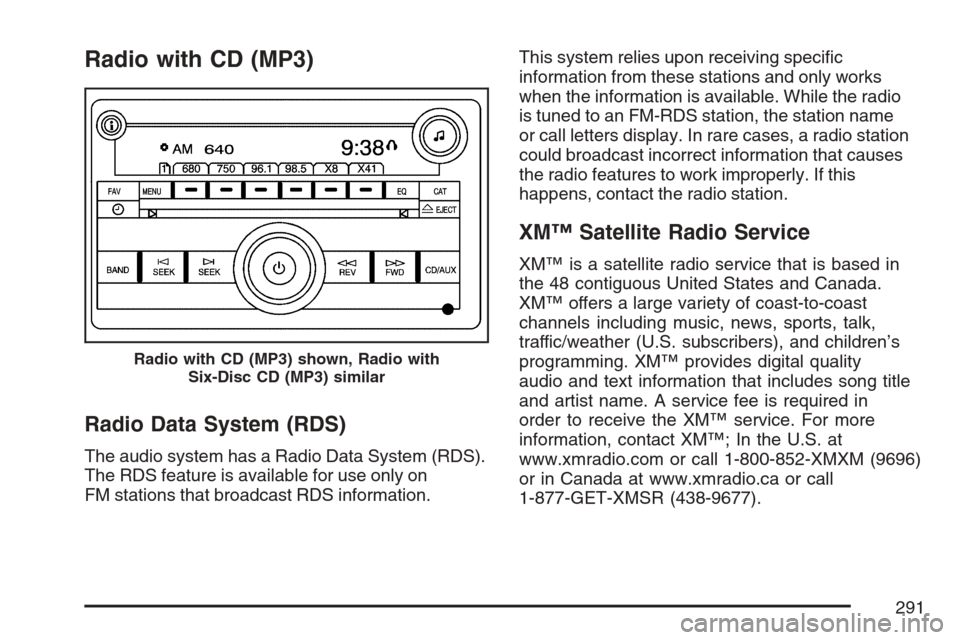
Radio with CD (MP3)
Radio Data System (RDS)
The audio system has a Radio Data System (RDS).
The RDS feature is available for use only on
FM stations that broadcast RDS information.This system relies upon receiving specic
information from these stations and only works
when the information is available. While the radio
is tuned to an FM-RDS station, the station name
or call letters display. In rare cases, a radio station
could broadcast incorrect information that causes
the radio features to work improperly. If this
happens, contact the radio station.
XM™ Satellite Radio Service
XM™ is a satellite radio service that is based in
the 48 contiguous United States and Canada.
XM™ offers a large variety of coast-to-coast
channels including music, news, sports, talk,
traffic/weather (U.S. subscribers), and children’s
programming. XM™ provides digital quality
audio and text information that includes song title
and artist name. A service fee is required in
order to receive the XM™ service. For more
information, contact XM™; In the U.S. at
www.xmradio.com or call 1-800-852-XMXM (9696)
or in Canada at www.xmradio.ca or call
1-877-GET-XMSR (438-9677).
Radio with CD (MP3) shown, Radio with
Six-Disc CD (MP3) similar
291