buttons CHEVROLET AVALANCHE 2007 2.G Owner's Manual
[x] Cancel search | Manufacturer: CHEVROLET, Model Year: 2007, Model line: AVALANCHE, Model: CHEVROLET AVALANCHE 2007 2.GPages: 618, PDF Size: 3.25 MB
Page 205 of 618
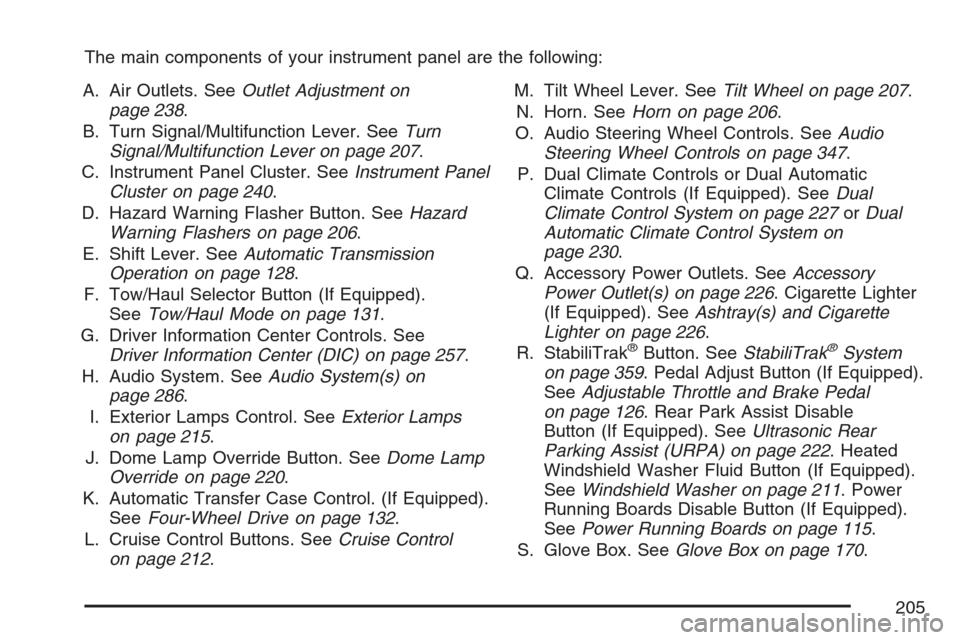
The main components of your instrument panel are the following:
A. Air Outlets. SeeOutlet Adjustment on
page 238.
B. Turn Signal/Multifunction Lever. SeeTurn
Signal/Multifunction Lever on page 207.
C. Instrument Panel Cluster. SeeInstrument Panel
Cluster on page 240.
D. Hazard Warning Flasher Button. SeeHazard
Warning Flashers on page 206.
E. Shift Lever. SeeAutomatic Transmission
Operation on page 128.
F. Tow/Haul Selector Button (If Equipped).
SeeTow/Haul Mode on page 131.
G. Driver Information Center Controls. See
Driver Information Center (DIC) on page 257.
H. Audio System. SeeAudio System(s) on
page 286.
I. Exterior Lamps Control. SeeExterior Lamps
on page 215.
J. Dome Lamp Override Button. SeeDome Lamp
Override on page 220.
K. Automatic Transfer Case Control. (If Equipped).
SeeFour-Wheel Drive on page 132.
L. Cruise Control Buttons. SeeCruise Control
on page 212.M. Tilt Wheel Lever. SeeTilt Wheel on page 207.
N. Horn. SeeHorn on page 206.
O. Audio Steering Wheel Controls. SeeAudio
Steering Wheel Controls on page 347.
P. Dual Climate Controls or Dual Automatic
Climate Controls (If Equipped). SeeDual
Climate Control System on page 227orDual
Automatic Climate Control System on
page 230.
Q. Accessory Power Outlets. SeeAccessory
Power Outlet(s) on page 226. Cigarette Lighter
(If Equipped). SeeAshtray(s) and Cigarette
Lighter on page 226.
R. StabiliTrak
®Button. SeeStabiliTrak®System
on page 359. Pedal Adjust Button (If Equipped).
SeeAdjustable Throttle and Brake Pedal
on page 126. Rear Park Assist Disable
Button (If Equipped). SeeUltrasonic Rear
Parking Assist (URPA) on page 222. Heated
Windshield Washer Fluid Button (If Equipped).
SeeWindshield Washer on page 211. Power
Running Boards Disable Button (If Equipped).
SeePower Running Boards on page 115.
S. Glove Box. SeeGlove Box on page 170.
205
Page 212 of 618
Cruise Control
{CAUTION:
Cruise control can be dangerous where
you cannot drive safely at a steady speed.
So, do not use your cruise control on
winding roads or in heavy traffic.
Cruise control can be dangerous on
slippery roads. On such roads, fast
changes in tire traction can cause
excessive wheel slip, and you could lose
control. Do not use cruise control on
slippery roads.
With cruise control, you can maintain a speed
of about 25 mph (40 km/h) or more without
keeping your foot on the accelerator. This can
really help on long trips. Cruise control does not
work at speeds below about 25 mph (40 km/h).
When you apply your brakes, cruise control
is turned off.If your vehicle has the StabiliTrak
®system and
begins to limit wheel spin while you are using cruise
control, the cruise control will automatically
disengage. SeeStabiliTrak
®System on page 359.
When road conditions allow you to safely use it
again, you may turn the cruise control back on.
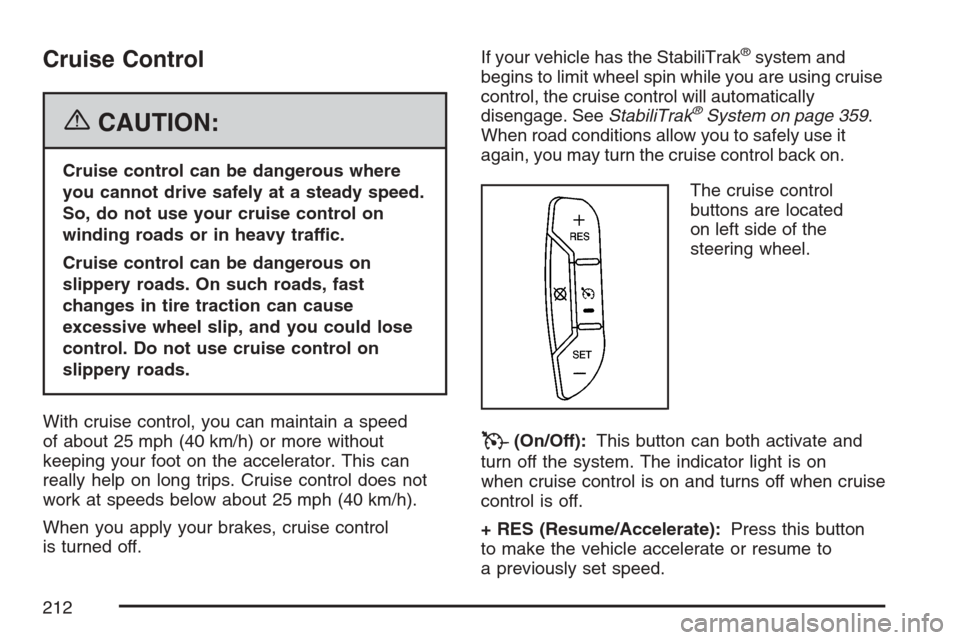
The cruise control
buttons are located
on left side of the
steering wheel.
T(On/Off):This button can both activate and
turn off the system. The indicator light is on
when cruise control is on and turns off when cruise
control is off.
+ RES (Resume/Accelerate):Press this button
to make the vehicle accelerate or resume to
a previously set speed.
212
Page 216 of 618
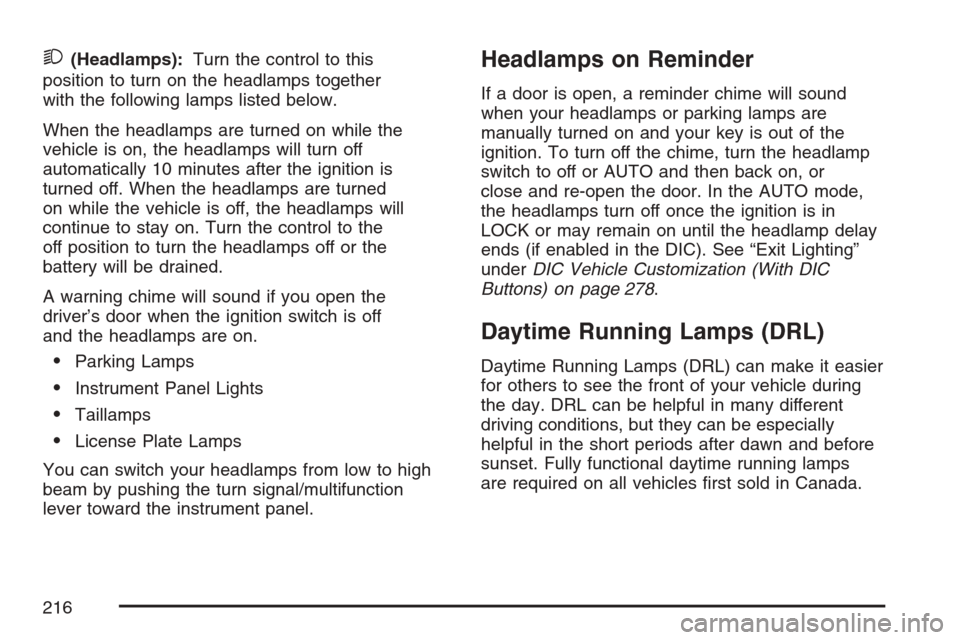
2(Headlamps):Turn the control to this
position to turn on the headlamps together
with the following lamps listed below.
When the headlamps are turned on while the
vehicle is on, the headlamps will turn off
automatically 10 minutes after the ignition is
turned off. When the headlamps are turned
on while the vehicle is off, the headlamps will
continue to stay on. Turn the control to the
off position to turn the headlamps off or the
battery will be drained.
A warning chime will sound if you open the
driver’s door when the ignition switch is off
and the headlamps are on.
Parking Lamps
Instrument Panel Lights
Taillamps
License Plate Lamps
You can switch your headlamps from low to high
beam by pushing the turn signal/multifunction
lever toward the instrument panel.
Headlamps on Reminder
If a door is open, a reminder chime will sound
when your headlamps or parking lamps are
manually turned on and your key is out of the
ignition. To turn off the chime, turn the headlamp
switch to off or AUTO and then back on, or
close and re-open the door. In the AUTO mode,
the headlamps turn off once the ignition is in
LOCK or may remain on until the headlamp delay
ends (if enabled in the DIC). See “Exit Lighting”
underDIC Vehicle Customization (With DIC
Buttons) on page 278.
Daytime Running Lamps (DRL)
Daytime Running Lamps (DRL) can make it easier
for others to see the front of your vehicle during
the day. DRL can be helpful in many different
driving conditions, but they can be especially
helpful in the short periods after dawn and before
sunset. Fully functional daytime running lamps
are required on all vehicles rst sold in Canada.
216
Page 231 of 618
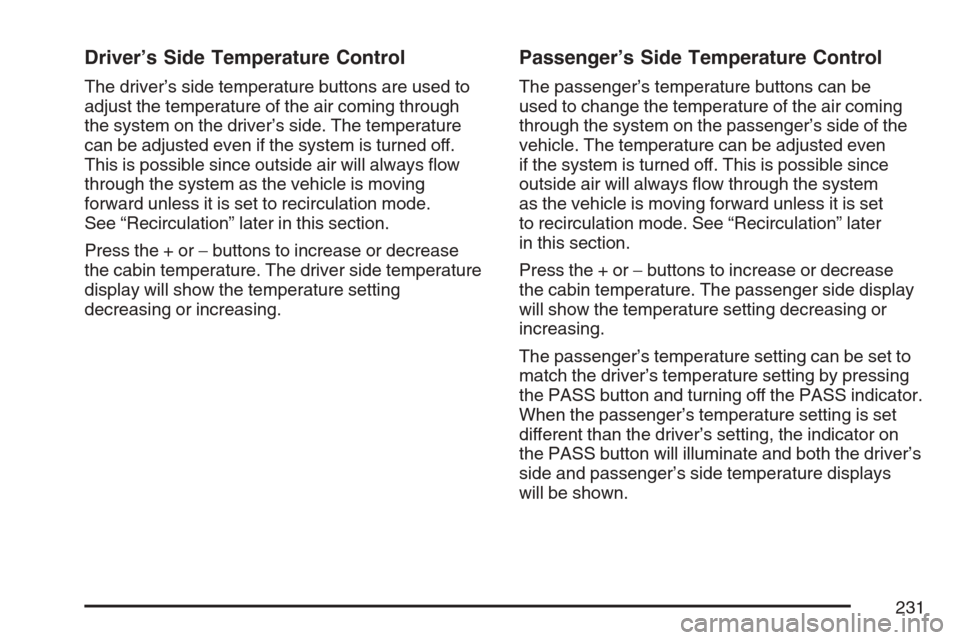
Driver’s Side Temperature Control
The driver’s side temperature buttons are used to
adjust the temperature of the air coming through
the system on the driver’s side. The temperature
can be adjusted even if the system is turned off.
This is possible since outside air will always ow
through the system as the vehicle is moving
forward unless it is set to recirculation mode.
See “Recirculation” later in this section.
Press the + or−buttons to increase or decrease
the cabin temperature. The driver side temperature
display will show the temperature setting
decreasing or increasing.
Passenger’s Side Temperature Control
The passenger’s temperature buttons can be
used to change the temperature of the air coming
through the system on the passenger’s side of the
vehicle. The temperature can be adjusted even
if the system is turned off. This is possible since
outside air will always ow through the system
as the vehicle is moving forward unless it is set
to recirculation mode. See “Recirculation” later
in this section.
Press the + or−buttons to increase or decrease
the cabin temperature. The passenger side display
will show the temperature setting decreasing or
increasing.
The passenger’s temperature setting can be set to
match the driver’s temperature setting by pressing
the PASS button and turning off the PASS indicator.
When the passenger’s temperature setting is set
different than the driver’s setting, the indicator on
the PASS button will illuminate and both the driver’s
side and passenger’s side temperature displays
will be shown.
231
Page 232 of 618

Automatic Operation
AUTO (Automatic):When automatic operation
is active the system will control the inside
temperature, the air delivery, and the fan speed.
Use the steps below to place the entire system
in automatic mode:
1. Press the AUTO button.
When AUTO is selected, the display will
change to show the current temperature(s)
and AUTO will be lit on the display. The
current delivery mode and fan speed will also
be displayed for approximately 5 seconds.
When AUTO is selected, the air conditioning
operation and air inlet will be automatically
controlled. The air conditioning compressor
will run when the outside temperature is over
about 40°F (4°C). The air inlet will normally
be set to outside air. If it is hot outside, the
air inlet may automatically switch to recirculate
inside air to help quickly cool down your
vehicle. The light on the button will illuminate
in recirculation.2. Set the driver’s and passenger’s temperature.
To nd your comfort setting, start with a
74°F (23°C) temperature setting and allow
about 20 minutes for the system to regulate.
Use the driver’s or passenger’s temperature
buttons to adjust the temperature setting
as necessary. If you choose the temperature
setting of 60°F (15°C), the system will
remain at the maximum cooling setting.
If you choose the temperature setting of
90°F (32°C), the system will remain at the
maximum heat setting. Choosing either
maximum setting will not cause the vehicle
to heat or cool any faster.
Be careful not to cover the solar sensor located
on the top of the instrument panel near the
windshield. This sensor regulates air temperature
based on sun load and also turns on your
headlamps. For more information on the solar
sensor, see “Sensors” later in this section.
232
Page 233 of 618
To avoid blowing cold air in cold weather, the
system will delay turning on the fan until warm
air is available. The length of delay depends on
the engine coolant temperature. Pressing the
fan switch will override this delay and change
the fan to a selected speed.
O(On/Off):Press this button to turn off the
climate control system. Outside air will still enter
the vehicle, and will be directed to the oor.
This direction can be changed by pressing the
mode button. Recirculation can be selected once
you have selected vent or bi-level mode. The
temperature can also be adjusted using either
temperature button. If you adjust the air delivery
mode or temperature settings with the system
off, the display will illuminate briey to show
you the settings and then return off. Press the
on/off button or the up down arrows on the
fan switch, the defrost button, AUTO button,
or the air conditioning button to turn the system
on when it is off.
Manual Operation
You may manually adjust the air delivery mode
or fan speed.
y9z(Fan):The buttons with the fan symbols
allow you to manually adjust the fan speed.
Press the up arrow to increase fan speed and
the down arrow to decrease fan speed.
Pressing one of these buttons when the system
is off will turn the system on. Pressing one of these
buttons when in automatic control will place the
fan under manual control. The fan setting will
remain displayed and the AUTO light will turn off.
The air delivery mode will remain under
automatic control.
yNz(Mode):Press the mode up and down
buttons to manually change the direction of
the airow in your vehicle. Repeatedly press the
button until the desired mode appears on the
display. Pressing one of these buttons when the
system is off will change air delivery mode without
turning the system on. Pressing one of these
buttons when in automatic control will place the
mode under manual control.
233
Page 257 of 618
When the fuel tank is low, the FUEL LEVEL LOW
message will appear in the Driver Information
Center (DIC). SeeDIC Warnings and Messages
on page 267for more information.
Here are some situations you may experience with
your fuel gage. None of these indicate a problem
with the fuel gage.
At the gas station, the fuel pump shuts off
before the gage reads full.
It takes a little more or less fuel to ll up than
the fuel gage indicated. For example, the
gage may have indicated the tank was half full,
but it actually took a little more or less than
half the tank’s capacity to ll the tank.
The gage goes back to empty when you turn
off the ignition.
Driver Information Center (DIC)
Your vehicle has a Driver Information Center (DIC).
The DIC displays information about your vehicle.
It also displays warning messages if a system
problem is detected.
All messages will appear in the DIC display
located below the tachometer in the instrument
panel cluster.
The DIC comes on when the ignition is on.
After a short delay, the DIC will display the
information that was last displayed before the
engine was turned off.
If your vehicle has DIC buttons, see “DIC
Operation and Displays (With DIC Buttons)”
later in this section andDIC Vehicle
Customization (With DIC Buttons) on page 278
for the displays available.
If your vehicle does not have DIC buttons, see
“DIC Operation and Displays (Without DIC
Buttons)” later in this section for the displays
available.
257
Page 258 of 618
DIC Operation and Displays
(With DIC Buttons)
If your vehicle has DIC buttons, the information
below explains the operation of this system.
The DIC has different displays which can be
accessed by pressing the DIC buttons located
on the instrument panel, next to the steering
wheel.
The DIC displays trip, fuel, and vehicle system
information, and warning messages if a system
problem is detected.
The DIC also allows some features to be
customized. SeeDIC Vehicle Customization
(With DIC Buttons) on page 278for more
information.
If your vehicle has DIC buttons, you can also
use the trip odometer reset stem to view some
of the DIC displays. See “DIC Operation and
Displays (Without DIC Buttons)” later in this
section.
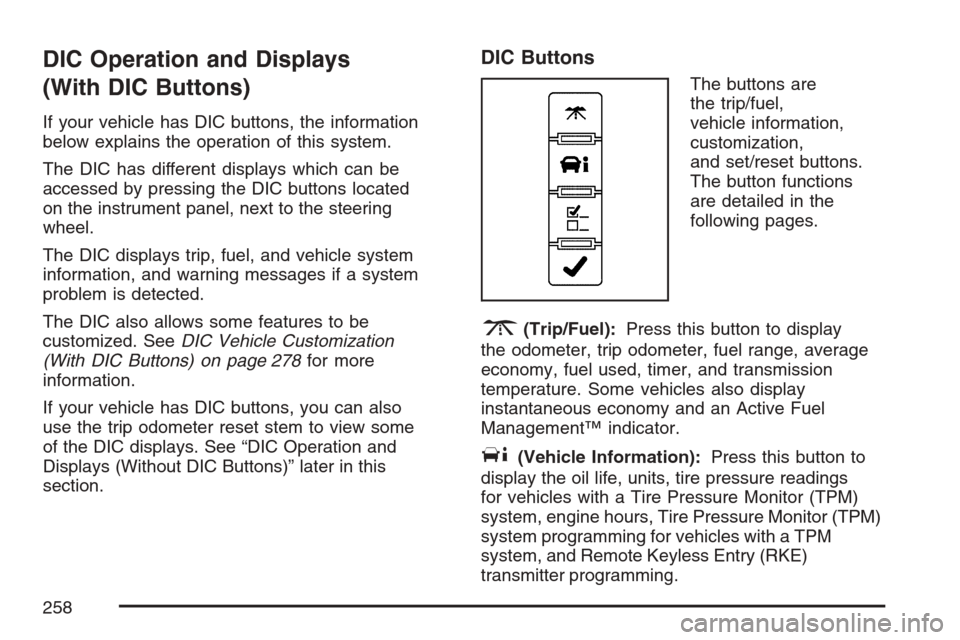
DIC Buttons
The buttons are
the trip/fuel,
vehicle information,
customization,
and set/reset buttons.
The button functions
are detailed in the
following pages.
3(Trip/Fuel):Press this button to display
the odometer, trip odometer, fuel range, average
economy, fuel used, timer, and transmission
temperature. Some vehicles also display
instantaneous economy and an Active Fuel
Management™ indicator.
T(Vehicle Information):Press this button to
display the oil life, units, tire pressure readings
for vehicles with a Tire Pressure Monitor (TPM)
system, engine hours, Tire Pressure Monitor (TPM)
system programming for vehicles with a TPM
system, and Remote Keyless Entry (RKE)
transmitter programming.
258
Page 259 of 618
U(Customization):Press this button to
customize the feature settings on your vehicle.
SeeDIC Vehicle Customization (With DIC Buttons)
on page 278for more information.
V(Set/Reset):Press this button to set or reset
certain functions and to turn off or acknowledge
messages on the DIC.
Trip/Fuel Menu Items
3
(Trip/Fuel):Press this button to scroll
through the following menu items:
Odometer
Press the trip/fuel button until ODOMETER
displays. This display shows the distance the
vehicle has been driven in either miles (mi)
or kilometers (km). Pressing the trip odometer
reset stem will also display the odometer.
To switch between English and metric
measurements, see “Units” later in this section.
Trip Odometer
Press the trip/fuel button until TRIP displays.
This display shows the current distance traveled
in either miles (mi) or kilometers (km) since the
last reset for the trip odometer. Pressing the
trip odometer reset stem will also display the
trip odometer.
The trip odometer can be reset to zero by pressing
the set/reset button while the trip odometer is
displayed. You can also reset the trip odometer
while it is displayed by pressing and holding
the trip odometer reset stem.
The trip odometer has a feature called the
retro-active reset. This can be used to set the
trip odometer to the number of miles (kilometers)
driven since the ignition was last turned on.
This can be used if the trip odometer is not
reset at the beginning of the trip.
To use the retro-active reset feature, press and
hold the set/reset button for at least four seconds.
The trip odometer will display the number of
miles (mi) or kilometers (km) driven since the
ignition was last turned on and the vehicle
was moving. Once the vehicle begins moving,
the trip odometer will accumulate mileage.
259
Page 263 of 618

If a low or high tire pressure condition is detected
by the system while driving, a message advising
you to check the pressure in a specic tire
will appear in the display. SeeInation - Tire
Pressure on page 500andDIC Warnings
and Messages on page 267for more information.
If the tire pressure display shows dashes
instead of a value, there may be a problem
with your vehicle. If this consistently occurs,
see your dealer for service.
Engine Hours
Press the vehicle information button until
ENGINE HOURS displays. This display shows
the total number of hours the engine has run.
Relearn Tire Positions
If your vehicle has a Tire Pressure Monitor (TPM)
system, after rotating the tires or after replacing
a tire or sensor, the system must re-learn the
tire positions. To re-learn the tire positions, see
Tire Pressure Monitor System on page 501.
SeeTire Inspection and Rotation on page 506
andDIC Warnings and Messages on page 267
for more information.
Relearn Remote Key
This display allows you to match Remote Keyless
Entry (RKE) transmitters to your vehicle. To match
an RKE transmitter to your vehicle, do the following:
1. Press the vehicle information button until
PRESS
VTO RELEARN REMOTE KEY
displays.
2. Press the set/reset button until REMOTE
KEY LEARNING ACTIVE is displayed.
3. Press and hold the lock and unlock buttons
on the rst transmitter at the same time
for about 15 seconds.
A chime will sound indicating that the
transmitter is matched.
4. To match additional transmitters at this time,
repeat Step 3.
Each vehicle can have a maximum of
eight transmitters matched to it.
5. To exit the programming mode, you must
cycle the key to LOCK.
Blank Display
This display shows no information.
263