service CHEVROLET AVALANCHE 2009 2.G User Guide
[x] Cancel search | Manufacturer: CHEVROLET, Model Year: 2009, Model line: AVALANCHE, Model: CHEVROLET AVALANCHE 2009 2.GPages: 550, PDF Size: 3.06 MB
Page 116 of 550
PASS-Key®III+ Electronic
Immobilizer
The PASS-Key III+ system operates on a radio
frequency subject to Federal Communications
Commission (FCC) Rules and with Industry Canada.
This device complies with Part 15 of the FCC Rules.
Operation is subject to the following two conditions:
1. This device may not cause harmful interference.
2. This device must accept any interference received,
including interference that may cause undesired
operation.
This device complies with RSS-210 of Industry Canada.
Operation is subject to the following two conditions:
1. This device may not cause interference.
2. This device must accept any interference received,
including interference that may cause undesired
operation of the device.
Changes or modications to this system by other than
an authorized service facility could void authorization to
use this equipment.
PASS-Key III+ uses a radio frequency transponder in
the key that matches a decoder in the vehicle.
PASS-Key®III+ Electronic
Immobilizer Operation
Your vehicle has PASS-Key®III+ (Personalized
Automotive Security System) theft-deterrent system.
PASS-Key
®III+ is a passive theft-deterrent system.
The system is automatically armed when the key
is removed from the ignition.
The system is automatically disarmed when the key is
turned to ON/RUN, ACC/ACCESSORY or START
from the LOCK/OFF position.
You do not have to manually arm or disarm the system.
The security light will come on if there is a problem
with arming or disarming the theft-deterrent system.
When the PASS-Key
®III+ system senses that someone
is using the wrong key, it prevents the vehicle from
starting. Anyone using a trial-and-error method to start
the vehicle will be discouraged because of the high
number of electrical key codes.
If the engine does not start and the security light on the
instrument panel cluster comes on when trying to
start the vehicle, there may be a problem with your
theft-deterrent system. Turn the ignition off and try again.
2-30
Page 117 of 550
If the engine still does not start, and the key appears to
be undamaged, try another ignition key. At this time,
you may also want to check the fuse, seeFuses
and Circuit Breakers on page 5-108. If the engine still
does not start with the other key, your vehicle needs
service. If your vehicle does start, the rst key may be
faulty. See your dealer/retailer who can service the
PASS-Key
®III+ to have a new key made. In an
emergency, contact Roadside Assistance.
It is possible for the PASS-Key
®III+ decoder to learn
the transponder value of a new or replacement key. Up
to 10 keys may be programmed for the vehicle. The
following procedure is for programming additional keys
only. If all the currently programmed keys are lost or
do not operate, you must see your dealer/retailer
or a locksmith who can service PASS-Key
®III+ to have
keys made and programmed to the system.
See your dealer/retailer or a locksmith who can service
PASS-Key
®III+ to get a new key blank that is cut
exactly as the ignition key that operates the system.To program the new additional key:
1. Verify that the new key has a
1stamped on it.
2. Insert the original, already programmed, key in the
ignition and start the engine. If the engine will not
start, see your dealer/retailer for service.
3. After the engine has started, turn the key to
LOCK/OFF, and remove the key.
4. Insert the new key to be programmed and turn it to
the ON/RUN position within ve seconds of turning
the ignition to the LOCK/OFF position in Step 3.
The security light will turn off once the key has been
programmed.
5. Repeat Steps 1 through 4 if additional keys are to
be programmed.
If you lose or damage your PASS-Key
®III+ key, see
your dealer/retailer or a locksmith who can service
PASS-Key
®III+ to have a new key made.
Do not leave the key or device that disarms or
deactivates the theft deterrent system in the vehicle.
2-31
Page 119 of 550
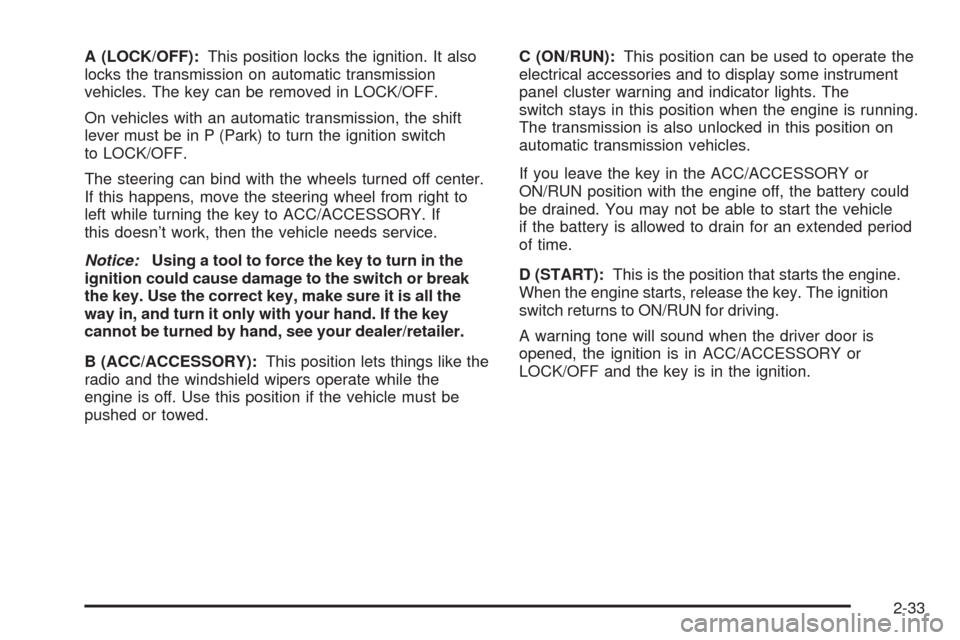
A (LOCK/OFF):This position locks the ignition. It also
locks the transmission on automatic transmission
vehicles. The key can be removed in LOCK/OFF.
On vehicles with an automatic transmission, the shift
lever must be in P (Park) to turn the ignition switch
to LOCK/OFF.
The steering can bind with the wheels turned off center.
If this happens, move the steering wheel from right to
left while turning the key to ACC/ACCESSORY. If
this doesn’t work, then the vehicle needs service.
Notice:Using a tool to force the key to turn in the
ignition could cause damage to the switch or break
the key. Use the correct key, make sure it is all the
way in, and turn it only with your hand. If the key
cannot be turned by hand, see your dealer/retailer.
B (ACC/ACCESSORY):This position lets things like the
radio and the windshield wipers operate while the
engine is off. Use this position if the vehicle must be
pushed or towed.C (ON/RUN):This position can be used to operate the
electrical accessories and to display some instrument
panel cluster warning and indicator lights. The
switch stays in this position when the engine is running.
The transmission is also unlocked in this position on
automatic transmission vehicles.
If you leave the key in the ACC/ACCESSORY or
ON/RUN position with the engine off, the battery could
be drained. You may not be able to start the vehicle
if the battery is allowed to drain for an extended period
of time.
D (START):This is the position that starts the engine.
When the engine starts, release the key. The ignition
switch returns to ON/RUN for driving.
A warning tone will sound when the driver door is
opened, the ignition is in ACC/ACCESSORY or
LOCK/OFF and the key is in the ignition.
2-33
Page 129 of 550
Four-Wheel Drive
If the vehicle has four-wheel drive, you can send the
engine’s driving power to all four wheels for extra
traction. Read the following before using four-wheel
drive.
Notice:Driving on clean, dry pavement in
Four-Wheel-Drive High or Four-Wheel-Drive Low for
an extended period of time may cause premature
wear on your vehicle’s powertrain. Do not drive on
clean, dry pavement in Four-Wheel-Drive High or
Four-Wheel-Drive Low for extended periods of time.
While driving on clean dry pavement and during tight
turns, you may experience a vibration in the steering
system.
The vehicle has StabiliTrak
®. Shifting into
Four-Wheel-Drive Low will turn Traction Control
and StabiliTrak
®off. SeeStabiliTrak®System on
page 4-6.
Front Axle
The front axle engages and disengages automatically
when you shift the transfer case. Some delay for
the axle to engage or disengage is normal.
Automatic Transfer Case
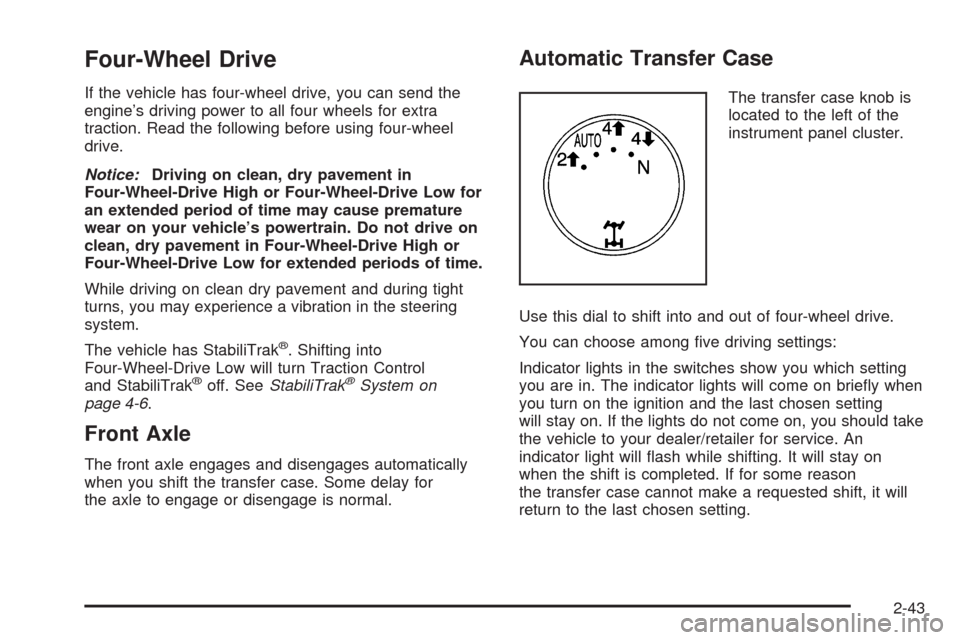
The transfer case knob is
located to the left of the
instrument panel cluster.
Use this dial to shift into and out of four-wheel drive.
You can choose among ve driving settings:
Indicator lights in the switches show you which setting
you are in. The indicator lights will come on briey when
you turn on the ignition and the last chosen setting
will stay on. If the lights do not come on, you should take
the vehicle to your dealer/retailer for service. An
indicator light will ash while shifting. It will stay on
when the shift is completed. If for some reason
the transfer case cannot make a requested shift, it will
return to the last chosen setting.
2-43
Page 130 of 550
2m(Two-Wheel Drive High):This setting is used for
driving in most street and highway situations. The
front axle is not engaged in two-wheel drive. This setting
also provides the best fuel economy.
AUTO (Automatic Four-Wheel Drive):This setting is
ideal for use when road surface traction conditions
are variable. When driving your vehicle in AUTO, the
front axle is engaged, but the vehicle’s power is primarily
sent to the rear wheels. When the vehicle’s software
determines a need for more traction, the system
will transfer more power to the front wheels. Driving in
this mode results in slightly lower fuel economy than
Two-Wheel Drive High.
4
m(Four-Wheel Drive High):Use the four-wheel high
position when you need extra traction, such as on snowy
or icy roads or in most off-road situations. This setting
also engages your front axle to help drive the vehicle.
This is the best setting to use when plowing snow.
4
n(Four-Wheel Drive Low):This setting also engages
the front axle and delivers extra torque. You may never
need this setting. It sends maximum power to all four
wheels. You might choose Four-Wheel Drive Low if you
are driving off-road in deep sand, deep mud, deep snow,
and while climbing or descending steep hills.The vehicle has StabiliTrak
®. Shifting into
Four-Wheel-Drive Low will turn Traction Control and
StabiliTrak
®off. SeeStabiliTrak®System on page 4-6.
{CAUTION:
Shifting the transfer case to N (Neutral) can cause
the vehicle to roll even if the transmission is in
P (Park). You or someone else could be seriously
injured. Be sure to set the parking brake before
placing the transfer case in N (Neutral). See
Parking Brake on page 2-48.
N (Neutral):Shift the vehicle’s transfer case to
N (Neutral) only when towing the vehicle. See
Recreational Vehicle Towing on page 4-40orTowing
Your Vehicle on page 4-40for more information.
If the SERVICE 4 WHEEL DRIVE message stays on,
you should take the vehicle to your dealer/retailer
for service. See “SERVICE 4 WHEEL DRIVE message”
underDIC Warnings and Messages on page 3-58.
2-44
Page 138 of 550
Shifting Out of Park
This vehicle is equipped with an electronic shift lock
release system. The shift lock release is designed to:
Prevent ignition key removal unless the shift
lever is in P (Park) with the shift lever button fully
released, and
Prevent movement of the shift lever out of P (Park),
unless the ignition is in ON/RUN or
ACC/ACCESSORY and the regular brake pedal is
applied.
The shift lock release is always functional except
in the case of an uncharged or low voltage (less than
9 volt) battery.
If the vehicle has an uncharged battery or a battery with
low voltage, try charging or jump starting the battery.
SeeJump Starting on page 5-40for more information.
To shift out of P (Park) use the following:
1. Apply the brake pedal.
2. Move the shift lever to the desired position.If you still are unable to shift out of P (Park):
1. Ease the pressure on the shift lever.
2. While holding down the brake pedal, press the shift
lever all the way into P (Park).
3. Move the shift lever to the desired position.
If you are still having a problem shifting, then have the
vehicle serviced soon.
Parking Over Things That Burn
{CAUTION:
Things that can burn could touch hot exhaust
parts under the vehicle and ignite. Do not park
over papers, leaves, dry grass, or other things that
can burn.
2-52
Page 141 of 550
Mirrors
Manual Rearview Mirror
Hold the inside rearview mirror in the center to move it
for a clearer view behind your vehicle. Adjust the
mirror to avoid glare from the headlamps behind you.
Push the tab forward for daytime use and pull it for
nighttime use.
Automatic Dimming Rearview Mirror
The vehicle may have an automatic dimming inside
rearview mirror.
Vehicles with OnStar
®have three additional control
buttons located at the bottom of the mirror. See
your dealer/retailer for more information about OnStar
®
and how to subscribe to it. SeeOnStar®System on
page 2-66for more information about the services
OnStar
®provides.
O(On/Off):Press to turn the dimming feature on
or off.
The vehicle may also have a Rear Vision Camera
(RVC). SeeRear Vision Camera (RVC) on page 2-61
for more information.
If the vehicle has RVC, the
O(On/Off) button for
turning the automatic dimming feature on or off will not
be available.
Automatic Dimming Mirror Operation
Automatic dimming reduces the glare from the
headlamps of the vehicle behind you. The dimming
feature comes on and the indicator light illuminates each
time the ignition is turned to start.
Cleaning the Mirror
Do not spray glass cleaner directly on the mirror. Use a
soft towel dampened with water.
2-55
Page 149 of 550
Adjusting the Brightness and Contrast of
the Screen
To adjust the brightness and contrast of the screen,
press the MENU button while the rear vision camera
image is on the display. Any adjustments made will only
affect the rear vision camera screen.
](Brightness):Touch the + (plus) or – (minus)
screen buttons to increase or decrease the brightness
of the screen.
_(Contrast):Touch the + (plus) or – (minus) screen
buttons to increase or decrease the contrast of the
screen.
Symbols
The navigation system may have a feature that lets the
driver view symbols on the navigation screen while
using the rear vision camera. The Ultrasonic Rear Park
Assist (URPA) system must not be disabled to use
the caution symbols. If URPA has been disabled and
the symbols have been turned on, the Rear Parking
Assist Symbols Unavailable error message may display.
SeeUltrasonic Rear Parking Assist (URPA) on
page 2-58.The symbols appear when an object has been detected
by the URPA system. The symbol may cover the
object when viewing the navigation screen.
To turn the symbols on or off:
1. Make sure that URPA has not been disabled.
2. Shift into P (Park).
3. Press the MENU hard key to enter the congure
menu options, then press the MENU hard key
repeatedly until Display is selected or touch
the Display screen button.
4. Select the Rear Camera Options screen button.
The Rear Camera Options screen will display.
5. Touch the Symbols screen button. The screen
button will be highlighted when on.Rear Vision Camera Error Messages
Service Rear Vision Camera System:This message
can display when the system is not receiving
information it requires from other vehicle systems.
If any other problem occurs or if a problem persists, see
your dealer/retailer.
2-63
Page 152 of 550
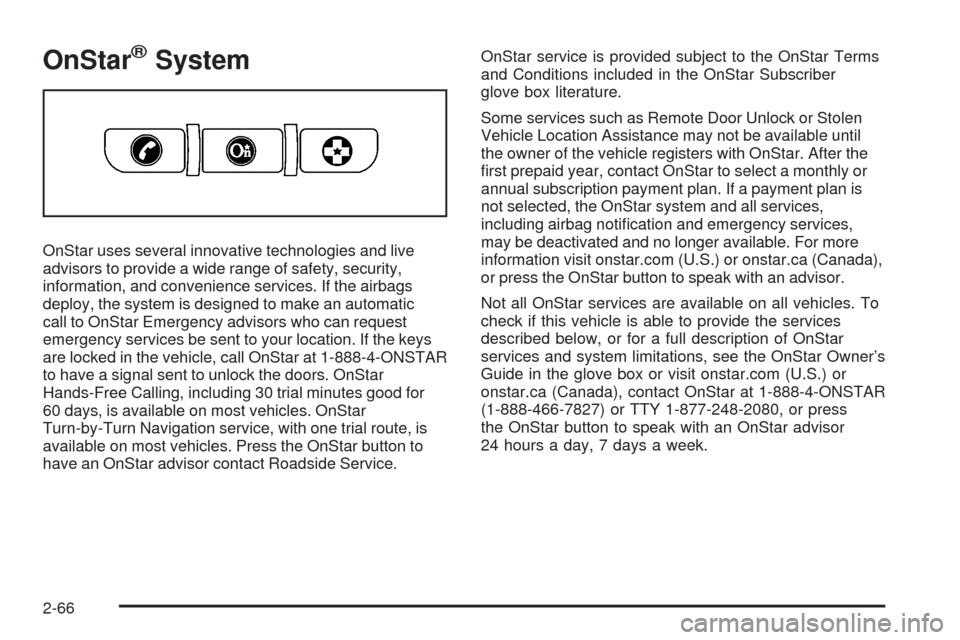
OnStar®System
OnStar uses several innovative technologies and live
advisors to provide a wide range of safety, security,
information, and convenience services. If the airbags
deploy, the system is designed to make an automatic
call to OnStar Emergency advisors who can request
emergency services be sent to your location. If the keys
are locked in the vehicle, call OnStar at 1-888-4-ONSTAR
to have a signal sent to unlock the doors. OnStar
Hands-Free Calling, including 30 trial minutes good for
60 days, is available on most vehicles. OnStar
Turn-by-Turn Navigation service, with one trial route, is
available on most vehicles. Press the OnStar button to
have an OnStar advisor contact Roadside Service.OnStar service is provided subject to the OnStar Terms
and Conditions included in the OnStar Subscriber
glove box literature.
Some services such as Remote Door Unlock or Stolen
Vehicle Location Assistance may not be available until
the owner of the vehicle registers with OnStar. After the
rst prepaid year, contact OnStar to select a monthly or
annual subscription payment plan. If a payment plan is
not selected, the OnStar system and all services,
including airbag notication and emergency services,
may be deactivated and no longer available. For more
information visit onstar.com (U.S.) or onstar.ca (Canada),
or press the OnStar button to speak with an advisor.
Not all OnStar services are available on all vehicles. To
check if this vehicle is able to provide the services
described below, or for a full description of OnStar
services and system limitations, see the OnStar Owner’s
Guide in the glove box or visit onstar.com (U.S.) or
onstar.ca (Canada), contact OnStar at 1-888-4-ONSTAR
(1-888-466-7827) or TTY 1-877-248-2080, or press
the OnStar button to speak with an OnStar advisor
24 hours a day, 7 days a week.
2-66
Page 153 of 550
OnStar Services Available with the
Safe & Sound Plan
Automatic Notication of Airbag Deployment
Advanced Automatic Crash Notication (AACN)
(If equipped)
Link to Emergency Services
Roadside Assistance
Stolen Vehicle Location Assistance
Remote Door Unlock/Vehicle Alert
OnStar Vehicle Diagnostic Email
GM Goodwrench On Demand Diagnostics
OnStar Hands-Free Calling with 30 trial minutes
OnStar Virtual Advisor (U.S. Only)
OnStar Services Included with
Directions & Connections Plan
All Safe and Sound Plan Services
OnStar Turn-by-Turn Navigation (If equipped) or
Driving Directions - Advisor delivered
RideAssist
Information and Convenience Services
OnStar Hands-Free Calling
OnStar Hands-Free Calling allows eligible OnStar
subscribers to make and receive calls using voice
commands. Hands-Free Calling is fully integrated into
the vehicle, and can be used with OnStar Pre-Paid
Minute Packages. Most vehicles include 30 trial minutes
good for 60 days. Hands-Free Calling can also be
linked to a Verizon Wireless service plan in the U.S. or
a Bell Mobility service plan in Canada, depending
on eligibility. To nd out more, refer to the OnStar
Owner’s Guide in the vehicle’s glove box, visit
onstar.com or onstar.ca, or speak with an OnStar
advisor by pressing the OnStar button or calling
1-888-4-ONSTAR (1-888-466-7827).
OnStar Turn-by-Turn Navigation
Vehicles with the OnStar Turn-by-Turn Navigation
system can provide voice-guided driving directions.
Press the OnStar button to have an OnStar advisor
locate a business or address and download driving
directions to the vehicle. Voice-guided directions to the
desired destination will play through the audio system
speakers. See the OnStar Owner’s Guide for more
information.
2-67