tailgate CHEVROLET AVALANCHE 2009 2.G User Guide
[x] Cancel search | Manufacturer: CHEVROLET, Model Year: 2009, Model line: AVALANCHE, Model: CHEVROLET AVALANCHE 2009 2.GPages: 550, PDF Size: 3.06 MB
Page 174 of 550
Even when all of these things are working properly and
the cover system is on, there may be some instances
(heavy rains, automated car washes, etc.) when
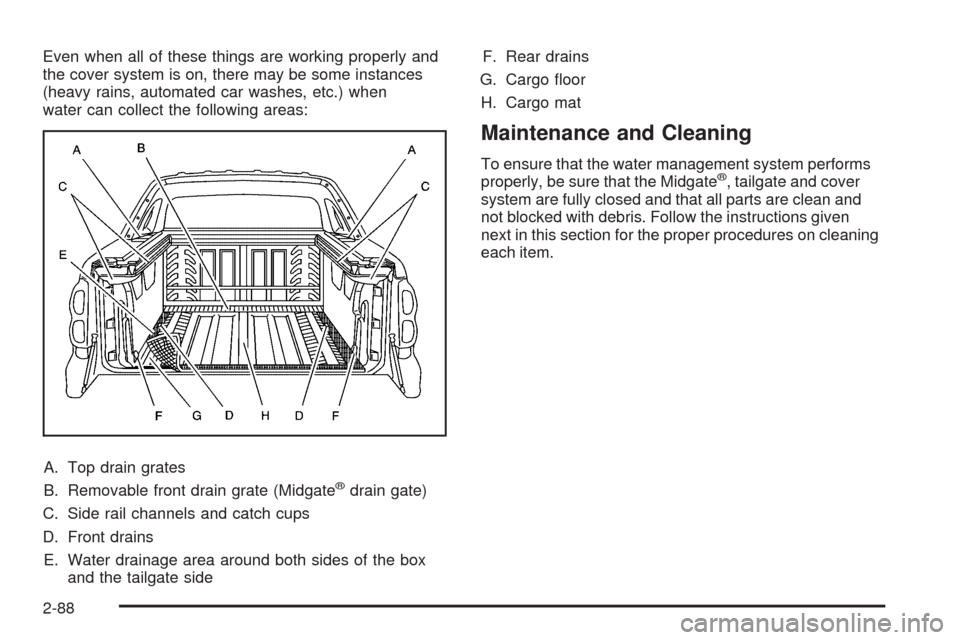
water can collect the following areas:
A. Top drain grates
B. Removable front drain grate (Midgate
®drain gate)
C. Side rail channels and catch cups
D. Front drains
E. Water drainage area around both sides of the box
and the tailgate sideF. Rear drains
G. Cargo oor
H. Cargo mat
Maintenance and Cleaning
To ensure that the water management system performs
properly, be sure that the Midgate®, tailgate and cover
system are fully closed and that all parts are clean and
not blocked with debris. Follow the instructions given
next in this section for the proper procedures on cleaning
each item.
2-88
Page 248 of 550
DISPLAY LANGUAGE
This feature allows you to select the language in which
the DIC messages will appear.
Press the customization button until the DISPLAY
LANGUAGE screen appears on the DIC display. Press
the set/reset button once to access the settings for
this feature. Then press the customization button
to scroll through the following settings:
ENGLISH (default):All messages will appear in
English.
FRANCAIS:All messages will appear in French.
ESPANOL:All messages will appear in Spanish.
NO CHANGE:No change will be made to this feature.
The current setting will remain.
To select a setting, press the set/reset button while the
desired setting is displayed on the DIC.
You can also change the language by pressing the trip
odometer reset stem. See “Language” under DIC
Operation and Displays (Without DIC Buttons) earlier in
this section for more information.
AUTO DOOR LOCK
This feature allows you to select when the vehicle’s
doors will automatically lock. SeeProgrammable
Automatic Door Locks on page 2-11for more
information.
Press the customization button until AUTO DOOR
LOCK appears on the DIC display. Press the set/reset
button once to access the settings for this feature.
Then press the customization button to scroll through
the following settings:
SHIFT OUT OF PARK (default):The doors, including
the tailgate, will automatically lock when the vehicle
is shifted out of P (Park).
AT VEHICLE SPEED:The doors, including the tailgate,
will automatically lock when the vehicle speed is
above 8 mph (13 km/h) for three seconds.
NO CHANGE:No change will be made to this feature.
The current setting will remain.
To select a setting, press the set/reset button while the
desired setting is displayed on the DIC.
3-68
Page 249 of 550
AUTO DOOR UNLOCK
This feature allows you to select whether or not to turn
off the automatic door unlocking feature. It also
allows you to select which doors and when the doors
will automatically unlock. SeeProgrammable Automatic
Door Locks on page 2-11for more information.
Press the customization button until AUTO DOOR
UNLOCK appears on the DIC display. Press the
set/reset button once to access the settings for this
feature. Then press the customization button to scroll
through the following settings:
OFF:None of the doors will automatically unlock.
DRIVER AT KEY OUT:Only the driver’s door will
unlock when the key is taken out of the ignition.
DRIVER IN PARK:Only the driver’s door will unlock
when the vehicle is shifted into P (Park).
ALL AT KEY OUT:All of the doors, including the
tailgate, will unlock when the key is taken out of the
ignition.
ALL IN PARK (default):All of the doors, including the
tailgate, will unlock when the vehicle is shifted into
P (Park).
NO CHANGE:No change will be made to this feature.
The current setting will remain.To select a setting, press the set/reset button while the
desired setting is displayed on the DIC.
REMOTE DOOR LOCK
This feature allows you to select the type of feedback
you will receive when locking the vehicle with the
Remote Keyless Entry (RKE) transmitter. You will not
receive feedback when locking the vehicle with the RKE
transmitter if the doors are open. SeeRemote Keyless
Entry (RKE) System Operation on page 2-5for more
information.
Press the customization button until REMOTE DOOR
LOCK appears on the DIC display. Press the set/reset
button once to access the settings for this feature.
Then press the customization button to scroll through
the following settings:
OFF:There will be no feedback when you press the
lock button on the RKE transmitter.
LIGHTS ONLY:The exterior lamps will ash when you
press the lock button on the RKE transmitter.
HORN ONLY:The horn will sound on the second press
of the lock button on the RKE transmitter.
HORN & LIGHTS (default):The exterior lamps will
ash when you press the lock button on the RKE
transmitter, and the horn will sound when the lock button
is pressed again within ve seconds of the previous
command.
3-69
Page 250 of 550
NO CHANGE:No change will be made to this feature.
The current setting will remain.
To select a setting, press the set/reset button while the
desired setting is displayed on the DIC.
REMOTE DOOR UNLOCK
This feature allows you to select the type of feedback you
will receive when unlocking the vehicle with the Remote
Keyless Entry (RKE) transmitter. You will not receive
feedback when unlocking the vehicle with the RKE
transmitter if the doors are open. SeeRemote Keyless
Entry (RKE) System Operation on page 2-5for more
information.
Press the customization button until REMOTE DOOR
UNLOCK appears on the DIC display. Press the set/reset
button once to access the settings for this feature. Then
press the customization button to scroll through the
following settings:
LIGHTS OFF:The exterior lamps will not ash when
you press the unlock button on the RKE transmitter.
LIGHTS ON (default):The exterior lamps will
ash when you press the unlock button on the RKE
transmitter.
NO CHANGE:No change will be made to this feature.
The current setting will remain.
To select a setting, press the set/reset button while the
desired setting is displayed on the DIC.
DELAY DOOR LOCK
This feature allows you to select whether or not the
locking of the vehicle’s doors and tailgate will be delayed.
When locking the doors and tailgate with the power door
lock switch and a door or the tailgate is open, this feature
will delay locking the doors and tailgate until ve seconds
after the last door is closed. You will hear three chimes to
signal that the delayed locking feature is in use. The key
must be out of the ignition for this feature to work. You
can temporarily override delayed locking by pressing the
power door lock switch twice or the lock button on the
RKE transmitter twice. SeeDelayed Locking on
page 2-11for more information.
Press the customization button until DELAY DOOR
LOCK appears on the DIC display. Press the set/reset
button once to access the settings for this feature.
Then press the customization button to scroll through
the following settings:
OFF:There will be no delayed locking of the vehicle’s
doors.
ON (default):The doors will not lock until ve seconds
after the last door or the tailgate is closed.
NO CHANGE:No change will be made to this feature.
The current setting will remain.
To select a setting, press the set/reset button while the
desired setting is displayed on the DIC.
3-70
Page 432 of 550
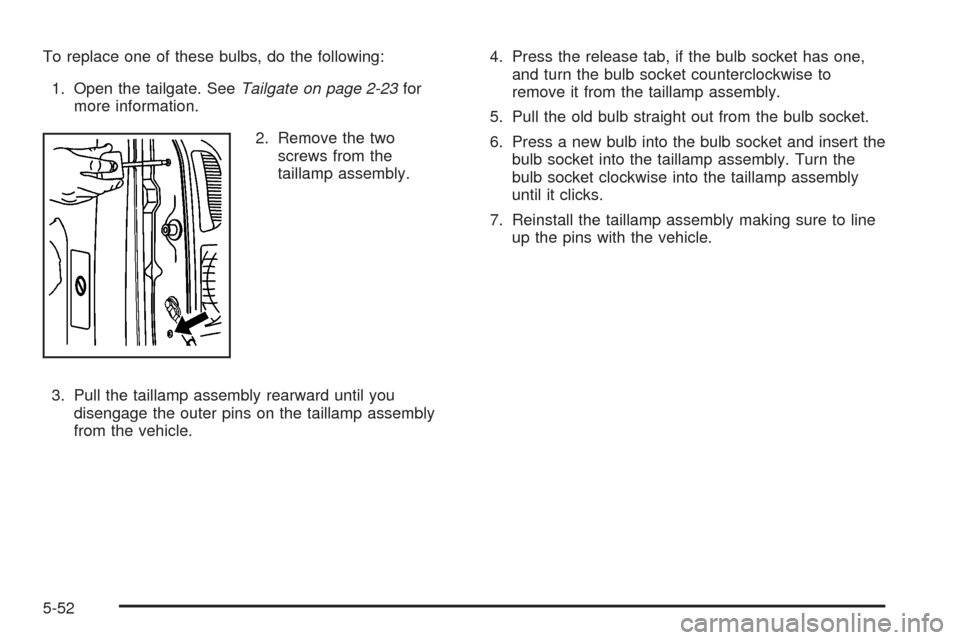
To replace one of these bulbs, do the following:
1. Open the tailgate. SeeTailgate on page 2-23for
more information.
2. Remove the two
screws from the
taillamp assembly.
3. Pull the taillamp assembly rearward until you
disengage the outer pins on the taillamp assembly
from the vehicle.4. Press the release tab, if the bulb socket has one,
and turn the bulb socket counterclockwise to
remove it from the taillamp assembly.
5. Pull the old bulb straight out from the bulb socket.
6. Press a new bulb into the bulb socket and insert the
bulb socket into the taillamp assembly. Turn the
bulb socket clockwise into the taillamp assembly
until it clicks.
7. Reinstall the taillamp assembly making sure to line
up the pins with the vehicle.
5-52
Page 507 of 550
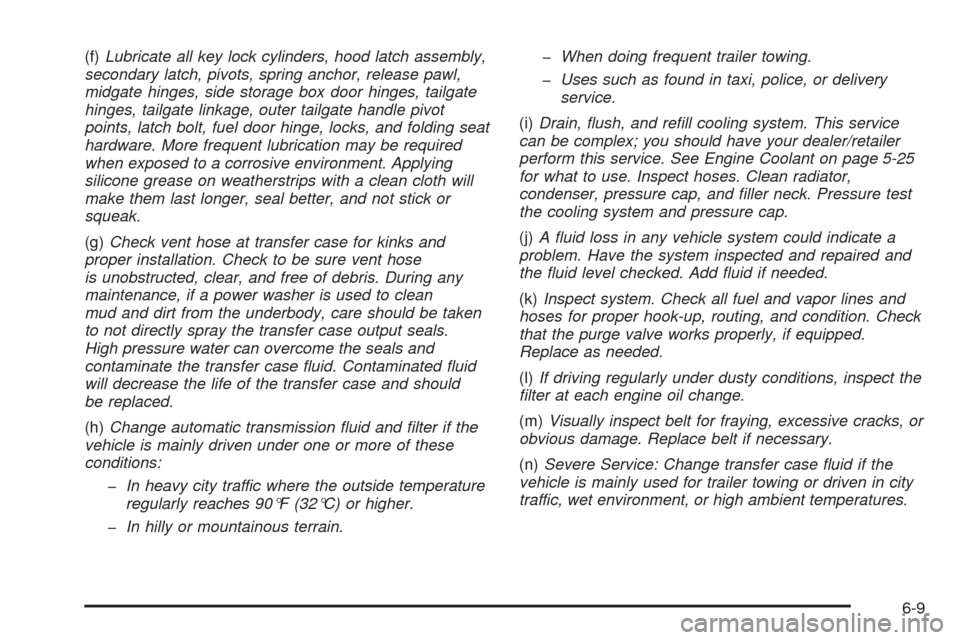
(f)Lubricate all key lock cylinders, hood latch assembly,
secondary latch, pivots, spring anchor, release pawl,
midgate hinges, side storage box door hinges, tailgate
hinges, tailgate linkage, outer tailgate handle pivot
points, latch bolt, fuel door hinge, locks, and folding seat
hardware. More frequent lubrication may be required
when exposed to a corrosive environment. Applying
silicone grease on weatherstrips with a clean cloth will
make them last longer, seal better, and not stick or
squeak.
(g)Check vent hose at transfer case for kinks and
proper installation. Check to be sure vent hose
is unobstructed, clear, and free of debris. During any
maintenance, if a power washer is used to clean
mud and dirt from the underbody, care should be taken
to not directly spray the transfer case output seals.
High pressure water can overcome the seals and
contaminate the transfer case uid. Contaminated uid
will decrease the life of the transfer case and should
be replaced.
(h)Change automatic transmission uid and lter if the
vehicle is mainly driven under one or more of these
conditions:
In heavy city traffic where the outside temperature
regularly reaches 90°F (32°C) or higher.
In hilly or mountainous terrain.When doing frequent trailer towing.
Uses such as found in taxi, police, or delivery
service.
(i)Drain, ush, and rell cooling system. This service
can be complex; you should have your dealer/retailer
perform this service. See Engine Coolant on page 5-25
for what to use. Inspect hoses. Clean radiator,
condenser, pressure cap, and ller neck. Pressure test
the cooling system and pressure cap.
(j)A uid loss in any vehicle system could indicate a
problem. Have the system inspected and repaired and
the uid level checked. Add uid if needed.
(k)Inspect system. Check all fuel and vapor lines and
hoses for proper hook-up, routing, and condition. Check
that the purge valve works properly, if equipped.
Replace as needed.
(l)If driving regularly under dusty conditions, inspect the
lter at each engine oil change.
(m)Visually inspect belt for fraying, excessive cracks, or
obvious damage. Replace belt if necessary.
(n)Severe Service: Change transfer case uid if the
vehicle is mainly used for trailer towing or driven in city
traffic, wet environment, or high ambient temperatures.
6-9
Page 512 of 550
Usage Fluid/Lubricant
Power Steering
SystemGM Power Steering Fluid
(GM Part No. U.S. 89021184, in
Canada 89021186).
Automatic
TransmissionDEXRON
®-VI Automatic
Transmission Fluid.
Key Lock
CylindersMulti-Purpose Lubricant, Superlube
(GM Part No. U.S. 12346241, in
Canada 10953474).
Chassis
LubricationChassis Lubricant
(GM Part No. U.S. 12377985, in
Canada 88901242) or lubricant
meeting requirements of NLGI #2,
Category LB or GC-LB.
Front AxleSAE 80W-90 Axle Lubricant
(GM Part No. U.S. 89021671, in
Canada 89021672).
Rear AxleSAE 75W-90 Synthetic
Axle Lubricant
(GM Part No. U.S. 89021677, in
Canada 89021678) meeting
GM Specication 9986115.
Transfer CaseDEXRON
®-VI Automatic
Transmission Fluid.
Usage Fluid/Lubricant
Front Axle
Propshaft
Spline or
One-Piece
Propshaft
Spline
(Two-Wheel
Drive with Auto.
Trans.)Spline Lubricant, Special Lubricant
(GM Part No. U.S. 12345879, in
Canada 10953511) or lubricant
meeting requirements of
GM 9985830.
Hood HingesMulti-Purpose Lubricant, Superlube
(GM Part No. U.S. 12346241, in
Canada 10953474).
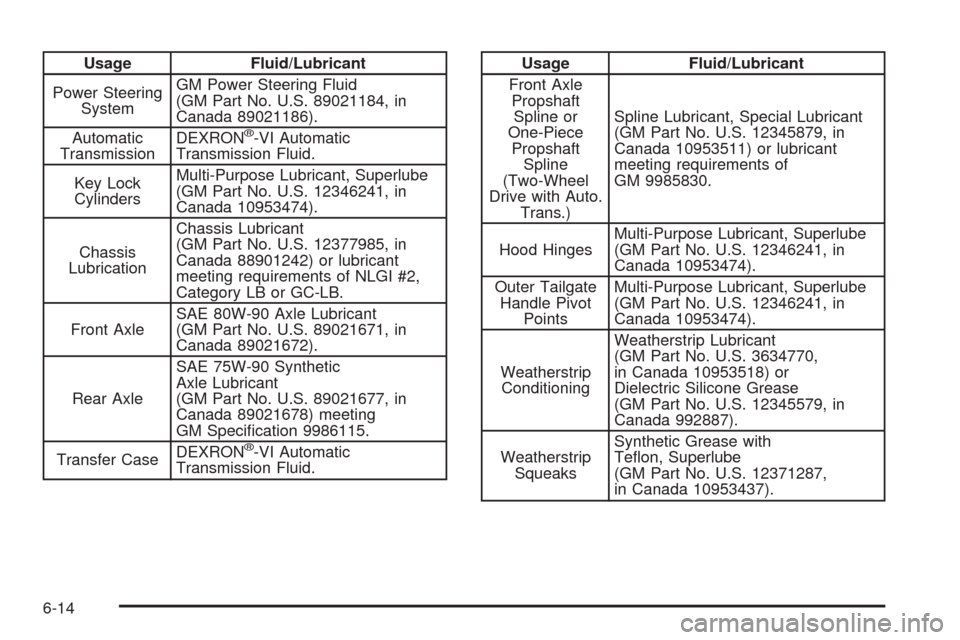
Outer Tailgate
Handle Pivot
PointsMulti-Purpose Lubricant, Superlube
(GM Part No. U.S. 12346241, in
Canada 10953474).
Weatherstrip
ConditioningWeatherstrip Lubricant
(GM Part No. U.S. 3634770,
in Canada 10953518) or
Dielectric Silicone Grease
(GM Part No. U.S. 12345579, in
Canada 992887).
Weatherstrip
SqueaksSynthetic Grease with
Teon, Superlube
(GM Part No. U.S. 12371287,
in Canada 10953437).
6-14
Page 548 of 550
Service (cont.)
Doing Your Own Work................................... 5-4
Engine Soon Lamp......................................3-39
Publications Ordering Information...................7-15
Service, Scheduling Appointments.....................7-10
Servicing Your Airbag-Equipped Vehicle..............1-76
Setting the Clock............................................3-77
Sheet Metal Damage.....................................5-106
Shifting Into Park............................................2-50
Shifting Out of Park........................................2-52
Signals, Turn and Lane-Change.......................... 3-7
Spare Tire.....................................................5-99
Installing....................................................5-86
Removing...................................................5-81
Storing.......................................................5-95
Specications, Capacities...............................5-116
Speedometer..................................................3-31
StabiliTrak
®Indicator Light...............................3-37
StabiliTrak®System.......................................... 4-6
Start Vehicle, Remote....................................... 2-7
Starting the Engine.........................................2-34
Steering.......................................................... 4-9
Steering Wheel Controls, Audio.......................3-130
Steering Wheel, Tilt Wheel................................. 3-6
Steps
Power Assist...............................................2-24
Storage Areas
All-Weather Cargo Area................................2-87
Center Console Storage Area........................2-76
Center Overhead Console.............................2-76Storage Areas (cont.)
Cupholders.................................................2-76
Front Armrest Storage Area...........................2-76
Glove Box..................................................2-76
Luggage Carrier..........................................2-77
Top-Box Storage..........................................2-92
Stuck in Sand, Mud, Ice, or Snow.....................4-32
Sun Visors.....................................................2-27
Sunroof.........................................................2-93
T
Tachometer....................................................3-31
Tailgate.........................................................2-23
Taillamps
Turn Signal, Sidemarker, Stoplamps, and
Back-Up Lamps.......................................5-51
Theft-Deterrent, Radio....................................3-130
Theft-Deterrent Systems...................................2-28
Content Theft-Deterrent................................2-28
PASS-Key
®III+ Electronic Immobilizer............2-30
PASS-Key®III+ Electronic Immobilizer
Operation................................................2-30
Tilt Wheel........................................................ 3-6
Time, Setting..................................................3-77
Tire
Pressure Light.............................................3-38
Tires.............................................................5-55
12