mirror CHEVROLET AVALANCHE 2011 2.G User Guide
[x] Cancel search | Manufacturer: CHEVROLET, Model Year: 2011, Model line: AVALANCHE, Model: CHEVROLET AVALANCHE 2011 2.GPages: 528, PDF Size: 7.65 MB
Page 58 of 528
Black plate (22,1)Chevrolet Avalanche Owner Manual - 2011
2-22 Keys, Doors and Windows
Heated Mirrors
For vehicles with heated mirrors:
<(Rear Window Defogger):
Press to heat the mirrors.
See “Rear Window Defogger” under
Dual Automatic Climate Control
System on page 8‑4 orClimate
Control Systems on page 8‑1 for
more information.
Park Tilt Mirrors
If the vehicle has the memory
package, the passenger and/or
driver mirror tilts to a preselected
position when the vehicle is in
R (Reverse). This feature lets the
driver view the curb when parallel
parking. The mirror(s) return to the
original position when the vehicle is
shifted out of R (Reverse), or the
ignition is turned off or to
OFF/LOCK.
Turn this feature on or off through
the Driver Information Center (DIC).
See Vehicle Personalization (With
DIC Buttons) on page 5‑47 for more
information.
Interior Mirrors
Manual Rearview Mirror
Hold the mirror in the center to
move it for a clearer view of behind
your vehicle. Adjust the mirror to
avoid glare from the headlamps
behind you. Push the tab at the
bottom of the mirror forward for
daytime use and pull it for
nighttime use.
Page 59 of 528
Black plate (23,1)Chevrolet Avalanche Owner Manual - 2011
Keys, Doors and Windows 2-23
Automatic Dimming
Rearview Mirror
The vehicle may have an automatic
dimming inside rearview mirror.
Automatic dimming reduces the
glare from the headlamps of the
vehicle behind you. The dimming
feature comes on and the indicator
light illuminates each time the
ignition is turned to start.
O(On/Off):Press to turn the
dimming feature on or off.
The vehicle may also have a Rear
Vision Camera (RVC). See Rear
Vision Camera (RVC) on page 9‑62
for more information.
If the vehicle has RVC, the
Obutton
for turning the dimming feature on or
off will not be available. Vehicles with OnStar have three
additional control buttons for the
OnStar system. See your dealer for
more information about OnStar and
how to subscribe to it. See the
OnStar Owner Guide for more
information about the services
OnStar provides.
Cleaning the Mirror
Do not spray glass cleaner directly
on the mirror. Use a soft towel
dampened with water.
Page 62 of 528
Black plate (26,1)Chevrolet Avalanche Owner Manual - 2011
2-26 Keys, Doors and Windows
Roof
Sunroof
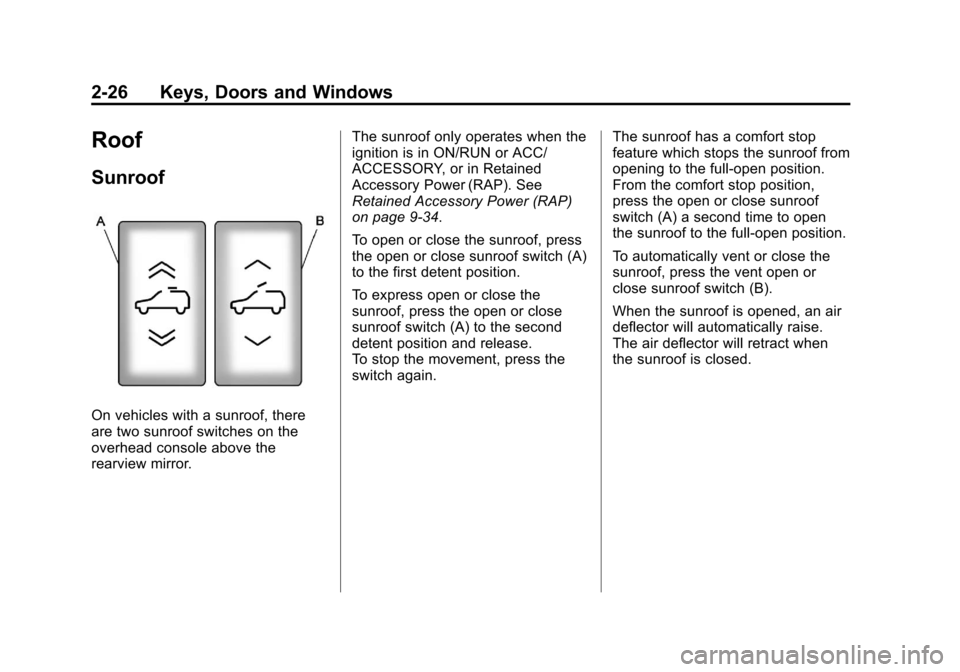
On vehicles with a sunroof, there
are two sunroof switches on the
overhead console above the
rearview mirror.The sunroof only operates when the
ignition is in ON/RUN or ACC/
ACCESSORY, or in Retained
Accessory Power (RAP). See
Retained Accessory Power (RAP)
on page 9‑34.
To open or close the sunroof, press
the open or close sunroof switch (A)
to the first detent position.
To express open or close the
sunroof, press the open or close
sunroof switch (A) to the second
detent position and release.
To stop the movement, press the
switch again.
The sunroof has a comfort stop
feature which stops the sunroof from
opening to the full-open position.
From the comfort stop position,
press the open or close sunroof
switch (A) a second time to open
the sunroof to the full-open position.
To automatically vent or close the
sunroof, press the vent open or
close sunroof switch (B).
When the sunroof is opened, an air
deflector will automatically raise.
The air deflector will retract when
the sunroof is closed.
Page 68 of 528
Black plate (4,1)Chevrolet Avalanche Owner Manual - 2011
3-4 Seats and Restraints
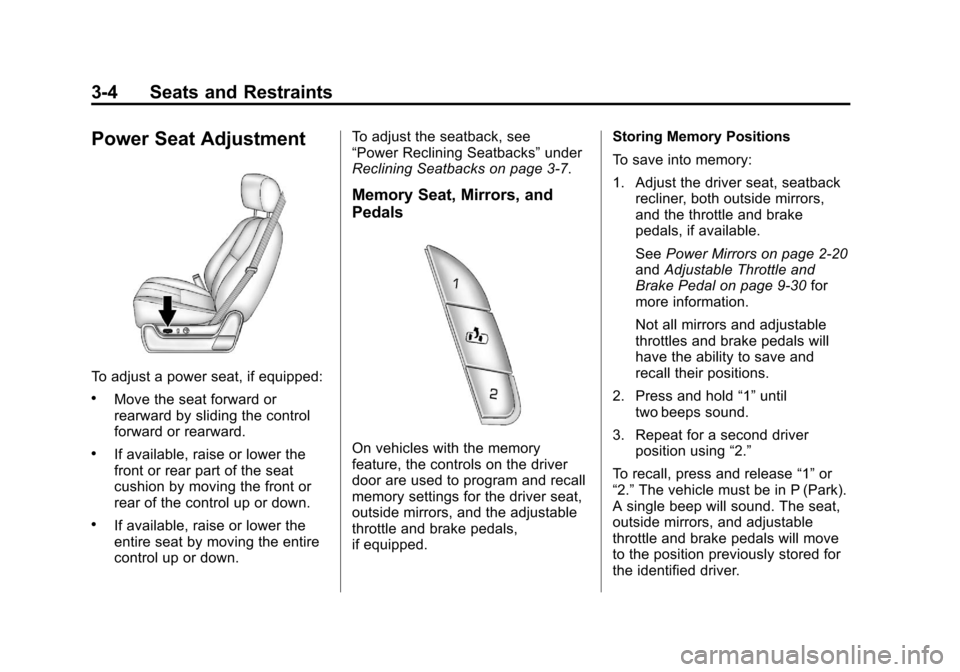
Power Seat Adjustment
To adjust a power seat, if equipped:
.Move the seat forward or
rearward by sliding the control
forward or rearward.
.If available, raise or lower the
front or rear part of the seat
cushion by moving the front or
rear of the control up or down.
.If available, raise or lower the
entire seat by moving the entire
control up or down.To adjust the seatback, see
“Power Reclining Seatbacks”
under
Reclining Seatbacks on page 3‑7.
Memory Seat, Mirrors, and
Pedals
On vehicles with the memory
feature, the controls on the driver
door are used to program and recall
memory settings for the driver seat,
outside mirrors, and the adjustable
throttle and brake pedals,
if equipped. Storing Memory Positions
To save into memory:
1. Adjust the driver seat, seatback
recliner, both outside mirrors,
and the throttle and brake
pedals, if available.
See Power Mirrors on page 2‑20
and Adjustable Throttle and
Brake Pedal on page 9‑30 for
more information.
Not all mirrors and adjustable
throttles and brake pedals will
have the ability to save and
recall their positions.
2. Press and hold “1”until
two beeps sound.
3. Repeat for a second driver position using “2.”
To recall, press and release “1”or
“2.” The vehicle must be in P (Park).
A single beep will sound. The seat,
outside mirrors, and adjustable
throttle and brake pedals will move
to the position previously stored for
the identified driver.
Page 69 of 528

Black plate (5,1)Chevrolet Avalanche Owner Manual - 2011
Seats and Restraints 3-5
Memory Remote Recall
The memory feature can recall the
driver seat, outside mirrors, and
pedals, if available, to stored
positions when entering the vehicle.
To activate, unlock the driver
door with the Remote Keyless
Entry (RKE) transmitter. The driver
seat, outside mirrors, and adjustable
pedals, if available, will move to the
memory position associated with the
transmitter used to unlock the
vehicle.
This feature can be turned on or off
using the vehicle personalization
menu. See“Memory Seat Recall”
under Vehicle Personalization (With
DIC Buttons) on page 5‑47 for more
information.
To stop recall movement, press one
of the power seat controls, memory
buttons, or power mirror buttons,
or the adjustable pedal switch. If something has blocked the driver
seat and/or the adjustable pedals
while recalling a memory position,
the recall may stop. Remove the
obstruction; then press and hold the
appropriate manual control for the
memory item that is not recalling for
two seconds. Try recalling the
memory position again by pressing
the appropriate memory button.
If the memory position is still not
recalling, see your dealer for
service.
Easy Exit Driver Seat
This feature can move the seat
rearward to allow extra room to exit
the vehicle.
B(Easy Exit Driver Seat):
Press
to recall the easy exit seat position.
The vehicle must be in P (Park).
If the easy exit seat feature is
programmed on in the vehicle
personalization menu, automatic
seat movement occurs when the
ignition key is removed. A single beep sounds. The driver
seat moves back approximately
8 cm (3 in). To move the seat back
farther, press the easy exit seat
button again until the seat is all the
way back.
If something has blocked the driver
seat while recalling the exit position,
the recall may stop. Remove the
obstruction; then press and hold the
power seat control rearward for
two seconds. Try recalling the exit
position again. If the exit position is
still not recalling, see your dealer
for service.
See
“Easy Exit Recall” and
“Easy Exit Setup” underVehicle
Personalization (With DIC Buttons)
on page 5‑47 for more information.
Page 199 of 528
Black plate (53,1)Chevrolet Avalanche Owner Manual - 2011
Instruments and Controls 5-53
PARK TILT MIRRORS
If your vehicle has this feature, it
allows you to select whether or
not the outside mirror(s) will
automatically tilt down when the
vehicle is shifted into R (Reverse).
See“Outside Power Foldaway
Mirrors” inFolding Mirrors on
page 2‑21 for more information.
Press the customization button until
PARK TILT MIRRORS appears on
the DIC display. Press the set/reset
button once to access the settings
for this feature. Then press the
customization button to scroll
through the following settings:
OFF (default): Neither outside
mirror will be tilted down when the
vehicle is shifted into R (Reverse). DRIVER MIRROR:
The driver
outside mirror will be tilted down
when the vehicle is shifted into
R (Reverse).
PASSENGER MIRROR: The
passenger outside mirror will be
tilted down when the vehicle is
shifted into R (Reverse).
BOTH MIRRORS: The driver and
passenger outside mirrors will be
tilted down when the vehicle is
shifted into R (Reverse).
NO CHANGE: No change will be
made to this feature. The current
setting will remain.
To select a setting, press the
set/reset button while the desired
setting is displayed on the DIC. EASY EXIT RECALL
If your vehicle has this feature, it
allows you to select your preference
for the automatic easy exit seat
feature. See
“Memory Seat, Mirrors,
and Pedals” inPower Seat
Adjustment on page 3‑4 for more
information.
Press the customization button until
EASY EXIT RECALL appears on
the DIC display. Press the set/reset
button once to access the settings
for this feature. Then press the
customization button to scroll
through the following settings:
DOOR BUTTON ONLY: No
automatic seat exit recall will occur.
The recall will only occur after
pressing the easy exit seat button.
Page 200 of 528
Black plate (54,1)Chevrolet Avalanche Owner Manual - 2011
5-54 Instruments and Controls
BUTTON & KEY OUT (default):If
the features are enabled through the
EASY EXIT SETUP menu, the
driver seat will move back when
the key is removed from the ignition
or after pressing the easy exit
seat button.
The automatic easy exit seat
movement will only occur one time
after the key is removed from the
ignition. If the automatic movement
has already occurred, and you put
the key back in the ignition and
remove it again, the seat will stay in
the original exit position, unless a
memory recall took place prior to
removing the key again.
NO CHANGE: No change will be
made to this feature. The current
setting will remain.
To select a setting, press the
set/reset button while the desired
setting is displayed on the DIC. EASY EXIT SETUP
If your vehicle has this feature, it
allows you to select which areas will
recall with the automatic easy exit
seat feature. It also allows you to
turn off the automatic easy exit
feature. See
“Memory Seat,
Mirrors, and Pedals” inPower Seat
Adjustment on page 3‑4 and“EASY
EXIT RECALL” earlier for more
information.
Press the customization button until
EASY EXIT SETUP appears on the
DIC display. Press the set/reset
button once to access the settings
for this feature. Then press the
menu up/down button to scroll
through the following settings:
OFF: No automatic seat exit will
recall.
SEAT ONLY (Default): The driver
seat will recall.
NO CHANGE: No change will be
made to this feature. The current
setting will remain. To select a setting, press the
set/reset button while the desired
setting is displayed on the DIC.
MEMORY SEAT RECALL
If your vehicle has this feature, it
allows you to select your preference
for the remote memory seat recall
feature. See
“Memory Seat,
Mirrors, and Pedals” inPower Seat
Adjustment on page 3‑4 for more
information.
Press the customization button until
MEMORY SEAT RECALL appears
on the DIC display. Press the set/
reset button once to access the
settings for this feature. Then press
the customization button to scroll
through the following settings:
OFF (default): No remote memory
seat recall will occur.
ON: The driver seat and, on some
vehicles, the outside mirrors will
automatically move to the stored
driving position when the unlock
button on the Remote Keyless Entry
(RKE) transmitter is pressed.
Page 271 of 528
Black plate (3,1)Chevrolet Avalanche Owner Manual - 2011
Climate Controls 8-3
:(Outside Air):Press to turn
the outside air mode on. An
indicator light comes on to show
that outside air is on. Air from
outside the vehicle is circulated
throughout the vehicle. The outside
air mode can be used with all
modes, but it cannot be used with
the recirculation mode. Pressing this
button again will cancel the
recirculation mode.
?(Recirculation): Press to turn
the recirculation mode on or off. An
indicator light comes on to show
that recirculation is on.
This mode recirculates and helps to
quickly cool the air inside the
vehicle. It can be used to help
prevent outside air and odors from
entering the vehicle. The recirculation mode cannot be
used with floor, defrost, or defogging
modes. If recirculation is selected
while in one of those modes, the
indicator flashes three times and
turns off. The air conditioning
compressor will also come on when
this mode is activated. While in
recirculation mode the windows may
fog when the weather is cold and
damp. To clear the fog, select either
the defog or defrost mode and
increase the fan speed. The
recirculation mode can also be
turned off by turning off the engine.
Rear Window Defogger
The rear window defogger uses a
warming grid to remove fog from the
rear window.
<(Rear Window Defogger):
Press this button on the right knob
to turn the rear window defogger on
or off. The system automatically
turns off several minutes after it has
been activated. The defogger can also be turned off by turning off the
engine. Do not drive the vehicle until
all the windows are clear.
For vehicles with heated outside
rearview mirrors, the mirrors will
heat to help clear fog or frost from
the surface of the mirror when the
rear window defog button is
pressed.
Notice:
Do not use anything
sharp on the inside of the rear
window. If you do, you could cut
or damage the warming grid, and
the repairs would not be covered
by the vehicle warranty. Do not
attach a temporary vehicle
license, tape, a decal, or anything
similar to the defogger grid.
Page 277 of 528
Black plate (9,1)Chevrolet Avalanche Owner Manual - 2011
Climate Controls 8-9
Rear Window Defogger
The rear window defogger uses a
warming grid to remove fog from the
rear window.
<(Rear Window Defogger):
Press to turn the rear window
defogger on or off. It automatically
turns off several minutes after it has
been activated. The defogger can
also be turned off by turning off the
engine. Do not drive the vehicle until
all the windows are clear.
Notice: Do not use a razor blade
or sharp object to clear the inside
rear window. Do not adhere
anything to the defogger grid
lines in the rear glass. These
actions may damage the rear
defogger. Repairs would not be
covered by your warranty.
Heated Mirrors: For vehicles with
heated outside rearview mirrors, the
mirrors heat to help clear fog or frost
from the surface of the mirror when
the rear window defog button is
pressed. See Power Mirrors on
page 2‑20.
Sensors
The solar sensor, located in
the defrost grille, middle of the
instrument panel, monitors the
solar heat. Do not cover the solar
sensor or the system will not work
properly.
There is also an interior temperature
sensor located next to the steering
wheel that measures the
temperature of the air inside
your vehicle.
Page 285 of 528
Black plate (7,1)Chevrolet Avalanche Owner Manual - 2011
Driving and Operating 9-7
Of course, traction is reduced when
water, snow, ice, gravel, or other
material is on the road. For safety,
slow down and adjust your driving to
these conditions. It is important to
slow down on slippery surfaces
because stopping distance is longer
and vehicle control more limited.
While driving on a surface with
reduced traction, try to avoid
sudden steering, acceleration,
or braking, including reducing
vehicle speed by shifting to a lower
gear. Any sudden changes could
cause the tires to slide. You might
not realize the surface is slippery
until the vehicle is skidding. Learn to
recognize warning clues—such as
enough water, ice, or packed snow
on the road to make a mirrored
surface —and slow down when you
have any doubt.
Remember: Antilock brakes help
avoid only the braking skid.Off-Road Driving
Vehicles with four-wheel drive can
be used for off-road driving.
Vehicles without four-wheel drive
and vehicles with 20‐inch tire/wheel
assemblies should not be driven
off-road except on a level,
solid surface.
The airbag system is designed to
work properly under a wide range of
conditions, including off‐road usage.
Always wear your safety belt and
observe safe driving speeds,
especially on rough terrain.
Drinking and driving can be very
dangerous on any road and this is
certainly true for off-road driving.
At the very time you need special
alertness and driving skills, your
reflexes, perceptions, and judgment
can be affected by even a small amount of alcohol. You could have a
serious
—or even fatal —accident
if you drink and drive or ride with a
driver who has been drinking.
Off-roading can be great fun but has
some definite hazards. The greatest
of these is the terrain itself. When
off-road driving, traffic lanes are not
marked, curves are not banked, and
there are no road signs. Surfaces
can be slippery, rough, uphill,
or downhill.
Avoid sharp turns and abrupt
maneuvers. Failure to operate the
vehicle correctly off‐road could
result in loss of vehicle control or
vehicle rollover.
Off-roading involves some new
skills. That is why it is very
important that you read these
driving tips and suggestions to help
make off-road driving safer and
more enjoyable.