door lock CHEVROLET AVALANCHE 2013 2.G Owners Manual
[x] Cancel search | Manufacturer: CHEVROLET, Model Year: 2013, Model line: AVALANCHE, Model: CHEVROLET AVALANCHE 2013 2.GPages: 494, PDF Size: 7.72 MB
Page 1 of 494

Black plate (1,1)Chevrolet Avalanche Owner Manual - 2013 - CRC - 8/27/12
2013 Chevrolet Avalanche Owner ManualM
In Brief. . . . . . . . . . . . . . . . . . . . . . . . 1-1
Instrument Panel . . . . . . . . . . . . . . 1-2
Initial Drive Information . . . . . . . . 1-4
Vehicle Features . . . . . . . . . . . . . 1-19
Performance and Maintenance . . . . . . . . . . . . . . . . 1-26
Keys, Doors, and Windows . . . . . . . . . . . . . . . . . . . . 2-1
Keys and Locks . . . . . . . . . . . . . . . 2-1
Doors . . . . . . . . . . . . . . . . . . . . . . . . . . 2-8
Vehicle Security . . . . . . . . . . . . . . 2-16
Exterior Mirrors . . . . . . . . . . . . . . . 2-19
Interior Mirrors . . . . . . . . . . . . . . . . 2-22
Windows . . . . . . . . . . . . . . . . . . . . . 2-23
Roof . . . . . . . . . . . . . . . . . . . . . . . . . . 2-25
Seats and Restraints . . . . . . . . . 3-1
Head Restraints . . . . . . . . . . . . . . . 3-2
Front Seats . . . . . . . . . . . . . . . . . . . . 3-3
Rear Seats . . . . . . . . . . . . . . . . . . . 3-10
Safety Belts . . . . . . . . . . . . . . . . . . 3-11
Airbag System . . . . . . . . . . . . . . . . 3-20
Child Restraints . . . . . . . . . . . . . . 3-35 Storage
. . . . . . . . . . . . . . . . . . . . . . . 4-1
Storage Compartments . . . . . . . . 4-1
Luggage/Load Locations . . . . . . . 4-2
Additional Storage Features . . . 4-5
Roof Rack System . . . . . . . . . . . . 4-11
Instruments and Controls . . . . 5-1
Controls . . . . . . . . . . . . . . . . . . . . . . . 5-2
Warning Lights, Gauges, and Indicators . . . . . . . . . . . . . . . . . . . . 5-9
Information Displays . . . . . . . . . . 5-25
Vehicle Messages . . . . . . . . . . . . 5-34
Vehicle Personalization . . . . . . . 5-44
Universal Remote System . . . . 5-52
Lighting . . . . . . . . . . . . . . . . . . . . . . . 6-1
Exterior Lighting . . . . . . . . . . . . . . . 6-1
Interior Lighting . . . . . . . . . . . . . . . . 6-7
Lighting Features . . . . . . . . . . . . . . 6-8
Infotainment System . . . . . . . . . 7-1
Introduction . . . . . . . . . . . . . . . . . . . . 7-1
Radio . . . . . . . . . . . . . . . . . . . . . . . . . 7-10
Audio Players . . . . . . . . . . . . . . . . 7-15 Rear Seat Infotainment . . . . . . . 7-36
Phone . . . . . . . . . . . . . . . . . . . . . . . . 7-48
Trademarks and License
Agreements . . . . . . . . . . . . . . . . . 7-55
Climate Controls . . . . . . . . . . . . . 8-1
Climate Control Systems . . . . . . 8-1
Air Vents . . . . . . . . . . . . . . . . . . . . . . . 8-9
Driving and Operating . . . . . . . . 9-1
Driving Information . . . . . . . . . . . . . 9-2
Starting and Operating . . . . . . . 9-20
Engine Exhaust . . . . . . . . . . . . . . 9-28
Automatic Transmission . . . . . . 9-29
Drive Systems . . . . . . . . . . . . . . . . 9-34
Brakes . . . . . . . . . . . . . . . . . . . . . . . 9-41
Ride Control Systems . . . . . . . . 9-43
Cruise Control . . . . . . . . . . . . . . . . 9-47
Object Detection Systems . . . . 9-49
Fuel . . . . . . . . . . . . . . . . . . . . . . . . . . 9-55
Towing . . . . . . . . . . . . . . . . . . . . . . . 9-60
Conversions and Add-Ons . . . 9-76
Page 7 of 494
Black plate (1,1)Chevrolet Avalanche Owner Manual - 2013 - CRC - 8/27/12
In Brief 1-1
In Brief
Instrument Panel
Instrument Panel . . . . . . . . . . . . . . 1-2
Initial Drive Information
Initial Drive Information . . . . . . . . 1-4
Remote Keyless Entry (RKE)System . . . . . . . . . . . . . . . . . . . . . . 1-4
Remote Vehicle Start . . . . . . . . . 1-4
Door Locks . . . . . . . . . . . . . . . . . . . 1-5
Midgate
®. . . . . . . . . . . . . . . . . . . . . . 1-5
Tailgate . . . . . . . . . . . . . . . . . . . . . . . 1-6
Windows . . . . . . . . . . . . . . . . . . . . . . 1-6
Seat Adjustment . . . . . . . . . . . . . . 1-6
Memory Features . . . . . . . . . . . . . 1-9
Second Row Seats . . . . . . . . . . . 1-9
Heated and Ventilated Seats . . . . . . . . . . . . . . . . . . . . . . . . 1-9
Head Restraint Adjustment . . . . . . . . . . . . . . . . . 1-10 Safety Belts . . . . . . . . . . . . . . . . . . 1-10
Passenger Sensing
System . . . . . . . . . . . . . . . . . . . . . 1-10
Mirror Adjustment . . . . . . . . . . . . 1-11
Steering Wheel Adjustment . . . . . . . . . . . . . . . . . 1-13
Throttle and Brake Pedal Adjustment . . . . . . . . . . . . . . . . . 1-13
Interior Lighting . . . . . . . . . . . . . . 1-14
Exterior Lighting . . . . . . . . . . . . . 1-15
Windshield Wiper/Washer . . . . 1-15
Climate Controls . . . . . . . . . . . . . 1-16
Transmission . . . . . . . . . . . . . . . . 1-17
Four-Wheel Drive . . . . . . . . . . . . 1-18
Vehicle Features
Radio(s) . . . . . . . . . . . . . . . . . . . . . 1-19
Satellite Radio . . . . . . . . . . . . . . . 1-21
Portable Audio Devices . . . . . . 1-21
Bluetooth
®. . . . . . . . . . . . . . . . . . . 1-21
Steering Wheel Controls . . . . . 1-22
Cruise Control . . . . . . . . . . . . . . . 1-22 Navigation System . . . . . . . . . . . 1-23
Driver Information
Center (DIC) . . . . . . . . . . . . . . . 1-23
Rear Vision Camera (RVC) . . . . . . . . . . . . . 1-24
Ultrasonic Parking Assist . . . . 1-24
Power Outlets . . . . . . . . . . . . . . . 1-24
Universal Remote System . . . 1-25
Sunroof . . . . . . . . . . . . . . . . . . . . . . 1-25
Performance and Maintenance
StabiliTrak®System . . . . . . . . . 1-26
Tire Pressure Monitor . . . . . . . . 1-26
Engine Oil Life System . . . . . . 1-27
Fuel E85 (85% Ethanol) . . . . . 1-27
Driving for Better Fuel Economy . . . . . . . . . . . . . . . . . . . 1-27
Roadside Assistance Program . . . . . . . . . . . . . . . . . . . . 1-28
OnStar
®. . . . . . . . . . . . . . . . . . . . . 1-28
Page 10 of 494
Black plate (4,1)Chevrolet Avalanche Owner Manual - 2013 - CRC - 8/27/12
1-4 In Brief
Initial Drive
Information
This section provides a brief
overview about some of the
important features that may or may
not be on your specific vehicle.
For more detailed information, refer
to each of the features which can be
found later in this owner manual.
Remote Keyless Entry
(RKE) System
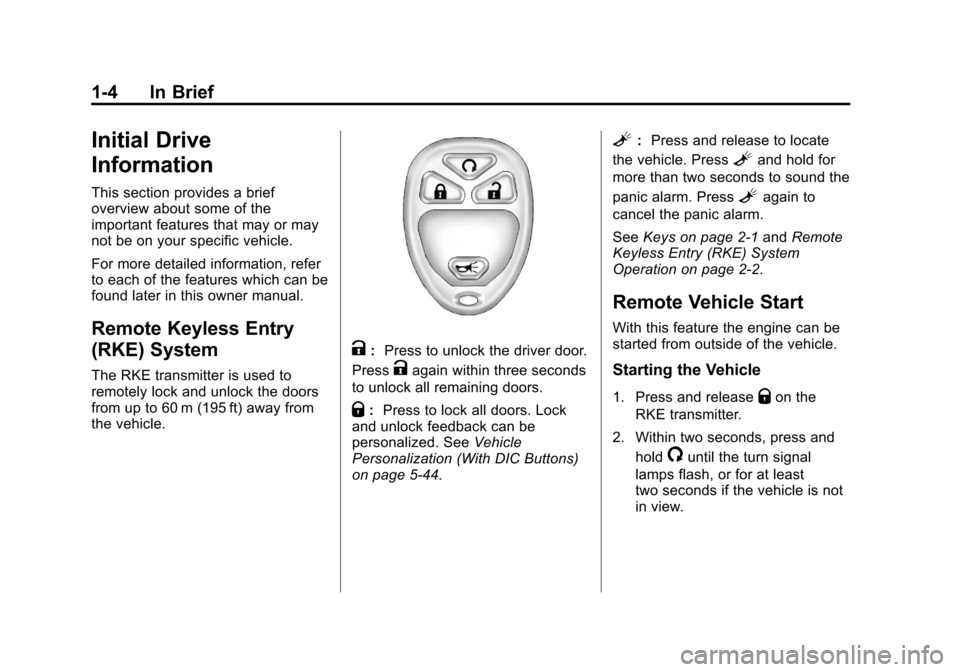
The RKE transmitter is used to
remotely lock and unlock the doors
from up to 60 m (195 ft) away from
the vehicle.
K:Press to unlock the driver door.
Press
Kagain within three seconds
to unlock all remaining doors.
Q: Press to lock all doors. Lock
and unlock feedback can be
personalized. See Vehicle
Personalization (With DIC Buttons)
on page 5‑44.
L: Press and release to locate
the vehicle. Press
Land hold for
more than two seconds to sound the
panic alarm. Press
Lagain to
cancel the panic alarm.
See Keys on page 2‑1 andRemote
Keyless Entry (RKE) System
Operation on page 2‑2.
Remote Vehicle Start
With this feature the engine can be
started from outside of the vehicle.
Starting the Vehicle
1. Press and releaseQon the
RKE transmitter.
2. Within two seconds, press and hold
/until the turn signal
lamps flash, or for at least
two seconds if the vehicle is not
in view.
Page 11 of 494
Black plate (5,1)Chevrolet Avalanche Owner Manual - 2013 - CRC - 8/27/12
In Brief 1-5
When the vehicle starts, the parking
lamps will turn on and remain on as
long as the engine is running. The
doors will be locked and the climate
control system may come on.
The engine will continue to run for
10 minutes. Repeat the steps for a
10-minute time extension. Remote
start can be extended only once.
Canceling a Remote Start
To cancel a remote start, do any of
the following:
.Press and hold/until the
parking lamps turn off.
.Turn on the hazard warning
flashers.
.Turn the vehicle on and then off.
See Remote Vehicle Start on
page 2‑4.
Door Locks
There are several ways to lock and
unlock the vehicle.
From outside, use the Remote
Keyless Entry (RKE) transmitter or
the key in the driver door.
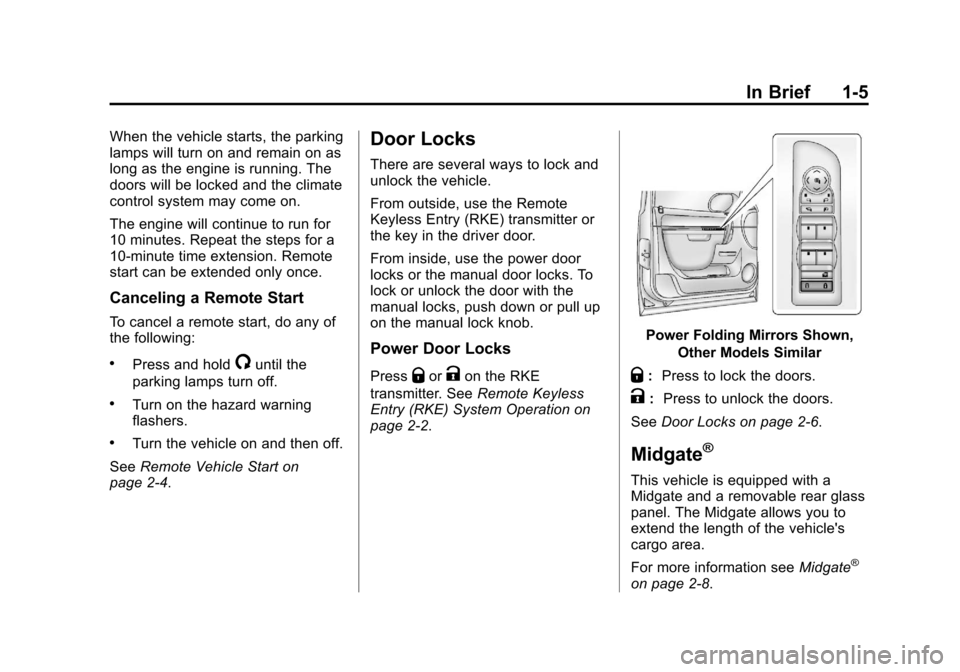
From inside, use the power door
locks or the manual door locks. To
lock or unlock the door with the
manual locks, push down or pull up
on the manual lock knob.
Power Door Locks
PressQorKon the RKE
transmitter. See Remote Keyless
Entry (RKE) System Operation on
page 2‑2.
Power Folding Mirrors Shown,
Other Models Similar
Q:Press to lock the doors.
K: Press to unlock the doors.
See Door Locks on page 2‑6.
Midgate®
This vehicle is equipped with a
Midgate and a removable rear glass
panel. The Midgate allows you to
extend the length of the vehicle's
cargo area.
For more information see Midgate
®
on page 2‑8.
Page 12 of 494
Black plate (6,1)Chevrolet Avalanche Owner Manual - 2013 - CRC - 8/27/12
1-6 In Brief
Tailgate
Use the Remote Keyless
Entry (RKE) transmitter or power
door lock switch to lock and unlock
the tailgate.
Open the tailgate by lifting up on its
handle while pulling the tailgate
toward you.
To close the tailgate, push it firmly
upward until it latches. Push and
pull on the tailgate to be sure it is
latched securely.
Tailgate Removal
The tailgate is not to be removed.
Removing the tailgate may cause
damage to the electrical connector
resulting in a loss of lock/unlock and
rear vision camera function.
SeeTailgate on page 2‑14.
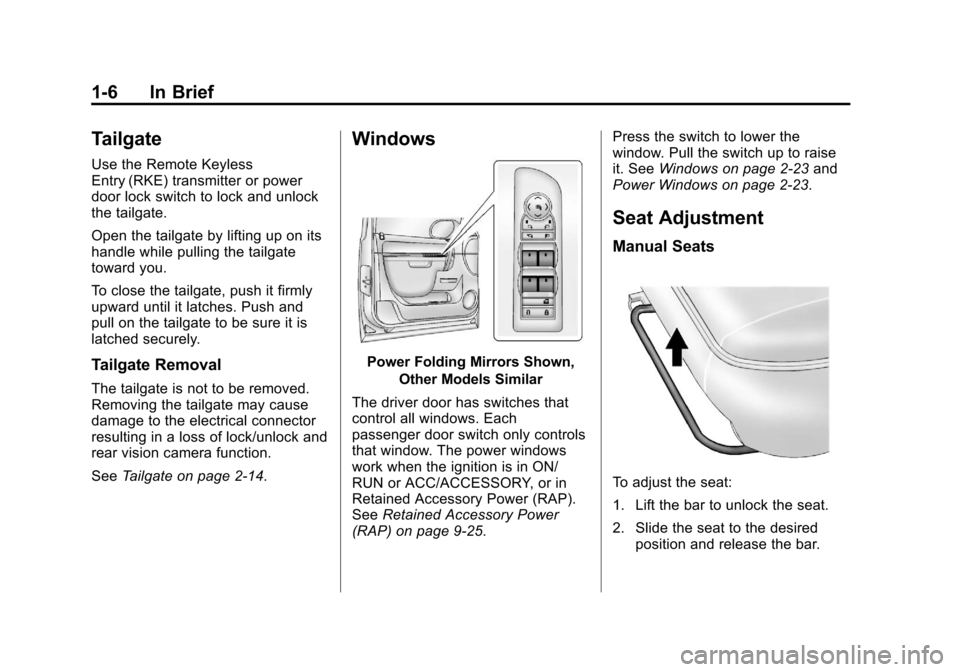
Windows
Power Folding Mirrors Shown,
Other Models Similar
The driver door has switches that
control all windows. Each
passenger door switch only controls
that window. The power windows
work when the ignition is in ON/
RUN or ACC/ACCESSORY, or in
Retained Accessory Power (RAP).
See Retained Accessory Power
(RAP) on page 9‑25. Press the switch to lower the
window. Pull the switch up to raise
it. See
Windows on page 2‑23 and
Power Windows on page 2‑23.
Seat Adjustment
Manual Seats
To adjust the seat:
1. Lift the bar to unlock the seat.
2. Slide the seat to the desired position and release the bar.
Page 20 of 494
Black plate (14,1)Chevrolet Avalanche Owner Manual - 2013 - CRC - 8/27/12
1-14 In Brief
Interior Lighting
Dome Lamps
The dome lamps are located in the
overhead console.
They come on when any door is
opened and turn off after all the
doors are closed.
Turn the instrument panel
brightness knob located below the
dome lamp override button,
clockwise to the farthest position to
manually turn on the dome lamps.
The dome lamps remain on until the
knob is turned counterclockwise.Dome Lamp Override
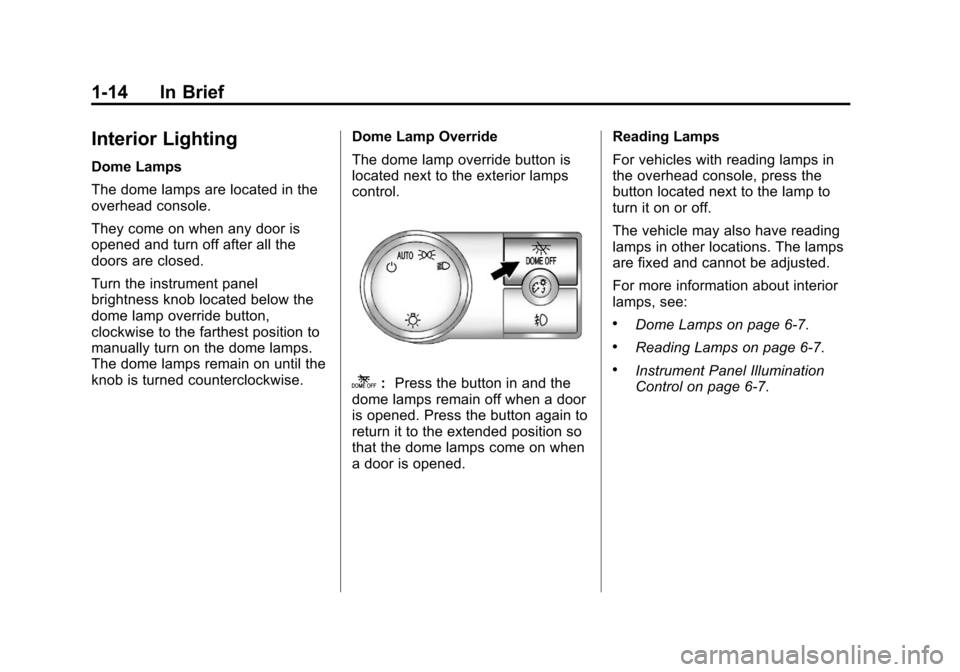
The dome lamp override button is
located next to the exterior lamps
control.
k:
Press the button in and the
dome lamps remain off when a door
is opened. Press the button again to
return it to the extended position so
that the dome lamps come on when
a door is opened. Reading Lamps
For vehicles with reading lamps in
the overhead console, press the
button located next to the lamp to
turn it on or off.
The vehicle may also have reading
lamps in other locations. The lamps
are fixed and cannot be adjusted.
For more information about interior
lamps, see:
.Dome Lamps on page 6‑7.
.Reading Lamps on page 6‑7.
.Instrument Panel Illumination
Control on page 6‑7.
Page 30 of 494
Black plate (24,1)Chevrolet Avalanche Owner Manual - 2013 - CRC - 8/27/12
1-24 In Brief
V:Press to set or reset certain
functions and to turn off or
acknowledge messages on the DIC.
For more information, see Driver
Information Center (DIC) on
page 5‑25.
Vehicle Customization
Some vehicle features can be
programmed by using the DIC
buttons next to the steering wheel.
These features include:
.Language
.Door Lock and Unlock Settings
.RKE Lock and Unlock Feedback
.Lighting
.Chime Volume
.Memory Features
See Vehicle Personalization (With
DIC Buttons) on page 5‑44.
Rear Vision
Camera (RVC)
If available, the RVC displays a
view of the area behind the vehicle
when the vehicle is shifted into
R (Reverse). This is displayed on
the inside rearview mirror or the
navigation screen, if equipped.
To clean the camera lens, near the
tailgate handle, rinse it with water
and wipe it with a soft cloth.
For more information, see Rear
Vision Camera (RVC) on page 9‑51.
Ultrasonic Parking Assist
If available, this system uses
sensors on the rear bumper to
assist with parking and avoiding
objects while in R (Reverse).
It operates at speeds less than
8 km/h (5 mph). URPA uses audible
beeps to provide distance and
system information. Keep the sensors on the vehicle's
rear bumper clean to ensure proper
operation.
See
Ultrasonic Parking Assist on
page 9‑49.
Power Outlets
Accessory power outlets can be
used to plug in electrical equipment,
such as a cell phone or MP3 player.
The vehicle may have two
accessory power outlets located
on the instrument panel and one
inside the center floor console.
The vehicle may also have an outlet
on the rear of the center floor
console above the cupholder door.
The accessory power outlet is
operational at all times.
See Power Outlets on page 5‑8.
Page 35 of 494
Black plate (1,1)Chevrolet Avalanche Owner Manual - 2013 - CRC - 8/27/12
Keys, Doors, and Windows 2-1
Keys, Doors, and
Windows
Keys and Locks
Keys . . . . . . . . . . . . . . . . . . . . . . . . . . 2-1
Remote Keyless Entry (RKE)System . . . . . . . . . . . . . . . . . . . . . . 2-2
Remote Keyless Entry (RKE) System Operation . . . . . . . . . . . 2-2
Remote Vehicle Start . . . . . . . . . 2-4
Door Locks . . . . . . . . . . . . . . . . . . . 2-6
Power Door Locks . . . . . . . . . . . . 2-7
Delayed Locking . . . . . . . . . . . . . . 2-7
Automatic Door Locks . . . . . . . . . 2-7
Lockout Protection . . . . . . . . . . . . 2-8
Safety Locks . . . . . . . . . . . . . . . . . . 2-8
Doors
Midgate®. . . . . . . . . . . . . . . . . . . . . . 2-8
Tailgate . . . . . . . . . . . . . . . . . . . . . . 2-14
Power Assist Steps . . . . . . . . . . 2-15
Vehicle Security
Vehicle Security . . . . . . . . . . . . . . 2-16
Vehicle Alarm System . . . . . . . 2-16
Immobilizer . . . . . . . . . . . . . . . . . . 2-17
Immobilizer Operation . . . . . . . 2-17
Exterior Mirrors
Convex Mirrors . . . . . . . . . . . . . . 2-19
Power Mirrors . . . . . . . . . . . . . . . . 2-19
Folding Mirrors . . . . . . . . . . . . . . . 2-20
Heated Mirrors . . . . . . . . . . . . . . . 2-21
Automatic Dimming Mirror . . . 2-21
Park Tilt Mirrors . . . . . . . . . . . . . . 2-21
Interior Mirrors
Manual Rearview Mirror . . . . . . 2-22
Automatic Dimming Rearview Mirror . . . . . . . . . . . . . . . . . . . . . . . 2-22
Windows
Windows . . . . . . . . . . . . . . . . . . . . . 2-23
Power Windows . . . . . . . . . . . . . 2-23
Sun Visors . . . . . . . . . . . . . . . . . . . 2-24
Roof
Sunroof . . . . . . . . . . . . . . . . . . . . . . 2-25
Keys and Locks
Keys
{WARNING
Leaving children in a vehicle with
the ignition key is dangerous and
children or others could be
seriously injured or killed. They
could operate the power windows
or other controls or make the
vehicle move. The windows will
function with the keys in the
ignition, and children or others
could be caught in the path of a
closing window. Do not leave
children in a vehicle with the
ignition key.
Page 36 of 494

Black plate (2,1)Chevrolet Avalanche Owner Manual - 2013 - CRC - 8/27/12
2-2 Keys, Doors, and Windows
The key can be used for the ignition,
door locks, tailgate, and side
storage boxes.
See your dealer if a replacement
key or additional key is needed.
If the vehicle has an ignition and it
becomes difficult to turn the key,
inspect the key blade for debris.
Periodically clean with a brush
or pick.If locked out of your vehicle, contact
Roadside Assistance. See
Roadside
Assistance Program (Mexico) on
page 13‑7 orRoadside Assistance
Program (U.S. and Canada) on
page 13‑11 for more information.
With an active OnStar subscription,
an OnStar Advisor may remotely
unlock the vehicle. See OnStar
Overview on page 14‑1.
Remote Keyless Entry
(RKE) System
See Radio Frequency Statement on
page 13‑21 for information
regarding Part 15 of the Federal
Communications Commission (FCC)
rules and Industry Canada
Standards RSS-GEN/210/220/310.
If there is a decrease in the RKE
operating range:
.Check the distance. The
transmitter may be too far from
the vehicle.
.Check the location. Other
vehicles or objects may be
blocking the signal.
.Check the transmitter's battery.
See “Battery Replacement” later
in this section.
.If the transmitter is still not
working correctly, see your
dealer or a qualified technician
for service.
Remote Keyless Entry
(RKE) System Operation
The Remote Keyless Entry (RKE)
transmitter functions work up to
60 m (195 ft) away from the vehicle.
There are other conditions which
can affect the performance of the
transmitter. See Remote Keyless
Entry (RKE) System on page 2‑2.
Page 37 of 494
Black plate (3,1)Chevrolet Avalanche Owner Manual - 2013 - CRC - 8/27/12
Keys, Doors, and Windows 2-3
With Remote Start (WithoutRemote Start Similar)
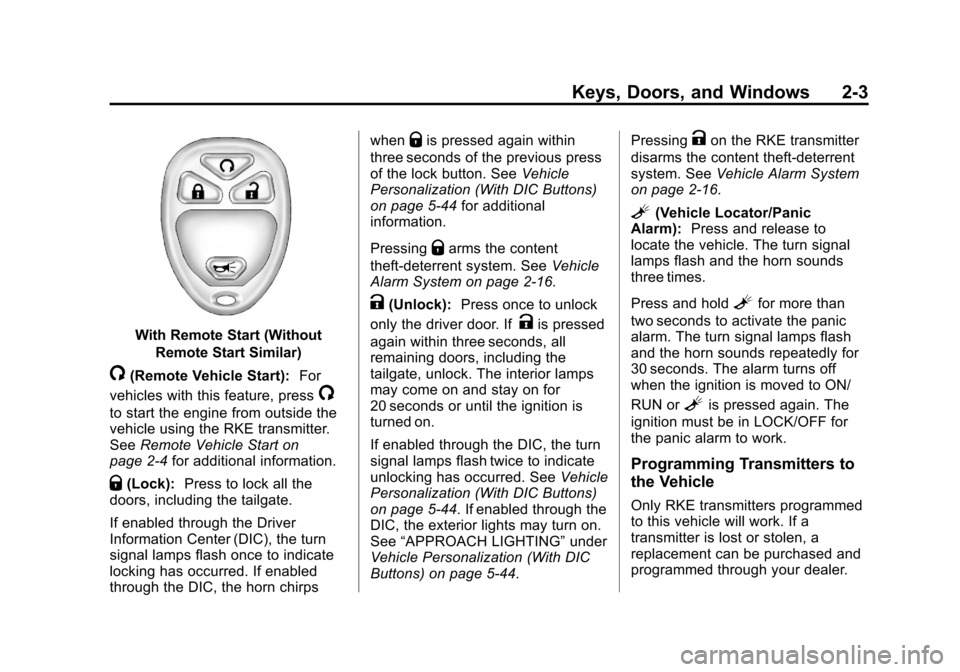
/(Remote Vehicle Start): For
vehicles with this feature, press
/
to start the engine from outside the
vehicle using the RKE transmitter.
See Remote Vehicle Start on
page 2‑4 for additional information.
Q(Lock):Press to lock all the
doors, including the tailgate.
If enabled through the Driver
Information Center (DIC), the turn
signal lamps flash once to indicate
locking has occurred. If enabled
through the DIC, the horn chirps when
Qis pressed again within
three seconds of the previous press
of the lock button. See Vehicle
Personalization (With DIC Buttons)
on page 5‑44 for additional
information.
Pressing
Qarms the content
theft-deterrent system. See Vehicle
Alarm System on page 2‑16.
K(Unlock): Press once to unlock
only the driver door. If
Kis pressed
again within three seconds, all
remaining doors, including the
tailgate, unlock. The interior lamps
may come on and stay on for
20 seconds or until the ignition is
turned on.
If enabled through the DIC, the turn
signal lamps flash twice to indicate
unlocking has occurred. See Vehicle
Personalization (With DIC Buttons)
on page 5‑44. If enabled through the
DIC, the exterior lights may turn on.
See “APPROACH LIGHTING” under
Vehicle Personalization (With DIC
Buttons) on page 5‑44. Pressing
Kon the RKE transmitter
disarms the content theft-deterrent
system. See Vehicle Alarm System
on page 2‑16.
L(Vehicle Locator/Panic
Alarm): Press and release to
locate the vehicle. The turn signal
lamps flash and the horn sounds
three times.
Press and hold
Lfor more than
two seconds to activate the panic
alarm. The turn signal lamps flash
and the horn sounds repeatedly for
30 seconds. The alarm turns off
when the ignition is moved to ON/
RUN or
Lis pressed again. The
ignition must be in LOCK/OFF for
the panic alarm to work.
Programming Transmitters to
the Vehicle
Only RKE transmitters programmed
to this vehicle will work. If a
transmitter is lost or stolen, a
replacement can be purchased and
programmed through your dealer.