lock CHEVROLET AVEO 2002 Service Repair Manual
[x] Cancel search | Manufacturer: CHEVROLET, Model Year: 2002, Model line: AVEO, Model: CHEVROLET AVEO 2002Pages: 5127, PDF Size: 41.82 MB
Page 1904 of 5127
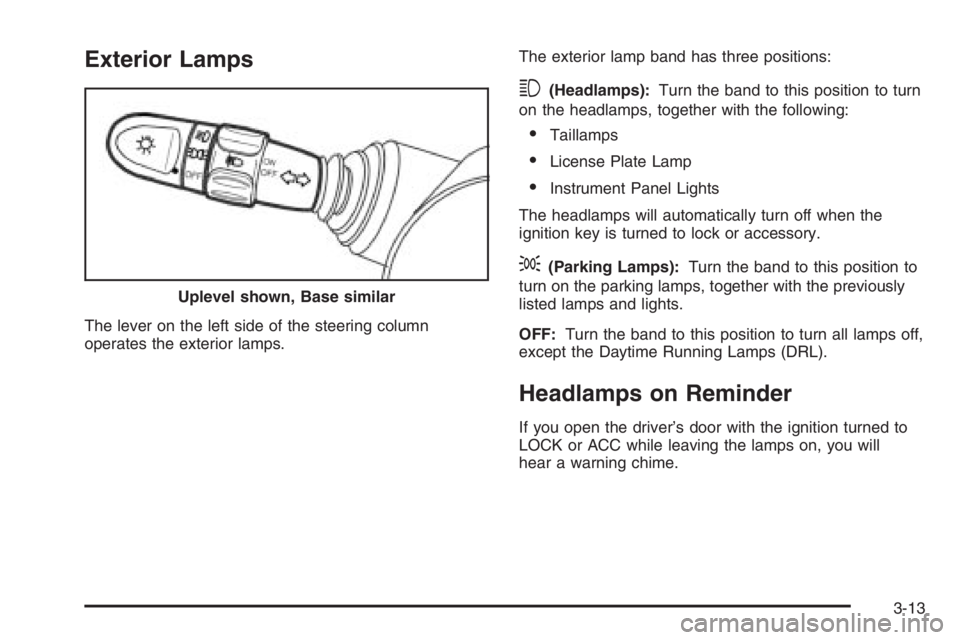
Exterior Lamps
The lever on the left side of the steering column
operates the exterior lamps.The exterior lamp band has three positions:
3(Headlamps):Turn the band to this position to turn
on the headlamps, together with the following:
•Taillamps
•License Plate Lamp
•Instrument Panel Lights
The headlamps will automatically turn off when the
ignition key is turned to lock or accessory.
;(Parking Lamps):Turn the band to this position to
turn on the parking lamps, together with the previously
listed lamps and lights.
OFF:Turn the band to this position to turn all lamps off,
except the Daytime Running Lamps (DRL).
Headlamps on Reminder
If you open the driver’s door with the ignition turned to
LOCK or ACC while leaving the lamps on, you will
hear a warning chime. Uplevel shown, Base similar
3-13
Page 1906 of 5127
Fog Lamps
If your vehicle has fog lamps, use them for better
visibility in foggy or misty conditions. The control for the
fog lamps is a band located on the middle of the turn
signal/multifunction lever.
While using the fog lamps, the ignition must be turned
to ON and the low-beam headlamps or parking
lamps must be on.
Turn the band to ON to turn the fog lamps on. An
indicator light on the secondary information center will
come on when the fog lamps are on. SeeFog Lamp
Light on page 3-38.
Turn the band to OFF to turn the fog lamps off. The fog
lamps will also turn off when the high-beam headlamps
are turned on. When the high-beam headlamps are
turned off, the fog lamps will turn on again.
Some localities have laws that require the headlamps to
be on along with the fog lamps.
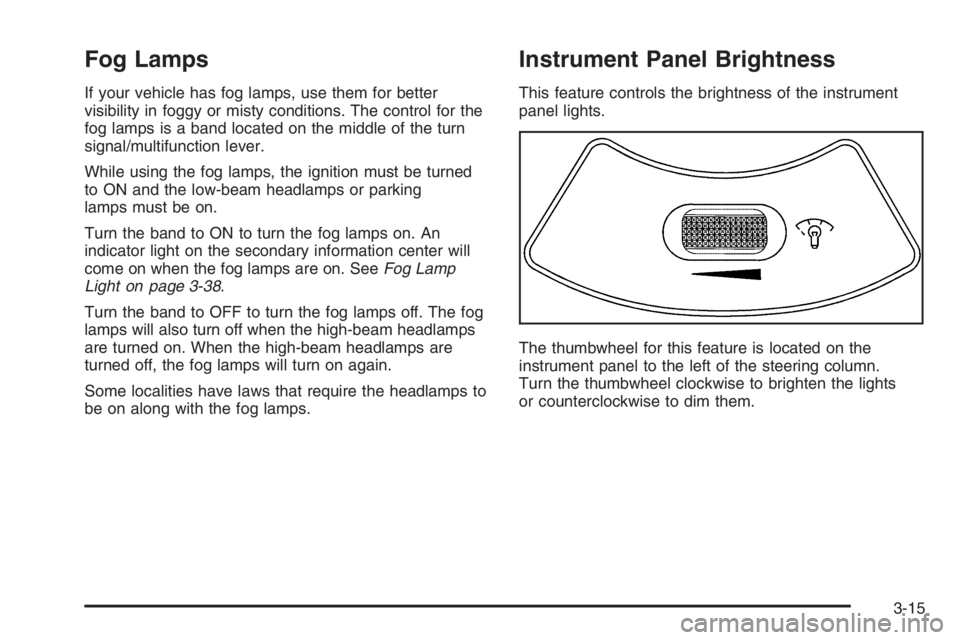
Instrument Panel Brightness
This feature controls the brightness of the instrument
panel lights.
The thumbwheel for this feature is located on the
instrument panel to the left of the steering column.
Turn the thumbwheel clockwise to brighten the lights
or counterclockwise to dim them.
3-15
Page 1909 of 5127
Climate Controls
Climate Control System
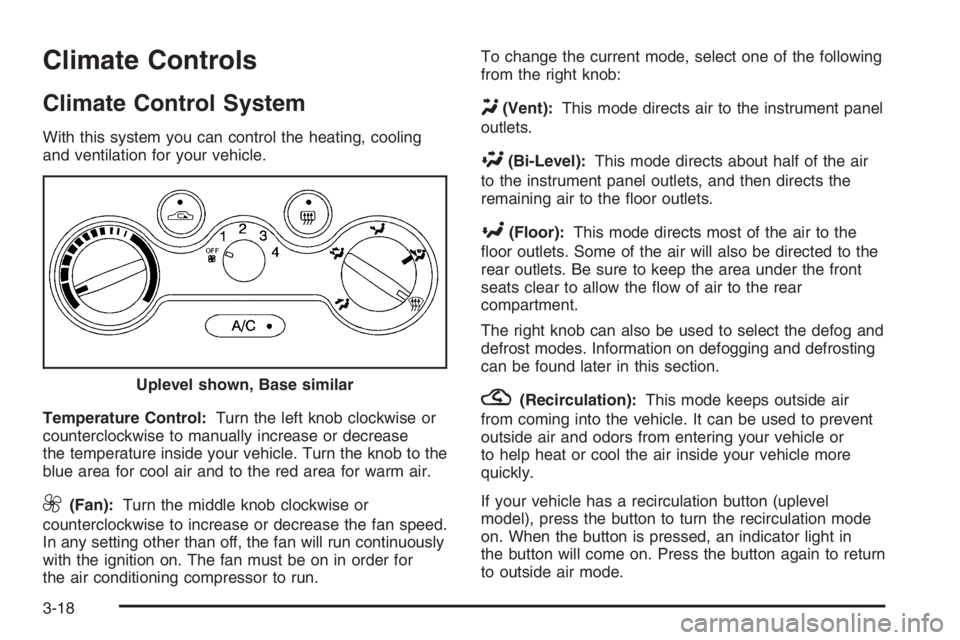
With this system you can control the heating, cooling
and ventilation for your vehicle.
Temperature Control:Turn the left knob clockwise or
counterclockwise to manually increase or decrease
the temperature inside your vehicle. Turn the knob to the
blue area for cool air and to the red area for warm air.
9(Fan):Turn the middle knob clockwise or
counterclockwise to increase or decrease the fan speed.
In any setting other than off, the fan will run continuously
with the ignition on. The fan must be on in order for
the air conditioning compressor to run.To change the current mode, select one of the following
from the right knob:
Y(Vent):This mode directs air to the instrument panel
outlets.
\(Bi-Level):This mode directs about half of the air
to the instrument panel outlets, and then directs the
remaining air to the floor outlets.
[(Floor):This mode directs most of the air to the
floor outlets. Some of the air will also be directed to the
rear outlets. Be sure to keep the area under the front
seats clear to allow the flow of air to the rear
compartment.
The right knob can also be used to select the defog and
defrost modes. Information on defogging and defrosting
can be found later in this section.
?(Recirculation):This mode keeps outside air
from coming into the vehicle. It can be used to prevent
outside air and odors from entering your vehicle or
to help heat or cool the air inside your vehicle more
quickly.
If your vehicle has a recirculation button (uplevel
model), press the button to turn the recirculation mode
on. When the button is pressed, an indicator light in
the button will come on. Press the button again to return
to outside air mode. Uplevel shown, Base similar
3-18
Page 1911 of 5127
Defogging and Defrosting
Fog on the inside of windows is a result of high humidity
or moisture condensing on the cool window glass. This
can be minimized if the climate control system is used
properly. There are two modes to clear fog or frost from
your windshield. Use the defog mode to clear the
windows of fog or moisture and warm the passengers.
Use the defrost mode to remove fog or frost from the
windshield more quickly.
For best results, clear all snow and ice from the
windshield before defrosting.
Select one of these available modes from the
right knob.
0(Defog):This mode directs most of the air to the
windshield and the floor outlets. A small amount of air
is also directed to the outboard outlets for the side
windows and to the instrument panel side outlets.
When you select this mode, the system runs the
air-conditioning compressor. To defog the windows
faster, turn the temperature control knob clockwise to
the warmest setting.
1(Defrost):This mode directs the air to the
windshield and the outboard outlets for the side
windows. A small amount of air is also directed to the
instrument panel side outlets. When you select this
mode, the system runs the air-conditioning compressor.
To defrost the windows faster, turn the temperature
control knob clockwise to the warmest setting.
Do not drive the vehicle until all windows are clear.
Rear Window and Outside Mirror
Defogger
Your vehicle may have a rear window and outside
mirror defogger. This feature will only work when the
ignition is turned to ON.
The rear window defogger uses a warming grid to
remove fog or frost from the rear window. Before using
this feature, clear as much snow from the rear
window as possible.
<(Rear Window Defogger):Press this button to
turn the rear window and outside mirror defogger on or
off. An indicator light in the button will come on to let
you know that the feature is activated.
If your vehicle does not have air conditioning, the rear
window defogger will remain on until the button is
pressed again.
3-20
Page 1912 of 5127
If your vehicle has air conditioning, the rear window
defogger will turn off about 10 minutes after the button
is pressed. The defogger can also be turned off by
pressing the button again or by turning the engine off.
Notice:Do not use anything sharp on the inside of
the rear window. If you do, you could cut or
damage the warming grid, and the repairs would not
be covered by your warranty. Do not attach a
temporary vehicle license, tape, a decal or anything
similar to the defogger grid.
Outlet Adjustment
Use the knob located in the center of each outlet to
change the direction of the airflow.
Operation Tips
•
Clear away any ice, snow or leaves from the air
inlets at the base of the windshield that may
block the flow of air into your vehicle.
•Use of non-GM approved hood deflectors may
adversely affect the performance of the system.
•Keep the path under the front seats clear of objects
to help circulate the air inside of your vehicle more
effectively.
Passenger Compartment Air Filter
Your vehicle may have a passenger compartment
air filter. It is located behind the glove box and can be
accessed after removing the glove box from its housing.
The filter traps most of the pollen from air entering
the module. Like your engine’s air cleaner/filter, it may
need to be changed periodically.
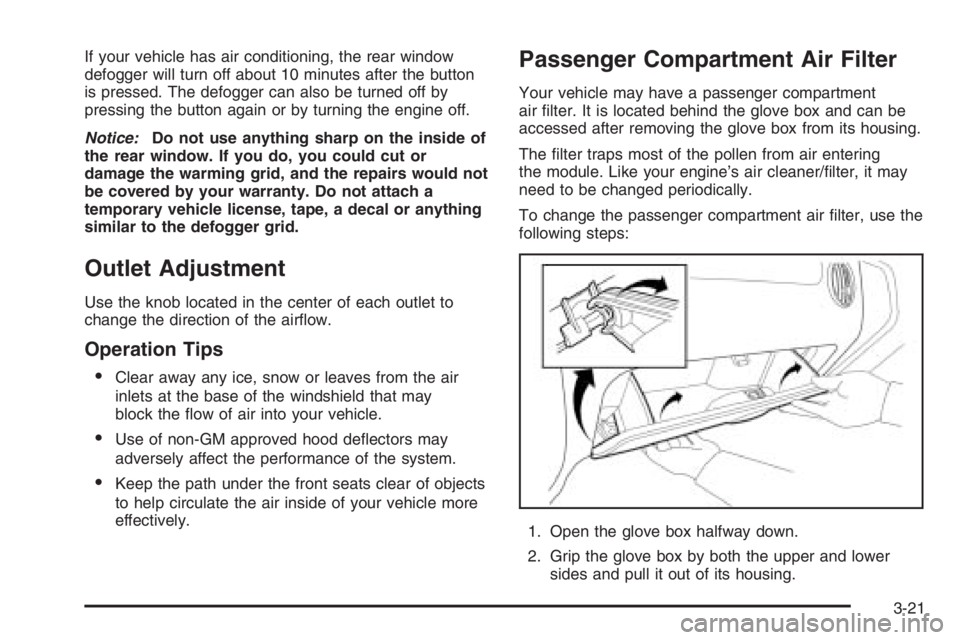
To change the passenger compartment air filter, use the
following steps:
1. Open the glove box halfway down.
2. Grip the glove box by both the upper and lower
sides and pull it out of its housing.
3-21
Page 1917 of 5127
Passenger Airbag Status Indicator
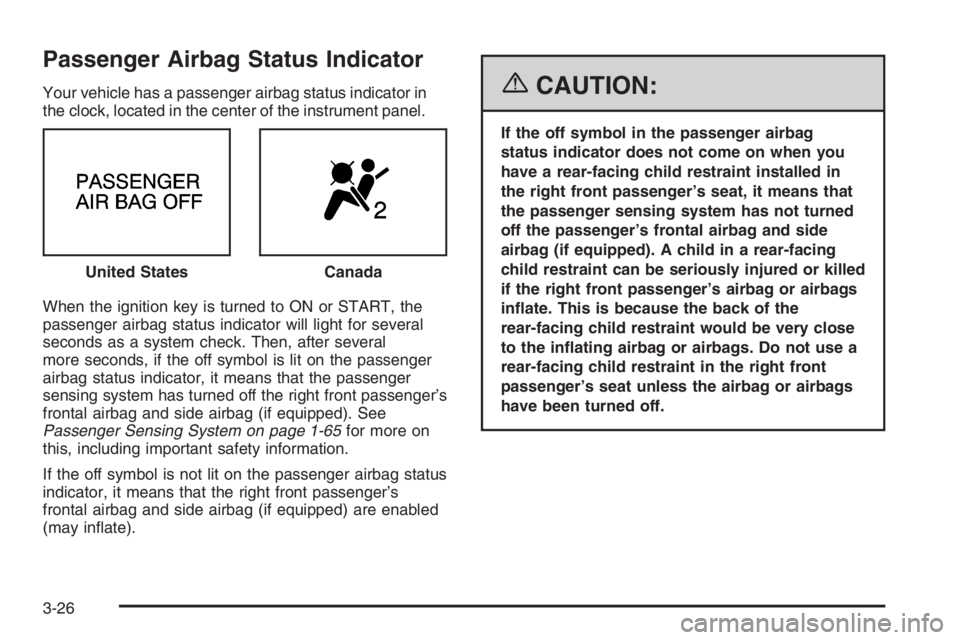
Your vehicle has a passenger airbag status indicator in
the clock, located in the center of the instrument panel.
When the ignition key is turned to ON or START, the
passenger airbag status indicator will light for several
seconds as a system check. Then, after several
more seconds, if the off symbol is lit on the passenger
airbag status indicator, it means that the passenger
sensing system has turned off the right front passenger’s
frontal airbag and side airbag (if equipped). See
Passenger Sensing System on page 1-65for more on
this, including important safety information.
If the off symbol is not lit on the passenger airbag status
indicator, it means that the right front passenger’s
frontal airbag and side airbag (if equipped) are enabled
(may inflate).{CAUTION:
If the off symbol in the passenger airbag
status indicator does not come on when you
have a rear-facing child restraint installed in
the right front passenger’s seat, it means that
the passenger sensing system has not turned
off the passenger’s frontal airbag and side
airbag (if equipped). A child in a rear-facing
child restraint can be seriously injured or killed
if the right front passenger’s airbag or airbags
inate. This is because the back of the
rear-facing child restraint would be very close
to the inating airbag or airbags. Do not use a
rear-facing child restraint in the right front
passenger’s seat unless the airbag or airbags
have been turned off. United States
Canada
3-26
Page 1922 of 5127
Secondary Information Center (SIC)
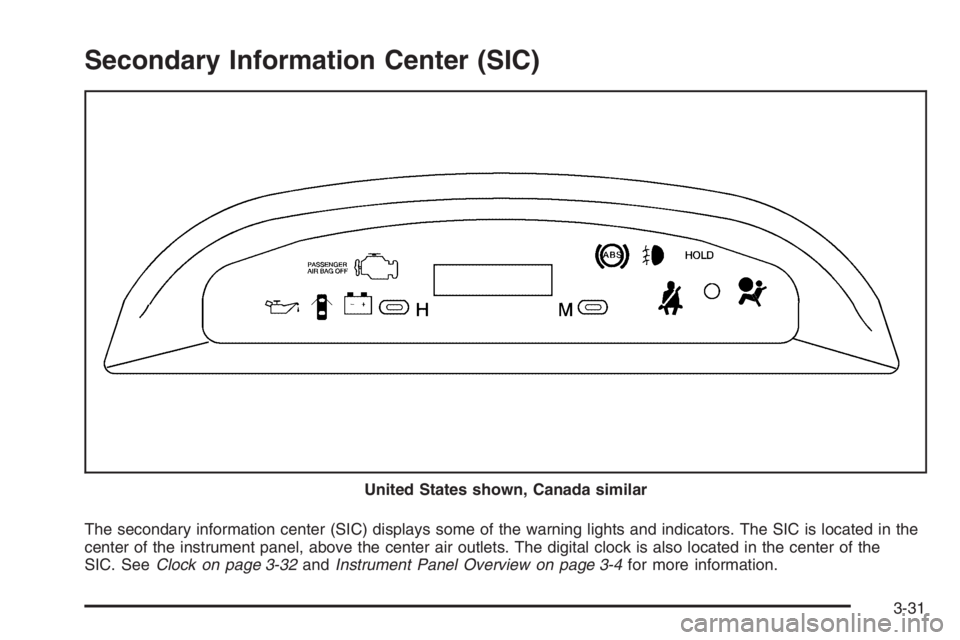
The secondary information center (SIC) displays some of the warning lights and indicators. The SIC is located in the
center of the instrument panel, above the center air outlets. The digital clock is also located in the center of the
SIC. SeeClock on page 3-32andInstrument Panel Overview on page 3-4for more information. United States shown, Canada similar
3-31
Page 1923 of 5127
Clock
Your vehicle has a digital clock. The clock is located in
the secondary instrument cluster on the center of
the instrument panel, above the center air outlets. When
the ignition is turned to ACC or ON, the time is
displayed in the digital clock. There are two adjusting
buttons for the digital clock:
H (Hour):To go forward one hour, press the H button
once. To go forward more than one hour, press and hold
the button until the correct hour is reached.
M (Minute):To go forward one minute, press the
M button once. To go forward more than one minute,
press and hold the button until the correct minute
is reached.
After disconnecting the battery or replacing the fuse,
reset the clock.
Safety Belt Reminder Light
The safety belt light will
come on and stay on until
the driver’s safety belt
is buckled.
If the driver’s belt is already buckled, the light will not
come on.
Airbag Readiness Light
There is an airbag readiness light on the secondary
information center (SIC), which shows the airbag
symbol. The system checks the airbag’s electrical
system for malfunctions. The light tells you if there is an
electrical problem. The system check includes the
airbag sensor, the airbag modules, the wiring and the
crash sensing and diagnostic module. For more
information on the airbag system, seeAirbag System on
page 1-56.
3-32
Page 1925 of 5127
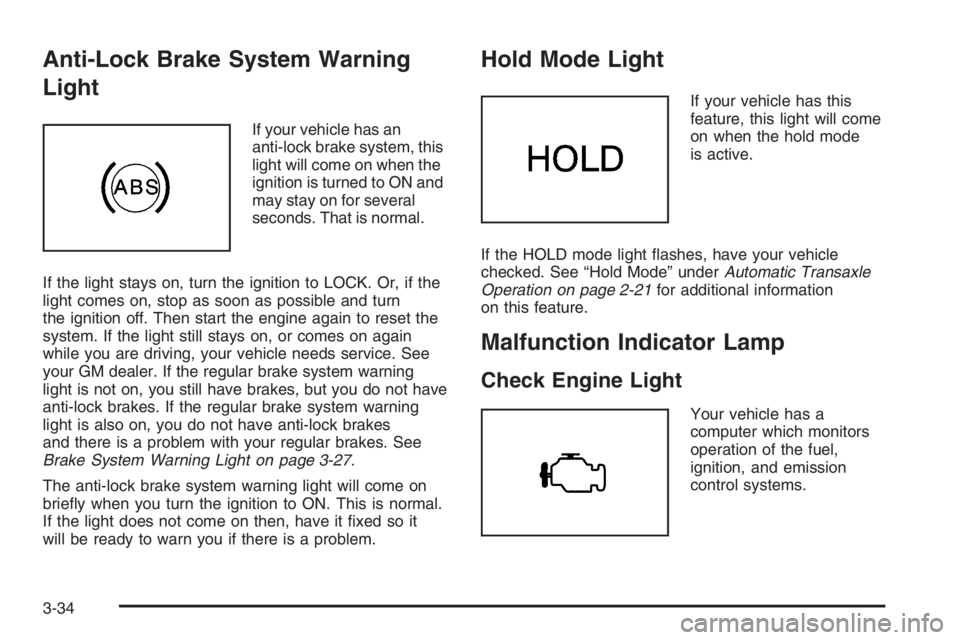
Anti-Lock Brake System Warning
Light
If your vehicle has an
anti-lock brake system, this
light will come on when the
ignition is turned to ON and
may stay on for several
seconds. That is normal.
If the light stays on, turn the ignition to LOCK. Or, if the
light comes on, stop as soon as possible and turn
the ignition off. Then start the engine again to reset the
system. If the light still stays on, or comes on again
while you are driving, your vehicle needs service. See
your GM dealer. If the regular brake system warning
light is not on, you still have brakes, but you do not have
anti-lock brakes. If the regular brake system warning
light is also on, you do not have anti-lock brakes
and there is a problem with your regular brakes. See
Brake System Warning Light on page 3-27.
The anti-lock brake system warning light will come on
briefly when you turn the ignition to ON. This is normal.
If the light does not come on then, have it fixed so it
will be ready to warn you if there is a problem.
Hold Mode Light
If your vehicle has this
feature, this light will come
on when the hold mode
is active.
If the HOLD mode light flashes, have your vehicle
checked. See “Hold Mode” underAutomatic Transaxle
Operation on page 2-21for additional information
on this feature.
Malfunction Indicator Lamp
Check Engine Light
Your vehicle has a
computer which monitors
operation of the fuel,
ignition, and emission
control systems.
3-34
Page 1943 of 5127
CD Messages
CHECK CD:If this message appears on the display
and/or the CD comes out, it could be for one of the
following reasons:
•It is very hot. When the temperature returns to
normal, the CD should play.
•You are driving on a very rough road. When the
road becomes smoother, the CD should play.
•The CD is dirty, scratched, wet, or upside down.
•The air is very humid. If so, wait about an hour and
try again.
•The format of the CD may not be compatible. See
“MP3 Format” earlier in this section.
•There may have been a problem while burning
the CD.
•The label may be caught in the CD player.
If the CD is not playing correctly, for any other reason,
try a known good CD.
If any error occurs repeatedly or if an error cannot be
corrected, contact your dealer. If the radio displays
an error message, write it down and provide it to your
dealer when reporting the problem.
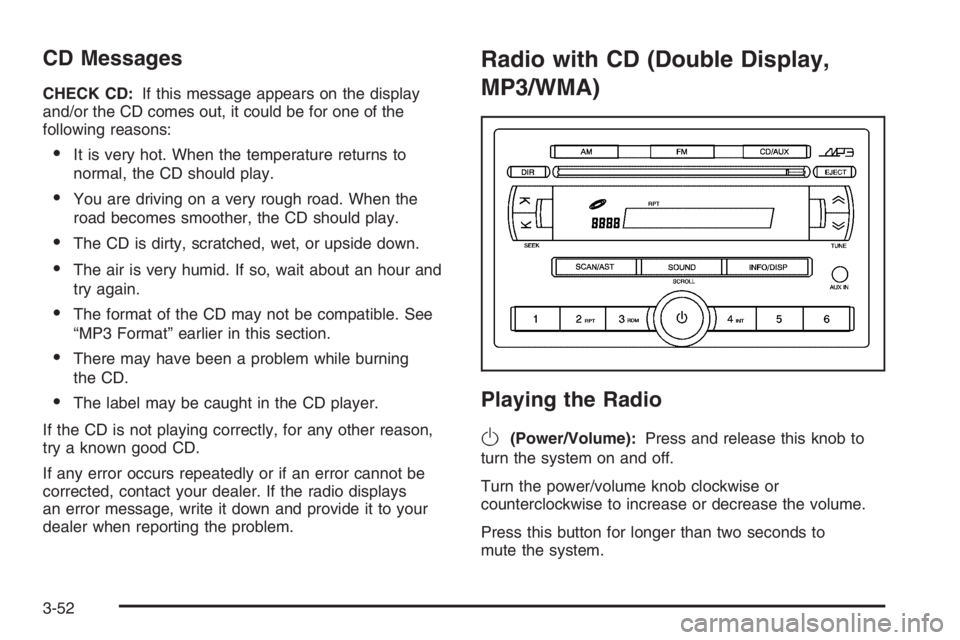
Radio with CD (Double Display,
MP3/WMA)
Playing the Radio
O
(Power/Volume):Press and release this knob to
turn the system on and off.
Turn the power/volume knob clockwise or
counterclockwise to increase or decrease the volume.
Press this button for longer than two seconds to
mute the system.
3-52