display CHEVROLET AVEO 2006 1.G Owner's Guide
[x] Cancel search | Manufacturer: CHEVROLET, Model Year: 2006, Model line: AVEO, Model: CHEVROLET AVEO 2006 1.GPages: 362, PDF Size: 2.24 MB
Page 178 of 362
Setting the Equalization
The order for customized equalization settings are EQ
OFF, CLASSIC, DANCE, ROCK, JAZZ, POP, VOICE,
TECHNO, EQ OFF.
SOUND (Equalization):Press this button until EQ OFF
appears on the display to select customized equalization
settings designed for classic, dance, rock, jazz, pop,
voice and techno. Turn the volume knob until the desired
equalization setting appears on the display. When
finished making the selection, press the SOUND button
to set the equalization setting.
To cancel an equalization setting, press the SOUND
button until EQ OFF appears on the display, turn
the volume knob until OFF appears on the display, then
press the SOUND button again to set the equalization
setting.
Playing a CD(s)
LOAD:Press this button to load CDs into the CD
player. This CD player will hold up to six CDs.
1. Press and release the load button. A message to
select a slot number from 1-6 will appear on
display.
2. Press the desired slot number. Wait for the
message to insert the disc.
3. Load a CD. Insert the CD partway into the slot,
label side up. The player will pull the CD in.To insert multiple CDs, do the following:
1. Press and hold the load button for two seconds.
You will hear a beep and a message to load
multiple discs will be displayed.
2. Follow the displayed instruction on when to insert
the discs. The CD player takes up to six CDs.
3. Press the LOAD button again to cancel loading
more CDs.
As each CD is inserted, CDP will appear on the display
and as each CD is loading Filecheck will appear on
the display.
Once playback begins, the track and track number will
appear on the display.
If the ignition or radio is turned off with a CD in the
player, it will stay in the player. When a CD is in
the player and the ignition is turned on, the radio must
be turned on before the current CD will start playback.
When the ignition and radio are turned on, the CD
will start playing where it stopped, if it was the
last selected audio source.
The CD player can play the smaller 3 inch (8 cm) single
CDs with an adapter ring. Full-size CDs and the
smaller CDs are loaded in the same manner.
3-64
Page 179 of 362
If playing a CD-R, the sound quality may be reduced
due to CD-R quality, the method of recording, the quality
of the music that has been recorded, and the way the
CD-R has been handled. There may be an increase
in skipping, difficulty in finding tracks, and/or difficulty in
loading and ejecting. If these problems occur, check
the bottom surface of the CD. If the surface of the CD is
damaged, such as cracked, broken, or scratched, the
CD will not play properly. If the surface of the CD
is soiled, seeCare of Your CDs on page 3-71for more
information.
If there is no apparent damage, try a known good CD.
Do not add any label to a CD, it could get caught in the
CD player. If a CD is recorded on a personal computer
and a description label is needed, try labeling the top of
the recorded CD with a marking pen instead.
Notice:If you add any label to a CD, insert more
than one CD into the slot at a time, or attempt
to play scratched or damaged CDs, you could
damage the CD player. When using the CD player,
use only CDs in good condition without any
label, load one CD at a time, and keep the CD player
and the loading slot free of foreign materials,
liquids, and debris.
If an error appears on the display, see “CD Messages”
later in this section.2 RPT (Repeat):Press this button to repeat the current
track. RPT will appear on the display. Press this
button again to turn off repeat play.
3 RDM (Random):Press this button to hear the tracks
in random, rather than sequential, order. RDM will
appear on the display.
To play tracks from all CDs loaded in a six-disc CD
player in random order, press this button until a
message that all discs are randomized is displayed.
Press the same button again to turn off random play.
4 INT (Scan):Press this button to listen to the first few
seconds of each track on each loaded CD. INTRO
will appear on the display. To stop scanning press this
button again. The current track will begin to play.
5 CDC−(Previous CDC):Press this button to go back
to the start of the previous CDC.
6 CDC + (Next CDC):Press this button to go forward
to the start of the next CDC.
()TUNE (Previous/Next Track):Press the down
arrows to go to the start of the current track or press
the up arrows to go to the next track. The track number
will appear on the display. The player will continue
moving backward or forward through the CD with each
press of the up or down arrows.
3-65
Page 180 of 362
AM:Press this button to listen to the radio when a CD
is playing. The inactive CD will remain safely inside
the radio for future listening.
FM:Press this button to listen to the radio when a CD
is playing. The inactive CD will remain safely inside
the radio for future listening.
CD/AUX:Press this button to play a CD when listening
to the radio. CDP will appear on the display when
the CD player has been selected. The CD symbol will
appear on the display when a CD is loaded.
Press this button while a CD is playing to pause the
CD. PAUSE will flash on the display. Press this button
again to start playing the CD.
EJECT:Press this button to eject the CD. Press and
hold this button to eject all CDs. The only way a CD can
be ejected from the player is by pressing the eject
button. The CD can eject when the ignition or the radio
is turned off.
Using an MP3 CD
MP3 Format
If you burn your own MP3/WMA disc on a personal
computer:
•Make sure the MP3/WMA files are recorded on a
CD-R disc.
•Do not mix standard audio and MP3/WMA files on
one disc.
•Make sure each MP3/WMA file has a .m3u or .wma
extension, other file extensions may not work.
•Files can be recorded with a variety of fixed or
variable bit rates. Song title, artist name, and album
will be available for display by the radio when
recorded using ID3 tags version 1 and 2.
•Create a folder structure that makes it easy to find
songs while driving. Organize songs by albums
using one folder for each album. Each folder
or album should contain 18 songs or less.
•Make sure to finalize the disc when burning an
MP3/WMA disc, using multiple sessions. It is usually
better to burn the disc all at once.
The player will be able to read and play a maximum of
50 folders, 5 sessions, and 999 files. Long file names,
folder names may use more disc memory space
than necessary. To conserve space on the disc,
minimize the length of the file, folder names. You can
also play an MP3/WMA CD that was recorded using no
file folders. The system can support up to 8 folders in
depth, though, keep the depth of the folders to a
minimum in order to keep down the complexity and
confusion in trying to locate a particular folder during
playback. If a CD contains more than the maximum of
50 folders, 5 sessions, and 999 files the player will
let you access and navigate up to the maximum, but all
items over the maximum will be ignored.
3-66
Page 181 of 362
Root Directory
The root directory will be treated as a folder. If the root
directory has compressed audio files, the directory
will be displayed as ROOT. All files contained directly
under the root directory will be accessed prior to
any other directory.
Empty Directory or Folder
If a root directory or a folder exists somewhere in the
file structure that contains only folders/subfolders and no
compressed files directly beneath them, the player will
advance to the next folder in the file structure that
contains compressed audio files and the empty folder
will not be displayed or numbered.
No Folder
When the CD contains only compressed files, the files will
be located under the root folder. The next and previous
folder functions will have no function on a CD that was
recorded without folders or playlists. When displaying the
name of the folder the radio will display ROOT.
When the CD contains only compressed audio files, but
no folders, all files will be located under the root
folder. When the radio displays the name of the folder,
the radio will display ROOT.
Order of Play
Tracks will be played in the following order:
•Playback will begin from the first track under the
root directory.
•When all tracks from the root directory have been
played, playback will continue from files, according
to their numerical listing.
•After playing the last track from the last folder, the
player will begin playing again at the first track of
the first folder or root directory.
File System and Naming
The song name in the ID3 tag will be displayed. If the
song name is not present in the ID3 tag, then the
radio will display the file name without the extension
(such as MP3/WMA) instead.
Track names longer than 32 characters or 4 pages will
be shortened. The display will not show parts of
words on the last page of text and the extension of the
filename will not be displayed.
3-67
Page 182 of 362
Playing an MP3/WMA
With the ignition on, insert a CD partway into the slot,
label side up. The player will pull it in, Loading, then
Filecheck, and then MP3 or WMA will appear on
the display. The CD should begin playing. You cannot
insert a CD with the ACC off.
As each new track starts to play, the track number, and
the song name will appear on the display.
If the ignition or radio is turned off with a CD in the player,
it will stay in the player. When a CD is in the player and
the ignition is turned on, the radio must be turned on
before the CD will start playback. When the ignition and
radio are turned on, the CD will start playing where it
stopped, if it was the last selected audio source.
The CD player can play the smaller 3 inch (8 cm) single
CDs with an adapter ring. Full-size CDs and the
smaller CDs are loaded in the same manner.
If playing a CD-R, the sound quality may be reduced due
to CD-R quality, the method of recording, the quality of
the music that has been recorded, and the way the CD-R
has been handled. There may be an increase in skipping,
difficulty in finding tracks, and/or difficulty in loading and
ejecting. If these problems occur, check the bottom
surface of the CD. If the surface of the CD is damaged,
such as cracked, broken, or scratched, the CD will not
play properly. If the surface of the CD is soiled, seeCare
of Your CDs on page 3-71for more information.If there is no apparent damage, try a known good CD.
Do not add any label to a CD, it could get caught in the
CD player. If a CD is recorded on a personal computer
and a description label is needed, try labeling the top of
the recorded CD with a marking pen instead.
Notice:If you add any label to a CD, insert more
than one CD into the slot at a time, or attempt
to play scratched or damaged CDs, you could
damage the CD player. When using the CD player,
use only CDs in good condition without any
label, load one CD at a time, and keep the CD player
and the loading slot free of foreign materials,
liquids, and debris.
If an error appears on the display, see “CD Messages”
later in this section.
All of the CD functions work the same while playing an
MP3WMA, except for those listed here. See “Playing
a CD” earlier for more information.
SCROLL (MP3/WMA Mode Only):Press the SOUND
button for longer than two seconds. The song title
and other available information of the song will scroll
on/off. The offset is scroll on. The scroll mode can
be changed only when the SOUND button is pressed
for longer than two seconds.
3-68
Page 183 of 362
1 DIR (Directory):Press this button to repeat the
tracks in the current directory. DIR will appear on the
display.
Press this button again to repeat the tracks in all of the
directories. ALL will appear on the display.
Press this button again to turn off repeat play.
¦¥SEEK (Previous/Next Folder) (in MP3/WMA
Mode):Press the up or down arrows to change
the folder. If CD-R don’t have any folder, “ROOT” will
flash on display for a short time.
()TUNE (Previous/Next Track):Press the down
arrows to go to the start of the current track or press
the up arrows to go to the next track. The track number
will appear on the display. The player will continue
moving backward or forward through the CD with each
press of the up or down arrows.
INFO/DISP (Information/Display):Press this button to
display additional text information related to the
current MP3/WMA song. A choice of additional
information such as: Song Title, Album Title, and Artist.
Bit rate may also appear on display.
When information is not available, No Info will appear
on the display.
Press this button for longer than two seconds to change
display mode.
CD Messages
CHECK CD:If this message appears on the display
and/or the CD comes out, it could be for one of the
following reasons:
•It is very hot. When the temperature returns to
normal, the CD should play.
•You are driving on a very rough road. When the
road becomes smoother, the CD should play.
•The CD is dirty, scratched, wet, or upside down.
•The air is very humid. If so, wait about an hour and
try again.
•The format of the CD may not be compatible. See
“MP3 Format” earlier in this section.
•There may have been a problem while burning
the CD.
•The label may be caught in the CD player.
If the CD is not playing correctly, for any other reason,
try a known good CD.
If any error occurs repeatedly or if an error cannot be
corrected, contact your dealer. If the radio displays
an error message, write it down and provide it to your
dealer when reporting the problem.
3-69
Page 184 of 362
Using the Auxiliary Input Jack
Your radio system has an auxiliary input jack located on
the lower right side of the faceplate. This is not an
audio output; do not plug the headphone set into the
front auxiliary input jack. You can however, connect an
external audio device such as an iPod, laptop
computer, MP3 player, CD changer, or cassette tape
player, etc. to the auxiliary input jack for use as another
source for audio listening.
The auxiliary input jack will also accept cell phone
connectors. Plug the cell phone connector into
the auxiliary input jack to hear the other side of a cell
phone’s conversation through the vehicle sound system.
To use a portable audio player, connect a 3.5 mm
(1/8 inch) cable to the radio’s front auxiliary input jack.
When a device is connected, press the radio CD/AUX
button as needed to begin playing audio from the device
over the car speakers.
CD/AUX (CD/Auxiliary):Press this button once to play
a CD while a portable audio device is playing. Press
this button a second time for the system will begin
playing audio from the connected portable audio player.
Once in this mode, “Auxinput” will appear on display.
If the auxiliary jack does not detect the presence of an
output jack, the aux mode will be prevented from
coming up.
O(Power/Volume):Turn this knob clockwise or
counterclockwise to increase or decrease the volume of
the portable player. You may need to do additional
volume adjustments from the portable device if
the volume does not go loud or soft enough.
Radio Reception
You may experience frequency interference and static
during normal radio reception if items such as cellphone
chargers, vehicle convenience accessories, and
external electronic devices are plugged into the
accessory power outlet. If there is interference or static,
unplug the item from the accessory power outlet.
AM
The range for most AM stations is greater than for FM,
especially at night. The longer range can cause
station frequencies to interfere with each other. For
better radio reception, most AM radio stations will boost
the power levels during the day, and then reduce
these levels during the night. Static can also occur when
things like storms and power lines interfere with radio
reception. When this happens, try reducing the treble on
your radio.
3-70
Page 329 of 362
Part D: Recommended Fluids and
Lubricants
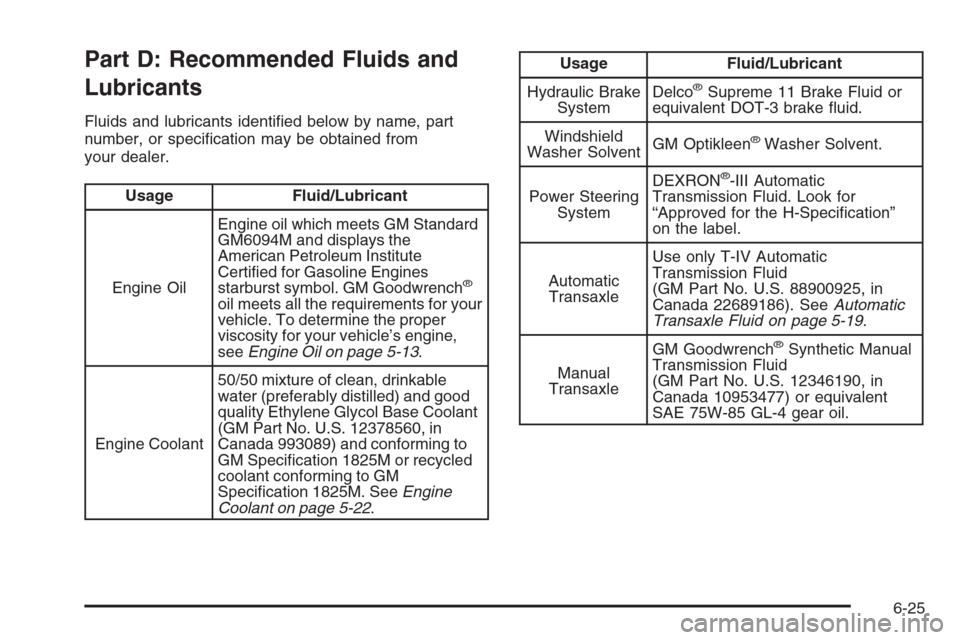
Fluids and lubricants identified below by name, part
number, or specification may be obtained from
your dealer.
Usage Fluid/Lubricant
Engine OilEngine oil which meets GM Standard
GM6094M and displays the
American Petroleum Institute
Certified for Gasoline Engines
starburst symbol. GM Goodwrench
®
oil meets all the requirements for your
vehicle. To determine the proper
viscosity for your vehicle’s engine,
seeEngine Oil on page 5-13.
Engine Coolant50/50 mixture of clean, drinkable
water (preferably distilled) and good
quality Ethylene Glycol Base Coolant
(GM Part No. U.S. 12378560, in
Canada 993089) and conforming to
GM Specification 1825M or recycled
coolant conforming to GM
Specification 1825M. SeeEngine
Coolant on page 5-22.
Usage Fluid/Lubricant
Hydraulic Brake
SystemDelco
®Supreme 11 Brake Fluid or
equivalent DOT-3 brake fluid.
Windshield
Washer SolventGM Optikleen
®Washer Solvent.
Power Steering
SystemDEXRON
®-III Automatic
Transmission Fluid. Look for
“Approved for the H-Specification”
on the label.
Automatic
TransaxleUse only T-IV Automatic
Transmission Fluid
(GM Part No. U.S. 88900925, in
Canada 22689186). SeeAutomatic
Transaxle Fluid on page 5-19.
Manual
TransaxleGM Goodwrench
®Synthetic Manual
Transmission Fluid
(GM Part No. U.S. 12346190, in
Canada 10953477) or equivalent
SAE 75W-85 GL-4 gear oil.
6-25