change time CHEVROLET AVEO 2007 1.G User Guide
[x] Cancel search | Manufacturer: CHEVROLET, Model Year: 2007, Model line: AVEO, Model: CHEVROLET AVEO 2007 1.GPages: 436, PDF Size: 2.52 MB
Page 214 of 436
All of the CD functions work the same while
playing an MP3/WMA, except for those listed here.
See “Playing a CD” earlier for more information.
SCROLL (MP3/WMA Mode Only):Press
the SOUND button for longer than two seconds.
The song title and other available information
of the song scrolls on/off. The offset is scroll on.
The scroll mode can be changed only when
the SOUND button is pressed for longer than
two seconds.
1 DIR (Directory):Press this button to repeat the
tracks in the current directory. DIR displays.
Press this button again to repeat the tracks in all
of the directories. ALL displays.
Press this button again to turn off repeat play.
¦¥SEEK (Previous/Next Folder) (in
MP3/WMA Mode):Press the up
¦or down¥
SEEK arrow to change the folder. If CD-R does not
have any folder, “ROOT” flashes on the display
for a short time.
()TUNE (Previous/Next Track):Press the
up
(TUNE arrow to go to the next track.
The track number displays. Press the down
)
TUNE arrow to go to the start of the current track.
The player continues moving forward or backward
through the CD with each press of the up or
down arrows.
INFO/DISP (Information/Display):Press this
button to display additional text information related
to the current MP3/WMA song. A choice of
additional information such as: Song Title, Album
Title, and Artist. Bit rate might also display.
When information is not available, No Info
(information) displays.
Press this button for longer than two seconds to
change display mode.
214
Page 227 of 436
Remember: ABS does not change the time you
need to get your foot up to the brake pedal or
always decrease stopping distance. If you get too
close to the vehicle in front of you, you will not have
time to apply the brakes if that vehicle suddenly
slows or stops. Always leave enough room up
ahead to stop, even though you have ABS.
Using ABS
Do not pump the brakes. Just hold the brake
pedal down firmly and let anti-lock work for you.
You might feel a slight brake pedal pulsation
or notice some noise, but this is normal.
Braking in Emergencies
At some time, nearly every driver gets into a
situation that requires hard braking.
If you have ABS, you can steer and brake at the
same time. However, if you do not have ABS, your
first reaction — to hit the brake pedal hard and
hold it down — might be the wrong thing to
do. Your wheels can stop rolling. Once they do,
the vehicle cannot respond to your steering.Momentum will carry it in whatever direction it was
headed when the wheels stopped rolling. That
could be off the road, into the very thing you were
trying to avoid, or into traffic.
If you do not have ABS, use a “squeeze” braking
technique. This will give you maximum braking
while maintaining steering control. You can do this
by pushing on the brake pedal with steadily
increasing pressure.
In an emergency, you will probably want to squeeze
the brakes hard without locking the wheels. If you
hear or feel the wheels sliding, ease off the brake
pedal. This will help you retain steering control. If
you do have ABS, it is different. SeeAnti-Lock
Brake System (ABS) on page 225.
In many emergencies, steering can help you more
than even the very best braking.
227
Page 232 of 436
•Check your vehicle’s mirrors, glance over your
shoulder, and start your left lane change signal
before moving out of the right lane to pass.
When you are far enough ahead of the passed
vehicle to see its front in your vehicle’s inside
mirror, activate the right lane change signal and
move back into the right lane. Remember that
your vehicle’s passenger side outside mirror is
convex. The vehicle you just passed may seem
to be farther away from you than it really is.
•Try not to pass more than one vehicle at a time
on two-lane roads. Reconsider before passing
the next vehicle.
•Do not overtake a slowly moving vehicle
too rapidly. Even though the brake lamps are
not flashing, it may be slowing down or starting
to turn.
•If you are being passed, make it easy for the
following driver to get ahead of you. Perhaps
you can ease a little to the right.
Loss of Control
Let us review what driving experts say
about what happens when the three control
systems — brakes, steering, and
acceleration — do not have enough friction
where the tires meet the road to do what the
driver has asked.
In any emergency, do not give up. Keep trying to
steer and constantly seek an escape route or
area of less danger.
Skidding
In a skid, a driver can lose control of the vehicle.
Defensive drivers avoid most skids by taking
reasonable care suited to existing conditions, and
by not overdriving those conditions. But skids
are always possible.
The three types of skids correspond to your
vehicle’s three control systems. In the braking skid,
the wheels are not rolling. In the steering or
cornering skid, too much speed or steering in a
curve causes tires to slip and lose cornering force.
And in the acceleration skid, too much throttle
causes the driving wheels to spin.
232
Page 303 of 436
Replacing Brake System Parts
The braking system on a vehicle is complex. Its
many parts have to be of top quality and work
well together if the vehicle is to have really good
braking. Your vehicle was designed and tested with
top-quality brake parts. When you replace parts of
the braking system — for example, when the brake
linings wear down and you need new ones put
in — be sure you get new approved replacement
parts. If you do not, the brakes might not work
properly. For example, if someone puts in
brake linings that are wrong for your vehicle, the
balance between the front and rear brakes can
change — for the worse. The braking performance
you have come to expect can change in many other
ways if someone puts in the wrong replacement
brake parts.
Battery
Your vehicle has a maintenance free battery.
When it is time for a new battery, get one that has
the replacement number shown on the original
battery’s label. SeeEngine Compartment Overview
on page 276for battery location.Warning:Battery posts, terminals, and related
accessories contain lead and lead compounds,
chemicals known to the State of California
to cause cancer and reproductive harm. Wash
hands after handling.
Vehicle Storage
If you are not going to drive your vehicle for
25 days or more, remove the black, negative (−)
cable from the battery. This will help keep
your battery from running down.
{CAUTION:
Batteries have acid that can burn you and
gas that can explode. You can be badly
hurt if you are not careful. SeeJump
Starting on page 304for tips on working
around a battery without getting hurt.
303
Page 328 of 436
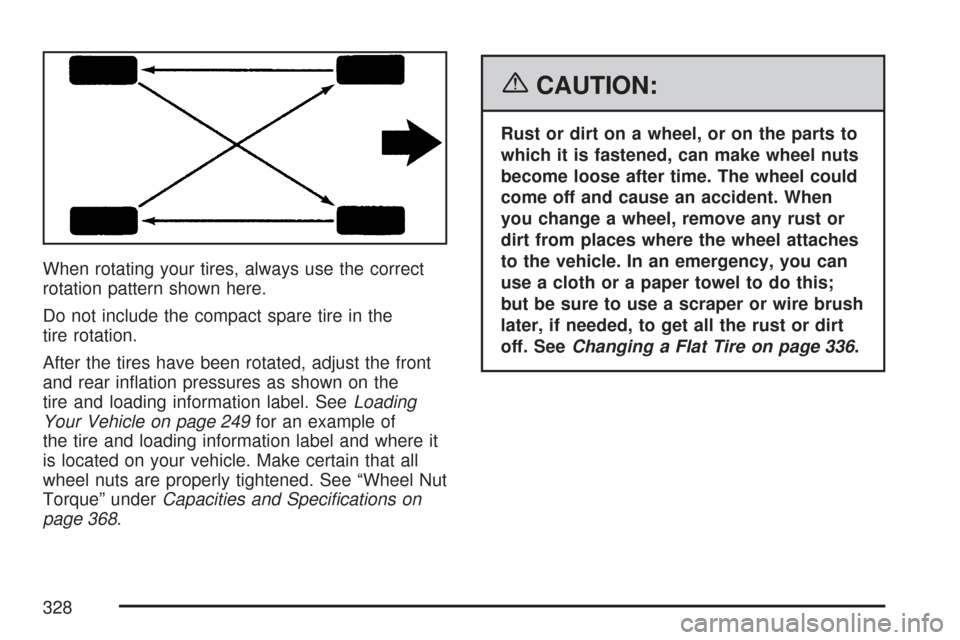
When rotating your tires, always use the correct
rotation pattern shown here.
Do not include the compact spare tire in the
tire rotation.
After the tires have been rotated, adjust the front
and rear inflation pressures as shown on the
tire and loading information label. SeeLoading
Your Vehicle on page 249for an example of
the tire and loading information label and where it
is located on your vehicle. Make certain that all
wheel nuts are properly tightened. See “Wheel Nut
Torque” underCapacities and Specifications on
page 368.
{CAUTION:
Rust or dirt on a wheel, or on the parts to
which it is fastened, can make wheel nuts
become loose after time. The wheel could
come off and cause an accident. When
you change a wheel, remove any rust or
dirt from places where the wheel attaches
to the vehicle. In an emergency, you can
use a cloth or a paper towel to do this;
but be sure to use a scraper or wire brush
later, if needed, to get all the rust or dirt
off. SeeChanging a Flat Tire on page 336.
328
Page 347 of 436
To clean, use the following instructions:
1. Saturate a lint-free, clean white cloth with
water or club soda.
2. Wring the cloth to remove excess moisture.
3. Start on the outside edge of the soil and gently
rub toward the center. Continue cleaning,
using a clean area of the cloth each time it
becomes soiled.
4. Continue to gently rub the soiled area until the
cleaning cloth remains clean.
5. If the soil is not completely removed, use a
mild soap solution and repeat the cleaning
process that was used with plain water.
If any of the soil remains, a commercial fabric
cleaner or spot lifter may be necessary. When a
commercial upholstery cleaner or spot lifter is to be
used, test a small hidden area for colorfastness
first. If the locally cleaned area gives any
impression that a ring formation may result, clean
the entire surface.
After the cleaning process has been completed, a
paper towel can be used to blot excess moisture
from the fabric or carpet.Leather
A soft cloth dampened with water may be used to
remove dust. If a more thorough cleaning is
necessary, a soft cloth dampened with a mild soap
solution can be used. Allow the leather to dry
naturally. Do not use heat to dry. Never use steam
to clean leather. Never use spot lifters or spot
removers on leather. Many commercial leather
cleaners and coatings that are sold to preserve
and protect leather may permanently change
the appearance and feel of your leather and are
not recommended. Do not use silicone or
wax-based products, or those containing organic
solvents to clean your vehicle’s interior because
they can alter the appearance by increasing
the gloss in a non-uniform manner. Never use
shoe polish on your leather.
347
Page 377 of 436
Footnotes
†The U.S. Environmental Protection Agency or
the California Air Resources Board has determined
that the failure to perform this maintenance item
will not nullify the emission warranty or limit
recall liability prior to the completion of the
vehicle’s useful life. We, however, urge that all
recommended maintenance services be performed
at the indicated intervals and the maintenance
be recorded.
+A good time to check your brakes is during tire
rotation. See Brake System Inspection on page 395.
3,000 Miles (5 000 km)
❑Change engine oil and filter (or every 3 months,
whichever occurs first).An Emission Control
Service.
6,000 Miles (10 000 km)
❑Change engine oil and filter (or every 3 months,
whichever occurs first).An Emission Control
Service.
❑Rotate tires. SeeTire Inspection and Rotation
on page 327for proper rotation pattern and
additional information.(See footnote +.)
9,000 Miles (15 000 km)
❑Change engine oil and filter (or every 3 months,
whichever occurs first).An Emission Control
Service.
12,000 Miles (20 000 km)
❑Change engine oil and filter (or every 3 months,
whichever occurs first).An Emission Control
Service.
❑Rotate tires. SeeTire Inspection and Rotation
on page 327for proper rotation pattern and
additional information.(See footnote +.)
15,000 Miles (25 000 km)
❑Change engine oil and filter (or every 3 months,
whichever occurs first).An Emission Control
Service.
❑Replace passenger compartment air filter.
If you drive regularly under dusty conditions,
the filter may require replacement more often.
❑Inspect engine air cleaner filter. If necessary,
replace the filter. If vehicle is driven in
dusty/dirty conditions, inspect filter at every
engine oil change. SeeEngine Air Cleaner/Filter
on page 281for more information.
❑Inspect drive belt(s).
377
Page 384 of 436
Long Trip/Highway Scheduled
Maintenance
The services shown in this schedule up to
100,000 miles (166 000 km) should be repeated
after 100,000 miles (166 000 km) at the same
intervals for the life of this vehicle. The services
shown at 150,000 miles (240 000 km) should be
repeated at the same interval after 150,000 miles
(240 000 km) for the life of this vehicle.
SeePart B: Owner Checks and Services on
page 389andPart C: Periodic Maintenance
Inspections on page 394.
Footnotes
†The U.S. Environmental Protection Agency or
the California Air Resources Board has determined
that the failure to perform this maintenance item
will not nullify the emission warranty or limit
recall liability prior to the completion of the
vehicle’s useful life. We, however, urge that all
recommended maintenance services be performed
at the indicated intervals and the maintenance
be recorded.
+A good time to check your brakes is during tire
rotation. See Brake System Inspection on page 395.
7,500 Miles (12 500 km)
❑Change engine oil and filter (or every 12 months,
whichever occurs first).An Emission Control
Service.
❑Rotate tires. SeeTire Inspection and Rotation
on page 327for proper rotation pattern and
additional information.(See footnote +.)
15,000 Miles (25 000 km)
❑Change engine oil and filter (or every 12 months,
whichever occurs first).An Emission Control
Service.
❑Replace passenger compartment air filter.
If you drive regularly under dusty conditions,
the filter may require replacement more often.
❑Inspect engine air cleaner filter. SeeEngine Air
Cleaner/Filter on page 281for more information.
❑Rotate tires. SeeTire Inspection and Rotation on
page 327for proper rotation pattern and
additional information.(See footnote +.)
❑Inspect drive belt(s).
384
Page 409 of 436
•Flat Tire Change:Installation of a spare tire in
good condition, when equipped and properly
inflated, is covered at no charge. The customer
is responsible for the repair or replacement of
the tire if not covered by a warrantable failure.
•Jump Start:No-start occurrences which
require a battery jump start will be covered at
no charge.
•Trip Routing Service (Canada only):Upon
request, Roadside Assistance will send you
detailed, computer personalized maps,
highlighting your choice of either the most
direct route or the most scenic route to your
destination, anywhere in North America, along
with helpful travel information pertaining to
your trip.
We will make every attempt to send your
personalized trip routing as quickly as possible,
but it is best to allow three weeks before your
planned departure date. Trip routing requests
will be limited to six per calendar year.
•Trip Interruption Benets and Assistance
(Canada only):In the event of a warranty
related vehicle disablement, while en route and
over 250 kilometres from original point ofdeparture, you may qualify for trip interruption
expense assistance. This assistance covers
reasonable reimbursement of up to a maximum
of $500 (Canadian) for (A) meals (maximum of
$50/day), (B) lodging (maximum of $100/night)
and (C) alternate ground transportation
(maximum of $40/day). This benefit is to assist
you with some of the unplanned expense you
may incur while waiting for your vehicle to be
repaired.
Pre-authorization, original detailed receipts and
a copy of the repair order are required.
Once authorization has been given, your
advisor will help you make any necessary
arrangements and explain how to claim for trip
interruption expense assistance.
•Alternative Service (Canada only):There
may be times, when Roadside Assistance
cannot provide timely assistance, your advisor
may authorize you to secure local emergency
road service, and you will be reimbursed up to
$100 upon submission of the original receipt to
Roadside Assistance.
409
Page 410 of 436
In many instances, mechanical failures are
covered under Chevrolet’s Bumper-to-Bumper
warranty, and the duration of the Base Warranty
Coverage for Canadian customers of the new
Vehicle Limited Warranty. However, any cost for
parts and labor for non-warranty repairs are
the responsibility of the driver.
For prompt and efficient assistance when calling,
please provide the following to the Roadside
Assistance Representative:
•Your name, home address, and home
telephone number.
•Telephone number of your location.
•Location of the vehicle.
•Model, year, color, and license plate number.
•Odometer reading, Vehicle Identification
Number (VIN), and delivery date of the vehicle.
•Description of the problem.While we hope you never have the occasion to
use our service, it is added security while traveling
for you and your family. Remember, we are
only a phone call away. U.S. customers call
Chevrolet Roadside Assistance:1-800-CHEV-USA
(1-800-243-8872), text telephone (TTY) users,
call1-888-889-2438, Canadian customers
call1-800-268-6800.
Chevrolet and General Motors of Canada Limited
reserve the right to limit services or reimbursement
to an owner or driver when, in their sole
discretion, the claims become excessive in
frequency or type of occurrence.
Roadside Assistance is not part of or included in
the coverage provided by the New Vehicle Limited
Warranty. Chevrolet and General Motors of
Canada Limited reserve the right to make any
changes or discontinue the Roadside Assistance
program at any time without notification.
410