service CHEVROLET AVEO 2007 1.G Owners Manual
[x] Cancel search | Manufacturer: CHEVROLET, Model Year: 2007, Model line: AVEO, Model: CHEVROLET AVEO 2007 1.GPages: 436, PDF Size: 2.52 MB
Page 1 of 436
Seats and Restraint Systems
........................ 7
Front Seats
.............................................. 8
Rear Seats
............................................. 13
Safety Belts
............................................ 20
Child Restraints
...................................... 41
Airbag System
........................................ 68
Restraint System Check
......................... 84
Features and Controls
................................. 87
Keys
....................................................... 88
Doors and Locks
.................................... 94
Windows
............................................... 101
Theft-Deterrent Systems
....................... 103
Starting and Operating Your Vehicle
..... 107
Mirrors
.................................................. 124
Storage Areas
...................................... 126
Sunroof
................................................ 128Instrument Panel
........................................ 129
Instrument Panel Overview
................... 132
Climate Controls
................................... 150
Warning Lights, Gages,
and Indicators
.................................... 156
Secondary Information Center (SIC)
...... 174
Audio System(s)
................................... 186
Driving Your Vehicle
.................................. 219
Your Driving, the Road,
and Your Vehicle
.............................. 220
Towing
................................................. 258
Service and Appearance Care
................... 261
Service
................................................. 264
Fuel
...................................................... 266
Checking Things Under the Hood
......... 273
Headlamp Aiming
................................. 309
2007 Chevrolet Aveo Owner ManualM
1
Page 77 of 436
In many crashes severe enough to inflate an
airbag, windshields are broken by vehicle
deformation. Additional windshield breakage may
also occur from the right front passenger airbag.
•Airbags are designed to inflate only once. After
they inflate, you will need some new parts for
the airbag system. If you do not get them, the
airbag system will not be there to help protect
you in another crash. A new system will include
airbag modules and possibly other parts. The
service manual for your vehicle covers the need
to replace other parts.
•Your vehicle has a crash sensing and
diagnostic module which records information
after a crash. SeeVehicle Data Collection and
Event Data Recorders on page 413.
•Let only qualified technicians work on your
airbag system. Improper service can mean that
an airbag system will not work properly. See
your dealer for service.
Passenger Sensing System
Your vehicle has a passenger sensing system for
the right front passenger position. The passenger
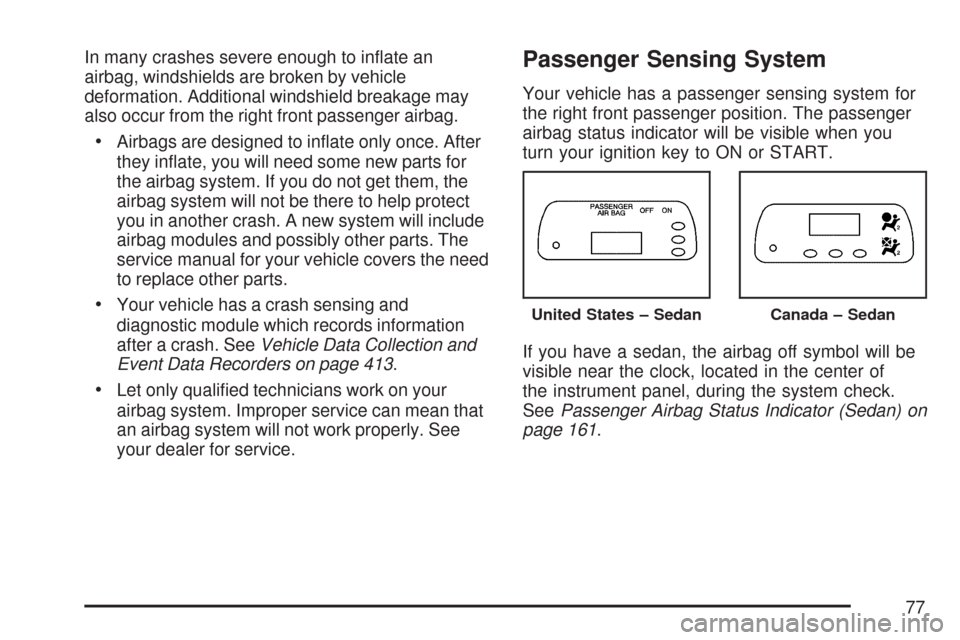
airbag status indicator will be visible when you
turn your ignition key to ON or START.
If you have a sedan, the airbag off symbol will be
visible near the clock, located in the center of
the instrument panel, during the system check.
SeePassenger Airbag Status Indicator (Sedan) on
page 161.
United States – SedanCanada – Sedan
77
Page 81 of 436
{CAUTION:
If the airbag readiness light in the
instrument panel cluster ever comes on
and stays on, it means that something
may be wrong with the airbag system.
CAUTION: (Continued)
CAUTION: (Continued)
If this ever happens, have the vehicle
serviced promptly, because an adult-size
person sitting in the right front
passenger’s seat may not have the
protection of the frontal airbag and side
airbag (if equipped). SeeAirbag
Readiness Light on page 176for more on
this, including important safety
information.
A thick layer of additional material such as a
blanket, or aftermarket equipment such as seat
covers, seat heaters, and seat massagers
can affect how well the passenger sensing system
operates. Remove any additional material from
the seat cushion before reinstalling or securing the
child restraint or small occupant. You may want
to consider not using seat covers or other
aftermarket equipment if your vehicle has the
passenger sensing system. SeeAdding Equipment
to Your Airbag-Equipped Vehicle on page 83for
more information about modifications that can
affect how the system operates.
81
Page 82 of 436
Servicing Your Airbag-Equipped
Vehicle
Airbags affect how your vehicle should be
serviced. There are parts of the airbag system in
several places around your vehicle. You do
not want the system to inflate while someone is
working on your vehicle. Your dealer and the
service manual have information about servicing
your vehicle and the airbag system. To purchase a
service manual, seeService Publications
Ordering Information on page 420.
{CAUTION:
For up to 10 seconds, after the ignition is
turned off and the battery is disconnected,
an airbag can still inate during improper
service. You can be injured if you are
close to an airbag when it inates. Avoid
yellow connectors. They are probably part
of the airbag system. Be sure to follow
proper service procedures, and make sure
the person performing work for you is
qualied to do so.
The airbag system does not need regular
maintenance.
82
Page 83 of 436
Adding Equipment to Your
Airbag-Equipped Vehicle
Q:Is there anything I might add to the
exterior of the vehicle that could keep the
airbags from working properly?
A:Yes. If you add things that change your
vehicle’s frame, bumper system, height,
front end or side sheet metal, they may keep
the airbag system from working properly.
Also, the airbag system may not work properly
if you relocate any of the airbag sensors. If
you have any questions about this, you should
contact Customer Assistance before you
modify your vehicle. The phone numbers and
addresses for Customer Assistance are in
Step Two of the Customer Satisfaction
Procedure in this manual. SeeCustomer
Satisfaction Procedure on page 402.
Q:Because I have a disability, I have to get
my vehicle modied. How can I nd out
whether this will affect my airbag system?
A:Changing or moving any parts of the
front seats, safety belts, the airbag sensing
and diagnostic module, steering wheel,
instrument panel, or airbag wiring can affect
the operation of the airbag system. If you have
questions, call Customer Assistance. The
phone numbers and addresses for Customer
Assistance are in Step Two of the Customer
Satisfaction Procedure in this manual.
SeeCustomer Satisfaction Procedure on
page 402.
Your dealer/retailer and the service manual have
information about the location of the airbag
sensors, sensing and diagnostic module and
airbag wiring.
83
Page 90 of 436
Remote Keyless Entry (RKE)
System
If the vehicle has the Remote Keyless Entry (RKE)
system, it operates on a radio frequency subject
to Federal Communications Commission (FCC)
Rules and with Industry Canada.
This device complies with Part 15 of the FCC
Rules. Operation is subject to the following
two conditions:
1. This device may not cause interference.
2. This device must accept any interference
received, including interference that may
cause undesired operation of the device.
This device complies with RSS-210 of Industry
Canada. Operation is subject to the following
two conditions:
1. This device may not cause interference.
2. This device must accept any interference
received, including interference that may
cause undesired operation of the device.Changes or modifications to this system by other
than an authorized service facility could void
authorization to use this equipment.
At times you may notice a decrease in range. This
is normal for any RKE system. If the transmitter
does not work or if you have to stand closer
to your vehicle for the transmitter to work, try this:
•Check the distance. You may be too far
from your vehicle. You may need to stand
closer during rainy or snowy weather.
•Check the location. Other vehicles or objects
may be blocking the signal. Take a few steps
to the left or right, hold the transmitter
higher, and try again.
•Check to determine if battery replacement is
necessary. See “Battery Replacement”
underRemote Keyless Entry (RKE) System
Operation on page 91.
•If you are still having trouble, see your
dealer/retailer or a qualified technician
for service.
90
Page 106 of 436
Immobilizer
This device complies with Part 15 of the FCC
Rules. Operation is subject to the following
two conditions:
1. This device may not cause interference.
2. This device must accept any interference
received, including interference that may
cause undesired operation.
This device complies with RSS-210 of Industry
Canada. Operation is subject to the following
two conditions:
1. This device may not cause interference.
2. This device must accept any interference
received, including interference that may
cause undesired operation of the device.
Changes or modifications to this system by other
than an authorized service facility could void
authorization to use this equipment.
Immobilizer Operation
Your vehicle may have a passive theft-deterrent
system. The immobilizer system prevents your
vehicle from being started by unauthorized persons.
If your vehicle has an immobilizer system, your
vehicle has a special key that works with the
theft-deterrent system. There is a transponder in
the key head that is electronically coded. The
correct key will start the vehicle. An invalid
key immobilizes the engine. The immobilizer
system isolates the power supply to the ignition
system, the fuel pump and the fuel injectors.
The engine immobilizer is activated after the key is
turned to LOCK and removed from the ignition. The
security light located on the top center of the
instrument panel in the secondary information
center will flash when the immobilizer is active. If
the light does not flash after removing the key, have
the system checked by your dealer.
If the immobilizer system does not recognize the
electronic code when the key is turned to
START, the engine will not start and the security
indicator will continue blinking. If your key is ever
damaged, you may not be able to start your vehicle.
106
Page 107 of 436
When trying to start the vehicle, if the engine does
not start and the security light continues flashing,
the key may have a damaged transponder.
Turn the ignition off and try again.
If the engine still does not start, and the key
appears to be undamaged, try another key. At this
time, you may also want to check the fuse. See
Fuses and Circuit Breakers on page 356.If
the engine still does not start with the other key,
your vehicle needs service. If your vehicle
does start, the first key may be faulty. See your
dealer who can have a new key made.
Up to five keys may be programmed for the
vehicle. If you lose or damage your keys, only a
GM dealer can have new keys made.
If you are ever driving and the security light comes
on and stays on, you will be able to restart your
engine if you turn it off. The theft-deterrent system,
however, is not working properly and must be
serviced by your dealer. Your vehicle is not
protected by the theft-deterrent system at this time.
In an emergency, contact Roadside Assistance.
SeeRoadside Assistance Program on page 408.Starting and Operating Your
Vehicle
New Vehicle Break-In
Notice:Your vehicle does not need an
elaborate break-in. But it will perform better in
the long run if you follow these guidelines:
Do not drive at any one constant speed,
fast or slow, for the rst 500 miles
(805 km). Do not make full-throttle starts.
Avoid downshifting to brake, or slow,
the vehicle.
Avoid making hard stops for the rst
200 miles (322 km) or so. During this time
the new brake linings are not yet broken
in. Hard stops with new linings can
mean premature wear and earlier
replacement. Follow this breaking-in
guideline every time you get new brake
linings.
Following break-in, engine speed and load can
be gradually increased.
107
Page 108 of 436
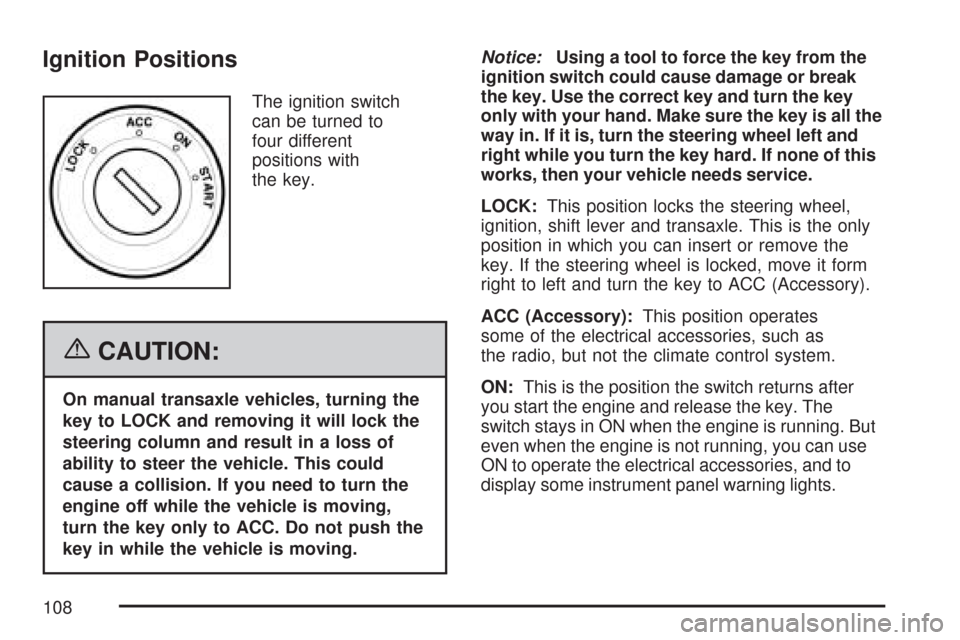
Ignition Positions
The ignition switch
can be turned to
four different
positions with
the key.
{CAUTION:
On manual transaxle vehicles, turning the
key to LOCK and removing it will lock the
steering column and result in a loss of
ability to steer the vehicle. This could
cause a collision. If you need to turn the
engine off while the vehicle is moving,
turn the key only to ACC. Do not push the
key in while the vehicle is moving.Notice:Using a tool to force the key from the
ignition switch could cause damage or break
the key. Use the correct key and turn the key
only with your hand. Make sure the key is all the
way in. If it is, turn the steering wheel left and
right while you turn the key hard. If none of this
works, then your vehicle needs service.
LOCK:This position locks the steering wheel,
ignition, shift lever and transaxle. This is the only
position in which you can insert or remove the
key. If the steering wheel is locked, move it form
right to left and turn the key to ACC (Accessory).
ACC (Accessory):This position operates
some of the electrical accessories, such as
the radio, but not the climate control system.
ON:This is the position the switch returns after
you start the engine and release the key. The
switch stays in ON when the engine is running. But
even when the engine is not running, you can use
ON to operate the electrical accessories, and to
display some instrument panel warning lights.
108
Page 114 of 436
AUTOMATIC OVERDRIVE (D4):This position is
for normal driving.
When operating your vehicle in severe cold
conditions, the transaxle may be prevented from
shifting into D4 gear until the transaxle fluid
has warmed up to it’s operational temperature.
Notice:If your vehicle seems to start up rather
slowly or not shift gears when you go faster,
and you continue to drive your vehicle that
way, you could damage the transaxle.
Have your vehicle serviced right away. You
can drive in SECOND (2) when you are driving
less than 35 mph (55 km/h) and AUTOMATIC
OVERDRIVE (D4) for higher speeds until then.
SECOND (2):This position gives you more
power but lower fuel economy. You can use
SECOND (2) on hills. It can help control your
speed as you go down steep mountain roads,
but then you would also want to use your brakes
off and on.Notice:Do not drive in SECOND (2) at speeds
over 65 mph (105 km/h), or you can damage the
transaxle. Use AUTOMATIC OVERDRIVE (D4) as
much as possible. Do not shift into SECOND (2)
unless you are going slower than 65 mph
(105 km/h) or you can damage your engine.
FIRST (1):This position gives you even more
power but lower fuel economy than SECOND (2).
You can use it on very steep hills, or in deep
snow or mud. If the shift lever is put in FIRST (1),
the transaxle will not shift into first gear until
the vehicle is going slowly enough.
Notice:Spinning the tires or holding the
vehicle in one place on a hill using only the
accelerator pedal may damage the transaxle. If
you are stuck, do not spin the tires. When
stopping on a hill, use the brakes, or parking
brake to hold the vehicle in place.
If there is a malfunction with the automatic
transaxle, the malfunction indicator lamp (MIL) or
the HOLD indicator light will turn on or flash.
SeeMalfunction Indicator Lamp on page 180or
Hold Mode Light on page 180.
Have your vehicle fixed as soon as possible.
114