audio CHEVROLET BLAZER 1994 2.G Owners Manual
[x] Cancel search | Manufacturer: CHEVROLET, Model Year: 1994, Model line: BLAZER, Model: CHEVROLET BLAZER 1994 2.GPages: 348, PDF Size: 17.88 MB
Page 6 of 348
Downloaded from www.Manualslib.com manuals search engine Table of Contents
Introduction - How to Use this Manual
This section tells you how to use your manual and includes safety
and vehicle damage warnings and symbols.
Section 1 - Seats and Safety Restraints
This section tells you how to use your seats and safety restraints
properly.
Section 2 - Features & Controls
This section explains how to start and operate your vehicle.
Section 3 - Comfort Controls & Audio Systems
This section tells you how to adjust the ventilation and comfort
controls and how
to operate your audio system.
Section 4 - Your Driving and the Road
Here you’ll find helpful information and tips about the road and \
how
to drive under different conditions.
Section 5 - Problems on the Road
This section tells you what to do if you have a problem while
driving, such as a flat tire or engine overheating.
Section 6 - Service & Appearance Care
Here the manual tells you how to keep your vehicle running
properly and looking good.
Section 7- Scheduled Maintenance Services
This section tells you when to perform vehicle maintenance and
what fluids and lubricants
to use.
Section 8 - Customer Assistance Information
This section tells you how to contact your GM division for
assistance and how
to get service publications. It also gives you
information
on “Reporting Safety Defects” on page 8-4.
Index
Here’s an alphabetical listing of almost every subject in this
manual. You can use
it to quickly find something you want to read.
1v
Page 118 of 348
Downloaded from www.Manualslib.com manuals search engine instrument Panel
I l2 l1 l3 l5 lo
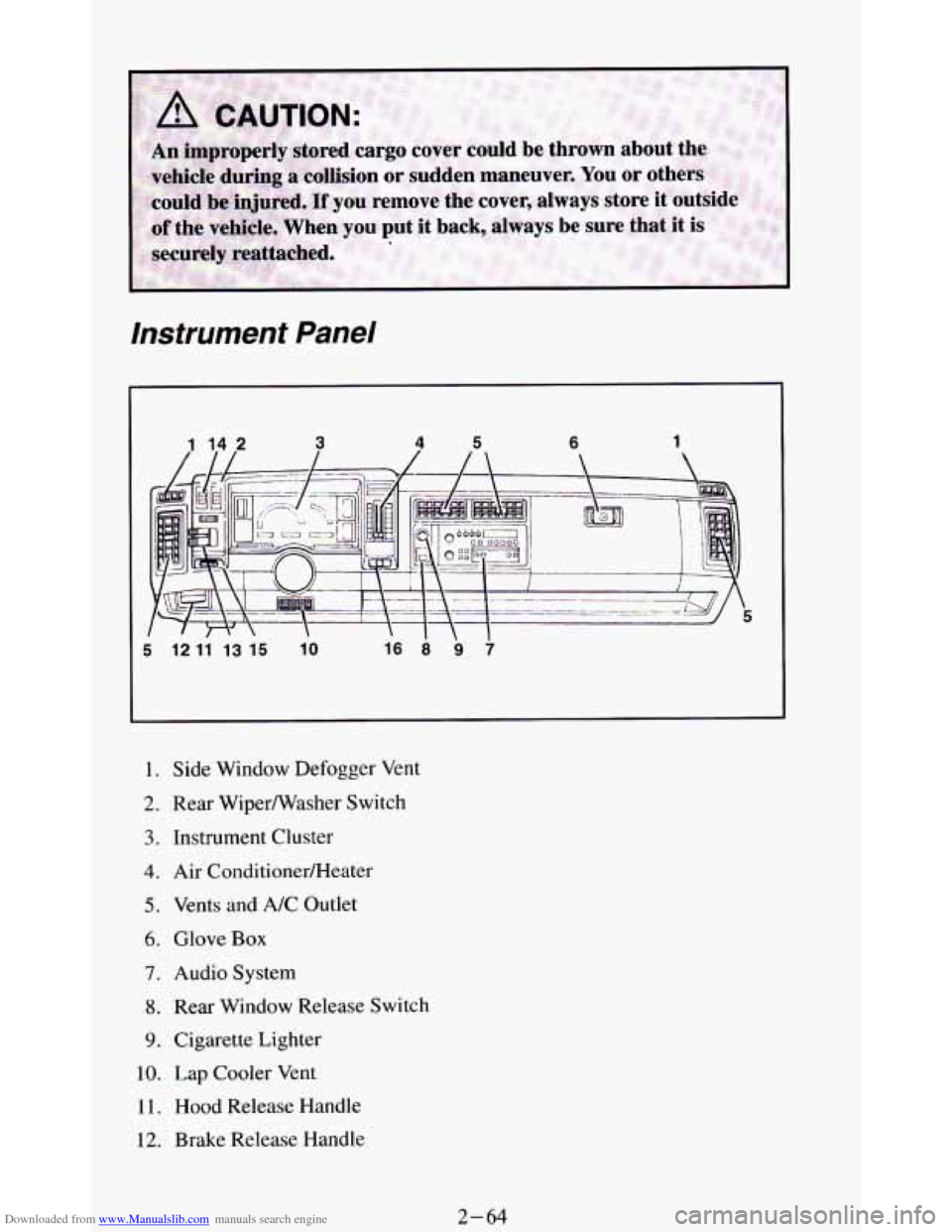
I. Side Window Defogger Vent
2. Rear Wiperwasher Switch
3. Instrument Cluster
4. Air ConditionerRIeater
5. Vents and A/C Outlet
6. Glove Box
7. Audio System
8. Rear Window Release Switch
9. Cigarette Lighter
10. Lap Cooler Vent
11. Hood Release Handle
12. Brake Release Handle
2-64
Page 135 of 348
Downloaded from www.Manualslib.com manuals search engine Comrort Controls & Audio Systems
Section
In this part you’ll find out how to operate the comfort control systems and
audio systems offered with your vehicle
. Be sure to read about the particular
system supplied with your vehicle
.
For explanation of vehicle symbols, refer to “Vehicle Symbols” in the
Introduction
.
Comfort Controls
Flow-Through Ventilation System
........................... 3-2
Heater Controls
.......................................... 3-3
Heater/Air Conditioning Controls ........................... 3-4
Engine Coolant Heater (Engine Block Heater) .................... 3-5
Rear Window Defogger
...................................... 3-5
Audiosystems ............................................. 3-6
FMStereo
.............................................. 3-7
AM
................................................... 3-7
AMStereo
.............................................. 3-7
How to Operate Your ETR@ AM Radio
....................... 3-8
How to Operate Your ETR@ AM-FM Stereo Audio System ..... 3-10
How to Operate Your ETR@ AM-FM Stereo Audio Cassette
System
............................................. 3-12
How to Operate Your ETR’ AM-FM Stereo Audio Cassette System
With Equalizer
....................................... 3-15
Care
of Your Cassette Tape Player .......................... 3-18
How to Operate Your ETR’ AM-FM Stereo Audio Compact Disc
(CD)System
........................................ 3-19
Care of Your Compact Discs ...................... **t!%*BB 3-24
Fixed Mast Antenna ..................................... 3-24
3-1
Page 140 of 348
Downloaded from www.Manualslib.com manuals search engine To turn on the rear
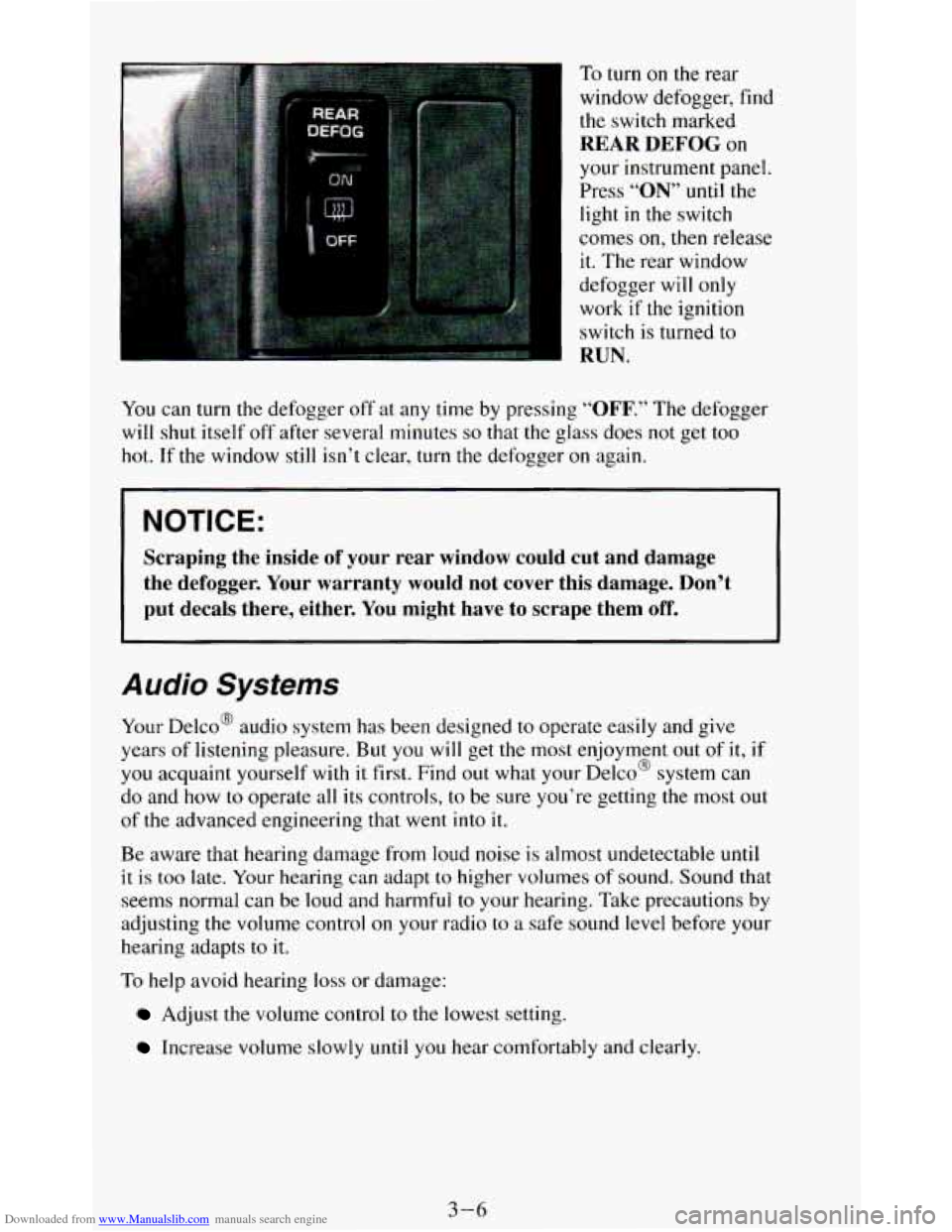
window defogger, find the switch marked
REAR DEFOG on
your instrument panel.
Press
“ON” until the
light
in the switch
comes
on, then release
it. The rear window
defogger will only
work
if the ignition
switch is turned to
RUN.
You can turn the defogger off at any time by pressing “OFF.” The defogger
will shut itself off after several minutes
so that the glass does not get too
hot. If the window
still isn’t clear, turn the defogger on again.
NOTICE:
Scraping the inside of your rear window could cut and damage
the defogger. Your warranty would not cover this damage. Don’t
put decals there, either. You might have to scrape them
off.
Audio Systems
Your Delco@ audio system has been designed to operate easily and give
years of listening pleasure. But
you will get the most enjoyment out of it,
you acquaint yourself with it first. Find out what your Delco@ system can
do and how
to operate all its controls, to be sure you’re getting the most o
of the advanced engineering that went into it.
if
I
IU t
Be aware that hearing damage from loud noise is almost undetectable until
it is too late. Your hearing can adapt to higher volumes of sound. Sound that
seems normal can be loud and harmful to your hearing. Take precautions by
adjusting the volume control
on your radio to a safe sound level before your
hearing adapts to it.
To help avoid hearing loss or damage:
Adjust the volume control to the lowest setting.
Increase volume slowly until you hear comfortably and clearly.
3-6
Page 144 of 348
Downloaded from www.Manualslib.com manuals search engine How to Operate Your
ETW AM-FM Siereo Audio Sysiem
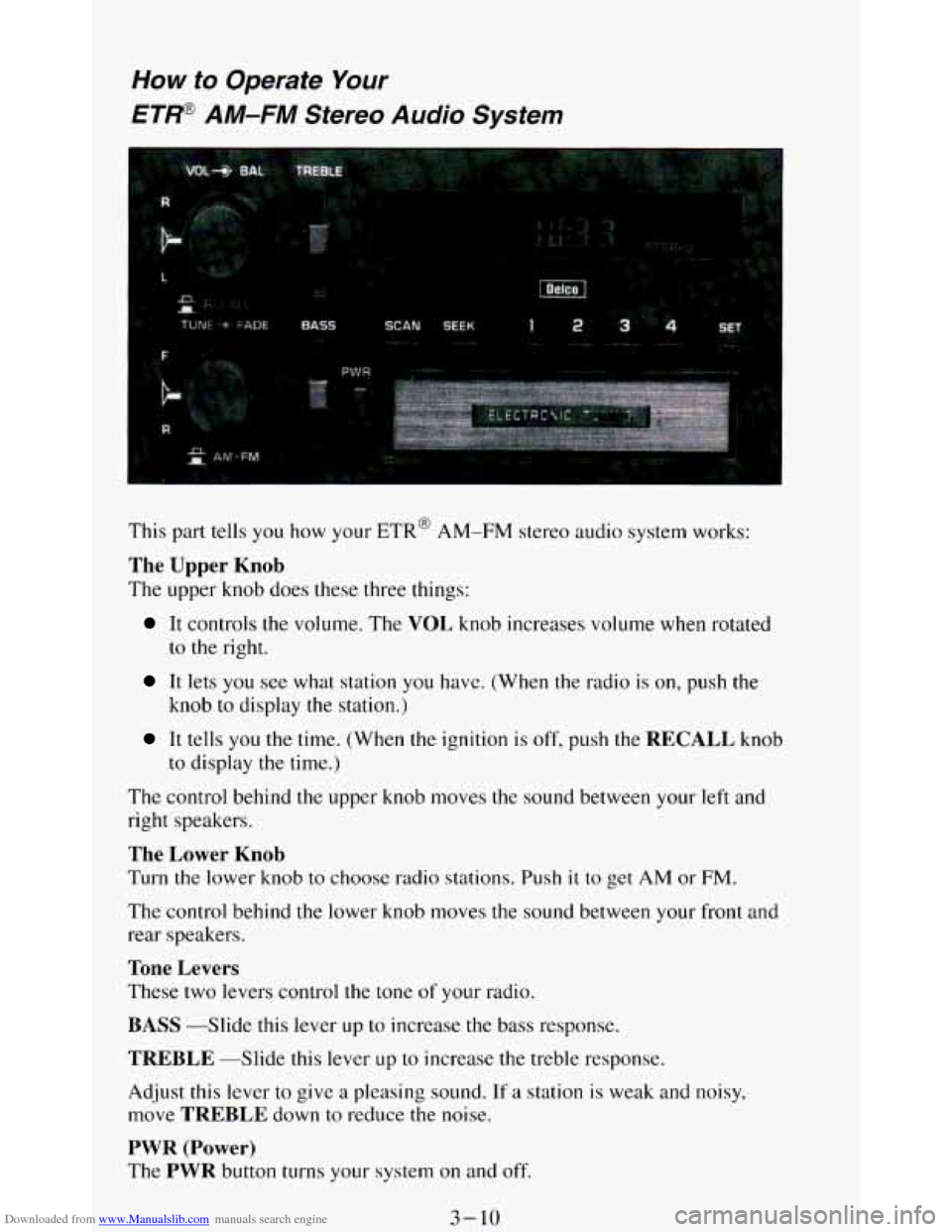
This part tells you how your ETR@ AM-FM stereo audio system works:
The Upper Knob
The upper knob does these three things:
It controls the volume. The VOL knob increases volume when rotated
to
the right.
It lets you see what station you have. (When the radio is on, push the
knob
to display the station.)
It tells you the time. (When the ignition is off, push the RECALL knob
to display
the time.)
The control behind the upper knob moves the sound between your left and
right speakers.
The Lower Knob
Turn the lower knob to choose radio stations. Push it to get AM or FM.
The control behind the lower knob moves the sound between your front and
rear speakers.
Tone Levers
These two levers control the tone of your radio.
BASS -Slide this lever up to increase the bass response.
TREBLE --Slide this lever LIP to increase the treble response.
Adjust this lever to give
a pleasing sound. If a station is weak and noisy,
move
TREBLE down to reduce the noise.
PWR (Power)
The PWR button turns your system on and off.
3-10
Page 146 of 348
Downloaded from www.Manualslib.com manuals search engine How to Operate Your
ETP AM-FM Stereo Audio Cassette System
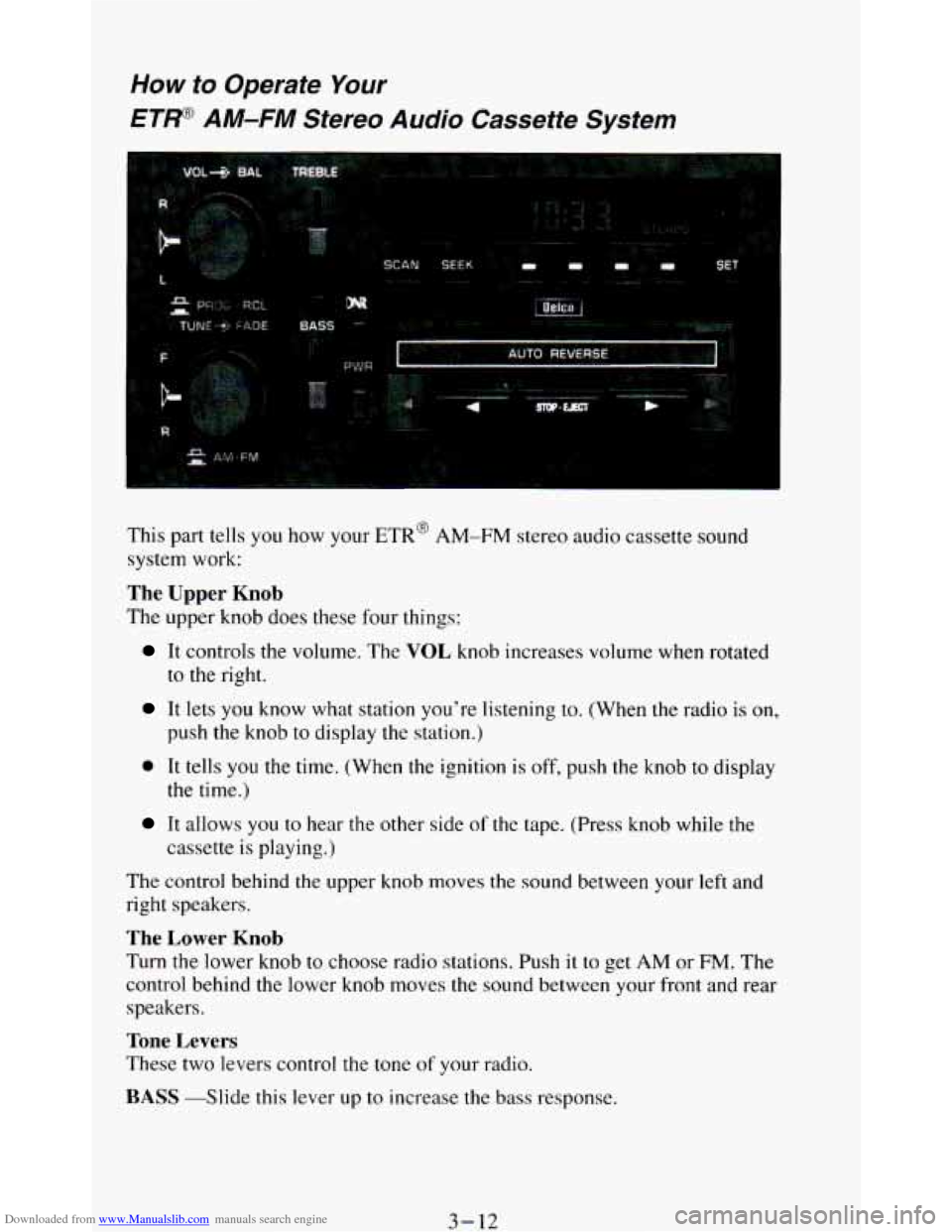
This part tells you how your ETR’ AM-FM stereo audio cassette sound
system work:
The Upper Knob
The upper knob does these four things:
It controls the volume. The VOL knob increases volume when rotated
to the right.
It lets you know what station you’re listening to. (When the radio is on,
push the knob to display the station.)
0 It tells you the time. (When the ignition is off, push the knob to display
It allows you to near the other side of the tape. (Press knob while the
the time.)
cassette
is playing.)
The control behind the upper knob moves
the sound between your left and
right speakers.
The Lower Knob
Turn the lower knob to choose radio stations. Push it to get AM or FM. The
control behind the lower knob moves the sound between your front and rear
speakers.
Tone Levers
These two levers control the tone of your radio.
BASS -Slide this lever up to increase the bass response.
3-12
Page 149 of 348
Downloaded from www.Manualslib.com manuals search engine How to Operate Your ET@ AM-FM Stereo Audio
Cassette System with Equalizer
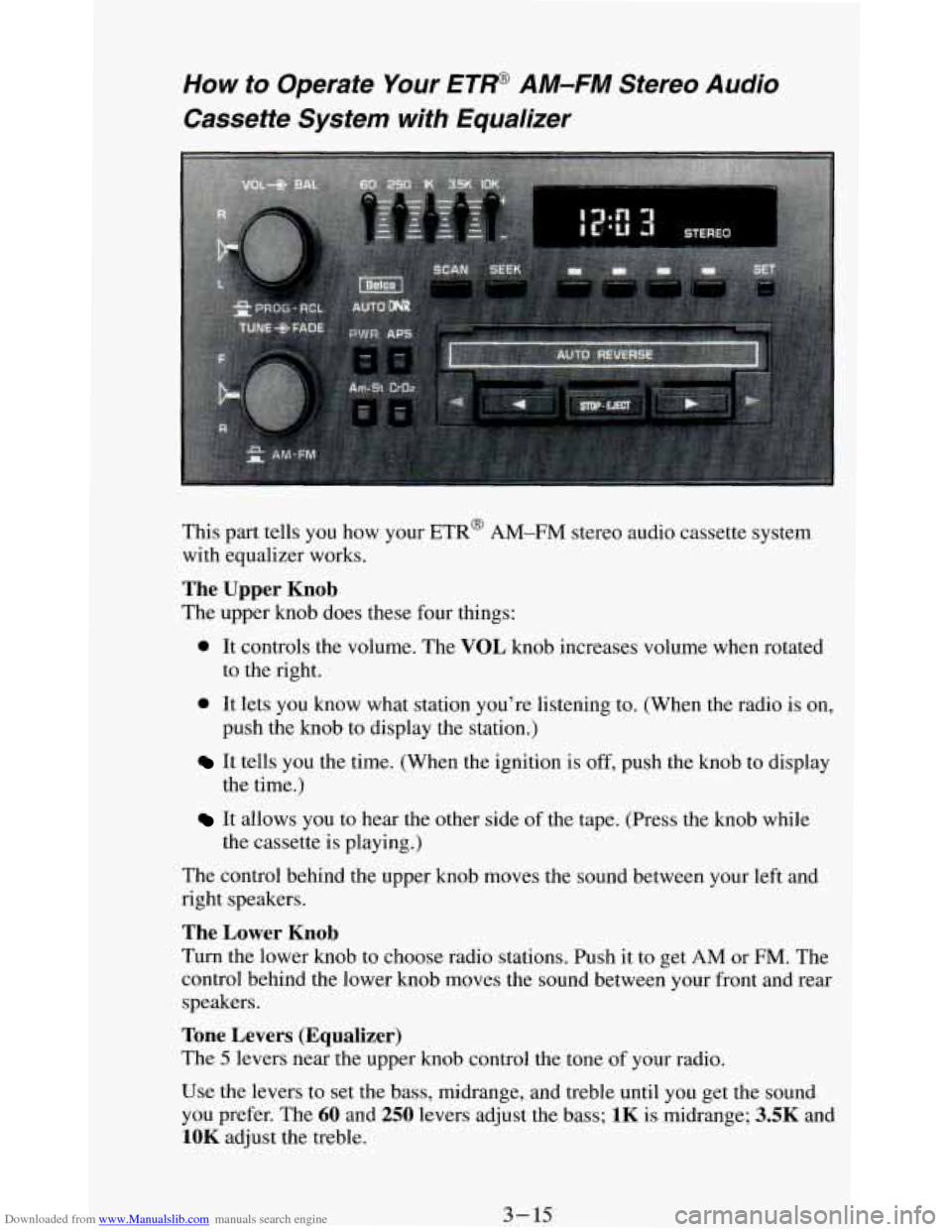
This part tells you how your ETR@ AM-FM stereo audio cassette system
with equalizer works.
The Upper Knob
The upper knob does these four things:
0 It controls the volume. The VOL knob increases volume when rotated
to the right.
push the knob to display the station.)
0 It lets you know what station you’re listening to. (When the radio is on,
It tells you the time. (When the ignition is off, push the knob to display
It allows you to hear the other side of the tape. (Press the knob while
the time.)
the cassette
is playing.)
The control behind the upper knob moves the sound between your left and
right speakers.
The Lower Knob
Turn the lower knob to choose radio stations. Push it to get AM or FM. The
control behind the lower knob moves the sound between your front and rear
speakers.
Tone Levers (Equalizer)
The 5 levers near the upper knob control the tone of your radio.
Use the levers to set the bass, midrange, and treble until you get the sound
you prefer. The
60 and 250 levers adjust the bass; 1K is midrange; 3.5K and
1OK adjust the treble.
3- 15
Page 150 of 348
Downloaded from www.Manualslib.com manuals search engine PWR (Power)
The PWR button turns your system on and off.
AM-ST Button
Push this button if you want AM stereo. (“STEREO” will be displayed
when
you are receiving an AM stereo station.)
Cr02 Button
The Cr02 button lets you set the system for the type of cassette being used.
If you are using chrome
or metal tapes, push the Cr02 button in. If you are
using standard iron tapes, make sure the button
is out.
Your audio system has automatic Dynamic Noise Reduction. It helps
remove background hiss
noise from the radio or tape player.
DNR@
DNR@ is a registered trademark of the National Semiconductor
Corporation.
Pushbuttons
The four pushbuttons let you return to favorite stations.
You can set the pushbuttons for up to eight favorite stations
(4 AM and
4 FM). Just:
Tune in the station.
Push SET. (SET appears in the VF display for a few seconds.)
Within 5 seconds, push one of the four pushbuttons. Whenever you
push that button, the preset station will return.
Repeat these steps for each pushbutton.
NOTE: You can preset
3 more stations on each band by pushing a pair of
buttons next to each other at the same time. Just:
Tune in the station.
Push SET. (SET appears in the VF display for a few seconds.)
Within 5 seconds, push two buttons next to each other at the same time.
Whenever
you push that pair of buttons, the preset station will return.
Repeat these steps for each pair of buttons.
SCAN Button
When you push this, the radio will go to the next station and stay there a
few seconds. Then
it will go to the next station and pause, and keep doing
that. Press
SCAN again to stop scanning.
SEEK Button
This chooses stations also, but it doesn’t keep moving as SCAN does. When
you push SEEK, the radio goes to the next station and stays there.
3-16
Page 153 of 348
Downloaded from www.Manualslib.com manuals search engine How to Operate Your ETP AM-FM Stereo Audio
Compact Disc (CD) System
i
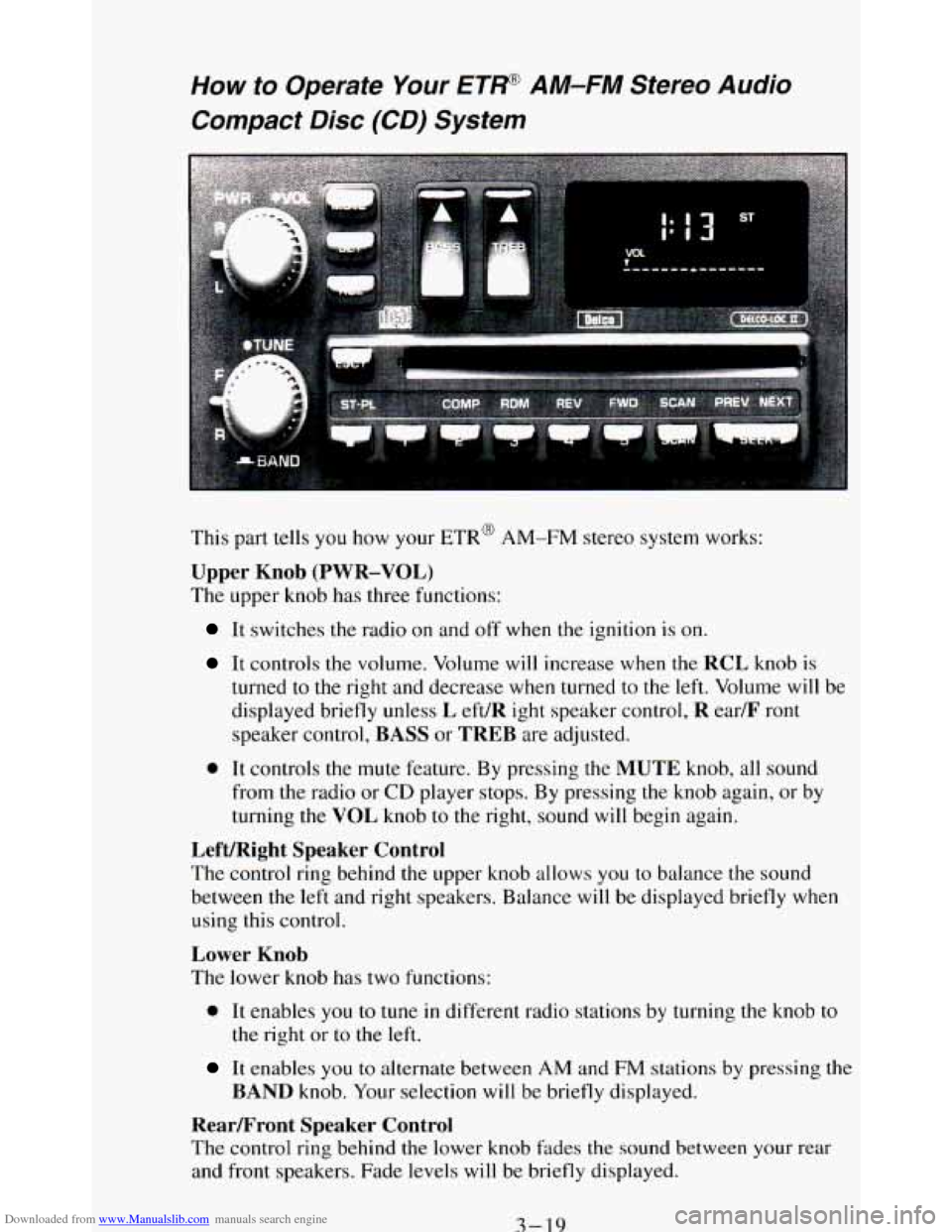
This part tells you how your ETR@ AM-FM stereo system works:
Upper Knob (PWR-VOL)
The upper knob has three functions:
It switches the radio on and off when the ignition is on.
It controls the volume. Volume will increase when the RCL knob is
turned
to the right and decrease when turned to the left. Volume will be
displayed briefly unless
L eft/R ight speaker control, R ear/F ront
speaker control, BASS or TREB are adjusted.
0 It controls the mute feature. By pressing the MUTE knob, all sound
from the radio or
CD player stops. By pressing the knob again, or by
turning the VOL knob
to the right, sound will begin again.
Left/Right Speaker Control
The control ring behind the upper knob allows you to balance the sound
between the left and right speakers. Balance will be displayed briefly when
using this control.
Lower Knob
The lower knob has two functions:
0 It enables you to tune in different radio stations by turning the knob to
the right or to the left.
It enables you to alternate between AM and FM stations by pressing the
BAND knob. Your selection will be briefly displayed.
RearLFront Speaker Control
The control ring behind the lower knob fades the sound between your rear
and front speakers. Fade levels will be briefly displayed.
3-19
Page 337 of 348
Downloaded from www.Manualslib.com manuals search engine Index
A
Accessory Power Outlet ........................................... 2-56
Aircleaner
..................................................... 6-14
Air Conditioning
............................................ 346-35
FanLever
.................................................... 34
FunctionLever
................................................ 34
Refrigerant Capacity
........................................... 6-69
Temperature Lever ............................................. 3-4
Antenna. Fixed Mast
............................................. 3-24
Anti-lock Brakes (See “Brakes”)
Appearancecare
................................................ 6-49
Materials Chart ............................................... 6-57
Arbitration Program
............................................... 8-3
Audiosystems
................................................... 3-6
AMRadio
.................................................... 3-7
AM-FM Stereo Audio Compact Disc (CD) System
................... 3-19
AM-FM Stereo Audio System with Cassette Deck
................... 3-12
AM-FM Stereo Audio System with Cassette Deck and Equalizer
........ 3-15
AM-FM Stereo Audio System ................................... 3-10
Anti-Theft Feature (CD) System)
................................. 3-22
Cassette Tape Player Care
....................................... 3-18
CompactDiscCare
............................................ 3-24
Automatic Transmission
.......................................... 2-20
Fluid
....................................................... 6-15
Axle Front
....................................................... 6-22
Rear
........................................................ 6-20
RearLocking ................................................. 2-25
........ 6-31 Battery ............................... .......
Belts (See “Safety Belts”)
Better Business Bureau Mediation
.................................... 8-3
Blizzard
....................................................... 4-34
Brakes Anti-lock
.................................................... 4-6
Fluid
.................................................. 6.29. 6.30
Four-wheel Anti-lock
.......................................... 4-7
Leakcheck
.................................................. 6-31
Mastercylinder
.............................................. 6-29
Parking
..................................................... 2-25
Replacingparts
............................................... 6-30
System Warning Light
.................................... 2.68. 4-16
Trailer ...................................................... 4-37
Braking
......................................................... 4-5
InEmergencies ................................................ 4-7
Break-In, New Vehicle
........................................... 2-15
Bulb Replacement
............................................... 6-32
Replacementchart ............................................ 6-63
1