lights CHEVROLET BLAZER 2021 User Guide
[x] Cancel search | Manufacturer: CHEVROLET, Model Year: 2021, Model line: BLAZER, Model: CHEVROLET BLAZER 2021Pages: 380, PDF Size: 9.1 MB
Page 127 of 380
Chevrolet Blazer Owner Manual (GMNA-Localizing-U.S./Canada/Mexico-
14608203) - 2021 - CRC - 10/29/20
126 Lighting
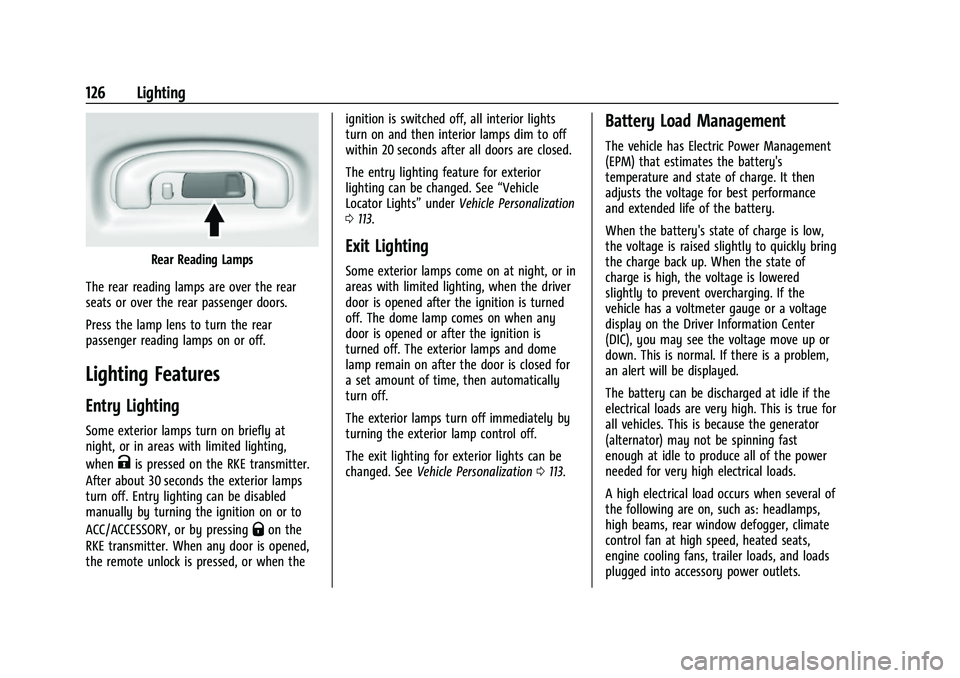
Rear Reading Lamps
The rear reading lamps are over the rear
seats or over the rear passenger doors.
Press the lamp lens to turn the rear
passenger reading lamps on or off.
Lighting Features
Entry Lighting
Some exterior lamps turn on briefly at
night, or in areas with limited lighting,
when
Kis pressed on the RKE transmitter.
After about 30 seconds the exterior lamps
turn off. Entry lighting can be disabled
manually by turning the ignition on or to
ACC/ACCESSORY, or by pressing
Qon the
RKE transmitter. When any door is opened,
the remote unlock is pressed, or when the ignition is switched off, all interior lights
turn on and then interior lamps dim to off
within 20 seconds after all doors are closed.
The entry lighting feature for exterior
lighting can be changed. See
“Vehicle
Locator Lights” underVehicle Personalization
0 113.
Exit Lighting
Some exterior lamps come on at night, or in
areas with limited lighting, when the driver
door is opened after the ignition is turned
off. The dome lamp comes on when any
door is opened or after the ignition is
turned off. The exterior lamps and dome
lamp remain on after the door is closed for
a set amount of time, then automatically
turn off.
The exterior lamps turn off immediately by
turning the exterior lamp control off.
The exit lighting for exterior lights can be
changed. See Vehicle Personalization 0113.
Battery Load Management
The vehicle has Electric Power Management
(EPM) that estimates the battery's
temperature and state of charge. It then
adjusts the voltage for best performance
and extended life of the battery.
When the battery's state of charge is low,
the voltage is raised slightly to quickly bring
the charge back up. When the state of
charge is high, the voltage is lowered
slightly to prevent overcharging. If the
vehicle has a voltmeter gauge or a voltage
display on the Driver Information Center
(DIC), you may see the voltage move up or
down. This is normal. If there is a problem,
an alert will be displayed.
The battery can be discharged at idle if the
electrical loads are very high. This is true for
all vehicles. This is because the generator
(alternator) may not be spinning fast
enough at idle to produce all of the power
needed for very high electrical loads.
A high electrical load occurs when several of
the following are on, such as: headlamps,
high beams, rear window defogger, climate
control fan at high speed, heated seats,
engine cooling fans, trailer loads, and loads
plugged into accessory power outlets.
Page 186 of 380

Chevrolet Blazer Owner Manual (GMNA-Localizing-U.S./Canada/Mexico-
14608203) - 2021 - CRC - 10/29/20
Climate Controls 185
To turn Auto Defog off or on, see“Climate
and Air Quality” underVehicle
Personalization 0113.
Rear Window Defogger
=:Press to turn the rear window
defogger on or off. An indicator light on the
button comes on to show that the rear
window defogger is on. The rear window
defogger only works when the ignition is
on. The defogger turns off when the ignition
is off or in ACC/ACCESSORY.
The rear window defogger can be set to
automatic operation. See “Climate and Air
Quality” underVehicle Personalization 0113.
When Auto Rear Defog is selected, the rear
window defogger turns on automatically
when the interior temperature is cold and
the outside temperature is about 7 °C (44 °F)
and below. The auto rear defogger turns off
automatically.
If the vehicle is equipped with heated
outside mirrors, they turn on when the rear
window defogger button is on and help to
clear fog or frost from the surface of the
mirror. See Heated Mirrors 026.
Caution
Do not try to clear frost or other material
from the inside of the front windshield
and rear window with a razor blade or
anything else that is sharp. This may
damage the rear window defogger grid
and affect the radio's ability to pick up
stations clearly. The repairs would not be
covered by the vehicle warranty.
LorM:If equipped, pressLorMto
heat the driver or passenger seat. See
Heated and Ventilated Front Seats 040.
{orC:If equipped, press{orCto
ventilate the driver or passenger seat. See
Heated and Ventilated Front Seats 040.
Remote Start Climate Control Operation :
If equipped with remote start, the climate
control system may run when the vehicle is
started remotely. The system will use the
defrost setting if it is cold outside or turn
on using the coldest settings if it is hot
outside. The rear defog may come on during
remote start based on cold ambient
conditions. The rear defog indicator light
does not come on during a remote start. If equipped, the heated seats will turn on if
it is cold outside or the ventilated seats will
turn on if it is hot outside. The heated and
ventilated seat indicator lights may not
come on during a remote start. If equipped,
the heated steering wheel will come on in a
remote start if it is cold outside. The heated
steering wheel indicator light may not come
on. See
Remote Vehicle Start 013 and
Heated and Ventilated Front Seats 040.
Sensor
The solar sensor, on top of the instrument
panel near the windshield, monitors the
solar heat.
The climate control system uses the sensor
information to adjust the temperature, fan
speed, recirculation, and air delivery mode
for best comfort.
Do not cover the sensor; otherwise the
automatic climate control system may not
work properly.
Afterblow Feature
Under certain conditions, the fan may stay
on or may turn on and off several times
after you turn off and lock the vehicle. This
is normal.
Page 202 of 380
Chevrolet Blazer Owner Manual (GMNA-Localizing-U.S./Canada/Mexico-
14608203) - 2021 - CRC - 10/29/20
Driving and Operating 201
The Remote Keyless Entry (RKE) transmitter
must be in the vehicle for the system to
operate. If the pushbutton start is not
working, the vehicle may be near a strong
radio antenna signal causing interference to
the Keyless Access system. SeeRemote
Keyless Entry (RKE) System Operation 07.
To shift out of P (Park), the ignition must be
on or in Service Mode and the brake pedal
must be applied.
Stopping the Engine/OFF (No Indicator
Lights) : When the vehicle is stopped, press
ENGINE START/STOP once to turn the
engine off.
If the vehicle is in P (Park), the ignition will
turn off, and Retained Accessory Power
(RAP) will remain active. See Retained
Accessory Power (RAP) 0205.
If the vehicle is not in P (Park), the ignition
will return to ACC/ACCESSORY and display
the message SHIFT TO PARK in the Driver
Information Center (DIC). When the vehicle
is shifted into P (Park), the ignition will
turn off.
Do not turn the engine off when the vehicle
is moving. This will cause a loss of power
assist in the brake and steering systems and
disable the airbags. If the vehicle must be shut off in an
emergency:
1. Brake using a firm and steady pressure. Do not pump the brakes repeatedly. This
may deplete power assist, requiring
increased brake pedal force.
2. Shift the vehicle to N (Neutral). This can be done while the vehicle is moving.
After shifting to N (Neutral), firmly apply
the brakes and steer the vehicle to a
safe location.
3. Come to a complete stop, shift to P (Park), and turn the ignition off. The
shift lever must be in P (Park) to turn the
ignition off.
4. Set the parking brake. See Electric
Parking Brake 0211.
{Warning
Turning off the vehicle while moving may
cause loss of power assist in the brake
and steering systems and disable the
airbags. While driving, only shut the
vehicle off in an emergency. If the vehicle cannot be pulled over, and
must be shut off while driving, press and
hold ENGINE START/STOP for longer than
two seconds, or press twice in five seconds.
ACC/ACCESSORY (Amber Indicator Light) :
This mode allows some electrical accessories
to be used when the engine is off.
With the ignition off, pressing the button
one time without the brake pedal applied
will place the ignition system in ACC/
ACCESSORY.
The ignition will switch from ACC/
ACCESSORY to OFF after five minutes to
prevent battery rundown.
ON/RUN/START (Green Indicator Light) :
This
mode is for driving and starting. With the
ignition off, and the brake pedal applied,
pressing the button once will place the
ignition system in ON/RUN/START. Once
engine cranking begins, release the button.
Engine cranking will continue until the
engine starts. See Starting the Engine 0202.
The ignition will then remain in ON/RUN.
Service Mode
This power mode is available for service and
diagnostics, and to verify the proper
operation of the malfunction indicator lamp
as may be required for emission inspection
Page 232 of 380
Chevrolet Blazer Owner Manual (GMNA-Localizing-U.S./Canada/Mexico-
14608203) - 2021 - CRC - 10/29/20
Driving and Operating 231
vehicle ahead too quickly, FCA provides a
red flashing alert on the windshield and
rapidly beeps or pulses the driver seat. FCA
also lights an amber visual alert if following
another vehicle much too closely.
FCA detects vehicles within a distance of
approximately 60 m (197 ft) and operates at
speeds above 8 km/h (5 mph). If the vehicle
has Adaptive Cruise Control (ACC), it can
detect vehicles to distances of approximately
110 m (360 ft) and operates at speeds above
4km/h (2.5 mph). SeeAdaptive Cruise Control
(Advanced) 0217.
{Warning
FCA is a warning system and does not
apply the brakes. When approaching a
slower-moving or stopped vehicle ahead
too rapidly, or when following a vehicle
too closely, FCA may not provide a
warning with enough time to help avoid
a crash. It also may not provide any
warning at all. FCA does not warn of
pedestrians, animals, signs, guardrails,
bridges, construction barrels, or other
objects. Be ready to take action and
apply the brakes. See Defensive Driving
0 188. FCA can be disabled with either the FCA
steering wheel control or, if equipped,
through vehicle personalization. See
“Collision/Detection Systems”
underVehicle
Personalization 0113.
Detecting the Vehicle Ahead
FCA warnings will not occur unless the FCA
system detects a vehicle ahead. When a
vehicle is detected, the vehicle ahead
indicator will display green. Vehicles may
not be detected on curves, highway exit
ramps, or hills, due to poor visibility; or if a
vehicle ahead is partially blocked by
pedestrians or other objects. FCA will not
detect another vehicle ahead until it is
completely in the driving lane.
{Warning
FCA does not provide a warning to help
avoid a crash, unless it detects a vehicle.
FCA may not detect a vehicle ahead if
(Continued)
Warning (Continued)
the FCA sensor is blocked by dirt, snow,
or ice, or if the windshield is damaged.
It may also not detect a vehicle on
winding or hilly roads, or in conditions
that can limit visibility such as fog, rain,
or snow, or if the headlamps or
windshield are not cleaned or in proper
condition. Keep the windshield,
headlamps, and FCA sensors clean and in
good repair.
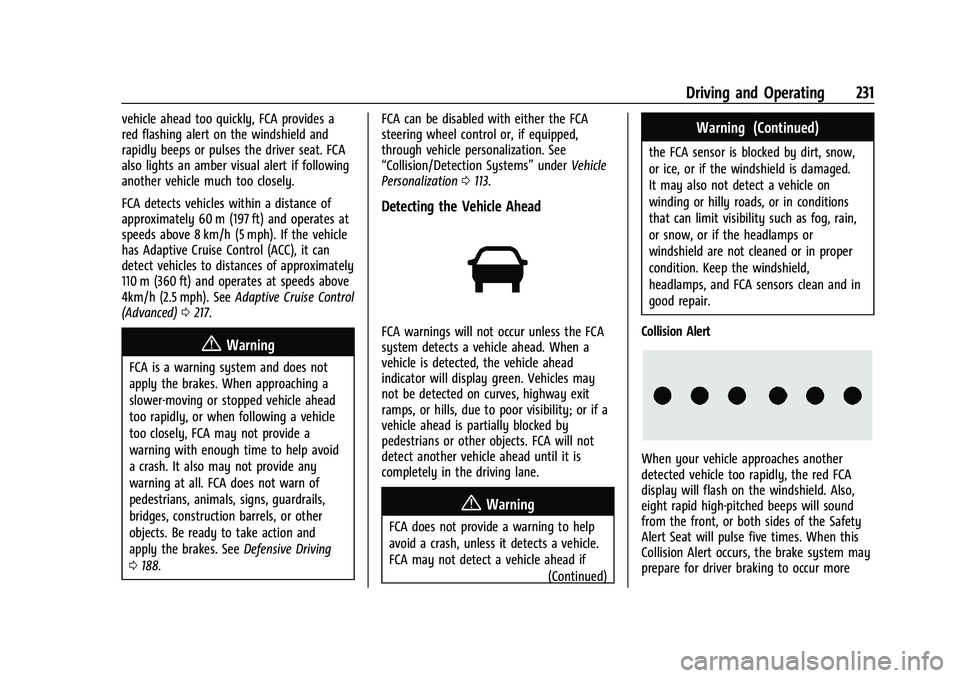
Collision Alert
When your vehicle approaches another
detected vehicle too rapidly, the red FCA
display will flash on the windshield. Also,
eight rapid high-pitched beeps will sound
from the front, or both sides of the Safety
Alert Seat will pulse five times. When this
Collision Alert occurs, the brake system may
prepare for driver braking to occur more
Page 237 of 380
Chevrolet Blazer Owner Manual (GMNA-Localizing-U.S./Canada/Mexico-
14608203) - 2021 - CRC - 10/29/20
236 Driving and Operating
Cleaning the System
If FPB does not seem to operate properly,
cleaning the outside of the windshield in
front of the rearview mirror may correct the
issue.
Side Blind Zone Alert (SBZA)
If equipped, the SBZA system is a
lane-changing aid that assists drivers with
avoiding crashes that occur with moving
vehicles in the side blind zone, or blind spot
areas. When the vehicle is in a forward gear,
the left or right side mirror display will light
up if a moving vehicle is detected in that
blind zone. If the turn signal is activated and
a vehicle is also detected on the same side,
the display will flash as an extra warning
not to change lanes. Since this system is
part of the Lane Change Alert (LCA) system,
read the entire LCA section before using this
feature.
Lane Change Alert (LCA)
If equipped, the LCA system is a
lane-changing aid that assists drivers with
avoiding lane change crashes that occur with
moving vehicles in the side blind zone (or
spot) areas or with vehicles rapidly
approaching these areas from behind. TheLCA warning display will light up in the
corresponding outside mirror and will flash
if the turn signal is on.
{Warning
LCA does not alert the driver to vehicles
outside of the system detection zones,
pedestrians, bicyclists, or animals. It may
not provide alerts when changing lanes
under all driving conditions. Failure to use
proper care when changing lanes may
result in injury, death, or vehicle damage.
Before making a lane change, always
check mirrors, glance over your shoulder,
and use the turn signals.
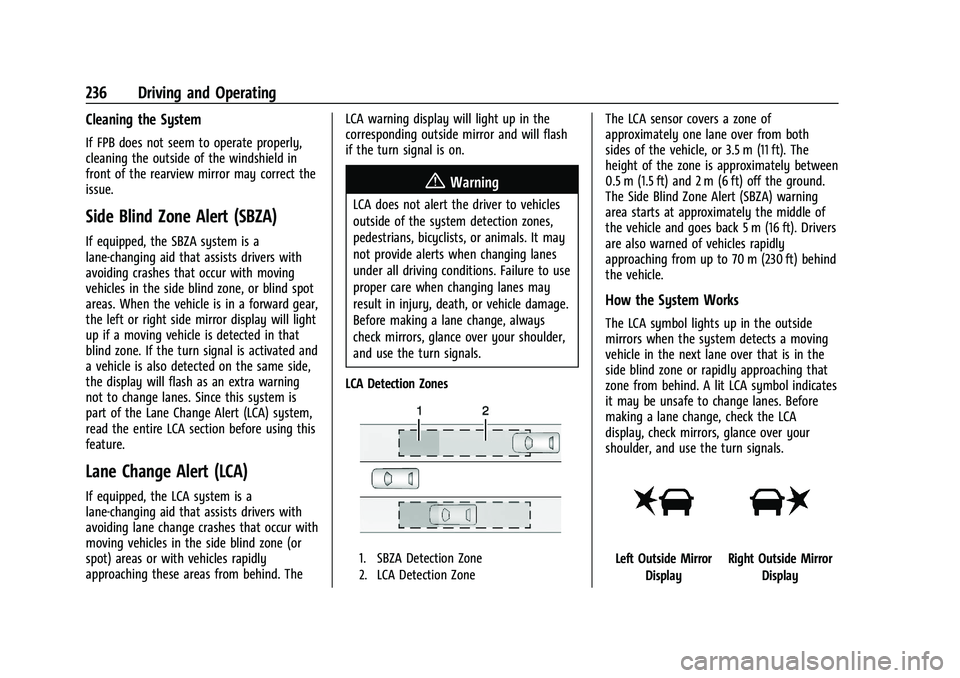
LCA Detection Zones
1. SBZA Detection Zone
2. LCA Detection Zone
The LCA sensor covers a zone of
approximately one lane over from both
sides of the vehicle, or 3.5 m (11 ft). The
height of the zone is approximately between
0.5 m (1.5 ft) and 2 m (6 ft) off the ground.
The Side Blind Zone Alert (SBZA) warning
area starts at approximately the middle of
the vehicle and goes back 5 m (16 ft). Drivers
are also warned of vehicles rapidly
approaching from up to 70 m (230 ft) behind
the vehicle.
How the System Works
The LCA symbol lights up in the outside
mirrors when the system detects a moving
vehicle in the next lane over that is in the
side blind zone or rapidly approaching that
zone from behind. A lit LCA symbol indicates
it may be unsafe to change lanes. Before
making a lane change, check the LCA
display, check mirrors, glance over your
shoulder, and use the turn signals.
Left Outside Mirror DisplayRight Outside Mirror Display
Page 320 of 380
Chevrolet Blazer Owner Manual (GMNA-Localizing-U.S./Canada/Mexico-
14608203) - 2021 - CRC - 10/29/20
Vehicle Care 319
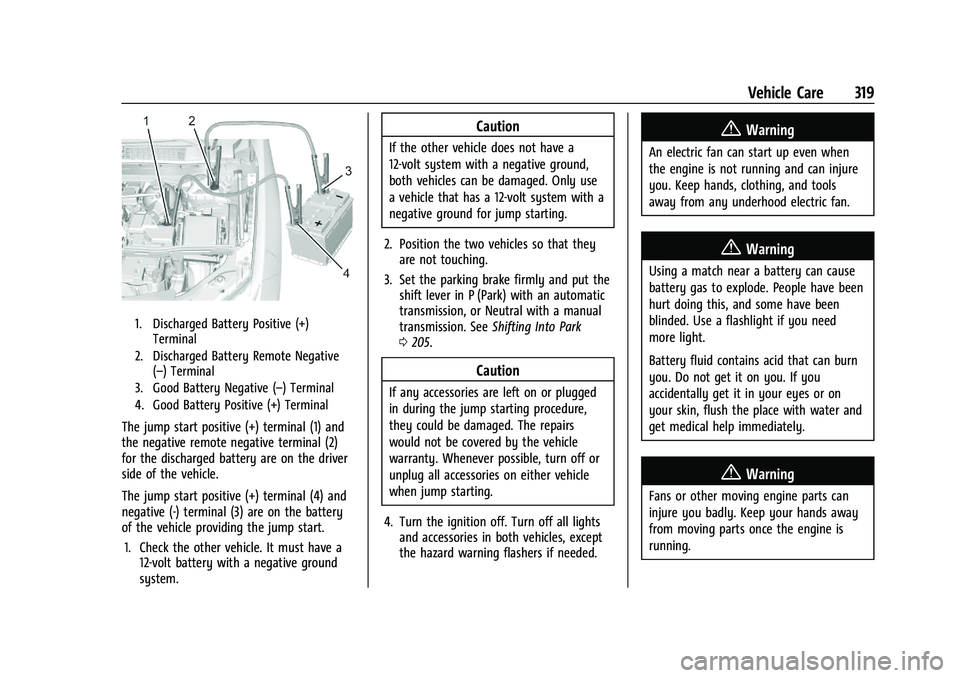
1. Discharged Battery Positive (+)Terminal
2. Discharged Battery Remote Negative (–) Terminal
3. Good Battery Negative (–) Terminal
4. Good Battery Positive (+) Terminal
The jump start positive (+) terminal (1) and
the negative remote negative terminal (2)
for the discharged battery are on the driver
side of the vehicle.
The jump start positive (+) terminal (4) and
negative (-) terminal (3) are on the battery
of the vehicle providing the jump start.
1. Check the other vehicle. It must have a 12-volt battery with a negative ground
system.
Caution
If the other vehicle does not have a
12-volt system with a negative ground,
both vehicles can be damaged. Only use
a vehicle that has a 12-volt system with a
negative ground for jump starting.
2. Position the two vehicles so that they are not touching.
3. Set the parking brake firmly and put the shift lever in P (Park) with an automatic
transmission, or Neutral with a manual
transmission. See Shifting Into Park
0 205.
Caution
If any accessories are left on or plugged
in during the jump starting procedure,
they could be damaged. The repairs
would not be covered by the vehicle
warranty. Whenever possible, turn off or
unplug all accessories on either vehicle
when jump starting.
4. Turn the ignition off. Turn off all lights and accessories in both vehicles, except
the hazard warning flashers if needed.
{Warning
An electric fan can start up even when
the engine is not running and can injure
you. Keep hands, clothing, and tools
away from any underhood electric fan.
{Warning
Using a match near a battery can cause
battery gas to explode. People have been
hurt doing this, and some have been
blinded. Use a flashlight if you need
more light.
Battery fluid contains acid that can burn
you. Do not get it on you. If you
accidentally get it in your eyes or on
your skin, flush the place with water and
get medical help immediately.
{Warning
Fans or other moving engine parts can
injure you badly. Keep your hands away
from moving parts once the engine is
running.
Page 339 of 380
Chevrolet Blazer Owner Manual (GMNA-Localizing-U.S./Canada/Mexico-
14608203) - 2021 - CRC - 10/29/20
338 Service and Maintenance
.Trained dealer technicians have the
diagnostic equipment to test the battery
and ensure that the connections and
cables are corrosion-free.
Belts
.Belts may need replacing if they squeak
or show signs of cracking or splitting.
.Trained dealer technicians have access to
tools and equipment to inspect the belts
and recommend adjustment or
replacement when necessary.
Brakes
Brakes stop the vehicle and are crucial to
safe driving.
.Signs of brake wear may include chirping,
grinding, or squealing noises, or difficulty
stopping.
.Trained dealer technicians have access to
tools and equipment to inspect the brakes
and recommend quality parts engineered
for the vehicle. Fluids
Proper fluid levels and approved fluids
protect the vehicle’s systems and
components. See
Recommended Fluids and
Lubricants 0340 for GM approved fluids.
.Engine oil and windshield washer fluid
levels should be checked at every fuel fill.
.Instrument cluster lights may come on to
indicate that fluids may be low and need
to be filled.
Hoses
Hoses transport fluids and should be
regularly inspected to ensure that there are
no cracks or leaks. With a multi-point
inspection, your dealer can inspect the hoses
and advise if replacement is needed.
Lamps
Properly working headlamps, taillamps, and
brake lamps are important to see and be
seen on the road.
.Signs that the headlamps need attention
include dimming, failure to light, cracking,
or damage. The brake lamps need to be
checked periodically to ensure that they
light when braking.
.With a multi-point inspection, your dealer
can check the lamps and note any
concerns.
Shocks and Struts
Shocks and struts help aid in control for a
smoother ride.
.Signs of wear may include steering wheel
vibration, bounce/sway while braking,
longer stopping distance, or uneven
tire wear.
.As part of the multi-point inspection,
trained dealer technicians can visually
inspect the shocks and struts for signs of
leaking, blown seals, or damage, and can
advise when service is needed.
Page 373 of 380
Chevrolet Blazer Owner Manual (GMNA-Localizing-U.S./Canada/Mexico-
14608203) - 2021 - CRC - 10/29/20
372 Index
Fuses (cont'd)Instrument Panel Fuse Block . . . . . . . . . . . 284
Rear Compartment Fuse Block . . . . . . . . . 285
G
Garage Door Opener . . . . . . . . . . . . . . . . . . . . . . 117
Programming . . . . . . . . . . . . . . . . . . . . . . . . . . . 117
Gas Strut(s) . . . . . . . . . . . . . . . . . . . . . . . . . . . . . . 277
Gauges
Engine Coolant Temperature . . . . . . . . . . . . 96
Engine Oil Temperature . . . . . . . . . . . . . . . . . 96
Fuel . . . . . . . . . . . . . . . . . . . . . . . . . . . . . . . . . . . . . 95
Odometer . . . . . . . . . . . . . . . . . . . . . . . . . . . . . . 94
Speedometer . . . . . . . . . . . . . . . . . . . . . . . . . . . 94
Tachometer . . . . . . . . . . . . . . . . . . . . . . . . . . . . . 95
Trip Odometer . . . . . . . . . . . . . . . . . . . . . . . . . . 95
Voltmeter . . . . . . . . . . . . . . . . . . . . . . . . . . . . . . . 97
Warning Lights and Indicators . . . . . . . . . . 89
General Information Service and Maintenance . . . . . . . . . . . . . . 331
Towing . . . . . . . . . . . . . . . . . . . . . . . . . . . . . . . . 242
Vehicle Care . . . . . . . . . . . . . . . . . . . . . . . . . . . 254
Global Positioning System (GPS) . . . . . . . . . . 152
Glove Box . . . . . . . . . . . . . . . . . . . . . . . . . . . . . . . . 76
GM Mobility Reimbursement Program . . . . . . . . . . . . . . . . . . . . . . . . . . . . . . . 352
Guidance Problems with the Route . . . . . . . . . . . . . . 153
H
Hazard Warning Flashers . . . . . . . . . . . . . . . . .124
HD Radio Technology . . . . . . . . . . . . . . . . . . . . . 135
Head Restraints . . . . . . . . . . . . . . . . . . . . . . . . . . . .33
HeadlampsAiming . . . . . . . . . . . . . . . . . . . . . . . . . . . . . . . . 278
Automatic . . . . . . . . . . . . . . . . . . . . . . . . . . . . . 123
Bulb Replacement . . . . . . . . . . . . . . . . . . . . . . 278
Daytime Running Lamps (DRL) . . . . . . . . . 123
Flash-to-Pass . . . . . . . . . . . . . . . . . . . . . . . . . . . 123
High Intensity Discharge (HID)Lighting . . . . . . . . . . . . . . . . . . . . . . . . . . . . . . 278
High-Beam On Light . . . . . . . . . . . . . . . . . . . 106
High/Low Beam Changer . . . . . . . . . . . . . . 122
Lamps On Reminder . . . . . . . . . . . . . . . . . . . 107
Heated Rear Seats . . . . . . . . . . . . . . . . . . . . . . . . . . . . . . 44
Steering Wheel . . . . . . . . . . . . . . . . . . . . . . . . . 83
Heated and Ventilated Front Seats . . . . . . . 40
Heated Mirrors . . . . . . . . . . . . . . . . . . . . . . . . . . . 26
Heater
Engine . . . . . . . . . . . . . . . . . . . . . . . . . . . . . . . . . 203
Heating . . . . . . . . . . . . . . . . . . . . . . . . . . . . . . . . . . .182
High Voltage Devices and Wiring . . . . . . . . 279
High-Beam On Light . . . . . . . . . . . . . . . . . . . . . 106
High-Speed Operation . . . . . . . . . . . . . . . . . . . 295
Hill and Mountain Roads . . . . . . . . . . . . . . . . 195
Hill Start Assist (HSA) . . . . . . . . . . . . . . . . . . . . . 212 Hood . . . . . . . . . . . . . . . . . . . . . . . . . . . . . . . . . . . . 255
Hooks
Shopping Bag . . . . . . . . . . . . . . . . . . . . . . . . . . . 78
Horn . . . . . . . . . . . . . . . . . . . . . . . . . . . . . . . . . . . . . . 84
How to Wear Seat Belts Properly . . . . . . . . . 45
HVAC . . . . . . . . . . . . . . . . . . . . . . . . . . . . . . . . . . . . .182
I
If the System Needs Service . . . . . . . . . . . . . . 153
Ignition Positions . . . . . . . . . . . . . . . . . . . . . . . . 200
Immobilizer . . . . . . . . . . . . . . . . . . . . . . . . . . . . . . . 24
Indicator Pedestrian Ahead . . . . . . . . . . . . . . . . . . . . . . 104
Vehicle Ahead . . . . . . . . . . . . . . . . . . . . . . . . . 103
Infants and Young Children, Restraints . . . . .61
Information Publication Ordering . . . . . . . . . . . . . . . . . . . 356
Infotainment System . . . . . . . . . . . . . . . . . . . . 359
Instrument Cluster . . . . . . . . . . . . . . . . . . . . 90, 93
Instrument Panel Overview . . . . . . . . . . . . . . . . 4
Interior Rearview Mirrors . . . . . . . . . . . . . . . . . 26
Introduction . . . . . . . . . . . . . . . . . . . . . . . . . . . 1, 128
J
Jump Starting - North America . . . . . . . . . . . .318
K
Keyless Entry Remote (RKE) System . . . . . . . . . . . . . . . . . . . . 7
Page 374 of 380
Chevrolet Blazer Owner Manual (GMNA-Localizing-U.S./Canada/Mexico-
14608203) - 2021 - CRC - 10/29/20
Index 373
Keys . . . . . . . . . . . . . . . . . . . . . . . . . . . . . . . . . . . . . . . 6
L
Labeling, Tire Sidewall . . . . . . . . . . . . . . . . . . . 289
LampsCourtesy . . . . . . . . . . . . . . . . . . . . . . . . . . . . . . . 125
Daytime Running (DRL) . . . . . . . . . . . . . . . . 123
Dome . . . . . . . . . . . . . . . . . . . . . . . . . . . . . . . . . . 125
Exterior Controls . . . . . . . . . . . . . . . . . . . . . . . . 121
Exterior Lamps Off Reminder . . . . . . . . . . 122
Exterior Lighting Battery Saver . . . . . . . . . 127
Malfunction Indicator (CheckEngine) . . . . . . . . . . . . . . . . . . . . . . . . . . . . . . 100
On Reminder . . . . . . . . . . . . . . . . . . . . . . . . . . 107
Reading . . . . . . . . . . . . . . . . . . . . . . . . . . . . . . . . 125
Lane Change Alert (LCA) . . . . . . . . . . . . . . . . . 236
Lane Keep Assist (LKA) . . . . . . . . . . . . . . . . . . . 237
Lane Keep Assist Light . . . . . . . . . . . . . . . . . . . 103
Lap-Shoulder Belt . . . . . . . . . . . . . . . . . . . . . . . . . 46
LATCH System Replacing Parts after a Crash . . . . . . . . . . . . 71
LATCH, Lower Anchors and Tethers for Children . . . . . . . . . . . . . . . . . . . . . . . . . . . . . . . . . 66
LED Lighting . . . . . . . . . . . . . . . . . . . . . . . . . . . . . 278
Liftgate . . . . . . . . . . . . . . . . . . . . . . . . . . . . . . . . . . . .18
Lighting Entry . . . . . . . . . . . . . . . . . . . . . . . . . . . . . . . . . . 126
Exit . . . . . . . . . . . . . . . . . . . . . . . . . . . . . . . . . . . . 126 Lighting (cont'd)
Illumination Control . . . . . . . . . . . . . . . . . . . 124
LED . . . . . . . . . . . . . . . . . . . . . . . . . . . . . . . . . . . . 278
Lights Airbag Readiness . . . . . . . . . . . . . . . . . . . . . . . 98
Antilock Brake System (ABS)Warning . . . . . . . . . . . . . . . . . . . . . . . . . . . . . 102
Brake System Warning . . . . . . . . . . . . . . . . 101
Charging System . . . . . . . . . . . . . . . . . . . . . . 100
Check Engine (Malfunction Indicator) . . . . . . . . . . . . . . . . . . . . . . . . . . . . 100
Cruise Control . . . . . . . . . . . . . . . . . . . . . . . . . 107
Door Ajar . . . . . . . . . . . . . . . . . . . . . . . . . . . . . . 107
Electric Parking Brake . . . . . . . . . . . . . . . . . . 102
Engine Coolant Temperature Warning . . . . . . . . . . . . . . . . . . . . . . . . . . . . . 105
Engine Oil Pressure . . . . . . . . . . . . . . . . . . . . 105
Flash-to-Pass . . . . . . . . . . . . . . . . . . . . . . . . . . . 123
High-Beam On . . . . . . . . . . . . . . . . . . . . . . . . . 106
High/Low Beam Changer . . . . . . . . . . . . . . 122
Lane Keep Assist . . . . . . . . . . . . . . . . . . . . . . . 103
Low Fuel Warning . . . . . . . . . . . . . . . . . . . . . 106
Seat Belt Reminders . . . . . . . . . . . . . . . . . . . . 98
Security . . . . . . . . . . . . . . . . . . . . . . . . . . . . . . . . 106
Service Electric Parking Brake . . . . . . . . . . 102
StabiliTrak OFF . . . . . . . . . . . . . . . . . . . . . . . . . 104
Tire Pressure . . . . . . . . . . . . . . . . . . . . . . . . . . . 105
Tow/Haul Mode . . . . . . . . . . . . . . . . . . . . . . . 103 Lights (cont'd)
Traction Control System
(TCS)/StabiliTrak . . . . . . . . . . . . . . . . . . . . . 104
Traction Off . . . . . . . . . . . . . . . . . . . . . . . . . . . . 104
Locks Automatic Door . . . . . . . . . . . . . . . . . . . . . . . . . . 17
Delayed Locking . . . . . . . . . . . . . . . . . . . . . . . . 16
Door . . . . . . . . . . . . . . . . . . . . . . . . . . . . . . . . . . . . 14
Lockout Protection . . . . . . . . . . . . . . . . . . . . . . . 17
Power Door . . . . . . . . . . . . . . . . . . . . . . . . . . . . . 16
Safety . . . . . . . . . . . . . . . . . . . . . . . . . . . . . . . . . . . 17
Loss of Control . . . . . . . . . . . . . . . . . . . . . . . . . . . 191
Low Fuel Warning Light . . . . . . . . . . . . . . . . . 106
Lower Anchors and Tethers for
Children (LATCH System) . . . . . . . . . . . . . . . . 66
Lumbar Adjustment . . . . . . . . . . . . . . . . . . . . . . . 36
Front Seats . . . . . . . . . . . . . . . . . . . . . . . . . . . . . 36
M
MaintenanceRecords . . . . . . . . . . . . . . . . . . . . . . . . . . . . . . . . 343
Maintenance and Care
Additional . . . . . . . . . . . . . . . . . . . . . . . . . . . . . 337
Maintenance Schedule . . . . . . . . . . . . . . . . . . . 332 Recommended Fluids andLubricants . . . . . . . . . . . . . . . . . . . . . . . . . . . . 340
Malfunction Indicator Lamp . . . . . . . . . . . . . . 100
Manual Mode . . . . . . . . . . . . . . . . . . . . . . . . . . . 209
Page 379 of 380
Chevrolet Blazer Owner Manual (GMNA-Localizing-U.S./Canada/Mexico-
14608203) - 2021 - CRC - 10/29/20
378 Index
Universal Remote System (cont'd)Operation . . . . . . . . . . . . . . . . . . . . . . . . . . . . . . . 119
Programming . . . . . . . . . . . . . . . . . . . . . . . . . . . 117
Updates Map Data . . . . . . . . . . . . . . . . . . . . . . . . . . . . . . 153
Software . . . . . . . . . . . . . . . . . . . . . . . . . . . . . . . 134
USB Port . . . . . . . . . . . . . . . . . . . . . . . . . . . . . . . . . . 137
Using the Navigation System . . . . . . . . . . . . .142
Using the System . . . . . . . . . . . . . . . . . . . . . . . . . 131
Using This Manual . . . . . . . . . . . . . . . . . . . . . . . . . .2
V
Vehicle
Alarm System . . . . . . . . . . . . . . . . . . . . . . . . . . 23
Canadian Owners . . . . . . . . . . . . . . . . . . . . . . . . . 1
Control . . . . . . . . . . . . . . . . . . . . . . . . . . . . . . . . 189
Identification Number (VIN) . . . . . . . . . . . . 344
Load Limits . . . . . . . . . . . . . . . . . . . . . . . . . . . . 197
Messages . . . . . . . . . . . . . . . . . . . . . . . . . . . . . . . 113
Personalization . . . . . . . . . . . . . . . . . . . . . . . . . 113
Remote Start . . . . . . . . . . . . . . . . . . . . . . . . . . . . 13
Security . . . . . . . . . . . . . . . . . . . . . . . . . . . . . . . . . 23
Speed Messages . . . . . . . . . . . . . . . . . . . . . . . . 113
Towing . . . . . . . . . . . . . . . . . . . . . . . . . . . . . . . . 320
Vehicle Ahead Indicator . . . . . . . . . . . . . . . . . . 103
Vehicle Care Storing the Tire Sealant andCompressor Kit . . . . . . . . . . . . . . . . . . . . . . . 313 Vehicle Care (cont'd)
Tire Pressure . . . . . . . . . . . . . . . . . . . . . . . . . . . 294
Vehicle Data Recording and Privacy . . . . . . 358
Vehicle Positioning . . . . . . . . . . . . . . . . . . . . . . . 152
Ventilation, Air . . . . . . . . . . . . . . . . . . . . . . . . . . 186
Visors . . . . . . . . . . . . . . . . . . . . . . . . . . . . . . . . . . . . . . 31
Voice Recognition . . . . . . . . . . . . . . . . . . . . . . . . .154
Voltage Devices and Wiring . . . . . . . . . . . . . 279
Voltmeter Gauge . . . . . . . . . . . . . . . . . . . . . . . . . 97
W
Warning Brake System Light . . . . . . . . . . . . . . . . . . . . 101
Caution and Danger . . . . . . . . . . . . . . . . . . . . . 2
Warning Lights, Gauges, and Indicators . . . . . . . . . . . . . . . . . . . . . . . . . . . . . . . 89
Warnings
Hazard Flashers . . . . . . . . . . . . . . . . . . . . . . . . 124
Washer Fluid . . . . . . . . . . . . . . . . . . . . . . . . . . . . 272
Wheels Alignment and Tire Balance . . . . . . . . . . . . 305
Different Size . . . . . . . . . . . . . . . . . . . . . . . . . . 303
Replacement . . . . . . . . . . . . . . . . . . . . . . . . . . . 305
When It Is Time for New Tires . . . . . . . . . . . 301
Where to Put the Restraint . . . . . . . . . . . . . . . 65
Windows . . . . . . . . . . . . . . . . . . . . . . . . . . . . . . . . . 29 Power . . . . . . . . . . . . . . . . . . . . . . . . . . . . . . . . . . 29 Windshield
Replacement . . . . . . . . . . . . . . . . . . . . . . . . . . . 277
Wiper/Washer . . . . . . . . . . . . . . . . . . . . . . . . . . 84
Winter Driving . . . . . . . . . . . . . . . . . . . . . . . . . . . . . . . . 195
Winter Tires . . . . . . . . . . . . . . . . . . . . . . . . . . . . . 288
Wiper Blade Replacement . . . . . . . . . . . . . . . . 276
Wipers Rear Washer . . . . . . . . . . . . . . . . . . . . . . . . . . . . 85
Wireless Charging . . . . . . . . . . . . . . . . . . . . . . . . 87
Wiring, High Voltage Devices . . . . . . . . . . . . 279