power outlet CHEVROLET BLAZER 2021 User Guide
[x] Cancel search | Manufacturer: CHEVROLET, Model Year: 2021, Model line: BLAZER, Model: CHEVROLET BLAZER 2021Pages: 380, PDF Size: 9.1 MB
Page 310 of 380
Chevrolet Blazer Owner Manual (GMNA-Localizing-U.S./Canada/Mexico-
14608203) - 2021 - CRC - 10/29/20
Vehicle Care 309
Using the Tire Sealant and Compressor
Kit to Temporarily Seal and Inflate a
Punctured Tire
When using the tire sealant and compressor
kit during cold temperatures, warm the kit
in a heated environment for five minutes.
This will help to inflate the tire faster.
If a tire goes flat, avoid further tire and
wheel damage by driving slowly to a level
place. Turn on the hazard warning flashers.
SeeHazard Warning Flashers 0124.
See If a Tire Goes Flat 0306 for other
important safety warnings.
Do not remove any objects that have
penetrated the tire.
1. Remove the tire sealant canister (4) and compressor from its storage location. See
Storing the Tire Sealant and Compressor
Kit 0313.
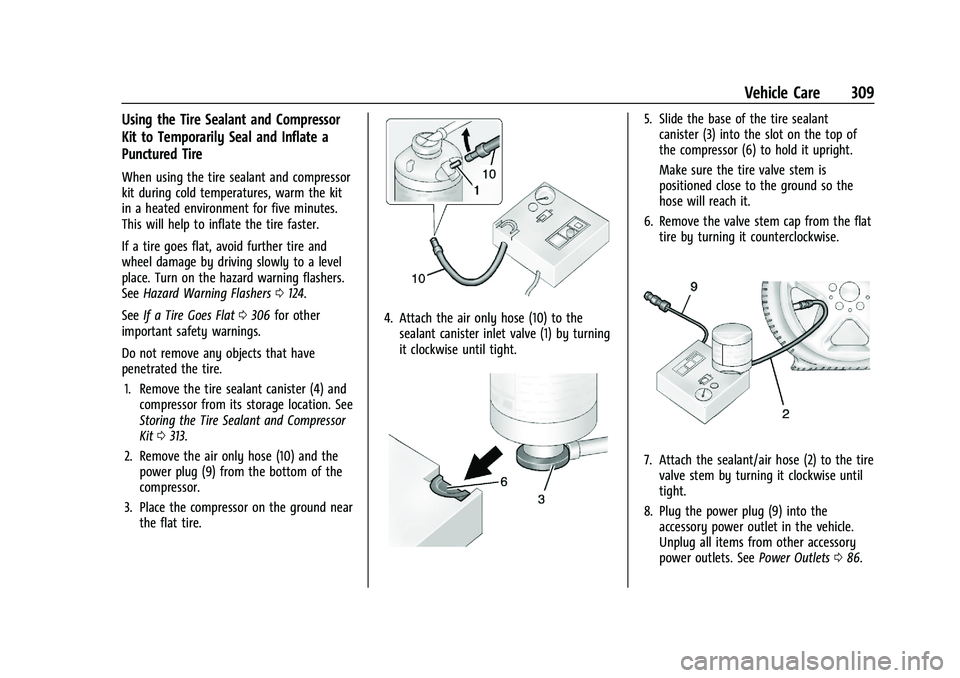
2. Remove the air only hose (10) and the power plug (9) from the bottom of the
compressor.
3. Place the compressor on the ground near the flat tire.
4. Attach the air only hose (10) to thesealant canister inlet valve (1) by turning
it clockwise until tight.
5. Slide the base of the tire sealantcanister (3) into the slot on the top of
the compressor (6) to hold it upright.
Make sure the tire valve stem is
positioned close to the ground so the
hose will reach it.
6. Remove the valve stem cap from the flat tire by turning it counterclockwise.
7. Attach the sealant/air hose (2) to the tirevalve stem by turning it clockwise until
tight.
8. Plug the power plug (9) into the accessory power outlet in the vehicle.
Unplug all items from other accessory
power outlets. See Power Outlets086.
Page 311 of 380
Chevrolet Blazer Owner Manual (GMNA-Localizing-U.S./Canada/Mexico-
14608203) - 2021 - CRC - 10/29/20
310 Vehicle Care
If the vehicle has an accessory power
outlet, do not use the cigarette lighter.
If the vehicle only has a cigarette lighter,
use the cigarette lighter.
Do not pinch the power plug cord in the
door or window.
9. Start the vehicle. The vehicle must be running while using the air compressor.
10. Press the on/off button (5) to turn the tire sealant and compressor kit on.
The compressor will inject sealant and air
into the tire.
The pressure gauge (8) will initially show
a high pressure while the compressor
pushes the sealant into the tire. Once
the sealant is completely dispersed into
the tire, the pressure will quickly drop
and start to rise again as the tire inflates
with air only.
11. Inflate the tire to the recommended inflation pressure using the pressure
gauge (8). The recommended inflation
pressure can be found on the Tire and
Loading Information label. See Tire
Pressure 0294.
The pressure gauge (8) may read higher
than the actual tire pressure while the
compressor is on. Turn the compressor off to get an accurate pressure reading.
The compressor may be turned on/off
until the correct pressure is reached.
Caution
If the recommended pressure cannot be
reached after approximately 25 minutes,
the vehicle should not be driven farther.
The tire is too severely damaged and the
tire sealant and compressor kit cannot
inflate the tire. Remove the power plug
from the accessory power outlet and
unscrew the inflating hose from the tire
valve. See
Roadside Assistance Program
0 352.
12. Press the on/off button (5) to turn the tire sealant and compressor kit off.
The tire is not sealed and will continue
to leak air until the vehicle is driven and
the sealant is distributed in the tire.
Therefore, Steps 13–21 must be done
immediately after Step 12.
Be careful while handling the tire sealant
and compressor kit as it could be warm
after usage.
13. Unplug the power plug (9) from the accessory power outlet in the vehicle. 14. Turn the sealant/air hose (2)
counterclockwise to remove it from the
tire valve stem.
15. Replace the tire valve stem cap.
16. Remove the tire sealant canister (4) from the slot on top of the compressor (6).
17. Turn the air only hose (10) counterclockwise to remove it from the
tire sealant canister inlet valve (1).
18. Turn the sealant/air hose (2) clockwise onto the sealant canister inlet valve (1)
to prevent sealant leakage.
19. Return the air only hose (10) and power plug (9) back to their original storage
location.
20. If the flat tire was able to inflate to therecommended inflation pressure, remove
the maximum speed label from the
sealant canister and place it in a highly
visible location.
Page 313 of 380
Chevrolet Blazer Owner Manual (GMNA-Localizing-U.S./Canada/Mexico-
14608203) - 2021 - CRC - 10/29/20
312 Vehicle Care
1. Remove the compressor from its storagelocation. See Storing the Tire Sealant and
Compressor Kit 0313.
2. Remove the air only hose (10) and the power plug (9) from the bottom of the
compressor.
3. Place the compressor on the ground near the flat tire.
Make sure the tire valve stem is
positioned close to the ground so the
hose will reach it.
4. Remove the valve stem cap from the flat tire by turning it counterclockwise.
5. Attach the air only hose (10) to the tire valve stem by turning it clockwise until
tight.
6. Plug the power plug (9) into the accessory power outlet in the vehicle.
Unplug all items from other accessory
power outlets. See Power Outlets086.
If the vehicle has an accessory power
outlet, do not use the cigarette lighter.
If the vehicle only has a cigarette lighter,
use the cigarette lighter.
Do not pinch the power plug cord in the
door or window. 7. Start the vehicle. The vehicle must be
running while using the air compressor.
8. Press the on/off button (5) to turn the tire sealant and compressor kit on.
The compressor will inflate the tire with
air only.
9. Inflate the tire to the recommended inflation pressure using the pressure
gauge (8). The recommended inflation
pressure can be found on the Tire and
Loading Information label. See Tire
Pressure 0294.
The pressure gauge (8) may read higher
than the actual tire pressure while the
compressor is on. Turn the compressor
off to get an accurate pressure reading.
The compressor may be turned on/off
until the correct pressure is reached.
Caution
If the recommended pressure cannot be
reached after approximately 25 minutes,
the vehicle should not be driven farther.
The tire is too severely damaged and the
tire sealant and compressor kit cannot
inflate the tire. Remove the power plug
from the accessory power outlet and
(Continued)
Caution (Continued)
unscrew the inflating hose from the tire
valve. See Roadside Assistance Program
0 352.
10. Press the on/off button (5) to turn the tire sealant and compressor kit off.
Be careful while handling the compressor
as it could be warm after usage.
11. Unplug the power plug (9) from the accessory power outlet in the vehicle.
12. Turn the air only hose (10) counterclockwise to remove it from the
tire valve stem.
13. Replace the tire valve stem cap.
14. Return the air only hose (10) and power plug (9) back to their original storage
location.
15. Return the equipment to its original storage location in the vehicle.
The tire sealant and compressor kit has
accessory adapters located in a
compartment on the bottom of its housing
that can be used to inflate air mattresses,
balls, etc.
Page 375 of 380
Chevrolet Blazer Owner Manual (GMNA-Localizing-U.S./Canada/Mexico-
14608203) - 2021 - CRC - 10/29/20
374 Index
Map Data Updates . . . . . . . . . . . . . . . . . . . . . . . . 153
Maps . . . . . . . . . . . . . . . . . . . . . . . . . . . . . . . . . . . . .145
MediaAvoiding Untrusted Devices . . . . . . . . . . . . . 137
Memory Seats . . . . . . . . . . . . . . . . . . . . . . . . . . . . 38
Messages Engine Power . . . . . . . . . . . . . . . . . . . . . . . . . . . 113
Vehicle . . . . . . . . . . . . . . . . . . . . . . . . . . . . . . . . . 113
Vehicle Speed . . . . . . . . . . . . . . . . . . . . . . . . . . . 113
Mirror Rear Camera . . . . . . . . . . . . . . . . . . . . . . . . . . . . 26
Mirrors Automatic Dimming . . . . . . . . . . . . . . . . . . . . 26
Automatic Dimming Rearview . . . . . . . . . . 26
Convex . . . . . . . . . . . . . . . . . . . . . . . . . . . . . . . . . 25
Folding . . . . . . . . . . . . . . . . . . . . . . . . . . . . . . . . . 26
Heated . . . . . . . . . . . . . . . . . . . . . . . . . . . . . . . . . 26
Manual Rearview . . . . . . . . . . . . . . . . . . . . . . . 26
Power . . . . . . . . . . . . . . . . . . . . . . . . . . . . . . . . . . 25
Tilt in Reverse . . . . . . . . . . . . . . . . . . . . . . . . . . 26
Mirrors, Interior Rearview . . . . . . . . . . . . . . . . . 26
Mode . . . . . . . . . . . . . . . . . . . . . . . . . . . . . . . . . . . . .214
Driver Control . . . . . . . . . . . . . . . . . . . . . . . . . 214
Monitor System, Tire Pressure . . . . . . . . . . . 296
Multi-band Antenna . . . . . . . . . . . . . . . . . . . . . . 137N
Navigation Connected Services . . . . . . . . . . . . . . . . . . . . 365
Destination . . . . . . . . . . . . . . . . . . . . . . . . . . . . 146
Using the System . . . . . . . . . . . . . . . . . . . . . . 142
Navigation Symbols . . . . . . . . . . . . . . . . . . . . . .145
New Vehicle Break-In . . . . . . . . . . . . . . . . . . . . 200
O
Odometer . . . . . . . . . . . . . . . . . . . . . . . . . . . . . . . . 94 Trip . . . . . . . . . . . . . . . . . . . . . . . . . . . . . . . . . . . . . 95
Off-Road . . . . . . . . . . . . . . . . . . . . . . . . . . . . . . . . . . 191 Driving . . . . . . . . . . . . . . . . . . . . . . . . . . . . . . . . . 191
Recovery . . . . . . . . . . . . . . . . . . . . . . . . . . . . . . . 190
Oil
Engine . . . . . . . . . . . . . . . . . . . . . . . . . . . . . . . . . 262
Engine Oil Life System . . . . . . . . . . . . . . . . . 264
Pressure Light . . . . . . . . . . . . . . . . . . . . . . . . . 105
Older Children, Restraints . . . . . . . . . . . . . . . . . 60
Online Owner Center . . . . . . . . . . . . . . . . . . . . . 351
OnStar . . . . . . . . . . . . . . . . . . . . . . . . . . . . . . . . . . . 359
OnStar Additional Information . . . . . . . . . . . 361
OnStar Emergency . . . . . . . . . . . . . . . . . . . . . . . 361
OnStar Overview . . . . . . . . . . . . . . . . . . . . . . . . . 360
OnStar Security . . . . . . . . . . . . . . . . . . . . . . . . . . 361
OnStar System . . . . . . . . . . . . . . . . . . . . . . .141, 151
Outlets Power . . . . . . . . . . . . . . . . . . . . . . . . . . . . . . . . . . 86 Overheating, Engine . . . . . . . . . . . . . . . . . . . . . . 271
Overview . . . . . . . . . . . . . . . . . . . . . . . . . . . . . . . . 129
Instrument Panel . . . . . . . . . . . . . . . . . . . . . . . . 4
P
ParkShifting Into . . . . . . . . . . . . . . . . . . . . . . . . . . . 205
Shifting Out of . . . . . . . . . . . . . . . . . . . . . . . . 205
Park Assist . . . . . . . . . . . . . . . . . . . . . . . . . . . . . . . 227
Parking Brake and P (Park) MechanismCheck . . . . . . . . . . . . . . . . . . . . . . . . . . . . . . . . 275
Extended . . . . . . . . . . . . . . . . . . . . . . . . . . . . . . 206
Over Things That Burn . . . . . . . . . . . . . . . . . 206
Parking or Backing Assistance Systems . . . . . . . . . . . . . . . . . . . . 227
Passenger Airbag Status Indicator . . . . . . . . . 99
Passenger Compartment Air Filter . . . . . . . 186
Passenger Sensing System . . . . . . . . . . . . . . . . .55
Pedestrian Ahead Indicator . . . . . . . . . . . . . . 104
Perchlorate Materials Requirements,
California . . . . . . . . . . . . . . . . . . . . . . . . . . . . . . 254
Personalization Vehicle . . . . . . . . . . . . . . . . . . . . . . . . . . . . . . . . . 113
Phone Apple CarPlay and Android Auto . . . . . . . 163
Bluetooth . . . . . . . . . . . . . . . . . . . . . . . . . . . . . . 159
Page 376 of 380
Chevrolet Blazer Owner Manual (GMNA-Localizing-U.S./Canada/Mexico-
14608203) - 2021 - CRC - 10/29/20
Index 375
PortUSB . . . . . . . . . . . . . . . . . . . . . . . . . . . . . . . . . . . . . 137
Positioning Vehicle . . . . . . . . . . . . . . . . . . . . . . . . . . . . . . . . 152
Power Door Locks . . . . . . . . . . . . . . . . . . . . . . . . . . . . . . 16
Mirrors . . . . . . . . . . . . . . . . . . . . . . . . . . . . . . . . . 25
Outlets . . . . . . . . . . . . . . . . . . . . . . . . . . . . . . . . . 86
Protection, Battery . . . . . . . . . . . . . . . . . . . . . . 127
Retained Accessory (RAP) . . . . . . . . . . . . . . 205
Seat Adjustment . . . . . . . . . . . . . . . . . . . . . . . . 36
Windows . . . . . . . . . . . . . . . . . . . . . . . . . . . . . . . 29
Pregnancy, Using Seat Belts . . . . . . . . . . . . . . 49
Privacy Vehicle Data Recording . . . . . . . . . . . . . . . . 358
Problems with Route Guidance . . . . . . . . . . . 153
Program
Courtesy Transportation . . . . . . . . . . . . . . . 354
Prohibited Fuels . . . . . . . . . . . . . . . . . . . . . . . . . 239
Proposition 65 Warning, California . . . . . . . . . . . . . . . . . . . . .254, 274, 318,
Back Cover
Publication Ordering Information . . . . . . . . 356
R
Radio HD Radio Technology . . . . . . . . . . . . . . . . . . 135 Radio Data System (RDS) . . . . . . . . . . . . . . . . 136
Radio Frequency Statement . . . . . . . . . . . . . . 357
Radio Reception . . . . . . . . . . . . . . . . . . . . . . . . . . 137
Radios
AM-FM Radio . . . . . . . . . . . . . . . . . . . . . . . . . . 134
Satellite . . . . . . . . . . . . . . . . . . . . . . . . . . . . . . . . 136
Reading Lamps . . . . . . . . . . . . . . . . . . . . . . . . . . . 125
Rear Camera Mirror . . . . . . . . . . . . . . . . . . . . . . . 26
Rear Seats . . . . . . . . . . . . . . . . . . . . . . . . . . . . . . . . 42
Heated . . . . . . . . . . . . . . . . . . . . . . . . . . . . . . . . . 44
Rear Storage . . . . . . . . . . . . . . . . . . . . . . . . . . . . . . .77
Rear Vision Camera (RVC) . . . . . . . . . . . . . . . . 227
Rear Window Washer/Wiper . . . . . . . . . . . . . 85
Rearview Mirrors . . . . . . . . . . . . . . . . . . . . . . . . . 26
Automatic Dimming . . . . . . . . . . . . . . . . . . . . 26
Reclining Seatbacks . . . . . . . . . . . . . . . . . . . . . . . .37
Recognition
Voice . . . . . . . . . . . . . . . . . . . . . . . . . . . . . . . . . . 154
Recommended Fuel . . . . . . . . . . . . . . . . . . . . . . . . . . . . . . . . . . . . 239
Recommended Fluids and Lubricants . . . . . 340
Records
Maintenance . . . . . . . . . . . . . . . . . . . . . . . . . . . 343
Recreational Vehicle Towing . . . . . . . . . . . . . . 321
Reimbursement Program, GM Mobility . . . . . . . . . . . . . . . . . . . . . . . . . . . . . . . 352
Remote Keyless Entry (RKE) System . . . . . . . .7
Remote Vehicle Start . . . . . . . . . . . . . . . . . . . . . . 13 Replacement Parts
Airbags . . . . . . . . . . . . . . . . . . . . . . . . . . . . . . . . . 60
Maintenance . . . . . . . . . . . . . . . . . . . . . . . . . . . 341
Replacing Airbag System . . . . . . . . . . . . . . . . . . 60
Replacing LATCH System Parts after a Crash . . . . . . . . . . . . . . . . . . . . . . . . . . . . . . . . . . . . 71
Replacing Seat Belt System Parts after
a Crash . . . . . . . . . . . . . . . . . . . . . . . . . . . . . . . . . 50
Reporting Safety Defects Canadian Government . . . . . . . . . . . . . . . . . 357
General Motors . . . . . . . . . . . . . . . . . . . . . . . . 358
U.S. Government . . . . . . . . . . . . . . . . . . . . . . . 357
Restraints Where to Put . . . . . . . . . . . . . . . . . . . . . . . . . . . 65
Retained Accessory Power (RAP) . . . . . . . . . 205
Reverse Tilt Mirrors . . . . . . . . . . . . . . . . . . . . . . . 26
Roads Driving, Wet . . . . . . . . . . . . . . . . . . . . . . . . . . . 194
Roadside Assistance Program . . . . . . . . . . . . 352
Roof Sunroof . . . . . . . . . . . . . . . . . . . . . . . . . . . . . . . . . . 31
Roof Rack System . . . . . . . . . . . . . . . . . . . . . . . . . .81
Rotation, Tires . . . . . . . . . . . . . . . . . . . . . . . . . . . 300
Routing, Engine Drive Belt . . . . . . . . . . . . . . . 348
Running the Vehicle While Parked . . . . . . . 207