steering CHEVROLET BLAZER 2021 User Guide
[x] Cancel search | Manufacturer: CHEVROLET, Model Year: 2021, Model line: BLAZER, Model: CHEVROLET BLAZER 2021Pages: 380, PDF Size: 9.1 MB
Page 56 of 380

Chevrolet Blazer Owner Manual (GMNA-Localizing-U.S./Canada/Mexico-
14608203) - 2021 - CRC - 10/29/20
Seats and Restraints 55
airbags inflate. The feature may also
activate, without airbag inflation, after an
event that exceeds a predetermined
threshold. After turning the ignition off and
then on again, the fuel system will return to
normal operation; the doors can be locked,
the interior lamps can be turned off, and
the hazard warning flashers can be turned
off using the controls for those features.
If any of these systems are damaged in the
crash they may not operate as normal.
{Warning
A crash severe enough to inflate the
airbags may have also damaged
important functions in the vehicle, such
as the fuel system, brake and steering
systems, etc. Even if the vehicle appears
to be drivable after a moderate crash,
there may be concealed damage that
could make it difficult to safely operate
the vehicle.
Use caution if you should attempt to
restart the engine after a crash has
occurred.In many crashes severe enough to inflate
the airbag, windshields are broken by
vehicle deformation. Additional windshield
breakage may also occur from the front
outboard passenger airbag.
.Airbags are designed to inflate only once.
After an airbag inflates, you will need
some new parts for the airbag system.
If you do not get them, the airbag
system will not be there to help protect
you in another crash. A new system will
include airbag modules and possibly other
parts. The service manual for the vehicle
covers the need to replace other parts.
.The vehicle has a crash sensing and
diagnostic module which records
information after a crash. See
Vehicle
Data Recording and Privacy 0358 and
Event Data Recorders 0359.
.Let only qualified technicians work on the
airbag system. Improper service can mean
that an airbag system will not work
properly. See your dealer for service.
Passenger Sensing System
The vehicle has a passenger sensing system
for the front outboard passenger position.
The passenger airbag status indicator will
light on the overhead console when the
vehicle is started.
The words ON and OFF, and the symbols for
on and off, will be visible during the system
check. When the system check is complete,
either the word ON or OFF, and the symbol
for on or off, will be visible. See Passenger
Airbag Status Indicator 099.
The passenger sensing system turns off the
front outboard passenger frontal airbag
under certain conditions. No other airbag is
affected by the passenger sensing system.
The passenger sensing system works with
sensors that are part of the front outboard
passenger seat and seat belt. The sensors
are designed to detect the presence of a
Page 60 of 380
Chevrolet Blazer Owner Manual (GMNA-Localizing-U.S./Canada/Mexico-
14608203) - 2021 - CRC - 10/29/20
Seats and Restraints 59
{Warning
For up to 10 seconds after the vehicle is
turned off and the battery is
disconnected, an airbag can still inflate
during improper service. You can be
injured if you are close to an airbag
when it inflates. Avoid yellow connectors.
They are probably part of the airbag
system. Be sure to follow proper service
procedures, and make sure the person
performing work for you is qualified to
do so.
Adding Equipment to the
Airbag-Equipped Vehicle
Adding accessories that change the vehicle's
frame, bumper system, height, front end,
or side sheet metal may keep the airbag
system from working properly.
The operation of the airbag system can also
be affected by changing, including
improperly repairing or replacing, any parts
of the following:
.Airbag system, including airbag modules,
front or side impact sensors, sensing and
diagnostic module, or airbag wiring
.Front seats, including stitching, seams or
zippers
.Seat belts
.Steering wheel, instrument panel,
overhead console, ceiling trim, or pillar
garnish trim
.Inner door seals, including speakers
Your dealer and the service manual have
information about the location of the airbag
modules and sensors, sensing and diagnostic
module, and airbag wiring along with the
proper replacement procedures.
In addition, the vehicle has a passenger
sensing system for the front outboard
passenger position, which includes sensors
that are part of the passenger seat. The
passenger sensing system may not operate
properly if the original seat trim is replaced
with non-GM covers, upholstery, or trim; or
with GM covers, upholstery, or trim
designed for a different vehicle. Any object,
such as an aftermarket seat heater or a
comfort-enhancing pad or device, installed
under or on top of the seat fabric, could
also interfere with the operation of the
passenger sensing system. This could either
prevent proper deployment of the passenger
airbag(s) or prevent the passenger sensing system from properly turning off the
passenger airbag(s). See
Passenger Sensing
System 055.
If the vehicle has rollover roof-rail airbags,
see Different Size Tires and Wheels 0303 for
additional important information.
If the vehicle must be modified because you
have a disability and have questions about
whether the modifications will affect the
vehicle's airbag system, or if you have
questions about whether the airbag system
will be affected if the vehicle is modified for
any other reason, call Customer Assistance.
See Customer Assistance Offices 0351.
Airbag System Check
The airbag system does not need regularly
scheduled maintenance or replacement.
Make sure the airbag readiness light is
working. See Airbag Readiness Light 098.
Caution
If an airbag covering is damaged, opened,
or broken, the airbag may not work
properly. Do not open or break the airbag
coverings. If there are any opened or
broken airbag coverings, have the airbag
(Continued)
Page 83 of 380
Chevrolet Blazer Owner Manual (GMNA-Localizing-U.S./Canada/Mexico-
14608203) - 2021 - CRC - 10/29/20
82 Instruments and Controls
Instruments and Controls
Controls
Steering Wheel Adjustment . . . . . . . . . . . . 83
Steering Wheel Controls . . . . . . . . . . . . . . . . 83
Heated Steering Wheel . . . . . . . . . . . . . . . . . 83
Horn . . . . . . . . . . . . . . . . . . . . . . . . . . . . . . . . . . . 84
Windshield Wiper/Washer . . . . . . . . . . . . . 84
Rear Window Wiper/Washer . . . . . . . . . . . 85
Compass . . . . . . . . . . . . . . . . . . . . . . . . . . . . . . . . 85
Clock . . . . . . . . . . . . . . . . . . . . . . . . . . . . . . . . . . . 86
Power Outlets . . . . . . . . . . . . . . . . . . . . . . . . . . 86
Wireless Charging . . . . . . . . . . . . . . . . . . . . . . 87
Warning Lights, Gauges, and Indicators
Warning Lights, Gauges, andIndicators . . . . . . . . . . . . . . . . . . . . . . . . . . . . . 89
Instrument Cluster (Base and Midlevel) . . . . . . . . . . . . . . . . . . . . . . . . . . . . . 90
Instrument Cluster (Uplevel) . . . . . . . . . . . . 93
Speedometer . . . . . . . . . . . . . . . . . . . . . . . . . . . 94
Odometer . . . . . . . . . . . . . . . . . . . . . . . . . . . . . . 94
Trip Odometer . . . . . . . . . . . . . . . . . . . . . . . . . 95
Tachometer . . . . . . . . . . . . . . . . . . . . . . . . . . . . 95
Fuel Gauge . . . . . . . . . . . . . . . . . . . . . . . . . . . . . 95
Engine Oil Temperature Gauge . . . . . . . . . 96
Engine Coolant Temperature Gauge . . . . 96
Voltmeter Gauge . . . . . . . . . . . . . . . . . . . . . . . 97
Seat Belt Reminders . . . . . . . . . . . . . . . . . . . . 98
Airbag Readiness Light . . . . . . . . . . . . . . . . . 98 Passenger Airbag Status Indicator . . . . . . 99
Charging System Light . . . . . . . . . . . . . . . . 100
Malfunction Indicator Lamp (Check
Engine Light) . . . . . . . . . . . . . . . . . . . . . . . . 100
Brake System Warning Light . . . . . . . . . . . 101
Electric Parking Brake Light . . . . . . . . . . . . 102
Service Electric Parking Brake Light . . . . 102
Antilock Brake System (ABS) Warning
Light . . . . . . . . . . . . . . . . . . . . . . . . . . . . . . . . . 102
Tow/Haul Mode Light . . . . . . . . . . . . . . . . . 103
Lane Keep Assist (LKA) Light . . . . . . . . . . . 103
Vehicle Ahead Indicator . . . . . . . . . . . . . . . 103
Pedestrian Ahead Indicator . . . . . . . . . . . . 104
Traction Off Light . . . . . . . . . . . . . . . . . . . . . 104
StabiliTrak OFF Light . . . . . . . . . . . . . . . . . . 104
Traction Control System (TCS)/ StabiliTrak Light . . . . . . . . . . . . . . . . . . . . . 104
Engine Coolant Temperature Warning Light . . . . . . . . . . . . . . . . . . . . . . . . . . . . . . . . . 105
Tire Pressure Light . . . . . . . . . . . . . . . . . . . . . 105
Engine Oil Pressure Light . . . . . . . . . . . . . . 105
Low Fuel Warning Light . . . . . . . . . . . . . . . 106
Security Light . . . . . . . . . . . . . . . . . . . . . . . . . 106
High-Beam On Light . . . . . . . . . . . . . . . . . . . 106
Lamps On Reminder . . . . . . . . . . . . . . . . . . . 107
Cruise Control Light . . . . . . . . . . . . . . . . . . . 107
Door Ajar Light . . . . . . . . . . . . . . . . . . . . . . . . 107
Information Displays
Driver Information Center (DIC) (Base and Midlevel) . . . . . . . . . . . . . . . . . . . . . . . . 107 Driver Information Center (DIC)
(Uplevel) . . . . . . . . . . . . . . . . . . . . . . . . . . . . . 110
Vehicle Messages
Vehicle Messages . . . . . . . . . . . . . . . . . . . . . . 113
Engine Power Messages . . . . . . . . . . . . . . . . 113
Vehicle Speed Messages . . . . . . . . . . . . . . . 113
Vehicle Personalization
Vehicle Personalization . . . . . . . . . . . . . . . . . 113
Universal Remote System
Universal Remote System . . . . . . . . . . . . . . 117
Universal Remote SystemProgramming . . . . . . . . . . . . . . . . . . . . . . . . . 117
Universal Remote System Operation . . . 119
Page 84 of 380
Chevrolet Blazer Owner Manual (GMNA-Localizing-U.S./Canada/Mexico-
14608203) - 2021 - CRC - 10/29/20
Instruments and Controls 83
Controls
Steering Wheel Adjustment
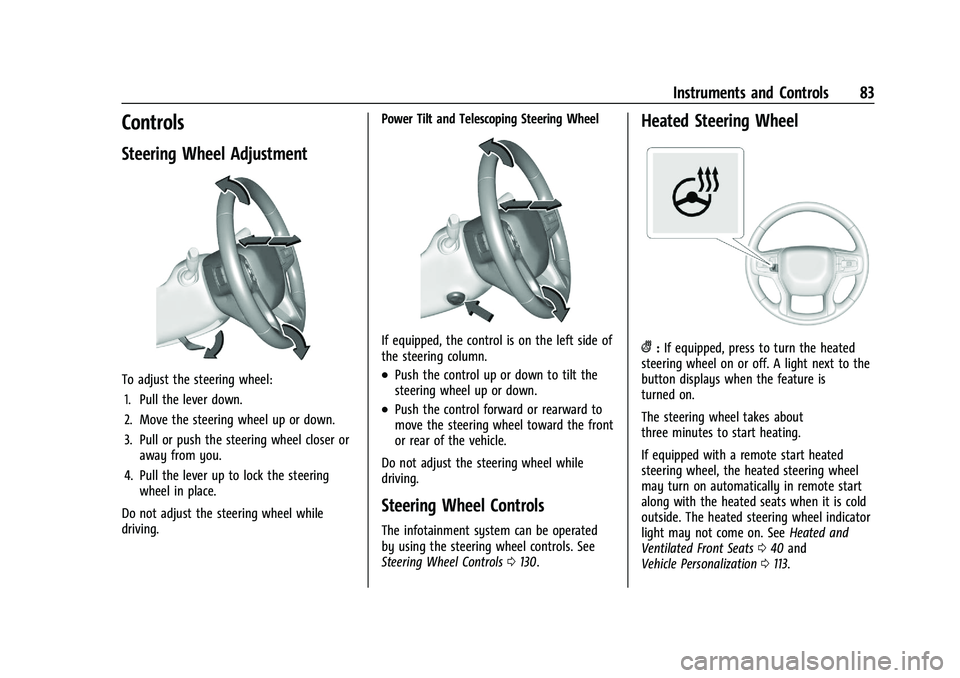
To adjust the steering wheel:1. Pull the lever down.
2. Move the steering wheel up or down.
3. Pull or push the steering wheel closer or away from you.
4. Pull the lever up to lock the steering wheel in place.
Do not adjust the steering wheel while
driving. Power Tilt and Telescoping Steering Wheel
If equipped, the control is on the left side of
the steering column.
.Push the control up or down to tilt the
steering wheel up or down.
.Push the control forward or rearward to
move the steering wheel toward the front
or rear of the vehicle.
Do not adjust the steering wheel while
driving.
Steering Wheel Controls
The infotainment system can be operated
by using the steering wheel controls. See
Steering Wheel Controls 0130.
Heated Steering Wheel
(:If equipped, press to turn the heated
steering wheel on or off. A light next to the
button displays when the feature is
turned on.
The steering wheel takes about
three minutes to start heating.
If equipped with a remote start heated
steering wheel, the heated steering wheel
may turn on automatically in remote start
along with the heated seats when it is cold
outside. The heated steering wheel indicator
light may not come on. See Heated and
Ventilated Front Seats 040 and
Vehicle Personalization 0113.
Page 85 of 380
Chevrolet Blazer Owner Manual (GMNA-Localizing-U.S./Canada/Mexico-
14608203) - 2021 - CRC - 10/29/20
84 Instruments and Controls
Horn
Pressaon the steering wheel pad to
sound the horn.
Windshield Wiper/Washer
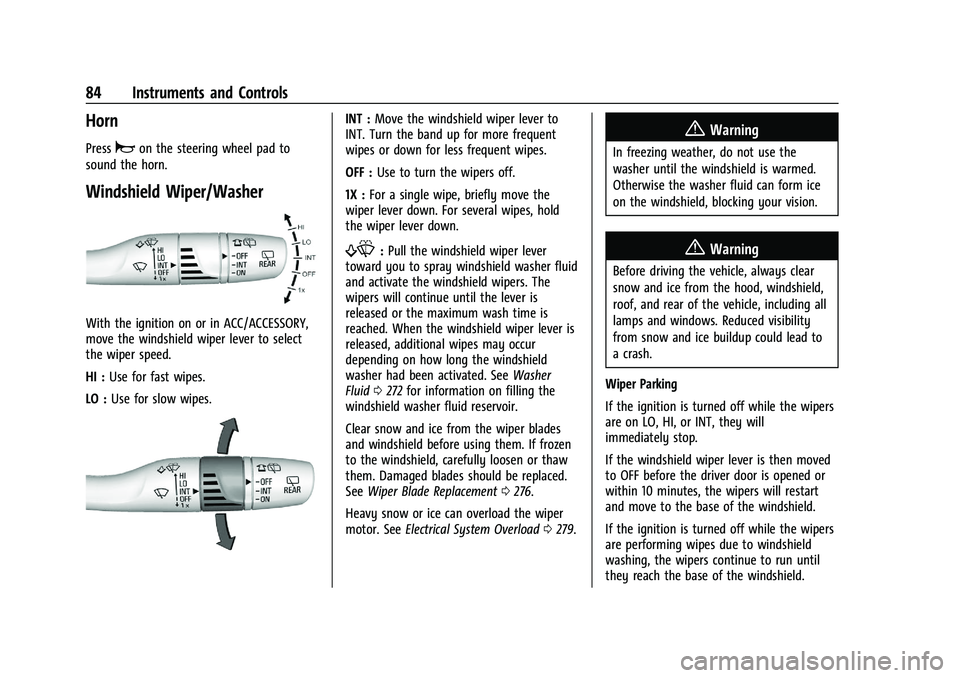
With the ignition on or in ACC/ACCESSORY,
move the windshield wiper lever to select
the wiper speed.
HI : Use for fast wipes.
LO : Use for slow wipes.
INT : Move the windshield wiper lever to
INT. Turn the band up for more frequent
wipes or down for less frequent wipes.
OFF : Use to turn the wipers off.
1X : For a single wipe, briefly move the
wiper lever down. For several wipes, hold
the wiper lever down.
f: Pull the windshield wiper lever
toward you to spray windshield washer fluid
and activate the windshield wipers. The
wipers will continue until the lever is
released or the maximum wash time is
reached. When the windshield wiper lever is
released, additional wipes may occur
depending on how long the windshield
washer had been activated. See Washer
Fluid 0272 for information on filling the
windshield washer fluid reservoir.
Clear snow and ice from the wiper blades
and windshield before using them. If frozen
to the windshield, carefully loosen or thaw
them. Damaged blades should be replaced.
See Wiper Blade Replacement 0276.
Heavy snow or ice can overload the wiper
motor. See Electrical System Overload 0279.
{Warning
In freezing weather, do not use the
washer until the windshield is warmed.
Otherwise the washer fluid can form ice
on the windshield, blocking your vision.
{Warning
Before driving the vehicle, always clear
snow and ice from the hood, windshield,
roof, and rear of the vehicle, including all
lamps and windows. Reduced visibility
from snow and ice buildup could lead to
a crash.
Wiper Parking
If the ignition is turned off while the wipers
are on LO, HI, or INT, they will
immediately stop.
If the windshield wiper lever is then moved
to OFF before the driver door is opened or
within 10 minutes, the wipers will restart
and move to the base of the windshield.
If the ignition is turned off while the wipers
are performing wipes due to windshield
washing, the wipers continue to run until
they reach the base of the windshield.
Page 91 of 380
Chevrolet Blazer Owner Manual (GMNA-Localizing-U.S./Canada/Mexico-
14608203) - 2021 - CRC - 10/29/20
90 Instruments and Controls
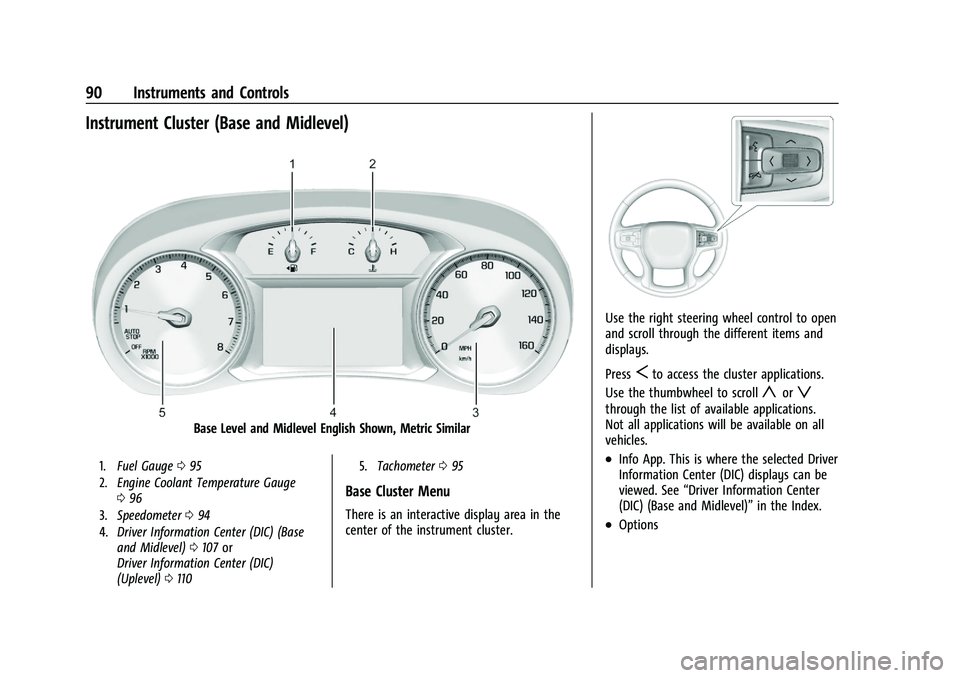
Instrument Cluster (Base and Midlevel)
Base Level and Midlevel English Shown, Metric Similar
1.Fuel Gauge 095
2. Engine Coolant Temperature Gauge
096
3. Speedometer 094
4. Driver Information Center (DIC) (Base
and Midlevel) 0107 or
Driver Information Center (DIC)
(Uplevel) 0110 5.
Tachometer 095
Base Cluster Menu
There is an interactive display area in the
center of the instrument cluster.
Use the right steering wheel control to open
and scroll through the different items and
displays.
Press
Sto access the cluster applications.
Use the thumbwheel to scroll
yorz
through the list of available applications.
Not all applications will be available on all
vehicles.
.Info App. This is where the selected Driver
Information Center (DIC) displays can be
viewed. See “Driver Information Center
(DIC) (Base and Midlevel)” in the Index.
.Options
Page 92 of 380
Chevrolet Blazer Owner Manual (GMNA-Localizing-U.S./Canada/Mexico-
14608203) - 2021 - CRC - 10/29/20
Instruments and Controls 91
Options
Press the thumbwheel to select the Options
app, then press
Tto enter the Options
menu. Use
yorzto scroll through items
in the Options menu.
Units : Press
Twhile Units is displayed to
enter the Units menu. Choose English or
Metric units by pressing the thumbwheel
while the desired item is highlighted.
Info Pages : Press
Twhile Info Pages is
displayed to enter the Info Pages menu and
select the items to be displayed in the
Info app.
Speed Warning : The Speed Warning display
allows you to set a speed not to be
exceeded. To set, press
Twhen Speed
Warning is displayed.
Scroll
yorzto adjust the value. Press
the thumbwheel to set the speed.
Once the speed is set, this feature can be
turned off by pressing the thumbwheel
while viewing this page. If the selected
speed limit is exceeded, a pop-up warning is
displayed with a chime.
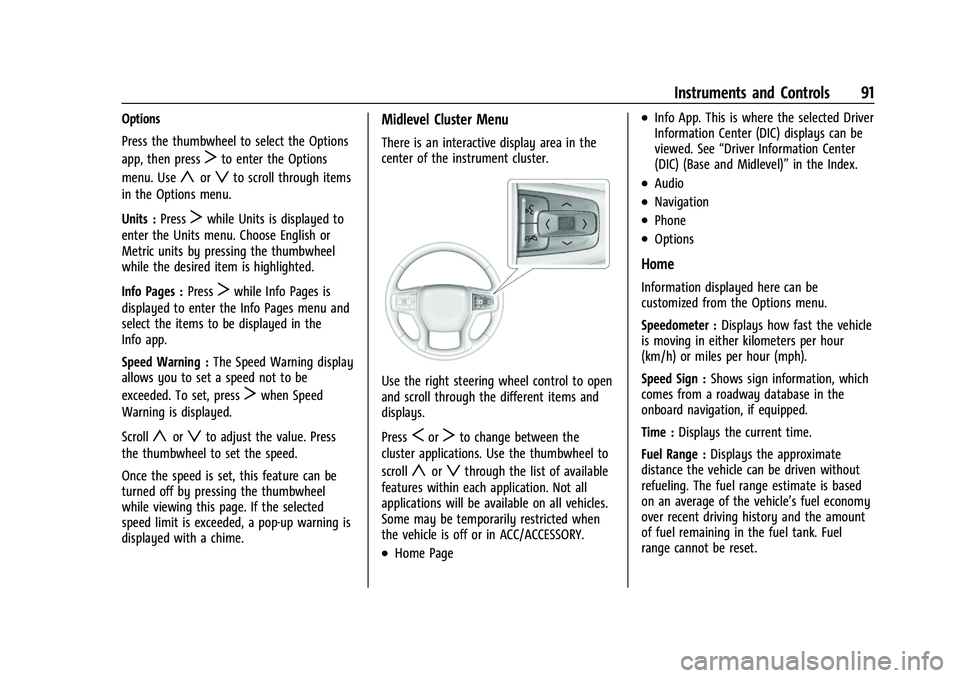
Midlevel Cluster Menu
There is an interactive display area in the
center of the instrument cluster.
Use the right steering wheel control to open
and scroll through the different items and
displays.
Press
SorTto change between the
cluster applications. Use the thumbwheel to
scroll
yorzthrough the list of available
features within each application. Not all
applications will be available on all vehicles.
Some may be temporarily restricted when
the vehicle is off or in ACC/ACCESSORY.
.Home Page
.Info App. This is where the selected Driver
Information Center (DIC) displays can be
viewed. See “Driver Information Center
(DIC) (Base and Midlevel)” in the Index.
.Audio
.Navigation
.Phone
.Options
Home
Information displayed here can be
customized from the Options menu.
Speedometer :Displays how fast the vehicle
is moving in either kilometers per hour
(km/h) or miles per hour (mph).
Speed Sign : Shows sign information, which
comes from a roadway database in the
onboard navigation, if equipped.
Time : Displays the current time.
Fuel Range : Displays the approximate
distance the vehicle can be driven without
refueling. The fuel range estimate is based
on an average of the vehicle’s fuel economy
over recent driving history and the amount
of fuel remaining in the fuel tank. Fuel
range cannot be reset.
Page 94 of 380
Chevrolet Blazer Owner Manual (GMNA-Localizing-U.S./Canada/Mexico-
14608203) - 2021 - CRC - 10/29/20
Instruments and Controls 93
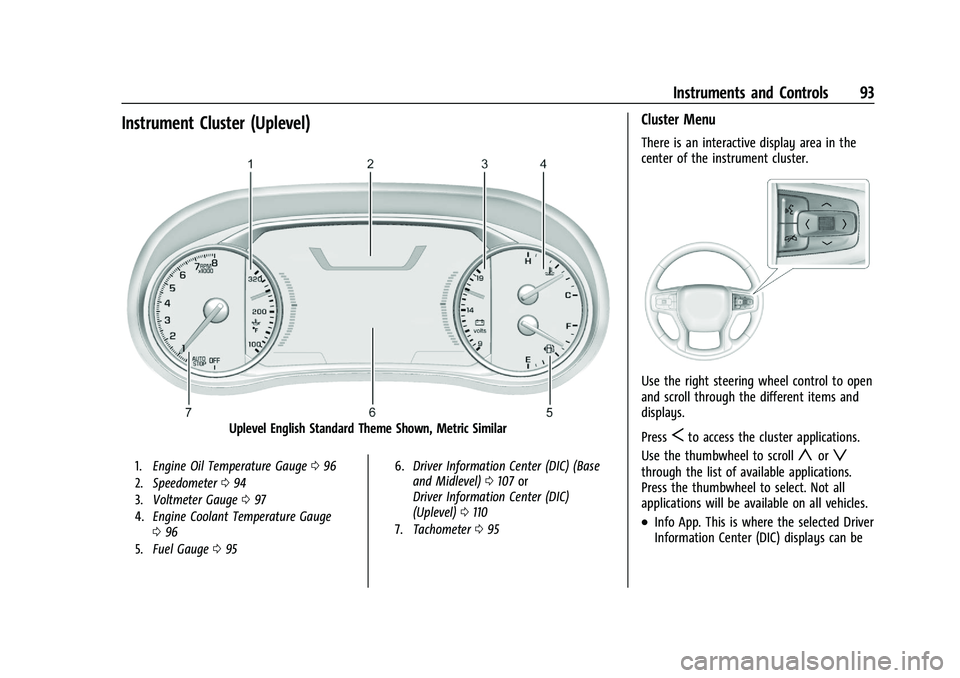
Instrument Cluster (Uplevel)
Uplevel English Standard Theme Shown, Metric Similar
1.Engine Oil Temperature Gauge 096
2. Speedometer 094
3. Voltmeter Gauge 097
4. Engine Coolant Temperature Gauge
096
5. Fuel Gauge 095 6.
Driver Information Center (DIC) (Base
and Midlevel) 0107 or
Driver Information Center (DIC)
(Uplevel) 0110
7. Tachometer 095
Cluster Menu
There is an interactive display area in the
center of the instrument cluster.
Use the right steering wheel control to open
and scroll through the different items and
displays.
Press
Sto access the cluster applications.
Use the thumbwheel to scroll
yorz
through the list of available applications.
Press the thumbwheel to select. Not all
applications will be available on all vehicles.
.Info App. This is where the selected Driver
Information Center (DIC) displays can be
Page 102 of 380

Chevrolet Blazer Owner Manual (GMNA-Localizing-U.S./Canada/Mexico-
14608203) - 2021 - CRC - 10/29/20
Instruments and Controls 101
If the light continues to flash, find a safe
place to park. Turn the vehicle off and wait
at least 10 seconds before restarting the
engine. If the light is still flashing, follow
the previous guidelines and see your dealer
for service as soon as possible.
If the light is on steady :A malfunction has
been detected. Diagnosis and service may be
required.
Check the following:
.If fuel has been added to the vehicle
using the capless fuel funnel adapter,
make sure that it has been removed. See
“Filling the Tank with a Portable Gas Can”
under Filling the Tank 0240. The
diagnostic system can detect if the
adapter has been left installed in the
vehicle, allowing fuel to evaporate into
the atmosphere. A few driving trips with
the adapter removed may turn off the
light.
.Poor fuel quality can cause inefficient
engine operation and poor driveability,
which may go away once the engine is
warmed up. If this occurs, change the fuel
brand. It may require at least one full
tank of the proper fuel to turn the light
off. See Recommended Fuel 0239.
If the light remains on, see your dealer.
Emissions Inspection and Maintenance
Programs
If the vehicle requires an Emissions
Inspection/Maintenance test, the test
equipment will likely connect to the
vehicle's Data Link Connector (DLC).
The DLC is under the instrument panel to
the left of the steering wheel. Connecting
devices that are not used to perform an
Emissions Inspection/Maintenance test or to
service the vehicle may affect vehicle
operation. See Add-On Electrical Equipment
0 252. See your dealer if assistance is
needed.
The vehicle may not pass inspection if:
.The light is on when the engine is
running.
.The light does not come on when the
ignition is in Service Mode.
.Critical emission control systems have not
been completely diagnosed. If this
happens, the vehicle would not be ready
for inspection and might require
several days of routine driving before the
system is ready for inspection. This can
happen if the 12-volt battery has recently
been replaced or run down, or if the
vehicle has been recently serviced.
See your dealer if the vehicle will not pass
or cannot be made ready for the test.
Brake System Warning Light
MetricEnglish
This light should come on briefly when the
vehicle is turned on. If it does not come on
then, have it fixed so it will be ready to
warn you if there is a problem.
If the light comes on and stays on at start
up, there is a brake problem. Have the brake
system inspected right away.
Page 104 of 380
Chevrolet Blazer Owner Manual (GMNA-Localizing-U.S./Canada/Mexico-
14608203) - 2021 - CRC - 10/29/20
Instruments and Controls 103
If the ABS warning light stays on, or comes
on again while driving, the vehicle needs
service. A chime may also sound when the
light stays on.
If the ABS warning light is the only light on,
the vehicle has regular brakes, but ABS is
not functioning.
If both the ABS warning light and the brake
system warning light are on, ABS is not
functioning and there is a problem with the
regular brakes. See your dealer for service.
SeeBrake System Warning Light 0101.
Tow/Haul Mode Light
For vehicles with the Tow/Haul Mode
feature, this light comes on when the Tow/
Haul Mode has been activated.
See Tow/Haul Mode 0210.
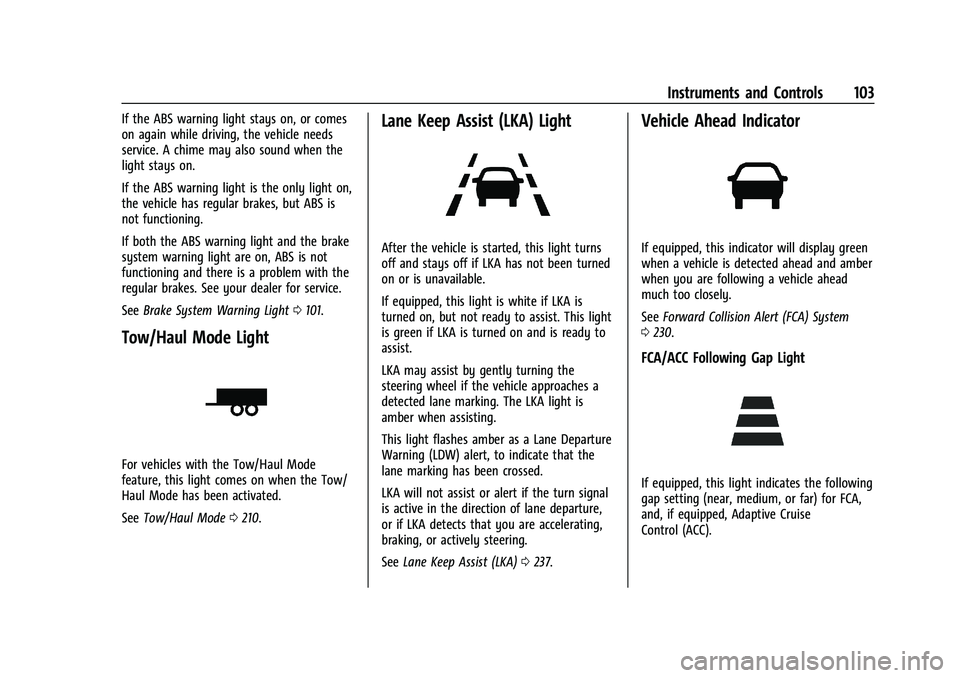
Lane Keep Assist (LKA) Light
After the vehicle is started, this light turns
off and stays off if LKA has not been turned
on or is unavailable.
If equipped, this light is white if LKA is
turned on, but not ready to assist. This light
is green if LKA is turned on and is ready to
assist.
LKA may assist by gently turning the
steering wheel if the vehicle approaches a
detected lane marking. The LKA light is
amber when assisting.
This light flashes amber as a Lane Departure
Warning (LDW) alert, to indicate that the
lane marking has been crossed.
LKA will not assist or alert if the turn signal
is active in the direction of lane departure,
or if LKA detects that you are accelerating,
braking, or actively steering.
See Lane Keep Assist (LKA) 0237.
Vehicle Ahead Indicator
If equipped, this indicator will display green
when a vehicle is detected ahead and amber
when you are following a vehicle ahead
much too closely.
See Forward Collision Alert (FCA) System
0 230.
FCA/ACC Following Gap Light
If equipped, this light indicates the following
gap setting (near, medium, or far) for FCA,
and, if equipped, Adaptive Cruise
Control (ACC).