clock CHEVROLET BLAZER 2021 Owner's Manual
[x] Cancel search | Manufacturer: CHEVROLET, Model Year: 2021, Model line: BLAZER, Model: CHEVROLET BLAZER 2021Pages: 380, PDF Size: 9.1 MB
Page 11 of 380
Chevrolet Blazer Owner Manual (GMNA-Localizing-U.S./Canada/Mexico-
14608203) - 2021 - CRC - 10/29/20
10 Keys, Doors, and Windows
lock with the RKE transmitter inside the
vehicle. Do not leave the RKE transmitter in
an unattended vehicle.
To customize the doors to automatically lock
when exiting the vehicle, see“Remote Lock,
Unlock, Start” underVehicle Personalization
0 113.
Temporary Disable of Passive Locking
Temporarily disable passive locking by
pressing and holding
Kon the interior door
switch with a door open for at least
four seconds, or until three chimes are
heard. Passive locking will then remain
disabled until
Qon the interior door is
pressed, or until the vehicle is turned on.
Remote Left in Vehicle Alert
When the vehicle is turned off and an RKE
transmitter is left in the vehicle, the horn
will chirp three times after all doors are
closed. To turn on or off, see Vehicle
Personalization 0113.
Remote No Longer in Vehicle Alert
If the vehicle is on with a door open, and
then all doors are closed, the vehicle will
check for RKE transmitters inside. If an RKE
transmitter is not detected, the Driver
Information Center (DIC) will display NO REMOTE DETECTED and the horn will chirp
three times. This occurs only once each time
the vehicle is driven. See
Vehicle
Personalization 0113.
Keyless Liftgate Opening
Press the touch pad in the liftgate handle to
open the liftgate if the RKE transmitter is
within 1 m (3 ft).
Key Access
To access a vehicle with a weak transmitter
battery, see Door Locks014.
Programming Transmitters to the Vehicle
Only RKE transmitters programmed to the
vehicle will work. If a transmitter is lost or
stolen, a replacement can be purchased and
programmed through your dealer. The
vehicle can be reprogrammed so that lost or
stolen transmitters no longer work. Each
vehicle can have up to eight transmitters
matched to it.
Programming with Recognized Transmitters
A new transmitter can be programmed to
the vehicle when there are two recognized
transmitters. To program, the vehicle must be off and all
of the transmitters, both currently
recognized and new, must be with you.
1. Remove the key lock cylinder cap on the driver door handle. See Door Locks014.
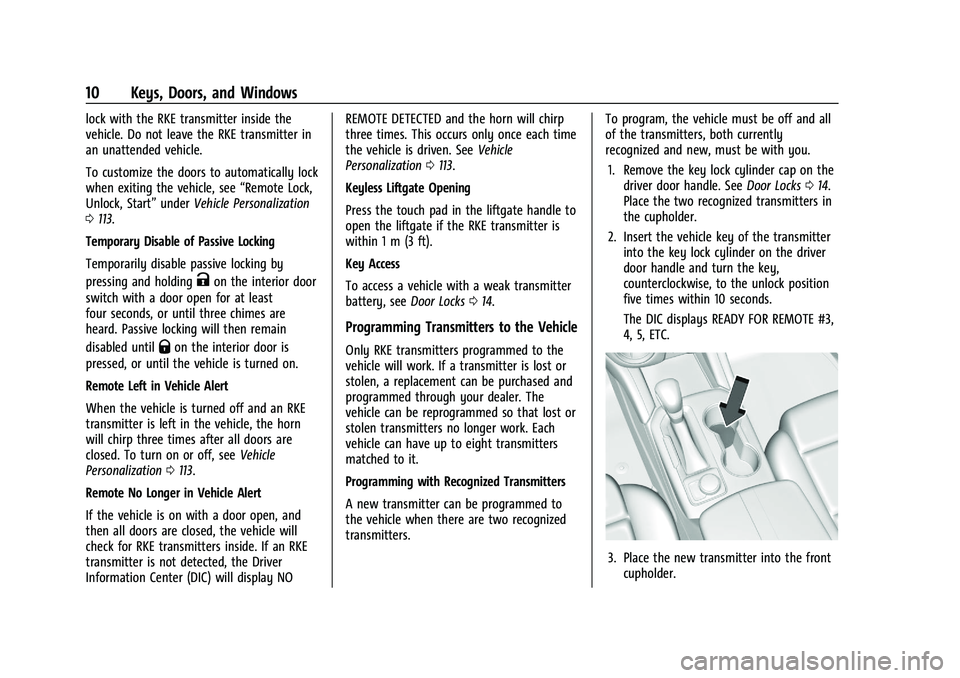
Place the two recognized transmitters in
the cupholder.
2. Insert the vehicle key of the transmitter into the key lock cylinder on the driver
door handle and turn the key,
counterclockwise, to the unlock position
five times within 10 seconds.
The DIC displays READY FOR REMOTE #3,
4, 5, ETC.
3. Place the new transmitter into the frontcupholder.
Page 12 of 380
Chevrolet Blazer Owner Manual (GMNA-Localizing-U.S./Canada/Mexico-
14608203) - 2021 - CRC - 10/29/20
Keys, Doors, and Windows 11
4. Press ENGINE START/STOP. When thetransmitter is learned, the DIC display
will show that it is ready to program the
next transmitter.
5. Remove the transmitter from the front cupholder and press the transmitter
K
orQbutton.
To program additional transmitters,
repeat Steps 3–5.
When all additional transmitters are
programmed, press and hold ENGINE
START/STOP for 12 seconds to exit
programming mode.
6. Put the key back into the transmitter.
7. Replace the key lock cylinder cap. See Door Locks 014.
Programming without Recognized
Transmitters
If two currently recognized transmitters are
not available, follow this procedure to
program up to eight transmitters. This
feature is not available in Canada. This
procedure will take approximately
30 minutes to complete. The vehicle must
be off and all of the transmitters you wish
to program must be with you. 1. Remove the key lock cylinder cap on the
driver door handle. See Door Locks014.
Insert the vehicle key of the transmitter
into the key lock cylinder on the driver
door handle and turn the key,
counterclockwise, to the unlock position
five times within 10 seconds.
The DIC displays REMOTE LEARN
PENDING, PLEASE WAIT.
2. Wait for 10 minutes until the DIC displays PRESS ENGINE START BUTTON TO
LEARN and then press ENGINE
START/STOP.
The DIC will again display REMOTE LEARN
PENDING, PLEASE WAIT.
3. Repeat Step 2 two additional times. After the third time all previously known
transmitters will no longer work with the
vehicle. Remaining transmitters can be
relearned during the next steps.
The DIC should now display READY FOR
REMOTE # 1.
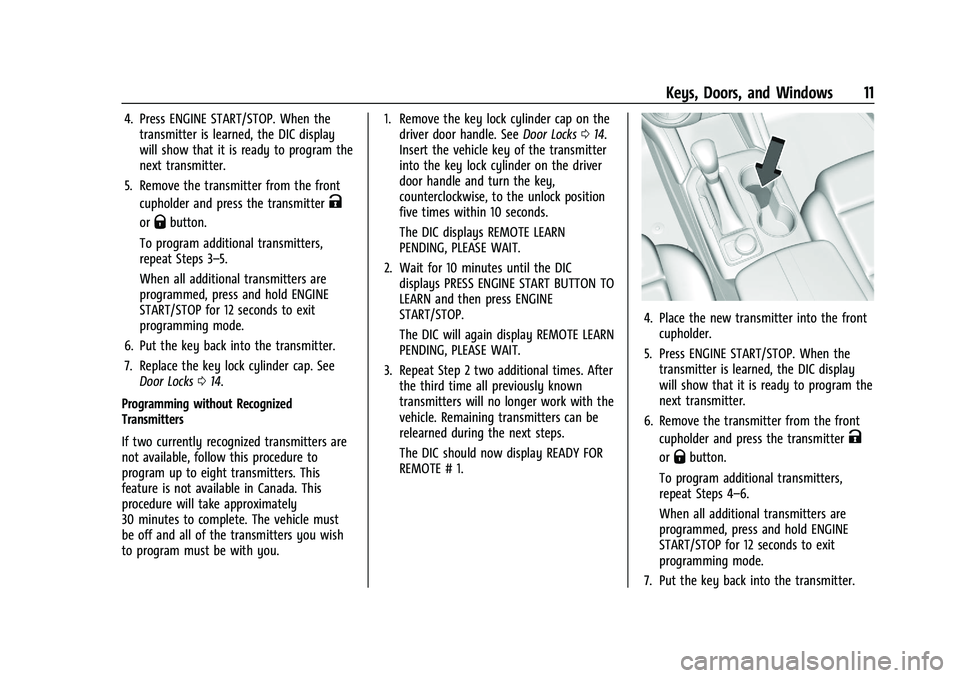
4. Place the new transmitter into the frontcupholder.
5. Press ENGINE START/STOP. When the transmitter is learned, the DIC display
will show that it is ready to program the
next transmitter.
6. Remove the transmitter from the front cupholder and press the transmitter
K
orQbutton.
To program additional transmitters,
repeat Steps 4–6.
When all additional transmitters are
programmed, press and hold ENGINE
START/STOP for 12 seconds to exit
programming mode.
7. Put the key back into the transmitter.
Page 83 of 380
Chevrolet Blazer Owner Manual (GMNA-Localizing-U.S./Canada/Mexico-
14608203) - 2021 - CRC - 10/29/20
82 Instruments and Controls
Instruments and Controls
Controls
Steering Wheel Adjustment . . . . . . . . . . . . 83
Steering Wheel Controls . . . . . . . . . . . . . . . . 83
Heated Steering Wheel . . . . . . . . . . . . . . . . . 83
Horn . . . . . . . . . . . . . . . . . . . . . . . . . . . . . . . . . . . 84
Windshield Wiper/Washer . . . . . . . . . . . . . 84
Rear Window Wiper/Washer . . . . . . . . . . . 85
Compass . . . . . . . . . . . . . . . . . . . . . . . . . . . . . . . . 85
Clock . . . . . . . . . . . . . . . . . . . . . . . . . . . . . . . . . . . 86
Power Outlets . . . . . . . . . . . . . . . . . . . . . . . . . . 86
Wireless Charging . . . . . . . . . . . . . . . . . . . . . . 87
Warning Lights, Gauges, and Indicators
Warning Lights, Gauges, andIndicators . . . . . . . . . . . . . . . . . . . . . . . . . . . . . 89
Instrument Cluster (Base and Midlevel) . . . . . . . . . . . . . . . . . . . . . . . . . . . . . 90
Instrument Cluster (Uplevel) . . . . . . . . . . . . 93
Speedometer . . . . . . . . . . . . . . . . . . . . . . . . . . . 94
Odometer . . . . . . . . . . . . . . . . . . . . . . . . . . . . . . 94
Trip Odometer . . . . . . . . . . . . . . . . . . . . . . . . . 95
Tachometer . . . . . . . . . . . . . . . . . . . . . . . . . . . . 95
Fuel Gauge . . . . . . . . . . . . . . . . . . . . . . . . . . . . . 95
Engine Oil Temperature Gauge . . . . . . . . . 96
Engine Coolant Temperature Gauge . . . . 96
Voltmeter Gauge . . . . . . . . . . . . . . . . . . . . . . . 97
Seat Belt Reminders . . . . . . . . . . . . . . . . . . . . 98
Airbag Readiness Light . . . . . . . . . . . . . . . . . 98 Passenger Airbag Status Indicator . . . . . . 99
Charging System Light . . . . . . . . . . . . . . . . 100
Malfunction Indicator Lamp (Check
Engine Light) . . . . . . . . . . . . . . . . . . . . . . . . 100
Brake System Warning Light . . . . . . . . . . . 101
Electric Parking Brake Light . . . . . . . . . . . . 102
Service Electric Parking Brake Light . . . . 102
Antilock Brake System (ABS) Warning
Light . . . . . . . . . . . . . . . . . . . . . . . . . . . . . . . . . 102
Tow/Haul Mode Light . . . . . . . . . . . . . . . . . 103
Lane Keep Assist (LKA) Light . . . . . . . . . . . 103
Vehicle Ahead Indicator . . . . . . . . . . . . . . . 103
Pedestrian Ahead Indicator . . . . . . . . . . . . 104
Traction Off Light . . . . . . . . . . . . . . . . . . . . . 104
StabiliTrak OFF Light . . . . . . . . . . . . . . . . . . 104
Traction Control System (TCS)/ StabiliTrak Light . . . . . . . . . . . . . . . . . . . . . 104
Engine Coolant Temperature Warning Light . . . . . . . . . . . . . . . . . . . . . . . . . . . . . . . . . 105
Tire Pressure Light . . . . . . . . . . . . . . . . . . . . . 105
Engine Oil Pressure Light . . . . . . . . . . . . . . 105
Low Fuel Warning Light . . . . . . . . . . . . . . . 106
Security Light . . . . . . . . . . . . . . . . . . . . . . . . . 106
High-Beam On Light . . . . . . . . . . . . . . . . . . . 106
Lamps On Reminder . . . . . . . . . . . . . . . . . . . 107
Cruise Control Light . . . . . . . . . . . . . . . . . . . 107
Door Ajar Light . . . . . . . . . . . . . . . . . . . . . . . . 107
Information Displays
Driver Information Center (DIC) (Base and Midlevel) . . . . . . . . . . . . . . . . . . . . . . . . 107 Driver Information Center (DIC)
(Uplevel) . . . . . . . . . . . . . . . . . . . . . . . . . . . . . 110
Vehicle Messages
Vehicle Messages . . . . . . . . . . . . . . . . . . . . . . 113
Engine Power Messages . . . . . . . . . . . . . . . . 113
Vehicle Speed Messages . . . . . . . . . . . . . . . 113
Vehicle Personalization
Vehicle Personalization . . . . . . . . . . . . . . . . . 113
Universal Remote System
Universal Remote System . . . . . . . . . . . . . . 117
Universal Remote SystemProgramming . . . . . . . . . . . . . . . . . . . . . . . . . 117
Universal Remote System Operation . . . 119
Page 87 of 380
Chevrolet Blazer Owner Manual (GMNA-Localizing-U.S./Canada/Mexico-
14608203) - 2021 - CRC - 10/29/20
86 Instruments and Controls
signal. The compass system will
automatically determine when a GPS signal
is restored and provide a heading again.
Clock
Set the time and date using the
infotainment system. See "Time / Date"
underSettings 0164.
Power Outlets
Power Outlets 12-Volt Direct Current
The vehicle is equipped with 12-volt outlets
that can be used to plug in electrical
equipment, such as a cell phone or MP3
player.
The power outlets are located:
.Inside the center console storage
compartment.
.In the rear cargo area.
Lift the cover to access the outlet and
replace when not in use.
There are also charging only USB ports on
the rear of the center console.
{Warning
Power is always supplied to the rear
cargo power outlet. Do not leave
electrical equipment plugged in when the
vehicle is not in use because the vehicle
could catch fire and cause injury or
death.
Caution
Leaving electrical equipment plugged in
for an extended period of time while the
ignition is off will drain the battery.
Always unplug electrical equipment when
not in use and do not plug in equipment
that exceeds the maximum 15 amp
rating.
Certain accessory plugs may not be
compatible with the accessory power outlet
and could overload vehicle and adapter
fuses. If a problem is experienced, see your
dealer.
When adding electrical equipment, be sure
to follow the proper installation instructions
included with the equipment. See Add-On
Electrical Equipment 0252.
Caution
Hanging heavy equipment from the
power outlet can cause damage not
covered by the vehicle warranty. The
power outlets are designed for accessory
power plugs only, such as cell phone
charge cords.
Power Outlet 110-V/120-V Alternating
Current
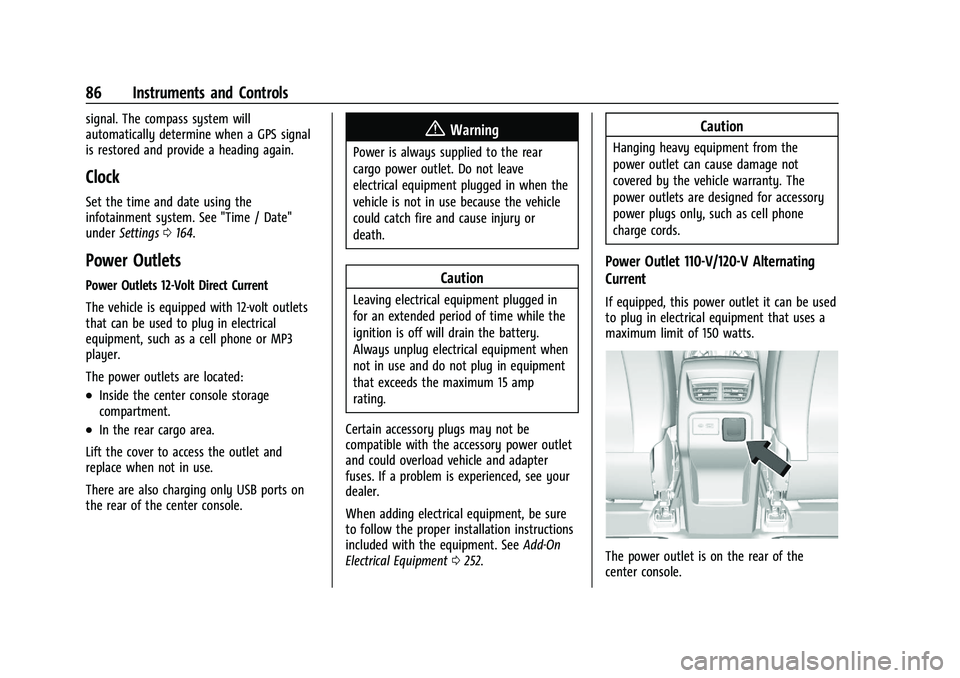
If equipped, this power outlet it can be used
to plug in electrical equipment that uses a
maximum limit of 150 watts.
The power outlet is on the rear of the
center console.
Page 125 of 380
Chevrolet Blazer Owner Manual (GMNA-Localizing-U.S./Canada/Mexico-
14608203) - 2021 - CRC - 10/29/20
124 Lighting
operating, these lamps turn off. Move the
exterior lamp control to
Oor;to disable
this feature.
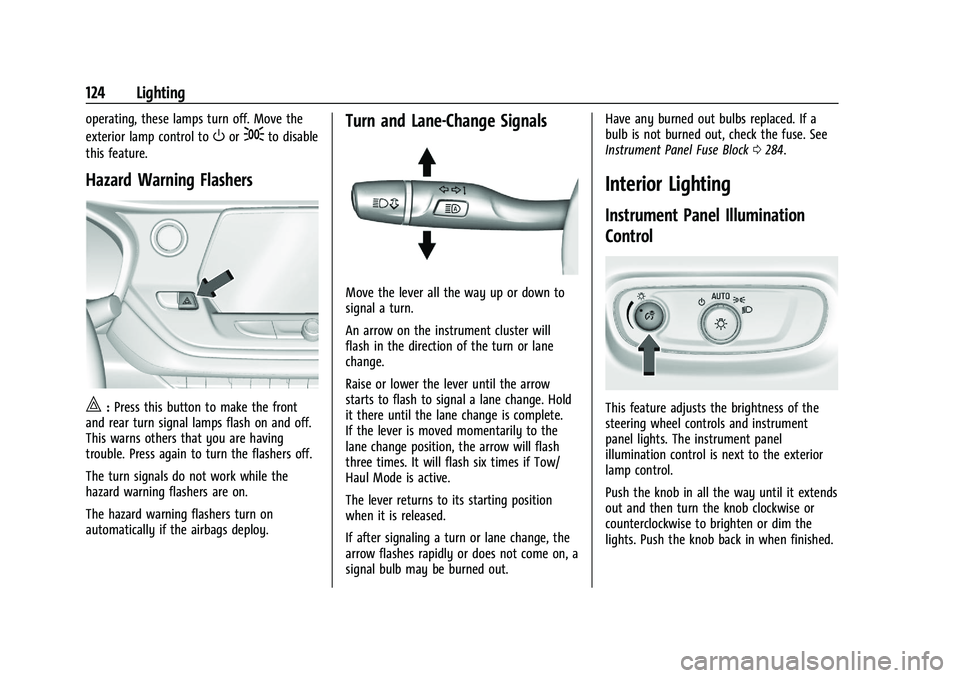
Hazard Warning Flashers
|: Press this button to make the front
and rear turn signal lamps flash on and off.
This warns others that you are having
trouble. Press again to turn the flashers off.
The turn signals do not work while the
hazard warning flashers are on.
The hazard warning flashers turn on
automatically if the airbags deploy.
Turn and Lane-Change Signals
Move the lever all the way up or down to
signal a turn.
An arrow on the instrument cluster will
flash in the direction of the turn or lane
change.
Raise or lower the lever until the arrow
starts to flash to signal a lane change. Hold
it there until the lane change is complete.
If the lever is moved momentarily to the
lane change position, the arrow will flash
three times. It will flash six times if Tow/
Haul Mode is active.
The lever returns to its starting position
when it is released.
If after signaling a turn or lane change, the
arrow flashes rapidly or does not come on, a
signal bulb may be burned out. Have any burned out bulbs replaced. If a
bulb is not burned out, check the fuse. See
Instrument Panel Fuse Block
0284.
Interior Lighting
Instrument Panel Illumination
Control
This feature adjusts the brightness of the
steering wheel controls and instrument
panel lights. The instrument panel
illumination control is next to the exterior
lamp control.
Push the knob in all the way until it extends
out and then turn the knob clockwise or
counterclockwise to brighten or dim the
lights. Push the knob back in when finished.
Page 166 of 380
Chevrolet Blazer Owner Manual (GMNA-Localizing-U.S./Canada/Mexico-
14608203) - 2021 - CRC - 10/29/20
Infotainment System 165
The settings menu may be organized into
four categories. Select the desired category
by touching System, Apps, Vehicle,
or Personal.
To access the personalization menus:1. Touch Settings on the Home Page on the infotainment display.
2. Touch the desired category to display a list of available options.
3. Touch to select the desired feature setting.
4. Touch the options on the infotainment display to disable or enable a feature.
5. Touch
zto go to the top level of the
Settings menu.
System
The menu may contain the following:
Time / Date
Use the following features to set the clock:
.Automatic Time and Date: Touch Off or
On to enable or disable automatic update
of the time and date. When this feature
is on, the time and date cannot be
manually set.
.Set Time: Touch to manually set the time
using the controls on the infotainment
display.
.Set Date: Touch to manually set the date
using the controls on the infotainment
display.
.Automatic Time Zone (If Equipped): Touch
Off or On to disable or enable automatic
update of the time zone based on vehicle
location. When this feature is on, the
time zone cannot be manually set.
.Select Time Zone: Touch to manually set
the time zone. Touch a time zone from
the list.
.Use 24-hour Format: Touch to specify the
clock format shown.
Touch Off or On to disable or enable.
Language
This will set the display language used on
the infotainment display. It may also use
the selected language for voice recognition
and audio feedback. Touch Language and
touch the appropriate language. Phones
Touch to connect to a different cell phone or
mobile device source, disconnect a cell
phone or media device, or delete a cell
phone or media device.
Wi-Fi Networks
This will show connected and available Wi-Fi
networks.
If a 4G LTE data package is not active on the
vehicle, the infotainment system can be
connected to an external protected Wi-Fi
network, such as a mobile device or home
hotspot, to utilize connected services.
Wi-Fi Hotspot
Touch and the following may display:
.Wi-Fi Services: This allows devices to use
the vehicle hotspot.
Touch the controls on the infotainment
display to disable or enable.
.Wi-Fi Name: Touch to change the vehicle
Wi-Fi name.
.Wi-Fi Password: Touch to change the
vehicle Wi-Fi password.
.Connected Devices: Touch to show
connected devices.
Page 184 of 380

Chevrolet Blazer Owner Manual (GMNA-Localizing-U.S./Canada/Mexico-
14608203) - 2021 - CRC - 10/29/20
Climate Controls 183
Climate Control Display
1. Driver and Passenger TemperatureSettings
2. Fan Control
3. Driver and Passenger Temperature Controls
4. Sync (Synchronized Temperature)
5. Recirculation
6. Air Delivery Mode Controls
7. Auto (Automatic Operation)
8. A/C (Air Conditioning)
9. On/Off (Power) The fan, air delivery mode, air conditioning,
driver and passenger temperatures, and Sync
settings can be controlled by touching
CLIMATE on the infotainment Home Page or
the climate button in the climate control
display application tray. A selection can then
be made on the front climate control page
displayed.
Climate Control Status Display
The climate control status display appears
briefly when the center stack climate
controls are adjusted.
Automatic Operation
The system automatically controls the fan
speed, air delivery, air conditioning, and
recirculation in order to heat or cool the
vehicle to the desired temperature.
When AUTO is lit, all four functions operate
automatically. Each function can also be
manually set and the selected setting is
displayed. Functions not manually set will
continue to be automatically controlled,
even if the AUTO indicator is not lit.
For automatic operation:
1. Press AUTO.
2. Set the temperature. Allow the system time to stabilize. Adjust the temperature
as needed for best comfort.
To improve fuel efficiency and to cool the
vehicle faster with A/C on, recirculation may
be automatically selected in warm weather.
Press
@to select recirculation; press it
again to select outside air.
Driver and Passenger Temperature
Controls : The temperature can be adjusted
separately for the driver and the passenger.
Turn the knob clockwise or counterclockwise
to increase or decrease the driver or
passenger temperature setting.
Page 187 of 380
Chevrolet Blazer Owner Manual (GMNA-Localizing-U.S./Canada/Mexico-
14608203) - 2021 - CRC - 10/29/20
186 Climate Controls
Air Vents
Use the air outlets in the center and on the
side of the instrument panel to direct the
airflow. Turn the center knobs on the air
outlets counterclockwise or clockwise to
open or close off the airflow.
Operation Tips
.Clear away any ice, snow, or leaves from
the air inlets at the base of the
windshield that can block the flow of air
into the vehicle.
.Clear snow off the hood to improve
visibility and help decrease moisture
drawn into the vehicle.
.Use of non-GM approved hood deflectors
can adversely affect the performance of
the system.
.Keep the path under all seats clear of
objects to help circulate the air inside the
vehicle more effectively.
.If fogging reoccurs while in vent or in a
combination mode with mild temperature
throughout the vehicle, turn on the air
conditioner to reduce windshield fogging.
Maintenance
Passenger Compartment Air Filter
The filter reduces dust, pollen, and other
airborne irritants from outside air that is
pulled into the vehicle. The filter should be
replaced as part of routine scheduled
maintenance. SeeMaintenance Schedule
0 332.
See your dealer regarding replacement of
the filter.
Service
All vehicles have a label underhood that
identifies the refrigerant used in the vehicle.
The refrigerant system should only be
serviced by trained and certified technicians.
The air conditioning evaporator should never
be repaired or replaced by one from a
salvage vehicle. It should only be replaced
by a new evaporator to ensure proper and
safe operation.
During service, all refrigerants should be
reclaimed with proper equipment. Venting
refrigerants directly to the atmosphere is
harmful to the environment and may also create unsafe conditions based on
inhalation, combustion, frostbite, or other
health-based concerns.
The air conditioning system requires periodic
maintenance. See
Maintenance Schedule
0 332.
Page 271 of 380
Chevrolet Blazer Owner Manual (GMNA-Localizing-U.S./Canada/Mexico-
14608203) - 2021 - CRC - 10/29/20
270 Vehicle Care
{Warning
Plain water, or other liquids such as
alcohol, can boil before the proper
coolant mixture will. With plain water or
the wrong mixture, the engine could get
too hot but there would not be an
overheat warning. The engine could catch
fire and you or others could be burned.
Caution
Failure to follow the specific coolant fill
procedure could cause the engine to
overheat and could cause system
damage. If coolant is not visible in the
surge tank, contact your dealer.
If no problem is found, check to see if
coolant is visible in the coolant surge tank.
If coolant is visible but the coolant level is
not at or above the indicated mark, add a
50/50 mixture of clean, drinkable water and
DEX-COOL coolant. Be sure the cooling
system, including the coolant surge tank
pressure cap, is cool before you do it.
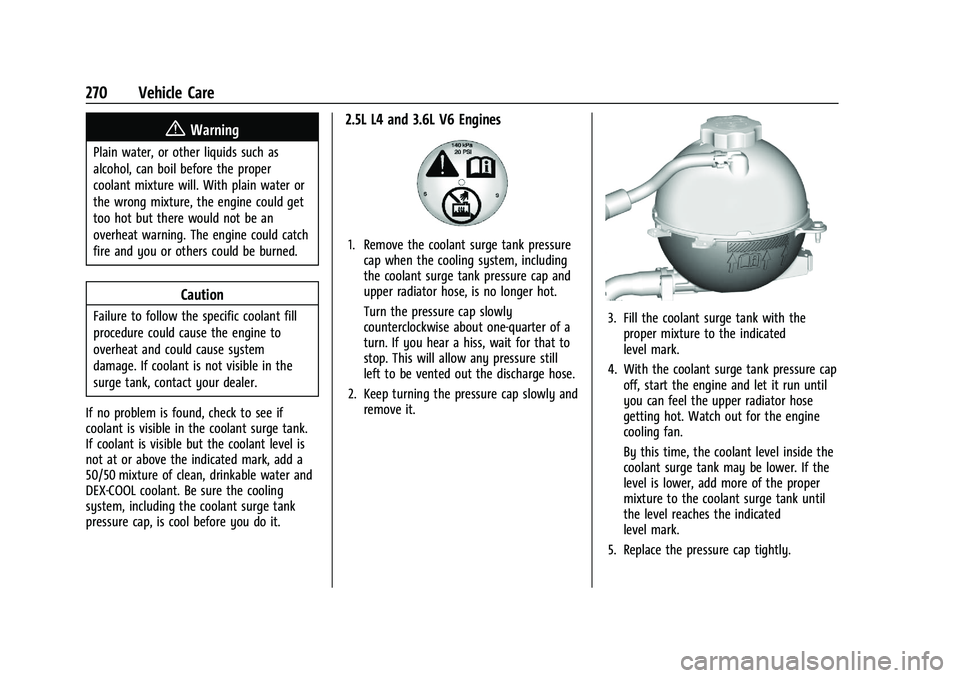
2.5L L4 and 3.6L V6 Engines
1. Remove the coolant surge tank pressure cap when the cooling system, including
the coolant surge tank pressure cap and
upper radiator hose, is no longer hot.
Turn the pressure cap slowly
counterclockwise about one-quarter of a
turn. If you hear a hiss, wait for that to
stop. This will allow any pressure still
left to be vented out the discharge hose.
2. Keep turning the pressure cap slowly and remove it.
3. Fill the coolant surge tank with theproper mixture to the indicated
level mark.
4. With the coolant surge tank pressure cap off, start the engine and let it run until
you can feel the upper radiator hose
getting hot. Watch out for the engine
cooling fan.
By this time, the coolant level inside the
coolant surge tank may be lower. If the
level is lower, add more of the proper
mixture to the coolant surge tank until
the level reaches the indicated
level mark.
5. Replace the pressure cap tightly.
Page 280 of 380
Chevrolet Blazer Owner Manual (GMNA-Localizing-U.S./Canada/Mexico-
14608203) - 2021 - CRC - 10/29/20
Vehicle Care 279
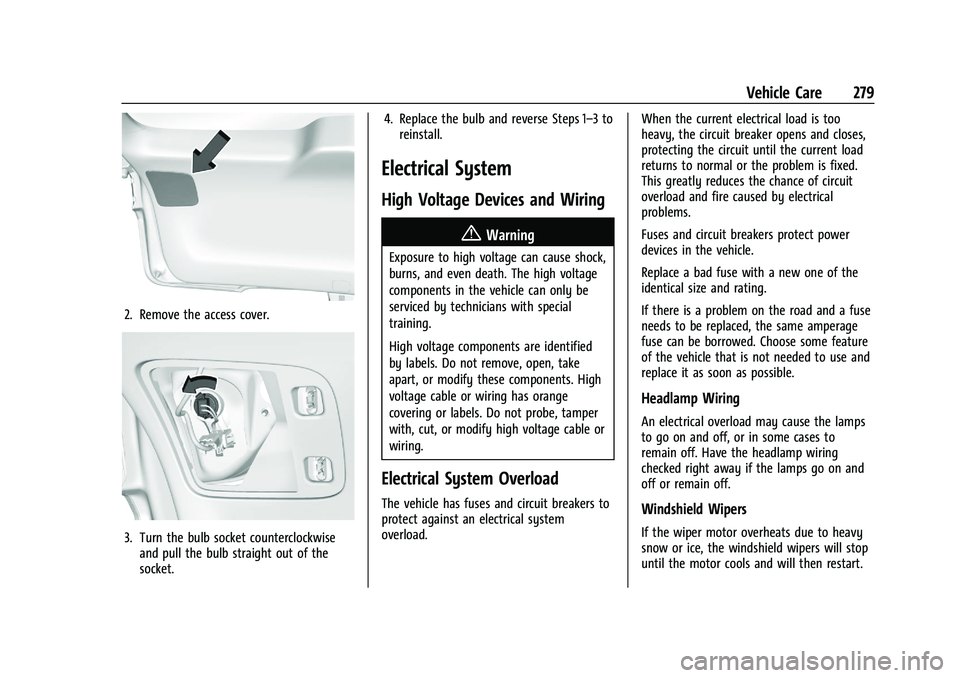
2. Remove the access cover.
3. Turn the bulb socket counterclockwiseand pull the bulb straight out of the
socket. 4. Replace the bulb and reverse Steps 1–3 to
reinstall.
Electrical System
High Voltage Devices and Wiring
{Warning
Exposure to high voltage can cause shock,
burns, and even death. The high voltage
components in the vehicle can only be
serviced by technicians with special
training.
High voltage components are identified
by labels. Do not remove, open, take
apart, or modify these components. High
voltage cable or wiring has orange
covering or labels. Do not probe, tamper
with, cut, or modify high voltage cable or
wiring.
Electrical System Overload
The vehicle has fuses and circuit breakers to
protect against an electrical system
overload. When the current electrical load is too
heavy, the circuit breaker opens and closes,
protecting the circuit until the current load
returns to normal or the problem is fixed.
This greatly reduces the chance of circuit
overload and fire caused by electrical
problems.
Fuses and circuit breakers protect power
devices in the vehicle.
Replace a bad fuse with a new one of the
identical size and rating.
If there is a problem on the road and a fuse
needs to be replaced, the same amperage
fuse can be borrowed. Choose some feature
of the vehicle that is not needed to use and
replace it as soon as possible.
Headlamp Wiring
An electrical overload may cause the lamps
to go on and off, or in some cases to
remain off. Have the headlamp wiring
checked right away if the lamps go on and
off or remain off.
Windshield Wipers
If the wiper motor overheats due to heavy
snow or ice, the windshield wipers will stop
until the motor cools and will then restart.