coolant level CHEVROLET BLAZER 2021 Owner's Manual
[x] Cancel search | Manufacturer: CHEVROLET, Model Year: 2021, Model line: BLAZER, Model: CHEVROLET BLAZER 2021Pages: 380, PDF Size: 9.1 MB
Page 3 of 380
Chevrolet Blazer Owner Manual (GMNA-Localizing-U.S./Canada/Mexico-
14608203) - 2021 - CRC - 10/29/20
2 Introduction
Using this Manual
To quickly locate information about the
vehicle, use the Index in the back of the
manual. It is an alphabetical list of what is
in the manual and the page number where
it can be found.
Danger, Warning, and Caution
Warning messages found on vehicle labels
and in this manual describe hazards and
what to do to avoid or reduce them.
{Danger
Danger indicates a hazard with a high
level of risk which will result in serious
injury or death.
{Warning
Warning indicates a hazard that could
result in injury or death.
Caution
Caution indicates a hazard that could
result in property or vehicle damage.
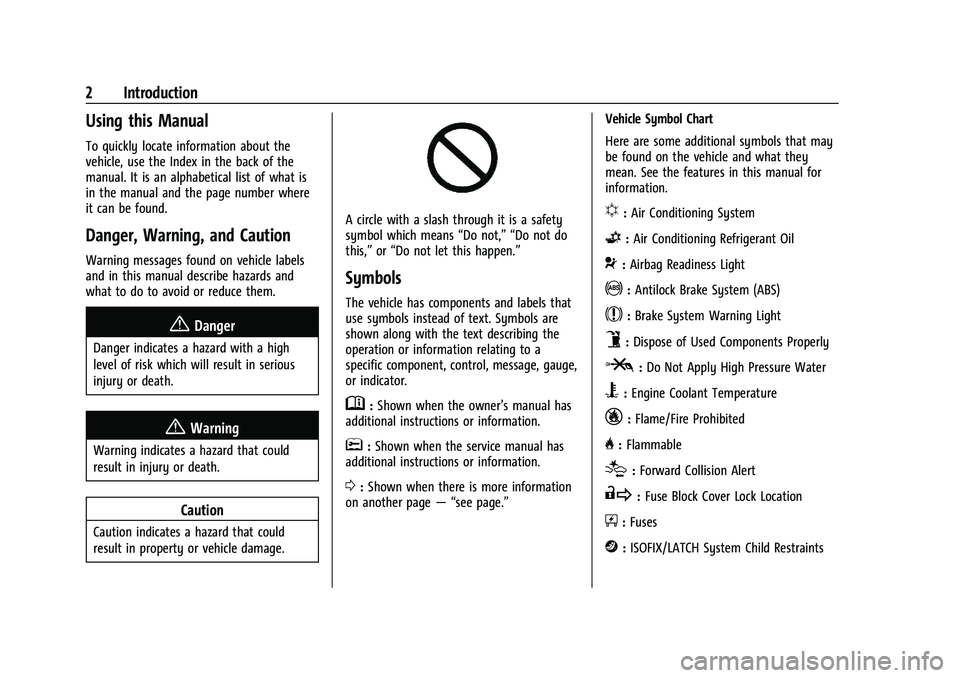
A circle with a slash through it is a safety
symbol which means“Do not,” “Do not do
this,” or“Do not let this happen.”
Symbols
The vehicle has components and labels that
use symbols instead of text. Symbols are
shown along with the text describing the
operation or information relating to a
specific component, control, message, gauge,
or indicator.
M:Shown when the owner’s manual has
additional instructions or information.
*: Shown when the service manual has
additional instructions or information.
0: Shown when there is more information
on another page — “see page.” Vehicle Symbol Chart
Here are some additional symbols that may
be found on the vehicle and what they
mean. See the features in this manual for
information.
u:
Air Conditioning System
G:Air Conditioning Refrigerant Oil
9:Airbag Readiness Light
!:Antilock Brake System (ABS)
$:Brake System Warning Light
9:Dispose of Used Components Properly
P:Do Not Apply High Pressure Water
B:Engine Coolant Temperature
_:Flame/Fire Prohibited
H: Flammable
[:Forward Collision Alert
R:Fuse Block Cover Lock Location
+:Fuses
j:ISOFIX/LATCH System Child Restraints
Page 83 of 380
Chevrolet Blazer Owner Manual (GMNA-Localizing-U.S./Canada/Mexico-
14608203) - 2021 - CRC - 10/29/20
82 Instruments and Controls
Instruments and Controls
Controls
Steering Wheel Adjustment . . . . . . . . . . . . 83
Steering Wheel Controls . . . . . . . . . . . . . . . . 83
Heated Steering Wheel . . . . . . . . . . . . . . . . . 83
Horn . . . . . . . . . . . . . . . . . . . . . . . . . . . . . . . . . . . 84
Windshield Wiper/Washer . . . . . . . . . . . . . 84
Rear Window Wiper/Washer . . . . . . . . . . . 85
Compass . . . . . . . . . . . . . . . . . . . . . . . . . . . . . . . . 85
Clock . . . . . . . . . . . . . . . . . . . . . . . . . . . . . . . . . . . 86
Power Outlets . . . . . . . . . . . . . . . . . . . . . . . . . . 86
Wireless Charging . . . . . . . . . . . . . . . . . . . . . . 87
Warning Lights, Gauges, and Indicators
Warning Lights, Gauges, andIndicators . . . . . . . . . . . . . . . . . . . . . . . . . . . . . 89
Instrument Cluster (Base and Midlevel) . . . . . . . . . . . . . . . . . . . . . . . . . . . . . 90
Instrument Cluster (Uplevel) . . . . . . . . . . . . 93
Speedometer . . . . . . . . . . . . . . . . . . . . . . . . . . . 94
Odometer . . . . . . . . . . . . . . . . . . . . . . . . . . . . . . 94
Trip Odometer . . . . . . . . . . . . . . . . . . . . . . . . . 95
Tachometer . . . . . . . . . . . . . . . . . . . . . . . . . . . . 95
Fuel Gauge . . . . . . . . . . . . . . . . . . . . . . . . . . . . . 95
Engine Oil Temperature Gauge . . . . . . . . . 96
Engine Coolant Temperature Gauge . . . . 96
Voltmeter Gauge . . . . . . . . . . . . . . . . . . . . . . . 97
Seat Belt Reminders . . . . . . . . . . . . . . . . . . . . 98
Airbag Readiness Light . . . . . . . . . . . . . . . . . 98 Passenger Airbag Status Indicator . . . . . . 99
Charging System Light . . . . . . . . . . . . . . . . 100
Malfunction Indicator Lamp (Check
Engine Light) . . . . . . . . . . . . . . . . . . . . . . . . 100
Brake System Warning Light . . . . . . . . . . . 101
Electric Parking Brake Light . . . . . . . . . . . . 102
Service Electric Parking Brake Light . . . . 102
Antilock Brake System (ABS) Warning
Light . . . . . . . . . . . . . . . . . . . . . . . . . . . . . . . . . 102
Tow/Haul Mode Light . . . . . . . . . . . . . . . . . 103
Lane Keep Assist (LKA) Light . . . . . . . . . . . 103
Vehicle Ahead Indicator . . . . . . . . . . . . . . . 103
Pedestrian Ahead Indicator . . . . . . . . . . . . 104
Traction Off Light . . . . . . . . . . . . . . . . . . . . . 104
StabiliTrak OFF Light . . . . . . . . . . . . . . . . . . 104
Traction Control System (TCS)/ StabiliTrak Light . . . . . . . . . . . . . . . . . . . . . 104
Engine Coolant Temperature Warning Light . . . . . . . . . . . . . . . . . . . . . . . . . . . . . . . . . 105
Tire Pressure Light . . . . . . . . . . . . . . . . . . . . . 105
Engine Oil Pressure Light . . . . . . . . . . . . . . 105
Low Fuel Warning Light . . . . . . . . . . . . . . . 106
Security Light . . . . . . . . . . . . . . . . . . . . . . . . . 106
High-Beam On Light . . . . . . . . . . . . . . . . . . . 106
Lamps On Reminder . . . . . . . . . . . . . . . . . . . 107
Cruise Control Light . . . . . . . . . . . . . . . . . . . 107
Door Ajar Light . . . . . . . . . . . . . . . . . . . . . . . . 107
Information Displays
Driver Information Center (DIC) (Base and Midlevel) . . . . . . . . . . . . . . . . . . . . . . . . 107 Driver Information Center (DIC)
(Uplevel) . . . . . . . . . . . . . . . . . . . . . . . . . . . . . 110
Vehicle Messages
Vehicle Messages . . . . . . . . . . . . . . . . . . . . . . 113
Engine Power Messages . . . . . . . . . . . . . . . . 113
Vehicle Speed Messages . . . . . . . . . . . . . . . 113
Vehicle Personalization
Vehicle Personalization . . . . . . . . . . . . . . . . . 113
Universal Remote System
Universal Remote System . . . . . . . . . . . . . . 117
Universal Remote SystemProgramming . . . . . . . . . . . . . . . . . . . . . . . . . 117
Universal Remote System Operation . . . 119
Page 91 of 380
Chevrolet Blazer Owner Manual (GMNA-Localizing-U.S./Canada/Mexico-
14608203) - 2021 - CRC - 10/29/20
90 Instruments and Controls
Instrument Cluster (Base and Midlevel)
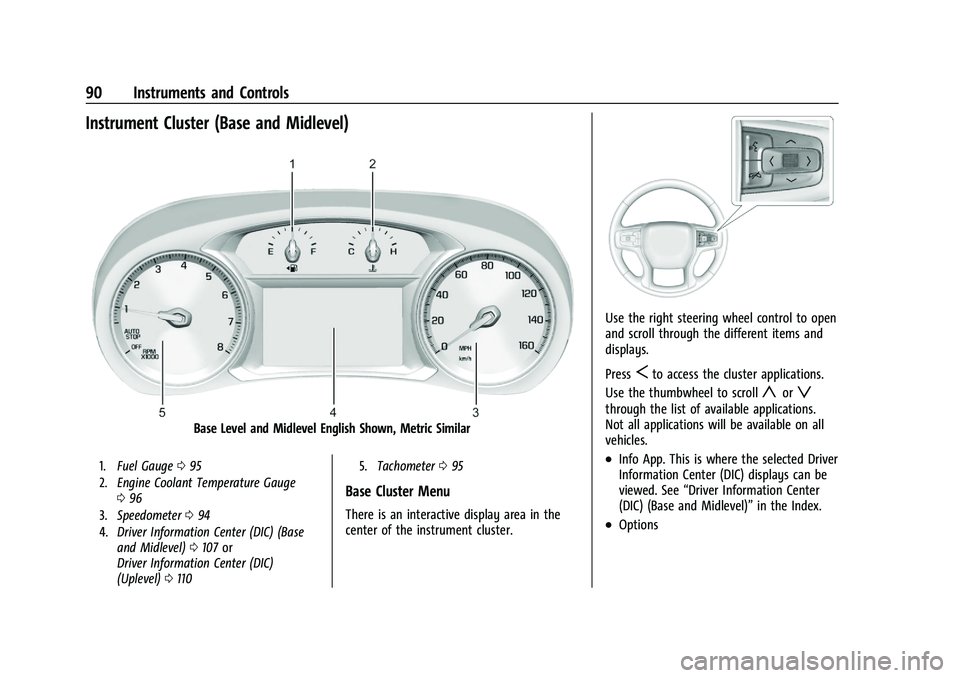
Base Level and Midlevel English Shown, Metric Similar
1.Fuel Gauge 095
2. Engine Coolant Temperature Gauge
096
3. Speedometer 094
4. Driver Information Center (DIC) (Base
and Midlevel) 0107 or
Driver Information Center (DIC)
(Uplevel) 0110 5.
Tachometer 095
Base Cluster Menu
There is an interactive display area in the
center of the instrument cluster.
Use the right steering wheel control to open
and scroll through the different items and
displays.
Press
Sto access the cluster applications.
Use the thumbwheel to scroll
yorz
through the list of available applications.
Not all applications will be available on all
vehicles.
.Info App. This is where the selected Driver
Information Center (DIC) displays can be
viewed. See “Driver Information Center
(DIC) (Base and Midlevel)” in the Index.
.Options
Page 94 of 380
Chevrolet Blazer Owner Manual (GMNA-Localizing-U.S./Canada/Mexico-
14608203) - 2021 - CRC - 10/29/20
Instruments and Controls 93
Instrument Cluster (Uplevel)
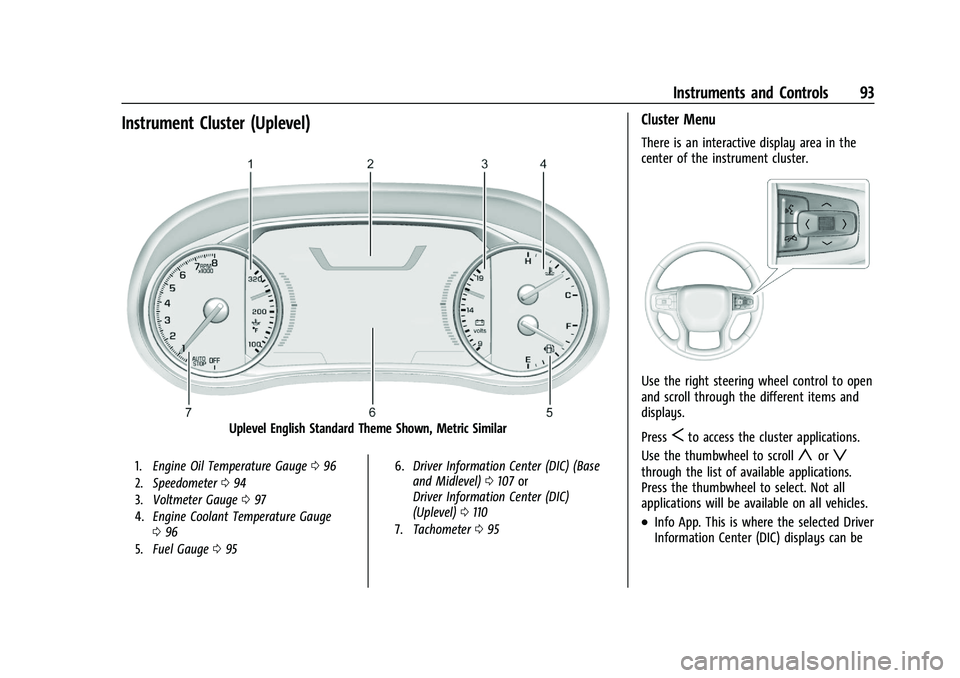
Uplevel English Standard Theme Shown, Metric Similar
1.Engine Oil Temperature Gauge 096
2. Speedometer 094
3. Voltmeter Gauge 097
4. Engine Coolant Temperature Gauge
096
5. Fuel Gauge 095 6.
Driver Information Center (DIC) (Base
and Midlevel) 0107 or
Driver Information Center (DIC)
(Uplevel) 0110
7. Tachometer 095
Cluster Menu
There is an interactive display area in the
center of the instrument cluster.
Use the right steering wheel control to open
and scroll through the different items and
displays.
Press
Sto access the cluster applications.
Use the thumbwheel to scroll
yorz
through the list of available applications.
Press the thumbwheel to select. Not all
applications will be available on all vehicles.
.Info App. This is where the selected Driver
Information Center (DIC) displays can be
Page 97 of 380
Chevrolet Blazer Owner Manual (GMNA-Localizing-U.S./Canada/Mexico-
14608203) - 2021 - CRC - 10/29/20
96 Instruments and Controls
When the ignition is on, the fuel gauge
indicates about how much fuel is left in
the tank.
An arrow on the fuel gauge indicates the
side of the vehicle the fuel door is on.
When the indicator nears empty, the low
fuel light comes on. There is a small amount
of fuel left, but the fuel tank should be
filled soon.
Here are three things that some owners ask
about. None of these show a problem with
the fuel gauge:
.It takes a little more, or less fuel to fill up
than the gauge indicated. For example,
the gauge may have indicated the tank
was half full, but it actually took a little
more, or less than half the tank's capacity
to fill the tank.
.The gauge moves a little while turning a
corner, speeding up or braking.
.The gauge takes a few seconds to
stabilize after the ignition is turned on
and goes back to empty when the
ignition is turned off.
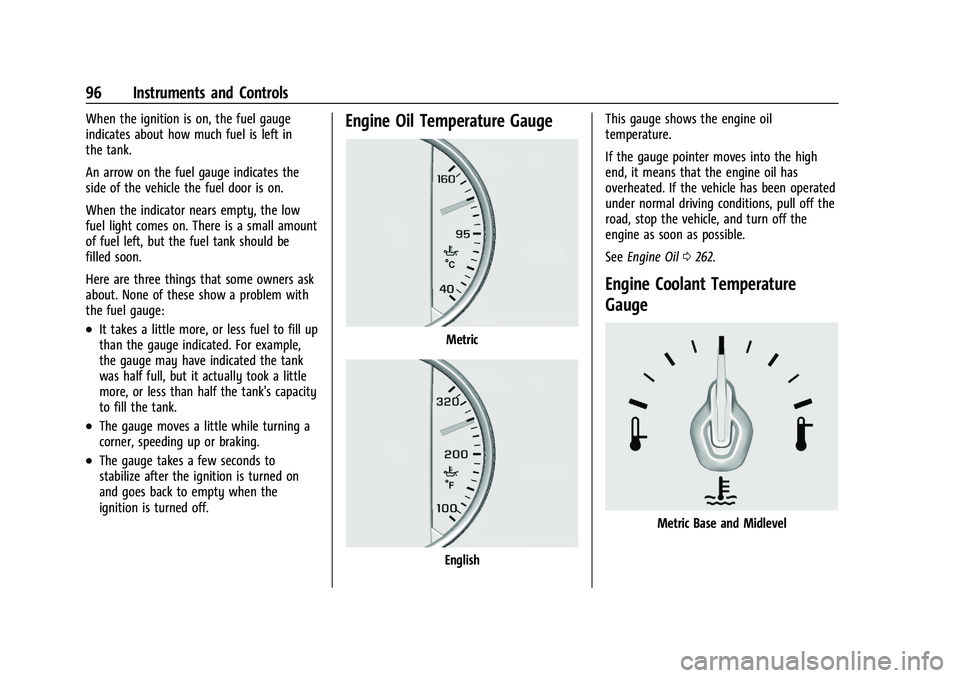
Engine Oil Temperature Gauge
Metric
EnglishThis gauge shows the engine oil
temperature.
If the gauge pointer moves into the high
end, it means that the engine oil has
overheated. If the vehicle has been operated
under normal driving conditions, pull off the
road, stop the vehicle, and turn off the
engine as soon as possible.
See
Engine Oil 0262.
Engine Coolant Temperature
Gauge
Metric Base and Midlevel
Page 98 of 380
Chevrolet Blazer Owner Manual (GMNA-Localizing-U.S./Canada/Mexico-
14608203) - 2021 - CRC - 10/29/20
Instruments and Controls 97
English Base and Midlevel
Metric Uplevel
English Uplevel
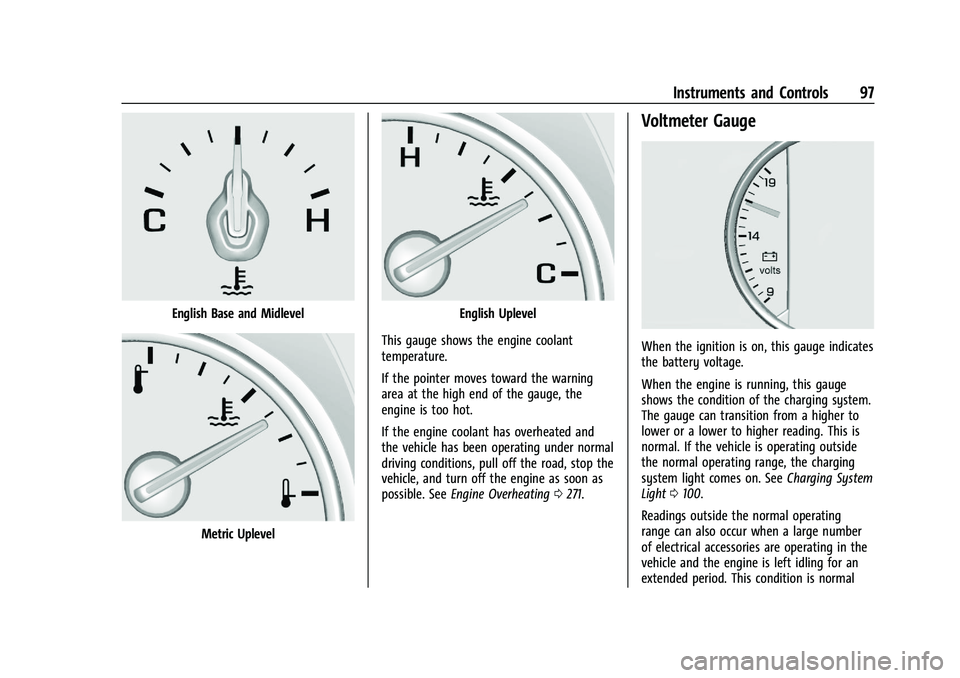
This gauge shows the engine coolant
temperature.
If the pointer moves toward the warning
area at the high end of the gauge, the
engine is too hot.
If the engine coolant has overheated and
the vehicle has been operating under normal
driving conditions, pull off the road, stop the
vehicle, and turn off the engine as soon as
possible. See Engine Overheating 0271.
Voltmeter Gauge
When the ignition is on, this gauge indicates
the battery voltage.
When the engine is running, this gauge
shows the condition of the charging system.
The gauge can transition from a higher to
lower or a lower to higher reading. This is
normal. If the vehicle is operating outside
the normal operating range, the charging
system light comes on. See Charging System
Light 0100.
Readings outside the normal operating
range can also occur when a large number
of electrical accessories are operating in the
vehicle and the engine is left idling for an
extended period. This condition is normal
Page 111 of 380
Chevrolet Blazer Owner Manual (GMNA-Localizing-U.S./Canada/Mexico-
14608203) - 2021 - CRC - 10/29/20
110 Instruments and Controls
Driver Assistance :If equipped, shows
information for Lane Keep Assist (LKA), Lane
Departure Warning (LDW), and Forward
Collision Alert (FCA).
Economy Trend : Shows history of the
Average Fuel Economy from the last 50 km
(30 mi). Each bar represents about 5 km
(3 mi) of driving. During driving the bars will
shift to always reflect the most recent
distance on the right side. Press the
thumbwheel to open the menu while this
display is active to clear the graph. Select
yes or no and press the thumbwheel.
Timer : This display can be used as a timer.
To start the timer, press the thumbwheel to
open the menu while this display is active.
Use
yorzto select Start Timer or Reset.
Press the thumbwheel. To stop the timer,
press the thumbwheel while this display is
active. The display will show the amount of
time that has passed since the timer was
last reset.
Speed Limit : Shows sign information, which
comes from a roadway database in the
onboard navigation, if equipped. The sign
will show “− −”when there is no detected
speed limit or the system is unavailable. Press the thumbwheel while this display is
active to toggle Speed Limit sign on or off.
Speed limit signs in your vehicle display
may vary from actual road speed depending
on the version of your current
navigation map.
Battery Voltage :
Displays the current
battery voltage, if equipped. Battery voltage
changes are normal while driving. See
Charging System Light 0100. If there is a
problem with the battery charging system, a
DIC will display a message.
Oil Pressure : Oil pressure is displayed in
either kilopascal (kPa) or in pounds per
square inch (psi). Oil pressure can vary with
engine speed, outside temperature, and oil
viscosity. On some models, the oil pump will
vary engine oil pressure according to engine
needs. Oil pressure may change quickly as
the engine speed or load varies. This is
normal. If the oil pressure warning light or
DIC message indicates oil pressure outside
the normal operating range, check the
vehicle's oil as soon as possible.
Coolant Temperature : Displays the coolant
temperature in degrees Celsius (°C) or
degrees Fahrenheit (°F).
Driver Information Center (DIC)
(Uplevel)
The DIC displays are shown in the center of
the instrument cluster in the Info app.
See Instrument Cluster (Base and Midlevel)
0 90 or
Instrument Cluster (Uplevel) 093. The
displays show the status of many vehicle
systems.
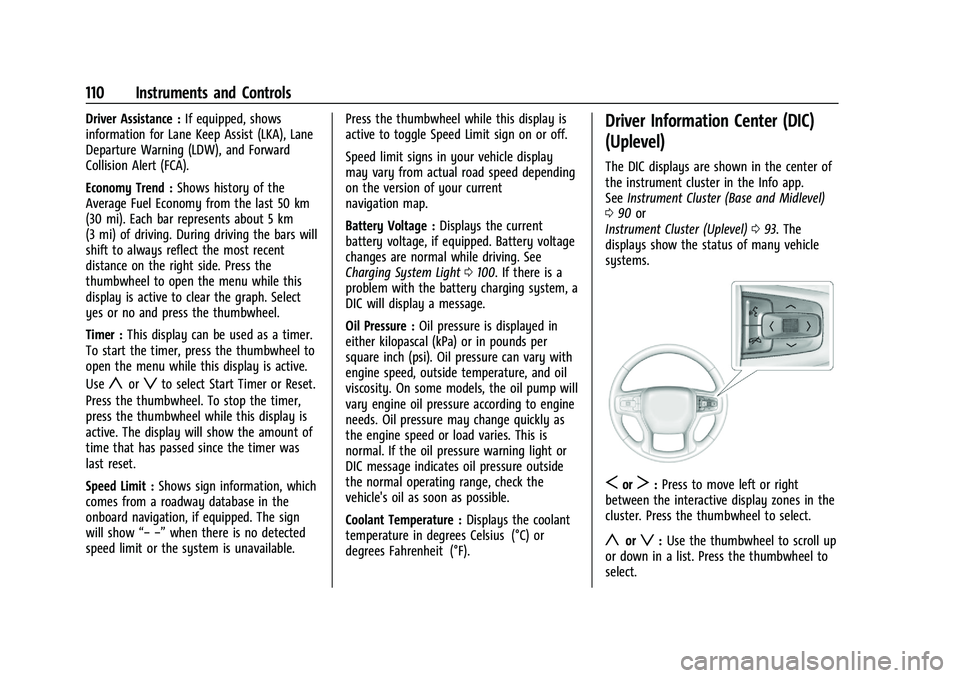
SorT: Press to move left or right
between the interactive display zones in the
cluster. Press the thumbwheel to select.
yorz: Use the thumbwheel to scroll up
or down in a list. Press the thumbwheel to
select.
Page 245 of 380
Chevrolet Blazer Owner Manual (GMNA-Localizing-U.S./Canada/Mexico-
14608203) - 2021 - CRC - 10/29/20
244 Driving and Operating
alone. It is necessary to go much farther
beyond the passed vehicle before returning
to the lane. Pass on level roadways. Avoid
passing on hills if possible.
Backing Up
Hold the bottom of the steering wheel with
one hand. To move the trailer to the left,
move that hand to the left. To move the
trailer to the right, move that hand to the
right. Always back up slowly and, if possible,
have someone guide you.
Making TurnsCaution
Turn more slowly and make wider arcs
when towing a trailer to prevent damage
to your vehicle. Making very sharp turns
could cause the trailer to contact the
vehicle.
Make wider turns than normal when towing,
so the trailer will not go over soft shoulders,
over curbs, or strike road signs, trees,
or other objects. Always signal turns well in
advance. Do not steer or brake suddenly.
Driving on Grades
Reduce speed and shift to a lower gear
before starting down a long or steep
downhill grade. If the transmission is not
shifted down, the brakes may overheat and
result in reduced braking efficiency.
The vehicle can tow in D (Drive). Shift the
transmission to a lower gear if the
transmission shifts too often under heavy
loads and/or hilly conditions.
When towing at higher altitudes, engine
coolant will boil at a lower temperature
than at lower altitudes. If the engine is
turned off immediately after towing at high
altitude on steep uphill grades, the vehicle
could show signs similar to engine
overheating. To avoid this, let the engine
run, preferably on level ground, with the
transmission in P (Park) for a few minutes
before turning the engine off. If the
overheat warning comes on, see Engine
Overheating 0271.
Parking on Hills
{Warning
To prevent serious injury or death,
always park your vehicle and trailer on a
level surface when possible.
When parking the vehicle and trailer on
a hill: 1. Press the brake pedal, but do not shift into P (Park) yet. Turn the wheels into
the curb if facing downhill or into traffic
if facing uphill.
2. Have someone place chocks under the trailer wheels.
3. When the wheel chocks are in place, gradually release the brake pedal to
allow the chocks to absorb the load of
the trailer.
4. Reapply the brake pedal. Then apply the parking brake and shift into P (Park).
5. Release the brake pedal.
Page 270 of 380
Chevrolet Blazer Owner Manual (GMNA-Localizing-U.S./Canada/Mexico-
14608203) - 2021 - CRC - 10/29/20
Vehicle Care 269
Warning (Continued)
engine if there is a leak; all coolant could
leak out. That could cause an engine fire
and can burn you. Fix any leak before
driving the vehicle.
Use a 50/50 mixture of clean, drinkable
water and DEX-COOL coolant. This mixture:
.Gives freezing protection down to −37 °C
(−34 °F), outside temperature.
.Gives boiling protection up to 129 °C
(265 °F), engine temperature.
.Protects against rust and corrosion.
.Will not damage aluminum parts.
.Helps keep the proper engine
temperature.
Caution
Do not use anything other than a mix of
DEX-COOL coolant that meets GM
Standard GMW3420 and clean, drinkable
water. Anything else can cause damage
to the engine cooling system and the
vehicle, which would not be covered by
the vehicle warranty. Never dispose of engine coolant by putting
it in the trash, or by pouring it on the
ground or into sewers, streams, or bodies of
water. Have the coolant changed by an
authorized service center, familiar with legal
requirements regarding used coolant
disposal. This will help protect the
environment and your health.
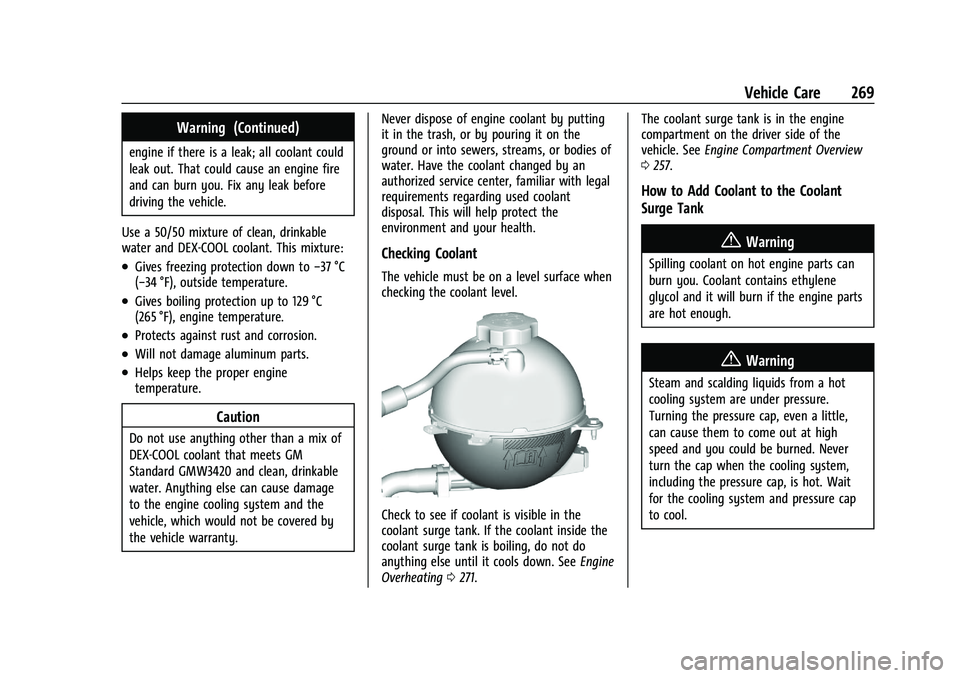
Checking Coolant
The vehicle must be on a level surface when
checking the coolant level.
Check to see if coolant is visible in the
coolant surge tank. If the coolant inside the
coolant surge tank is boiling, do not do
anything else until it cools down. See
Engine
Overheating 0271. The coolant surge tank is in the engine
compartment on the driver side of the
vehicle. See
Engine Compartment Overview
0 257.
How to Add Coolant to the Coolant
Surge Tank
{Warning
Spilling coolant on hot engine parts can
burn you. Coolant contains ethylene
glycol and it will burn if the engine parts
are hot enough.
{Warning
Steam and scalding liquids from a hot
cooling system are under pressure.
Turning the pressure cap, even a little,
can cause them to come out at high
speed and you could be burned. Never
turn the cap when the cooling system,
including the pressure cap, is hot. Wait
for the cooling system and pressure cap
to cool.
Page 271 of 380
Chevrolet Blazer Owner Manual (GMNA-Localizing-U.S./Canada/Mexico-
14608203) - 2021 - CRC - 10/29/20
270 Vehicle Care
{Warning
Plain water, or other liquids such as
alcohol, can boil before the proper
coolant mixture will. With plain water or
the wrong mixture, the engine could get
too hot but there would not be an
overheat warning. The engine could catch
fire and you or others could be burned.
Caution
Failure to follow the specific coolant fill
procedure could cause the engine to
overheat and could cause system
damage. If coolant is not visible in the
surge tank, contact your dealer.
If no problem is found, check to see if
coolant is visible in the coolant surge tank.
If coolant is visible but the coolant level is
not at or above the indicated mark, add a
50/50 mixture of clean, drinkable water and
DEX-COOL coolant. Be sure the cooling
system, including the coolant surge tank
pressure cap, is cool before you do it.
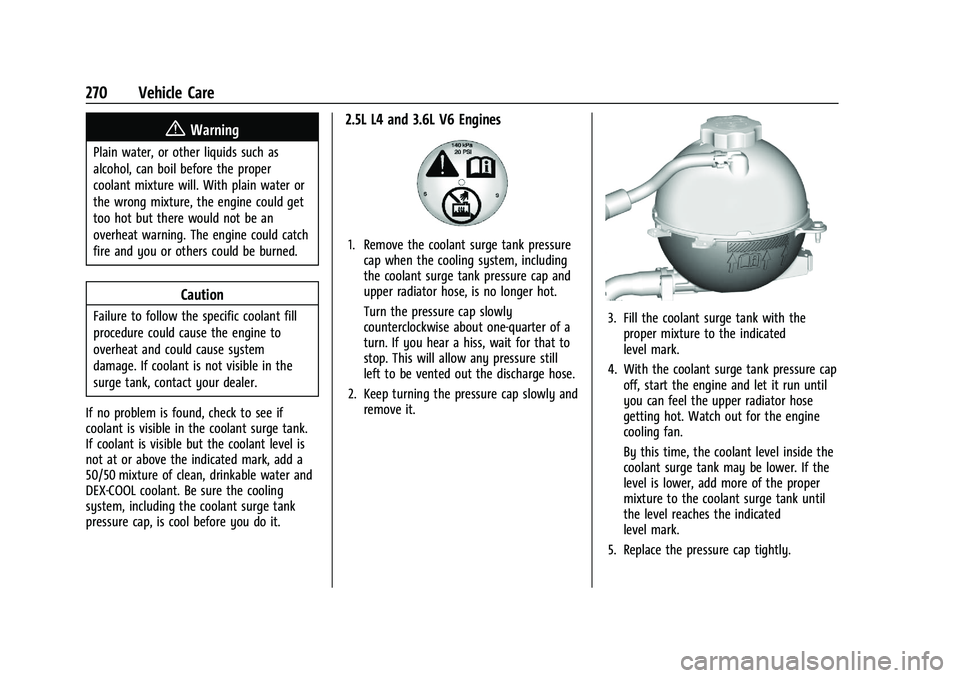
2.5L L4 and 3.6L V6 Engines
1. Remove the coolant surge tank pressure cap when the cooling system, including
the coolant surge tank pressure cap and
upper radiator hose, is no longer hot.
Turn the pressure cap slowly
counterclockwise about one-quarter of a
turn. If you hear a hiss, wait for that to
stop. This will allow any pressure still
left to be vented out the discharge hose.
2. Keep turning the pressure cap slowly and remove it.
3. Fill the coolant surge tank with theproper mixture to the indicated
level mark.
4. With the coolant surge tank pressure cap off, start the engine and let it run until
you can feel the upper radiator hose
getting hot. Watch out for the engine
cooling fan.
By this time, the coolant level inside the
coolant surge tank may be lower. If the
level is lower, add more of the proper
mixture to the coolant surge tank until
the level reaches the indicated
level mark.
5. Replace the pressure cap tightly.