ABS CHEVROLET BLAZER 2022 User Guide
[x] Cancel search | Manufacturer: CHEVROLET, Model Year: 2022, Model line: BLAZER, Model: CHEVROLET BLAZER 2022Pages: 386, PDF Size: 13.37 MB
Page 220 of 386
Chevrolet Blazer Owner Manual (GMNA-Localizing-U.S./Canada/Mexico-
15165663) - 2022 - CRC - 4/27/21
Driving and Operating 219
Driver Mode Control
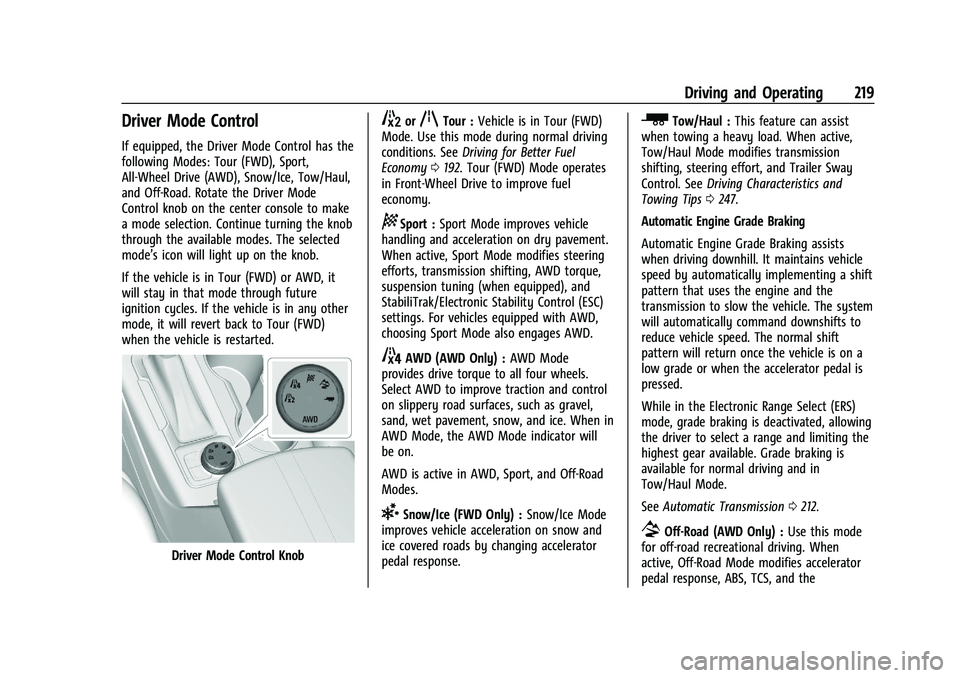
If equipped, the Driver Mode Control has the
following Modes: Tour (FWD), Sport,
All-Wheel Drive (AWD), Snow/Ice, Tow/Haul,
and Off-Road. Rotate the Driver Mode
Control knob on the center console to make
a mode selection. Continue turning the knob
through the available modes. The selected
mode’s icon will light up on the knob.
If the vehicle is in Tour (FWD) or AWD, it
will stay in that mode through future
ignition cycles. If the vehicle is in any other
mode, it will revert back to Tour (FWD)
when the vehicle is restarted.
Driver Mode Control Knob
5orqTour :Vehicle is in Tour (FWD)
Mode. Use this mode during normal driving
conditions. See Driving for Better Fuel
Economy 0192. Tour (FWD) Mode operates
in Front-Wheel Drive to improve fuel
economy.
8Sport : Sport Mode improves vehicle
handling and acceleration on dry pavement.
When active, Sport Mode modifies steering
efforts, transmission shifting, AWD torque,
suspension tuning (when equipped), and
StabiliTrak/Electronic Stability Control (ESC)
settings. For vehicles equipped with AWD,
choosing Sport Mode also engages AWD.
4AWD (AWD Only) : AWD Mode
provides drive torque to all four wheels.
Select AWD to improve traction and control
on slippery road surfaces, such as gravel,
sand, wet pavement, snow, and ice. When in
AWD Mode, the AWD Mode indicator will
be on.
AWD is active in AWD, Sport, and Off-Road
Modes.
6Snow/Ice (FWD Only) : Snow/Ice Mode
improves vehicle acceleration on snow and
ice covered roads by changing accelerator
pedal response.
_Tow/Haul : This feature can assist
when towing a heavy load. When active,
Tow/Haul Mode modifies transmission
shifting, steering effort, and Trailer Sway
Control. See Driving Characteristics and
Towing Tips 0247.
Automatic Engine Grade Braking
Automatic Engine Grade Braking assists
when driving downhill. It maintains vehicle
speed by automatically implementing a shift
pattern that uses the engine and the
transmission to slow the vehicle. The system
will automatically command downshifts to
reduce vehicle speed. The normal shift
pattern will return once the vehicle is on a
low grade or when the accelerator pedal is
pressed.
While in the Electronic Range Select (ERS)
mode, grade braking is deactivated, allowing
the driver to select a range and limiting the
highest gear available. Grade braking is
available for normal driving and in
Tow/Haul Mode.
See Automatic Transmission 0212.
7Off-Road (AWD Only) : Use this mode
for off-road recreational driving. When
active, Off-Road Mode modifies accelerator
pedal response, ABS, TCS, and the
Page 251 of 386
Chevrolet Blazer Owner Manual (GMNA-Localizing-U.S./Canada/Mexico-
15165663) - 2022 - CRC - 4/27/21
250 Driving and Operating
When parking the vehicle and trailer on
a hill:1. Press the brake pedal, but do not shift into P (Park) yet. Turn the wheels into
the curb if facing downhill or into traffic
if facing uphill.
2. Have someone place chocks under the trailer wheels.
3. When the wheel chocks are in place, gradually release the brake pedal to
allow the chocks to absorb the load of
the trailer.
4. Reapply the brake pedal. Then apply the parking brake and shift into P (Park).
5. Release the brake pedal.
Leaving After Parking on a Hill
1. Apply and hold the brake pedal.
.Start the engine.
.Shift into a gear.
.Release the parking brake.
2. Let up on the brake pedal.
3. Drive slowly until the trailer is clear of the chocks.
4. Stop and have someone pick up and store the chocks.
Maintenance When Trailer Towing
The vehicle needs service more often when
used to tow trailers. See the Maintenance
Schedule 0339. It is especially important to
check the engine oil, axle lubricant, belts,
cooling system, and brake system before
and during each trip.
Check periodically that all nuts and bolts on
the trailer hitch are tight.
Engine Cooling When Trailer Towing
The cooling system may temporarily
overheat during severe operating conditions.
See Engine Overheating 0274.
Trailer Towing
Caution
Towing a trailer improperly can damage
the vehicle and result in costly repairs
not covered by the vehicle warranty. To
tow a trailer correctly, follow the
directions in this section and see your
dealer for important information about
towing a trailer with the vehicle.
Trailer Weight
{Warning
Never exceed the towing capacity for
your vehicle.
Safe trailering requires monitoring the
weight, speed, altitude, road grades, outside
temperature, dimensions of the front of the
trailer, and how frequently the vehicle is
used to tow a trailer.
Trailer Weight Ratings
When towing a trailer, the combined weight
of the vehicle, vehicle contents, trailer, and
trailer contents must be below all of the
maximum weight ratings for the vehicle,
including:
.GCWR: Gross Combined Weight Rating
.GVWR: Gross Vehicle Weight Rating
.Maximum Trailer Weight Rating
.Maximum Trailer Tongue Weight Rating
See “Weight-Distributing Hitch Adjustment”
under Towing Equipment 0254 to determine
if equalizer bars are required to obtain the
maximum trailer weight rating.
Page 255 of 386
Chevrolet Blazer Owner Manual (GMNA-Localizing-U.S./Canada/Mexico-
15165663) - 2022 - CRC - 4/27/21
254 Driving and Operating
Towing Equipment
Hitches
Always use the correct hitch equipment for
your vehicle. Crosswinds, large trucks going
by, and rough roads can affect the trailer
and the hitch.
Never attach rental hitches or other
bumper-type hitches. Only use
frame-mounted hitches that do not attach to
the bumper.
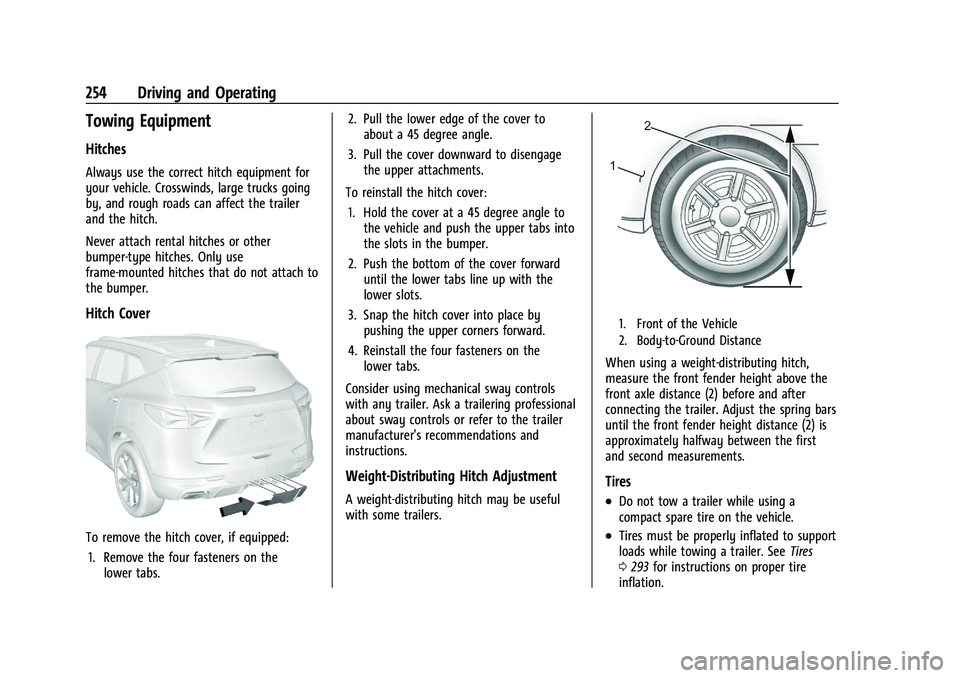
Hitch Cover
To remove the hitch cover, if equipped:1. Remove the four fasteners on the lower tabs. 2. Pull the lower edge of the cover to
about a 45 degree angle.
3. Pull the cover downward to disengage the upper attachments.
To reinstall the hitch cover: 1. Hold the cover at a 45 degree angle to the vehicle and push the upper tabs into
the slots in the bumper.
2. Push the bottom of the cover forward until the lower tabs line up with the
lower slots.
3. Snap the hitch cover into place by pushing the upper corners forward.
4. Reinstall the four fasteners on the lower tabs.
Consider using mechanical sway controls
with any trailer. Ask a trailering professional
about sway controls or refer to the trailer
manufacturer's recommendations and
instructions.
Weight-Distributing Hitch Adjustment
A weight-distributing hitch may be useful
with some trailers.
1. Front of the Vehicle
2. Body-to-Ground Distance
When using a weight-distributing hitch,
measure the front fender height above the
front axle distance (2) before and after
connecting the trailer. Adjust the spring bars
until the front fender height distance (2) is
approximately halfway between the first
and second measurements.
Tires
.Do not tow a trailer while using a
compact spare tire on the vehicle.
.Tires must be properly inflated to support
loads while towing a trailer. See Tires
0 293 for instructions on proper tire
inflation.
Page 278 of 386
Chevrolet Blazer Owner Manual (GMNA-Localizing-U.S./Canada/Mexico-
15165663) - 2022 - CRC - 4/27/21
Vehicle Care 277
Replacing Brake System Parts
Always replace brake system parts with
new, approved replacement parts. If this is
not done, the brakes may not work
properly. The braking performance can
change in many ways if the wrong brake
parts are installed or if parts are improperly
installed.
Brake Fluid
The brake master cylinder reservoir is filled
with GM approved DOT 4 brake fluid as
indicated on the reservoir cap. SeeEngine
Compartment Overview 0263 for the
location of the reservoir.
Checking Brake Fluid
With the vehicle in P (Park) on a level
surface, the brake fluid level should be
between the minimum and maximum marks
on the brake fluid reservoir. There are only two reasons why the brake
fluid level in the reservoir may go down:
.Normal brake lining wear. When new
linings are installed, the fluid level goes
back up.
.A fluid leak in the brake hydraulic system.
Have the brake hydraulic system fixed.
With a leak, the brakes will not
work well.
Always clean the brake fluid reservoir cap
and the area around the cap before
removing it.
Do not top off the brake fluid. Adding fluid
does not correct a leak. If fluid is added
when the linings are worn, there will be too
much fluid when new brake linings are
installed. Add or remove fluid, as necessary,
only when work is done on the brake
hydraulic system.
{Warning
If too much brake fluid is added, it can
spill on the engine and burn, if the
engine is hot enough. You or others could
be burned, and the vehicle could be
damaged. Add brake fluid only when
work is done on the brake hydraulic
system. When the brake fluid falls to a low level,
the brake warning light comes on. See
Brake
System Warning Light 0104.
Brake fluid absorbs water over time which
degrades the effectiveness of the brake fluid.
Replace brake fluid at the specified intervals
to prevent increased stopping distance. See
Maintenance Schedule 0339.
What to Add
Use only GM approved DOT 4 brake fluid
from a clean, sealed container. See
Recommended Fluids and Lubricants 0347.
{Warning
The wrong or contaminated brake fluid
could result in damage to the brake
system. This could result in the loss of
braking leading to a possible injury.
Always use the proper GM approved
brake fluid.
Caution
If brake fluid is spilled on the vehicle's
painted surfaces, the paint finish can be
damaged. Immediately wash off any
painted surface.
Page 279 of 386
Chevrolet Blazer Owner Manual (GMNA-Localizing-U.S./Canada/Mexico-
15165663) - 2022 - CRC - 4/27/21
278 Vehicle Care
Battery - North America
The original equipment battery is
maintenance free. Do not remove the cap
and do not add fluid.
Refer to the replacement number on the
original battery label when a new battery is
needed. For replacement of the battery, see
your dealer.
Stop/Start System
The vehicle has a Stop/Start system to shut
off the engine to help conserve fuel. See
Stop/Start System0207.
It has an Absorbed Glass Mat (AGM) 12-volt
battery. Installation of a standard 12-volt
battery will result in reduced 12-volt
battery life.
When using a 12-volt battery charger on the
12-volt AGM battery, some chargers have an
AGM battery setting on the charger.
If available, use the AGM setting on the
charger, to limit charge voltage to 14.8 volts.
{Warning
WARNING: Battery posts, terminals and
related accessories can expose you to
chemicals including lead and lead (Continued)
Warning (Continued)
compounds, which are known to the
State of California to cause cancer and
birth defects or other reproductive harm.
Wash hands after handling. For more
information go to
www.P65Warnings.ca.gov.
See the warning on the back cover.
Vehicle Storage
{Warning
Batteries have acid that can burn you and
gas that can explode. You can be badly
hurt if you are not careful. See Jump
Starting - North America 0323 for tips on
working around a battery without
getting hurt.
Infrequent Usage: Remove the black,
negative (−) cable from the battery to keep
the battery from running down.
Extended Storage: Remove the black,
negative (−) cable from the battery or use a
battery trickle charger.
All-Wheel Drive
Transfer Case
Under normal driving conditions, transfer
case fluid does not require maintenance
unless there is a fluid leak or unusual noise.
If required, have the transfer case serviced
by your dealer.
Automatic Transmission Shift Lock
Control Function Check
{Warning
When you are doing this inspection, the
vehicle could move suddenly. If the
vehicle moves, you or others could be
injured.
1. Before starting this check, be sure there is enough room around the vehicle.
It should be parked on a level surface.
2. Apply the parking brake. Be ready to apply the regular brake immediately if
the vehicle begins to move.
3. With the engine off, turn the ignition on, but do not start the engine. Without
applying the regular brake, try to move
the shift lever out of P (Park) with
Page 324 of 386
Chevrolet Blazer Owner Manual (GMNA-Localizing-U.S./Canada/Mexico-
15165663) - 2022 - CRC - 4/27/21
Vehicle Care 323
When using a compact spare tire, the AWD
(if equipped), ABS, and Traction Control
systems may engage until the spare tire is
recognized by the vehicle, especially on
slippery roads. Adjust driving to reduce
possible wheel slip.
Caution
When the compact spare is installed, do
not take the vehicle through an
automatic car wash with guide rails. The
compact spare can get caught on the rails
which can damage the tire, wheel, and
other parts of the vehicle.
Do not use the compact spare on other
vehicles.
Do not mix the compact spare tire or wheel
with other wheels or tires. They will not fit.
Keep the spare tire and its wheel together.
Caution
Tire chains will not fit the compact spare.
Using them can damage the vehicle and
the chains. Do not use tire chains on the
compact spare.
Jump Starting
Jump Starting - North America
For more information about the vehicle
battery, see Battery - North America 0278.
If the battery has run down, try to use
another vehicle and some jumper cables to
start your vehicle. Be sure to use the
following steps to do it safely.
{Warning
WARNING: Battery posts, terminals and
related accessories can expose you to
chemicals including lead and lead
compounds, which are known to the
State of California to cause cancer and
birth defects or other reproductive harm.
Wash hands after handling. For more
information go to
www.P65Warnings.ca.gov.
See the warning on the back cover.
{Warning
Batteries can hurt you. They can be
dangerous because:
.They contain acid that can burn you.
.They contain gas that can explode or
ignite.
.They contain enough electricity to
burn you.
If you do not follow these steps exactly,
some or all of these things can hurt you.
Caution
Ignoring these steps could result in costly
damage to the vehicle that would not be
covered by the vehicle warranty. Trying
to start the vehicle by pushing or pulling
it will not work, and it could damage the
vehicle.
Page 330 of 386
Chevrolet Blazer Owner Manual (GMNA-Localizing-U.S./Canada/Mexico-
15165663) - 2022 - CRC - 4/27/21
Vehicle Care 329
Caution
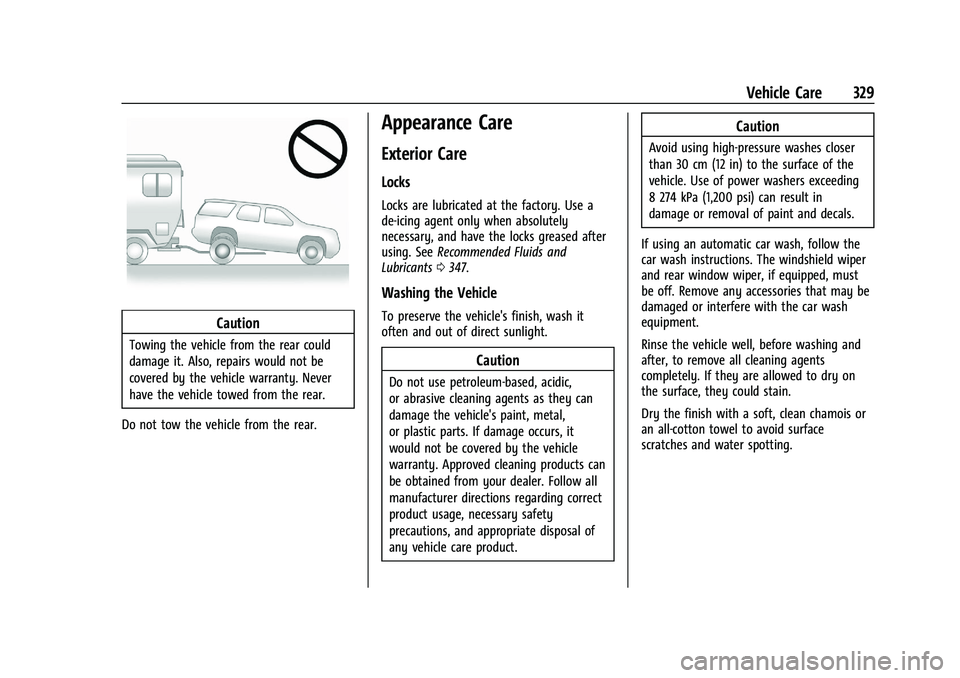
Towing the vehicle from the rear could
damage it. Also, repairs would not be
covered by the vehicle warranty. Never
have the vehicle towed from the rear.
Do not tow the vehicle from the rear.
Appearance Care
Exterior Care
Locks
Locks are lubricated at the factory. Use a
de-icing agent only when absolutely
necessary, and have the locks greased after
using. See Recommended Fluids and
Lubricants 0347.
Washing the Vehicle
To preserve the vehicle's finish, wash it
often and out of direct sunlight.
Caution
Do not use petroleum-based, acidic,
or abrasive cleaning agents as they can
damage the vehicle's paint, metal,
or plastic parts. If damage occurs, it
would not be covered by the vehicle
warranty. Approved cleaning products can
be obtained from your dealer. Follow all
manufacturer directions regarding correct
product usage, necessary safety
precautions, and appropriate disposal of
any vehicle care product.
Caution
Avoid using high-pressure washes closer
than 30 cm (12 in) to the surface of the
vehicle. Use of power washers exceeding
8 274 kPa (1,200 psi) can result in
damage or removal of paint and decals.
If using an automatic car wash, follow the
car wash instructions. The windshield wiper
and rear window wiper, if equipped, must
be off. Remove any accessories that may be
damaged or interfere with the car wash
equipment.
Rinse the vehicle well, before washing and
after, to remove all cleaning agents
completely. If they are allowed to dry on
the surface, they could stain.
Dry the finish with a soft, clean chamois or
an all-cotton towel to avoid surface
scratches and water spotting.
Page 375 of 386
Chevrolet Blazer Owner Manual (GMNA-Localizing-U.S./Canada/Mexico-
15165663) - 2022 - CRC - 4/27/21
374 Index
IndexA
Accessories and Modifications . . . . . . . . . . . 260
Accessory Power . . . . . . . . . . . . . . . . . . . . . . . . . 209
Active Fuel Management . . . . . . . . . . . . . . . . 210
Adaptive Cruise Control . . . . . . . . . . . . . . . . . . . 221
Add-On Electrical Equipment . . . . . . . . . . . . . 257
Additional InformationOnStar . . . . . . . . . . . . . . . . . . . . . . . . . . . . . . . . . 368
Additional Maintenance and Care . . . . . . . . 344
Adjustments Lumbar, Front Seats . . . . . . . . . . . . . . . . . . . . 38
Agreements Trademarks and License . . . . . . . . . . . . . . . 178
Air Cleaner/Filter, Engine . . . . . . . . . . . . . . . . 270
Air Conditioning . . . . . . . . . . . . . . . . . . . . . . . . . 186
Air Filter
Life System . . . . . . . . . . . . . . . . . . . . . . . . . . . . 269
Air Filter, Passenger Compartment . . . . . . . 190
Air Vents . . . . . . . . . . . . . . . . . . . . . . . . . . . . . . . . 190
Airbag System Check . . . . . . . . . . . . . . . . . . . . . . . . . . . . . . . . . . . 61
How Does an Airbag Restrain? . . . . . . . . . . 55
Passenger Sensing System . . . . . . . . . . . . . . 57
What Makes an Airbag Inflate? . . . . . . . . . 55
What Will You See after an AirbagInflates? . . . . . . . . . . . . . . . . . . . . . . . . . . . . . . 56
When Should an Airbag Inflate? . . . . . . . . 54
Where Are the Airbags? . . . . . . . . . . . . . . . . 53 Airbags
Adding Equipment to the Vehicle . . . . . . . 60
Passenger Status Indicator . . . . . . . . . . . . . 102
Readiness Light . . . . . . . . . . . . . . . . . . . . . . . . 101
Servicing Airbag-Equipped Vehicles . . . . . . 60
System Check . . . . . . . . . . . . . . . . . . . . . . . . . . . 52
Alarm
Vehicle Security . . . . . . . . . . . . . . . . . . . . . . . . 24
Alert Lane Change . . . . . . . . . . . . . . . . . . . . . . . . . . . 241
Rear Cross Traffic . . . . . . . . . . . . . . . . . . . . . . 235
Side Blind Zone (SBZA) . . . . . . . . . . . . . . . . . 241
All-Season Tires . . . . . . . . . . . . . . . . . . . . . . . . . . 293
All-Wheel Drive System . . . . . . . . . . . . . . . . . . . . . . . . . . 214
All-Wheel Drive . . . . . . . . . . . . . . . . . . . . . . . . . . 278
AM-FM Radio . . . . . . . . . . . . . . . . . . . . . . . . . . . . . 137
Antenna
Multi-band . . . . . . . . . . . . . . . . . . . . . . . . . . . . . 140
Antilock Brake System (ABS) . . . . . . . . . . . . . . 215 Warning Light . . . . . . . . . . . . . . . . . . . . . . . . . 105
Appearance Care Exterior . . . . . . . . . . . . . . . . . . . . . . . . . . . . . . . . 329
Interior . . . . . . . . . . . . . . . . . . . . . . . . . . . . . . . . 333
Apple CarPlay and Android Auto . . . . . . . . . 164
Armrest Storage . . . . . . . . . . . . . . . . . . . . . . . . . . 80
Assistance Program, Roadside . . . . . . . . . . . . 358
Assistance Systems for Driving . . . . . . . . . . 236
Page 380 of 386
Chevrolet Blazer Owner Manual (GMNA-Localizing-U.S./Canada/Mexico-
15165663) - 2022 - CRC - 4/27/21
Index 379
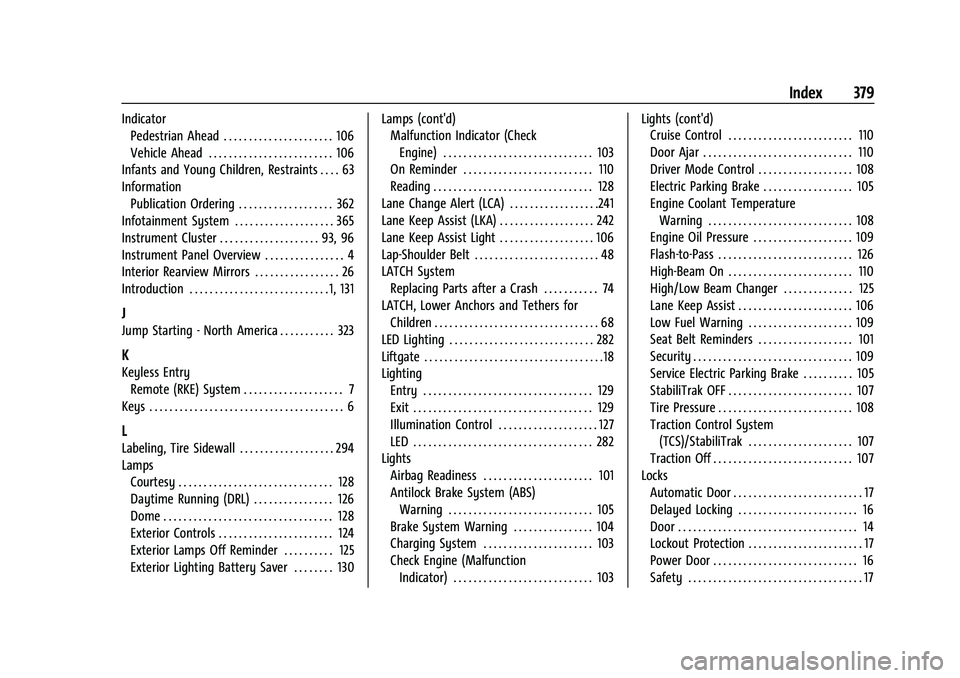
IndicatorPedestrian Ahead . . . . . . . . . . . . . . . . . . . . . . 106
Vehicle Ahead . . . . . . . . . . . . . . . . . . . . . . . . . 106
Infants and Young Children, Restraints . . . . 63
Information Publication Ordering . . . . . . . . . . . . . . . . . . . 362
Infotainment System . . . . . . . . . . . . . . . . . . . . 365
Instrument Cluster . . . . . . . . . . . . . . . . . . . . 93, 96
Instrument Panel Overview . . . . . . . . . . . . . . . . 4
Interior Rearview Mirrors . . . . . . . . . . . . . . . . . 26
Introduction . . . . . . . . . . . . . . . . . . . . . . . . . . . . 1, 131
J
Jump Starting - North America . . . . . . . . . . . 323
K
Keyless Entry
Remote (RKE) System . . . . . . . . . . . . . . . . . . . . 7
Keys . . . . . . . . . . . . . . . . . . . . . . . . . . . . . . . . . . . . . . . 6
L
Labeling, Tire Sidewall . . . . . . . . . . . . . . . . . . . 294
Lamps Courtesy . . . . . . . . . . . . . . . . . . . . . . . . . . . . . . . 128
Daytime Running (DRL) . . . . . . . . . . . . . . . . 126
Dome . . . . . . . . . . . . . . . . . . . . . . . . . . . . . . . . . . 128
Exterior Controls . . . . . . . . . . . . . . . . . . . . . . . 124
Exterior Lamps Off Reminder . . . . . . . . . . 125
Exterior Lighting Battery Saver . . . . . . . . 130 Lamps (cont'd)
Malfunction Indicator (Check
Engine) . . . . . . . . . . . . . . . . . . . . . . . . . . . . . . 103
On Reminder . . . . . . . . . . . . . . . . . . . . . . . . . . 110
Reading . . . . . . . . . . . . . . . . . . . . . . . . . . . . . . . . 128
Lane Change Alert (LCA) . . . . . . . . . . . . . . . . . .241
Lane Keep Assist (LKA) . . . . . . . . . . . . . . . . . . . 242
Lane Keep Assist Light . . . . . . . . . . . . . . . . . . . 106
Lap-Shoulder Belt . . . . . . . . . . . . . . . . . . . . . . . . . 48
LATCH System Replacing Parts after a Crash . . . . . . . . . . . 74
LATCH, Lower Anchors and Tethers for
Children . . . . . . . . . . . . . . . . . . . . . . . . . . . . . . . . . 68
LED Lighting . . . . . . . . . . . . . . . . . . . . . . . . . . . . . 282
Liftgate . . . . . . . . . . . . . . . . . . . . . . . . . . . . . . . . . . . .18
Lighting Entry . . . . . . . . . . . . . . . . . . . . . . . . . . . . . . . . . . 129
Exit . . . . . . . . . . . . . . . . . . . . . . . . . . . . . . . . . . . . 129
Illumination Control . . . . . . . . . . . . . . . . . . . . 127
LED . . . . . . . . . . . . . . . . . . . . . . . . . . . . . . . . . . . . 282
Lights
Airbag Readiness . . . . . . . . . . . . . . . . . . . . . . 101
Antilock Brake System (ABS)Warning . . . . . . . . . . . . . . . . . . . . . . . . . . . . . 105
Brake System Warning . . . . . . . . . . . . . . . . 104
Charging System . . . . . . . . . . . . . . . . . . . . . . 103
Check Engine (Malfunction Indicator) . . . . . . . . . . . . . . . . . . . . . . . . . . . . 103 Lights (cont'd)
Cruise Control . . . . . . . . . . . . . . . . . . . . . . . . . 110
Door Ajar . . . . . . . . . . . . . . . . . . . . . . . . . . . . . . 110
Driver Mode Control . . . . . . . . . . . . . . . . . . . 108
Electric Parking Brake . . . . . . . . . . . . . . . . . . 105
Engine Coolant Temperature
Warning . . . . . . . . . . . . . . . . . . . . . . . . . . . . . 108
Engine Oil Pressure . . . . . . . . . . . . . . . . . . . . 109
Flash-to-Pass . . . . . . . . . . . . . . . . . . . . . . . . . . . 126
High-Beam On . . . . . . . . . . . . . . . . . . . . . . . . . 110
High/Low Beam Changer . . . . . . . . . . . . . . 125
Lane Keep Assist . . . . . . . . . . . . . . . . . . . . . . . 106
Low Fuel Warning . . . . . . . . . . . . . . . . . . . . . 109
Seat Belt Reminders . . . . . . . . . . . . . . . . . . . 101
Security . . . . . . . . . . . . . . . . . . . . . . . . . . . . . . . . 109
Service Electric Parking Brake . . . . . . . . . . 105
StabiliTrak OFF . . . . . . . . . . . . . . . . . . . . . . . . . 107
Tire Pressure . . . . . . . . . . . . . . . . . . . . . . . . . . . 108
Traction Control System (TCS)/StabiliTrak . . . . . . . . . . . . . . . . . . . . . 107
Traction Off . . . . . . . . . . . . . . . . . . . . . . . . . . . . 107
Locks Automatic Door . . . . . . . . . . . . . . . . . . . . . . . . . . 17
Delayed Locking . . . . . . . . . . . . . . . . . . . . . . . . 16
Door . . . . . . . . . . . . . . . . . . . . . . . . . . . . . . . . . . . . 14
Lockout Protection . . . . . . . . . . . . . . . . . . . . . . . 17
Power Door . . . . . . . . . . . . . . . . . . . . . . . . . . . . . 16
Safety . . . . . . . . . . . . . . . . . . . . . . . . . . . . . . . . . . . 17