clock CHEVROLET BLAZER 2022 User Guide
[x] Cancel search | Manufacturer: CHEVROLET, Model Year: 2022, Model line: BLAZER, Model: CHEVROLET BLAZER 2022Pages: 386, PDF Size: 13.37 MB
Page 315 of 386
Chevrolet Blazer Owner Manual (GMNA-Localizing-U.S./Canada/Mexico-
15165663) - 2022 - CRC - 4/27/21
314 Vehicle Care
Using the Tire Sealant and Compressor
Kit to Temporarily Seal and Inflate a
Punctured Tire
When using the tire sealant and compressor
kit during cold temperatures, warm the kit
in a heated environment for five minutes.
This will help to inflate the tire faster.
If a tire goes flat, avoid further tire and
wheel damage by driving slowly to a level
place. Turn on the hazard warning flashers.
SeeHazard Warning Flashers 0127.
See If a Tire Goes Flat 0311 for other
important safety warnings.
Do not remove any objects that have
penetrated the tire.
1. Remove the tire sealant canister (4) and compressor from its storage location. See
Storing the Tire Sealant and Compressor
Kit 0318.
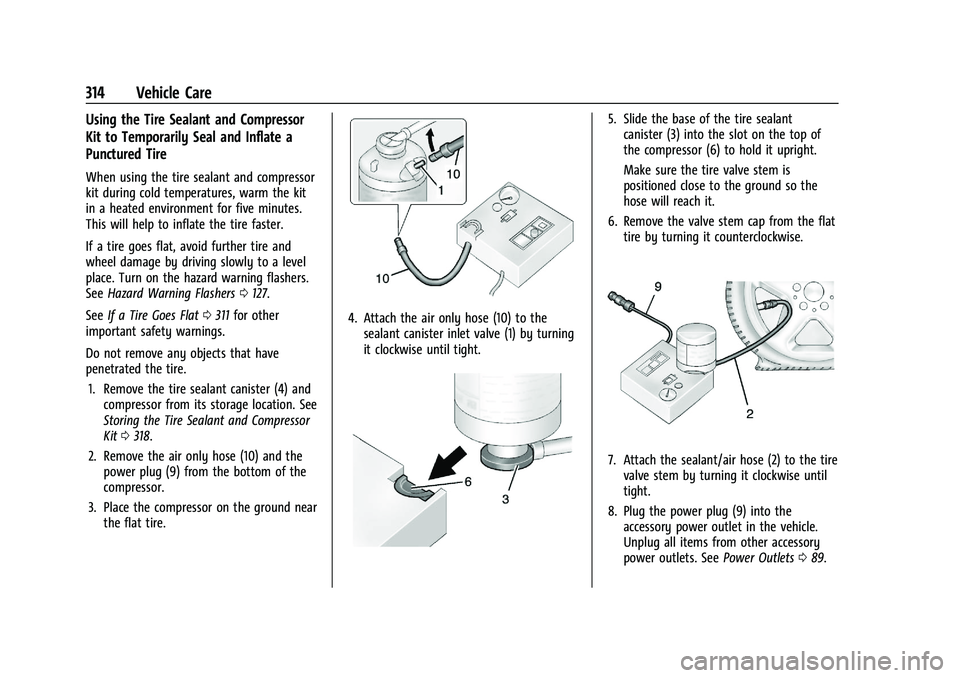
2. Remove the air only hose (10) and the power plug (9) from the bottom of the
compressor.
3. Place the compressor on the ground near the flat tire.
4. Attach the air only hose (10) to thesealant canister inlet valve (1) by turning
it clockwise until tight.
5. Slide the base of the tire sealantcanister (3) into the slot on the top of
the compressor (6) to hold it upright.
Make sure the tire valve stem is
positioned close to the ground so the
hose will reach it.
6. Remove the valve stem cap from the flat tire by turning it counterclockwise.
7. Attach the sealant/air hose (2) to the tirevalve stem by turning it clockwise until
tight.
8. Plug the power plug (9) into the accessory power outlet in the vehicle.
Unplug all items from other accessory
power outlets. See Power Outlets089.
Page 316 of 386
Chevrolet Blazer Owner Manual (GMNA-Localizing-U.S./Canada/Mexico-
15165663) - 2022 - CRC - 4/27/21
Vehicle Care 315
If the vehicle has an accessory power
outlet, do not use the cigarette lighter.
If the vehicle only has a cigarette lighter,
use the cigarette lighter.
Do not pinch the power plug cord in the
door or window.
9. Start the vehicle. The vehicle must be running while using the air compressor.
10. Press the on/off button (5) to turn the tire sealant and compressor kit on.
The compressor will inject sealant and air
into the tire.
The pressure gauge (8) will initially show
a high pressure while the compressor
pushes the sealant into the tire. Once
the sealant is completely dispersed into
the tire, the pressure will quickly drop
and start to rise again as the tire inflates
with air only.
11. Inflate the tire to the recommended inflation pressure using the pressure
gauge (8). The recommended inflation
pressure can be found on the Tire and
Loading Information label. See Tire
Pressure 0299.
The pressure gauge (8) may read higher
than the actual tire pressure while the
compressor is on. Turn the compressor off to get an accurate pressure reading.
The compressor may be turned on/off
until the correct pressure is reached.
Caution
If the recommended pressure cannot be
reached after approximately 25 minutes,
the vehicle should not be driven farther.
The tire is too severely damaged and the
tire sealant and compressor kit cannot
inflate the tire. Remove the power plug
from the accessory power outlet and
unscrew the inflating hose from the tire
valve. See
Roadside Assistance Program
0 358.
12. Press the on/off button (5) to turn the tire sealant and compressor kit off.
The tire is not sealed and will continue
to leak air until the vehicle is driven and
the sealant is distributed in the tire.
Therefore, Steps 13–21 must be done
immediately after Step 12.
Be careful while handling the tire sealant
and compressor kit as it could be warm
after usage.
13. Unplug the power plug (9) from the accessory power outlet in the vehicle. 14. Turn the sealant/air hose (2)
counterclockwise to remove it from the
tire valve stem.
15. Replace the tire valve stem cap.
16. Remove the tire sealant canister (4) from the slot on top of the compressor (6).
17. Turn the air only hose (10) counterclockwise to remove it from the
tire sealant canister inlet valve (1).
18. Turn the sealant/air hose (2) clockwise onto the sealant canister inlet valve (1)
to prevent sealant leakage.
19. Return the air only hose (10) and power plug (9) back to their original storage
location.
20. If the flat tire was able to inflate to therecommended inflation pressure, remove
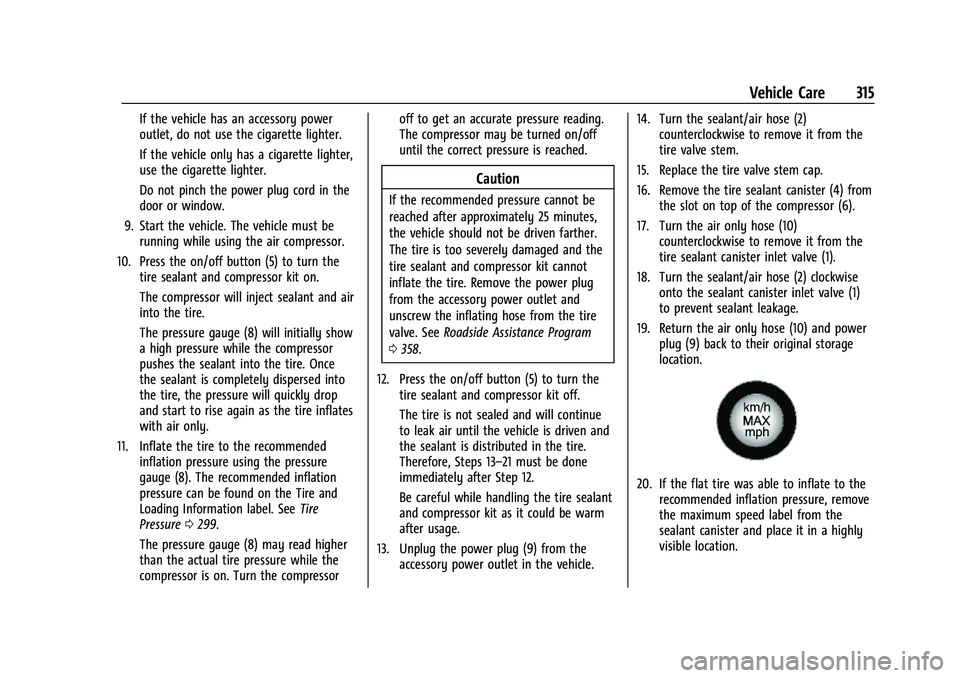
the maximum speed label from the
sealant canister and place it in a highly
visible location.
Page 318 of 386
Chevrolet Blazer Owner Manual (GMNA-Localizing-U.S./Canada/Mexico-
15165663) - 2022 - CRC - 4/27/21
Vehicle Care 317
1. Remove the compressor from its storagelocation. See Storing the Tire Sealant and
Compressor Kit 0318.
2. Remove the air only hose (10) and the power plug (9) from the bottom of the
compressor.
3. Place the compressor on the ground near the flat tire.
Make sure the tire valve stem is
positioned close to the ground so the
hose will reach it.
4. Remove the valve stem cap from the flat tire by turning it counterclockwise.
5. Attach the air only hose (10) to the tire valve stem by turning it clockwise until
tight.
6. Plug the power plug (9) into the accessory power outlet in the vehicle.
Unplug all items from other accessory
power outlets. See Power Outlets089.
If the vehicle has an accessory power
outlet, do not use the cigarette lighter.
If the vehicle only has a cigarette lighter,
use the cigarette lighter.
Do not pinch the power plug cord in the
door or window. 7. Start the vehicle. The vehicle must be
running while using the air compressor.
8. Press the on/off button (5) to turn the tire sealant and compressor kit on.
The compressor will inflate the tire with
air only.
9. Inflate the tire to the recommended inflation pressure using the pressure
gauge (8). The recommended inflation
pressure can be found on the Tire and
Loading Information label. See Tire
Pressure 0299.
The pressure gauge (8) may read higher
than the actual tire pressure while the
compressor is on. Turn the compressor
off to get an accurate pressure reading.
The compressor may be turned on/off
until the correct pressure is reached.
Caution
If the recommended pressure cannot be
reached after approximately 25 minutes,
the vehicle should not be driven farther.
The tire is too severely damaged and the
tire sealant and compressor kit cannot
inflate the tire. Remove the power plug
from the accessory power outlet and
(Continued)
Caution (Continued)
unscrew the inflating hose from the tire
valve. See Roadside Assistance Program
0 358.
10. Press the on/off button (5) to turn the tire sealant and compressor kit off.
Be careful while handling the compressor
as it could be warm after usage.
11. Unplug the power plug (9) from the accessory power outlet in the vehicle.
12. Turn the air only hose (10) counterclockwise to remove it from the
tire valve stem.
13. Replace the tire valve stem cap.
14. Return the air only hose (10) and power plug (9) back to their original storage
location.
15. Return the equipment to its original storage location in the vehicle.
The tire sealant and compressor kit has
accessory adapters located in a
compartment on the bottom of its housing
that can be used to inflate air mattresses,
balls, etc.
Page 319 of 386
Chevrolet Blazer Owner Manual (GMNA-Localizing-U.S./Canada/Mexico-
15165663) - 2022 - CRC - 4/27/21
318 Vehicle Care
Storing the Tire Sealant and
Compressor Kit
To store the tire sealant and compressor kit,
reverse the steps for removing it.
Tire Changing
Removing the Spare Tire and Tools
To access the spare tire and tools:1. Open the liftgate. See Liftgate018.
2. Remove the cargo management system divider, if equipped. See “Rail and Divider
Option” underCargo Management
System 082.
3. Lift the load floor. Use the hook to hold the load floor open. See Cargo
Management System 082.
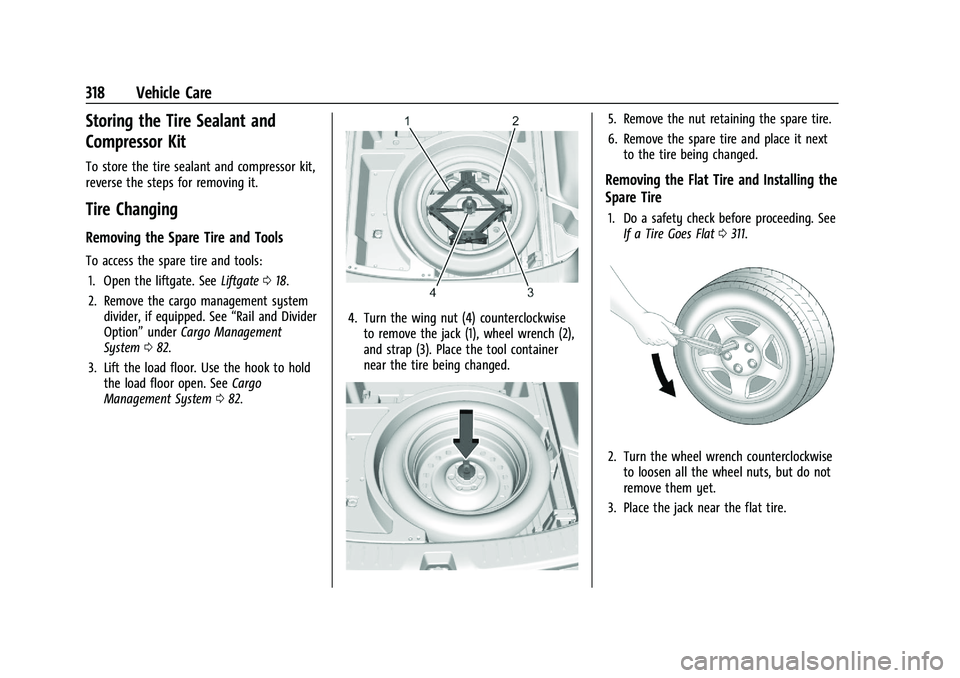
4. Turn the wing nut (4) counterclockwise
to remove the jack (1), wheel wrench (2),
and strap (3). Place the tool container
near the tire being changed.
5. Remove the nut retaining the spare tire.
6. Remove the spare tire and place it nextto the tire being changed.
Removing the Flat Tire and Installing the
Spare Tire
1. Do a safety check before proceeding. SeeIf a Tire Goes Flat 0311.
2. Turn the wheel wrench counterclockwise
to loosen all the wheel nuts, but do not
remove them yet.
3. Place the jack near the flat tire.
Page 321 of 386
Chevrolet Blazer Owner Manual (GMNA-Localizing-U.S./Canada/Mexico-
15165663) - 2022 - CRC - 4/27/21
320 Vehicle Care
5. Turn the wheel wrench clockwise to raisethe jack until the slot in the jack lift
head fits into the metal flange located
behind the cut out on the plastic
molding.
Do not raise the vehicle yet.
6. Put the compact spare tire near you.
7. Raise the vehicle by turning the wheel wrench clockwise in the jack. Raise the
vehicle far enough off the ground so
there is enough room for the spare tire
to fit under the wheel well.
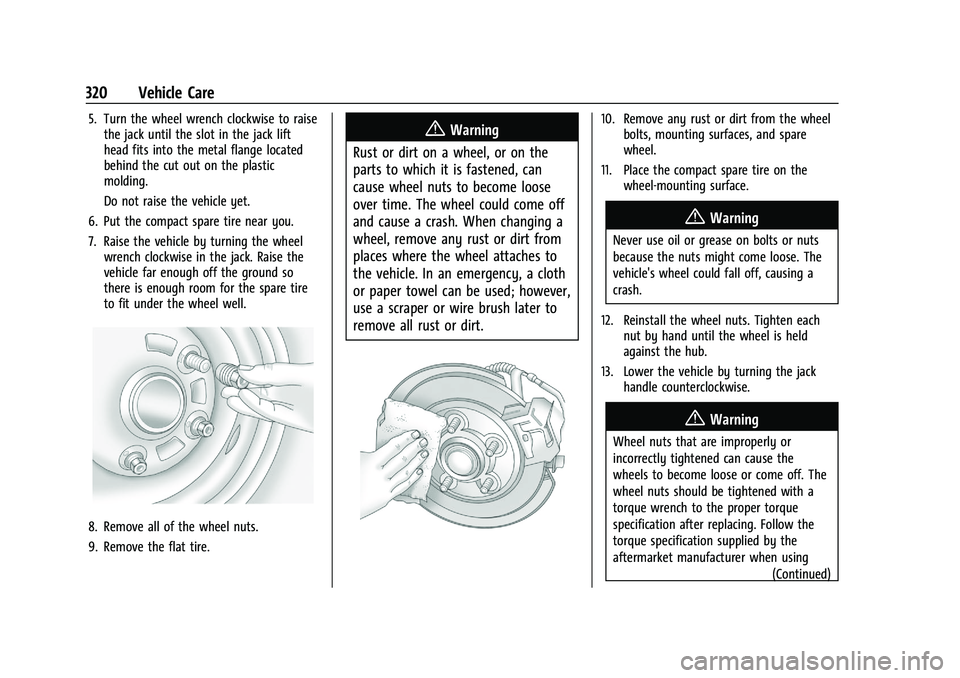
8. Remove all of the wheel nuts.
9. Remove the flat tire.
{Warning
Rust or dirt on a wheel, or on the
parts to which it is fastened, can
cause wheel nuts to become loose
over time. The wheel could come off
and cause a crash. When changing a
wheel, remove any rust or dirt from
places where the wheel attaches to
the vehicle. In an emergency, a cloth
or paper towel can be used; however,
use a scraper or wire brush later to
remove all rust or dirt.10. Remove any rust or dirt from the wheel bolts, mounting surfaces, and spare
wheel.
11. Place the compact spare tire on the wheel-mounting surface.
{Warning
Never use oil or grease on bolts or nuts
because the nuts might come loose. The
vehicle's wheel could fall off, causing a
crash.
12. Reinstall the wheel nuts. Tighten each nut by hand until the wheel is held
against the hub.
13. Lower the vehicle by turning the jack handle counterclockwise.
{Warning
Wheel nuts that are improperly or
incorrectly tightened can cause the
wheels to become loose or come off. The
wheel nuts should be tightened with a
torque wrench to the proper torque
specification after replacing. Follow the
torque specification supplied by the
aftermarket manufacturer when using
(Continued)
Page 377 of 386
Chevrolet Blazer Owner Manual (GMNA-Localizing-U.S./Canada/Mexico-
15165663) - 2022 - CRC - 4/27/21
376 Index
CheckEngine Light (Malfunction
Indicator) . . . . . . . . . . . . . . . . . . . . . . . . . . . . 103
Child Restraints Infants and Young Children . . . . . . . . . . . . . 63
Lower Anchors and Tethers forChildren . . . . . . . . . . . . . . . . . . . . . . . . . . . . . . . 68
Older Children . . . . . . . . . . . . . . . . . . . . . . . . . . 62
Securing . . . . . . . . . . . . . . . . . . . . . . . . . . . . . 74, 75
Systems . . . . . . . . . . . . . . . . . . . . . . . . . . . . . . . . 65
Circuit Breakers . . . . . . . . . . . . . . . . . . . . . . . . . . 284
Cleaning
Exterior Care . . . . . . . . . . . . . . . . . . . . . . . . . . . 329
Interior Care . . . . . . . . . . . . . . . . . . . . . . . . . . . 333
Climate Control Systems Dual Automatic . . . . . . . . . . . . . . . . . . . . . . . . 186
Clock . . . . . . . . . . . . . . . . . . . . . . . . . . . . . . . . . . . . . 89
Cluster, Instrument . . . . . . . . . . . . . . . . . . . 93, 96
Collision Damage Repair . . . . . . . . . . . . . . . . . 361
Compact Spare Tire . . . . . . . . . . . . . . . . . . . . . . 322
Compartments Storage . . . . . . . . . . . . . . . . . . . . . . . . . . . . . . . . . 79
Compass . . . . . . . . . . . . . . . . . . . . . . . . . . . . . . . . . . 88
Compressor Kit, Tire Sealant . . . . . . . . . . . . . . 312
Connected Services Connections . . . . . . . . . . . . . . . . . . . . . . . . . . . . 371
Diagnostics . . . . . . . . . . . . . . . . . . . . . . . . . . . . 373
Navigation . . . . . . . . . . . . . . . . . . . . . . . . . . . . . . 371 Connections
Connected Services . . . . . . . . . . . . . . . . . . . . . 371
Control Traction and Electronic Stability . . . . . . . . 217
Control of a Vehicle . . . . . . . . . . . . . . . . . . . . . 193
Controls Steering Wheel . . . . . . . . . . . . . . . . . . . . . . . . 133
Convex Mirrors . . . . . . . . . . . . . . . . . . . . . . . . . . . .25
Coolant Engine Temperature Gauge . . . . . . . . . . . . . 99
Engine Temperature Warning Light . . . . 108
Cooling . . . . . . . . . . . . . . . . . . . . . . . . . . . . . . . . . . 186
Cooling System . . . . . . . . . . . . . . . . . . . . . . . . . . . 271
Courtesy Lamps . . . . . . . . . . . . . . . . . . . . . . . . . . .128
Courtesy Transportation Program . . . . . . . . 360
Coverage Explanations . . . . . . . . . . . . . . . . . . . . 155
Cruise Control . . . . . . . . . . . . . . . . . . . . . . . . . . . 220 Light . . . . . . . . . . . . . . . . . . . . . . . . . . . . . . . . . . . 110
Cruise Control, Adaptive . . . . . . . . . . . . . . . . . . 221
Customer Assistance . . . . . . . . . . . . . . . . . . . . . 357 Offices . . . . . . . . . . . . . . . . . . . . . . . . . . . . . . . . . 357
Text Telephone (TTY) Users . . . . . . . . . . . . 357
Customer Information Publications Ordering Information . . . . . 362
Customer Satisfaction Procedure . . . . . . . . . 355
Cybersecurity . . . . . . . . . . . . . . . . . . . . . . . . . . . . 364D
Damage Repair, Collision . . . . . . . . . . . . . . . . . 361
Danger, Warning, and Caution . . . . . . . . . . . . . .2
Data Collection Infotainment System . . . . . . . . . . . . . . . . . . 365
OnStar . . . . . . . . . . . . . . . . . . . . . . . . . . . . . . . . . 365
Data Recorders, Event . . . . . . . . . . . . . . . . . . . 365
Database Coverage Explanations . . . . . . . . . . 155
Daytime Running Lamps (DRL) . . . . . . . . . . . 126
Defensive Driving . . . . . . . . . . . . . . . . . . . . . . . . 193
Delayed Locking . . . . . . . . . . . . . . . . . . . . . . . . . . .16
Destination . . . . . . . . . . . . . . . . . . . . . . . . . . . . . . 148
Diagnostics Connected Services . . . . . . . . . . . . . . . . . . . . 373
Distracted Driving . . . . . . . . . . . . . . . . . . . . . . . . 192
Dome Lamps . . . . . . . . . . . . . . . . . . . . . . . . . . . . . .128
Door Ajar Light . . . . . . . . . . . . . . . . . . . . . . . . . . . . . . 110
Delayed Locking . . . . . . . . . . . . . . . . . . . . . . . . 16
Locks . . . . . . . . . . . . . . . . . . . . . . . . . . . . . . . . . . . 14
Power Locks . . . . . . . . . . . . . . . . . . . . . . . . . . . . 16
Drive Belt Routing, Engine . . . . . . . . . . . . . . . 354
Drive Systems All-Wheel Drive . . . . . . . . . . . . . . . . . . . . 214, 278
Driver Teen . . . . . . . . . . . . . . . . . . . . . . . . . . . . . . . 172, 175
Driver Assistance Systems . . . . . . . . . . . . . . . 229
Driver Information Center (DIC) . . . . . . . 111, 114