power steering CHEVROLET BLAZER 2022 User Guide
[x] Cancel search | Manufacturer: CHEVROLET, Model Year: 2022, Model line: BLAZER, Model: CHEVROLET BLAZER 2022Pages: 386, PDF Size: 13.37 MB
Page 206 of 386
Chevrolet Blazer Owner Manual (GMNA-Localizing-U.S./Canada/Mexico-
15165663) - 2022 - CRC - 4/27/21
Driving and Operating 205
Caution (Continued)
.Avoid making hard stops for the first
300 km (200 mi) or so. During this
time the new brake linings are not yet
broken in. Hard stops with new linings
can mean premature wear and earlier
replacement. Follow this breaking-in
guideline every time you get new
brake linings.
.Do not tow a trailer during break-in.
SeeTrailer Towing 0250 for the
trailer towing capabilities of the
vehicle and more information.
Following break-in, engine speed and load
can be gradually increased.
On new vehicles, the various mechanical and
electrical systems experience a “break-in”
period during the first 6,400 km
(4,000 miles) of routine driving. As the
vehicle is driven, the mechanical systems
adjust to provide optimal fuel economy and
transmission shift performance.
Electrical systems will adapt and calibrate
during the break-in period. A one-time
occurrence of clicks and similar vehicle
noises is normal during this process. Normal driving charges the vehicle’s battery
to achieve the best operation of the vehicle,
including fuel economy and the Stop/Start
System. See
Stop/Start System 0207.
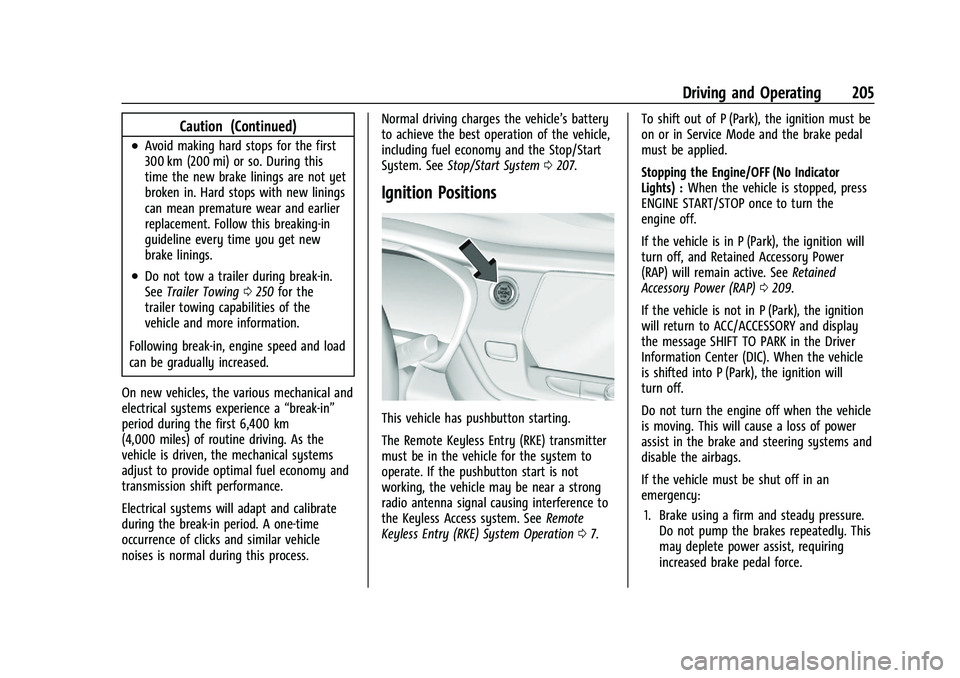
Ignition Positions
This vehicle has pushbutton starting.
The Remote Keyless Entry (RKE) transmitter
must be in the vehicle for the system to
operate. If the pushbutton start is not
working, the vehicle may be near a strong
radio antenna signal causing interference to
the Keyless Access system. See Remote
Keyless Entry (RKE) System Operation 07. To shift out of P (Park), the ignition must be
on or in Service Mode and the brake pedal
must be applied.
Stopping the Engine/OFF (No Indicator
Lights) :
When the vehicle is stopped, press
ENGINE START/STOP once to turn the
engine off.
If the vehicle is in P (Park), the ignition will
turn off, and Retained Accessory Power
(RAP) will remain active. See Retained
Accessory Power (RAP) 0209.
If the vehicle is not in P (Park), the ignition
will return to ACC/ACCESSORY and display
the message SHIFT TO PARK in the Driver
Information Center (DIC). When the vehicle
is shifted into P (Park), the ignition will
turn off.
Do not turn the engine off when the vehicle
is moving. This will cause a loss of power
assist in the brake and steering systems and
disable the airbags.
If the vehicle must be shut off in an
emergency: 1. Brake using a firm and steady pressure. Do not pump the brakes repeatedly. This
may deplete power assist, requiring
increased brake pedal force.
Page 207 of 386
Chevrolet Blazer Owner Manual (GMNA-Localizing-U.S./Canada/Mexico-
15165663) - 2022 - CRC - 4/27/21
206 Driving and Operating
2. Shift the vehicle to N (Neutral). This canbe done while the vehicle is moving.
After shifting to N (Neutral), firmly apply
the brakes and steer the vehicle to a
safe location.
3. Come to a complete stop, shift to P (Park), and turn the ignition off. The
shift lever must be in P (Park) to turn the
ignition off.
4. Set the parking brake. See Electric
Parking Brake 0215.
{Warning
Turning off the vehicle while moving may
cause loss of power assist in the brake
and steering systems and disable the
airbags. While driving, only shut the
vehicle off in an emergency.
If the vehicle cannot be pulled over, and
must be shut off while driving, press and
hold ENGINE START/STOP for longer than
two seconds, or press twice in five seconds.
ACC/ACCESSORY (Amber Indicator Light) :
This mode allows some electrical accessories
to be used when the engine is off. With the ignition off, pressing the button
one time without the brake pedal applied
will place the ignition system in ACC/
ACCESSORY.
The ignition will switch from ACC/
ACCESSORY to OFF after five minutes to
prevent battery rundown.
ON/RUN/START (Green Indicator Light) :
This
mode is for driving and starting. With the
ignition off, and the brake pedal applied,
pressing the button once will place the
ignition system in ON/RUN/START. Once
engine cranking begins, release the button.
Engine cranking will continue until the
engine starts. See Starting the Engine 0206.
The ignition will then remain in ON/RUN.
Service Mode
This power mode is available for service and
diagnostics, and to verify the proper
operation of the malfunction indicator lamp
as may be required for emission inspection
purposes. With the vehicle off, and the
brake pedal not applied, pressing and
holding ENGINE START/STOP for more than
five seconds will place the vehicle in Service
Mode. The instruments and audio systems
will operate as they do in ON/RUN, but the vehicle will not be able to be driven. The
engine will not start in Service Mode. Press
the button again to turn the vehicle off.
Starting the Engine
Move the shift lever to P (Park) or
N (Neutral). The engine will not start in any
other position. To restart the engine when
the vehicle is already moving, use
N (Neutral) only.
Caution
Do not try to shift to P (Park) if the
vehicle is moving. If you do, you could
damage the transmission. Shift to P (Park)
only when the vehicle is stopped.
Caution
If you add electrical parts or accessories,
you could change the way the engine
operates. Any resulting damage would
not be covered by the vehicle warranty.
See
Add-On Electrical Equipment 0257.
Page 216 of 386
Chevrolet Blazer Owner Manual (GMNA-Localizing-U.S./Canada/Mexico-
15165663) - 2022 - CRC - 4/27/21
Driving and Operating 215
Brakes
Electric Brake Boost
Vehicles equipped with electric brake boost
have hydraulic brake circuits that are
electronically controlled when the brake
pedal is applied during normal operation.
The system performs routine tests and turns
off within a few minutes after the vehicle is
turned off. Noise may be heard during this
time. If the brake pedal is pressed during
the tests or when the electric brake boost
system is off, a noticeable change in pedal
force and travel may be felt. This is normal.
Antilock Brake System (ABS)
The Antilock Brake System (ABS) helps
prevent a braking skid and maintain steering
while braking hard.
ABS performs a system check when the
vehicle is first driven. A momentary motor
or clicking noise may be heard while this
test is going on, and the brake pedal may
move slightly. This is normal.
If there is a problem with ABS, this warning
light stays on. SeeAntilock Brake System
(ABS) Warning Light 0105.
ABS does not change the time needed to
get a foot on the brake pedal and does not
always decrease stopping distance. If you
get too close to the vehicle ahead, there will
not be enough time to apply the brakes if
that vehicle suddenly slows or stops. Always
leave enough room ahead to stop, even
with ABS.
Using ABS
Do not pump the brakes. Just hold the brake
pedal down firmly. Hearing or feeling ABS
operate is normal.
Braking in Emergencies
ABS allows steering and braking at the same
time. In many emergencies, steering can
help even more than braking.
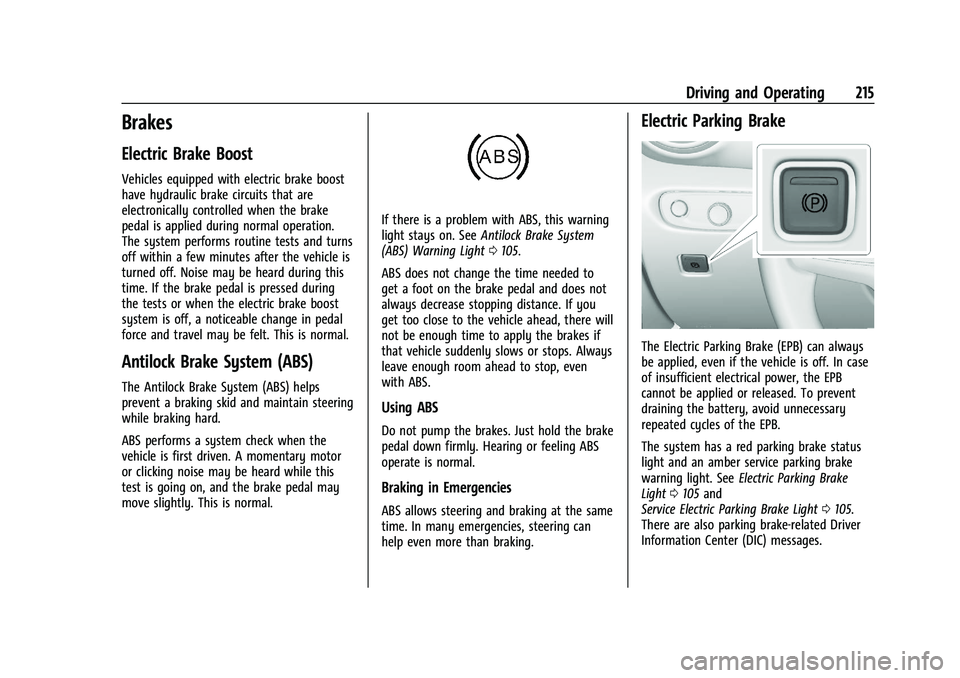
Electric Parking Brake
The Electric Parking Brake (EPB) can always
be applied, even if the vehicle is off. In case
of insufficient electrical power, the EPB
cannot be applied or released. To prevent
draining the battery, avoid unnecessary
repeated cycles of the EPB.
The system has a red parking brake status
light and an amber service parking brake
warning light. See Electric Parking Brake
Light 0105 and
Service Electric Parking Brake Light 0105.
There are also parking brake-related Driver
Information Center (DIC) messages.
Page 291 of 386
Chevrolet Blazer Owner Manual (GMNA-Localizing-U.S./Canada/Mexico-
15165663) - 2022 - CRC - 4/27/21
290 Vehicle Care
FusesUsage
F31 Electric Brake Control Module Electric Brake
Booster
F32 DC AC Inverter
F33 Driver Power Seat
F34 Passenger Power Seat F35 Battery IEC 1 Feed
F36 Electric Power Steering F37 Rear Seat Entertainment/USB
Charge/Wireless
Charging Module/
Auxiliary Power Outlet/
Lighter
F38 Body Control Module 8
F39 – Circuit Breakers/
Minifuse Usage
F40 –
F41 –
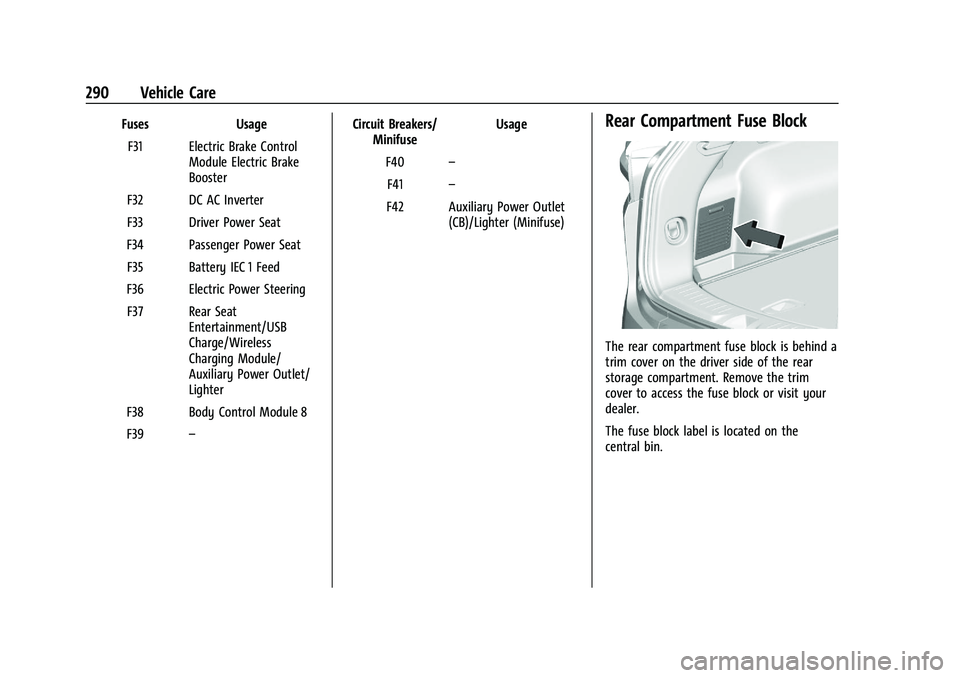
F42 Auxiliary Power Outlet (CB)/Lighter (Minifuse)Rear Compartment Fuse Block
The rear compartment fuse block is behind a
trim cover on the driver side of the rear
storage compartment. Remove the trim
cover to access the fuse block or visit your
dealer.
The fuse block label is located on the
central bin.
Page 333 of 386
Chevrolet Blazer Owner Manual (GMNA-Localizing-U.S./Canada/Mexico-
15165663) - 2022 - CRC - 4/27/21
332 Vehicle Care
blades. Bugs, road grime, sap, and a buildup
of vehicle wash/wax treatments may cause
wiper streaking.
Replace the wiper blades if they are worn or
damaged. Damage can be caused by
extreme dusty conditions, sand, salt, heat,
sun, snow, and ice.
Weatherstrips
Apply weatherstrip lubricant on
weatherstrips to make them last longer, seal
better, and not stick or squeak. Lubricate
weatherstrips at least once a year. Hot, dry
climates may require more frequent
application. Black marks from rubber
material on painted surfaces can be removed
by rubbing with a clean cloth. See
Recommended Fluids and Lubricants0347.
Tires
Use a stiff brush with tire cleaner to clean
the tires.
Caution
Using petroleum-based tire dressing
products on the vehicle may damage the
paint finish and/or tires. When applying a
(Continued)
Caution (Continued)
tire dressing, always wipe off any
overspray from all painted surfaces on
the vehicle.
Wheels and Wheel Trim
Use a soft, clean cloth with mild soap and
water to clean the wheels. After rinsing
thoroughly with clean water, dry with a
soft, clean towel. A wax may then be
applied.
Caution
Chrome wheels and chrome wheel trim
may be damaged if the vehicle is not
washed after driving on roads that have
been sprayed with magnesium chloride or
calcium chloride. These are used on roads
for conditions such as dust and ice.
Always wash the chrome with soap and
water after exposure.
Caution
To avoid surface damage on wheels and
wheel trim, do not use strong soaps,
chemicals, abrasive polishes, cleaners,
(Continued)
Caution (Continued)
or brushes. Use only GM approved
cleaners. Do not drive the vehicle through
an automatic car wash that uses silicon
carbide tire/wheel cleaning brushes.
Damage could occur and the repairs
would not be covered by the vehicle
warranty.
Brake System
Visually inspect brake lines and hoses for
proper hook-up, binding, leaks, cracks,
chafing, etc. Inspect disc brake pads for wear
and rotors for surface condition. Inspect
drum brake linings/shoes for wear or cracks.
Inspect all other brake parts.
Steering, Suspension, and Chassis
Components
Visually inspect steering, suspension, and
chassis components for damaged, loose,
or missing parts or signs of wear at least
once a year.
Inspect power steering for proper electrical
connections, binding, cracks, chafing, etc.
Visually check constant velocity joint boots
and axle seals for leaks.
Page 341 of 386
Chevrolet Blazer Owner Manual (GMNA-Localizing-U.S./Canada/Mexico-
15165663) - 2022 - CRC - 4/27/21
340 Service and Maintenance
Air Conditioning Desiccant (Replace Every
Seven Years)
The air conditioning system requires
maintenance every seven years. This service
requires replacement of the desiccant to
help the longevity and efficient operation of
the air conditioning system. This service can
be complex. See your dealer.
Tire Rotation and Required Services
Every 12 000 km/7,500 mi
Rotate the tires, if recommended for the
vehicle, and perform the following services.
SeeTire Rotation 0305.
.Check engine oil level and oil
life percentage. If needed, change engine
oil and filter, and reset oil life system.
See Engine Oil 0266 and
Engine Oil Life System 0268.
.Check the air filter life percentage.
If necessary, replace the engine air filter
and reset the engine air filter life system.
See Engine Air Filter Life System 0269.
.Check engine coolant level. See Cooling
System 0271.
.Check windshield washer fluid level. See
Washer Fluid 0275.
.Check tire inflation pressures. See Tire
Pressure 0299.
.Inspect tire wear. See Tire Inspection
0 305.
.Visually check for fluid leaks.
.Inspect brake system. See Exterior Care
0 329.
.Visually inspect steering, suspension, and
chassis components for damage, including
cracks or tears in the rubber boots, loose
or missing parts, or signs of wear at least
once a year. See Exterior Care0329.
.Inspect power steering for proper
electrical connections, binding, cracks,
chafing, etc.
.Visually inspect halfshafts and drive
shafts for excessive wear, lubricant leaks,
and/or damage including: tube dents or
cracks, constant velocity joint or universal
joint looseness, cracked or missing boots,
loose or missing boot clamps, center
bearing excessive looseness, loose or
missing fasteners, and axle seal leaks.
.Check restraint system components. See
Safety System Check 051.
.Visually inspect the fuel system, including
the evaporative (EVAP) system, for
damage or leaks. Visually check all fuel pipes, vapor lines, and hoses for proper
attachment, connection, routing, and
condition.
.Visually inspect exhaust system and
nearby heat shields for loose or damaged
parts.
.Lubricate body components. See
Exterior
Care 0329.
.Check automatic transmission shift lock
control function. See Automatic
Transmission Shift Lock Control Function
Check 0278.
.Check parking brake and automatic
transmission park mechanism. See Park
Brake and P (Park) Mechanism Check
0 279.
.Check accelerator pedal for damage, high
effort, or binding. Replace if needed.
.Visually inspect gas strut for signs of
wear, cracks, or other damage. Check the
hold open ability of the strut. If the hold
open ability is low, service the gas strut.
See Gas Strut(s) 0280.
.Check tire sealant expiration date,
if equipped. See Tire Sealant and
Compressor Kit 0312.
.Inspect sunroof track and seal,
if equipped. See Sunroof031.
Page 377 of 386
Chevrolet Blazer Owner Manual (GMNA-Localizing-U.S./Canada/Mexico-
15165663) - 2022 - CRC - 4/27/21
376 Index
CheckEngine Light (Malfunction
Indicator) . . . . . . . . . . . . . . . . . . . . . . . . . . . . 103
Child Restraints Infants and Young Children . . . . . . . . . . . . . 63
Lower Anchors and Tethers forChildren . . . . . . . . . . . . . . . . . . . . . . . . . . . . . . . 68
Older Children . . . . . . . . . . . . . . . . . . . . . . . . . . 62
Securing . . . . . . . . . . . . . . . . . . . . . . . . . . . . . 74, 75
Systems . . . . . . . . . . . . . . . . . . . . . . . . . . . . . . . . 65
Circuit Breakers . . . . . . . . . . . . . . . . . . . . . . . . . . 284
Cleaning
Exterior Care . . . . . . . . . . . . . . . . . . . . . . . . . . . 329
Interior Care . . . . . . . . . . . . . . . . . . . . . . . . . . . 333
Climate Control Systems Dual Automatic . . . . . . . . . . . . . . . . . . . . . . . . 186
Clock . . . . . . . . . . . . . . . . . . . . . . . . . . . . . . . . . . . . . 89
Cluster, Instrument . . . . . . . . . . . . . . . . . . . 93, 96
Collision Damage Repair . . . . . . . . . . . . . . . . . 361
Compact Spare Tire . . . . . . . . . . . . . . . . . . . . . . 322
Compartments Storage . . . . . . . . . . . . . . . . . . . . . . . . . . . . . . . . . 79
Compass . . . . . . . . . . . . . . . . . . . . . . . . . . . . . . . . . . 88
Compressor Kit, Tire Sealant . . . . . . . . . . . . . . 312
Connected Services Connections . . . . . . . . . . . . . . . . . . . . . . . . . . . . 371
Diagnostics . . . . . . . . . . . . . . . . . . . . . . . . . . . . 373
Navigation . . . . . . . . . . . . . . . . . . . . . . . . . . . . . . 371 Connections
Connected Services . . . . . . . . . . . . . . . . . . . . . 371
Control Traction and Electronic Stability . . . . . . . . 217
Control of a Vehicle . . . . . . . . . . . . . . . . . . . . . 193
Controls Steering Wheel . . . . . . . . . . . . . . . . . . . . . . . . 133
Convex Mirrors . . . . . . . . . . . . . . . . . . . . . . . . . . . .25
Coolant Engine Temperature Gauge . . . . . . . . . . . . . 99
Engine Temperature Warning Light . . . . 108
Cooling . . . . . . . . . . . . . . . . . . . . . . . . . . . . . . . . . . 186
Cooling System . . . . . . . . . . . . . . . . . . . . . . . . . . . 271
Courtesy Lamps . . . . . . . . . . . . . . . . . . . . . . . . . . .128
Courtesy Transportation Program . . . . . . . . 360
Coverage Explanations . . . . . . . . . . . . . . . . . . . . 155
Cruise Control . . . . . . . . . . . . . . . . . . . . . . . . . . . 220 Light . . . . . . . . . . . . . . . . . . . . . . . . . . . . . . . . . . . 110
Cruise Control, Adaptive . . . . . . . . . . . . . . . . . . 221
Customer Assistance . . . . . . . . . . . . . . . . . . . . . 357 Offices . . . . . . . . . . . . . . . . . . . . . . . . . . . . . . . . . 357
Text Telephone (TTY) Users . . . . . . . . . . . . 357
Customer Information Publications Ordering Information . . . . . 362
Customer Satisfaction Procedure . . . . . . . . . 355
Cybersecurity . . . . . . . . . . . . . . . . . . . . . . . . . . . . 364D
Damage Repair, Collision . . . . . . . . . . . . . . . . . 361
Danger, Warning, and Caution . . . . . . . . . . . . . .2
Data Collection Infotainment System . . . . . . . . . . . . . . . . . . 365
OnStar . . . . . . . . . . . . . . . . . . . . . . . . . . . . . . . . . 365
Data Recorders, Event . . . . . . . . . . . . . . . . . . . 365
Database Coverage Explanations . . . . . . . . . . 155
Daytime Running Lamps (DRL) . . . . . . . . . . . 126
Defensive Driving . . . . . . . . . . . . . . . . . . . . . . . . 193
Delayed Locking . . . . . . . . . . . . . . . . . . . . . . . . . . .16
Destination . . . . . . . . . . . . . . . . . . . . . . . . . . . . . . 148
Diagnostics Connected Services . . . . . . . . . . . . . . . . . . . . 373
Distracted Driving . . . . . . . . . . . . . . . . . . . . . . . . 192
Dome Lamps . . . . . . . . . . . . . . . . . . . . . . . . . . . . . .128
Door Ajar Light . . . . . . . . . . . . . . . . . . . . . . . . . . . . . . 110
Delayed Locking . . . . . . . . . . . . . . . . . . . . . . . . 16
Locks . . . . . . . . . . . . . . . . . . . . . . . . . . . . . . . . . . . 14
Power Locks . . . . . . . . . . . . . . . . . . . . . . . . . . . . 16
Drive Belt Routing, Engine . . . . . . . . . . . . . . . 354
Drive Systems All-Wheel Drive . . . . . . . . . . . . . . . . . . . . 214, 278
Driver Teen . . . . . . . . . . . . . . . . . . . . . . . . . . . . . . . 172, 175
Driver Assistance Systems . . . . . . . . . . . . . . . 229
Driver Information Center (DIC) . . . . . . . 111, 114
Page 383 of 386
Chevrolet Blazer Owner Manual (GMNA-Localizing-U.S./Canada/Mexico-
15165663) - 2022 - CRC - 4/27/21
382 Index
Reverse Tilt Mirrors . . . . . . . . . . . . . . . . . . . . . . . 26
RoadsDriving, Wet . . . . . . . . . . . . . . . . . . . . . . . . . . . 199
Roadside Assistance Program . . . . . . . . . . . . 358
Roof Sunroof . . . . . . . . . . . . . . . . . . . . . . . . . . . . . . . . . . 31
Roof Rack System . . . . . . . . . . . . . . . . . . . . . . . . . 84
Rotation, Tires . . . . . . . . . . . . . . . . . . . . . . . . . . . 305
Routing, Engine Drive Belt . . . . . . . . . . . . . . . 354
Running the Vehicle While Parked . . . . . . . . 211
S
Safety Defects Reporting
Canadian Government . . . . . . . . . . . . . . . . . 363
General Motors . . . . . . . . . . . . . . . . . . . . . . . . 364
U.S. Government . . . . . . . . . . . . . . . . . . . . . . . 363
Safety Locks . . . . . . . . . . . . . . . . . . . . . . . . . . . . . . . 17
Safety System Check . . . . . . . . . . . . . . . . . . . . . . 51
Satellite Radio . . . . . . . . . . . . . . . . . . . . . . . . . . . 139
Scheduling Appointments . . . . . . . . . . . . . . . . 360
Sealant Kit, Tire . . . . . . . . . . . . . . . . . . . . . . . . . . . 312
Seat Belts . . . . . . . . . . . . . . . . . . . . . . . . . . . . . . . . . 44
Buckle To Drive . . . . . . . . . . . . . . . . . . . . . . . . . 45
Care . . . . . . . . . . . . . . . . . . . . . . . . . . . . . . . . . . . . . 51
Extender . . . . . . . . . . . . . . . . . . . . . . . . . . . . . . . . 50
How to Wear Seat Belts Properly . . . . . . . 46
Lap-Shoulder Belt . . . . . . . . . . . . . . . . . . . . . . . 48
Reminders . . . . . . . . . . . . . . . . . . . . . . . . . . . . . 101 Seat Belts (cont'd)
Replacing after a Crash . . . . . . . . . . . . . . . . . . 51
Use During Pregnancy . . . . . . . . . . . . . . . . . . 50
Seats Adjustment, Front . . . . . . . . . . . . . . . . . . . . . . 35
Head Restraints . . . . . . . . . . . . . . . . . . . . . . . . . 33
Heated and Ventilated Front . . . . . . . . . . . . 41
Heated, Rear . . . . . . . . . . . . . . . . . . . . . . . . . . . . 44
Lumbar Adjustment, Front . . . . . . . . . . . . . . 38
Memory . . . . . . . . . . . . . . . . . . . . . . . . . . . . . . . . 38
Power Adjustment, Front . . . . . . . . . . . . . . . 36
Rear . . . . . . . . . . . . . . . . . . . . . . . . . . . . . . . . . . . . 42
Reclining Seatbacks . . . . . . . . . . . . . . . . . . . . . 36
Securing Child Restraints . . . . . . . . . . . . . . . 74, 75
Security Light . . . . . . . . . . . . . . . . . . . . . . . . . . . . . . . . . . . 109
OnStar . . . . . . . . . . . . . . . . . . . . . . . . . . . . . . . . . 367
Vehicle . . . . . . . . . . . . . . . . . . . . . . . . . . . . . . . . . 24
Vehicle Alarm . . . . . . . . . . . . . . . . . . . . . . . . . . . 24
Service . . . . . . . . . . . . . . . . . . . . . . . . . . . . . . . . . . . 190 Accessories and Modifications . . . . . . . . . 260
Doing Your Own Work . . . . . . . . . . . . . . . . . 261
Maintenance Records . . . . . . . . . . . . . . . . . . 350
Maintenance, General Information . . . . . 338
Parts Identification . . . . . . . . . . . . . . . . . . . . . 351
Scheduling Appointments . . . . . . . . . . . . . . 360
Service Electric Parking Brake Light . . . . . . 105 Services
Special Application . . . . . . . . . . . . . . . . . . . . . 344
Servicing System . . . . . . . . . . . . . . . . . . . . . . . . .154
Servicing the Airbag . . . . . . . . . . . . . . . . . . . . . . 60
Settings . . . . . . . . . . . . . . . . . . . . . . . . . . . . . . . . . . 166
Shift Lock Control Function Check, Automatic Transmission . . . . . . . . . . . . . . . . 278
Shifting Into Park . . . . . . . . . . . . . . . . . . . . . . . . . . . . . . 209
Out of Park . . . . . . . . . . . . . . . . . . . . . . . . . . . . 210
Shopping Bag Hooks . . . . . . . . . . . . . . . . . . . . . . .81
Side Blind Zone Alert (SBZA) . . . . . . . . . . . . . .241
Signals, Turn and Lane-Change . . . . . . . . . . . . 127
Software Updates . . . . . . . . . . . . . . . . . . . . . . . . . 137
Spare Tire Compact . . . . . . . . . . . . . . . . . . . . . . . . . . . . . . . 322
Special Application Services . . . . . . . . . . . . . . 344
Specifications and Capacities . . . . . . . . . . . . . 352
Speedometer . . . . . . . . . . . . . . . . . . . . . . . . . . . . . 97
StabiliTrak OFF Light . . . . . . . . . . . . . . . . . . . . . . . . . . . . . . 107
Start Assist, Hill . . . . . . . . . . . . . . . . . . . . . . . . . . . 217
Start Vehicle, Remote . . . . . . . . . . . . . . . . . . . . . . 13
Starting the Engine . . . . . . . . . . . . . . . . . . . . . . 206
Steering . . . . . . . . . . . . . . . . . . . . . . . . . . . . . . . . . 194 Heated Wheel . . . . . . . . . . . . . . . . . . . . . . . . . . 86
Wheel Adjustment . . . . . . . . . . . . . . . . . . . . . . 86
Wheel Controls . . . . . . . . . . . . . . . . . . . . . . . . . 86